




Digital signage screens and interactive kiosks represent significant investments for schools, businesses, and organizations—yet many installations underperform because content strategies fail to match display capabilities with audience needs. Screens displaying generic announcements or outdated information waste technology possibilities while failing to engage communities these systems should serve.
The challenge facing organizations with new or underutilized digital displays involves moving beyond basic slideshow thinking toward strategic content approaches that inform, celebrate, connect, and inspire audiences through purposeful visual communication. Traditional bulletin board mentalities limit digital signage to announcement replication, ignoring interactive capabilities, multimedia storytelling potential, and dynamic content opportunities that distinguish digital platforms from static alternatives.
This comprehensive guide presents 120 specific content ideas for digital signage screens and interactive kiosks organized across recognition applications, educational displays, wayfinding systems, communication channels, engagement tools, and specialized implementations. Whether launching new installations or revitalizing existing displays showing stale content, you’ll discover actionable concepts transforming screens from ignored background elements into active community engagement platforms.
Organizations implementing diverse, strategic content across digital signage networks report engagement levels 400-600 percent higher than those displaying basic announcements alone. This increased interaction translates to stronger community connections, improved communication effectiveness, enhanced institutional pride, and measurable return on display investments through active use rather than passive viewing.

Strategic kiosk placement in high-traffic hallways maximizes visibility while diverse content ideas keep displays fresh and engaging
Recognition and Achievement Celebration (Ideas 1-25)
Recognition content forms the foundation of engaging digital signage in educational institutions, athletic facilities, and community organizations. These applications celebrate individual excellence while building institutional pride and motivation.
Hall of Fame and Honor Roll Displays
1. Athletic Hall of Fame Profiles Create comprehensive athlete profiles featuring photos, biographical narratives, achievement statistics, career highlights, and current updates. Interactive navigation enables visitors to browse by sport, year, or achievement type while search functionality allows instant location of specific individuals. Digital platforms like Rocket Alumni Solutions provide unlimited capacity accommodating comprehensive athletic excellence recognition across all sports and eras.
2. Academic Achievement Showcases Highlight valedictorians, salutatorians, National Merit Scholars, perfect test scorers, and academic competition winners through dedicated recognition displays. Include standardized test achievements, scholarship recipients, and subject-specific excellence creating visibility for intellectual accomplishment equal to athletic recognition. Schools implementing academic recognition programs find these displays motivate current students while demonstrating institutional commitment to comprehensive excellence celebration.
3. Current Honor Roll Recognition Display current semester or quarter honor roll students with photos and achievement levels. Update immediately after grading periods maintaining timely relevance while celebrating consistent academic performance. Filter views by grade level, GPA tier, or academic department enabling targeted recognition across student populations.
4. Alumni Achievement Galleries Feature distinguished alumni demonstrating institutional impact through professional success, community service, creative accomplishment, entrepreneurial achievement, or continued academic excellence. Connect current students with inspiring role models while strengthening alumni engagement through visible acknowledgment of post-graduation success.
5. Faculty and Staff Excellence Recognize teaching awards, years of service milestones, advanced degrees completed, professional certifications achieved, and community contributions made by faculty and staff. These displays demonstrate appreciation while highlighting the expertise serving students and communities.
6. Student Leadership Recognition Celebrate student government officers, club presidents, team captains, committee chairs, and peer leaders through dedicated profiles. Include leadership philosophies, accomplishments during tenure, and future goals creating visibility for student governance while encouraging leadership participation.
7. Community Service Leaders Recognize students, faculty, and community members contributing significant volunteer service. Display cumulative service hours, organizations supported, impact stories, and ongoing project information encouraging continued service participation across communities.
8. Scholarship Recipients Acknowledge scholarship recipients with donor information when appropriate, award criteria, recipient achievements qualifying them for recognition, and future academic goals. These displays thank donors visibly while motivating prospective recipients to pursue similar excellence.
9. Perfect Attendance Awards Recognize students maintaining perfect or exceptional attendance records. While attendance alone doesn’t measure learning, public acknowledgment reinforces commitment behaviors while celebrating consistency and dedication valued across educational contexts.
10. Graduate Degree Completions Celebrate staff members completing advanced degrees, professional certifications, or specialized training programs. These recognitions demonstrate institutional commitment to professional development while highlighting expertise benefiting students and programs.
Championship and Team Recognition
11. State Championship Teams Document championship seasons comprehensively through team rosters, season statistics, playoff progression, final game highlights, and coach acknowledgment. Include historical context showing championship frequency and program excellence trajectory over decades. Organizations addressing state championship display challenges find digital solutions accommodate unlimited championship recognition without physical space constraints limiting traditional banner approaches.
12. Conference Championship Recognition Acknowledge conference titles across all sports and competitive activities. Display conference standings, key victories, defining moments, and individual award recipients contextualizing championship achievements within competitive frameworks.
13. Tournament Success Stories Document playoff runs, tournament appearances, bracket progressions, and post-season achievements even when not resulting in championships. These recognitions celebrate competitive excellence across broader participation rather than limiting acknowledgment to ultimate winners alone.
14. Individual Award Recipients Display all-conference, all-state, all-region, and national honor recipients across athletics, academics, and activities. Include selection criteria, achievement statistics qualifying individuals, and career context demonstrating sustained excellence rather than single-season performance.
15. Coaching Milestone Achievements Celebrate coaching career victories, championships won, years of service, program building accomplishments, and mentorship impact. Include coach profiles with philosophies, memorable moments, and lasting contributions to programs and student-athletes.
16. Team Record Progressions Display program records across sports showing evolution over time. Enable comparison views showing current season leaders approaching records, historical context for achievements, and multimedia documentation of record-setting performances preserving these moments permanently.
17. Senior Class Celebrations Create dedicated recognitions for graduating senior classes across athletics and activities. Include individual profiles, career statistics, memorable moments, post-graduation plans, and senior reflections on experiences and growth during participation.
18. Comeback Season Recognition Acknowledge teams and individuals overcoming adversity, rebuilding programs, exceeding expectations, or demonstrating extraordinary perseverance. These stories provide inspiration beyond raw statistics while celebrating qualities like resilience, determination, and growth mindset.
19. Academic All-American Athletes Recognize student-athletes achieving both athletic and academic excellence through national recognition programs. These displays demonstrate balanced success while reinforcing institutional commitments to comprehensive student-athlete development beyond competition alone.
20. Sportsmanship Award Recipients Recognize individuals and teams exemplifying exceptional sportsmanship, ethical competition, and positive representation. Include specific examples, peer nominations, and coach acknowledgments explaining why recipients earned recognition beyond performance statistics.
Donor and Supporter Recognition
21. Major Gift Donor Profiles Acknowledge significant philanthropic contributions through individual donor profiles including photos, biographical information when appropriate, giving history, impact statements describing how gifts support missions, and personal motivations for supporting institutions. Digital platforms provide flexible donor recognition solutions accommodating diverse giving levels while maintaining privacy controls donors require.
22. Cumulative Giving Societies Display donors organized by lifetime contribution levels. Enable navigation by giving tier, recognition society name, or donation timeframe while maintaining appropriate privacy for donors preferring anonymous support. Update automatically as giving levels change ensuring current, accurate acknowledgment.
23. Memorial Giving Recognition Honor individuals through gifts made in their memory. Include photos and brief biographies of those memorialized when families provide information, describe how memorial funds support ongoing programs, and acknowledge families making contributions preserving loved ones’ legacies.
24. Corporate Sponsor Acknowledgment Acknowledge business sponsors supporting athletic programs, academic initiatives, facility improvements, or community events. Display sponsor logos, describe partnership scope, and detail specific programs or facilities enabled through sponsorships while communicating ongoing collaboration opportunities.
25. Volunteer Service Recognition Celebrate volunteers contributing time, expertise, and energy supporting institutional missions. Include volunteer hour totals, specific contributions made, impact statements, and ongoing volunteer opportunities encouraging continued community participation.

Intuitive touchscreen interfaces enable independent exploration without requiring staff assistance or specialized training
Educational and Informational Content (Ideas 26-50)
Educational content transforms digital signage from passive viewing into active learning tools delivering curriculum support, enrichment opportunities, and knowledge sharing across diverse subjects and audiences.
Academic Content and Learning Resources
26. Daily Learning Objectives Display grade-level or subject-specific learning targets for current instructional periods. Help students understand daily educational goals while providing parents and visitors visibility into academic focuses and curriculum progressions.
27. Vocabulary Word of the Day Rotate advanced vocabulary terms with definitions, example sentences, etymological origins, and usage contexts. Include pronunciation guides and challenge students to incorporate words into conversations or assignments.
28. Math Problem of the Week Present challenging problems appropriate for different grade levels. Display solutions at week’s end with explanatory steps demonstrating problem-solving approaches. Encourage student submissions of alternative solution methods fostering mathematical thinking.
29. Science Fact Highlights Share fascinating scientific discoveries, current research findings, historical breakthroughs, and emerging technologies. Connect content to curriculum topics while broadening scientific awareness beyond textbook coverage alone.
30. Historical This Day in History Present significant historical events occurring on current dates. Include primary source materials, contextual analysis, and connections to present-day implications helping students understand historical continuity and relevance.
31. Literary Quote Rotations Display compelling quotes from literature, philosophy, historical figures, and contemporary thinkers. Include author biographies, work context, and interpretive questions encouraging reflection and discussion beyond surface reading.
32. College and Career Information Provide resources supporting post-secondary planning including college visit schedules, application deadlines, scholarship opportunities, career exploration information, and alumni career path examples demonstrating diverse post-graduation possibilities.
33. Study Tips and Learning Strategies Share evidence-based study techniques, time management approaches, note-taking methods, test preparation strategies, and metacognitive practices supporting academic success. Rotate content throughout academic years addressing seasonal needs like exam preparation.
34. Student Research Showcases Feature exemplary student research projects, science fair winners, independent studies, capstone presentations, and original investigations. Include research questions, methodologies, findings, and student reflections on research experiences.
35. STEM Challenge Problems Present hands-on engineering challenges, coding puzzles, design problems, and scientific investigations encouraging applied learning. Document student solution attempts and successful approaches inspiring creative problem-solving across student populations.
Current Events and News
36. Campus News and Announcements Deliver timely information about schedule changes, upcoming events, deadline reminders, procedural updates, and community news. Ensure content relevance through frequent updates maintaining currency and reliability establishing displays as trusted information sources.
37. Emergency Notifications Integrate with alert systems delivering weather warnings, safety notifications, schedule disruptions, and emergency instructions. Ensure high visibility placement and attention-grabbing presentations during critical situations demanding immediate awareness.
38. Event Countdowns Display visual countdowns to major events like homecoming, graduation, testing periods, performance dates, competition schedules, or community celebrations. Build anticipation while keeping communities informed about upcoming milestone dates.
39. Daily Bulletin Replacements Transition paper announcement systems to digital formats providing richer multimedia content, better organization, improved searchability, and environmental benefits. Include submission workflows enabling departments to contribute content directly maintaining distributed announcement responsibilities.
40. Student Journalism Integration Feature student newspaper articles, journalism class reports, investigative pieces, opinion columns, and photojournalism projects. Provide student journalists visible platforms reaching broader audiences than traditional print circulation alone while demonstrating institutional support for student voice.
41. Community Partnership Highlights Present collaborations with local businesses, service organizations, cultural institutions, healthcare providers, or educational partners. Describe partnership activities, community benefits, student opportunities, and ongoing engagement possibilities.
42. Staff Spotlight Series Introduce faculty and staff through personal profiles highlighting backgrounds, teaching philosophies, personal interests, community involvement, and reasons for choosing educational careers. Help students know educators as complete individuals building relationships beyond classroom interactions.
43. Parent and Family Information Deliver content supporting family engagement including volunteer opportunities, school policies, curriculum information, parenting resources, community event calendars, and contact information helping families navigate institutional systems effectively.
44. Lunch Menu and Nutrition Information Display current menu options with nutritional details, allergen warnings, special dietary accommodations, and upcoming featured items. Link to full nutritional databases enabling detailed dietary planning for students with specific requirements.
45. Transportation and Logistics Updates Communicate bus schedules, route changes, traffic patterns, parking information, campus maps, and arrival/dismissal procedures. Reduce confusion while improving operational efficiency through clear, accessible logistical communication.
Language and Global Learning
46. Foreign Language of the Month Feature different languages through basic phrases, cultural information, geographical context, and speaker population statistics. Include audio pronunciation when possible supporting language awareness even without formal instruction programs.
47. Cultural Celebration Recognition Acknowledge diverse cultural celebrations, heritage months, religious observances, and international awareness days. Provide historical context, cultural significance explanations, and observance practices educating broad audiences while demonstrating inclusive community values.
48. Study Abroad Opportunities Feature international education programs, exchange opportunities, language immersion experiences, and global learning initiatives. Include alumni testimonials, program details, application information, and photographic documentation of experiences inspiring international engagement.
49. International Student Welcomes Introduce international students through profiles sharing home countries, cultural backgrounds, languages spoken, academic interests, and adjustment experiences. Build cross-cultural understanding while helping international students feel welcomed and valued.
50. Global Current Events Present international news stories, global issue explorations, worldwide environmental updates, and international achievement recognitions. Broaden awareness beyond local and national focuses developing global citizenship perspectives.
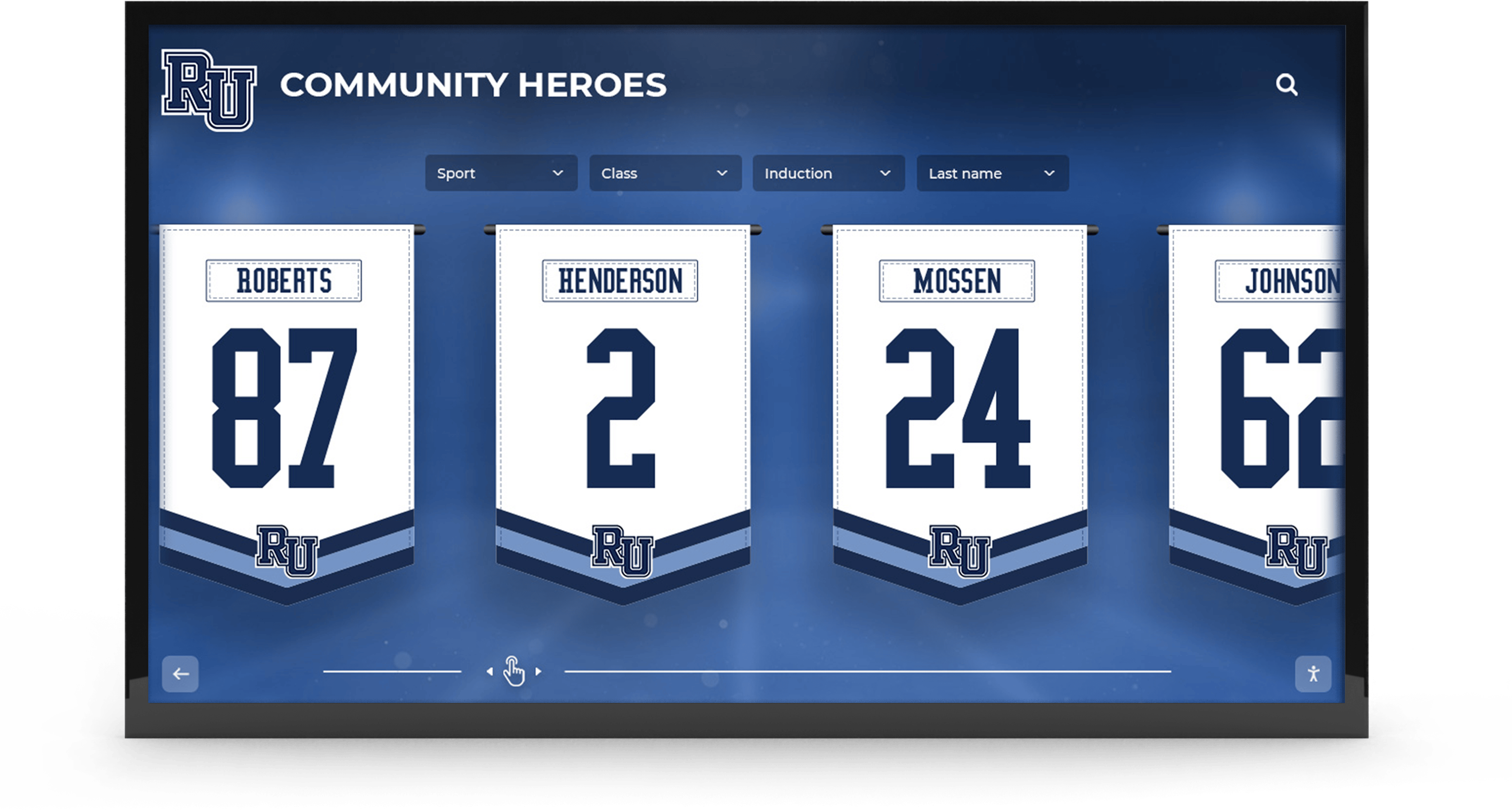
Creative layout designs showcase multiple honorees simultaneously through compelling visual arrangements maximizing screen real estate
Wayfinding and Directory Applications (Ideas 51-65)
Wayfinding content helps visitors navigate physical spaces, locate services, and access information reducing confusion while improving experiences in complex facilities serving diverse populations with varying familiarity levels.
Navigation and Location Services
51. Interactive Campus Maps Provide searchable campus or facility maps with building labels, department locations, amenity identification, and path highlighting showing routes between points. Enable search by name, room number, or service type supporting diverse navigation needs without requiring prior facility knowledge.
52. Building Directory Systems List all offices, classrooms, service centers, and facilities alphabetically with room numbers, floor locations, and department affiliations. Include staff names and titles when appropriate helping visitors locate specific individuals or services quickly.
53. You Are Here Orientation Maps Display current location prominently within broader facility context. Show nearby amenities, exits, restrooms, and navigation landmarks helping visitors orient themselves spatially before planning movements through unfamiliar buildings.
54. Event Location Guidance Provide specific directions to current event locations including conferences, athletic competitions, performances, meetings, or ceremonies. Update dynamically based on event schedules ensuring information relevance throughout busy multi-event periods.
55. Parking Information Show available parking areas, accessibility parking locations, visitor parking zones, permit requirements, overflow options during high-traffic periods, and walking paths from parking to destinations reducing arrival confusion and navigation stress.
56. Public Transportation Connections Display bus schedules, transit stop locations, route maps, fare information, and connection options for visitors using public transportation. Include real-time arrival information when systems provide data feeds supporting precise timing of departures.
57. Accessibility Route Identification Show wheelchair-accessible routes, elevator locations, accessible restroom facilities, hearing assistance availability, and other accommodations supporting visitors with disabilities navigating facilities independently and comfortably.
58. Emergency Exit Mapping Show clearly marked emergency exit routes, evacuation assembly areas, fire extinguisher locations, AED placement, and emergency contact information. Ensure high visibility during normal operations familiarizing occupants with emergency procedures before crisis situations arise.
59. Amenity Locations Identify restrooms, water fountains, vending machines, ATMs, phone charging stations, WiFi availability, seating areas, and other amenities visitors commonly seek. Reduce time spent searching while improving facility usability and satisfaction.
60. Department and Office Hours Display service hours for offices, libraries, counseling centers, health services, dining facilities, and other variable-schedule services. Include holiday and break closures preventing wasted trips during closed periods.
Service and Resource Directories
61. Staff Contact Directories Provide searchable databases of staff members with names, titles, departments, phone extensions, email addresses, and office locations. Enable search by name or department supporting visitors needing to contact specific individuals or services.
62. Athletic Facility Schedules Show gymnasium availability, field usage schedules, pool operating hours, fitness center access, and equipment reservation systems. Help community members plan facility usage around team practices, competitions, and maintenance periods.
63. Computer Lab and Technology Resources Display lab locations, available software, equipment specifications, operating hours, reservation procedures, and technology support contact information. Help students and faculty utilize technology resources effectively without extensive searching.
64. Library Resource Guides Provide catalog access, database directories, research assistance availability, study room reservations, collection information, and librarian contact details supporting academic research and information literacy development.
65. Visitor Welcome Stations Create comprehensive visitor orientation kiosks providing campus overviews, popular destination identification, self-guided tour suggestions, parking information, dining options, and contact information for visitor services helping guests navigate experiences independently.

Touch-optimized interfaces with appropriately sized targets enable precise selection and natural exploration mirroring smartphone experiences
Engagement and Interactive Experiences (Ideas 66-85)
Interactive content transforms passive viewing into active participation creating memorable experiences, gathering feedback, and building connections between institutions and communities through two-way communication rather than one-way broadcasts.
Social Media and User-Generated Content
66. Social Media Feed Integration Display live feeds from institutional Instagram, Twitter, Facebook, or other social platforms. Show recent posts, event photos, student highlights, and community celebrations creating dynamic content refreshing automatically while encouraging social media following.
67. Hashtag Campaign Displays Aggregate posts using specific hashtags related to events, spirit weeks, campaigns, or initiatives. Encourage participation through visible display of contributed content recognizing community members while building collective experiences around shared themes.
68. Photo Contest Galleries Host photography competitions with theme-based submissions displayed publicly. Enable community voting when appropriate, showcase winning entries prominently, and maintain galleries celebrating photographic talent across student and community populations.
69. Student Artwork Showcases Feature visual art, digital design, photography, and creative projects from art classes, clubs, and independent creators. Rotate exhibits regularly providing ongoing recognition platforms while bringing art beyond classroom and gallery spaces into daily community awareness.
70. Video Project Highlights Display student video productions from broadcasting classes, multimedia courses, club projects, or athletic documentaries. Provide visible platforms showcasing production quality and storytelling capabilities demonstrating program excellence.
71. QR Code Connection Points Provide QR codes linking to extended content, survey participation, event registration, additional resources, social media profiles, or mobile applications. Enable content transfer from public displays to personal devices extending engagement beyond physical touchscreen interactions.
72. Social Media Challenge Prompts Encourage participation in photo challenges, video submissions, creative writing prompts, or community engagement activities promoted through signage. Display participation examples and acknowledgments motivating continued community involvement.
73. Alumni Social Media Features Highlight alumni social media posts sharing career updates, achievement announcements, nostalgic memories, or ongoing institutional connections. Strengthen alumni engagement while demonstrating post-graduation success and continued community bonds.
74. Live Event Streaming Display live video feeds from current athletic competitions, performing arts presentations, graduation ceremonies, or special events occurring in other campus locations. Enable broader participation when seating capacity limits prevent attendance or events occur simultaneously.
75. Student Blog Integrations Feature excerpts from student blogs, writing projects, personal essays, or reflection pieces. Provide student voice platforms reaching audiences beyond traditional publication formats while demonstrating writing quality and personal growth.
Polling, Surveys, and Feedback Collection
76. Interactive Opinion Polls Conduct quick polls gathering community perspectives on topics like upcoming event preferences, school spirit initiatives, facility improvement priorities, or general interest questions. Display real-time results building engagement through visible response aggregation.
77. Satisfaction Surveys Gather feedback on dining services, facility conditions, program quality, support services, or general institutional satisfaction. Use anonymous response collection encouraging honest feedback while demonstrating institutional commitment to continuous improvement.
78. Suggestion Submission Systems Enable community members to submit ideas, concerns, suggestions, or creative proposals directly through touchscreen interfaces. Acknowledge submissions, follow up on implemented suggestions, and demonstrate responsiveness to community input.
79. Event Feedback Collection Immediately after events, gather attendee feedback on experiences, organization quality, content value, and improvement suggestions. Use rapid feedback cycles enabling quick adjustments for subsequent events rather than waiting for delayed survey responses.
80. Program Interest Assessments Survey potential interest in new clubs, activities, courses, or programs before committing resources to development. Gauge demand, identify scheduling preferences, and understand participation barriers informing strategic program planning.
Games, Trivia, and Entertainment
81. Trivia Challenge Systems Present school history questions, subject-based trivia, current event quizzes, or general knowledge challenges. Track high scores, recognize top performers, and create recurring competitions building engagement through friendly competition.
82. Scavenger Hunt Integration Coordinate multi-location scavenger hunts with clues, checkpoints, and progress tracking through networked displays. Build exploration of facilities, teamwork, and community engagement through gamified activities particularly effective during orientation periods or school spirit weeks.
83. Daily Brain Teasers Pose logic puzzles, riddles, mathematical challenges, or critical thinking problems encouraging cognitive engagement during passing periods. Reveal solutions at day’s end or following morning maintaining suspense and encouraging return visits.
84. School History Trivia Test community knowledge about institutional history, traditions, famous alumni, historical achievements, and founding stories. Educate newer community members while allowing longtime members to demonstrate institutional knowledge and connection.
85. Interactive Seasonal Games Develop holiday-themed games, seasonal challenges, or celebration-related activities tied to calendar events. Maintain freshness through time-limited availability while building anticipation for recurring annual experiences.

Comprehensive recognition networks deploy multiple coordinated displays serving different content categories while maintaining consistent brand presentation
Wellness, Safety, and Support Services (Ideas 86-100)
Wellness and support content positions digital signage as resources promoting physical health, mental wellbeing, safety awareness, and support service accessibility demonstrating institutional commitment to holistic community care beyond academic instruction alone.
Health and Wellness Information
86. Daily Fitness Challenges Suggest simple exercises, stretching routines, physical activity goals, or movement breaks encouraging active lifestyles. Include demonstration videos or animated graphics showing proper form and technique making fitness accessible regardless of experience levels.
87. Nutrition Education Content Share healthy eating tips, recipe suggestions, nutritional information, balanced diet guidance, and cooking techniques supporting wellness through informed food choices. Connect to cafeteria offerings highlighting healthier menu options available daily.
88. Mental Health Resources Provide information about counseling services, crisis hotlines, stress management techniques, mindfulness practices, and mental health awareness reducing stigma while ensuring students know support resources available during difficult periods.
89. Sleep Hygiene Education Educate about healthy sleep patterns, sleep duration recommendations, bedtime routine suggestions, and sleep environment optimization. Address adolescent sleep needs and technology impact on sleep quality supporting this overlooked wellness component.
90. Substance Abuse Prevention Share factual information about substance risks, decision-making strategies, peer pressure resistance techniques, and support resources for students struggling with substance issues or concerned about friends’ behaviors.
91. Sexual Health and Wellness Provide age-appropriate information about healthy relationships, consent education, sexual health resources, and support services available for students navigating personal relationship questions or seeking confidential guidance.
92. Stress Management Techniques Demonstrate breathing exercises, meditation practices, time management strategies, and coping mechanisms helping students manage academic pressure, social stress, and personal challenges affecting wellbeing and academic performance.
93. Campus Recreation Programs Promote intramural sports, fitness classes, outdoor adventure programs, wellness workshops, and recreational activities encouraging physical activity, social connection, and stress relief through organized programs accommodating diverse interests and ability levels.
94. Health Services Information Display health center hours, services available, insurance information, vaccination requirements, illness management guidance, and when to seek medical attention helping students make informed healthcare decisions and access appropriate services.
95. Mindfulness and Meditation Guides Offer brief guided meditation sessions, breathing exercises, mindfulness practices, and stress reduction techniques accessible during passing periods or breaks. Create moments of calm within busy school days supporting emotional regulation and mental clarity.
Safety and Security Information
96. Emergency Preparedness Information Educate about emergency procedures, evacuation routes, shelter-in-place protocols, emergency contact systems, and response procedures for various scenarios. Regular visibility builds familiarity reducing panic and confusion during actual emergencies.
97. Weather Alert Systems Display current weather conditions, forecasts, severe weather warnings, and weather-related schedule impacts. Integrate with emergency management systems ensuring rapid communication of weather-related safety information and procedural changes.
98. Safety Tip Rotations Share personal safety practices, digital security awareness, bullying prevention strategies, reporting procedures, bystander intervention techniques, and community safety resources promoting proactive safety awareness across diverse situations.
99. Bullying and Harassment Reporting Provide clear information about reporting procedures, anonymous tip systems, support resources for targets and witnesses, and institutional response processes. Reduce barriers to reporting while demonstrating serious approach to maintaining safe, respectful environments.
100. Transportation Safety Reminders Communicate safe driving practices, seatbelt reminders, distracted driving dangers, pedestrian safety guidelines, bicycle safety protocols, and parking lot awareness supporting safe transportation behaviors protecting community members from preventable accidents.
Specialized Applications and Creative Uses (Ideas 101-120)
Specialized content ideas address unique institutional needs, creative applications, and innovative uses maximizing digital signage value across diverse contexts and organizational objectives beyond common recognition and communication applications.
Athletics and Recreation Specializations
101. Pre-Game Hype Content Build excitement before athletic competitions through highlight reels, player introductions, opponent information, game attendance details, and spirit prompts. Create energizing atmospheres supporting team morale and spectator enthusiasm.
102. Live Game Statistics Display real-time scoring, statistics, player performance data, and game progression information during competitions. Serve spectators unable to see scoreboards clearly while providing detailed statistical context television broadcasts typically offer.
103. Recruiting Information Present program excellence to prospective student-athletes through championship histories, facility tours, academic support resources, alumni success stories, and coaching philosophies. Support recruitment efforts through visible program marketing during campus visits.
104. Opponent Scouting Reports Provide information about upcoming opponents including records, key players, playing styles, historical series records, and tactical considerations. Educate spectators while demonstrating thorough preparation supporting competitive excellence.
105. Athletic Training Resources Share workout demonstrations, training schedules, injury prevention techniques, recovery protocols, and sports nutrition guidance supporting athlete development. Position training rooms as educational resources rather than solely treatment facilities.
106. Equipment and Facility Maintenance Communicate about equipment checkout procedures, facility reservation systems, maintenance schedules, usage policies, and care instructions. Reduce equipment damage while maximizing facility utilization through clear procedural communication.
Performing Arts and Creative Programs
107. Upcoming Performance Information Promote concerts, plays, recitals, art exhibitions, and creative showcases through multimedia previews, ticket information, performer bios, director notes, and program descriptions. Build audiences while celebrating performing arts excellence deserving visibility equal to athletic programs.
108. Behind-the-Scenes Content Share rehearsal footage, set construction documentation, costume design processes, technical preparation, and performer preparation routines. Educate audiences about production complexity while building appreciation for creative work beyond final performances.
109. Music Theory and Appreciation Present composer profiles, musical genre explorations, instrument demonstrations, music history lessons, and listening examples enriching musical understanding beyond performance contexts alone supporting comprehensive music education.
110. Visual Arts Techniques Demonstrate artistic techniques, medium explorations, artist spotlights, art history connections, and creative process documentation. Support art education and appreciation across broad audiences including students not enrolled in formal art courses.
Community Building and Spirit
111. Birthday Recognition Boards Celebrate community member birthdays through daily displays building connection and acknowledgment across large populations where personal recognition otherwise proves difficult. Maintain appropriate privacy boundaries while creating friendly, personal atmospheres.
112. New Member Welcomes Introduce new students, staff, faculty, or community members through welcome profiles sharing backgrounds, interests, previous experiences, and reasons for joining communities. Facilitate relationship building while helping newcomers feel welcomed and valued.
113. Spirit Week Tracking Document spirit week participation through photos, dress-up theme examples, competition standings, event schedules, and participation prompts. Build excitement while encouraging widespread involvement in community traditions and celebrations.
114. School Traditions Education Teach newer community members about institutional traditions, historical significance, participation methods, and cultural contexts. Preserve traditions across generational transitions ensuring continuity while explaining meaning to those unfamiliar with practices.
115. Mascot History and Evolution Explore mascot origins, design evolution, symbolic meanings, memorable appearances, and student performer profiles celebrating school identity symbols central to institutional culture and community pride.
Administrative and Operational Uses
116. Board Meeting Agendas Display governing board meeting schedules, agendas, public comment opportunities, streaming information, and meeting outcome summaries. Promote transparency and community engagement in institutional governance beyond insider participation alone.
117. Policy and Procedure Updates Communicate new policies, procedural changes, requirement modifications, deadline adjustments, and regulatory updates ensuring broad awareness. Reduce confusion and non-compliance resulting from ineffective distribution of policy information.
118. Professional Development Opportunities Advertise workshops, training sessions, conference opportunities, certification programs, and continuing education resources for faculty and staff. Support continuous professional growth through visible promotion of development opportunities.
119. Volunteer Opportunity Postings Promote community service opportunities, volunteer positions, committee vacancies, event staffing needs, and parent involvement options. Facilitate community participation through clear communication of needs and engagement pathways.
120. Vendor and Partnership Showcases Recognize local businesses, community partners, service providers, and organizational collaborators supporting institutional missions. Build relationships while demonstrating community interconnection and partnership appreciation.
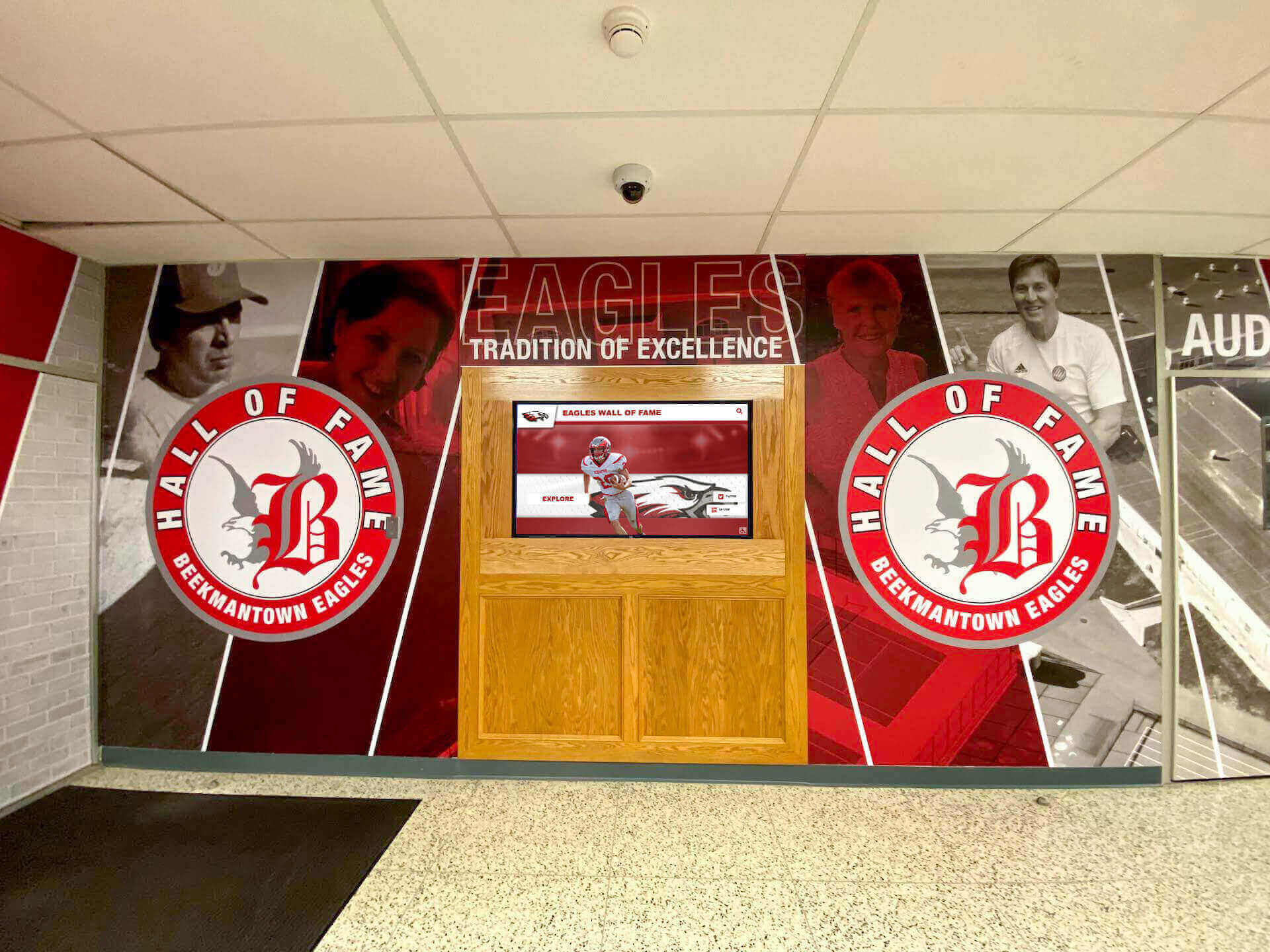
Integrated installations blend digital displays with traditional murals creating comprehensive recognition environments celebrating history alongside modern technology
Content Strategy Development Framework
Transforming these 120 ideas into effective digital signage requires strategic frameworks ensuring content serves audience needs while remaining sustainable over time through manageable workflows and clear responsibilities.
Assessing Content Needs and Priorities
Organizations should systematically evaluate which content categories align with primary institutional goals, available resources, and audience preferences before attempting comprehensive implementation across all possibilities.
Audience Analysis Identify primary and secondary audiences using displays—students, staff, parents, alumni, visitors, community members—and understand information needs, navigation challenges, recognition desires, and engagement preferences each group brings to interactions with digital signage systems.
Institutional Goal Alignment Connect content strategies to broader institutional objectives whether prioritizing recognition and celebration, improving communication effectiveness, supporting navigation and wayfinding, building community engagement, or promoting programs and opportunities deserving greater visibility.
Resource Reality Assessment Honestly evaluate content development capacity including staff time available for creation and maintenance, technical skills present in-house, budget allocations for professional content development, and sustainable update frequencies maintainable over years rather than months of initial enthusiasm.
Starting with focused content categories delivering clear value proves more effective than attempting comprehensive implementation overwhelming available resources resulting in stale, outdated displays undermining rather than supporting institutional communication goals.
Creating Sustainable Content Workflows
Effective content strategies require systematic approaches distributing responsibilities, establishing update rhythms, maintaining quality standards, and preventing single-person dependencies that fail when individuals leave positions or priorities shift.
Distributed Responsibility Models Assign content domains to appropriate departments or individuals rather than centralizing all management in single roles. Athletic directors maintain sports recognition, academic deans oversee achievement displays, development offices handle donor acknowledgment, and communications teams coordinate announcements creating expertise-aligned responsibilities.
Content Calendar Development Establish regular update schedules aligned with institutional rhythms including daily updates for announcements and events, weekly refreshes for featured content and highlights, monthly rotations for thematic content and educational material, quarterly reviews for program information and resource directories, and annual audits ensuring accuracy across all permanent content elements.
Quality Standards and Templates Define content quality expectations including photo resolution requirements, biographical length guidelines, statistical accuracy verification, grammatical standards, brand compliance specifications, and accessibility considerations. Provide templates and examples simplifying creation while maintaining consistency across distributed content contributors.
Organizations implementing digital recognition programs find sustainable workflows prove more critical to long-term success than initial technology selection or content ambition levels.
Measuring Content Effectiveness
Data-driven evaluation identifies which content categories engage audiences most effectively, reveals gaps requiring attention, and demonstrates program value justifying continued investment in content development and display maintenance.
Engagement Analytics Quality digital signage platforms provide interaction tracking showing most-viewed content, search queries revealing what visitors seek, navigation patterns demonstrating how users explore content, peak usage times informing update scheduling, and session durations indicating content depth and engagement quality.
Qualitative Feedback Complement quantitative analytics through community surveys gathering satisfaction data, observational research documenting display usage patterns, stakeholder interviews exploring perception and value, and comment collection near displays enabling immediate feedback from users encountering content naturally.
Continuous Refinement Use insights to eliminate low-value content consuming management effort without delivering engagement returns, expand high-interest categories deserving deeper coverage, improve navigation based on observed confusion patterns, enhance popular profiles through additional multimedia, and adjust update frequencies matching observed usage patterns and content type requirements.
Regular assessment prevents content strategies from ossifying around initial assumptions rather than evolving based on actual community needs and usage patterns emerging through live deployment experience.
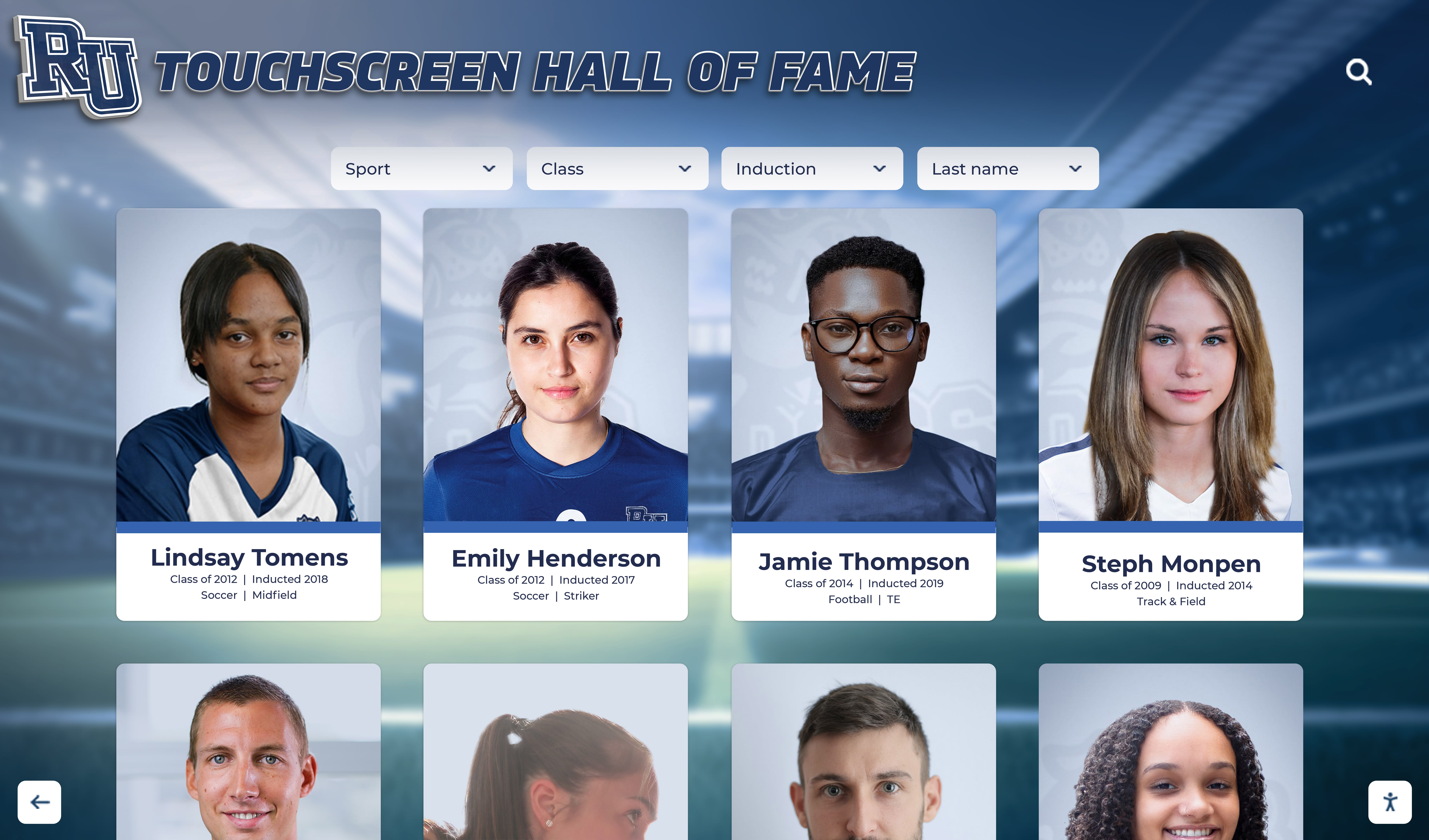
Card-based layouts enable browsing multiple profiles simultaneously supporting discovery patterns where visitors explore beyond specific search targets
Platform Selection for Content-Rich Digital Signage
Content strategy success depends significantly on platform capabilities supporting intended content types through appropriate features, intuitive management interfaces, and sustainable operational requirements matching available technical resources.
Purpose-Built vs. Generic Signage Platforms
Organizations should evaluate whether recognition and interactive content represents primary display purposes or whether passive viewing of announcements and information dominates intended usage before selecting platforms optimized for fundamentally different applications.
Recognition-Focused Platforms Solutions like Rocket Alumni Solutions specifically designed for celebrating people provide database-driven content organization around individual profiles, powerful search and filtering enabling instant discovery, rich multimedia storytelling through photos and videos, intuitive touchscreen navigation designed for exploration, web portal integration extending recognition accessibility, and specialized workflows supporting recognition-specific content management needs.
These platforms excel when celebrating achievement, building community pride, acknowledging contributions, or preserving institutional heritage represent core display objectives demanding people-focused capabilities generic signage platforms cannot effectively replicate regardless of configuration effort.
Generic Digital Signage Software General-purpose platforms emphasize content scheduling across display networks, template-based content creation, announcement rotation and display management, and broadcast-oriented communication rather than interactive exploration. These solutions serve passive viewing applications effectively including corporate communications, event announcements, menu displays, and general information distribution.
However, attempting to force recognition content into announcement-oriented frameworks produces disappointing results reducing people to slideshow elements without searchability, limited storytelling capacity, and frustrated administrators struggling with workflows designed for scheduled content rotation rather than profile management.
Organizations should match platform capabilities to primary content purposes rather than attempting to make generic tools serve specialized needs or purchasing specialized platforms for simple announcement applications. Resources comparing digital signage software options provide detailed evaluation frameworks supporting informed decisions.
Content Management Capabilities
Regardless of platform category, effective digital signage requires robust content management supporting distributed contributors, maintaining quality standards, enabling efficient updates, and providing sufficient flexibility accommodating diverse content types across the 120 ideas presented throughout this guide.
Multi-User Access and Permissions Enable department heads, teachers, coaches, administrators, and communications staff to manage respective content domains without requiring IT intervention for every update. Implement role-based permissions ensuring appropriate access while preventing unauthorized modifications of sensitive or shared content areas.
Multimedia Support Accommodate photos at appropriate resolution levels, videos in standard formats without transcoding requirements, audio content when contextually appropriate, document uploads for resources and downloadable materials, and embedded content from external platforms like social media feeds or live data sources.
Template and Design Systems Provide consistent visual frameworks through brand-compliant templates, reusable layout patterns, approved color palettes and typography, logo and mark libraries, and design guidelines maintaining professional quality across distributed content contributors with varying design expertise levels.
Version Control and Approval Workflows Support content drafting requiring approval before publication, scheduled publishing enabling advance content preparation with automatic activation, revision history tracking who changed what content when for accountability, and rollback capabilities recovering from mistaken updates or unwanted changes.
Analytics and Optimization Features
Understanding how communities engage with content informs strategic decisions about what to expand, what to eliminate, and how to continuously improve display effectiveness over time through evidence-based refinement rather than assumptions.
Interaction Tracking Monitor which content receives most engagement, identify popular navigation paths, track search queries revealing what visitors seek, measure session duration indicating content depth, and analyze temporal patterns showing peak usage times informing update scheduling and attraction loop design.
Behavioral Insights Identify navigation confusion through drop-off analysis, discover missing content through failed searches, understand category popularity guiding development priorities, recognize seasonal patterns enabling timely content strategies, and benchmark performance against goals and comparable installations.
Reporting and Visualization Generate stakeholder reports demonstrating display value, create executive summaries communicating program impact, export detailed data supporting deep analysis, visualize trends revealing engagement evolution, and share insights broadly building program support and justifying continued investment.
Organizations implementing interactive touchscreen displays find analytics transform displays from “set it and forget it” installations into continuously optimized engagement tools demonstrating clear value through concrete metrics.
Implementation Best Practices
Moving from content ideas to effective deployed displays requires strategic planning addressing placement decisions, hardware selection, installation quality, launch strategies, and ongoing maintenance ensuring long-term program sustainability beyond initial enthusiasm periods.
Strategic Display Placement
Location significantly impacts engagement levels—displays in low-traffic areas receive minimal interaction regardless of content quality while high-visibility placements drive usage even with less compelling content creating opportunities to refine experiences based on observed patterns.
High-Traffic Location Prioritization Position initial installations in main entrance lobbies welcoming all visitors, cafeterias and common areas where students gather daily, athletic facility central areas frequenting by teams and spectators, main hallways connecting high-use spaces capturing transitional moments, and administrative areas visited during tours and community events.
Phased deployment strategies start with flagship installations in highest-visibility locations demonstrating value before expanding to secondary spaces ensuring each display receives appropriate content attention and management oversight preventing dilution across too many simultaneous responsibilities.
Content Launch Strategies
Launching displays with compelling content from day one establishes positive first impressions and usage patterns whereas initial deployment with minimal placeholder content teaches communities to ignore displays making subsequent engagement building more difficult regardless of content improvement.
Focused Initial Content Rather than attempting comprehensive content across all 120 idea categories immediately, launch with focused depth in fewer areas delivering clear value from first interactions. Athletic programs might emphasize championship teams and hall of fame profiles, academic institutions might highlight distinguished alumni and academic achievement, and community organizations might focus on donor recognition and volunteer acknowledgment.
Systematic expansion follows initial success adding content categories progressively based on available resources, community response, and strategic priorities ensuring sustainable growth rather than unsustainable initial overcommitment followed by stagnation.
Community Launch Events Celebrate display installations through ribbon cuttings, dedication ceremonies, open houses, or unveiling events building awareness, generating excitement, demonstrating institutional commitment, and establishing displays as significant community assets deserving attention and engagement rather than simply new hallway fixtures appearing without explanation.
Ongoing Content Maintenance
Initial launch represents beginnings rather than conclusions—sustainable programs require ongoing content development, regular updates maintaining currency and freshness, technical maintenance ensuring reliable operation, and periodic major refreshes preventing content stagnation over years of operation.
Update Rhythm Establishment Create regular update schedules tied to institutional calendars including immediate updates following recognition events, weekly feature rotations maintaining freshness, monthly thematic content changes, quarterly information verification ensuring accuracy, and annual comprehensive content audits identifying outdated material requiring revision or removal.
Technical Monitoring Implement remote monitoring alerting administrators to display outages, verify content synchronization across networked displays, schedule software updates maintaining security and functionality, clean screens and hardware protecting appearance and operation, and document vendor contact information and warranty coverage supporting rapid problem resolution.
Evolution Based on Usage Use analytics and feedback to gradually refine content strategies eliminating low-engagement content consuming management effort without delivering value, expanding high-interest categories deserving deeper coverage, improving navigation addressing observed confusion, enhancing popular content through additional multimedia, and adjusting strategies as community needs and priorities evolve over years of program operation.
Resources on maintaining digital recognition displays provide detailed operational frameworks supporting long-term program sustainability.
Conclusion: Transforming Digital Signage Through Strategic Content
The 120 content ideas presented throughout this guide demonstrate the vast potential of digital signage screens and interactive kiosks extending far beyond basic announcement displays toward comprehensive communication platforms serving recognition, education, navigation, engagement, and specialized institutional needs across diverse organizational contexts.
Effective digital signage begins with clear content strategies matching display capabilities with audience needs through purposeful visual communication. Generic slideshow thinking limits possibilities regardless of hardware quality, while strategic content approaches transform screens from ignored background elements into active community engagement tools building connection, pride, and information access.
Organizations implementing diverse content across recognition applications, educational displays, wayfinding systems, interactive experiences, and specialized uses consistently achieve engagement levels 400-600 percent higher than those limiting displays to basic announcements alone. This increased interaction translates to stronger community connections, improved communication effectiveness, enhanced institutional pride, and measurable return on display investments through active use rather than passive viewing.
Transform Your Digital Signage Strategy
Discover how purpose-built interactive platforms deliver superior engagement compared to generic digital signage for recognition, celebration, and community building applications. Rocket Alumni Solutions creates custom touchscreen experiences implementing the content strategies that connect institutions with communities through compelling visual storytelling.
Explore Recognition SolutionsSuccess requires matching content strategies to available resources through realistic capacity assessment, distributed responsibility models preventing single-person dependencies, sustainable update rhythms maintainable over years, quality standards ensuring professional presentation, and continuous improvement based on analytics and feedback rather than initial assumptions.
Platform selection significantly impacts content strategy effectiveness—purpose-built recognition platforms excel for celebrating people through halls of fame, donor acknowledgment, and achievement displays while generic digital signage serves announcement and passive viewing applications effectively. Organizations should evaluate primary content purposes before selecting platforms optimized for intended applications rather than forcing specialized content into inappropriate frameworks or purchasing specialized tools for simple announcement needs.
Implementation best practices emphasize strategic placement in high-traffic locations, focused initial content delivering immediate value, community launch strategies building awareness and engagement, ongoing maintenance sustaining quality and currency, and evolution based on observed usage patterns and changing community needs over time.
Whether implementing first digital signage installations or revitalizing existing displays showing stale content, the 120 ideas presented throughout this guide provide starting points for strategic content development transforming screens into valued community assets rather than ignored background elements. The difference between effective digital signage and wasted technology investments lies not in hardware specifications or platform costs but in content strategies purposefully serving community needs through relevant, timely, engaging visual communication.
Ready to maximize digital signage value through strategic content? Explore interactive touchscreen design principles, discover comprehensive digital hall of fame implementation guides, learn about creating effective recognition displays, and understand digital signage platform comparisons ensuring informed decisions that deliver lasting value through technology investments purposefully serving organizational missions and community needs.































