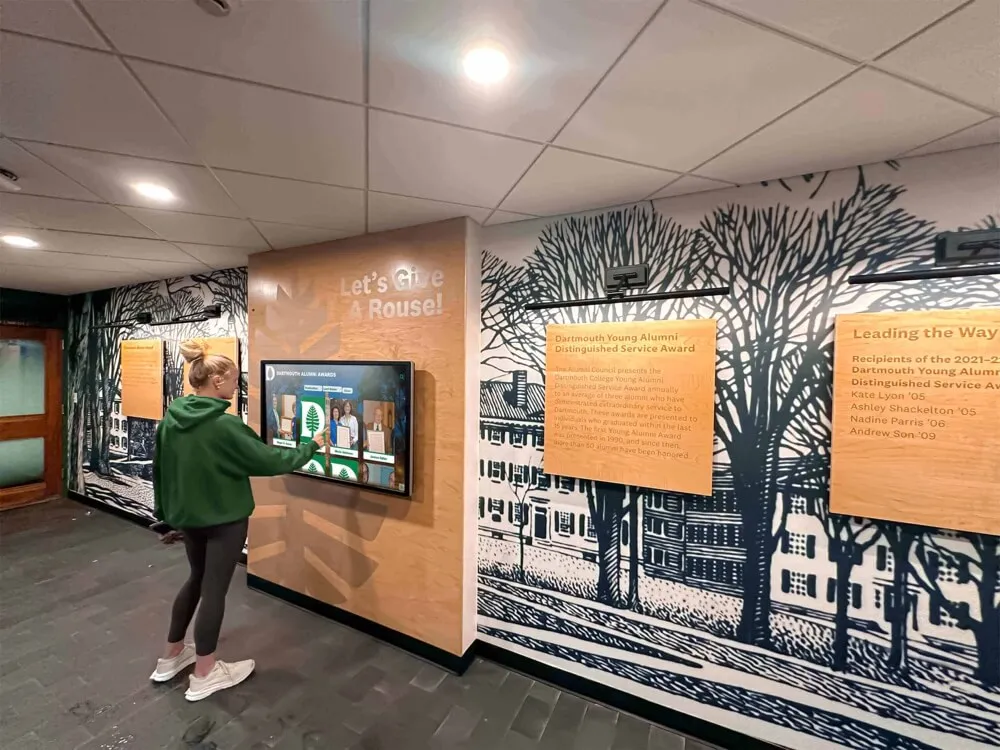




An alumni portal website for a school should include five core sections: a recognition hub for honorees and Hall of Fame inductees, an event calendar with registration and recap pages, a searchable digital archive of yearbooks and athletic records, an alumni directory with profile management, and a content integration layer that pushes portal data to on-campus touchscreen displays. When these sections share a consistent data structure, staff enter recognition content once and it flows to every channel—the portal, the lobby kiosk, printed programs, and social media—without duplication.
This guide walks school administrators and communications staff through each section a complete alumni portal needs, explains what belongs inside each one, and provides a planning checklist table you can use to audit an existing portal or map a new build from scratch.
An alumni portal website is a step beyond a basic alumni page. A page lists names and dates. A portal gives graduates a destination they can return to—a place to find teammates, register for events, watch recognition unfold, and explore the school’s history. That distinction matters when you are deciding how much structure to build and where to invest limited content hours.

Schools that structure portal content correctly can display the same recognition data on a hallway touchscreen and on the web portal without entering it twice.
What Sets an Alumni Portal Apart from a Basic Alumni Page
A basic alumni page is static. A portal is interactive. The difference shows up in three places:
- Authentication: Graduates can log in, update their own profiles, and see content tailored to their class year or sport.
- Searchability: A portal has a directory and archive search that let graduates find peers, records, and historical photos without navigating manually through every page.
- Data integration: A well-built portal exports its content to other channels—email newsletters, printed reunion programs, and on-campus recognition displays—rather than existing as an isolated website.
For K-12 schools and programs with athletic recognition traditions, the portal structure also needs to accommodate sport-specific record boards, season-by-season stats archives, and athlete Hall of Fame profiles—content types that general-purpose web templates rarely handle cleanly.
Portal Section Planning Checklist
Use this table to audit your current portal or map a new build. Each row describes a section, what triggers it, and which other systems benefit when that data is structured consistently.
| Section | Primary Purpose | Key Content | Display Integration? |
|---|---|---|---|
| Recognition Hub | Celebrate honorees and Hall of Fame inductees | Bios, photos, induction year, career highlights, nomination form | Yes — feeds lobby kiosks and hallway displays |
| Alumni Directory | Searchable graduate profiles | Name, class year, location, career, contact preference | No — usually portal-only |
| Events Calendar | Drive registration and preserve event history | Event name, date, RSVP link, recaps, honoree list | Yes — upcoming events to digital signage |
| Digital Archives | Surface school and athletic history | Yearbooks, photos, team records, newspapers, oral histories | Partial — highlight reels to displays |
| News and Spotlights | Maintain an active community signal | Alumni achievements, school updates, class notes | Yes — news ticker feeds to lobby screens |
| Update and Submit Forms | Keep data accurate | Address changes, career updates, photo uploads, privacy settings | No — internal data hygiene only |
| Volunteer and Mentorship | Connect graduates to current students | Signup forms, matching preferences, career panel interest | No — internal coordination |
1. Recognition Hub: The Anchor Section of Any Alumni Portal
Recognition content is the reason most graduates visit an alumni portal more than once. It is also the section where data structure pays the highest dividends—profile information entered for a Hall of Fame inductee on the portal can directly populate a lobby touchscreen without a second round of data entry.
Hall of Fame Profiles
Every honoree profile should include at minimum:
- Full name and graduation year
- Sport, program, or field of distinction
- Career and community highlights (300–500 words)
- Professional headshot
- Induction year and ceremony details
- A quote from the honoree when available
- Links to related class pages or team archive pages
Group inductees by induction year on the hub landing page, and provide a filter by sport or category so that a visitor looking specifically for athletic honorees does not have to scroll past academic and community recognition to find them.
Athlete and Academic Award Records
Beyond Hall of Fame profiles, schools with strong athletic or academic traditions benefit from structured award record pages—sectional champions, conference MVPs, all-state selections, and milestone point scorers. These records are highly searchable: a parent googling a player from 1997 may land on your portal before finding anything else, and a well-structured records page keeps them there.
The school alumni website guide covers how to structure these records so they remain maintainable as the list grows year after year.
Monthly and Ongoing Recognition Programs
If your school runs an ongoing program—athlete of the month, alumni spotlight, or academic honoree series—the portal recognition hub is the right place to archive every past honoree. Maintaining that archive builds the program’s prestige and gives future nominees a reason to share their selection.
For structuring these recurring programs, the alumni of the month recognition programs guide provides a nomination-to-display workflow that keeps programs running without requiring constant staff intervention.
2. Alumni Directory and Profile Management
The directory is the most-visited section of most alumni portals and the hardest to keep current. A few structural decisions made early determine whether the directory remains useful at year five or degrades into a stale list.
Profile Fields That Matter
Build directory profiles around fields that graduates will actually update:
- Name and any name changes
- Graduation year and program or sport
- Current location (city and state; not full address)
- Employer and industry
- Optional headshot uploaded by the graduate
- Visibility preference: public, alumni-only, or name-only
For athletic programs, add sport and jersey number as optional fields—these details unlock a filtering dimension that academic fields cannot provide, and they matter enormously to graduates who primarily identify with their team experience.
Search and Filter Design
Directory search fails when it only supports name lookup. Add filters for graduation year range, sport or program, geographic region, and—when your platform supports it—industry or career field. A graduate searching for teammates from the class of 2004 basketball team should reach those profiles in two clicks.
For schools evaluating platforms to manage the underlying alumni database that feeds the portal, the alumni CRM software guide for K-12 schools covers what to look for in a system that integrates cleanly with a public-facing portal.
3. Events Calendar and Registration
An alumni portal events section does three jobs: it drives attendance for upcoming events, preserves a history of past gatherings, and gives honorees being recognized at those events a permanent web presence tied to the moment of their recognition.
What Each Event Page Needs
- Event name and brief description
- Date, time, and location with a map embed
- RSVP or ticket purchase link (embedded, not a redirect to a third-party form)
- Honorees being recognized at the event, with links to their recognition profiles
- Sponsorship or volunteer opportunities
- Photo gallery and recap summary added after the event
Connecting Events to Campus Displays
When an upcoming Hall of Fame induction or reunion weekend is published on the portal, the same event data should appear on lobby and hallway digital displays. Schools that build this integration—even a simple one where the same CMS entry populates both the web page and a display template—eliminate the scheduling gap where the campus displays are still showing last semester’s events while the website has moved on.

Event information entered once in the portal CMS can populate both the web calendar and on-campus touchscreen displays, keeping every channel current without duplicate entry.
4. Digital Archives
A well-structured digital archive is the section alumni return to most over the long run—often finding the site through a search for a specific yearbook, a championship record, or a photo from a specific decade. Done right, the archive becomes the most SEO-valuable section of the portal.
What to Archive
- Yearbooks: Scanned and organized by year, browseable by page with basic text search
- Team photos and game action shots: Tagged by sport, season, and players when possible
- Athletic records: Season results, championship history, individual milestones; see the alumni tracking platform guide for how to structure records that connect to portal profiles
- School newspapers and programs: Full PDFs with a searchable index by date and subject
- Building and campus history: Maps, renovation timelines, notable locations across decades
- Oral histories: Video or audio interviews with retired faculty, staff, and older alumni
Archive Search Design
Surface archives through at least two navigation paths: a dedicated archive section in the main navigation, and a global site search that returns archive results alongside directory profiles and news. Most graduates who arrive looking for a specific record do not know your information architecture—they type a name or a year into search and expect to find it.
Alumni Contribution System
Allow graduates to submit historical photos and records through a simple form with fields for year, event or subject, and names pictured. Staff review submissions before publishing. Over time, crowdsourced contributions fill gaps that no institutional digitization budget could cover—and the act of contributing gives graduates a meaningful way to participate in the portal beyond attending events and updating profiles.
5. Connecting the Portal to On-Campus Touchscreen Displays
The most efficient alumni programs treat the portal and on-campus displays as two outputs from a single content source. When a new Hall of Fame inductee is added to the portal, the same profile should populate the lobby touchscreen. When a monthly honoree is posted to the portal recognition hub, it should appear on hallway displays near the gym or main entrance the same day.
This approach requires three things: a consistent data structure across both channels, a platform that supports multi-channel publishing, and a workflow that assigns one person ownership of the canonical record.
Schools that establish this workflow eliminate the scenario where the portal shows the current year’s Hall of Fame class while the lobby display still shows two years ago—a mismatch that erodes credibility on both sides.
For schools evaluating platforms purpose-built for this kind of recognition workflow, solutions like Rocket Alumni Solutions are designed around structured recognition data that flows from one entry point to every display channel.
The interactive school display software guide covers how to evaluate platforms specifically for this alumni-portal-to-display workflow.
Technical Checklist Before You Launch
Before publishing an alumni portal, verify these elements:
- Mobile-responsive design — most alumni will visit on phones
- Secure login for alumni-only content with a clear registration flow for new accounts
- ADA/WCAG 2.1 compliance — alt text on images, keyboard navigation, sufficient color contrast
- SSL certificate on all pages; double-check any embedded forms
- Search engine indexing configured — public recognition pages indexed, personal profile details behind login
- Email notification system — alert relevant graduates when their class year has a new honoree or upcoming event
- Analytics on key sections — track which recognition pages get traffic, which archive years are most searched, and where users abandon event registration
- CMS editorial roles — defined permissions for who can publish recognition profiles, edit event pages, and approve archive contributions
- Display integration tested — if portal data feeds on-campus displays, verify the feed before launch, not after
Ready to Build a Portal That Powers Every Recognition Channel?
Rocket Alumni Solutions helps K-12 schools structure alumni portal data so recognition entered once flows automatically to touchscreen displays, printed programs, and event pages throughout the year.
Schedule a DemoFAQ: Alumni Portal Website Planning
What is the difference between an alumni portal website and a regular alumni website?
A portal is interactive—graduates can log in, search a directory, register for events, and submit their own profile updates. A regular alumni website is primarily a static publication: it announces events and lists honorees but does not give graduates a personalized account or self-service tools. For K-12 schools with active alumni programs, the portal structure delivers meaningfully better long-term engagement because graduates have a reason to return rather than just to land and leave.
Which section of an alumni portal should a school build first?
Start with the recognition hub. It delivers immediate visible value—graduates search for their name or their teammates’ names more than any other content type—and it establishes the data structure that every other portal section benefits from. A well-built recognition profile schema (name, photo, year, sport or program, career highlights) is reusable for the directory, the archive, and the display integration layer. Build that schema first and the rest of the portal snaps into place around it.
How do you keep alumni portal content from going stale?
Three mechanisms in combination: a monthly calendar reminder for staff to publish any recognition content or event updates that are due, an annual alumni email campaign inviting graduates to review and update their own profiles, and a permanent submission form that lets alumni contribute archive photos and news year-round. No single method is sufficient. The monthly staff calendar prevents institutional content from aging; the annual email handles directory hygiene; the submission form turns the alumni community itself into a content contributor.
How do you connect an alumni portal to physical recognition displays on campus?
The cleanest approach is a platform that supports multi-channel publishing—data entered once in the portal CMS populates both the web page and connected display templates. If your current tools do not support this natively, establish a documented workflow: the person who publishes a new Hall of Fame profile on the portal is also responsible for updating the display content within a defined window, typically 24–48 hours. Process discipline compensates for platform gaps while you work toward a more integrated solution.
What content should be public on the portal versus locked behind a login?
Recognition profiles—Hall of Fame bios, award records, monthly honorees—should be publicly accessible. They are the most search-visible content on the portal and generate the most inbound traffic from alumni who are not yet registered. Full alumni directory profiles, personal contact details, and class page community content should require a logged-in account. This tiered approach maximizes SEO value on recognition content while protecting graduate privacy on personal data.
How often should a school update the alumni portal?
Aim for at least two to four content updates per month across news, spotlights, and events. The recognition hub and archive should receive new content at least once per quarter. The alumni directory should be treated as a living record—automated reminders to graduates and a frictionless update form make this possible without requiring constant staff time. Portals that go more than 60 days without any new content signal to returning graduates that the program is inactive, which accelerates disengagement.
Conclusion
An alumni portal website that includes a recognition hub, alumni directory, events calendar, digital archive, and a content workflow connecting the portal to on-campus displays gives K-12 schools a single platform to manage the full alumni relationship—from the year a student graduates to the decade they are inducted into the Hall of Fame.
The most durable portals are built around clean data structures that make recognition content reusable across the web, physical displays, email, and print without requiring staff to update each channel separately. Build for that workflow from the start, and the alumni portal compounds in value every year rather than becoming a maintenance burden that nobody trusts.
For more on managing the underlying graduate data that powers a portal, see the companion guide on alumni tracking platforms for schools.































