




As America approaches its 250th anniversary in 2026—the Semiquincentennial—museums, historical societies, and cultural institutions across the nation face an extraordinary opportunity: capturing public attention at a moment of heightened national interest in American history while modernizing how they present heritage content to contemporary audiences.
Traditional static exhibits with printed labels and glass cases cannot match the engagement expectations of visitors accustomed to interactive digital experiences in every other aspect of their lives. Families visiting history museums spend an average of 15-30 seconds viewing traditional exhibits before moving on—barely enough time to read a single label. Meanwhile, physical space constraints force curators to hide 90% of their collections in storage, accessible to no one.
This comprehensive design guide explores how interactive history touchscreens solve these challenges for America 250 celebrations and permanent museum installations. You’ll discover proven layout frameworks that transform passive viewing into active exploration, UX patterns optimized for multigenerational audiences, accessibility strategies ensuring inclusive access, content organization approaches that connect local stories to national narratives, and multimedia integration techniques bringing American heritage to life through purposeful interactive design.
Museum touchscreen displays fundamentally reshape heritage experiences by enabling unlimited content depth within constrained physical spaces, supporting personalized exploration paths matching diverse visitor interests, providing multimedia storytelling impossible with static exhibits, facilitating real-time content updates reflecting new scholarship and community contributions, and generating analytics revealing exactly how audiences engage—data-driven insights enabling continuous improvement.

Professional-quality interactive displays create museum experiences worthy of documentation and national attention
America 250: The Semiquincentennial Opportunity for Museums
Before exploring technical implementation, understanding the America 250 context helps museums design exhibits that capture public attention while serving lasting institutional missions beyond 2026.
Understanding America’s 250th Anniversary Celebration
The United States Semiquincentennial Commission was established to plan and coordinate the 250th anniversary of American independence, occurring July 4, 2026. Unlike previous milestone anniversaries focused primarily on patriotic ceremonies, America 250 emphasizes inclusive historical narratives that acknowledge the full complexity of American history—celebrating achievements while honestly examining challenges, failures, and ongoing work toward fulfilling founding ideals.
This approach creates opportunities for museums to present nuanced historical content that resonates with diverse audiences rather than presenting simplified triumphalist narratives that alienate communities whose experiences were historically marginalized or misrepresented.
Key America 250 Themes and Initiatives
Planning documents emphasize several core themes particularly well-suited to interactive touchscreen presentation:
The Unfinished Work theme explores how founding principles of liberty, equality, and self-governance have expanded gradually through struggle and advocacy—from abolition and women’s suffrage through civil rights and ongoing movements toward inclusion. Interactive timelines can present these evolving narratives with primary source documents, photographs, and personal stories layered across chronological frameworks.
We The People focuses on diverse individuals and communities who built America beyond traditionally celebrated leaders—immigrants, laborers, inventors, activists, artists, and countless others whose contributions shaped national development. Searchable biographical databases enable visitors to discover stories reflecting their own heritage and identity.
A More Perfect Union examines how American identity evolved through conflict and compromise, exploring how different communities understood and contested what it means to be American across different eras. Comparative interfaces can juxtapose perspectives from different groups during the same historical moments.
America and the World investigates how global contexts shaped American development—from colonial origins through immigration, trade, warfare, cultural exchange, and contemporary international relationships. Map-based interfaces excel at presenting geographic connections between American stories and global events.

Strategically placed touchscreens in high-traffic areas encourage casual exploration and serendipitous historical discovery
Why Interactive Touchscreens Matter for America 250 Exhibits
Several convergent factors make interactive touchscreen technology particularly appropriate for Semiquincentennial programming:
Audience Expectations Have Changed
Visitors arriving at America 250 exhibits will have spent the previous months engaging with sophisticated interactive digital content through smartphones, streaming services, social media, and countless other platforms. Museums presenting heritage exclusively through traditional formats risk appearing outdated regardless of content quality. Interactive touchscreens signal that museums understand contemporary communication while honoring historical content through modern presentation.
Inclusive Narratives Require Multimedia Depth
Presenting nuanced, inclusive American history demands space for multiple perspectives, primary sources, and contextual information that static labels cannot accommodate. A single interactive display can present dozens of biographical profiles where traditional exhibits might feature one representative figure. Video oral histories preserve authentic voices. Layered content allows casual browsers to access overview information while researchers explore detailed documentation—serving diverse audiences through single installations.
Space Constraints Limit Traditional Exhibits
Most museums lack physical space for comprehensive America 250 exhibitions spanning 250 years of history across multiple thematic areas. Interactive displays provide virtually unlimited capacity—a 55-inch touchscreen can present thousands of photographs, documents, and stories that would require entire gallery wings if displayed traditionally. This capacity enables small museums with limited exhibition space to create comprehensive Semiquincentennial programming competitive with larger institutions.
Temporary Exhibits Must Consider Post-2026 Use
Museums investing in America 250 exhibitions must plan for relevance beyond July 2026. Interactive platforms excel at transformation—content developed for Semiquincentennial programming can be reorganized, updated, and expanded to serve permanent institutional missions after anniversary excitement fades. The same technology presenting America 250 themes can subsequently showcase local history collections, rotating special exhibitions, and ongoing heritage documentation.
Solutions like Rocket Alumni Solutions provide purpose-built platforms designed specifically for cultural and educational institutions, combining intuitive content management enabling non-technical staff to maintain exhibits with engaging visitor experiences optimized for public touchscreen environments. These systems ensure America 250 investments deliver value across decades rather than becoming obsolete exhibitions requiring expensive removal and replacement.
Experience Layout: Designing Intuitive History Touchscreen Interfaces
Effective touchscreen design follows proven patterns balancing aesthetic appeal, functional usability, and compelling content discovery specifically adapted for museum contexts.
Functional Zone Architecture
Well-designed museum touchscreen interfaces organize screen real estate into distinct functional areas serving specific purposes:
Hero / Masthead Zone (Top 20% of Screen)
This prominent area establishes context and draws attention through institutional branding identifying the museum or historical society, clear exhibit titles communicating what visitors will discover (“America 250: Stories from Our Community” or “Building a Nation: 250 Years of Local History”), featured content highlighting compelling stories that entice exploration, and attract-mode visuals cycling when displays idle—drawing passing visitors toward engagement.
The masthead functions like exhibition entrance signage—orienting visitors and inviting exploration. Effective designs use high-quality historical imagery, generous white space avoiding clutter, and clear typography creating professional first impressions. For America 250 exhibits, masthead visuals might rotate between historical photographs spanning different eras and themes, demonstrating content breadth while maintaining visual interest.
Primary Navigation Zone (Left Sidebar or Top Bar)
Consistent navigation placement enables intuitive discovery. Common patterns for history touchscreens include persistent home buttons returning to main screens from anywhere within deep content hierarchies, clear category organization aligned with content structure (Browse by Era, Explore by Theme, Search Collection, Featured Stories), prominent search functionality enabling visitors to find specific people, events, or topics, visual indicators showing current location within content hierarchies, and timeline access providing chronological browsing alternatives to thematic organization.
Navigation should remain visible throughout experiences rather than hiding after initial selections. Museum visitors need constant orientation—understanding where they are within content structures and how to access other materials without becoming lost or frustrated.
For America 250 exhibits, navigation categories might include: Revolutionary Era (1760s-1780s), Early Republic (1790s-1820s), Expansion & Division (1830s-1860s), Reconstruction & Industry (1870s-1900s), Progressive Era & World Wars (1900s-1940s), Civil Rights & Cold War (1950s-1970s), Contemporary America (1980s-Present), and Featured America 250 Stories.
Main Content Area (Center 60-70% of Screen)
This primary zone presents historical materials through layouts adapted to content types. Grid galleries display multiple photographs or artifacts enabling visual scanning and selection. List views provide detailed directories with sorting and filtering capabilities. Individual content pages showcase comprehensive information including high-resolution images with zoom functionality, descriptive text and historical context, embedded multimedia (video, audio oral histories, document scans), related content suggestions connecting stories, and source citations supporting research use.
Timeline presentations organize chronological narratives with scrollable interfaces spanning decades or centuries. Map views plot geographic information with location-based content access. Comparison tools enable side-by-side examination of perspectives from different historical actors or communities. And thematic collections group related materials around specific topics crossing chronological boundaries.
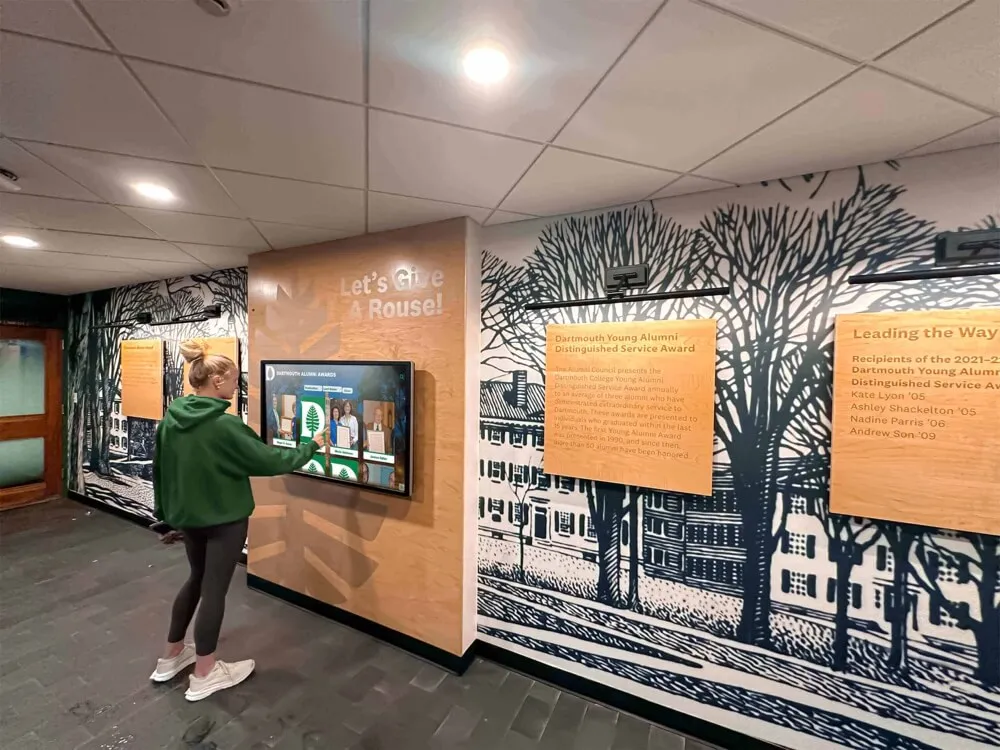
Intuitive content organization enables visitors of all ages and technical abilities to discover historical materials independently
Footer / Action Zone (Bottom 10-15% of Screen)
Footer areas support secondary actions without competing for attention with primary content. Common elements include social sharing buttons (Facebook, Twitter, email) enabling visitors to distribute discoveries, QR codes linking to mobile-accessible web versions or extended online collections, home and back navigation reinforcing primary navigation, language selection when serving multilingual audiences, and optional sponsor acknowledgment when exhibits receive donor funding.
The footer should remain subtle—supporting useful actions without distracting from historical content that represents visitor experience focus.
Navigation and Information Architecture for Historical Content
Content organization profoundly impacts whether visitors can discover materials efficiently or become frustrated navigating confusing structures. Historical content poses particular challenges given chronological spans, thematic diversity, and varying visitor knowledge levels.
Hierarchical Organization Frameworks
Museum collections naturally organize into hierarchical categories visitors understand intuitively. Effective structures for America 250 exhibits include:
Chronological organization by historical period or decade provides familiar frameworks most visitors bring to historical understanding. Clear period boundaries (Revolutionary Era, Civil War Period, Progressive Era) help visitors locate content within mental timelines they already possess. However, strict chronological structures can fragment thematic narratives spanning multiple periods.
Thematic grouping explores subjects across time—stories about immigration, technological innovation, social movements, cultural expression, or economic development. This organization reveals patterns and continuities that chronological approaches fragment. However, visitors without strong historical knowledge may struggle identifying where to begin exploration.
Geographic navigation organizes content by location—state, county, city, or neighborhood. This approach works particularly well for local history museums connecting America 250 national narratives to specific community experiences. Visitors can explore how national events manifested in their hometown or trace local contributions to broader American developments.
People-focused organization enables biographical discovery—searching individuals by name, browsing alphabetically, or filtering by occupation, ethnicity, gender, or era. This approach centers human stories while supporting visitors seeking specific individuals or demographic groups.
Hybrid approaches combining multiple organizational frameworks often prove most effective. Primary navigation might use chronological periods, with secondary filtering enabling thematic refinement, geographic limits, or people-focused browsing within selected periods. This layered architecture serves visitors with different mental models and knowledge levels.
Avoid overly complex hierarchies requiring excessive drilling down. Aim for maximum three levels of depth—main category, sub-category, individual content item. Deeper structures frustrate visitors who abandon exploration before reaching actual historical materials.
Search and Discovery Capabilities
While browsing serves casual exploration, targeted search serves visitors seeking specific information or following research questions. Comprehensive search should cover all content fields including names, dates, locations, topics, keywords, and full text of documents and transcriptions.
Faceted filtering enables progressive refinement—visitors search broadly then narrow results through checkbox filters for date ranges, content types (photographs, documents, artifacts, oral histories), geographic origins, thematic categories, or demographic attributes. Clear result counts for each filter option help visitors understand collection composition and refine searches effectively.
Auto-complete suggestions assist searches by displaying matching terms as visitors type, reducing spelling errors and helping visitors discover correct historical terminology. For America 250 exhibits, auto-complete might suggest historical figures, events, locations, and thematic terms as visitors begin typing queries.
Recent search persistence enables visitors to return to previous searches without re-entering terms—particularly valuable when visitors explore branching paths then want to return to earlier discovery points.
Saved collections or favorites enable registered users to bookmark items for later review, particularly valuable for educators and researchers building teaching materials or planning extended research visits.
Organizations implementing comprehensive museum kiosks should prioritize search functionality during initial design phases rather than treating search as optional enhancement—robust discovery capabilities fundamentally determine whether comprehensive digital collections become genuinely accessible or remain effectively hidden despite technical availability.
Content Blocks and Multimedia: Presenting American History Effectively
Beyond navigation and interaction patterns, thoughtful content presentation design determines whether visitors engage deeply with historical materials or skim superficially before abandoning exhibits.
Historical Content Presentation Modules
Individual historical item pages should follow consistent templates supporting comprehensive documentation while maintaining visual appeal and accessibility.
Essential Historical Information
Core content for historical materials includes descriptive titles identifying what materials show, creation dates or periods documenting when materials originated, creators, makers, or subjects identifying people associated with materials, geographic origins or locations documenting where materials came from or depict, material types and physical characteristics describing objects, provenance documenting ownership history and museum acquisition, and current location within institutional collections.
Present information in scannable formats using consistent label-value pairs rather than dense paragraphs. Consider collapsible sections for detailed technical information serving specialist audiences without overwhelming general visitors exploring casually.
Contextual Interpretation and Storytelling
Beyond basic cataloging, interpretive content transforms objects into meaningful narratives through historical context explaining why materials matter within broader American history, usage descriptions showing how objects functioned or documents were created, cultural significance connecting materials to specific communities or movements, connections to America 250 themes linking local materials to national narratives, related stories connecting materials to other collection items or external resources, and diverse perspectives presenting multiple interpretations when historical materials carry contested meanings.
This interpretive layer makes collections accessible to general audiences lacking specialized historical knowledge while structured metadata serves researchers requiring systematic documentation. For America 250 programming, interpretive content should explicitly connect local materials to national themes—explaining how community experiences reflect or contrast with common national narratives.

Grid-based card layouts enable intuitive browsing and selection of biographical profiles and historical materials
Multimedia Integration Strategies for Heritage Content
Digital displays enable rich multimedia impossible with traditional exhibits, but poor implementation overwhelms rather than enhances experiences.
High-Resolution Historical Photography
Historical photograph presentation should support detailed examination through resolution adequate for 2-3× digital zoom revealing details invisible in thumbnail views, multiple view angles when museums possess multiple images of same subjects, comparative images showing locations or subjects across different time periods, detail callouts highlighting significant features visitors might miss, and contextual images showing objects in original use contexts or geographic settings.
Implement zoom functionality through intuitive pinch gestures or prominent magnification buttons. Ensure zoomed images remain sharp—pixelated magnification frustrates visitors and undermines professional credibility. High-resolution scanning during digitization (minimum 600 DPI for archival photographs) provides necessary quality supporting detailed examination.
Historical Document and Artifact Presentation
Primary sources including letters, diaries, newspapers, official documents, and manuscripts require special presentation considerations. Provide high-resolution scans enabling visitors to examine original materials, transcriptions making handwritten or deteriorated text readable, annotations explaining historical context and unfamiliar terminology, translations when original materials use languages beyond museum audiences’ capabilities, and metadata documenting provenance, authenticity, and scholarly citations.
Interactive examination features might include side-by-side original and transcription views, highlighted sections with explanatory annotations appearing on selection, linked glossaries defining period terminology, and related document suggestions connecting materials within broader documentary collections.
Oral History Audio and Video Integration
First-person narratives provide irreplaceable perspectives on American experiences across different eras and communities. Oral history presentations should include clear audio with transcript text appearing synchronized with playback, speaker identification with biographical context establishing narrator credentials and perspectives, chapter navigation enabling visitors to jump to specific topics rather than listening chronologically, searchable transcripts allowing keyword discovery within long recordings, and contextual framing explaining interview circumstances and historical context.
Keep individual video segments concise—2-4 minutes for casual viewing areas, with options to view complete interviews for dedicated research. Provide clear play buttons rather than auto-play disrupting quiet museum environments. Include closed captions serving hearing-impaired visitors and those in sound-sensitive spaces.
Platforms supporting school history archives demonstrate effective oral history integration combining recorded interviews, archival photographs, and contemporary documentation into layered historical narratives spanning institutional evolution.
Interactive Timeline Presentations
America 250 content naturally suits timeline interfaces presenting events, developments, and biographical milestones across 250 years. Horizontal scrolling timelines work well for extended periods, while vertical layouts suit mobile contexts and shorter timeframes.
Effective historical timelines include clear date markers and period labels, zoomable views enabling overview browsing and detailed exploration, event cards revealing comprehensive information on selection, filtering options narrowing displayed content by theme or location, visual encoding using color, icons, or size to communicate event significance, and connection lines showing relationships between contemporaneous events.
Timelines particularly benefit institutions documenting how local community experiences relate to national historical developments—showing when national events occurred alongside local responses, adaptations, or parallel developments.
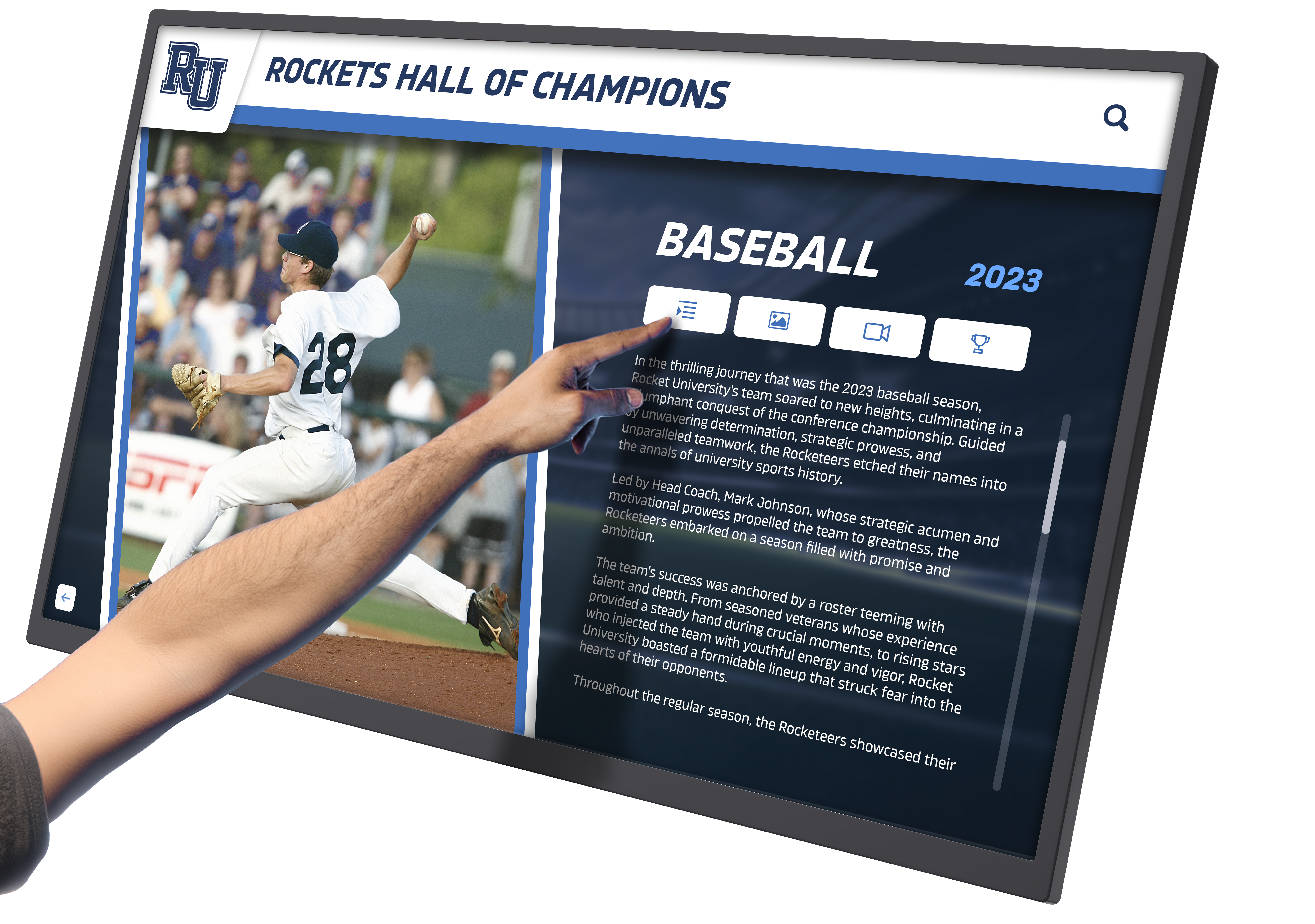
Individual profile pages provide comprehensive biographical information through clear layouts combining images, historical documentation, and narrative content
Organizations implementing digital tools that bring history to life find that interactive timelines particularly resonate with visitors—providing both overview orientation showing historical scope and detailed exploration satisfying curiosity about specific moments.
Geographic Story Mapping
Historical events unfold across physical landscapes, making map-based visualization powerful for presenting location-based narratives. Interactive historical maps can show territorial expansion and boundary changes, migration patterns and demographic shifts, battle locations and military campaigns, Underground Railroad routes and freedom seeker journeys, industrial development and transportation infrastructure, and community growth patterns showing how towns and cities evolved.
Map interfaces enable visitors to explore history geographically—clicking locations to reveal associated stories, filtering by time period to see changes across decades, and toggling thematic layers showing different types of historical activity. For local history museums, detailed community maps can present neighborhood-level stories connecting residents to specific streets, buildings, and landmarks.
Comparative and Contextual Frameworks
Interactive displays excel at presenting relationships and comparisons that static exhibits struggle to convey. Split-screen comparisons can juxtapose related materials—showing how different communities experienced same national events, contrasting perspectives from different historical actors, presenting before-and-after views of locations across time, or examining how different primary sources describe same events differently.
Network visualizations map connections between people, organizations, and events—revealing relationships and influences that narrative text struggles to communicate clearly. For America 250 exhibits, network maps might visualize how reform movements influenced each other, how immigrant communities maintained transnational connections, or how local figures connected to national networks.
Accessibility and Inclusive Design for Heritage Touchscreens
Museums serve public missions requiring accessible experiences for all community members regardless of physical capabilities, cognitive differences, or technological familiarity. America 250 programming emphasizing inclusive narratives must provide equally inclusive access.
Physical Accessibility Requirements
Mounting and Placement Standards
ADA compliance requires interactive controls positioned within reach for wheelchair users. Primary touch interface elements should be 15-48 inches above finished floor. Displays require minimum 30" × 48" clear floor space enabling direct approach. Screen mounting angles should be visible from seated positions—typically 10-15 degree downward tilt from vertical.
Consider multiple display installations at varied heights when space permits—standard mounting serves standing visitors while lower companion displays accommodate seated users and children. For America 250 special exhibitions expecting high family attendance, dual-height installations ensure comfortable access for visitors of all ages.
Alternative Input and Navigation Methods
Touchscreens present challenges for visitors with limited motor control or physical disabilities preventing touch interaction. Provide alternatives including physical navigation buttons for basic home, back, and menu controls, keyboard input support for search functionality, voice control capabilities when technically feasible, and QR codes linking to mobile-accessible web versions controllable through personal assistive technologies visitors already use.
Mobile web access proves particularly valuable for accessibility—visitors unable to comfortably use vertical touchscreens can access identical content through personal smartphones and tablets they can hold, position, and control according to individual needs.
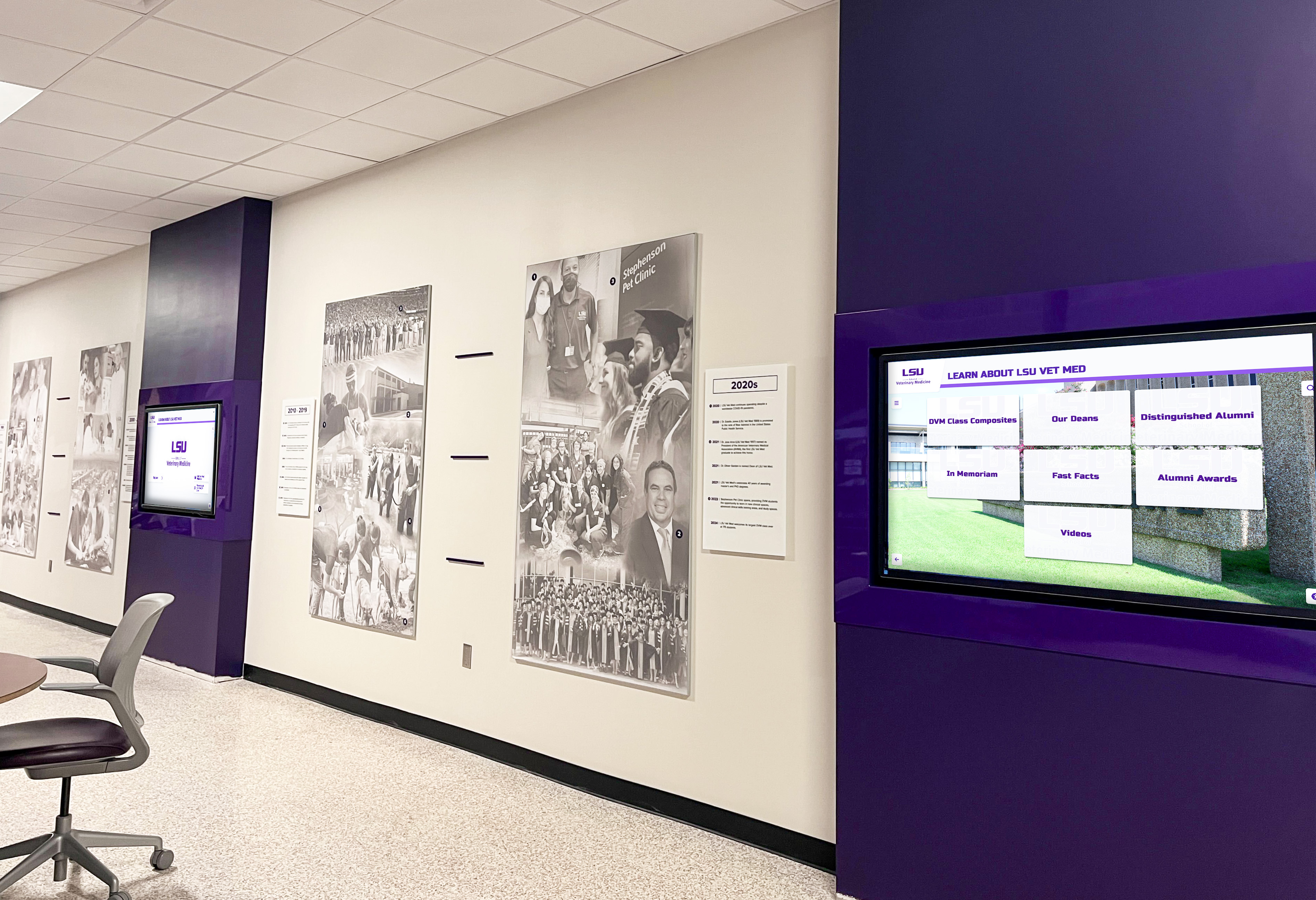
Multiple coordinated displays create comprehensive institutional presence while maintaining accessible viewing heights and positions
Digital Accessibility Standards
Visual Accessibility Compliance
WCAG 2.1 AA standards require color contrast ratios meeting minimum thresholds (4.5:1 for normal text under 18pt, 3:1 for large text 18pt and above or 14pt bold), resizable text supporting enlargement to 200% without breaking layouts, color-independent information ensuring nothing is conveyed through color alone, focus indicators showing keyboard navigation position clearly, and text alternatives for images and icons.
Test contrast using automated tools like WebAIM’s contrast checker, but verify with actual users representing various visual capabilities. Avoid background patterns or images behind text—these decorative elements consistently cause readability problems for visitors with low vision.
Cognitive Accessibility Considerations
Clear interfaces serve visitors with cognitive differences, older adults, and anyone unfamiliar with digital technology through plain language avoiding jargon and academic terminology, consistent navigation patterns minimizing confusion, clear task flows requiring minimal steps to accomplish goals, error prevention through clear instructions and confirmation dialogs, recovery options enabling easy return to known states when visitors navigate into unexpected places, and generous touch targets reducing fine motor precision requirements.
Test interfaces with diverse users including older adults, children, and individuals with limited technological experience ensuring broad usability. Museums often discover that accessibility improvements benefiting visitors with disabilities simultaneously improve experiences for all visitors—simplified navigation benefits everyone, not just those with cognitive impairments.
Multilingual Access and Cultural Sensitivity
America 250 programming emphasizing inclusive narratives should serve diverse language communities through multilingual interfaces and content. Implement language selection prominently in navigation headers, provide complete content translation rather than partial translation limited to interface elements, accommodate text expansion when translating from English to languages requiring more space, and ensure translated content receives professional translation rather than relying on automated tools producing awkward or incorrect text.
Beyond language, cultural sensitivity requires presenting diverse historical perspectives, avoiding triumphalist narratives marginalizing specific communities, acknowledging historical injustices honestly, including multiple voices when presenting contested historical events, and consulting with represented communities during exhibit development.
Organizations designing interactive museum displays should integrate accessibility from initial design phases rather than treating it as afterthought requiring expensive retrofitting. Universal design principles benefiting all visitors cost minimally when implemented from the beginning.
Implementation Strategies: Building America 250 Interactive Exhibits
Museums ready to implement interactive touchscreen exhibits for America 250 programming can follow systematic approaches maximizing success probability while avoiding common challenges.
Planning and Scoping Your Exhibit
Define Clear Exhibit Objectives
Successful projects begin with explicit objectives answering several key questions: What specific America 250 themes will your exhibit address? Will you focus on comprehensive local history across 250 years, specific thematic deep dives, connections between local and national narratives, or community participation and memory sharing?
Who are your primary audiences? Families with children require different design than scholarly researchers. Tourist visitors need different orientation than local residents with existing historical knowledge. School groups benefit from educator resources and curriculum connections.
What institutional goals beyond Semiquincentennial programming will exhibits serve? Consider how America 250 content can be repurposed or expanded for permanent collections, whether platforms can support ongoing exhibits after 2026, how systems might facilitate community engagement and participation, and whether technology investments advance broader digital strategy goals.
What physical and financial resources are available? Realistic budgeting and space planning prevent mid-project challenges derailing implementation. Consider available exhibition space and locations, existing hardware that might be repurposed, staff capacity for content development and ongoing management, timeline constraints for launch before July 4, 2026, and budget including initial investment and ongoing operational costs.
Clear objectives enable focused decision-making throughout design and implementation—evaluating technology options, prioritizing content development, allocating resources effectively, and measuring success against defined goals rather than vague aspirations.

Purpose-built kiosks provide professional presentation suitable for museum environments while protecting technology investment
Technology Selection and Vendor Evaluation
Choosing appropriate technology platforms significantly impacts long-term success, visitor satisfaction, and total cost of ownership.
Platform Evaluation Criteria
When comparing interactive display options, assess several critical factors:
Content management accessibility determines whether non-technical museum staff can independently add content, update information, and maintain exhibits without requiring ongoing IT support or vendor assistance. User-friendly systems with visual editors, drag-and-drop interfaces, and clear workflows prove far more sustainable than platforms requiring technical expertise for routine tasks.
Historical content support ensures platforms accommodate varied materials including photographs, documents, audio, video, maps, timelines, and biographical databases. Generic digital signage systems lacking specialized heritage functionality often prove frustrating to adapt.
Search and discovery capabilities determine whether comprehensive collections become genuinely accessible. Robust search, filtering, browsing, and recommendation features prove essential as databases grow beyond a few dozen items.
Accessibility compliance ensures platforms meet ADA requirements and WCAG standards without requiring custom development—particularly crucial for government-funded museums with legal accessibility obligations.
Analytics and reporting reveal how visitors engage with exhibits—which content generates interest, where navigation confusion occurs, peak usage times, and demographic patterns. These insights enable evidence-based refinement improving exhibits continuously.
Scalability and flexibility accommodate growth, content changes, and repurposing after America 250. Rigid systems designed specifically for Semiquincentennial programming become obsolete in 2027, while flexible platforms continue serving institutional missions indefinitely.
Support quality and responsiveness determine whether problems get resolved quickly or linger indefinitely. Evaluate vendor responsiveness, support hours, update frequency, and whether ongoing support requires additional fees.
Solutions like Rocket Alumni Solutions provide purpose-built platforms specifically designed for cultural and educational institutions, combining sophisticated features with user-friendly management accessible to staff without technical backgrounds. These specialized systems typically deliver better results and lower total costs than generic alternatives requiring extensive customization.
Content Development and Community Engagement
Historical Research and Documentation
Developing comprehensive America 250 content requires systematic approaches to historical research, particularly when exhibits emphasize inclusive narratives beyond traditionally documented subjects.
Begin with institutional collections including existing catalogs and databases, prior exhibits and publications, photograph and document archives, artifact collections, and oral history recordings. Review these materials identifying America 250 connections—how do institutional holdings relate to national themes? Which materials tell stories of underrepresented communities?
Expand beyond institutional holdings through community outreach soliciting photograph donations, biographical information, and oral history participation from diverse community members. Local newspaper archives often contain historical coverage unavailable elsewhere. Historical societies, genealogical organizations, and specialized museums may provide collaborative resources. And academic researchers studying relevant topics might share documentation or suggest research directions.
For America 250 exhibits emphasizing inclusive narratives, prioritize documenting historically marginalized communities whose experiences traditional collections underrepresent. This focused research often reveals remarkable untold stories while demonstrating institutional commitment to comprehensive representation.
Participatory Content Development
Community participation strengthens America 250 programming while building engagement beyond passive visitation. Participatory approaches include community memory walls where visitors contribute personal stories and reflections, photograph identification projects soliciting help identifying unnamed individuals in historical images, oral history initiatives recording community member perspectives and experiences, youth engagement programs involving students in historical research and documentation, and collaborative curation inviting community input on exhibit design, content selection, and interpretation.
These participatory elements transform America 250 from institutional product to community conversation—building ownership and engagement while surfacing knowledge and materials institutions might never discover independently.
Organizations implementing community showcase projects find that community participation generates enthusiasm, publicity, and ongoing engagement far exceeding passive exhibit attendance.
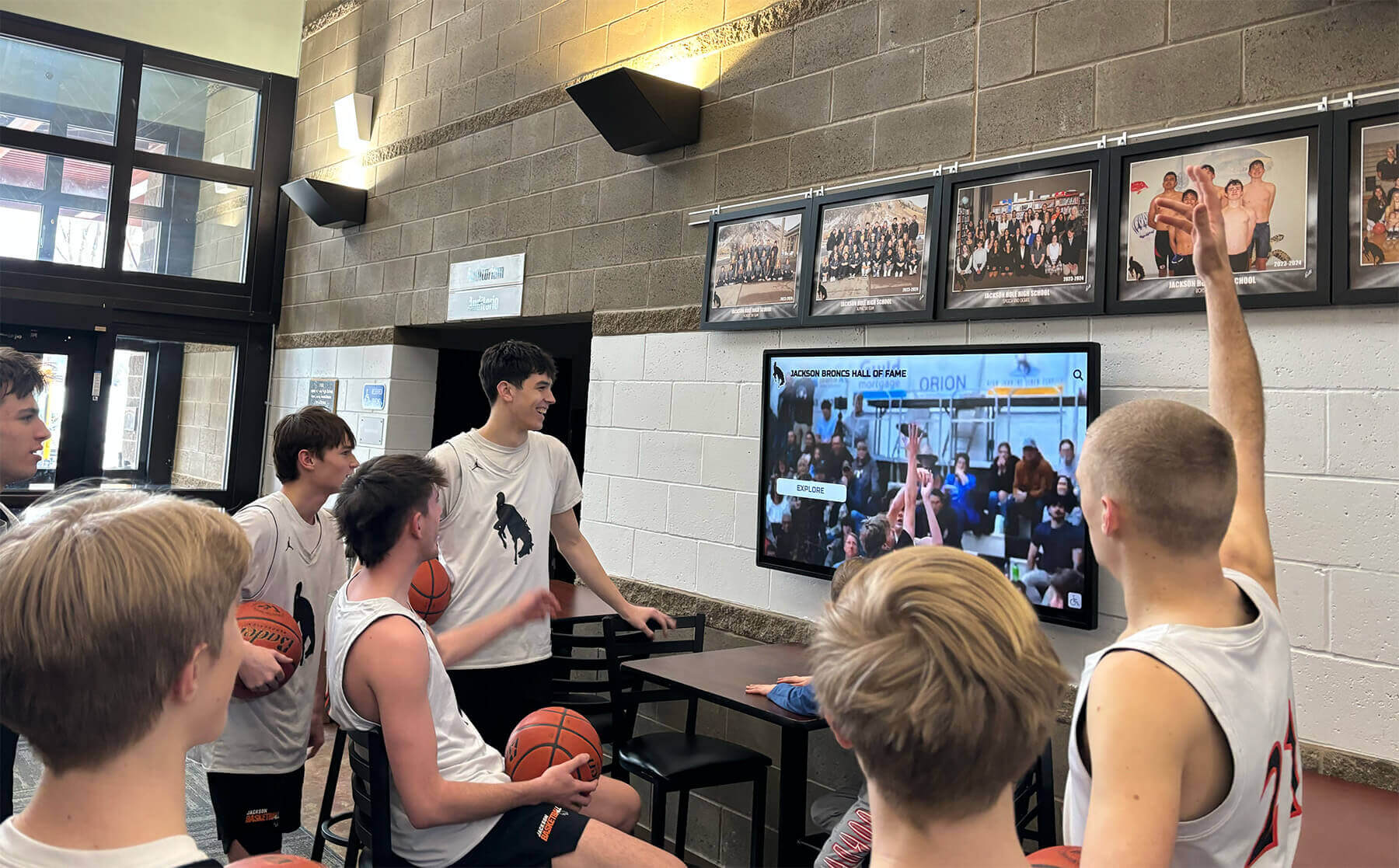
Engaging content and strategic placement encourage social viewing experiences where visitors explore exhibits together
Launch and Promotion: Maximizing America 250 Exhibit Impact
Even excellently designed exhibits fail without effective promotion ensuring target audiences know they exist and understand how to access them.
Pre-Launch Awareness Building
Generate anticipation before exhibit opening through teaser campaigns sharing compelling historical discoveries from exhibit research, behind-the-scenes content showing exhibit development, countdown posts building excitement toward opening dates, community involvement invitations encouraging participation, and preview events for donors, members, and community leaders.
Social media proves particularly valuable for awareness building—create dedicated hashtags for America 250 programming, share compelling historical images from upcoming exhibits, post short video teasers featuring interesting stories, engage with follower questions and comments, and coordinate with other institutions using America 250 programming to amplify collective reach.
Media outreach generates broader awareness through press releases announcing exhibit opening and highlighting unique features, media preview events enabling journalists to experience exhibits firsthand, feature story pitches emphasizing human interest angles within historical content, opinion pieces contributed by curators or historians connecting America 250 to contemporary issues, and broadcast media appearances demonstrating interactive features visually.
Opening Events and Programming
Formal exhibit openings create momentum driving initial visitation and media coverage. Effective opening events include dedication ceremonies with elected officials and community leaders, first-look tours for donors and members, family-friendly activities encouraging multigenerational attendance, expert talks or panel discussions providing context, entertainment reflecting historical themes, and social media opportunities encouraging visitor-generated content amplification.
Schedule opening events well before July 4, 2026—launching in spring 2026 allows exhibits to build audiences before peak Semiquincentennial attention saturates public awareness. Early launch also enables refinement based on visitor feedback before maximum national attention.
Ongoing Engagement and Dynamic Programming
Sustain visitor interest beyond opening excitement through content rotation highlighting different exhibit sections monthly or seasonally, special programs timed to historical anniversaries, temporary exhibition elements exploring specific topics deeply for limited periods, community contribution features encouraging ongoing participation, educator programs integrating exhibits into school curricula, and researcher access promoting scholarly use of digital collections.
Regular programming maintains visibility while demonstrating that exhibits offer fresh experiences justifying repeat visits rather than one-time attendance.
Museums implementing digital hall of fame systems face similar promotional challenges requiring systematic awareness campaigns, programming calendars, and community engagement strategies sustaining long-term interest.
Beyond 2026: Sustaining Interactive Heritage Exhibits
America 250 investments should deliver value across decades rather than becoming obsolete after Semiquincentennial excitement fades.
Repurposing Content for Permanent Collections
Design America 250 content with post-2026 use in mind. Thematic organization transcends specific anniversary framing—stories about immigration, innovation, social movements, or community development remain relevant regardless of commemorative context. Biographical databases documenting local historical figures serve institutional missions indefinitely. Oral histories preserve irreplaceable first-person perspectives. And interactive platforms supporting America 250 programming can showcase completely different content serving permanent collection needs.
Plan content transitions before launch. How will America 250 thematic organization transform into ongoing collection access? Which temporary interpretive framing requires revision? What new content additions will maintain freshness? Advance planning enables smooth transitions rather than crisis responses when public attention shifts away from Semiquincentennial themes.
Building Sustainable Content Management Workflows
Long-term success requires systematic processes ensuring exhibits remain current and relevant rather than becoming frozen historical artifacts themselves. Establish clear responsibility for ongoing content management with explicit expectations and accountability. Create regular schedules for content additions maintaining visitor interest. Implement procedures for community contribution of materials and information. And document all processes enabling continuity during inevitable staff transitions.
Many museums find that initial America 250 implementation momentum dissipates without systematic workflows transforming exhibits into ongoing programs rather than completed projects.
Continuous Improvement Through Analytics
Digital platforms provide usage data revealing visitor behavior patterns informing continuous refinement. Review analytics quarterly identifying trends and opportunities. Which content generates most engagement? What searches do visitors perform unsuccessfully, revealing content gaps? Where does navigation confusion occur? What peak usage times inform staffing and programming?
Use data systematically to guide improvements through content additions filling revealed gaps, navigation refinements addressing confusion patterns, featured content rotation highlighting underutilized excellent materials, and performance optimization ensuring fast operation maintaining visitor satisfaction.
Digital heritage exhibits should evolve continuously—small iterative improvements compound over time creating dramatically better experiences than initial implementations.
Conclusion: Designing Interactive History Touchscreens for America 250 and Beyond
America’s 250th anniversary represents an extraordinary opportunity for museums and cultural institutions—capturing public attention at a moment of heightened historical interest while implementing interactive technology that transforms heritage presentation for decades beyond 2026. Interactive touchscreen displays enable museums to address space constraints limiting traditional exhibits, create engaging experiences matching modern expectations, present inclusive narratives impossible through limited physical labels, facilitate community participation and memory sharing, and preserve digital collections ensuring long-term access and discovery.
The most successful America 250 implementations share common characteristics including clear strategic objectives guiding design toward specific outcomes, thoughtful experience layouts organizing content intuitively, accessible interfaces serving all visitors regardless of abilities, compelling multimedia content combining scholarship with engaging storytelling, reliable technology providing smooth operation through extended public use, and sustainable management ensuring exhibits remain current across years of operation.
Design Your America 250 Interactive Exhibit
Transform your historical collection into an engaging America 250 experience. Request a custom design preview showing exactly how your content will come to life through purposeful interactive touchscreen design.
Book a DemoWhether implementing new America 250 exhibitions, enhancing existing heritage displays, or planning comprehensive museum renovations, interactive touchscreen technology provides capabilities transforming passive viewing into active discovery. Solutions like Rocket Alumni Solutions offer purpose-built platforms specifically designed for museum and heritage applications, combining user-friendly content management accessible to non-technical staff with engaging visitor experiences optimized for public touchscreen environments.
Museums face no shortage of important stories to tell. Every community holds narratives connecting local experiences with national developments across 250 years of American history—stories of ordinary people whose contributions built the nation, struggles toward fulfilling founding ideals, innovations advancing human flourishing, cultural expressions enriching American life, and countless other experiences deserving recognition and preservation. The challenge lies not in having compelling content, but in presenting that content through formats contemporary audiences find engaging rather than dated.
Thoughtfully designed interactive touchscreens bridge this gap, honoring heritage significance while meeting modern engagement expectations. Through strategic layout design, intuitive navigation patterns, rich multimedia integration, accessible interfaces, and sustainable content management, museums create experiences worthy of their irreplaceable collections—experiences that inform, inspire, and invite discovery for all who encounter them, not just during America 250 commemorations but across decades of ongoing institutional service to community, scholarship, and collective memory.
Ready to explore interactive possibilities for America 250 programming? Discover how interactive museum displays create engaging heritage experiences. Learn about developing historical timelines presenting institutional evolution. Explore digital archive strategies organizing comprehensive collections. Understand how ballpark village interactive museums demonstrate professional heritage implementation. And review public library digital archives adapting interactive technology for community heritage.































