




Running a school athletic department has never involved more moving pieces. Between eligibility verification, scheduling conflicts, parent communication, championship records, digital media, and end-of-season banquets, athletic directors routinely manage workloads that would strain a much larger staff. Athletic department management software has expanded rapidly to address these demands—but the category now covers so many distinct tools that assembling an effective, integrated stack requires deliberate thinking about what each system actually does and how each piece connects to the others.
No single platform handles everything well. The athletic directors who operate most efficiently have typically built a small, purposeful stack of tools that each solve a real problem without duplicating one another: one system for scheduling and compliance, one for roster and registration management, one for records and statistics, one for communications, and one for recognition and legacy displays. Understanding where each category begins and ends helps administrators avoid both the chaos of too many disconnected tools and the frustration of expecting a single platform to do everything.
This guide walks through the core layers of an athletic department management software stack with the detail and specificity administrators actually need—covering what each category handles, what to look for when evaluating options, and how recognition and hall-of-fame workflows fit into the larger operational picture.
Understanding how these software categories relate to one another—and where workflows cross system boundaries—is the foundational step in building a stack that serves your program for years rather than requiring constant replacement and retraining.

Recognition technology sits at the intersection of athletic department management and institutional memory—connecting current rosters to decades of program history in a single interactive display
Why Athletic Departments Need a Purpose-Built Software Stack
Generic school administration tools were not designed for the specific workflows athletic departments run. A student information system tracks enrollment but cannot manage sport-specific eligibility rules. A standard CRM captures contacts but cannot produce a compliant athletic roster with updated physical and clearance dates. A school website platform publishes content but cannot manage live record boards or searchable hall-of-fame archives.
The result for many athletic directors is a patchwork of spreadsheets, shared drives, email chains, and generic tools that technically get the job done while generating significant administrative drag. Purpose-built athletic department management software replaces that patchwork with systems designed specifically for the tasks athletic administrators actually perform.
Understanding the full scope of athletic department structure and the roles within it clarifies why different categories of software serve different personnel. An athletic director focused on compliance and scheduling has different daily needs than a communications coordinator managing media assets or a recognition committee maintaining hall-of-fame nominations. A good stack serves all of them without requiring each person to learn systems designed for someone else’s role.
What Athletic Departments Actually Manage
Before evaluating specific tools, it helps to enumerate the operational domains an athletic department owns:
- Scheduling: game, practice, facility, and transportation logistics across every sport
- Compliance and eligibility: physical forms, academic requirements, transfer rules, insurance documentation
- Roster management: active rosters by sport, parent contacts, emergency information, gear assignments
- Financial management: budget tracking, gate receipts, booster accounting, purchase orders
- Communications: parent and coach notifications, media releases, social media
- Records and statistics: all-time performance records, season results, championship history
- Awards and recognition: end-of-season honors, letter awards, all-conference selections
- Hall of fame and legacy: nomination processes, induction ceremonies, permanent displays
- Fundraising and development: booster campaigns, donor management, sponsorship coordination
No one tool covers all of these domains completely. The following sections address each major software category and what belongs in a well-designed stack.
Layer 1: Athletic Scheduling and Compliance Software
Scheduling sits at the operational core of every athletic department. A scheduling platform needs to manage contest schedules across all sports, handle facility assignments and conflicts, generate transportation requests, and produce the official athletic calendar that feeds every other communication channel.
What to Look for in Scheduling Tools
Multi-sport calendar management: The system should display all sport schedules in a unified view with filtering by sport, gender, or level. Staff reviewing facility availability should not need to check separate sport-specific spreadsheets.
Eligibility and compliance tracking: The best scheduling platforms include eligibility management features that flag athletes who have not completed physical requirements, failed to meet academic thresholds, or whose transfer eligibility is under review. These flags should tie directly to roster management so ineligible athletes are prevented from appearing on active game-day rosters.
Transportation and facility coordination: Scheduling software that integrates transportation requests—generating bus orders from the game schedule rather than requiring a separate manual process—saves substantial weekly administrative time across a multi-sport program.
NFHS and state-association rule alignment: Scheduling tools designed specifically for scholastic athletics understand maximum contest rules, minimum days-between-competition requirements, and postseason qualification tracking in ways generic calendar systems do not.
Understanding athletic department roles and responsibilities helps administrators assign system ownership clearly so compliance tracking does not fall through the cracks between coaches, administrators, and front office staff.
Layer 2: Roster Management and Registration Systems
Roster management handles the data about who is on each team, their eligibility status, emergency contacts, physical clearance, and equipment assignments. This layer connects directly to scheduling (who can play this week) and to compliance (who has completed required documentation).
Registration and Onboarding Workflows
Modern athletic registration platforms replace paper packets with digital workflows that parents complete online. A complete registration system handles:
- Annual physical upload and verification: Parents upload physical exam documentation; athletic trainers or administrators verify and approve clearance before the athlete appears on an active roster
- Emergency contact and medical history collection: Structured forms that capture allergy information, medications, prior injuries, and physician contacts in searchable, exportable formats
- Signed consent and participation agreements: Digital signature capture for athletic participation agreements, transportation waivers, photo release forms, and code-of-conduct acknowledgments
- Equipment and uniform assignment: Inventory tracking tied to individual athletes so gear assignments, return status, and replacement costs are visible at the roster level
What Registration Data Feeds Downstream
The value of a good registration platform multiplies when the data collected flows directly into other systems. Roster data should feed the scheduling platform’s eligibility checks, the communications platform’s parent contact lists, and the records system’s performance tracking. Schools that treat registration as an isolated annual exercise rather than a living data system collect the same information repeatedly without gaining compounding efficiency.
Layer 3: Athletic Records and Statistics Tracking
All-time athletic records represent an institution’s competitive history—and they deserve better infrastructure than a PDF attachment or a painted gymnasium board. Records software tracks individual and team performance across sports, seasons, and years, maintaining the kind of searchable, updatable archive that serves current athletes, coaches, alumni, and hall-of-fame committees alike.
Core Records Management Requirements
Sport-specific statistical categories: A records system that handles football and track-and-field equally well needs configurable stat categories rather than forcing all sports into a generic numeric field. Swimming records track to hundredths of a second; cross-country records include course context; basketball records distinguish points, rebounds, and assists across career and single-season spans.
Historical record preservation: Records software should allow entry of historical performances dating back to the program’s founding, not just data collected since the software was purchased. A 1978 school record in the 400-meter hurdles belongs in the same system as last week’s meet results.
Public-facing display integration: Records databases that feed live digital displays—interactive kiosks in hallways and lobbies, screens in athletic facilities, web-published leaderboards—transform static archives into active program culture. Athletes who can walk past a record board and see their name approaching an all-time mark train differently than athletes who have no visibility into historical benchmarks.
The relationship between well-maintained records and athletic department branding is direct: programs that visibly celebrate what their athletes have achieved over decades project a culture of excellence that generic scheduling software cannot create.
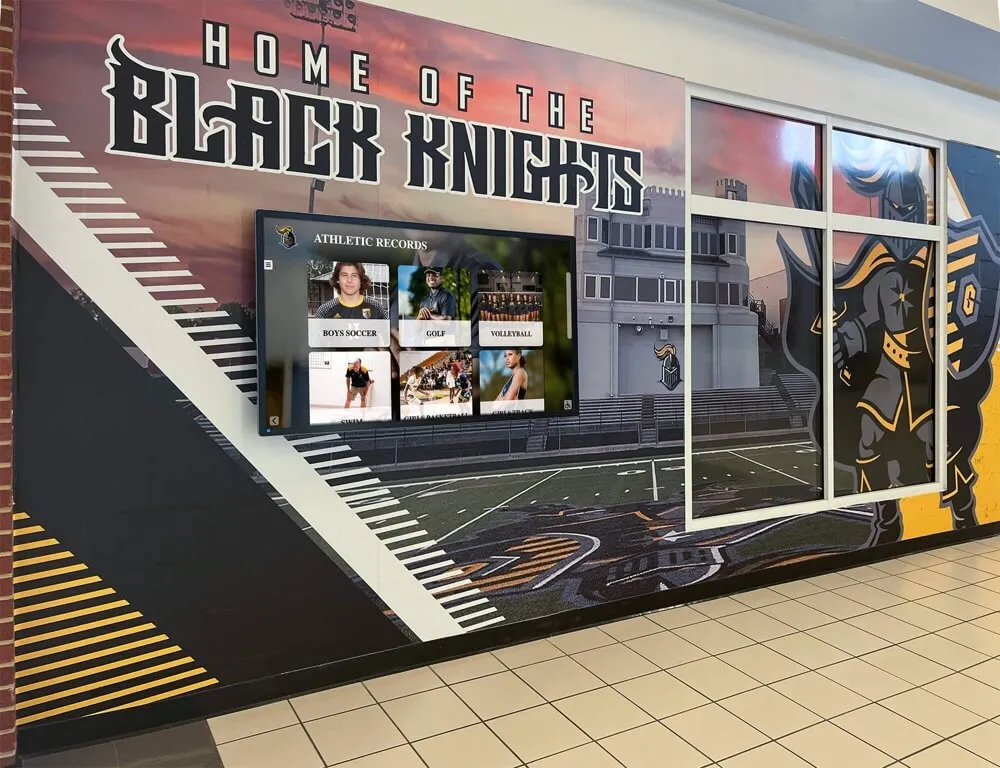
Digital athletic records displays integrated into hallway installations connect current athletes with decades of program history in visible, daily touchpoints
Layer 4: Athletic Communications and Media Tools
Communications software for athletic departments must handle several distinct audiences and content types simultaneously: parent and family notifications about schedule changes and emergencies, media releases to local press, social media content management, and internal coach-to-administrator messaging. These needs are different enough that many departments use separate tools for each audience.
Parent and Family Communication
Emergency notification and schedule-change communication requires a reliable broadcast system with documented delivery confirmation. Text and email delivery to verified parent contacts, with the ability to segment by sport, is the minimum viable functionality for athletic department parent communication. Systems that require parents to install an app introduce friction that reduces engagement; email and SMS delivery reaches the broadest audience without barriers.
Media and Social Content Management
Athletic communications coordinators managing content across multiple social platforms benefit from scheduling tools that allow content to be drafted, approved, and queued across channels. A well-structured athletic communications plan defines which content types go to which channels, who approves posts involving athletes, and how game results translate into shareable media.
What athletic communications software should handle:
- Automated game-result notifications triggered by scoreboard integrations or manual result entry
- Photo and video asset management with tagging by sport, athlete, and season
- Media guide production workflows that pull roster data from the registration system
- Press release templates for significant achievements, coaching changes, and award announcements
Layer 5: Financial Management and Fundraising Tools
Athletic department budgets combine institutional allocations, gate receipts, booster organization contributions, and fundraising revenue in ways that general school accounting software handles awkwardly. Dedicated athletic financial tools track budget lines by sport, manage gate deposits, reconcile booster transfers, and produce the sport-by-sport budget reports that school boards and administrators require for compliance review.
Booster Organization Coordination
Booster clubs and parent organizations represent significant revenue for most athletic programs, but the financial relationship between booster organizations and school athletic departments requires careful documentation. Software that generates clear audit trails for booster contributions, tracks restricted fund usage by sport, and produces annual reports for both school administrators and booster treasurers reduces the administrative and compliance risk that informal booster accounting creates.
Fundraising Campaign Management
Athletic fundraising extends beyond booster club contributions. Direct donation campaigns, equipment drives, facility improvement campaigns, and endowment gifts require donor management infrastructure that tracks giving history, acknowledges contributions appropriately, and segments donors for targeted follow-up. The connection between athletic fundraising and recognition matters here: donors who see their support acknowledged through named spaces, digital displays, and banquet recognition give again at higher rates than donors who receive only a thank-you letter.
Reviewing athletic department fundraising ideas and creative approaches to funding school sports programs reveals how recognition technology and fundraising strategy reinforce each other—programs that visibly celebrate donors through digital displays consistently report stronger year-over-year retention.
Layer 6: Recognition, Awards, and Hall of Fame Systems
Recognition workflows represent the layer of the athletic software stack most likely to be underbuilt relative to its cultural importance. End-of-season award nominations, letter award processing, all-conference documentation, and hall-of-fame management typically live in email threads and shared spreadsheets even at programs that have invested in scheduling and roster software.
End-of-Season Awards Management
A structured awards management workflow handles nomination collection, committee review, approval routing, and award documentation in a single traceable process. Athletic directors managing dozens of teams across fall, winter, and spring seasons process hundreds of individual award decisions annually. Software that tracks which athletes have received which awards across their careers—making it easy to identify four-year letter winners, sport-specific all-time honorees, and multi-year recognition milestones—transforms an administrative chore into a searchable institutional record.
Hall of Fame Nomination and Selection
The hall-of-fame nomination process deserves dedicated workflow support. Athletic hall of fame nomination criteria and what committees look for typically includes performance records, post-graduation achievements, character, and service to the school community—categories that require documentation gathering across multiple data sources. Software that centralizes nomination submissions, committee scoring rubrics, vote tabulation, and induction records creates consistency and defensibility that informal nomination processes cannot match.
What hall-of-fame software should handle:
- Online nomination submission forms accessible to alumni, coaches, and staff
- Biographical data collection tied to existing records and roster archives
- Committee scoring and ranking workflows with documented vote trails
- Induction ceremony logistics and communications
- Permanent inductee profiles that feed display systems and web archives
Digital Recognition Displays
The most visible layer of the recognition software stack is the display technology that brings award records, hall-of-fame inductees, and athletic history into physical spaces where athletes, families, and visitors encounter them daily. Interactive touchscreen displays installed in lobbies, hallways, athletic facilities, and trophy rooms deliver searchable inductee profiles, live record boards, season photo galleries, championship histories, and donor recognition in formats that static plaques and painted boards cannot match.
For an in-depth evaluation of display options, reviewing athletic hall of fame display software buyers guide helps administrators understand what to prioritize—from content management interfaces that non-technical staff can update independently to hardware specifications suited to different installation environments.
Layer 7: Integration and Data Governance Considerations
Software layers that do not share data create redundant entry burden and produce inconsistent records. The athletic director who enters roster data in three separate systems—registration, scheduling, and records—is effectively tripling their administrative work while creating the conditions for conflicting information to circulate.
Integration Points That Matter Most
Registration to eligibility: Physical clearance and academic eligibility status from the registration system should be readable by the scheduling platform so coaches do not need to manually verify eligibility for every game.
Records to display: All-time performance records maintained in the records system should publish automatically to digital displays and web pages rather than requiring manual exports and re-entry.
Awards to archives: Hall-of-fame inductee data and end-of-season award records should flow into a permanent institutional archive that outlasts any individual staff member’s tenure.
Roster to communications: Parent contact information collected during registration should populate communications platform contact lists so athletic directors do not maintain duplicate contact databases.
Data Ownership and Documentation
Athletic departments have experienced the disruption of a long-tenured athletic director or registrar departing and taking institutional knowledge with them. Athletic department handbook best practices for high schools consistently emphasize documented data governance as a risk management priority: knowing where each category of athletic data lives, who owns it, and what happens to it during staff transitions prevents the kind of historical record loss that permanently damages a program’s institutional memory.
The Checklist: What Belongs in Your Athletic Department Management Software Stack
Assembling an effective stack means confirming coverage across each operational domain without redundancy. Use this checklist when auditing your current tools or evaluating new ones:
Scheduling and Compliance
- Multi-sport unified calendar with conflict detection
- Integration with state association compliance databases
- Transportation request generation from game schedules
- Facility assignment and usage tracking
Roster and Registration
- Digital registration with physical clearance workflow
- Emergency contact and medical history collection
- Equipment inventory tied to individual athletes
- Eligibility flag system tied to scheduling
Records and Statistics
- Sport-specific configurable stat categories
- Historical record entry dating to program founding
- All-time, season, and career record tracking
- Public display and web publishing integration
Communications
- Multi-channel parent notification with delivery confirmation
- Social media scheduling and content management
- Photo and video asset library with sport/athlete tagging
- Automated game-result notification capability
Financial and Fundraising
- Sport-by-sport budget tracking
- Gate receipt management and reconciliation
- Booster contribution tracking with audit trails
- Donor management with giving history
Recognition and Hall of Fame
- End-of-season award nomination and tracking workflows
- Career award history by athlete
- Hall-of-fame nomination submission and committee tools
- Permanent inductee archive with display integration
- Interactive display technology for physical spaces
Comprehensive guides covering software products for athletic administrators provide expanded vendor-level breakdowns for each of these categories, helping administrators move from the checklist to specific platform comparisons.
How Recognition Technology Completes the Stack
Athletic department management software handles operations efficiently—but efficiency is not the same as culture. The systems that drive scheduling, compliance, and roster management are infrastructure. Recognition technology is the layer that makes the infrastructure matter to the people it serves.
When a first-year athlete walks through a school lobby and sees an interactive display showing fifty years of program history, record holders across every sport, hall-of-fame inductees who graduated before their parents were born, and the championship banner count scrolling through decades of postseason results, they understand immediately what program they have joined. That experience cannot be created by a scheduling platform or a registration system. It requires purposeful investment in recognition infrastructure that connects records data, award history, and hall-of-fame archives to visible, engaging physical displays.
For programs considering how their current stack addresses the recognition layer, reviewing the broader landscape of software products athletic administrators rely on for recognition and operations clarifies which platforms have earned consistent adoption across the high school and collegiate levels and which categories remain underserved by current market offerings.
Open Source and Proprietary Considerations
Some athletic departments explore open source tools for parts of their stack, particularly for communications, data management, and basic record keeping. Understanding when open source alumni management software works and when to skip it applies equally to athletic records and recognition tools: open source solutions require technical maintenance that most athletic departments cannot sustain, and the ongoing development investment needed to keep athletic-specific features current rarely exists in open source athletic software communities. Purpose-built commercial platforms with dedicated support typically deliver better long-term value for programs without dedicated IT resources.
Building Toward an Integrated Future
The most forward-thinking athletic departments are moving toward stacks where data entered once flows across every system that needs it: registration data feeds scheduling, scheduling outcomes feed records, records feed displays, displays engage alumni, and alumni engagement feeds fundraising. Each integration eliminates duplicate entry, reduces error rates, and creates compounding value from data that would otherwise live in silos.
The investment in building this kind of integrated stack pays forward for decades. Athletic records preserved in a living digital system outlast any individual staff member’s institutional memory. Hall-of-fame archives built on solid software infrastructure remain accessible and accurate across coaching changes, administrative turnover, and facility renovations. Recognition displays fed by properly maintained databases stay current without requiring manual updates that busy athletic staff can never consistently prioritize.
Building the right athletic department management software stack starts with an honest audit of where your program currently manages each operational domain, where data currently lives in silos or spreadsheets, and where the recognition layer of your program is underserving the athletes and alumni who built it. Rocket Alumni Solutions specializes in the recognition layer of this stack—connecting athletic records, hall-of-fame archives, and award histories to interactive displays that create the kind of lasting institutional memory every program deserves.































