




Most school athletic department websites were built to post schedules and score updates—and that was enough when parents just needed to know what time Friday’s game started. But the expectations on that website have grown considerably. Prospective student-athletes research programs before committing. Alumni look for names from decades past. Boosters expect to see the programs they fund presented with care. And current athletes want to see their achievements treated as the permanent record they represent. A website that serves all of those audiences does more than publish a calendar—it becomes the digital home of every record, recognition, and chapter of program history a school has accumulated.
Building that website requires deliberate thinking about which pages actually need to exist, what each one should contain, and how the digital presence connects to the physical recognition environment schools maintain in their hallways, lobbies, and athletic facilities. This guide provides a complete page checklist for school athletic department websites, organized by function, with the detail athletic directors and web teams need to build something worth returning to.
Before running through the checklist, it helps to name why so many school athletic websites fall short: they were built for the operational audience—parents, coaches, and officials who need logistics—without accounting for the historical and recognition audience that is often larger. Alumni who graduated thirty years ago outnumber current varsity athletes by an order of magnitude. They arrive at the website looking for connection to a program that shaped them, and most school athletic websites have nothing to offer them. The pages below address both audiences.

A well-designed athletic department website extends the recognition environment from physical spaces—like this touchscreen trophy case kiosk—into a digital presence that serves current athletes and alumni alike
The Complete Athletic Department Website Page Checklist
The pages below are organized into five functional areas: operations, records and statistics, recognition and honors, history and archives, and digital integration. Every program will not need every page on day one—but understanding the full landscape helps athletic directors make intentional choices about what to build when.
1. Operations Pages (The Baseline Every Site Needs)
These are the pages most school athletic websites already have. The checklist here is less about adding new pages and more about confirming that existing pages are complete and current.
Sports Schedule and Calendar Page
The schedule page is the highest-traffic page on most athletic department websites, and it is frequently the worst maintained. A functional schedule page should:
- Display all sports in a unified calendar view, filterable by sport and season
- Include opponent information, venue address, and start time for every event
- Surface postponement and cancellation notices prominently rather than burying them in news posts
- Link to livestream resources where applicable
- Update automatically through integration with scheduling platforms rather than requiring manual entry
Coaching Staff Directory
A current coaching directory with photos, sport assignments, and contact information signals to families, recruits, and the public that the program is professionally run. Staff directories that list coaches who left three seasons ago, or that have no photos and only an email address, undermine that impression.
Athletic Department Contacts and Office Information
Eligibility questions, facility rental inquiries, and media requests need a clear point of contact. This page should include the athletic director’s name and contact, the administrative assistant or registrar contact for eligibility and registration questions, and guidance for media and press inquiries.
Registration and Eligibility Information
Families of prospective athletes need to know what registration, physical clearance, and academic eligibility processes look like before the season begins. A dedicated page with step-by-step guidance, links to required forms, and deadline information reduces the volume of routine administrative calls the athletic office handles every season.
2. Records and Statistics Pages
This is the section most athletic department websites neglect entirely—and where the gap between current practice and best practice is widest. Athletic director checklists for recognition and records display updates consistently identify the all-time records page as the most commonly requested content that schools do not have published online.
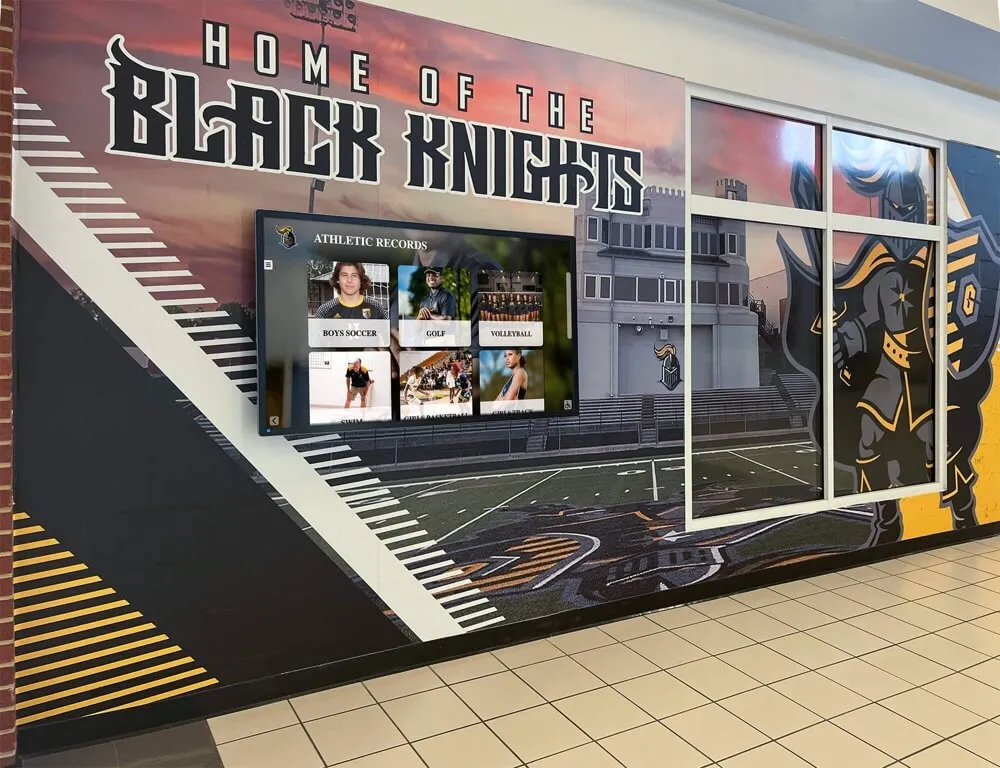
All-time records displayed physically in hallways and digitally on the website serve the same purpose: giving current athletes visible benchmarks and honoring the athletes who set them
All-Time Athletic Records Page
The all-time records page is the single most historically significant page an athletic department website can publish. It answers a question every serious athlete in your program is asking: what would I have to do to be remembered here?
A complete all-time records page organizes records by sport, then by category within each sport—individual event records, single-season marks, and career totals where applicable. Football records and recognition guides illustrate how thoroughly a single sport’s record page can be organized when the structure is built intentionally, covering passing yards, rushing records, defensive marks, and special teams statistics in separate, searchable categories.
What the page should include:
- Records organized by sport and statistical category
- The athlete’s name, graduation year or season, and the specific performance (with date or meet name where relevant)
- Visual separation between sports so the page is navigable without a search function
- Last-updated date so visitors know the information is current
- Integration with digital record displays where applicable
Season Results Archive
A season-by-season results archive serves a different audience than the all-time records page. Alumni who want to look up a specific year—their senior year, a championship run their child heard stories about—need to find that season’s results organized by sport. An archive page with a year selector and sport filter is sufficient; what matters is that historical seasons are accessible rather than existing only in someone’s memory or a filing cabinet.
Championship and Playoff History
Championship history deserves its own page rather than being buried inside the season results archive. A school that has won twenty-three conference titles across its programs should present that accomplishment visibly, organized by sport and year, with links to season details where available. This page is particularly valuable for recruiting: prospective athletes and families evaluating programs want to understand the history of success they would be joining.
Unbreakable sports records and the most impressive athletic achievements in history put school-level records in context—many all-time marks at individual schools represent performances that would be remarkable at any level of competition, and publishing them publicly acknowledges that fact.
3. Recognition and Hall of Fame Pages
Recognition pages serve a fundamentally different audience than operational pages. Athletes, families, and alumni visit recognition pages to find specific people—to confirm that someone’s contribution to the program has been documented, honored, and preserved. The design principle here is findability: every name should be locatable within a few seconds of arriving on the page.
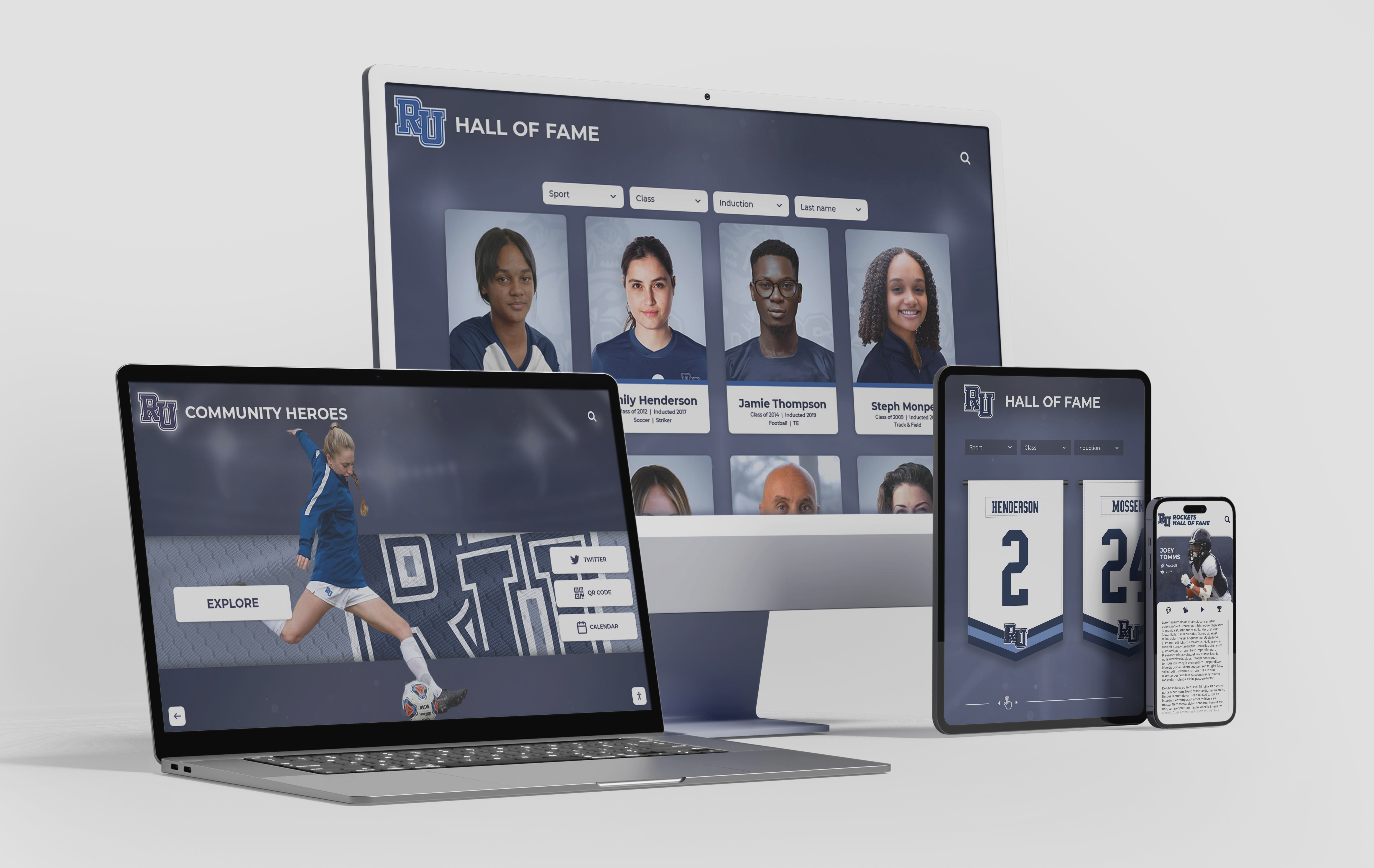
A responsive athletic department website makes hall of fame profiles and recognition pages accessible across every device—from desktop research to mobile browsing at a reunion
Hall of Fame Inductee Profiles
The hall of fame page is the most alumni-facing page on any athletic department website. Done well, it is also one of the most visited. Each inductee should have a dedicated profile page with:
- A photo or portrait (ideally from their playing days, though a current portrait is far better than no photo at all)
- Sport, graduation year or induction year
- A brief biographical note covering competitive achievements, career records, and post-graduation accomplishments
- Any special recognitions: all-state selections, records held, award names
Searchability matters enormously here. An alphabetical list of names is the minimum; a searchable directory filtered by sport, decade, or induction year is substantially more useful and sends a clearer signal that the program takes its hall of fame seriously. Basketball records and recognition guides demonstrate how inductee profiles can integrate statistical records with biographical narrative, creating pages that serve both the official documentation function and the storytelling function simultaneously.
Athletic Awards and Honors Archive
Beyond the hall of fame, most programs present annual awards: most valuable player by sport, coaches’ awards, academic achievement recognition, and leadership honors. A publicly accessible awards archive—organized by sport and year—creates an accountability trail for the program’s recognition practices and gives alumni a way to find whether their own recognition was documented.
Senior Recognition and Athlete Spotlights
Many programs already produce individual athlete spotlights for social media. Collecting those spotlights on the website rather than letting them disappear into a social feed creates a searchable archive that athletes and families can return to years later. A senior recognition page that collects every year’s outgoing class gives future alumni a landing page for their school athletic career.
Donor Recognition Page
Programs with naming rights, donor-funded facilities, or scholarship programs should maintain a donor recognition page that publicly acknowledges significant contributors. Giving Tuesday donor recognition pages and donor pages recognition guides document the pattern clearly: donors who see their support acknowledged publicly renew at higher rates and give more generously in subsequent campaigns. The donor recognition page is not optional infrastructure for programs that depend on donor support—it is an investment in the relationships that fund athletic excellence.
4. History and Archives Pages
History pages serve the longest-term audience of any content on an athletic department website. They are written for the alumnus who returns to the site in 2045 and wants to understand what the program looked like in the 1980s, the community member who wants to explore decades of local athletic tradition, and the coach who has just arrived and wants to understand the program they have inherited.

Digital archives bring historical athlete portraits and program records into an accessible, searchable format that serves alumni and new arrivals equally
Program History and Timeline Page
A narrative history page describes how the athletic program came to be: when it was founded, which sports were established first, significant milestones in facility development, and eras of particular competitive success. This page does not need to be exhaustive—a well-written timeline covering key decades and significant turning points serves the purpose. What it should not do is stop at a date several years in the past, which signals that the program has stopped maintaining its own story.
Digital Archive of Historical Media and Documents
School athletics generate photographs, programs, yearbook pages, newspaper coverage, and other physical media that accumulates over decades. Digitizing that material and making it accessible through the website creates something genuinely valuable that no other institution can replicate: a school-specific, sport-specific visual history. How athletic departments organize history and digitize archives covers the practical steps in moving from physical media to searchable digital collections, including scanning standards, metadata requirements, and storage approaches.
What a digital archive page should contain:
- Historical team photographs organized by sport and season
- Programs and game-day publications from significant events
- Newspaper clippings covering memorable performances, championships, and milestones
- Yearbook pages featuring athletic content
- Video footage where available and licensed for web publication
Notable Alumni and Former Athletes Page
This page exists at the intersection of the hall of fame and the archive: it highlights athletes who went on to significant careers after leaving the program, whether in professional sports, coaching, or other fields. Unlike the hall of fame, which focuses on competitive achievement within the school’s program, the notable alumni page can recognize post-graduation accomplishment. Student newspaper article ideas covering school records and alumni athletic history consistently identify “where are they now” content as among the most-read and most-shared content school athletic programs can produce.
Community Recognition and Inclusion Archive
Athletic department websites that reflect the full scope of the community they serve build stronger, more durable alumni connections. National recognition programs and what students need to know illuminate why inclusive recognition matters: students who see their community represented in historical records and honored in current displays develop stronger institutional loyalty. An archive that documents diverse athletic achievement across eras sends a clear message about the program’s values.
5. Digital Integration and Display Pages
The most forward-thinking athletic department websites are not separate from the physical recognition environment—they extend it. Interactive touchscreen displays in hallways and lobbies can surface content from the same underlying database that powers the website, creating a unified recognition system rather than two disconnected experiences.
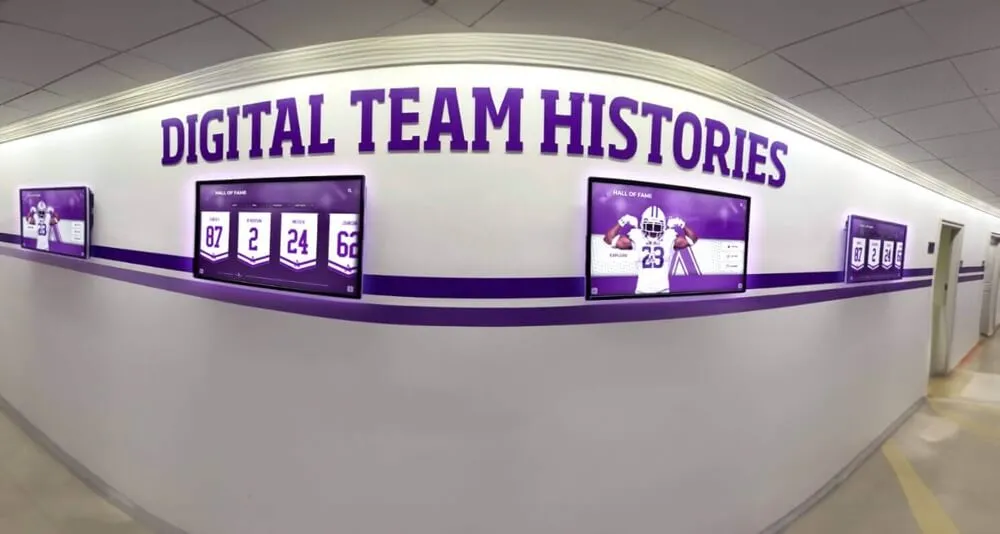
Digital screens in school hallways can display the same team histories and records content that lives on the athletic department website, creating a unified recognition environment across physical and digital spaces
Live Record Board Integration Page
A live record board page publishes current all-time records in a format that updates automatically when new marks are entered into the records system. Rather than requiring the athletic director or web administrator to manually edit the records page after every season, a live record board integration pulls from the same database that feeds digital displays in the facility. Big Ten championship basketball history and recognition displays illustrate what this integration looks like at scale: records maintained in a central system appear simultaneously on the website, on hallway kiosks, and in athletic facility displays.
Touchscreen Kiosk and Display Portal
Many schools with interactive touchscreen displays find value in publishing a companion web portal that mirrors the kiosk’s content—allowing alumni who cannot visit in person to explore the same inductee profiles, record books, and historical media that lobby visitors access on the screen. This companion page extends the reach of the physical installation without duplicating the management burden, since both experiences draw from the same content library.
QR Code and Mobile Access Landing Page
Facilities that include QR codes on physical plaques, trophy cases, and display installations need landing pages that deliver meaningful content when scanned. A QR landing page for a specific hall-of-fame inductee’s plaque, for example, can surface the full profile, historical photographs, and related records that a physical plaque cannot contain. These landing pages represent the most direct integration between physical recognition infrastructure and the digital athletic department website.
Building the Page Checklist: Where to Start
Not every program can build all of these pages simultaneously. A practical approach organizes the build by priority tier based on audience size and long-term value.
Tier 1: Build First (Operational Foundation)
- Sports schedule and calendar — filterable by sport and season
- Coaching staff directory — current, with photos and contact information
- Registration and eligibility information — step-by-step guidance with current forms
Tier 2: Build for Records and Recognition
- All-time athletic records — organized by sport and statistical category
- Hall of fame inductee profiles — searchable, with photos and biographical notes
- Championship and playoff history — by sport and year
- Athletic awards archive — annual honors organized by sport
Tier 3: Build for History and Longevity
- Program history and timeline
- Digital archive of historical media
- Season results archive — back to founding where available
- Notable alumni and former athletes page
- Donor recognition page — for programs with named facilities or scholarship donors
Tier 4: Integration (When Infrastructure Supports It)
- Live record board integration — auto-updating from records system
- Touchscreen display companion portal — for programs with physical kiosk installations
- QR code landing pages — tied to physical plaques and recognition elements
Ready to see what a complete athletic recognition system looks like?
Rocket Alumni Solutions builds the touchscreen displays, digital record boards, hall of fame installations, and companion web experiences that give school athletic programs a permanent home for their records, recognition, and history.
Why the Athletic Department Website Is an Institutional Memory Tool
The operational pages on an athletic department website have a shelf life measured in weeks or months—a schedule is relevant until the season ends, a coaching directory until someone’s role changes. The records, recognition, and history pages on that same website have a shelf life measured in decades. A hall-of-fame inductee profile published today will be the reference a grandchild uses to research their grandfather’s athletic career in 2055.
That asymmetry in longevity makes the investment in records, recognition, and archive pages a fundamentally different kind of decision than the decision to update the schedule page. Programs that build robust recognition infrastructure—both on their websites and in their physical spaces—create institutional memory that outlasts any individual staff member’s tenure and connects current athletes to the generations that preceded them.
The athletic department website is the public face of that institutional memory. What it contains—and what it leaves out—communicates exactly how the program values its history.
Building complete athletic department websites starts with understanding what each page is actually for and who it serves. For programs ready to connect their website presence to a physical recognition environment that brings records, hall-of-fame archives, and athletic history into daily view for athletes, families, and visitors, Rocket Alumni Solutions specializes in exactly that integration—from touchscreen walls of fame to digital record boards to donor recognition displays that extend the web presence into the spaces where school culture actually lives.































