




Selecting digital signage software represents one of the most critical decisions organizations face when implementing interactive displays, information kiosks, or recognition systems in 2026. The right platform transforms screens from simple announcement boards into dynamic engagement tools that inform, inspire, and connect communities—while the wrong choice leads to frustrated administrators, underwhelmed audiences, and wasted technology investments gathering dust in hallways.
The digital signage landscape has evolved dramatically as organizations move beyond basic slideshow capabilities toward sophisticated interactive experiences. Modern platforms now integrate touchscreen interactivity, real-time content management, multi-user permissions, analytics dashboards, and seamless cross-device accessibility—yet many buyers focus exclusively on price or flashy features without evaluating whether solutions actually match their specific use cases, technical capabilities, and long-term sustainability requirements.
This comprehensive guide explores the best digital signage software options for 2026, with particular focus on interactive touchscreen applications for educational institutions, recognition programs, wayfinding systems, and organizational communication. You’ll discover what differentiates purpose-built recognition platforms from generic digital signage, key features that actually matter versus marketing buzzwords, total cost considerations beyond initial licensing, and frameworks for matching solutions to your specific needs and technical resources.
Organizations implementing well-matched digital signage solutions report satisfaction rates exceeding 85 percent, with displays becoming indispensable communication and engagement tools. Conversely, those selecting platforms based primarily on cost or superficial feature comparisons face disappointment rates above 60 percent within the first year—discovering too late that cheap solutions lack essential capabilities while complex enterprise platforms overwhelm available technical resources.

Modern digital signage software powers interactive touchscreen installations serving diverse applications from recognition displays to wayfinding systems
Understanding Digital Signage Software Categories
Before comparing specific platforms, understanding fundamental software categories and architectures helps organizations identify which solution types align with their needs.
Generic Digital Signage vs. Purpose-Built Platforms
Digital signage software falls into two broad categories serving fundamentally different requirements:
Generic Digital Signage Platforms
General-purpose digital signage software prioritizes content scheduling and display management across large screen networks. These platforms excel at broadcasting announcements, emergency alerts, promotional content, wayfinding information, and rotating media to passive viewing audiences. Common applications include corporate lobbies displaying company news, retail environments showing promotional videos, cafeterias broadcasting menus and announcements, and waiting rooms presenting health information.
Generic platforms typically emphasize ease of content creation through templates and drag-and-drop designers, scheduling capabilities enabling time-based content rotation, multi-display management controlling dozens or hundreds of screens centrally, and remote monitoring verifying displays operate correctly. However, most lack sophisticated interactivity features, advanced data organization for complex content collections, or specialized capabilities supporting specific use cases beyond passive content display.
Purpose-Built Recognition and Interactive Platforms
Specialized platforms designed specifically for celebrating people, achievements, and organizational history take fundamentally different approaches optimized for interactive exploration rather than passive viewing. These solutions organize content around individual profiles enabling searchable databases where visitors control discovery, support rich multimedia storytelling through photos, videos, and biographical narratives, provide intuitive navigation designed for touchscreen interaction, and extend content accessibility beyond physical displays through integrated web portals.
Purpose-built recognition software like Rocket Alumni Solutions understands unique requirements of halls of fame, donor recognition, academic achievement displays, and alumni engagement that generic digital signage platforms cannot effectively accommodate. The difference parallels using word processors versus desktop publishing software—both create documents, but each optimizes for fundamentally different outcomes and workflows.
Organizations implementing digital hall of fame displays consistently find purpose-built platforms deliver superior results compared to attempting to force recognition content into generic signage frameworks designed for announcements and advertisements.
Cloud-Based vs. On-Premises Solutions
Software deployment architecture significantly impacts operational requirements, ongoing costs, and long-term sustainability:
Cloud-Based Digital Signage Software
Cloud-hosted platforms operate entirely through web browsers with no local software installation required beyond kiosk browsers on display devices. Organizations access content management through any internet-connected device, with the vendor maintaining servers, performing updates, ensuring security, and providing technical infrastructure. This approach minimizes IT burden while enabling instant updates distributed automatically across all displays worldwide.
Cloud solutions typically use subscription pricing models charging monthly or annually per display or per user. While this creates ongoing expenses, subscriptions usually include software updates, infrastructure maintenance, technical support, and feature enhancements—capabilities that on-premises solutions require separate maintenance contracts or internal IT resources to provide.
The primary consideration involves internet dependency. Cloud platforms require reliable connectivity, though well-designed solutions like those using Progressive Web App technology enable offline operation with content cached locally, automatically synchronizing when connectivity returns.
On-Premises and Hybrid Approaches
On-premises software installs on organizational servers with local content management and display control. This approach provides complete control over data, infrastructure, and operations while eliminating ongoing subscription costs beyond optional support contracts. However, organizations assume responsibility for server maintenance, software updates, security patches, backup systems, and technical troubleshooting.
Hybrid solutions attempt balancing these tradeoffs by combining cloud content management with local display control or vice versa. These approaches prove most practical for organizations with strong IT departments comfortable managing infrastructure but seeking convenient cloud-based administration.
For educational institutions and nonprofits without dedicated IT staff, cloud-based solutions typically prove more sustainable despite subscription costs. Enterprise organizations with robust IT departments may prefer on-premises control despite higher internal operational complexity.

Cloud-based platforms enable synchronized content management across multiple displays while maintaining consistent brand presentation
Essential Features for Interactive Touchscreen Applications
Moving beyond basic slideshow capabilities, interactive digital signage demands specific features enabling engagement rather than passive viewing:
Touchscreen Interactivity and User Experience Design
Not all digital signage software supports interactive touchscreen experiences effectively—many platforms add touchscreen features as afterthoughts rather than designing specifically for interactive use:
Native Touch Support
Quality interactive platforms provide true touch-optimized interfaces rather than simply making clickable slideshows. This means appropriately sized touch targets (minimum 44-60 pixels), gesture support including swipe scrolling and pinch-zoom where appropriate, immediate visual feedback confirming touch registration, and responsive performance delivering sub-100-millisecond interaction acknowledgment.
Generic signage platforms often require users to tap small buttons designed for mouse interaction, creating frustration when imprecise targeting fails to register touches or activates wrong elements. Purpose-built touchscreen software designs all interface elements specifically for finger-based interaction at appropriate sizes and spacing.
Intuitive Navigation Patterns
Interactive experiences require thoughtful navigation enabling visitors to explore content confidently without training or assistance. Effective patterns include persistent home buttons providing psychological safety by ensuring visitors can always return to starting points, breadcrumb trails showing current location within content hierarchies, clear category organization enabling predictable browsing, powerful search functionality allowing instant location of specific content, and visual consistency maintaining familiar interface patterns throughout experiences.
Organizations implementing interactive touchscreen experiences discover that intuitive navigation proves more critical to engagement success than any specific content features—visitors won’t engage with content they cannot find or navigate confidently.
Content Management and Organizational Tools
Complex content collections require sophisticated organization and management capabilities:
Structured Data Management
Recognition and information applications organize content around entities—people, events, locations, achievements—rather than simply displaying media files in sequences. Effective platforms provide database-driven content organization with fields for names, dates, categories, relationships, and metadata enabling powerful filtering, searching, and automated content relationships.
This structured approach enables creating dynamic views showing “all 2024 inductees,” “basketball hall of fame members,” or “donors contributing over $10,000” without manually building separate presentations for each category. Content updates automatically reflect in all relevant views and searches immediately.
Multi-User Permissions and Workflows
Organizations with distributed content management across departments or individuals require granular permission systems enabling department heads to manage their respective areas without accessing others’ content, content creators to draft profiles requiring administrative approval before publication, administrators to oversee all content while delegating routine updates, and read-only access for staff needing visibility without editing capabilities.
Sophisticated workflows support content review cycles where multiple stakeholders approve additions before publication, scheduled publishing where content becomes visible at specific dates without manual intervention, and audit trails documenting who modified what content when for accountability and historical tracking.
Solutions like touchscreen kiosk software platforms designed for organizational environments provide these enterprise features missing from consumer-oriented generic signage tools.
Analytics and Engagement Measurement
Understanding how audiences interact with displays informs optimization and demonstrates program value:
Usage Analytics
Comprehensive platforms track essential engagement metrics including total interaction sessions showing how frequently displays get used, average session duration indicating depth of engagement, most-viewed content revealing community interests, search queries demonstrating what visitors seek, navigation patterns showing how users explore content, and peak usage times informing content launch strategies and attraction loop optimization.
These insights enable data-driven refinement rather than guessing what content resonates or how to improve user experiences. Organizations can identify popular categories deserving expanded content, discover confusing navigation requiring simplification, and measure engagement trends over time demonstrating program growth and impact.
Return on Investment Demonstration
For recognition programs funded through campaigns, sponsorships, or competing against other budget priorities, engagement analytics provide concrete evidence of program value. Documented interaction counts, session durations, and social media sharing demonstrate that displays actively engage audiences rather than passively occupying wall space—justifying investments and supporting requests for program expansion.
Quality platforms integrate analytics dashboards within content management interfaces, eliminating need for separate analytics tools or technical expertise to extract and interpret usage data.

Touch-optimized interfaces with appropriately sized targets enable natural exploration without requiring precise targeting or multiple attempts
Best Digital Signage Software for Recognition and Achievement Displays
Organizations implementing halls of fame, donor recognition, academic achievement displays, and similar applications require specialized platforms optimized for celebrating people:
Rocket Alumni Solutions: Purpose-Built Recognition Platform
Rocket Alumni Solutions represents the gold standard for recognition-focused digital signage, specifically designed for educational institutions, athletic programs, nonprofits, and organizations celebrating achievement and building community through digital displays.
Key Strengths for Recognition Applications
Unlimited recognition capacity accommodates comprehensive honoree collections without artificial limits or incremental costs per profile. Rich multimedia profiles support photos, videos, biographical narratives, achievement statistics, and social media integration creating engaging stories rather than simple directories. Powerful search and filtering enable visitors to instantly locate specific individuals or browse by year, category, achievement type, or other attributes. Integrated web portals extend recognition beyond physical touchscreens, allowing alumni to explore from anywhere while prospective members research organizational history during home visits.
The platform provides institution-specific customization incorporating school colors, logos, mascots, and branding elements creating cohesive experiences reflecting organizational identity. Cloud-based content management empowers non-technical administrators to update recognition from any device without IT involvement or physical display access. And comprehensive analytics track engagement patterns demonstrating program impact through concrete usage data rather than assumptions.
Ideal Use Cases
Athletic halls of fame celebrating competitors across all sports and eras, academic recognition honoring scholars, valedictorians, and intellectual achievement, alumni achievement showcasing distinguished graduates inspiring current students, donor recognition acknowledging philanthropic support at all giving levels, and military recognition honoring service and sacrifice.
Pricing and Deployment
Rocket Alumni Solutions operates on subscription models scaled to organizational size and feature requirements, with typical installations ranging $10,000-20,000 initial investment including hardware, software, installation, training, and first-year service. This represents comprehensive turnkey solutions rather than software licensing alone—organizations receive complete functional systems ready for immediate content population and operation.
The company provides white-glove implementation support including content strategy consultation, design customization, hardware procurement and installation, comprehensive training, and ongoing technical support ensuring long-term program success without requiring internal technical expertise.
ScreenCloud: Flexible Cloud-Based Signage Platform
ScreenCloud represents a well-regarded cloud-based digital signage platform serving diverse applications from corporate communications through retail displays, with growing capabilities supporting interactive touchscreen deployments.
Platform Capabilities
Browser-based content management accessible from any device enables distributed administration across locations. Extensive app marketplace integrates third-party services including social media feeds, weather displays, news tickers, calendars, and data visualization tools. Support for diverse display hardware accommodates Windows PCs, Android devices, Chrome OS, and specialized media players. Scheduling flexibility enables time-based content rotation and day-part programming.
The platform supports basic touchscreen interaction through clickable navigation and interactive apps, though primarily optimized for passive viewing applications rather than deep interactive exploration like recognition databases. Content organization follows media library approaches rather than structured database models, which works well for announcements and information displays but proves limiting for complex people-focused recognition applications.
Best Applications
Corporate communications displaying company news, event calendars, and announcements. Retail environments showcasing promotions, product information, and brand content. Cafeterias and common areas broadcasting menus, schedules, and real-time information. Wayfinding applications presenting maps and directory information.
Pricing Considerations
ScreenCloud uses per-screen subscription pricing starting around $20-30 monthly per display with discounts for annual commitments and volume licensing. While this seems economical initially, costs accumulate across multiple displays and years—organizations deploying five displays pay $1,200-1,800 annually just for software access, with additional costs for content creation, management time, and potential custom development for advanced features.
Rise Vision: Education-Focused Digital Signage
Rise Vision markets specifically to educational institutions with free basic plans and education-oriented content templates, making it popular for school announcement systems and cafeteria displays.
Education-Specific Features
The platform emphasizes easy content creation through templates designed for school announcements, lunch menus, event calendars, and basic information displays. Pricing includes completely free options for simple applications supporting budget-constrained schools. Google Drive integration enables content pulling from familiar platforms many schools already use.
However, the platform primarily serves passive viewing applications showing announcements and scheduled content rather than interactive exploration. While Rise Vision supports basic touchscreen navigation, it lacks sophisticated database organization, advanced search functionality, and the rich profile capabilities required for effective recognition displays. Schools seeking comprehensive hall of fame touchscreen software typically find Rise Vision suitable for announcements but inadequate for recognition storytelling.
Organizations comparing Rise Vision versus Rocket Alumni Solutions for touchscreen applications consistently find that while Rise Vision excels at scheduled content broadcasting, purpose-built recognition platforms deliver dramatically superior results for celebrating achievement and building community through interactive storytelling.
Appropriate Use Cases
Daily announcements and emergency alerts across school buildings, cafeteria menu boards and nutritional information, event calendars and schedule displays, simple directional wayfinding, and basic informational displays requiring scheduled content rotation.
Cost Structure
Rise Vision offers genuinely free options for basic applications—schools can deploy unlimited screens showing simple scheduled content without any licensing fees. Premium features including advanced templates, priority support, and additional storage options range $10-20 monthly per screen. This pricing proves extremely attractive for pure announcement applications but doesn’t address specialized recognition requirements demanding purpose-built platforms regardless of cost.

Purpose-built recognition platforms enable independent exploration through intuitive interfaces requiring no training or staff assistance
Best Digital Signage Software for General Information and Wayfinding
Organizations prioritizing announcements, wayfinding, and general information displays over deep interactive recognition can consider broader digital signage platforms:
Yodeck: User-Friendly Cloud Signage
Yodeck has earned reputation as one of the most user-friendly digital signage platforms, with intuitive interfaces enabling non-technical users to create and manage content effectively.
Platform Strengths
The drag-and-drop content designer requires no technical skills or design expertise—administrators simply arrange text, images, videos, and widgets creating layouts through visual composition. Affordable pricing starts at $7.99 monthly per screen making it accessible for small deployments. Free Raspberry Pi support enables extremely low-cost hardware implementations using $50 computers rather than expensive media players. And responsive customer support receives consistently positive reviews from users appreciating accessible technical assistance.
Yodeck serves passive viewing applications excellently, with strong scheduling, content rotation, and multi-display management. However, interactive capabilities remain limited compared to purpose-built platforms—the system can support basic touch navigation but lacks database-driven content organization, advanced search, and sophisticated profile management essential for recognition applications.
Ideal Applications
Retail displays showcasing products and promotions, restaurant menu boards with rotating content, real estate office property showcases, corporate lobby displays presenting company information, and event signage for conferences and exhibitions.
NoviSign: Enterprise Digital Signage Platform
NoviSign targets mid-size to enterprise organizations with robust platforms supporting large screen networks and complex content management requirements.
Enterprise Capabilities
The platform supports massive scale with deployments managing thousands of screens across multiple locations from centralized control. Advanced scheduling enables day-part programming, conditional content based on rules and triggers, and coordinated campaigns across screen networks. Extensive widgets and integrations connect to external data sources including weather services, social media, RSS feeds, and custom APIs.
Multi-user access control with role-based permissions supports distributed administration across departments while maintaining centralized oversight. And professional services including content design, installation assistance, and custom development address enterprise requirements beyond self-service capabilities.
Pricing and Positioning
NoviSign positions as premium platform with pricing starting around $20 monthly per screen but increasing substantially with advanced features, custom development, and professional services. Total costs for comprehensive implementations often reach several hundred dollars monthly plus significant upfront implementation fees.
This investment makes sense for enterprises requiring sophisticated announcement systems, corporate communications, and passive viewing applications at scale. However, organizations specifically implementing recognition displays typically find purpose-built platforms deliver superior results at comparable or lower costs while providing specialized capabilities NoviSign cannot replicate regardless of budget.
OptiSigns: Affordable Multi-Platform Solution
OptiSigns emphasizes affordability and simplicity, appealing to small businesses and organizations wanting basic digital signage without complexity or significant investment.
Value Proposition
Subscription pricing starting around $10 monthly per screen provides cost-effective entry into digital signage. Support for diverse hardware including Amazon Fire TV, Android tablets, and standard computers enables using existing devices rather than purchasing specialized media players. Simple interfaces enable quick content creation and deployment without extensive training.
The platform handles basic slideshow content, scheduled media rotation, and simple announcements effectively for passive viewing applications. Interactive capabilities remain minimal—while touch hardware physically works, the platform lacks sophisticated navigation, content organization, and user experience design required for engaging interactive applications.
Best Fit Scenarios
Small retail displays showing promotions and product information, service business waiting rooms presenting company information, restaurants displaying menu boards with daily specials, small office corporate communications, and budget-constrained implementations prioritizing basic functionality over advanced capabilities.

Strategic placement in high-traffic entrance areas maximizes visibility and engagement while welcoming visitors with dynamic institutional storytelling
Comparing Software Based on Your Specific Use Case
No single platform proves optimal for all applications—effective selection requires matching software capabilities to specific organizational needs:
Decision Framework: Recognition vs. Information vs. Announcements
Start by clearly defining primary display objectives:
Recognition and Achievement Celebration
If celebrating people represents the core objective—athletic halls of fame, donor recognition, academic achievement, alumni showcases, military honor rolls—purpose-built recognition platforms deliver dramatically superior results compared to forcing recognition content into generic signage frameworks.
Recognition demands rich individual profiles, powerful search enabling instant location of specific people, multimedia storytelling through photos and videos, biographical narratives creating emotional connections, and web accessibility extending recognition beyond physical displays. Generic signage platforms treating people as slideshow elements cannot replicate these capabilities regardless of configuration effort.
Organizations implementing digital recognition displays should evaluate specialized recognition platforms first before considering generic alternatives lacking essential people-focused features.
Wayfinding and Directory Information
Interactive wayfinding helping visitors navigate facilities, locate departments, find services, and access building information requires different capabilities than recognition. These applications prioritize map interfaces, directory searches, and point-to-point directions rather than biographical profiles and achievement narratives.
Platforms optimizing for wayfinding emphasize clear visual presentation of maps and floor plans, integration with directory databases, real-time information including room schedules, and simplified interfaces enabling quick information access under time pressure.
Announcements and Communication
Passive viewing applications broadcasting announcements, emergency alerts, event calendars, corporate communications, promotional content, and general information leverage different feature sets emphasizing content scheduling, automatic rotation, template-based design, and multi-display synchronization rather than interactive exploration.
Generic digital signage platforms excel at these passive viewing applications, with scheduling and content management optimized for broadcast communication rather than user-controlled exploration.
Technical Capability and Resource Assessment
Honestly evaluate organizational technical resources and capabilities:
Organizations with Limited IT Resources
Schools, nonprofits, and small organizations without dedicated IT staff benefit enormously from fully managed cloud platforms requiring no server maintenance, software updates, security patches, or complex troubleshooting. These organizations should prioritize turnkey solutions including hardware, software, installation, training, and ongoing support as comprehensive packages rather than attempting to assemble components requiring technical expertise lacking in-house.
Vendors offering white-glove service including content strategy consultation, design customization, professional installation, comprehensive training, and responsive technical support prove essential for ensuring long-term program sustainability when technical resources remain limited.
Organizations with Robust IT Departments
Enterprise organizations and larger institutions with professional IT staff can consider on-premises solutions, custom development, and complex platform integrations that smaller organizations cannot sustain. These capabilities enable greater customization, control, and potentially lower long-term costs by avoiding subscription fees—though only when internal resources exist for ongoing platform maintenance and evolution.
Even technically sophisticated organizations increasingly choose cloud platforms for operational simplicity and vendor-managed infrastructure, recognizing that strategic focus on core missions delivers more value than maintaining custom signage infrastructure.
Budget Analysis: Total Cost of Ownership
Look beyond initial software licensing to evaluate complete five-year costs:
Purpose-Built Recognition Platform Total Cost
- Initial investment: $10,000-15,000 (hardware, software, installation, training)
- Annual subscription: $2,000-4,000 (software access, updates, support)
- Content development: Internal staff time or $2,000-5,000 annually for assistance
- Five-year total: $26,000-50,000
This investment delivers comprehensive recognition systems with professional design, robust interactivity, analytics, web accessibility, and ongoing vendor support ensuring long-term success.
Generic Digital Signage Platform Total Cost
- Hardware: $2,000-3,000 (commercial display, media player, installation)
- Software subscriptions: $240-600 annually per screen × 5 years = $1,200-3,000
- Custom development for advanced features: $5,000-15,000
- Content development and management: $3,000-8,000 annually
- Technical troubleshooting and maintenance: $1,000-3,000 annually
- Five-year total: $20,000-60,000
While initial costs appear lower, total ownership frequently equals or exceeds purpose-built solutions while delivering inferior results for recognition applications lacking specialized features generic platforms cannot provide. Organizations discover too late that customizing generic signage for recognition requirements costs more than implementing purpose-built platforms from the start.
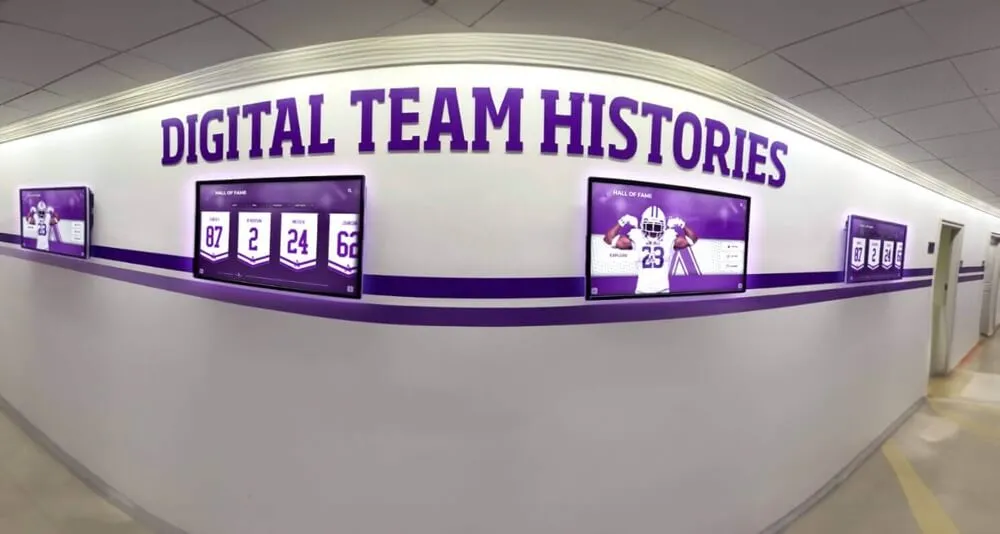
Comprehensive recognition programs often deploy multiple coordinated displays serving different content categories while maintaining consistent brand presentation
Hardware Considerations for Digital Signage Success
Even exceptional software proves ineffective without appropriate hardware supporting reliable operation and quality user experiences:
Commercial-Grade Display Requirements
Consumer televisions prove inadequate for public installations expected to operate reliably under continuous use:
Durability and Operational Requirements
Commercial-grade displays designed for 16-24 hour daily operation provide critical durability through higher-rated components resisting failure under continuous use, superior thermal management preventing overheating damage, industrial power supplies maintaining stable operation, and typically three-year manufacturer warranties versus one-year consumer standards.
Touch cycle ratings differ dramatically—consumer touchscreens rate for thousands of touches annually suitable for personal devices, while commercial interactive displays support millions of touches required for public installations serving thousands of visitors. Organizations implementing interactive touchscreen displays must specify commercial-grade hardware avoiding premature failure requiring expensive replacements.
Display Size and Viewing Distance
Appropriate screen size depends on primary viewing distances and application requirements:
- 43-49 inches for close-proximity interaction (3-5 feet) typical of desktop-height interactive kiosks
- 55-65 inches for mixed use supporting both close interaction and medium-distance viewing (5-10 feet)
- 70-75+ inches for large spaces where visibility from distance matters more than touch interaction
Organizations should match display size to installation context rather than simply buying largest affordable screens—oversized displays at close distances create uncomfortable viewing experiences while undersized screens prove illegible from typical viewing distances.
Touch Technology Selection
Commercial touchscreens use different technologies affecting responsiveness, durability, and user experience:
Capacitive Touch
Capacitive technology senses electrical conductivity of fingertips, providing responsive smartphone-like experiences supporting multi-touch gestures, excellent precision, and smooth tracking. Modern capacitive displays deliver sub-50-millisecond response times creating instantaneous feel users expect from personal devices.
Limitations include requiring direct skin contact (won’t work with gloves) and typically higher costs than alternatives. However, capacitive clearly represents optimal choice for interactive installations prioritizing user experience quality and responsiveness.
Infrared Touch
Infrared systems use light beams across screen surfaces, detecting touch when beams break. This technology supports any contact including gloved hands, styluses, and pointing objects while scaling easily to very large formats (75+ inches) where capacitive becomes prohibitively expensive.
However, infrared proves less precise than capacitive with slower response times (100-150 milliseconds typical) and susceptibility to false triggers from dust, debris, or bright sunlight interfering with infrared beams. This technology suits applications where universal input methods matter more than maximum responsiveness.
For educational institutions and public installations prioritizing user experience quality over cost minimization, capacitive technology delivers experiences meeting smartphone-conditioned user expectations while infrared leaves visitors disappointed by comparatively sluggish responsiveness.
Kiosk Enclosures and Mounting Solutions
How displays integrate into spaces significantly impacts usability and aesthetics:
Freestanding Kiosks
Self-contained floor stands provide complete installations including displays, computers, and protective enclosures in single integrated units requiring only power connections. Kiosks enable flexible placement without construction or wall modifications while projecting professional commercial appearance.
Quality kiosks include adjustable height positioning accommodating standing adults and wheelchair users, cable management concealing wires, lockable enclosures protecting components from tampering, and optional branding opportunities incorporating institutional colors and logos.
Wall-Mount Installations
Wall-mounting creates sleeker permanent installations integrating into architectural environments. This approach works well when wall space exists in optimal locations and professional installation addresses power/data access plus mounting support for display weight (100+ pounds for large commercial touchscreens).
Consider viewing height carefully—center of display at 48-60 inches serves standing adults, while lower positioning accommodates wheelchair users ensuring ADA accessibility compliance.
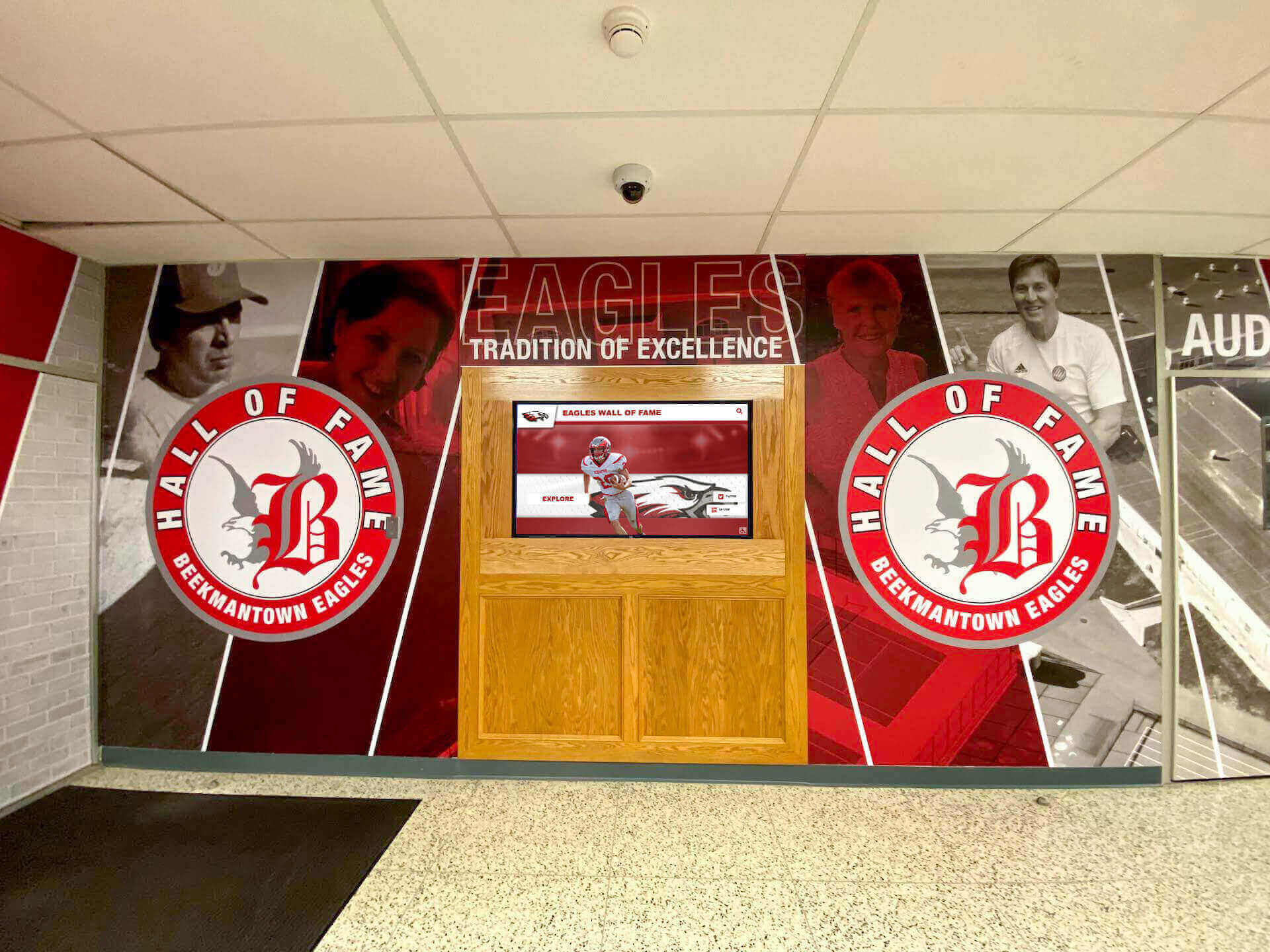
Integrated installations blend digital displays with traditional murals and architectural elements creating comprehensive recognition environments
Implementation Best Practices for Digital Signage Success
Technology alone doesn’t guarantee success—effective implementation requires strategic planning and systematic execution:
Content Strategy Development
Compelling content ultimately determines whether displays engage audiences or become ignored background elements:
Content Planning Before Technology Selection
Organizations should map content requirements before selecting platforms—understanding what you need to display, how content organizes and relates, who creates and maintains content, and how frequently updates occur informs which software capabilities matter versus marketing features lacking practical value.
For recognition applications, inventory honoree populations, define profile completeness standards (photos, biographical length, multimedia requirements), establish content approval workflows, assign creation and maintenance responsibilities, and plan systematic expansion strategies covering historical content gradually rather than attempting impossible comprehensive coverage immediately.
Sustainable Content Workflows
Assign clear ownership with designated individuals responsible for ongoing updates rather than treating content management as everyone’s responsibility (which typically means no one’s priority). Establish update schedules aligned with organizational rhythms—annual induction ceremonies, quarterly reviews, monthly feature highlights maintaining freshness.
Cloud-based content management enables distributed workflows where department heads manage respective areas (athletic director maintains sports recognition, development office updates donor acknowledgment, academic affairs oversees scholar recognition) without requiring technical expertise or central IT bottlenecks for every update.
Resources on developing sustainable content strategies provide detailed frameworks preventing common pitfalls where initial enthusiasm fades leaving displays with stale outdated content undermining program value.
Training and Change Management
Even intuitive platforms benefit from proper training ensuring staff understand capabilities and established workflows:
Role-Specific Training Programs
Content managers require comprehensive platform training covering routine tasks including profile creation, multimedia upload, search functionality testing, and analytics review. Administrators need overview training understanding platform capabilities, limitations, and cost implications for informed decision-making. IT support staff benefit from technical training covering infrastructure, troubleshooting, and vendor escalation procedures.
Hands-on practice with realistic scenarios proves far more effective than passive demonstrations—have athletic directors actually create sample athlete profiles, ask alumni coordinators to search for and update specific individuals, encourage communications staff to build feature highlight collections.
Building Organizational Support
Introducing digital recognition sometimes faces resistance from stakeholders valuing traditional plaques or questioning technology replacing valued traditions. Build support by demonstrating how digital platforms enhance rather than replace traditional recognition, involving stakeholders in planning ensuring their priorities shape implementation, celebrating early wins highlighting positive impacts and engagement, and maintaining traditional elements alongside digital displays during transition periods when appropriate.
Organizations successfully implementing digital halls of fame treat deployments as cultural initiatives requiring communication and stakeholder engagement rather than purely technical installations.
Measuring Success and Continuous Improvement
Establish success metrics before launch enabling objective evaluation:
Engagement Metrics
Quality platforms provide analytics tracking total interaction sessions, average session durations, most-viewed content, search queries, and peak usage times demonstrating engagement levels and content resonance. These metrics inform optimization by identifying popular categories deserving expansion, revealing confusing navigation requiring simplification, and measuring engagement trends over time.
Qualitative Feedback
Complement quantitative analytics with qualitative feedback through brief intercept interviews asking visitors about their experiences, staff observations documenting engagement patterns, comment cards or digital feedback forms near displays, and social media monitoring capturing organic reactions and shares.
Iterative Refinement
Initial deployments rarely prove optimal—effective programs embrace continuous improvement based on observed usage. Small interface modifications often yield surprisingly large engagement impacts through clearer navigation, enlarged touch targets improving activation success, refined content organization matching visitor mental models, and enriched high-interest profiles responding to popular content.

Rich multimedia profiles transform recognition from simple directories into engaging stories celebrating achievement comprehensively
Common Pitfalls and How to Avoid Them
Learning from others’ mistakes prevents common implementation failures:
Choosing Wrong Platform for Your Application
The most expensive digital signage mistake involves selecting platforms optimized for different applications than you need:
Recognition Forced Into Generic Signage
Organizations implementing halls of fame frequently attempt forcing recognition content into generic digital signage platforms designed for announcements and advertisements. The result proves disappointing—people reduced to slideshow elements, no searching or filtering, minimal storytelling capability, and frustrated administrators struggling with workflows designed for scheduled content rotation rather than profile management.
This mismatch typically costs more over time than implementing appropriate purpose-built platforms initially, considering wasted implementation effort, inferior results failing to engage audiences, and eventual replacement costs when organizations finally acknowledge inadequacy.
When celebrating people represents core objective, evaluate specialized recognition platforms designed specifically for that purpose before attempting cheaper generic alternatives lacking essential capabilities.
Underestimating Content Development Requirements
Technology proves simple compared to content development—comprehensive recognition requires substantial effort gathering information, locating photos, writing narratives, verifying accuracy, and obtaining permissions:
Content Development Reality
Each recognition profile requires research identifying achievements and biographical information, photo acquisition from historical archives or personal collections, biographical narrative writing (200-500 words typical), statistics compilation and verification, approval from relevant stakeholders, and multimedia enhancement when videos or additional imagery exist.
This work requires 30-90 minutes per profile depending on source availability and profile complexity. Organizations planning 100-person halls of fame face 50-150 hours of content development work—substantial investment requiring realistic planning, adequate resources, and patient timelines.
Successful implementations often start focused on recent recognition (last 5-10 years) demonstrating value before systematically expanding historical coverage as capacity permits rather than attempting comprehensive coverage immediately.
Ignoring Accessibility Requirements
Federal accessibility requirements apply to interactive displays in educational institutions and public facilities—violations create legal liability while excluding users with disabilities:
ADA Compliance Essentials
Interactive elements must position within reach ranges—48 inches maximum height for side approaches, 44 inches for front approaches where users cannot get close due to display depth. Touch targets must provide adequate size (44+ pixels minimum) and spacing (8+ pixels) enabling reliable activation. Color contrast must meet WCAG standards (4.5:1 minimum for normal text, 3:1 for large text). And alternative access methods should support users who cannot use touch interfaces.
Organizations should verify accessibility compliance during platform evaluation and installation planning rather than discovering violations after expensive installations require modification.
Future Trends in Digital Signage Software
Understanding emerging trends helps organizations make forward-looking platform selections:
Artificial Intelligence and Personalization
AI-powered features increasingly enhance digital signage through personalized content recommendations, intelligent search understanding natural language queries, automated content organization reducing manual tagging, voice interaction supplementing touch input, and facial recognition enabling demographic-based content adaptation (with appropriate privacy controls).
Both cloud-based and purpose-built platforms increasingly integrate AI capabilities, though implementation approaches vary. Organizations should evaluate whether AI features provide genuine value for their applications or primarily serve as marketing buzzwords with minimal practical impact.
Integrated Multi-Device Experiences
Modern digital signage increasingly extends beyond physical displays through QR codes enabling content transfer from public touchscreens to personal smartphones, web portals providing identical content accessible from anywhere, mobile apps extending recognition to always-available formats, and social sharing amplifying recognition reach through visitor networks.
Solutions like Rocket Alumni Solutions exemplify integrated approaches where physical touchscreen installations and web-based platforms share content seamlessly, ensuring recognition reaches entire communities regardless of physical proximity to campus installations.
Enhanced Analytics and Engagement Insights
Next-generation platforms provide increasingly sophisticated analytics including heatmap visualization showing exact screen areas attracting attention, session flow analysis revealing how visitors navigate content, cohort analysis comparing engagement across user segments, predictive analytics forecasting content performance, and ROI calculators quantifying program value for budget justification.
These capabilities transform digital signage from “set it and forget it” installations into continuously optimized engagement tools demonstrating clear organizational value through concrete metrics.
Conclusion: Selecting Digital Signage Software That Delivers Long-Term Value
Choosing the best digital signage software for 2026 requires moving beyond superficial feature comparisons and pricing considerations to systematically match platform capabilities with specific organizational needs, technical resources, and long-term objectives.
Discover Purpose-Built Recognition Software
While generic digital signage serves announcement and communication applications effectively, celebrating achievement demands specialized platforms designed specifically for honoring people through interactive storytelling. Discover how purpose-built recognition solutions deliver superior engagement, unlimited capacity, intuitive administration, and proven results for schools and organizations building community through digital displays.
Generic digital signage platforms excel at passive viewing applications broadcasting announcements, displaying schedules, presenting promotional content, and communicating general information to audiences. These solutions provide affordable, user-friendly options for organizations primarily needing content scheduling and multi-display management without sophisticated interactivity requirements.
However, recognition applications celebrating people through halls of fame, donor acknowledgment, academic achievement displays, and alumni showcases demand fundamentally different capabilities that generic platforms cannot effectively provide. Purpose-built recognition software delivers structured data management organizing content around individuals, powerful search and filtering enabling instant discovery, rich multimedia storytelling creating emotional connections, intuitive touchscreen interfaces designed for exploration, web accessibility extending recognition worldwide, and specialized workflows supporting recognition-specific content management.
Organizations should prioritize total cost analysis evaluating five-year ownership expenses rather than focusing exclusively on initial investments, honest technical capability assessment ensuring selected platforms match available resources, clear use case definition determining whether recognition, wayfinding, announcements, or mixed applications represent core objectives, and vendor evaluation emphasizing demonstrated recognition expertise over generic digital signage experience.
Success requires more than technology—content strategy development ensuring compelling material worthy of sophisticated delivery platforms, proper training empowering staff to leverage platform capabilities fully, strategic placement maximizing visibility and engagement, and continuous improvement based on analytics and feedback optimizing experiences over time.
The best digital signage software for your organization matches your specific needs rather than winning generic “best” competitions. Generic platforms serve passive viewing excellently while proving inadequate for interactive recognition. Purpose-built recognition solutions deliver exceptional results for celebrating achievement while proving overly specialized for pure announcement applications. And enterprise platforms provide capabilities most organizations never need at premium costs exceeding value delivered.
Organizations implementing interactive touchscreen displays for recognition in 2026 will find purpose-built platforms like Rocket Alumni Solutions deliver superior results compared to attempting to force people-focused content into announcement-oriented generic signage frameworks. The difference between mediocre digital signage occupying wall space and transformative recognition experiences inspiring communities lies not just in technology selection but in choosing solutions specifically designed for your actual objectives rather than settling for affordable compromises lacking essential capabilities.
Ready to transform recognition for your school or organization? Explore resources on designing effective interactive experiences, discover best practices for digital halls of fame, learn about web-based versus native touchscreen software, and understand complete buying guides for recognition displays ensuring informed decisions delivering lasting value through digital signage technology that genuinely engages, inspires, and connects communities for years to come.































