



School history software has emerged as an essential technology for educational institutions seeking to preserve decades of institutional heritage while creating engaging experiences for students, alumni, and community members. Traditional approaches—physical yearbooks gathering dust in storage, trophies hidden in overcrowded cases, and historical photos deteriorating in filing cabinets—leave invaluable school history inaccessible and at risk of permanent loss.
Modern schools face competing pressures that make heritage preservation increasingly urgent yet challenging. Declining storage space forces difficult decisions about which materials to keep. Staff turnover erases institutional knowledge that exists only in memory. Physical archives deteriorate through age and handling. And students accustomed to instant digital access find printed yearbooks and static displays uninspiring compared to interactive experiences they encounter everywhere else.
This comprehensive guide explores the best school history software solutions available in 2025, comparing features, benefits, implementation approaches, and strategic considerations. You’ll discover how leading platforms combine digital archiving, interactive displays, yearbook digitization, and content management to transform scattered historical materials into organized, accessible, and engaging digital heritage experiences that inspire pride, strengthen community bonds, and ensure past achievements continue influencing future excellence.
Schools investing in proper history software solutions transform scattered physical archives and fading memories into organized, accessible digital resources. The right platform doesn’t just store historical content—it creates discovery experiences that connect current students with institutional legacy, enables alumni to revisit meaningful memories from anywhere in the world, provides recruitment advantages by demonstrating tradition and excellence, and protects irreplaceable heritage from deterioration and loss.

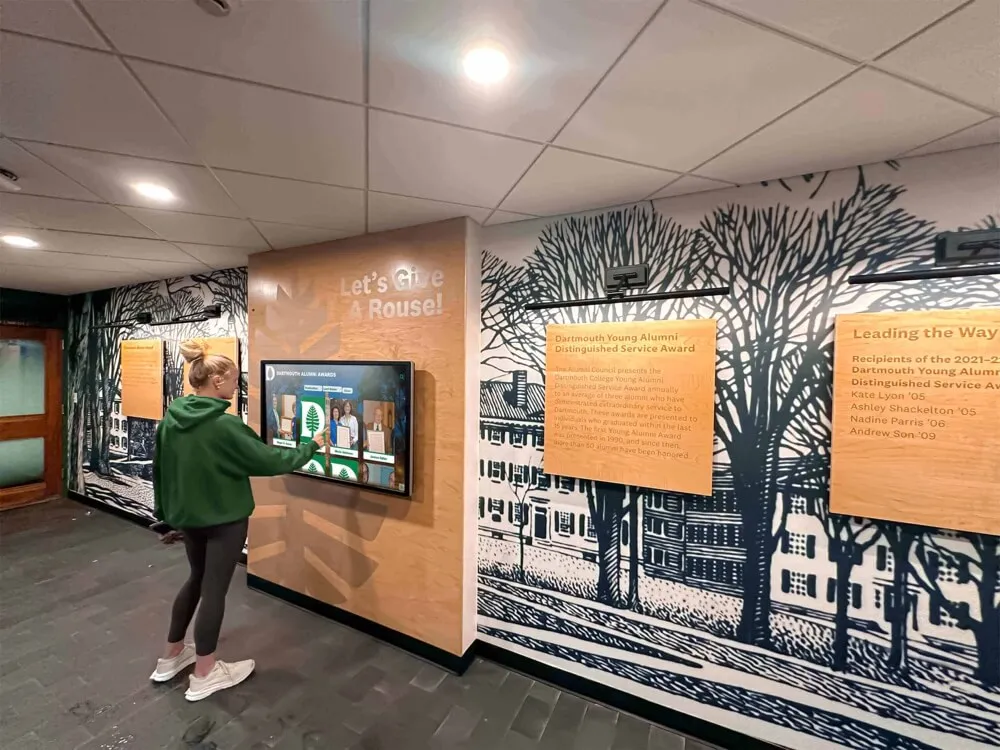
Modern school history software enables intuitive exploration of institutional heritage through interactive touchscreen displays
Understanding School History Software: Core Functions and Benefits
Before comparing specific platforms and features, understanding what school history software encompasses and the value it delivers helps institutions make informed selection decisions aligned with strategic priorities.
What Is School History Software?
School history software represents purpose-built digital tools designed specifically to help educational institutions capture decades of institutional heritage, preserve historical materials through digitization and proper archival storage, organize content with searchable metadata enabling discovery, and present history through engaging interfaces rather than overwhelming databases.
Unlike generic document management systems or simple digital signage platforms, specialized school history software addresses the unique needs of educational institutions managing diverse historical content types spanning decades or centuries. These platforms combine multiple capabilities into integrated solutions rather than forcing schools to cobble together separate systems for different historical content.
Core Components of Comprehensive School History Software
The most effective platforms integrate several essential capabilities:
Digital archiving and asset management organize and store thousands of historical photographs, scanned documents, yearbooks, videos, and audio recordings in searchable databases with appropriate metadata tagging. Yearbook digitization and OCR technology make text searchable, enabling visitors to instantly locate specific names, years, or events across decades of publications. Interactive display systems create engaging touchscreen presentations where students and visitors explore institutional history through intuitive interfaces, multimedia content, and personalized discovery experiences. Content management interfaces provide administrative tools where authorized staff members easily add new historical content, update existing information, correct errors, and organize materials without requiring technical expertise.
The integration of these components distinguishes true school history software from generic systems adapted for educational use—purpose-built platforms understand schools need to honor athletic championships alongside academic excellence, preserve graduating class memories while documenting facility evolution, and create engaging experiences for teenage students as well as elderly alumni.
Why Schools Need Specialized History Software
Generic technology solutions appear capable of managing school history, but institutions quickly discover significant limitations when attempting to adapt general-purpose tools for heritage preservation and presentation.
Limitations of Generic Alternatives
Many schools initially attempt using readily available systems for managing institutional history:
Standard file storage services like Google Drive or Dropbox can store digitized photos and documents but lack metadata frameworks enabling meaningful search and discovery. Someone knowing exactly which folder contains a specific 1987 homecoming photo can retrieve it, but visitors cannot search by person’s name, activity type, or theme across all historical materials. Cloud storage solves preservation but not accessibility or engagement.
Digital signage platforms designed for announcements and advertising can display historical photos but cannot provide interactive exploration, individual profile pages, or searchable databases. History reduces to rotating slideshows visitors watch passively rather than explore actively according to personal interest.
Website builders and content management systems like WordPress can create online historical archives but require significant technical expertise for setup and ongoing maintenance. Schools must custom-build database structures, search functionality, and user interfaces—essentially creating school history software from scratch using general web development tools.
Advantages of Purpose-Built School History Software
Specialized platforms designed specifically for educational institutions deliver capabilities generic systems cannot easily provide:
- Pre-configured content structures organized around schools’ actual needs (graduating classes, athletic teams, faculty members, facility milestones)
- Search and filtering optimized for how people explore school history (by year, by sport, by name, by achievement type)
- Interactive interfaces designed for touchscreen displays in school lobbies rather than desktop computer browsing
- Workflow tools supporting school-specific processes like senior profile collection, athletic statistics entry, and alumni biography updates
- Templates and designs reflecting educational contexts rather than corporate or commercial aesthetics
- Technical support from vendors understanding schools’ unique challenges, constraints, and priorities

Purpose-built platforms integrate seamlessly with school environments and existing recognition traditions
Key Benefits Schools Achieve Through History Software
Understanding specific value delivered by school history software helps justify investment and shapes implementation approaches maximizing impact.
Preservation and Protection of Irreplaceable Materials
Physical historical materials face inevitable deterioration without proper intervention. According to the Image Permanence Institute, photographic prints stored in typical conditions survive 20-50 years before significant fading occurs, while improper storage accelerates deterioration. Schools with materials from the 1960s-1980s face urgent preservation needs as these items enter critical deterioration periods.
School history software addresses preservation through systematic digitization creating permanent digital copies unaffected by physical deterioration, redundant cloud storage protecting against loss from fires, floods, or disasters affecting physical archives, format migration ensuring long-term accessibility as file formats evolve, and reduced handling of fragile originals since digital copies serve most access needs.
The preservation imperative alone justifies school history software investment for institutions with significant historical materials—once deterioration occurs or items are lost, no amount of money can recover what’s permanently gone.
Unlimited Capacity Solving Space Constraints
Traditional recognition methods impose severe space limitations forcing impossible choices about whose achievements deserve display. Trophy cases fill completely within years. Wall space for banners and plaques becomes exhausted. Expanding physical recognition requires construction projects costing thousands of dollars while consuming additional limited building space.
Digital recognition systems eliminate capacity constraints entirely. A single touchscreen display can showcase thousands of students across all achievement categories spanning decades of school history without ever running out of space. Schools can comprehensively honor every championship team, academic achievement, artistic accomplishment, and community service milestone without painful decisions about what to exclude or remove.
This unlimited capacity fundamentally transforms recognition philosophy from competitive selection (who deserves limited recognition space?) to comprehensive celebration (how do we honor everyone’s achievements meaningfully?).
Enhanced Accessibility for Alumni and Families
Traditional physical displays serve only those who can visit campus in person—alumni living across the country or around the world cannot access recognition they earned during their school years. Families wanting to revisit memories from their children’s high school experiences must make special trips to campus during building access hours.
Modern school history software extends access globally through web-based platforms enabling exploration from any internet-connected device, mobile-responsive interfaces optimized for smartphones and tablets, social sharing capabilities allowing alumni to share specific content with friends and family, and 24/7 availability unconstrained by building hours or physical access.
This expanded accessibility dramatically increases engagement. Schools consistently report that online history platforms receive more total interactions than physical displays, as thousands of alumni browse occasionally from home rather than hundreds visiting campus annually.
Student Engagement and Educational Value
Well-implemented school history software creates educational opportunities beyond simple recognition. Students researching institutional history develop information literacy and research skills. Historical timeline exploration connects classroom learning to local institutional context. Oral history interview projects with alumni and longtime staff members build communication abilities and intergenerational understanding.
The educational applications extend beyond history classes—English courses analyze how institutional narratives are constructed and communicated, media production classes create video content for historical archives, design courses tackle historical exhibit projects, and service learning initiatives engage students in heritage preservation work benefiting their school community.
Essential Features in School History Software Platforms
Evaluating school history software requires understanding which capabilities matter most and how different platforms address schools’ specific needs.
Digital Archive Management and Organization
The foundation of any school history software is robust systems for storing, organizing, and managing diverse historical content types.
Content Storage and Asset Management
Effective platforms provide:
- Unlimited or high-capacity cloud storage accommodating thousands of high-resolution photos, scanned documents, and video files
- Automated backup systems protecting against data loss
- Version control tracking changes and enabling restoration of previous content versions
- Bulk upload capabilities enabling efficient processing of large digitization projects
- Support for diverse file formats including JPG, PNG, PDF, MP4, and audio files
Storage capacity matters significantly—schools often possess tens of thousands of historical photos when digitization projects fully inventory attic storage boxes, filing cabinets, and donated alumni collections.
Metadata and Tagging Systems
Rich metadata transforms unorganized files into searchable, discoverable resources:
- Structured fields capturing essential information (year, people, events, locations, subjects)
- Keyword tagging enabling flexible categorization beyond rigid folder structures
- Facial recognition technology identifying individuals across multiple photos
- Batch editing capabilities applying metadata to groups of related items efficiently
- Metadata import from spreadsheets avoiding tedious manual entry
The metadata framework determines how effectively people can find specific content—comprehensive metadata enables powerful search and discovery, while minimal metadata leaves visitors frustrated by inability to locate items they know exist somewhere in the system.
Search and Discovery Capabilities
Intuitive search functionality enables meaningful access:
- Full-text search across all metadata fields and OCR-processed document text
- Faceted filtering narrowing results by year range, category, person, or other attributes
- Auto-complete suggestions helping users refine search queries
- Related content recommendations encouraging serendipitous discovery
- Saved searches enabling quick access to frequently referenced content sets
Search quality directly impacts user satisfaction—exceptional content poorly organized becomes nearly as useless as having no content at all.

Powerful search and filtering enable visitors to quickly find specific individuals, years, or achievements
Yearbook Digitization and OCR Processing
For many schools, digitized yearbooks represent the single most valuable historical resource—comprehensive documentation of students, activities, and institutional life spanning decades.
Yearbook Scanning and Processing
Leading school history software platforms either provide integrated yearbook digitization services or partner with specialized providers offering:
- High-resolution scanning capturing every page at 300-600 DPI ensuring text readability and photo clarity
- Professional handling protecting fragile vintage yearbooks during scanning process
- Page-by-page organization maintaining yearbook structure and navigation
- Quality control review catching scanning errors before project completion
- Return of physical yearbooks promptly after digitization completes
Schools can attempt DIY yearbook scanning using consumer flatbed scanners, but professional services deliver dramatically superior results in fraction of the time while avoiding potential damage to irreplaceable original yearbooks.
OCR and Text Recognition
The transformative technology enabling yearbook searchability is Optical Character Recognition (OCR) converting printed text into searchable digital text:
- Advanced OCR engines achieving 95%+ accuracy on clearly printed text
- Handling of various fonts, sizes, and layouts typical in yearbooks across decades
- Name extraction identifying and indexing every student, faculty, and staff name
- Caption processing capturing photo descriptions and context
- Index integration incorporating yearbook indexes into searchable database
Without OCR, digitized yearbooks function like scanned image PDFs—you can browse page by page but cannot search for specific names or quickly locate particular content. OCR transforms yearbooks from page-turning exercises into powerful searchable databases where alumni instantly find every appearance across their school years.
Alumni Search and Personal Discovery
The most engaging feature of digitized yearbooks is personalized search enabling alumni to:
- Enter their name and instantly see every yearbook page where they appear across multiple graduating years
- Discover forgotten photos from clubs, activities, and events they participated in decades ago
- Share specific yearbook pages with former classmates via social media or email
- Download or print yearbook pages containing personal memories
- Browse classmates’ profiles and senior photos from their graduating year
This personalized discovery creates powerful emotional connections driving alumni engagement far beyond what generic historical browsing achieves.
Interactive Touchscreen Display Software
For schools wanting to showcase history prominently in physical locations, interactive touchscreen capability distinguishes school history software from simple archive platforms.
Kiosk Mode and Touchscreen Optimization
Purpose-built touchscreen software provides:
- Kiosk mode interfaces designed specifically for large touchscreen displays rather than desktop monitors
- Touch-optimized navigation with appropriately sized buttons and intuitive gestures
- Attract loop displays drawing attention when no one is actively interacting
- Session timeout automatically returning to home screen after period of inactivity
- Lock-down mode preventing access to underlying operating system or unauthorized content
Generic websites or applications rarely work effectively on touchscreen kiosks without significant customization—purpose-built kiosk interfaces deliver dramatically superior user experiences.
Content Presentation and Storytelling
Interactive displays should engage through rich multimedia:
- High-resolution photo galleries with pinch-to-zoom capability
- Embedded video content including championship highlights, historical footage, and oral history interviews
- Scrolling timelines presenting institutional evolution chronologically
- Featured content spotlights highlighting significant achievements or upcoming events
- Individual profile pages providing comprehensive information about each recognized person
The presentation quality determines whether displays inspire extended exploration or quick glances—engaging multimedia storytelling keeps visitors interacting for 5-10 minutes rather than 30 seconds.
Navigation and User Experience
Intuitive navigation enables successful self-service exploration:
- Clear home screen organizing content by logical categories (decades, achievements, people, facilities)
- Consistent navigation patterns across all sections avoiding confusion
- Breadcrumb trails showing current location and enabling easy return to previous sections
- Quick search access from every screen for visitors seeking specific content
- Multiple browsing paths accommodating different discovery preferences
User experience testing with actual students, alumni, and visitors reveals navigation problems before public deployment—what seems obvious to software developers may confuse real users unfamiliar with the system.

Well-designed touchscreen interfaces enable intuitive exploration without instructions or assistance
Web-Based Access and Online Platforms
Complementing physical displays, web-based access extends school history to global audiences unable to visit campus.
Responsive Web Design
Modern online platforms must function effectively across devices:
- Desktop browser optimization for full-featured exploration from home computers
- Tablet interfaces adapted for touch interaction on iPads and similar devices
- Mobile phone layouts optimized for smaller screens while maintaining core functionality
- Consistent experience across iOS, Android, and various browser platforms
- Fast loading times essential for mobile users on cellular connections
Mobile access matters increasingly as alumni primarily interact via smartphones—platforms requiring desktop computers exclude majority of potential users.
Social Features and Sharing
Community engagement increases when platforms facilitate social interaction:
- Direct sharing of specific profiles, photos, or achievements to Facebook, Twitter, or LinkedIn
- Email sharing enabling alumni to send content to friends not on social media
- Comments or guest book features allowing visitors to contribute memories and reactions
- Alumni contribution portals where graduates submit updated biographies, career information, or historical materials from personal collections
- Reunion planning tools helping class coordinators connect classmates
Social features transform passive archives into active communities, with alumni regularly checking platforms for newly added content and classmate updates.
Analytics and Engagement Tracking
Understanding how people use school history platforms informs content priorities and improvements:
- User analytics showing traffic patterns, popular content, and search queries
- Interaction tracking revealing which sections receive extended engagement versus quick dismissal
- Demographic data indicating whether platforms successfully reach alumni across age groups
- Device analytics showing desktop versus mobile usage patterns
- Search query logs highlighting content gaps where users seek information not yet available
Analytics distinguish what schools assume people want from what they actually engage with—data-driven decisions improve platforms more effectively than intuition alone.
Content Management and Administration
Backend administrative systems determine how easily schools maintain platforms after initial implementation.
User-Friendly Content Management Systems
Non-technical staff need accessible interfaces for routine content management:
- Visual editors similar to word processors avoiding HTML or code requirements
- Template-based content entry guiding users through required fields
- Preview functionality showing exactly how content will appear before publishing
- Draft mode enabling content preparation without immediate public visibility
- Bulk editing capabilities updating multiple items efficiently
Complex administration interfaces requiring IT expertise create bottlenecks preventing timely content updates—user-friendly systems enable broader staff participation and more current content.
Workflow and Approval Processes
Larger schools benefit from structured content workflows:
- Role-based permissions controlling who can create, edit, or publish different content types
- Approval workflows routing content through designated reviewers before public visibility
- Change tracking showing what was modified, by whom, and when
- Scheduled publishing enabling content preparation ahead of planned release dates
- Audit trails documenting all administrative actions for accountability
Workflow features prevent unauthorized changes while enabling distributed content contribution from multiple departments and staff members.
Import and Export Capabilities
Efficient data portability prevents vendor lock-in and facilitates platform selection:
- CSV import accepting content from spreadsheets avoiding manual individual entry
- Bulk photo upload with automated metadata extraction from file names or embedded data
- API access enabling integration with other school systems like student information databases or athletic statistics platforms
- Export functionality allowing complete content download for backup or migration purposes
- Standards compliance using open formats rather than proprietary structures
Import capabilities particularly matter during initial implementation when schools transfer existing historical content into new platforms—efficient bulk import tools reduce implementation time from months to weeks.
Comparing Top School History Software Platforms
Understanding the school history software landscape helps institutions evaluate options and select platforms matching specific needs and priorities.
Comprehensive Recognition and History Platforms
Several platforms offer integrated solutions combining multiple school history software functions into unified systems.
Rocket Alumni Solutions
Solutions like Rocket Alumni Solutions provide comprehensive platforms designed specifically for educational institutions, combining interactive touchscreen displays positioned in high-traffic school locations, web-based online access enabling alumni engagement from anywhere globally, integrated yearbook digitization with full OCR and name search capability, content management systems designed for non-technical administrators, and multimedia content support including photos, videos, documents, and audio.
These all-in-one platforms eliminate the complexity of integrating separate systems for different heritage management needs. Schools work with a single vendor for hardware, software, content services, and ongoing support rather than coordinating multiple providers.
Key Advantages
Comprehensive platforms excel when schools want turnkey solutions minimizing technical complexity, unified presentation across physical and online experiences, vendor support understanding educational context and constraints, and proven implementations demonstrating success at similar institutions.
Considerations
Schools should evaluate total cost of ownership including initial setup, ongoing subscription fees, and content services, customization flexibility balancing ease of use with ability to adapt to unique institutional needs, and long-term vendor viability ensuring continued support and platform development.
Specialized Yearbook Digitization Services
Some providers focus specifically on yearbook digitization rather than comprehensive heritage platforms.
Dedicated Yearbook Services
Companies like Advantage Archives and E-Records USA specialize in yearbook scanning and digitization:
- Professional-grade scanning equipment and processes optimized specifically for yearbooks
- Experienced staff understanding how to handle fragile vintage materials safely
- Advanced OCR processing achieving high accuracy rates on yearbook-specific layouts
- Name indexing extracting and organizing every individual appearance
- Delivery in formats compatible with various display and archive platforms
Specialized yearbook services make sense when schools already have presentation platforms but need digitization expertise, possess large yearbook collections requiring efficient processing, or require archival-quality scanning exceeding typical office equipment capabilities.
Integration Considerations
When selecting yearbook digitization services, verify compatibility with your intended display or archive platform. Confirm output formats match platform requirements, metadata structures enable easy import, and OCR results integrate with platform search capabilities. The best digitization yields limited value if resulting files don’t integrate cleanly with systems where you’ll actually present content to users.
Archive Management Systems
Schools prioritizing long-term preservation and professional archival standards may consider specialized archive management platforms.
Professional Archive Platforms
Systems like Preservica, ArchivesSpace, or Omeka provide sophisticated capabilities designed for museum and archival contexts:
- Comprehensive metadata standards supporting detailed cataloging
- Format migration capabilities ensuring long-term file accessibility
- Provenance tracking documenting content sources and history
- Conservation condition monitoring for physical materials
- Professional preservation workflows following archival best practices
These platforms excel for schools with dedicated archivists or librarians, significant historical collections requiring professional management, or preservation priorities emphasizing archival standards over public engagement features.
Complexity Trade-offs
Professional archive systems provide powerful capabilities but typically require significant technical expertise for implementation and ongoing management. Schools should honestly assess available staff capabilities and priorities—sophisticated platforms that exceed staff expertise remain underutilized, while more accessible systems receive regular use despite fewer advanced features.

Schools can implement multiple displays throughout buildings creating comprehensive heritage presence
Implementing School History Software Successfully
Selecting appropriate platforms represents only the first step—successful implementation requires strategic planning and systematic execution.
Planning Your School History Project
Thoughtful planning before technology selection or content work prevents costly mistakes and false starts.
Define Clear Objectives and Success Criteria
What do you want to achieve through school history software?
Different objectives suggest different implementation approaches:
- If engaging alumni and building connections is the priority, emphasize features enabling personalized discovery and social sharing
- If preserving at-risk materials is most urgent, prioritize digitization capacity and archival storage
- If enhancing student pride and school culture is the goal, focus on prominent physical displays and student-friendly content
- If supporting recruitment and marketing is key, emphasize professional presentation and compelling storytelling
Clear objectives enable focused evaluation—platforms excelling at every possible function don’t exist, but specific solutions may perfectly address your particular priorities.
Assess Current Historical Materials and Content
Understanding what you have shapes realistic project scopes:
- Inventory yearbooks identifying which years exist in school collections
- Evaluate photograph collections determining quantities, conditions, and organization levels
- Review trophy cases and awards cataloging significant achievements deserving recognition
- Document oral history opportunities identifying knowledgeable alumni, retired faculty, and longtime community members
- Assess existing digital content determining what can be imported versus needs initial digitization
This assessment reveals project scale, helping distinguish achievable initial implementations from comprehensive long-term visions requiring phased approaches.
Establish Realistic Timelines and Budgets
School history projects typically unfold across months or years, not weeks:
- Software selection and procurement: 1-3 months researching options, requesting proposals, and negotiating contracts
- Content digitization: 2-6 months depending on collection size and chosen approaches (professional services versus DIY)
- Platform setup and configuration: 1-3 months for initial implementation including content organization and presentation design
- Content entry and refinement: Ongoing process continuing indefinitely as new content is added and historical research progresses
- Hardware procurement and installation: 1-2 months for physical touchscreen displays when applicable
Budget considerations include initial software and hardware costs, content digitization services if using professional providers, ongoing subscription or maintenance fees, staff time for content management and ongoing updates, and future expansion phases as projects mature.
Content Digitization Strategies
Converting physical historical materials into digital formats suitable for school history software represents substantial work requiring strategic approaches.
Yearbook Digitization Approaches
Schools face several yearbook digitization options:
Professional Digitization Services Specialized companies pick up yearbooks, scan at archival quality using specialized equipment, process with advanced OCR achieving high accuracy, return physical yearbooks typically within 4-8 weeks, and deliver organized digital files ready for platform import. Costs typically run $50-$150 per yearbook depending on page count and service level.
DIY Scanning Projects Schools with limited budgets, smaller yearbook collections, or patient staff can handle scanning internally using flatbed scanners with automatic document feeders, scanning software organizing pages automatically, free or low-cost OCR software, and student volunteers or library staff providing labor. This approach reduces costs but requires substantially more time and typically achieves lower quality than professional services.
Hybrid Approaches Many schools prioritize professional digitization for earliest and most fragile yearbooks while handling recent yearbooks internally, scan representative pages from each yearbook initially then complete full digitization later as budget allows, or focus on graduation class sections first before adding supplementary yearbook content.
The yearbook digitization approach you select should match your budget, timeline, staff capacity, and quality requirements—perfect comprehensive digitization delayed indefinitely helps no one, while accessible partial digitization creates immediate value.
Photograph and Document Scanning
Beyond yearbooks, schools typically possess thousands of loose photographs, program covers, newspaper clippings, and documents:
- Prioritize most significant materials first, accepting that comprehensive digitization represents long-term ongoing projects
- Establish scanning standards for resolution, color accuracy, and file formats ensuring consistent quality
- Create metadata capture workflows recording essential information about each item before details are forgotten
- Implement secure storage and handling procedures protecting fragile materials during digitization
- Consider student volunteer projects or community service initiatives providing digitization labor
Many schools discover that photograph digitization efforts prompt alumni donations of personal collections containing unique historical images schools didn’t previously possess.
Video and Audio Content
Moving image and sound recordings add powerful multimedia dimensions:
- Convert VHS tapes, 8mm films, and other obsolete formats before playback equipment becomes unavailable
- Edit lengthy raw footage into highlight reels more suitable for display platform presentation
- Record oral history interviews with knowledgeable community members capturing memories before they’re lost
- Capture audio of school songs, fight songs, and traditional music preserving cultural heritage
- Coordinate with local historical societies or universities offering digitization assistance for community history projects
Video content particularly resonates with younger audiences accustomed to YouTube and TikTok—even brief historical video clips generate more engagement than lengthy text descriptions.
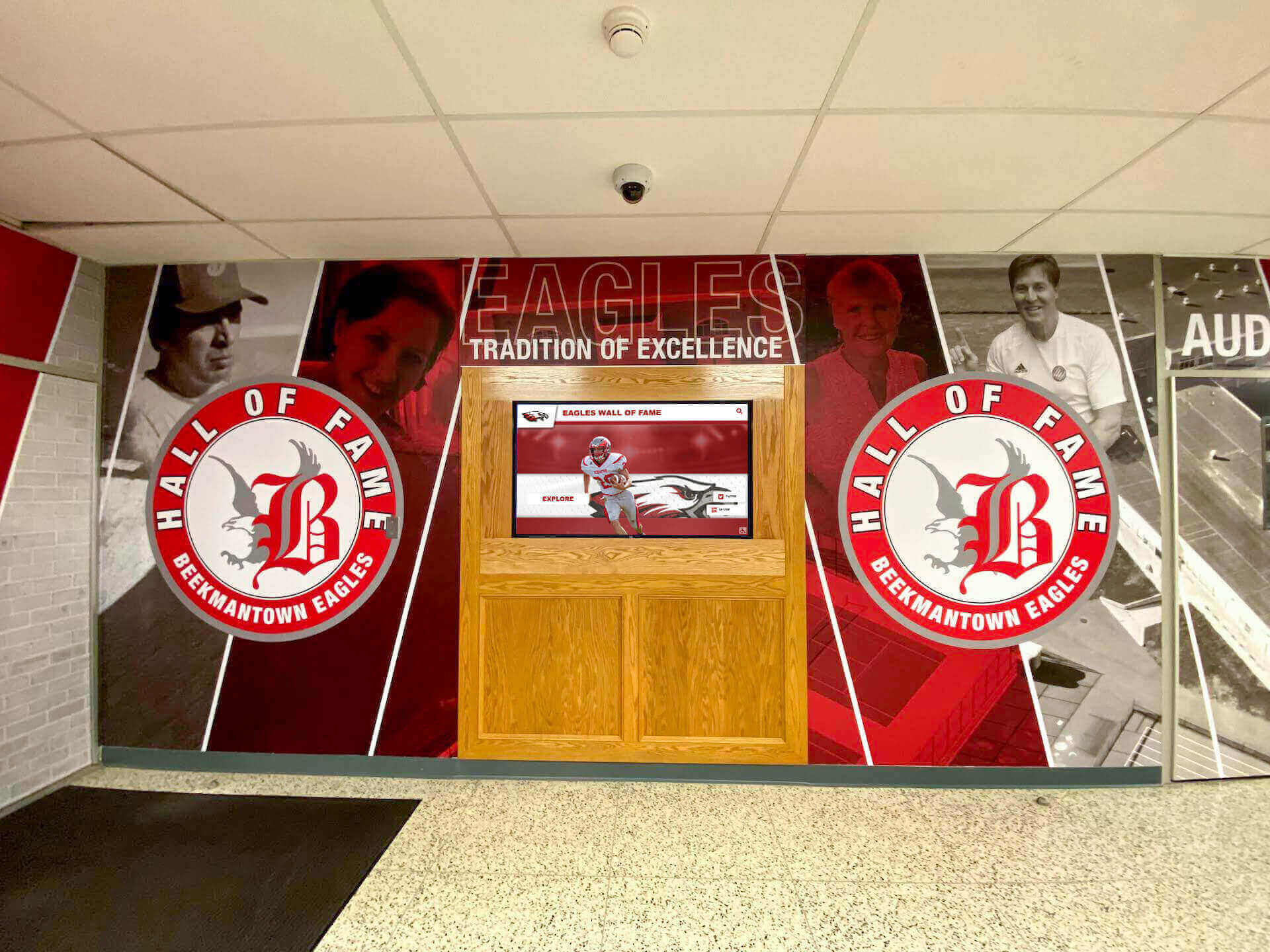
Successful implementations often combine digital technology with traditional design elements honoring school heritage
Hardware Selection for Physical Displays
When implementing touchscreen displays, appropriate hardware selection ensures reliable operation and positive user experiences.
Touchscreen Display Specifications
Commercial-grade displays designed for continuous operation deliver better results than consumer TVs:
- 55-86 inch diagonal screens depending on installation location and viewing distances
- Commercial-grade panels rated for 16-24 hour daily operation versus consumer TVs designed for a few hours daily
- Capacitive multi-touch capability supporting intuitive gesture navigation
- Minimum 1920x1080 Full HD resolution (4K preferred for larger screens)
- 3-5 year commercial warranties typical versus 1-year consumer warranties
Consumer-grade televisions adapted for touchscreen use typically fail within 1-2 years when operated continuously—initial savings disappear through replacement costs and downtime.
Computer Hardware and Connectivity
Touchscreen displays require connected computers running display software:
- Compact Windows PCs or media players mounted behind displays out of sight
- Sufficient processing power for smooth video playback and responsive navigation
- Reliable internet connectivity for cloud-based platforms (Ethernet preferred over WiFi for stability)
- Remote management capabilities enabling troubleshooting without physical access
- Uninterruptible power supplies (UPS) preventing shutdowns from brief power interruptions
Many school history software providers offer complete hardware packages including properly specified computers and displays, simplifying procurement and ensuring compatibility.
Installation and Placement Considerations
Strategic placement maximizes visibility and engagement:
- High-traffic locations like main lobbies, cafeteria entrances, or athletic facility entrances
- Viewing heights appropriate for both standing adults and seated wheelchair users
- Lighting conditions avoiding direct sunlight causing glare or overheating
- Electrical and network connectivity avoiding unsightly exposed cables
- ADA compliance ensuring accessibility for all community members
Work with facilities staff early in planning to address electrical, mounting, and network infrastructure needs before hardware arrives.
Training and Change Management
The best technology implementations fail without adequate training and change management supporting adoption.
Staff Training and Support
Content administrators need comprehensive training:
- Hands-on workshops walking through all common content management tasks
- Written documentation and video tutorials providing reference materials
- Sandbox environments enabling practice without affecting public-facing content
- Dedicated support contacts for questions and troubleshooting
- Periodic refresher training as new features are added or staff turnover occurs
Insufficient training creates bottlenecks where only one or two staff members can manage content—cross-training multiple people ensures continuity when individuals are unavailable or leave positions.
Community Awareness and Promotion
Even excellent platforms require promotion generating awareness and engagement:
- Launch events celebrating new displays or online platform availability
- Email campaigns informing alumni about new ways to explore school history
- Social media content featuring highlighted historical finds and interesting discoveries
- Student orientation including school history exploration activities
- Alumni magazine or newsletter articles explaining platform features and encouraging use
Many schools report initial platform usage spikes following promotion then declining engagement as initial curiosity fades—ongoing content additions and regular promotional reminders sustain long-term engagement.
Establishing Ongoing Content Workflows
Sustainable school history platforms require systematic content management:
- Designate responsible staff members with clear content management expectations
- Create regular schedules for content additions (weekly, monthly, quarterly depending on volume)
- Establish processes for community members to contribute historical materials and information
- Implement quality control reviews ensuring accuracy before public visibility
- Document procedures enabling continuity during staff transitions
The most common reason school history initiatives lose momentum is lack of clear responsibility and accountability for ongoing management.
Measuring Success and Maximizing Impact
Assessing school history software value and optimizing performance requires appropriate metrics and continuous improvement.
Key Performance Indicators
Different objectives suggest different success measures:
For Preservation Objectives
- Number of historical items digitized and safely archived
- Percentage of yearbook collection converted to searchable digital format
- Oral history interviews recorded and preserved
- At-risk materials protected before deterioration or loss
- Backup and redundancy systems ensuring content security
For Engagement Objectives
- Physical display interaction counts and average session durations
- Online platform unique visitors and page views
- Alumni registration and profile claim rates
- Social sharing frequency of historical content
- Community contributions of photos, stories, and information
For Educational Objectives
- Student research projects utilizing school history resources
- Classroom integration of local institutional history
- Historical literacy improvement among students
- Student volunteer participation in heritage preservation work
- Intergenerational connections formed through oral history projects
For Institutional Advancement
- Alumni engagement increases correlated with history platform launches
- Donor recognition integration showcasing institutional appreciation
- Recruitment tour integration highlighting tradition and excellence
- Media coverage of historical milestones and discoveries
- Community pride indicators from surveys and feedback
Continuous Improvement Strategies
School history platforms should evolve continuously rather than remaining static after initial implementation.
Content Expansion and Enrichment
Systematic content development maintains engagement:
- Regular addition of newly digitized historical materials
- Current year content ensuring platforms remain relevant beyond historical focus
- Featured content rotations highlighting different eras, achievements, or themes
- Enhanced metadata adding detail to existing items making them more discoverable
- Multimedia supplementation adding video and audio to primarily photo-based content
Many schools establish annual cycles where specific historical eras or themes receive focused attention, systematically building comprehensive coverage over time.
User Experience Optimization
Analytics and feedback reveal optimization opportunities:
- Navigation improvements addressing common user confusion patterns
- Search refinements responding to frequent unsuccessful queries
- Featured content adjustments highlighting underutilized but valuable sections
- Performance optimization ensuring fast loading and responsive interaction
- Accessibility enhancements serving users with disabilities or assistive technologies
Regular user testing with actual students, alumni, and families identifies issues designers and administrators overlook.
Technology Upgrades and Expansion
School history platforms should grow with institutional needs:
- Hardware refreshes as displays age or newer technology offers improved capabilities
- Software updates adding features and improving performance
- Additional displays extending heritage presence to more building locations
- Mobile app development when web platforms prove successful
- Integration with other school systems creating unified experiences
Budget for ongoing platform development, not just initial implementation—stagnant systems become dated quickly in rapidly evolving technology landscapes.

Regular content updates keep platforms current and give alumni reasons to return frequently
Overcoming Common Implementation Challenges
Understanding typical obstacles helps schools prepare effective responses and avoid common pitfalls.
Budget Constraints and Funding Strategies
Comprehensive school history software represents significant investment, but creative approaches make projects financially feasible.
Phased Implementation Approaches
Rather than attempting complete implementations immediately, consider:
- Starting with yearbook digitization before investing in display hardware
- Implementing single prominent touchscreen display initially with expansion plans for future phases
- Beginning with basic online platform then adding advanced features over time
- Focusing on specific content areas (athletics, performing arts, academics) before comprehensive coverage
- Pursuing pilot programs demonstrating value before requesting larger budgets
Successful initial phases build institutional support for expanded investment.
Alternative Funding Sources
Beyond operating budgets, explore:
- Alumni association fundraising campaigns dedicated to heritage preservation
- Class reunion giving opportunities where milestone classes fund historical projects
- Booster organization support from athletic or arts boosters valuing recognition platforms
- Grant applications to local foundations supporting educational or cultural heritage projects
- Corporate sponsorships from businesses valuing community engagement and visibility
Many schools fund school history initiatives entirely through external sources, avoiding competition with operating budget priorities.
Staff Capacity and Technical Expertise
Limited staff time and technical expertise challenge implementation and ongoing management.
Leveraging External Support
When internal expertise is limited:
- Select turnkey platforms with vendor-provided implementation services
- Use professional digitization services rather than DIY approaches requiring internal labor
- Engage student technology clubs or classes as implementation partners
- Partner with local universities whose students need service learning projects
- Hire retired staff or community members with relevant skills for part-time project work
Schools shouldn’t attempt complex technical projects exceeding actual staff capabilities—simpler platforms maintained consistently outperform sophisticated systems languishing from neglect.
Building Sustainable Workflows
Efficient processes reduce ongoing effort:
- Templates and standardized formats accelerating content entry
- Batch processing capabilities handling multiple items simultaneously
- Student volunteer programs providing content entry and digitization labor
- Community contribution portals where alumni submit information directly
- Scheduled maintenance routines preventing overwhelming accumulated work
The key is establishing manageable ongoing effort levels rather than intensive periodic campaigns that burn out responsible staff members.
Content Gaps and Historical Research
Schools often discover significant gaps in historical records complicating comprehensive heritage coverage.
Research and Recovery Strategies
Fill content gaps through:
- Alumni outreach campaigns requesting donation of personal yearbooks, photos, and memorabilia
- Local newspaper archives research finding coverage of school achievements and milestones
- Historical society partnerships accessing community collections including school materials
- Social media campaigns where alumni share memories and information
- Oral history projects capturing memories from longtime community members
Many schools are surprised by alumni enthusiasm for contributing to heritage preservation projects—simply asking often yields substantial donated materials and information.
Accepting Imperfection
Perfect comprehensive historical coverage remains impossible for most schools:
- Focus efforts on eras and content areas where materials exist rather than obsessing over gaps
- Clearly acknowledge known gaps rather than presenting incomplete coverage as comprehensive
- Establish processes for incorporating newly discovered materials as they emerge
- Prioritize recent decades where alumni remain engaged before addressing distant historical periods
- Accept that some history is irretrievably lost and cannot be recovered regardless of effort
Schools paralyzed by pursuit of perfect historical completeness often accomplish less than those accepting partial coverage and starting where they can.
Future Trends in School History Software
Understanding emerging capabilities helps schools make forward-looking technology selections and plan future enhancements.
Artificial Intelligence and Machine Learning
AI capabilities increasingly enhance school history platforms:
- Automated facial recognition identifying individuals across thousands of photos reducing manual tagging effort
- Natural language processing enabling conversational search (“show me all basketball championships in the 1990s”)
- Automated content recommendations surfacing related materials visitors might find interesting
- Smart metadata generation suggesting tags and classifications based on image and text analysis
- Predictive analytics identifying content likely to engage specific user segments
These capabilities transform manual labor-intensive tasks into automated processes while improving discovery and engagement.
Augmented and Virtual Reality
Immersive technologies create new heritage experience possibilities:
- AR applications overlaying historical photos onto current campus locations during campus tours
- VR recreations of historical buildings or spaces no longer existing
- 360-degree video enabling virtual visits to school historical locations
- Interactive historical timeline experiences where visitors “step into” different eras
- Mixed reality exhibits combining physical artifacts with digital contextual information
While currently limited to well-funded institutions and experimental projects, these technologies will become increasingly accessible as costs decrease and development tools simplify.
Advanced Analytics and Personalization
Data-driven platforms increasingly personalize experiences:
- Individual user profiles remembering preferences and previous exploration
- Personalized content recommendations based on graduation year, activities, or viewing history
- Social connection suggestions helping alumni find and reconnect with classmates
- Engagement scoring identifying highly active community members
- Predictive engagement modeling informing content development priorities
Personalization transforms generic historical archives into individualized discovery experiences more likely to sustain ongoing engagement.
Integration and Ecosystem Development
Isolated platforms give way to integrated ecosystems:
- Student information system integration automatically populating current student profiles
- Athletic statistics platform connections incorporating performance data into recognition
- Alumni management system integration unifying heritage and advancement functions
- Content management workflow automation reducing administrative effort
- Third-party service marketplaces enabling specialized functionality additions
Integrated platforms deliver more value with less effort than isolated systems requiring manual data transfer between applications.

Future platforms will increasingly integrate heritage content across physical and digital experiences
Conclusion: Preserving Heritage While Building Future
The best school history software solutions don’t simply store historical materials in digital databases—they transform institutional heritage into accessible, engaging resources that inspire current students, connect alumni across generations, demonstrate excellence to prospective families, and ensure that decades of achievements and memories continue influencing future community members.
Schools in 2025 possess unprecedented opportunities to preserve institutional legacy before irreplaceable materials deteriorate beyond recovery. Physical yearbooks, aging photographs, and fading memories face urgent preservation deadlines as materials enter critical deterioration periods and knowledgeable community members age. Waiting means permanent loss—materials destroyed or forgotten cannot be recovered regardless of future investment.
The technology platforms, digitization services, and implementation expertise needed for comprehensive heritage preservation have never been more accessible or affordable. Schools need not be technology pioneers experimenting with unproven systems—mature platforms deployed successfully at thousands of institutions deliver predictable results with manageable investment.
Transform Your School's Historical Archives
Discover how comprehensive school history software can help you preserve institutional heritage, engage alumni, and celebrate decades of student achievement through interactive digital displays and online platforms.
Explore School History SolutionsSuccessful implementation requires clear strategic thinking about objectives, realistic assessment of current materials and institutional capacity, phased approaches that deliver value quickly while building toward comprehensive coverage, sustainable workflows preventing burnout and ensuring long-term content currency, and continuous improvement adapting platforms as needs evolve and technologies advance.
The most important step is beginning. Schools postponing heritage preservation projects while seeking perfect plans or comprehensive budgets often accomplish nothing, while institutions starting with modest focused initiatives build momentum, demonstrate value, secure expanded support, and systematically develop comprehensive platforms over time.
Ready to preserve and showcase your school’s unique heritage? Explore how digital hall of fame solutions eliminate space constraints while honoring unlimited achievements. Learn about school historical timeline approaches presenting institutional evolution engagingly. Discover high school graduate display strategies celebrating each graduating class comprehensively. Consider student mentorship and alumni discovery programs connecting current students with graduate role models. Review the complete school history software guide comparing platforms and implementation approaches.
Your school’s history matters—decades of achievement, growth, and community impact deserve recognition equal to the dedication that created it. Modern school history software ensures that past excellence continues inspiring future success for generations to come.































