




Intent: Demonstrate the essential criteria, design principles, and evaluation frameworks that guide high schools toward digital hall of fame investments that inspire students, engage communities, and deliver lasting value.
A digital hall of fame represents one of the most significant technology investments an athletic director or school administrator will make—often the largest single purchase they’ll personally champion. Unlike routine equipment that cycles every few years, recognition displays become permanent fixtures defining how institutions celebrate excellence for decades. The display you select today will honor athletes, scholars, and achievers long after you’ve moved on to new roles.
This buying guide explores the critical decisions facing high schools investing in digital recognition technology. From understanding layout design principles and essential software features to evaluating vendors and comparing pricing structures, you’ll discover the frameworks needed to select solutions that enhance your school’s legacy while avoiding costly missteps that create administrative burdens instead of celebrating achievements.
High school digital halls of fame typically represent investments between $8,000 and $25,000 per display, with decisions affecting recognition programs for 10-20+ years. Making informed choices requires understanding not just what technology can do, but what design elements create engaging experiences, which features matter most for school environments, and how different vendors approach long-term partnerships with educational institutions.

Modern digital recognition kiosks transform traditional trophy cases into engaging interactive experiences celebrating achievement
Understanding Digital Hall of Fame Investment Decisions
Before evaluating specific products or vendors, understanding why digital halls of fame matter and what makes them effective provides essential context for buying decisions.
Why High Schools Choose Digital Recognition
Traditional recognition approaches—plaques, trophy cases, and wall-mounted displays—have served schools for generations. Yet physical recognition faces fundamental limitations that digital solutions address:
Space Constraints That Limit Recognition
Wall space fills quickly. A standard hallway accommodates 30-50 plaques before exhausting capacity, forcing schools to choose between omitting deserving athletes or initiating expensive renovation projects. Digital platforms eliminate space constraints entirely, honoring unlimited individuals without physical expansion.
Update Complexity and Delay
Adding recognition through traditional methods requires coordinating with plaque manufacturers, waiting 4-6 weeks for production, and scheduling installation. Digital updates happen instantly through content management systems, allowing schools to honor new inductees within hours of ceremonies rather than months later.
Limited Storytelling Capacity
Engraved plaques communicate minimal information—typically names, years, and brief achievements. Digital profiles incorporate photos, videos, statistics, biographical narratives, and historical context that transform recognition from documentation into compelling storytelling preserving institutional memory.
Accessibility Restrictions
Physical displays serve only those physically present during building hours. Digital recognition platforms extend accessibility through web portals and mobile applications, enabling alumni worldwide to explore achievements and share recognition with families regardless of geographic location.
Schools implementing well-designed digital halls of fame report 3-5x longer visitor engagement compared to traditional displays, with students, parents, and alumni actively exploring achievement archives rather than passively viewing static plaques.
What Makes Digital Recognition Effective
Not all digital displays deliver equal value. The most effective recognition systems share common characteristics worth understanding before beginning vendor evaluation:
Intuitive Navigation and Discovery
Effective platforms enable visitors to find specific individuals quickly while encouraging serendipitous exploration. Search functionality, filtering by category or year, and clear visual navigation patterns ensure all visitors—regardless of technical comfort—can engage successfully with recognition content.
Visual Appeal and Design Quality
Recognition displays represent institutional identity. Professional design incorporating school colors, logos, and cohesive visual systems creates pride and reflects the respect deserving athletes and scholars merit. Amateur-looking interfaces undermine recognition value regardless of content quality.
Administrative Simplicity
The best technology disappears, allowing non-technical staff to manage content confidently. If updating recognition requires IT department intervention for routine tasks, displays become administrative burdens rather than celebration tools. Cloud-based management with intuitive interfaces ensures recognition stays current.
Reliability and Professional Operation
Displays must operate flawlessly. Screens showing error messages, outdated content, or frozen interfaces reflect poorly on institutions and dishonor the individuals they’re meant to celebrate. Commercial-grade hardware and proven software platforms ensure consistent, professional operation.
Comprehensive resources on digital hall of fame design principles provide additional frameworks for understanding what separates effective recognition from disappointing implementations.
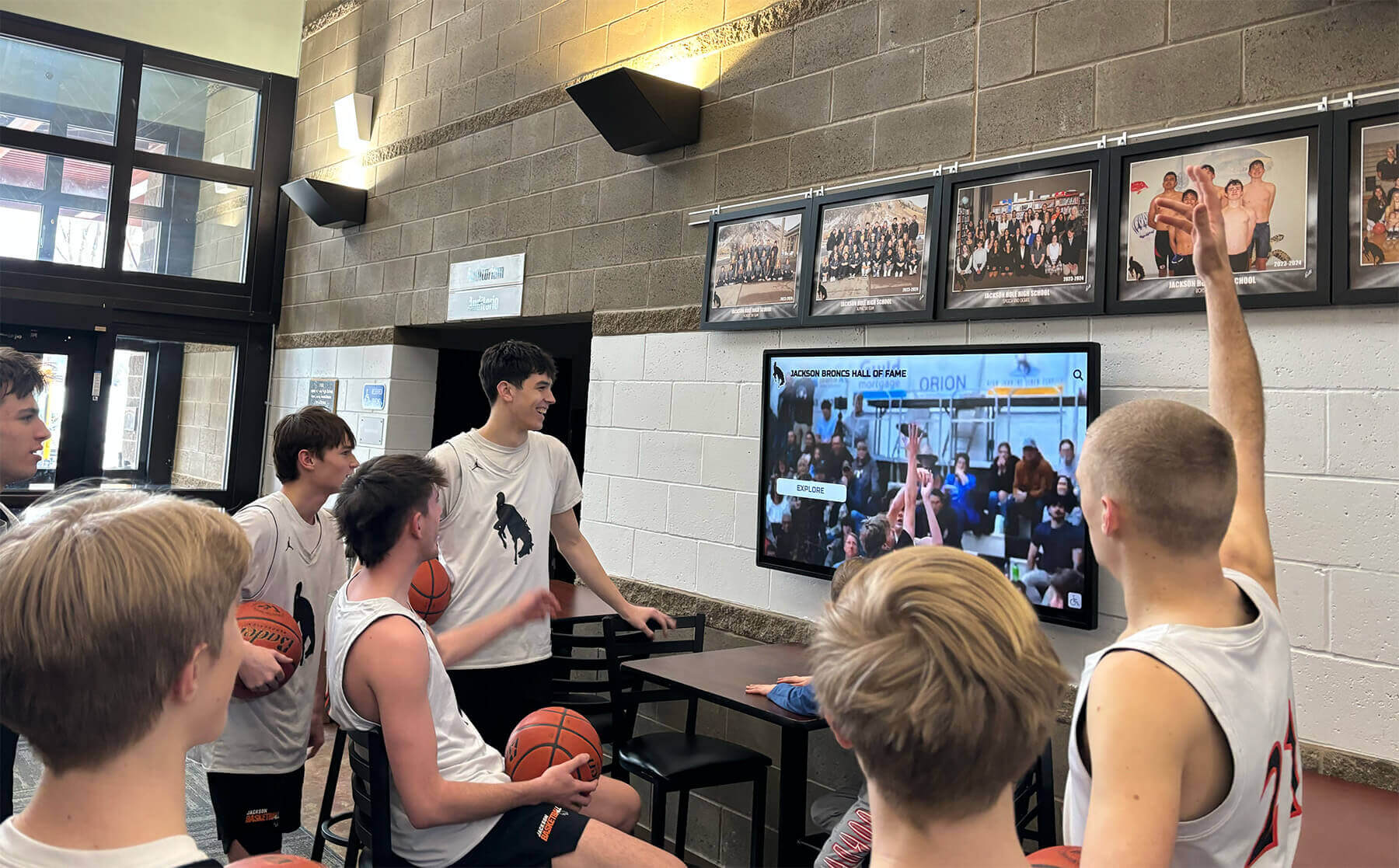
Effective digital displays capture student attention and create authentic engagement with school legacy
Essential Design and Layout Considerations
Digital hall of fame effectiveness depends heavily on thoughtful design that balances aesthetic appeal with functional usability. Understanding layout fundamentals helps buyers evaluate whether proposed designs will truly serve their schools.
Experience Layout Blueprint
Well-designed recognition interfaces organize screen space systematically, creating intuitive navigation patterns and clear information hierarchy:
Hero Zone and Institutional Identity
The top 15-20% of screen real estate establishes context and brand presence. This masthead area should feature:
- School logos and colors creating immediate institutional connection
- Display title clearly identifying the recognition purpose (“Athletic Hall of Fame,” “Wall of Champions”)
- Optional rotating featured athlete spotlights drawing attention to compelling content
- Clean, uncluttered design that communicates professionalism
Primary Navigation Architecture
Navigation bars occupying 10-15% of screen height enable content discovery through clear, touch-friendly buttons:
- Browse by year enabling chronological exploration
- Browse by sport or achievement category organizing recognition logically
- Search functionality allowing direct name-based discovery
- Featured collections highlighting special recognition (state championships, record holders)
Touch targets must be large (minimum 44x44 pixels) with adequate spacing preventing accidental selections. Navigation labels should use plain language rather than jargon, ensuring visitors of all ages understand options immediately.
Content Display Zone
The central 50-60% of screen space presents honoree profiles, lists, and galleries:
- Grid-based card layouts showing multiple athletes simultaneously with photos and key achievements
- List views providing scrollable directories with sorting options
- Detail views displaying comprehensive individual profiles when visitors select specific honorees
- Gallery modes showcasing images and videos with minimal text overlay
Content zones must balance information density with visual breathing room. Cramped interfaces overwhelm visitors, while excessive whitespace suggests empty recognition programs despite comprehensive content.
Footer and Action Areas
Bottom screen zones (10-15% of height) provide secondary functionality:
- Social media sharing options enabling profile distribution
- QR codes linking to mobile experiences for continued exploration on personal devices
- Home/back navigation buttons supporting easy return to starting points
- Optional sponsor acknowledgment when appropriate
Schools should review interactive display layout strategies for detailed wireframe examples and zone architecture patterns proven effective across educational environments.
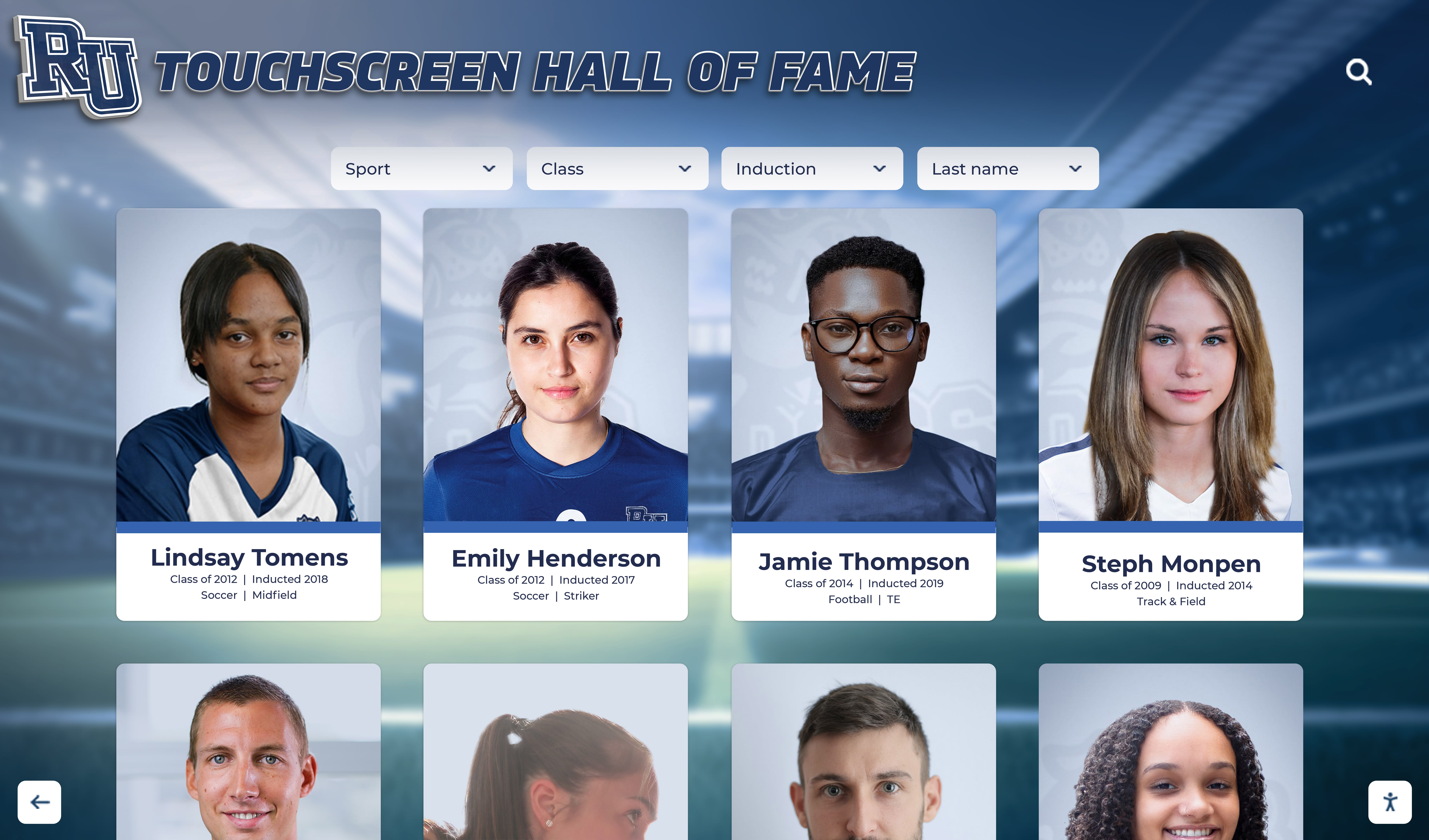
Card-based grid layouts enable efficient browsing while maintaining visual appeal and clear information hierarchy
Motion Design and Animation Strategy
Static layouts represent only part of effective recognition design. Motion and animation guide attention, confirm interactions, and create polish that communicates quality:
Attraction Loop Content
When displays sit idle, attraction loops draw attention and demonstrate interactivity:
- Rotating athlete highlight reels showcasing compelling photos and video clips
- Featured achievement statistics building school pride
- Recent inductee spotlights encouraging exploration of new recognition
- Clear touch prompts inviting visitor interaction (“Touch to Explore”)
Attraction content should change regularly, preventing displays from appearing static or stale to regular building occupants who pass them daily.
Transition Animation Patterns
Movement between screens should feel purposeful and professional:
- Fade transitions for content swaps within consistent layouts
- Slide animations indicating directional navigation (left/right for categories, up/down for chronological movement)
- Zoom effects when moving from overview grids to detailed individual profiles
- Loading indicators providing feedback during content retrieval
Smooth, thoughtful animation elevates perceived quality dramatically, while jerky or inconsistent movement creates unprofessional impressions undermining recognition value.
Interactive Feedback Systems
Visitors need immediate confirmation that touch inputs registered:
- Button press states showing visual response to touch
- Ripple effects radiating from touch points
- Selection highlights on cards or list items
- Success confirmations when actions complete (social shares, QR code generation)
These micro-interactions seem minor but profoundly affect user confidence and willingness to explore recognition content deeply.
Accessibility and Inclusive Design Requirements
Digital recognition must serve all community members regardless of physical ability or technical comfort:
ADA WCAG 2.1 AA Compliance Standards
- Text contrast ratios minimum 4.5:1 for body text, 3:1 for large headings ensuring readability
- Touch targets sized adequately (44x44 pixel minimum) with sufficient spacing preventing mis-touches
- Text scaling supporting enlargement without horizontal scrolling requirements
- Alternative text for images when accessible modes enabled
- Video captions supporting deaf and hard-of-hearing community members
Physical Accessibility Considerations
- Display mounting heights placing primary controls 15-48 inches from floor for wheelchair accessibility
- Forward reach depth not exceeding 25 inches ensuring access from seated positions
- Kiosk approaches providing knee and toe clearance when applicable
- Volume controls respecting quiet building environments while providing audio options
Cognitive Accessibility Design
- Clear, simple navigation with consistent patterns throughout experiences
- Plain language avoiding technical jargon or complex terminology
- Minimal steps required for common tasks (finding specific individual, viewing achievements)
- Obvious home/back buttons enabling navigation error recovery
- Optional high-contrast visual modes for visibility impairments
Schools must verify accessibility compliance before finalizing purchases. Resources on accessibility requirements for digital displays provide detailed implementation checklists ensuring inclusive recognition serving all community members.
Critical Software Features and Capabilities
Hardware provides the canvas, but software determines whether digital halls of fame succeed or become expensive disappointments. Understanding essential software capabilities helps buyers separate genuinely capable platforms from those promising more than they deliver.
Content Management System Requirements
The administrative interface where staff creates and maintains recognition content directly determines long-term success:
Non-Technical User Interface Design
School staff managing recognition typically aren’t IT professionals. Effective content management systems must offer:
- Drag-and-drop organization requiring zero coding knowledge
- Visual editing showing exactly how changes appear to visitors
- Template-based profile creation ensuring formatting consistency
- Intuitive media library management for photos and videos
- Scheduled publishing enabling advance content preparation for timed releases
If routine recognition updates require technical support, displays will fall behind quickly as busy staff avoid complicated systems.
Cloud-Based Management Access
Modern recognition platforms should enable content management from any internet-connected device:
- Web-based administrative portals accessible from office computers, home devices, or mobile phones
- Multi-user support allowing distributed content responsibilities across staff members
- Automatic synchronization deploying changes across all displays instantly
- Version history enabling rollback if mistakes occur
- Role-based permissions controlling what different staff members can edit
Local-only management systems that require physical access to display computers create unnecessary administrative friction and single-person dependencies.
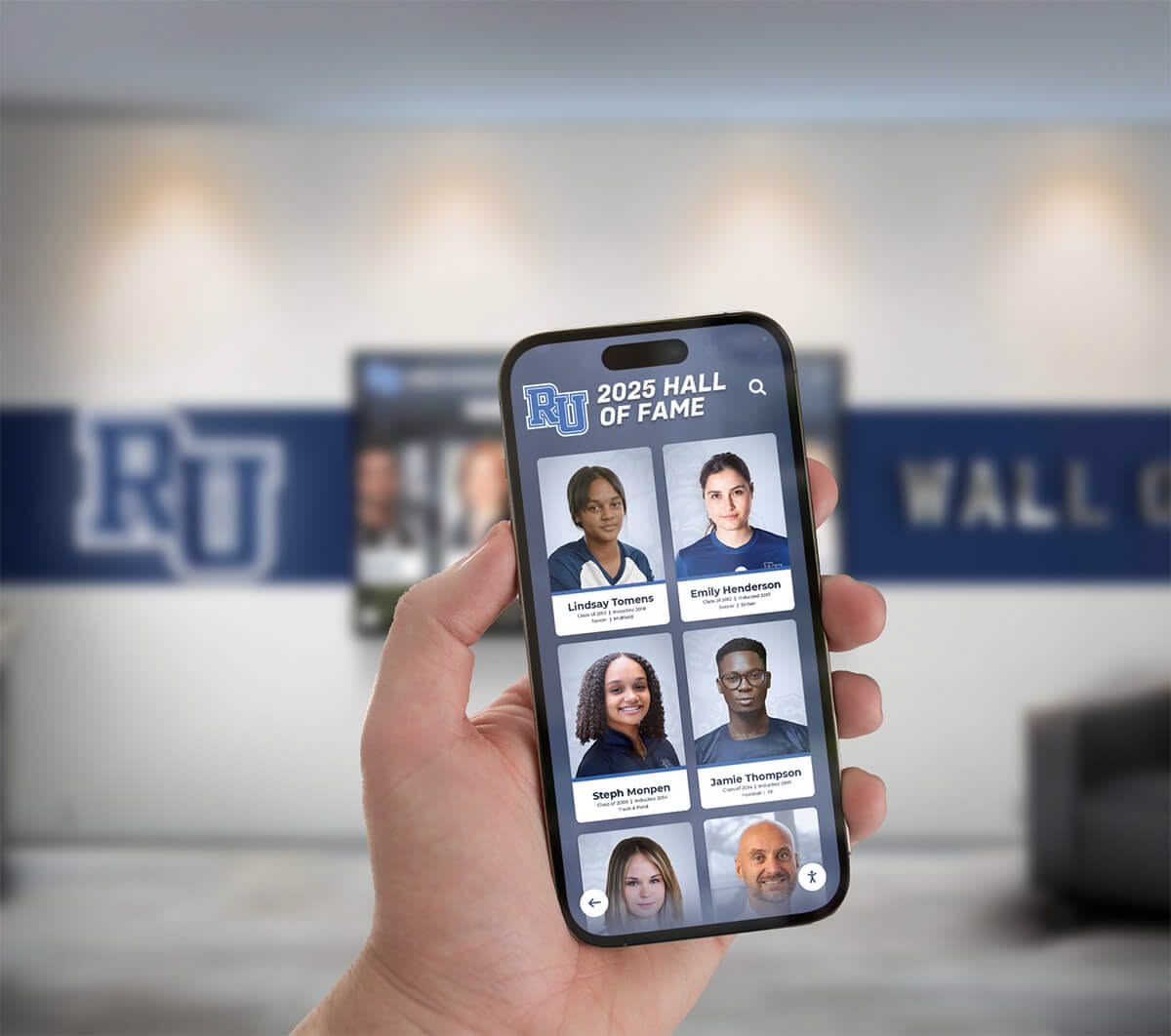
Cloud-based platforms enable recognition management from any device, eliminating location constraints
Bulk Import and Data Migration Tools
Schools honoring decades of athletes need efficient historical content population:
- Spreadsheet import accepting CSV or Excel files with athlete information
- Batch photo upload with automatic profile matching
- Historical data migration assistance from existing systems
- Data validation identifying errors before publication
- Template-based bulk profile generation
Without robust import capabilities, populating initial recognition content becomes prohibitively time-consuming, leading to launches with incomplete athlete coverage that undermines display credibility.
Visitor-Facing Feature Requirements
What visitors experience determines whether recognition displays engage communities or sit ignored:
Search and Discovery Functionality
Powerful search enables instant location of specific individuals:
- Keyword search across names, sports, years, and achievements
- Filter controls by graduation year, sport, achievement type, or custom categories
- Alphabetical browsing with intuitive letter-based navigation
- Featured content spotlighting recent additions or notable achievements
- Related profile suggestions connecting teammates or classmates
Advanced platforms like academic and athletic recognition systems excel at providing multiple discovery paths accommodating different visitor intentions—from parents seeking specific children to alumni exploring classmates to current students discovering program history.
Profile Page Content Richness
Individual honoree pages should tell complete stories:
- Multiple photo support showing athletes across career progression
- Video integration for game highlights, testimonials, or biographical interviews
- Statistics and achievement documentation with context
- Timeline visualization showing career progression
- Related profile linking to teammates, coaches, or era peers
- Social sharing enabling profile distribution to family and friends
Rich profiles transform recognition from name listings to compelling archives preserving individual legacies and institutional memory.
Mobile and Web Integration
Recognition impact extends far beyond physical display locations:
- Web-accessible versions enabling exploration from any browser
- Responsive design ensuring excellent experiences across all device sizes
- Native mobile applications with offline access capabilities
- QR code integration allowing visitors to continue exploration on personal devices
- Push notification options for new inductee announcements
These extensions multiply recognition reach, engaging alumni communities regardless of proximity to physical school locations.
Analytics and Engagement Measurement
Understanding how visitors use recognition displays informs content strategy and demonstrates investment value:
Essential Engagement Metrics
- Total interaction sessions and average engagement duration
- Most-viewed profiles revealing popular content
- Search term analysis showing what visitors seek
- Peak usage times informing content update scheduling
- Navigation path analysis identifying effective and confusing interface elements
Schools implementing digital recognition with comprehensive analytics use engagement data to refine content, add frequently-requested athletes, and optimize navigation—creating continuously improving visitor experiences.

Strategic placement in high-traffic areas maximizes community engagement with achievement recognition
Hardware Specifications and Installation Requirements
Software runs on hardware foundations. Understanding essential specifications ensures displays operate reliably for years while delivering excellent visual experiences.
Display Hardware Requirements
Commercial-grade touchscreens differ dramatically from consumer televisions in ways directly impacting recognition applications:
Screen Size Selection Guidelines
- 43-55 inch displays: Suitable for hallway installations with 6-10 foot viewing distances
- 55-65 inch displays: Most common for high school recognition, working well for 8-12 foot viewing distances
- 65-75 inch displays: Appropriate for large gathering spaces, fieldhouses, or main lobby installations
Consider typical viewing distances and whether displays primarily serve individual interaction or group viewing when selecting sizes.
Resolution and Image Quality Standards
- Minimum: 1920x1080 (Full HD) provides acceptable quality for most content
- Recommended: 3840x2160 (4K UHD) delivers superior image quality crucial for photo-heavy recognition
- Brightness: 350-450 cd/m² suits most indoor installations; areas with significant natural light require 500+ cd/m²
Higher resolution becomes increasingly important as screen sizes grow—large displays with only Full HD resolution show noticeable pixelation at interaction distances.
Touch Technology Options
- Projected Capacitive (PCAP): Industry standard offering precise multi-touch response and durability
- Infrared Touch: Lower-cost alternative using sensor frames; less precise but functional for basic interactions
- Optical Touch: Camera-based systems suitable for very large formats where other technologies become expensive
For recognition applications, PCAP touch provides the most reliable, responsive experience visitors expect based on smartphone familiarity.
Computing and Network Infrastructure
Displays require computing power and connectivity:
Processor and Memory Specifications
- Minimum: Intel Core i5 (or AMD Ryzen 5) with 4 cores, 8GB RAM
- Recommended: Intel Core i7 (or AMD Ryzen 7) with 8 cores, 16GB RAM for video-heavy content
- Storage: 256GB SSD minimum; 512GB recommended for extensive photo/video libraries
Underpowered computers create frustrating visitor experiences through slow loading, stuttering video, and laggy touch response.
Network Connectivity Requirements
- Ethernet (wired) connection strongly preferred over WiFi for reliability
- Minimum 10 Mbps download speed adequate for cloud-based content management
- Firewall configurations may require adjustment for recognition software connectivity
- IT department involvement essential early in planning process
Mounting and Enclosure Options
Installation approaches affect aesthetics, accessibility, and total costs:
Wall-Mounted Displays
- Flush Mount: Display sits flat against wall; requires adequate wall depth
- Tilted Mount: Display angles slightly downward reducing glare
- Recessed Installation: Creates seamless built-in appearance but requires construction
Professional wall mounting typically costs $500-2,000 depending on wall construction and electrical requirements.
Freestanding Kiosks
- Standard Floor Kiosks: Self-contained units housing display, computer, and often custom branding
- Custom Enclosures: Purpose-designed housings matching school architecture
- Mobile Kiosks: Rolling stands enabling flexible positioning
Freestanding kiosks range from $1,500-8,000 depending on size, materials, and customization level.
Accessibility Compliance
- Display viewing area must be reachable from wheelchair positions
- Bottom of viewable screen no higher than 36 inches from floor
- Adequate clear floor space for wheelchair maneuvering
- Controls operable without tight grasping or wrist twisting
Schools should consult detailed digital hall of fame installation guidelines ensuring installations meet ADA requirements while providing excellent experiences for all visitors.
Vendor Evaluation and Selection Criteria
Choosing the right vendor partner matters as much as selecting appropriate technology. Understanding how to evaluate vendors helps schools identify partners truly committed to long-term recognition success.
Essential Vendor Qualification Questions
Thorough vendor evaluation requires asking specific, probing questions:
About Recognition Experience
- How many high school hall of fame installations has your company completed?
- Can you provide references from schools similar to ours (size, budget, recognition focus)?
- What content preparation and digitization support do you provide?
- Do you offer pre-built templates specifically for high school athletic recognition?
- How do you help schools with historical photo collection and organization?
Vendors lacking high school-specific experience often underestimate implementation complexity, leading to delays, unexpected requirements, and disappointing results.
About Platform Evolution
- How frequently do you release platform updates?
- What new features have you added in the past year?
- How do you gather and incorporate customer feedback?
- What’s on your product development roadmap?
- Will updates be automatically available or require additional purchases?
Platforms that haven’t evolved in 2-3 years likely represent technology investments rather than ongoing service commitments—concerning for relationships spanning decades.
About Implementation and Support
- What is your typical implementation timeline from purchase to launch?
- What training do our staff receive on content management?
- What’s included in your standard support versus available as paid add-ons?
- What are your guaranteed response times for technical issues?
- Do you offer direct phone support or only email/ticket-based assistance?
Support quality matters tremendously. If you can’t count on help when problems arise, even excellent technology becomes a liability.
About Total Cost Structure
- What is the total first-year cost including hardware, software, installation, and services?
- What are the ongoing annual costs for software, hosting, support, and any other recurring fees?
- Are there additional costs for content storage, user accounts, or feature access?
- What would expanding to additional displays cost in future years?
- What costs might we encounter that aren’t included in standard pricing?
Vendors should provide clear, detailed cost breakdowns. Vague pricing often indicates hidden fees or unclear offerings.
Pricing Structure Comparison
High school digital halls of fame typically follow several pricing models, each with distinct advantages and considerations:
One-Time Purchase Models
Some vendors offer single payment options with no ongoing fees:
Advantages:
- Predictable total cost appeals to tight budgets
- No recurring payment approvals required
- Ownership feeling versus subscription
Considerations:
- Vendors may have limited incentive to improve platforms after purchase
- Support often minimal or available only as expensive add-ons
- Platforms may feel outdated within 3-5 years as technology evolves
- Content management systems may lack modern cloud-based convenience
Annual Subscription Models
Many modern platforms operate on recurring subscription pricing:
Advantages:
- Vendors incentivized to maintain excellent platforms retaining customers
- Continuous feature improvements and platform evolution included
- Comprehensive support typically included in subscription
- Cloud-based management and modern capabilities standard
Considerations:
- Ongoing budget commitments required annually
- Total cost over 10+ years potentially higher than one-time purchases
- Budget approval processes may be more complex annually
Hybrid Models
Some vendors separate hardware purchases from software subscriptions:
- One-time hardware investment ($5,000-15,000)
- Annual software/support subscriptions ($500-2,000)
- Flexibility to upgrade hardware independently of software
- Clearer cost allocation between capital and operating budgets
Resources on digital recognition pricing and budgeting provide detailed cost comparison frameworks helping schools evaluate total ownership costs across pricing structures.
Red Flags and Warning Signs
Certain vendor characteristics suggest potential problems:
- Generic Signage Focus: Vendors primarily selling general digital signage lack recognition-specific expertise
- Limited Reference Portfolio: Inability to provide multiple checkable high school references
- Vague Feature Descriptions: Unclear explanations of what platform actually does
- Pushy Sales Tactics: High-pressure approaches prioritizing speed over your evaluation needs
- Unclear Support Commitments: Ambiguous response times, support hours, or included services
- Proprietary Lock-In: Platforms preventing data export or requiring specific hardware from single sources
Trust your instincts. If something feels unclear or concerning during evaluation, it rarely improves after purchase.

Many schools successfully integrate digital displays with traditional recognition elements creating comprehensive celebration spaces
Making Your Final Decision
Armed with research, vendor proposals, and evaluation insights, buyers can confidently select recognition solutions serving their schools effectively for years.
Creating Systematic Evaluation
Systematic comparison helps identify best-fit solutions:
Key Factors to Score (Rate 1-10 for each vendor):
- Recognition-specific features and templates
- Content management simplicity for non-technical staff
- Design quality and visual appeal
- Total cost of ownership over 5 years
- Vendor high school experience and references
- Implementation support and training quality
- Ongoing technical support availability
- Platform reliability and proven track record
- Mobile and web accessibility features
- Analytics and engagement measurement capabilities
Weight factors based on your priorities. Some schools prioritize lowest cost, others emphasize best features or most comprehensive support, while others focus on simplest administration for small staff teams.
Pilot Programs and Hands-On Evaluation
Before significant investment, verify capabilities through thorough assessment:
- Request interactive demos using actual recognition content, not generic examples
- Speak with administrators at reference schools about day-to-day experience
- Visit existing installations to see displays in actual operational environments
- Request trial access to content management systems assessing administrative ease
- Evaluate vendor responsiveness during the evaluation process
Vendors confident in their platforms willingly provide extensive evaluation opportunities. Those reluctant to allow thorough assessment may have limitations they’d prefer to obscure.
Implementation Planning for Success
Successful launches require careful preparation:
Pre-Launch Preparation Checklist:
- Content inventory identifying historical athletes requiring recognition
- Photo gathering or digitization from yearbooks and archives
- Biographical information collection and verification
- Brand guidelines documentation for design customization
- Staff training scheduling and participation commitment
- IT infrastructure verification (power, network, mounting locations)
- Launch event planning maximizing community engagement
Post-Launch Optimization:
- Visitor observation noting navigation confusion or content gaps
- Analytics review showing engagement patterns and popular content
- Staff feedback on administrative burden and workflow effectiveness
- Regular content additions maintaining current, relevant recognition
Organizations implementing comprehensive digital wall of fame systems report that the first 3-6 months involve learning and optimization—expect refinement rather than instant perfection, but ensure vendors support your improvement process.
Brand Integration and Custom Design
Digital halls of fame should reflect institutional identity while delivering professional, engaging experiences.
Visual Identity Implementation
Color Systems and Typography
Apply school colors systematically:
- Primary colors for navigation, hero areas, and key UI elements
- Secondary colors for backgrounds and supporting elements
- Accent colors for interactive elements and highlights
- Neutral colors for text ensuring readability
Establish clear typography hierarchy:
- Headline fonts reflecting school personality for titles
- Body fonts optimizing legibility for biographical content
- Size scales creating clear information hierarchy
- Weight variations emphasizing key information
Logo and Mascot Integration
- Primary logos in hero areas maintaining required clear space
- Mascot integration appropriate for athletic recognition
- Consistent branding creating institutional pride
- Professional execution avoiding amateur appearance
Custom Backgrounds and Environmental Connection
Photography and Imagery
Incorporate location-specific imagery:
- Campus exteriors and athletic facilities establishing context
- Interior architectural details providing familiarity
- Historical photos blending heritage with modern presentation
- Action photography celebrating athletic excellence
Motion Graphics and Video
Dynamic backgrounds create engaging experiences:
- Campus life footage showing school community
- Athletic action highlighting program excellence
- Time-lapse sequences demonstrating facility evolution
- Abstract motion graphics supporting brand without distraction
Resources on digital storytelling in athletic programs provide frameworks for effective multimedia integration that enhances rather than distracts from recognition content.
Conclusion: Investing Wisely in Recognition That Lasts
Digital halls of fame represent transformative opportunities for high schools to celebrate achievement, preserve institutional legacy, and build community pride through modern interactive experiences. Unlike traditional recognition constrained by physical space and minimal storytelling capacity, thoughtfully implemented digital platforms provide unlimited recognition potential, engaging multimedia experiences, and accessible celebration reaching far beyond building walls.
Get Your Touchscreen Mock-Up
Discover how custom-designed digital hall of fame experiences can transform recognition for your high school. Rocket Alumni Solutions creates interactive displays purpose-built for educational environments, combining professional design with intuitive administration that makes celebrating achievement effortless.
Schedule Your Design ConsultationThe most successful high school digital hall of fame implementations share common characteristics: they start with clear recognition goals understanding what achievement celebration should accomplish, select purpose-built platforms designed specifically for recognition rather than generic signage repurposed, partner with vendors demonstrating genuine commitment to long-term educational relationships, and plan thoroughly for content development and staff training ensuring sustainable operation.
Whether implementing athletic recognition inspiring current competitors, academic displays celebrating intellectual excellence, or comprehensive achievement recognition honoring all forms of student success, digital touchscreen technology provides proven solutions that strengthen school culture while ensuring every deserving individual receives the permanent recognition their accomplishments merit.
The investment you make today will define how your school celebrates excellence for decades. Choose partners who understand educational environments, prioritize design quality that honors achievement appropriately, provide administrative simplicity enabling sustainable management, and demonstrate commitment to platform evolution ensuring your recognition technology never feels outdated.
Ready to explore options for your school? Learn more about comprehensive digital recognition systems, discover interactive display design best practices, explore digital trophy case strategies, and understand vendor evaluation frameworks that guide schools toward recognition investments delivering exceptional value while celebrating achievement through purpose-built interactive technology designed specifically for educational excellence.































