



Museums face a fundamental challenge: how to transform static artifact collections into experiences that captivate contemporary audiences accustomed to interactive digital engagement. Traditional glass-case displays and printed placards work for preserving objects, yet they fail to spark the curiosity and sustained attention that modern visitors expect.
Walk through most museums and you’ll notice a pattern. Visitors spend 15-30 seconds scanning exhibits before moving on—barely enough time to read a label, let alone form meaningful connections with historical content. Physical space constraints force impossible curatorial choices about which artifacts deserve visibility. And once exhibits open, updating them requires costly reinstallation, leaving displays frozen in time regardless of new discoveries or evolving interpretations.
This comprehensive design guide explores how digital interactive museum displays solve these challenges through thoughtful experience design. You’ll discover proven layout frameworks that transform passive viewing into active exploration, UX patterns optimized for public touchscreen environments, accessibility strategies ensuring inclusive access, content organization approaches that invite discovery, and multimedia integration techniques that bring heritage narratives to life.
Digital interactive displays fundamentally reshape museum visitor experiences by enabling unlimited content depth within finite physical footprints, supporting personalized exploration paths matching individual interests, providing multimedia storytelling impossible with static exhibits, facilitating real-time content updates reflecting current scholarship, and generating analytics revealing exactly how audiences engage with material—data-driven insights enabling continuous experience improvement.

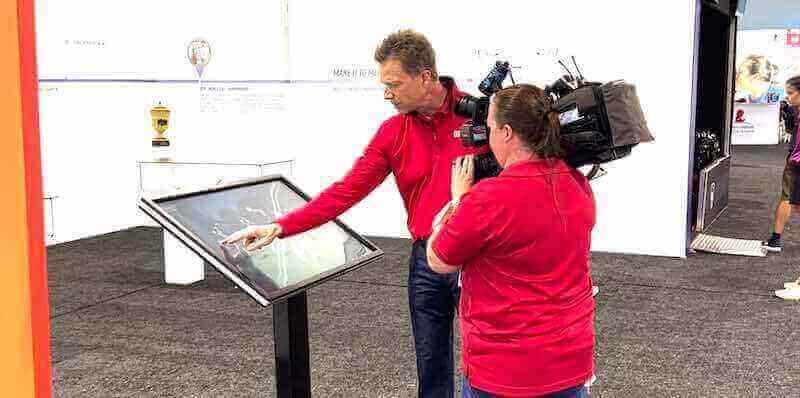
Professional interactive museum displays create engaging discovery experiences worthy of documentation and media attention
Experience Goals: What Interactive Museum Displays Must Achieve
Before diving into specific design patterns, understanding the strategic objectives that interactive museum displays serve helps focus design decisions on outcomes rather than features.
Engagement: Moving Beyond Passive Observation
Traditional museum exhibits impose single narratives on all visitors regardless of background knowledge or specific interests. Interactive displays flip this model—empowering visitors to control their own discovery journeys.
Creating Active Participation
Touchscreen interaction requires physical engagement that passive reading cannot match. When visitors tap, swipe, and explore content according to curiosity rather than curator-imposed sequence, they invest attention and form stronger memory connections. Museum studies research consistently demonstrates that interactive exhibits generate 3-5 times longer engagement compared to traditional static displays in comparable locations.
Solutions like Rocket Alumni Solutions provide purpose-built platforms designed specifically for public touchscreen environments, combining intuitive interfaces with reliable content management enabling non-technical staff to maintain fresh, relevant exhibits without ongoing developer support.
Supporting Diverse Visitor Motivations
Museum audiences bring varied goals—casual tourists seeking highlights, students researching specific topics, enthusiasts pursuing deep knowledge, families entertaining children, and local residents exploring community heritage. Static exhibits serve none of these audiences particularly well, forcing identical experiences on everyone.
Interactive displays accommodate diversity through layered information architecture. Casual browsers access highlights and visual content immediately, while curious visitors drill into detailed text, zoom into high-resolution images, explore related artifacts, and access scholarly references—all within the same interface serving different needs through progressive disclosure.

Touchscreen displays positioned in high-traffic circulation areas encourage serendipitous exploration and casual discovery
Storytelling: Context That Transforms Artifacts Into Narratives
Objects alone communicate limited meaning. A Civil War uniform displayed in isolation shows fabric and buttons—interesting to costume historians, opaque to most visitors. But combine that uniform with the soldier’s letters home, photographs of his regiment, battle maps showing where he fought, audio narration of historical accounts, and video explaining uniform significance, and suddenly visitors understand human experience rather than viewing historical debris.
Multimedia Integration Bringing Heritage to Life
Digital displays enable rich storytelling impossible through text panels. High-resolution artifact photography supports zoom revealing manufacturing details and wear patterns. Embedded video provides expert interpretation and contextual explanation. Audio narration delivers professional storytelling without forcing visitors to read lengthy text. 3D object rotation allows comprehensive examination from all angles. And interactive maps connect events to geography, helping visitors understand spatial relationships and movement patterns.
This multimedia approach particularly benefits heritage institutions where digital tools bring history to life through layered content supporting both overview understanding and detailed research.
Comparative and Contextual Frameworks
Interactive displays excel at showing relationships and changes over time. Split-screen comparisons juxtapose related artifacts. Timeline views present evolution across decades or centuries. Thematic groupings connect disparate objects through conceptual relationships. And network visualizations map connections between people, places, and events that linear narratives struggle to convey.
These frameworks transform collection browsing into discovery experiences where visitors make connections and construct understanding rather than passively consuming predetermined interpretations.
Accessibility: Inclusive Design Serving All Community Members
Museums serve public missions requiring accessibility for all visitors regardless of physical capabilities, cognitive differences, or technological familiarity.
Physical Accessibility Considerations
Interactive display mounting must accommodate wheelchair users through appropriate height placement (15-48 inches above floor for primary controls), adequate clear floor space enabling close approach (minimum 30" × 48" unobstructed area), and screen angles visible from seated positions. Touch targets require generous sizing (minimum 44 × 44 pixels) with adequate spacing preventing accidental activation.
Volume controls support visitors who need audio content without disturbing quiet museum atmospheres. And tactile navigation buttons provide alternatives for visitors unable to use touchscreens.
Interface Accessibility Standards
Digital accessibility follows WCAG 2.1 AA guidelines requiring text contrast ratios meeting readability standards (4.5:1 minimum for normal text, 3:1 for large text), font sizing supporting enlargement without breaking layouts, alternative text enabling screen reader access, caption availability for video content, and clear language avoiding jargon for cognitive accessibility.
Organizations designing museum kiosks should verify accessibility through testing with diverse users including wheelchair users, older adults, and people with visual impairments before finalizing installations.
Extended Access Through Mobile Integration
QR codes connect physical displays to mobile experiences enabling personal device access for visitors preferring familiar interfaces. Web-based companion experiences extend museum content beyond physical visits, serving remote audiences unable to travel to physical locations. And social sharing capabilities amplify content reach through personal networks.
Sustainability: Content Management That Scales
Static exhibits require professional design, fabrication, and installation for every update—expensive processes limiting how frequently museums refresh content. Digital displays separate presentation from content, enabling staff to update exhibits through web-based management interfaces without specialized technical skills or vendor coordination.
Cloud-Based Content Management Systems
Modern platforms provide intuitive interfaces where staff upload images, enter text, and arrange layouts through drag-and-drop simplicity. Scheduled publishing enables advance content preparation with automatic updates at specified times. Version control preserves change history enabling rollback if needed. And multi-user access supports collaborative content development across staff members.

Purpose-built kiosks provide durable, professionally presented interactive experiences suitable for high-traffic public environments
This sustainable content model means museums can respond to new acquisitions immediately, reflect evolving scholarship as understanding develops, rotate seasonal content keeping exhibits fresh for repeat visitors, and adapt presentations based on analytics revealing which content resonates most strongly.
Layout Blueprint: Designing Intuitive Interactive Museum Experiences
Effective interactive display design follows proven patterns balancing aesthetic appeal, functional usability, and compelling content discovery.
Experience Layout Zones
Well-designed museum touchscreen interfaces organize screen real estate into distinct functional areas serving specific purposes:
Hero / Masthead Zone (Top 20% of Screen)
This prominent area establishes context and draws attention through institutional branding identifying the museum or institution, clear exhibit titles communicating what visitors will discover, featured content highlighting compelling stories or artifacts, and attract-mode visuals that cycle when no one is actively using the display.
The hero zone functions like exhibition entrance signage—orienting visitors and inviting exploration. Effective designs use high-quality imagery, generous white space, and clear typography creating professional first impressions that encourage engagement.
Primary Navigation Zone (Top-Left or Left Sidebar)
Consistent navigation placement enables intuitive discovery. Common patterns include persistent home button returning to main screen from anywhere, clear category organization (Browse by Period, Explore by Theme, Search Collection, Featured Exhibits), prominent search functionality for directed finding, and visual indicators showing current location within content hierarchy.
Navigation should remain visible throughout experiences rather than hiding after initial selection. Visitors need constant orientation understanding where they are and how to access other content.
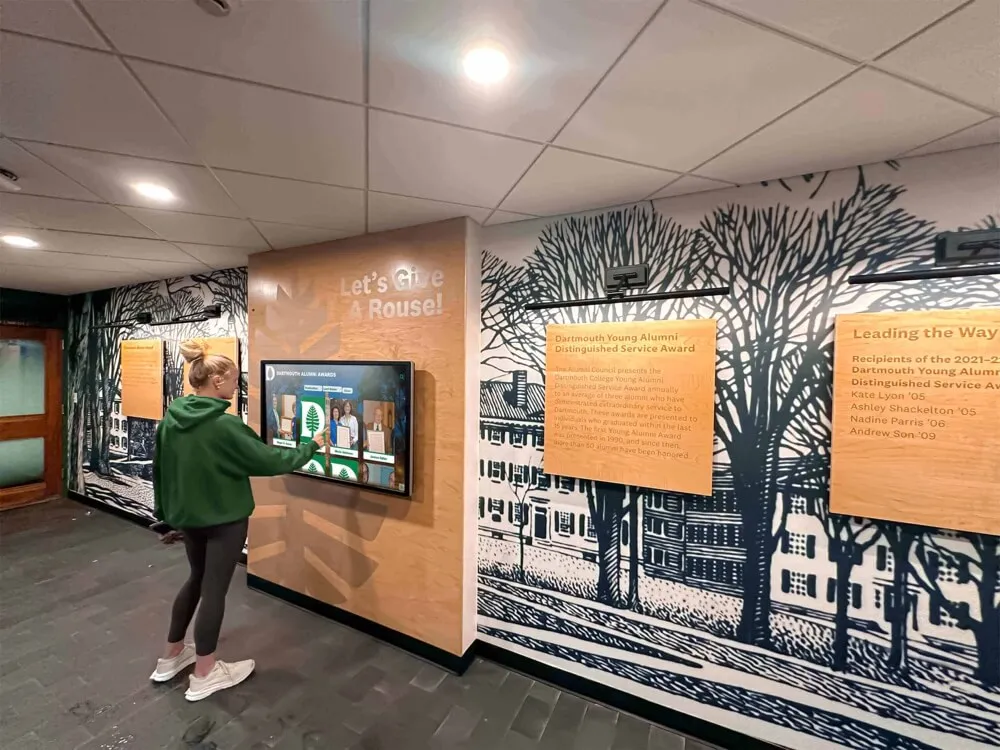
Clear navigation structures enable comfortable exploration without confusion or disorientation
Main Content Area (Center 60-70% of Screen)
This primary zone presents artifact information, stories, and multimedia through layouts adapted to content types:
Grid galleries display multiple artifacts or photographs enabling visual scanning and selection. List views provide detailed directories with sorting and filtering capabilities. Individual artifact pages showcase comprehensive information including high-resolution images with zoom, descriptive text and provenance information, multimedia content (embedded video, audio narration, 3D models), and related content suggestions.
Timeline presentations organize chronological narratives with scrollable interfaces. Map views plot geographic information with location-based content access. And comparison tools enable side-by-side examination of related artifacts.
Footer / Action Zone (Bottom 10-15% of Screen)
Footer areas support secondary actions including social sharing (Facebook, Twitter, email), QR codes linking to mobile experiences or extended web content, home and back navigation reinforcing primary navigation, language selection when serving multilingual audiences, and optional sponsor acknowledgment when displays receive donor funding.
The footer should remain subtle—supporting useful actions without competing for attention with primary content.
Navigation and Information Architecture
Content organization profoundly impacts whether visitors can discover artifacts and information efficiently or become frustrated navigating confusing structures.
Hierarchical Organization Frameworks
Museum collections naturally organize into hierarchical categories that visitors understand intuitively. Effective structures include chronological organization (browse by historical period or decade), thematic grouping (explore by subject, culture, or artifact type), geographic navigation (discover by region or location), curatorial tours (featured collections and expert-guided paths), and alphabetical directories for comprehensive browsing.
Avoid overly complex hierarchies requiring excessive drilling down. Aim for maximum three levels of depth—main category, sub-category, individual artifact. Deeper structures frustrate visitors who abandon exploration before reaching content.
Search and Filter Capabilities
While browsing serves casual exploration, targeted search serves visitors seeking specific information. Comprehensive search should cover all metadata fields including artifact names and descriptions, people and places, time periods and dates, materials and techniques, and curatorial notes.
Faceted filtering enables progressive refinement—visitors search broadly then narrow results through checkbox filters for date ranges, object types, geographic origins, or thematic categories. Clear result counts for each filter option help visitors understand collection composition.
Auto-complete suggestions assist searches by displaying matching terms as visitors type, reducing spelling errors and helping visitors discover correct terminology. And recent search persistence enables visitors to return to previous searches without re-entering terms.
Touch Interaction Patterns and Gestures
Touchscreen interfaces should use familiar interaction patterns people know from smartphones and tablets while accommodating public display contexts that differ from personal devices.
Primary Touch Gestures
Standard gestures include tap for selection and activation, swipe for content navigation and scrolling, pinch-to-zoom for examining high-resolution images, drag for repositioning content or moving map views, and long-press for additional options or context menus.
Avoid complex gesture requirements—stick with the basic patterns that even technologically inexperienced visitors execute naturally. Save advanced gesture interactions for installations where staff can provide orientation.
Button and Touch Target Sizing
Public touchscreens demand larger touch targets than mobile devices. Fingers are less precise on vertical screens than handheld devices, and diverse visitor capabilities require generous sizing. Minimum touch target dimensions should be 60 × 60 pixels for primary actions and 44 × 44 pixels for secondary controls. Space targets with minimum 8-pixel gaps preventing accidental activation of adjacent elements.
Text links require particular attention—underlined text alone makes poor touch targets. Wrap linked text in generous clickable areas extending beyond text boundaries, or convert text links to explicit buttons with clear touch zones.
Visual Feedback and Confirmation
Touchscreens provide no physical feedback, creating uncertainty whether taps registered. Immediate visual feedback confirms interaction through subtle animations (buttons slightly depress when tapped), color changes indicating activation, loading indicators for actions requiring processing time, and transition effects showing relationship between screens.
Never leave visitors wondering whether taps registered. Instant visual response eliminates this uncertainty.

Grid-based card layouts enable intuitive browsing and selection of individual profiles or artifacts
Content Blocks and Motion: Presenting Heritage Material Effectively
Beyond navigation and interaction patterns, thoughtful content presentation design determines whether visitors engage deeply or skim superficially.
Artifact Presentation Modules
Individual artifact or exhibit pages should follow consistent templates supporting comprehensive documentation while maintaining visual appeal.
Essential Artifact Information
Core content includes artifact name or title, accession or catalog number, creation date or period, creator, maker, or cultural origin, materials and dimensions, provenance (ownership history), and current location within museum collections.
Present this information in scannable formats—use consistent label-value pairs rather than dense paragraphs. Consider collapsible sections for detailed technical information serving specialist audiences without overwhelming general visitors.
Contextual Interpretation and Storytelling
Beyond basic documentation, interpretive content transforms objects into meaningful narratives through historical context explaining why artifacts matter, usage descriptions showing how objects functioned, cultural significance connecting artifacts to broader stories, conservation information documenting preservation efforts, and related stories linking artifacts to people, events, and other collection items.
This narrative layer makes collections accessible to general audiences while structured metadata serves researchers requiring systematic information.
Multimedia Integration Strategies
Digital displays enable rich multimedia impossible with traditional exhibits, but poor implementation overwhelms rather than enhances experiences.
High-Resolution Photography
Artifact photography should support detailed examination through resolution adequate for 2-3× digital zoom, multiple view angles showing objects comprehensively, scale references helping visitors understand size, detail shots highlighting significant features, and contextual images showing objects in use or original settings.
Implement zoom functionality through intuitive pinch gestures or magnification buttons. Ensure zoomed images remain sharp—pixelated magnification frustrates visitors and undermines professional credibility.
Video Content Integration
Video serves multiple purposes in museum contexts including expert interviews providing curatorial perspective, conservation demonstrations showing preservation processes, historical footage bringing eras to life, 3D artifact rotation enabling comprehensive examination, and contextual recreations visualizing historical environments.
Keep videos concise—2-3 minutes maximum for most content, with longer options for dedicated viewing areas. Provide clear play buttons rather than auto-play that disrupts ambient museum environments. Include captions serving hearing-impaired visitors and those in sound-sensitive spaces.
Platforms supporting school history archives demonstrate effective video integration combining oral histories, archival footage, and contemporary documentation into layered historical narratives.
Interactive Timeline Presentations
Chronological content benefits from timeline interfaces presenting events, acquisitions, or historical developments across time. Horizontal scrolling timelines work well for extended periods, while vertical layouts suit shorter timeframes and mobile contexts.
Effective timelines include clear date markers and period labels, zoomable views enabling overview and detailed exploration, event cards revealing details on selection, filtering options narrowing displayed content, and visual encoding using color, icons, or size to communicate event significance.
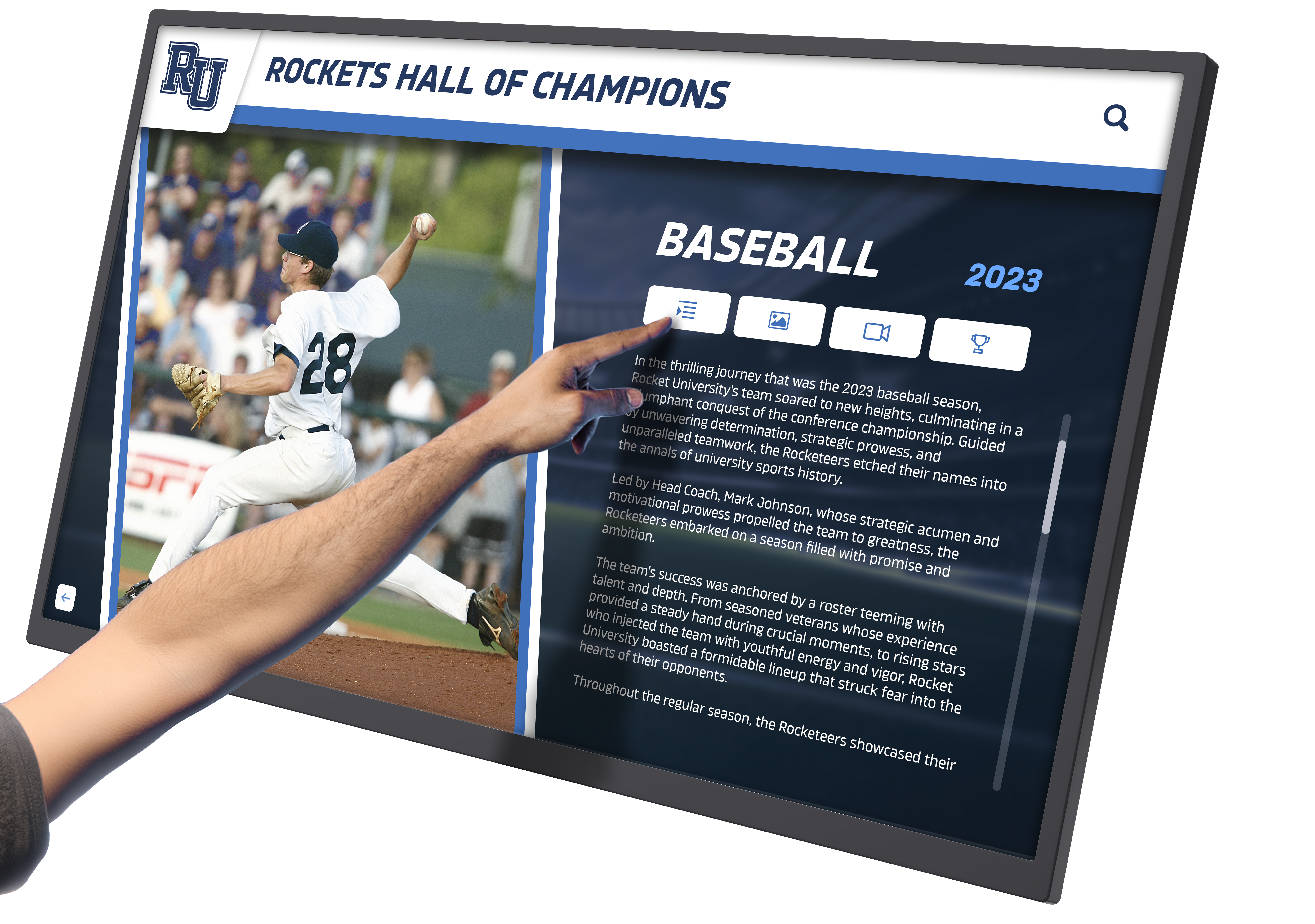
Individual profile pages provide comprehensive information through clear layouts combining images, statistics, and narrative content
Timelines particularly benefit heritage institutions documenting institutional evolution, community development, or artifact provenance across extended timeframes.
Audio Narration and Soundscapes
Audio enriches exhibits through professional narration providing polished storytelling, first-person accounts preserving authentic voices, ambient soundscapes evoking historical atmospheres, and language options serving diverse audiences.
Implement audio through headphone jacks maintaining quiet museum environments, integrated speakers with volume controls for dedicated display areas, or visitor personal devices accessed through QR codes. Always provide transcripts serving hearing-impaired visitors and those unable to use audio.
Animation and Transition Effects
Motion attracts attention and communicates relationships, but excessive animation creates chaotic experiences undermining content focus.
Purposeful Animation Principles
Use motion purposefully to direct attention to new content appearing, communicate relationships through elements entering together, indicate state changes through smooth transitions, and provide engagement through subtle attract-mode animations when idle.
Avoid gratuitous animation including bouncing elements without purpose, spinning logos and decorative motion, parallax scrolling undermining content focus, and auto-advancing carousels forcing specific pacing.
Performance and Smooth Operation
Public displays demand reliable performance through extended continuous operation. Prioritize smooth 60fps animation and transitions, instant response to touch input, efficient asset loading preventing lag, optimized code and media files, and stability through power cycling and extended runtimes.
Test installations under realistic conditions including continuous operation for multiple days, rapid repeated interactions, network interruptions, and power events. Public displays cannot fail gracefully—they must simply not fail.
Brand Integration Checklist: Institutional Identity and Sponsor Recognition
Museum interactive displays should reflect institutional identity while acknowledging supporter contributions when appropriate.
Institutional Branding Elements
Primary Brand Expression
Incorporate museum identity through consistent color palettes matching institutional standards, logo placement in masthead or footer areas, typography aligning with broader museum communications, and design elements complementing physical facility aesthetics.
Avoid overwhelming content with branding—establish identity clearly but keep focus on exhibits rather than institutional self-promotion.
Exhibition-Specific Theming
Dedicated exhibits benefit from unique visual identities within overall institutional frameworks. Temporary exhibitions might use distinctive color schemes, period-appropriate typography reflecting historical eras, thematic imagery supporting exhibition focus, and custom navigation icons connecting to exhibit content.
This layered identity approach distinguishes special content while maintaining overall museum brand coherence.
Sponsor and Donor Acknowledgment
When exhibits receive dedicated funding, appropriate recognition honors supporter contributions without compromising visitor experiences.
Discreet Recognition Approaches
Effective sponsor acknowledgment includes dedicated recognition screens accessible from main navigation, footer placement noting exhibition support, splash screens displaying briefly when displays wake from idle, and companion web content crediting supporters in permanent public records.
Avoid intrusive sponsor content including forced viewing before accessing exhibits, sponsor branding competing with institutional identity, or prominent placement distracting from educational content.
Balance genuine gratitude toward supporters with visitor experience priorities—acknowledge generosity without transforming educational exhibits into promotional vehicles.
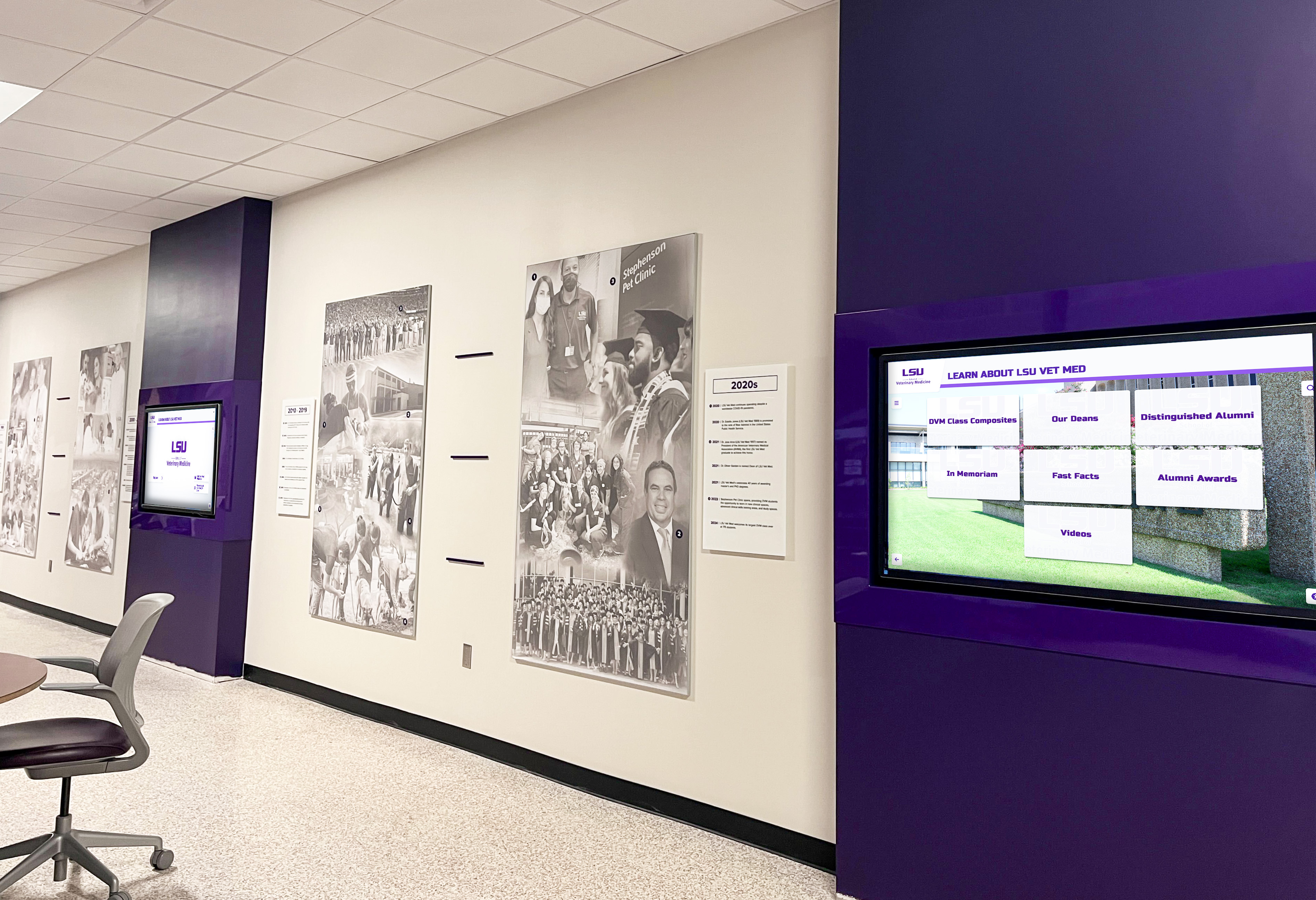
Multiple coordinated displays create comprehensive institutional presence while maintaining consistent visual identity
Accessibility and ADA WCAG 2.1 AA Compliance
Museums serve public missions requiring inclusive access for all community members regardless of abilities. Digital displays must meet accessibility standards through thoughtful design.
Physical Accessibility Requirements
Mounting and Placement Standards
ADA compliance requires interactive controls positioned within reach for wheelchair users. Primary touch interface elements should be 15-48 inches above finished floor. Displays require minimum 30" × 48" clear floor space enabling direct approach. And screen mounting angles should be visible from seated positions (typically 10-15 degree downward tilt).
Consider multiple display installations at varied heights when space permits—standard mounting serves standing visitors while lower companion displays accommodate seated users and children.
Alternative Input Methods
Touchscreens present challenges for visitors with limited motor control or physical disabilities preventing touch interaction. Provide alternatives including physical navigation buttons for basic controls, keyboard input support for search functionality, voice control when technically feasible, and QR codes linking to mobile-accessible web versions controllable through personal assistive technologies.
Digital Accessibility Standards
Visual Accessibility
WCAG 2.1 AA compliance requires color contrast ratios meeting minimum standards (4.5:1 for normal text under 18pt, 3:1 for large text 18pt and above or 14pt bold), resizable text supporting enlargement to 200% without breaking layouts, color independence ensuring information isn’t conveyed through color alone, and focus indicators showing keyboard navigation position.
Test contrast using automated tools like WebAIM’s contrast checker, but verify with actual users representing various visual capabilities.
Screen Reader Compatibility
When displays support screen reader access, ensure alternative text for all meaningful images, semantic HTML markup structuring content logically, keyboard navigation enabling control without touch input, skip navigation links bypassing repeated elements, and clear form labels for search and interactive elements.
Screen reader support remains challenging on public touchscreen kiosks due to privacy concerns about audio output and limited adoption of assistive technologies on shared devices. QR code links to mobile-accessible web versions often provide more practical accessibility than native screen reader support.
Cognitive Accessibility
Clear interfaces serve visitors with cognitive differences through plain language avoiding jargon and complex terminology, consistent navigation patterns minimizing confusion, clear task flows requiring minimal steps, error prevention through clear instructions and confirmation dialogs, and recovery options enabling easy return to known states.
Test interfaces with diverse users including older adults, children, and individuals with limited technological experience ensuring broad usability.
Activation Plan: Deploying and Maintaining Museum Interactive Displays
Successful interactive exhibits require planning beyond initial design and installation—ongoing management ensures displays remain engaging across years of operation.
Hardware Selection and Installation
Display Hardware Considerations
Museum environments demand commercial-grade touchscreen displays designed for continuous public operation. Key specifications include screen sizes appropriate for viewing distances (43-55" for intimate gallery spaces, 65-75" for large halls), anti-glare coatings maintaining visibility under varied lighting, vandal-resistant protection for high-traffic areas, integrated computing power or support for separate media players, and thermal management for enclosed installations.
Avoid consumer displays lacking durability and support for 24/7 operation. While cheaper initially, consumer equipment fails in public environments requiring costly replacement.
Physical Installation Requirements
Professional installation ensures reliable operation through secure mounting preventing theft or tipping hazards, cable management concealing power and network connections, adequate ventilation preventing overheating, accessibility-compliant positioning serving wheelchair users, and appropriate lighting avoiding screen glare while highlighting displays.
Coordinate installation with facility management addressing electrical requirements, network connectivity, structural mounting considerations, and aesthetic integration with existing architecture.
Content Management and Refresh Strategies
Initial Content Development
Launch with comprehensive content providing valuable experiences immediately. Phased implementation works better than sparse initial content promising future additions—visitors base impressions on what they encounter, not future promises.
Prioritize core collection highlights and visitor interest themes over comprehensive coverage. Better to provide excellent depth on limited topics than thin coverage across everything.
Ongoing Content Refresh
Maintain visitor engagement through regular content updates including new acquisition features highlighting recent additions, seasonal rotations connecting to current exhibitions or events, historical anniversary features marking significant dates, visitor-contributed content when appropriate, and enhanced metadata improving discoverability.
Establish sustainable schedules rather than ambitious plans that staff cannot maintain. Monthly minor updates with quarterly major refreshes prove more sustainable than continuous intensive content development.
Organizations managing digital hall of fame systems face similar content management challenges requiring systematic workflows and clear staff responsibilities.

Professional installations create destinations within facilities, drawing visitors to explore comprehensive content
Analytics and Continuous Improvement
Usage Metrics and Visitor Behavior
Digital displays provide analytics impossible with traditional exhibits including total interactions and session counts, average session duration measuring engagement depth, most-viewed content revealing visitor interests, search queries showing what visitors seek, navigation paths exposing intuitive versus confusing flows, and time-of-day patterns informing staffing and programming.
Review analytics quarterly identifying trends and opportunities. Compare performance across multiple displays revealing location effects. And correlate digital engagement with broader visitor metrics exploring relationships.
Iterative Enhancement Processes
Use data to guide improvements through content additions filling gaps that search queries reveal, navigation refinements addressing common confusion patterns, featured rotations highlighting underutilized excellent content, and performance optimization ensuring fast operation.
Digital exhibits should evolve continuously rather than remaining static after launch. Small iterative improvements compound over time creating dramatically better experiences than initial versions.
Specialized Applications: Interactive Displays in Different Heritage Contexts
While core design principles apply broadly, different heritage institutions have unique requirements shaping implementation approaches.
School and University Heritage Displays
Educational institutions document their own institutional histories through interactive displays celebrating heritage while building community pride.
Content Focus Areas
School heritage displays typically showcase institutional founding and development timelines, notable alumni achievement recognition, athletic program histories and championship documentation, performing arts and academic competition accomplishments, architectural evolution and facility development, and community connections including local history and partnerships.
Organizations implementing campus directory touchscreen displays often expand functionality to include heritage content, creating multifunctional installations serving both wayfinding and historical exploration.
Strategic Placement
Effective locations include main entrance lobbies greeting visitors immediately, athletic facility concourses celebrating sports traditions, performing arts center lobbies honoring theatrical heritage, alumni gathering spaces connecting graduates to institutional memory, and classroom buildings demonstrating academic evolution.
Multiple coordinated displays create comprehensive institutional storytelling across campus rather than concentrating heritage in single locations.
Community Museums and Historical Societies
Local heritage organizations document community stories through accessible interactive exhibits.
Participatory Content Development
Community museums benefit from participatory approaches where residents contribute photographs, objects, and oral histories. Interactive displays become living community memory banks growing through collective contribution rather than purely curatorial selection.
Digital platforms supporting community showcase projects enable systematic community participation balancing curatorial quality standards with inclusive contribution opportunities.
Geographical Organization
Local museums naturally organize content geographically—neighborhood histories, landmark documentation, business district evolution, residential area development, and infrastructure changes. Map-based interfaces with location-triggered content provide intuitive navigation reflecting how residents understand community geography.
Athletic Halls of Fame and Sports Heritage Centers
Sports heritage institutions celebrate athletic achievement through interactive recognition systems.
Record Board and Leaderboard Integration
Athletic heritage displays excel at presenting statistical information through interactive record boards enabling filtering by sport, gender, or era, individual athlete profiles with complete career statistics, team championship documentation with rosters and season summaries, video highlights featuring memorable performances, and year-by-year historical record books.
This data-rich presentation serves both recognition and motivation—current athletes see achievements they aspire to match, while alumni revisit accomplishments from their competitive careers.
Learning about displaying athletic awards digitally reveals comprehensive strategies applicable to sports heritage contexts.
Corporate Heritage and Workplace Recognition
Businesses use interactive heritage displays celebrating institutional history and employee achievement.
Organizational Storytelling
Corporate applications document company founding and growth milestones, product evolution and innovation timelines, employee recognition and achievement celebration, community involvement and philanthropic initiatives, and facility development across locations.
This storytelling strengthens organizational identity and culture while honoring contributions across company history.
Conclusion: Designing Interactive Museum Experiences That Inspire Discovery
Digital interactive museum displays transform how heritage institutions engage audiences—addressing space limitations that constrain traditional exhibits, creating personalized exploration experiences matching individual interests, providing multimedia storytelling bringing artifacts to life, enabling sustainable content management through intuitive platforms, and generating insights revealing exactly how visitors engage with material.
The most successful implementations share common characteristics including clear strategic objectives guiding design decisions toward specific outcomes, thoughtful experience layouts organizing content intuitively, accessible interfaces serving all visitors regardless of abilities, compelling content combining scholarship with engaging storytelling, reliable technology providing smooth operation through extended public use, and sustainable management ensuring displays remain current across years of operation.
Get Your Touchscreen Mock-Up
Transform your heritage collection into an engaging interactive experience. Request a custom design preview showing exactly how your content will come to life through purposeful interactive display design.
Book a DemoWhether implementing new interactive exhibits, enhancing existing displays, or planning comprehensive heritage installations, digital touchscreen technology provides capabilities transforming passive viewing into active discovery. Solutions like Rocket Alumni Solutions offer purpose-built platforms specifically designed for museum and heritage applications, combining user-friendly content management with engaging visitor experiences optimized for public touchscreen environments.
Museums face no shortage of important stories to tell. Every collection holds narratives connecting contemporary audiences with past human experiences, cultural traditions, technological innovations, artistic achievements, and community identities. The challenge lies not in having compelling content, but in presenting that content through formats that contemporary audiences—accustomed to interactive digital experiences in every other aspect of their lives—find engaging rather than dated.
Thoughtfully designed interactive displays bridge this gap, honoring heritage significance while meeting modern engagement expectations. Through strategic layout design, intuitive navigation patterns, rich multimedia integration, accessible interfaces, and sustainable content management, museums create experiences worthy of their irreplaceable collections—experiences that inform, inspire, and invite discovery for all who encounter them.
Ready to explore interactive possibilities for your heritage content? Discover how touchscreen technology enhances storytelling through purposeful experience design. Learn about donor recognition displays acknowledging supporter contributions. Explore digital archive strategies organizing comprehensive collections. And understand how digital recognition systems celebrate achievement across diverse contexts.































