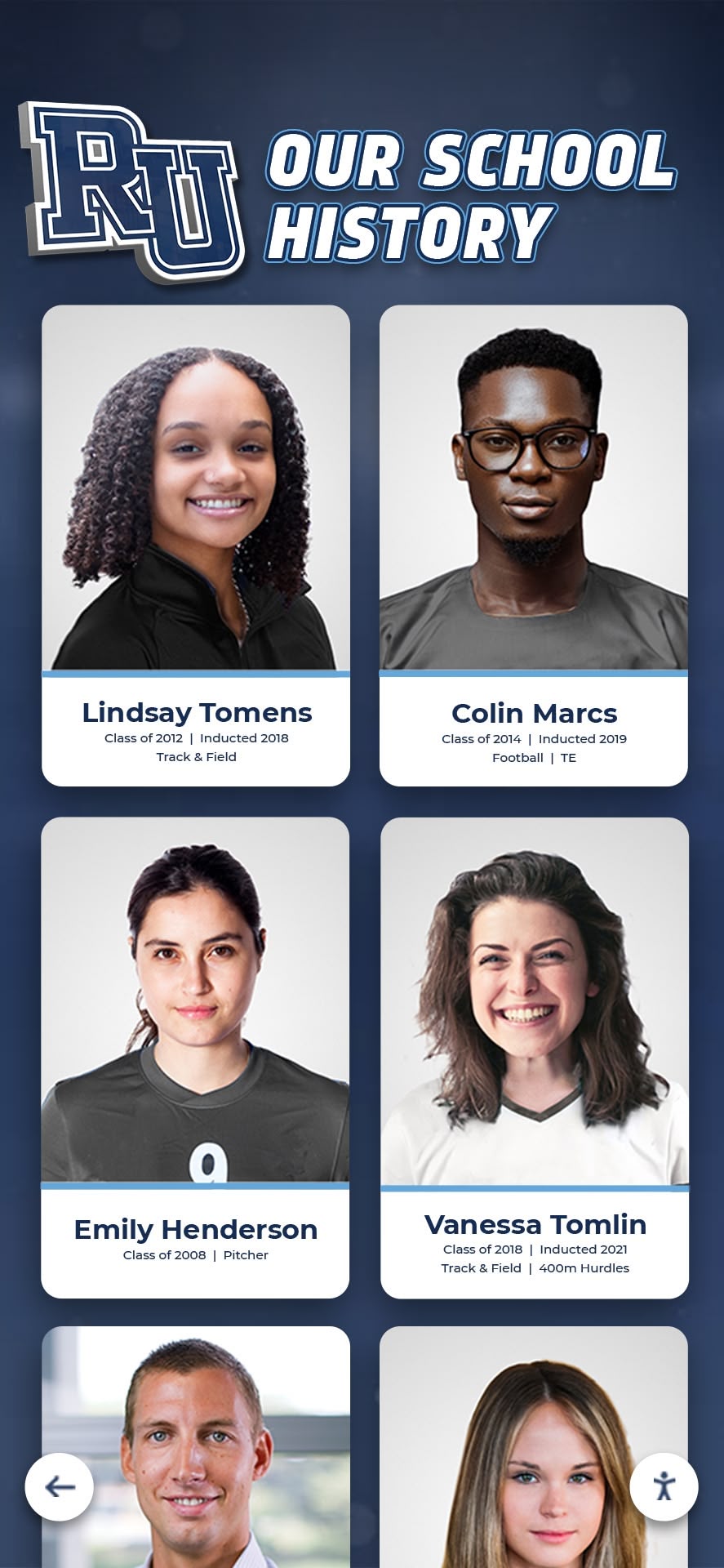




Intent: Demonstrate how digital tools transform static historical content into engaging interactive experiences that inspire curiosity, strengthen community connections, and preserve heritage for future generations.
Historical content holds immense power to educate, inspire, and connect communities with their past—yet traditional presentation methods often fail to capture modern audiences accustomed to interactive digital experiences. Museums struggle with static exhibits that visitors quickly scan and forget. Schools possess rich archives gathering dust in storage while students remain disconnected from institutional heritage. Historical societies manage precious photograph collections accessible only during limited office hours to physically present visitors.
The challenge extends beyond mere storage or display. Physical space constraints force impossible choices about which artifacts and stories deserve visibility. Static presentations provide no pathways for personal discovery or deeper exploration. Traditional formats exclude remote audiences unable to visit physical locations. And aging materials deteriorate while awaiting preservation interventions that never arrive due to resource constraints.
This comprehensive guide explores proven digital tools that bring history to life through interactive experiences—covering touchscreen displays, digital archives, virtual reality applications, multimedia storytelling platforms, and preservation technologies. Whether managing school heritage, curating museum collections, preserving organizational history, or documenting community stories, you’ll discover actionable strategies for leveraging modern technology to transform passive historical content into engaging experiences that resonate with contemporary audiences while ensuring proper preservation for future generations.
Organizations implementing digital history tools report remarkable outcomes including dramatically increased engagement with average interaction times extending from 30 seconds for traditional displays to 5-10 minutes for interactive experiences, expanded accessibility reaching global audiences rather than limiting access to physical visitors, improved preservation protecting endangered materials through systematic digitization, and enhanced educational value as interactive exploration creates deeper learning compared to passive observation.

Digital tools transform scattered historical materials into organized, searchable archives accessible through intuitive interfaces
Understanding Digital History Tools: Core Technologies and Applications
Before exploring specific tools and implementation strategies, understanding the digital history landscape helps organizations make informed technology selections aligned with their heritage preservation and presentation goals.
The Digital History Revolution: Why Technology Matters for Heritage
Historical content has always served crucial cultural, educational, and community-building functions—preserving collective memory, transmitting knowledge across generations, strengthening identity and belonging, and providing context for contemporary experiences. Yet traditional presentation methods face inherent limitations that digital tools directly address.
Traditional History Presentation Limitations
Physical displays and traditional archives impose significant constraints. Space limitations restrict what can be displayed, forcing curators to showcase tiny fractions of collections while valuable materials remain hidden in storage. Static presentations offer no personalization, compelling all visitors through identical experiences regardless of individual interests or background knowledge. Access restrictions limit heritage to those who can physically visit during operating hours. Physical handling causes cumulative damage to fragile materials. And traditional formats struggle to engage audiences accustomed to interactive digital experiences in every other aspect of their lives.
According to museum industry research, the average visitor spends 15-30 seconds viewing traditional exhibit labels and objects before moving on. This limited engagement fails to create meaningful connections or deep understanding—visitors consume surfaces rather than exploring depths.
How Digital Tools Transform Historical Content
Modern digital technologies address traditional limitations comprehensively through several interconnected capabilities:
Interactive exploration enables visitors to control their own discovery journeys, spending time on personally meaningful content while bypassing less relevant material. Rather than consuming predetermined narratives, users navigate according to curiosity and interest.
Unlimited capacity allows comprehensive presentation of entire collections without physical space constraints. Digital platforms can showcase thousands of photographs, documents, artifacts, and stories that would require massive physical galleries if displayed traditionally.
Enhanced accessibility extends heritage beyond physical locations through web-based platforms accessible worldwide, mobile apps enabling exploration from anywhere, and social sharing amplifying content reach through personal networks.
Rich multimedia transforms static images into immersive experiences through high-resolution zoom revealing fine details, embedded video providing motion and context, audio narration offering professional storytelling, 3D object rotation enabling comprehensive artifact examination, and layered information supporting both casual browsing and deep research.
Powerful search and discovery replace sequential browsing with targeted finding, enabling visitors to instantly locate specific people, dates, events, or themes across comprehensive collections spanning decades or centuries.
Proper preservation through systematic digitization creates permanent records unaffected by physical deterioration, protects endangered materials from handling damage, enables redundant backup preventing catastrophic loss, and facilitates format migration ensuring long-term accessibility.

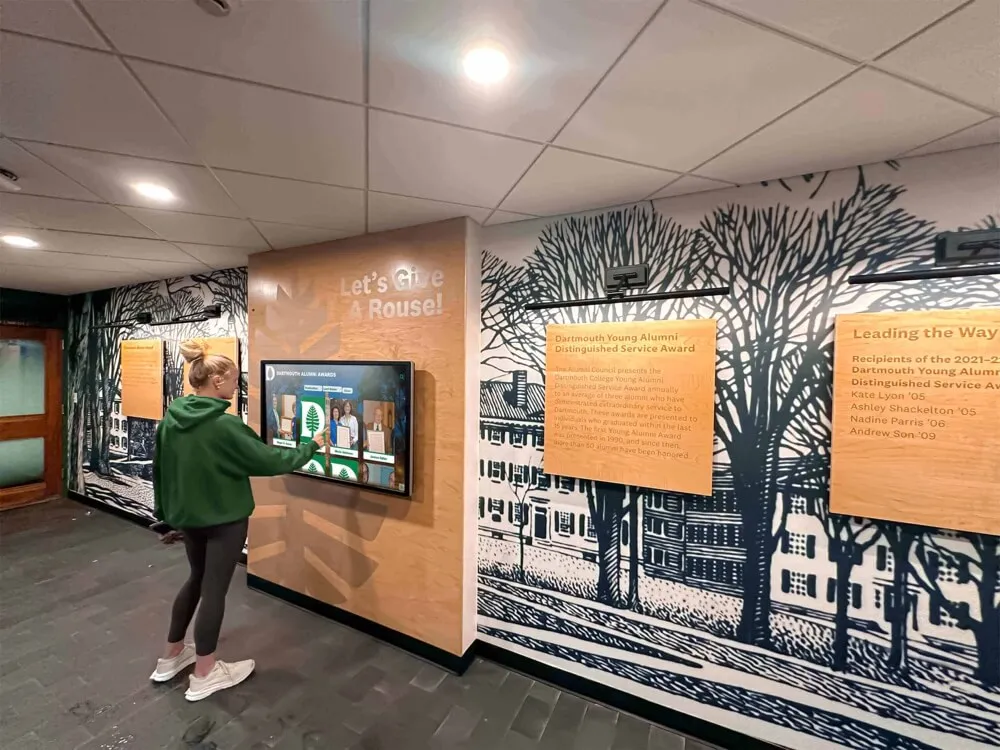
Interactive touchscreen displays positioned in high-traffic areas encourage casual exploration and serendipitous discovery
Categories of Digital History Tools
The digital history ecosystem comprises diverse technologies serving different functions within comprehensive heritage programs.
Interactive Display Technologies
Physical display technologies create engaging experiences in museums, schools, historical societies, and public spaces. Touchscreen kiosks provide intuitive interfaces where visitors explore content through natural touch gestures similar to smartphones and tablets. Large-format interactive walls transform architectural surfaces into discovery experiences supporting multi-user simultaneous interaction. Projection mapping overlays digital content onto physical objects and spaces, creating augmented environments blending past and present. And responsive installations react to visitor presence and movement, creating dynamic experiences rather than static presentations.
Solutions like Rocket Alumni Solutions provide purpose-built platforms designed specifically for schools and organizations, combining user-friendly content management with engaging interactive experiences optimized for public installations.
Digital Archive and Collection Management Platforms
Backend systems organize, preserve, and provide access to digitized historical materials. Digital asset management systems store and organize photographs, documents, audio, and video with robust metadata enabling discovery. Content management platforms provide web-based public access to collections with search, browsing, and user contribution features. Preservation repositories ensure long-term digital preservation through format migration, fixity checking, and standards compliance. And crowdsourcing platforms enable community participation in collection development, identification, and documentation.
Multimedia Storytelling Tools
Narrative technologies transform raw historical content into compelling stories. Timeline applications present chronological narratives through scrolling interfaces combining text, images, and video. Story mapping tools connect historical events to geographic locations through interactive maps. Oral history platforms record, transcribe, and present first-person narratives preserving community voices. And virtual reality experiences immerse users in recreated historical environments enabling experiential learning impossible through traditional formats.
Research and Documentation Technologies
Specialized tools support historical research and content development. Optical character recognition (OCR) converts printed and handwritten text into searchable digital text, transforming old yearbooks, newspapers, and documents into discoverable resources. Transcription software assists with audio and video processing, creating accessible text versions of oral histories and recorded content. Facial recognition identifies individuals across photograph collections, accelerating organization and enabling personalized discovery. And genealogy research platforms help trace individual histories connecting personal and community narratives.
The most effective digital history programs integrate multiple technologies into cohesive ecosystems rather than relying on single-purpose tools. Comprehensive platforms combine interactive displays, online archives, and content management into unified systems where updates automatically propagate across all presentation channels.
Interactive Touchscreen Displays: Making History Tactile and Engaging
Interactive touchscreen technology represents perhaps the most immediately impactful digital tool for bringing history to life in physical spaces where people gather, learn, and connect with community heritage.
Why Touchscreens Excel for Historical Presentation
Touchscreen interfaces leverage familiar interaction patterns people use daily with smartphones and tablets, eliminating learning curves and enabling intuitive exploration. Unlike traditional museum exhibits requiring reading dense text panels or guided audio tours dictating specific sequences, touchscreens empower visitors to navigate according to personal interest and curiosity.
The tactile nature of touch interaction creates physical engagement that passive observation cannot match. Research in museum studies demonstrates that interactive exhibits generate significantly longer engagement times and stronger memory retention compared to traditional static displays. When visitors actively participate in discovery rather than passively consuming curated narratives, they form deeper connections with content.
Touchscreen Advantages for Historical Content
Several characteristics make touchscreen technology particularly well-suited for heritage applications:
Self-service exploration enables access without staff mediation, allowing 24/7 discovery in school hallways, museum lobbies, or public spaces. Visitors explore at their own pace without rushing to keep up with groups or waiting for staff availability.
Unlimited content depth accommodates comprehensive collections impossible to display physically. A single 55-inch touchscreen can provide access to thousands of photographs, documents, videos, and biographical profiles that would require entire gallery wings if displayed traditionally.
Intuitive navigation through familiar gestures—tapping, swiping, pinching to zoom—requires no instruction for digitally literate modern audiences. Even elderly visitors accustomed to smartphones can navigate effectively with minimal assistance.
Engaging multimedia combines high-resolution images, embedded video, audio narration, and interactive elements into rich experiences that static displays cannot match. Historical photographs zoom to reveal fine details. Championship game footage brings faded newspaper accounts to life. Oral history audio preserves authentic voices and perspectives.
Dynamic content updates allow real-time additions without physical reinstallation. Adding new inductees to a digital hall of fame requires simply uploading content through web-based management systems rather than ordering new plaques and coordinating installation.
Analytics tracking reveals exactly which content resonates with audiences, which searches people perform, and where navigation confusion occurs—data-driven insights enabling continuous improvement impossible with traditional displays.

Purpose-built interactive displays create intuitive discovery experiences supporting extended engagement with historical content
Designing Effective Historical Touchscreen Experiences
Creating touchscreen experiences that successfully engage diverse audiences requires thoughtful design balancing aesthetic appeal, functional usability, and compelling content.
Experience Layout and Navigation Architecture
Well-designed historical touchscreen interfaces organize screen real estate into functional zones serving specific purposes. The hero or masthead area at the top establishes context through institutional branding, clear titles identifying the display purpose, and featured content drawing attention to compelling stories. The primary navigation zone provides clear category organization enabling content discovery—common patterns include browsing by decade or era, browsing by theme or subject, searching by name or keyword, and exploring featured collections or timelines.
The main content area presents historical materials through layouts adapted to content types. Grid galleries display multiple photographs enabling visual scanning. Timeline views present chronological narratives. Individual profile pages showcase comprehensive information about specific people, events, or artifacts. And list views provide sortable directories of all collection items.
Footer areas support secondary actions including social sharing, QR codes linking to mobile experiences, home and back navigation enabling easy orientation, and optional sponsor acknowledgment when displays receive donor funding.
Successful navigation requires consistency throughout experiences, obvious home screen access from every location, clear visual indication of current location, and intuitive paths supporting both directed searching and casual browsing exploration.
Content Presentation and Storytelling Approaches
Raw historical materials require careful presentation transforming archives into narratives. Effective approaches include biographical storytelling that moves beyond basic facts to share personal journeys and human connections, contextual framing explaining historical circumstances helping modern audiences understand past events and decisions, comparative perspectives showing evolution over time through before-and-after or then-and-now juxtapositions, and multimedia richness combining photographs, documents, audio, and video into layered experiences supporting varying engagement depths.
The best historical touchscreen experiences balance comprehensiveness with accessibility—providing sufficient depth to satisfy serious researchers while remaining approachable for casual browsers with limited background knowledge. Progressive disclosure patterns reveal basic information initially with expansion options accessing additional detail supporting both use cases.
Accessibility and Inclusive Design Considerations
Creating heritage experiences accessible to diverse audiences requires deliberate attention to accessibility standards. Physical accessibility considerations include mounting heights placing primary controls within reach for wheelchair users (15-48 inches above floor), adequate clear floor space enabling approach, and volume controls for audio content respecting quiet environments. Interface accessibility requirements include text contrast ratios meeting WCAG 2.1 AA standards (4.5:1 minimum for normal text), touch target sizes minimum 44×44 pixels with adequate spacing, text scaling supporting enlargement without breaking layouts, and alternative text for images supporting screen readers when accessibility modes activate.
Cognitive accessibility emphasizes clear language avoiding jargon, consistent navigation patterns minimizing confusion, minimal required steps to accomplish tasks, and obvious recovery options when users navigate into unexpected places.
Organizations should verify accessibility through testing with diverse users including wheelchair users, older adults, and people with visual impairments before finalizing display designs.
Digital Archives: Preserving and Providing Access to Historical Collections
While interactive displays excel at engaging audiences in physical spaces, comprehensive online archives extend historical content to worldwide audiences while ensuring proper long-term preservation.
Building Searchable Digital Archives of Historical Materials
Digital archives transform scattered physical collections into organized, searchable resources accessible from anywhere. The foundation of effective archives involves systematic digitization converting physical materials into digital formats through professional scanning of photographs, documents, and print materials, OCR processing making printed and handwritten text searchable, audio and video digitization preserving recorded content, and 3D scanning capturing physical artifacts when appropriate.
According to the Library of Congress preservation guidelines, archival photographs require minimum 600 pixels per inch scanning resolution ensuring sufficient detail for both preservation and various display uses. Higher resolutions prove particularly important for detailed images or materials likely to be cropped or zoomed during presentation.
Metadata and Organization Systems
Digitization alone provides limited value without robust metadata enabling discovery. Comprehensive metadata frameworks include descriptive information identifying what materials show including people, places, dates, and events, technical metadata documenting file specifications and digitization parameters, administrative metadata tracking rights, permissions, and preservation actions, and structural metadata defining relationships between items within collections.
Effective metadata requires consistency through controlled vocabularies standardizing terminology, clear documentation enabling future staff to understand systems, and batch editing capabilities applying information to groups of related items efficiently.
Organizations implementing historical photo archives should establish metadata standards before digitization begins, ensuring systematic capture of crucial information while materials and institutional knowledge remain available.
Well-organized digital archives enable intuitive discovery through powerful search and filtering capabilities
Web-Based Access and Public Engagement
Digital archives achieve maximum impact when accessible through user-friendly online platforms extending access beyond physical locations.
Online Platform Features and Functionality
Effective web-based archives provide responsive design adapting seamlessly to desktop computers, tablets, and smartphones, powerful search supporting full-text queries across all content and metadata, faceted filtering enabling refinement by date range, subject, person, or other attributes, high-resolution image viewing with zoom capabilities revealing fine details, collection browsing through curated galleries and thematic groupings, and social sharing allowing users to distribute discoveries through personal networks.
Advanced features increasingly include user contributions enabling community members to upload materials and share memories, crowdsourced identification soliciting help with unnamed photographs and incomplete documentation, personalized collections allowing registered users to save and organize favorites, and API access supporting integration with research tools and external platforms.
Balancing Open Access with Privacy and Rights Management
Historical archives often contain materials raising privacy concerns or copyright questions. Schools must balance open access with appropriate restrictions, recognizing that not all historical content should be universally public. Privacy considerations include limiting access to recent materials depicting living individuals without consent, providing options for individuals to request removal or restriction of personal content, and implementing access tiers requiring registration for sensitive materials.
Copyright management requires documenting rights and permissions for donated materials, respecting donor restrictions on use and distribution, clearly communicating usage terms to users, and providing appropriate attribution for content creators.
Many institutions implement hybrid approaches providing open access to materials beyond privacy concern periods while restricting recent content requiring consent or rights clearance.
Preservation Standards and Long-Term Sustainability
Digital preservation extends beyond initial digitization to encompass ongoing stewardship ensuring materials remain accessible across technology changes.
Digital Preservation Best Practices
The Open Archival Information System (OAIS) reference model provides comprehensive framework for long-term digital preservation adopted by major archival institutions. While full OAIS implementation exceeds most organization requirements, key principles include file format management ensuring future accessibility as formats evolve, fixity checking verifying file integrity over time through checksum monitoring, format migration updating files as needed while preserving original quality, redundant storage maintaining multiple copies across different systems and locations, and documented procedures ensuring preservation continuity during staff transitions.
The “3-2-1 rule” provides practical guidance accessible to organizations without specialized preservation expertise—maintain at least three copies of preserved files, store copies on two different media types, and keep one copy in offsite location protecting against localized disasters.
Sustainability and Resource Planning
Digital preservation represents ongoing commitment rather than one-time projects. Organizations should budget for continued storage as collections grow, periodic format migration maintaining accessibility, staff training as technologies and standards evolve, and periodic technology refresh replacing aging systems before catastrophic failures.
Many schools and smaller institutions leverage cloud-based preservation services providing professional infrastructure without requiring local technical expertise or significant capital investment in server hardware.
Multimedia Storytelling: Creating Immersive Historical Narratives
Beyond organizing and presenting historical materials, digital tools enable compelling narrative experiences that bring past events, people, and contexts to life through multimedia storytelling.
Interactive Timeline Applications
Timeline interfaces provide powerful frameworks for presenting chronological historical narratives combining text, images, video, and interactive elements along temporal axes.
Timeline Design Approaches
Effective historical timelines balance chronological precision with narrative clarity. Horizontal scrolling timelines work well for extended periods spanning decades or centuries, enabling users to scroll through time while maintaining consistent vertical space for content. Vertical layouts suit mobile devices and shorter timeframes. Zooming timelines support multiple scales, allowing overview browsing then detailed exploration of specific periods.
Content density requires careful consideration. Sparse timelines highlighting only major milestones risk appearing incomplete, while overcrowded timelines overwhelm users with excessive information. Effective approaches use filtering enabling users to toggle categories on and off, progressive disclosure revealing basic information initially with expansion accessing detail, and featured events providing entry points drawing attention to significant moments.
Several specialized timeline platforms facilitate creation without custom development. TimelineJS from Northwestern University Knight Lab provides free, user-friendly timeline creation using Google Sheets for data entry. Tiki-Toki offers visually rich commercial timelines with multimedia support. And many digital archive platforms incorporate integrated timeline features as standard functionality.
Schools developing historical timelines find that collaborative development involving students, staff, and alumni creates engagement while capturing comprehensive information that single individuals might miss.

Timeline displays present institutional evolution through intuitive chronological interfaces combining major milestones with detailed exploration options
Story Mapping and Geographic Visualization
Historical events unfold across physical spaces, making geographic visualization powerful for presenting location-based narratives.
Geographic Storytelling Platforms
Story mapping tools combine interactive maps with multimedia content, enabling users to explore historical narratives through geographic discovery. StoryMapJS enables creation of maps where users click locations to reveal associated content including text, images, and video. ArcGIS StoryMaps provides professional-grade geographic storytelling with sophisticated cartographic capabilities. And Neatline integrates with Omeka digital collections, plotting archival materials on interactive maps and timelines.
Geographic approaches work particularly well for documenting institutional expansion through campus development maps, local history showing how communities evolved over time, migration narratives tracing movement patterns, and battlefield or historic site interpretation connecting contemporary landscapes with past events.
Effective story maps balance geographic accuracy with narrative flow, ensuring that spatial progression creates coherent stories rather than disconnected location jumping.
Oral History Platforms and Audio Archives
First-person narratives provide irreplaceable perspectives that documents and photographs cannot capture. Digital tools enable systematic oral history collection, preservation, and presentation.
Oral History Collection and Processing
Professional oral history practice requires thoughtful approaches respecting narrators while creating useful historical records. Best practices include informed consent documenting narrator permission for recording and use, structured but conversational interview techniques balancing consistency with natural discussion, professional recording equipment ensuring audio quality suitable for preservation and transcription, and comprehensive documentation noting context, dates, participants, and significant topics.
Processing recorded interviews requires transcription converting audio to searchable text, time-coding synchronizing transcripts with audio playback, metadata creation documenting narrators, topics, and content, and potentially video editing when recording visual content.
Several platforms facilitate oral history management and presentation. Oral History Metadata Synchronizer (OHMS) enables creation of synchronized audio with searchable transcripts and time-coded indexes. StoryCorps Connect provides infrastructure for community oral history collection. And many digital archive systems incorporate oral history modules as integrated functionality.
Organizations implementing community history projects find that oral histories create powerful emotional connections while preserving voices and perspectives that written records omit.
Virtual and Augmented Reality Applications
Immersive technologies enable experiential history impossible through traditional formats, though current costs and complexity limit adoption primarily to well-funded institutions and specialized applications.
Virtual Reality Historical Experiences
VR applications transport users into recreated historical environments through 360-degree immersive experiences. Applications include reconstructions of demolished or altered buildings enabling virtual visits to vanished spaces, recreated events positioning users within historical moments, and archival exploration placing users “inside” photograph or document collections through spatial interfaces.
Current VR limitations include equipment costs requiring dedicated headsets, motion sickness affecting some users, limited resolution compared to non-immersive displays, and development complexity requiring specialized expertise. These constraints restrict VR primarily to museums and large institutions with dedicated technology resources.
Augmented Reality Historical Overlays
AR applications overlay digital content onto physical environments through smartphone or tablet cameras, enabling location-based historical interpretation. Users point devices at buildings, monuments, or landscapes seeing historical photographs, information overlays, or animated recreations superimposed on contemporary views.
AR requires less specialized hardware than VR since smartphones and tablets provide adequate platforms, though content development remains complex and expensive. Effective applications include campus tour augmentation showing historical photos at relevant locations, monument interpretation providing context at historic sites, and museum exhibit enhancement supplementing physical displays with additional digital content.
Specialized Digital History Tools for Schools and Educational Institutions
Educational institutions possess unique historical needs and constraints requiring specialized approaches and tools designed specifically for school contexts.
Digital Yearbook Archives and Alumni Discovery
For most schools, yearbooks represent the single most comprehensive historical record documenting students, activities, and institutional life across decades. Digital yearbook tools transform these printed volumes into searchable, interactive resources.
Yearbook Digitization and OCR Processing
Professional yearbook digitization services provide high-resolution scanning capturing every page clearly, advanced OCR converting printed text into searchable digital content, name extraction identifying and indexing every individual appearance, and delivery in formats optimized for online presentation and interactive displays.
The transformative capability enabling yearbook utility is OCR accuracy—poorly processed yearbooks function merely as page-turning exercises, while high-accuracy OCR enables powerful search where alumni enter names and instantly see every appearance across multiple graduating years.
Schools can pursue DIY yearbook scanning using consumer flatbed scanners, though professional services deliver dramatically superior results in fraction of the time while avoiding potential damage to irreplaceable original volumes. Typical professional costs range $50-$150 per yearbook depending on page count and service level.
Once digitized with quality OCR, yearbooks enable personalized alumni discovery where graduates search their own names and discover forgotten photos from decades ago, browse classmate profiles reconnecting with former friends, and share specific yearbook pages through social media and email.
This personalized discovery creates powerful emotional engagement driving alumni connection far beyond generic historical browsing.
Athletic and Academic Achievement Recognition
Schools recognize student achievement across athletics, academics, arts, and activities—recognition that traditionally exhausts limited physical display space within years. Digital recognition tools eliminate capacity constraints while enhancing engagement.
Comprehensive Achievement Documentation
Digital platforms enable systematic recognition across all achievement categories without space limitations. Athletic recognition can honor hall of fame inductees from all sports and eras, championship teams with complete rosters and season documentation, individual record holders with statistics and context, and all-conference, all-state, and national honors. Academic achievement recognition celebrates honor roll students across all graduating classes, scholarship recipients and academic competition winners, perfect attendance and citizenship awards, and subject-specific excellence in STEM, humanities, and arts.
The unlimited capacity of digital systems fundamentally transforms recognition philosophy from competitive selection (who deserves limited space?) to comprehensive celebration (how do we honor everyone’s achievements meaningfully?).
Interactive Record Boards and Leaderboards
Dynamic digital record displays serve dual recognition and motivation purposes. Interactive features enable visitors to browse records by sport or category, filter by time period comparing eras, view athlete profiles with statistics and photos, watch video highlights of record-setting performances, and see current season leaderboards showing active students approaching school records.
This combination of historical recognition with current performance tracking creates powerful motivation for student athletes and scholars to pursue excellence knowing their achievements will receive permanent digital recognition.
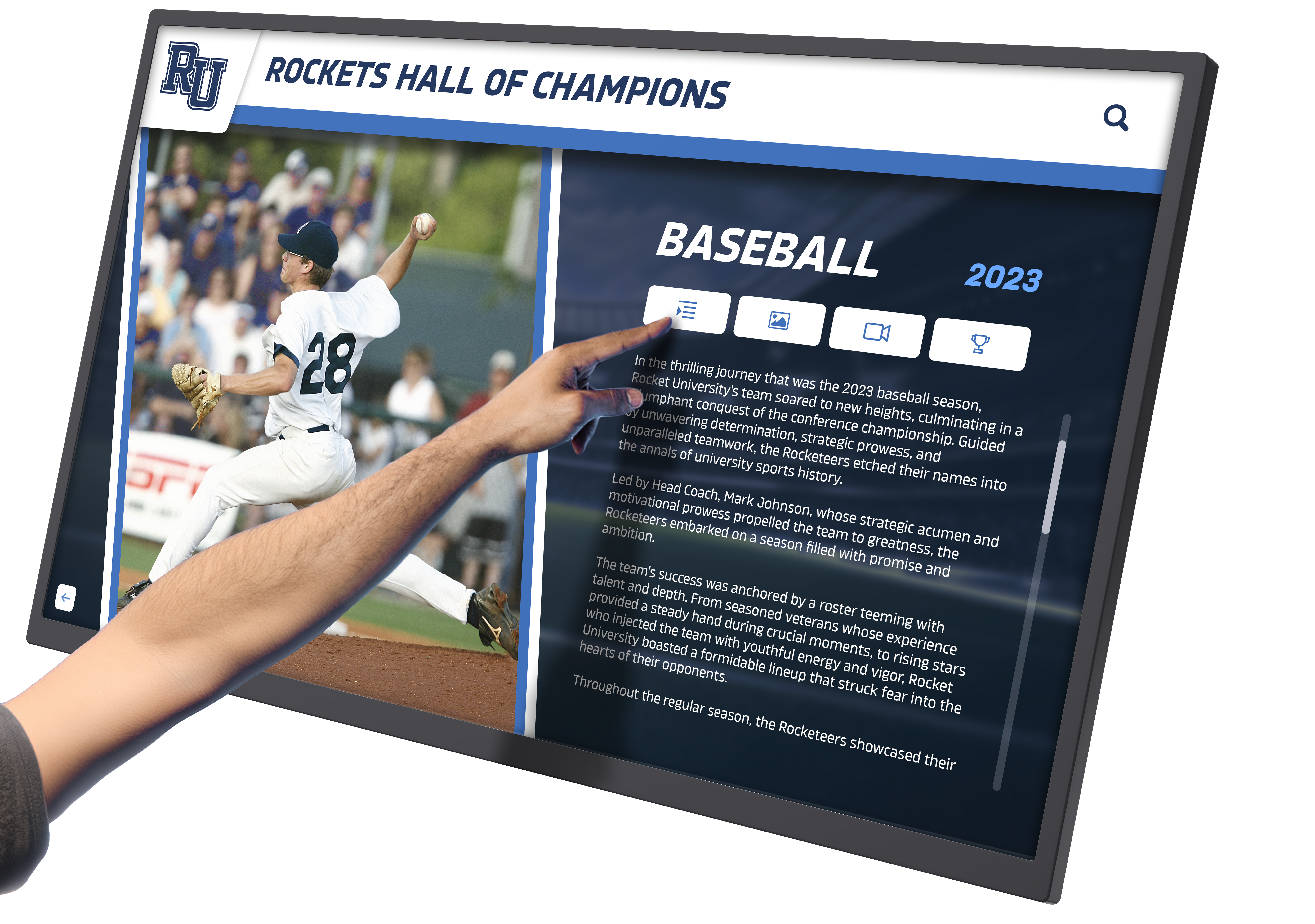
Digital recognition systems honor unlimited achievements while providing intuitive search and filtering for discovery
School History Timelines and Heritage Displays
Comprehensive institutional histories connect students with tradition and legacy, strengthening school identity and pride.
Institutional Timeline Development
Effective school timelines combine major institutional milestones including founding dates, name changes, facility construction, and administrative eras with departmental and program development tracking curricular and extracurricular evolution, significant achievements celebrating championships, academic distinctions, and notable alumni, cultural and demographic changes documenting institutional diversity and community shifts, and facility and campus development showing physical evolution through historical photographs and maps.
Collaborative timeline development involving diverse stakeholders captures comprehensive information while building engagement. Current staff contribute recent history, retired educators share institutional memory, alumni provide graduating class perspectives, and student research projects fill historical gaps through systematic investigation.
Many schools implement timelines as ongoing projects, systematically adding content annually ensuring histories remain current rather than concluding at arbitrary cutoff dates making displays immediately outdated.
Implementation Strategies: Bringing Digital History Tools to Your Organization
Moving from concept to operational digital history programs requires systematic planning addressing technology selection, content development, funding, and organizational considerations.
Planning Your Digital History Initiative
Thoughtful planning before technology selection or content work prevents costly mistakes and false starts.
Define Clear Objectives and Success Criteria
What do you want to achieve through digital history tools? Different objectives suggest different implementation approaches. If preservation of endangered materials is most urgent, prioritize systematic digitization with archival storage. If engaging alumni and building connections is primary, emphasize features enabling personalized discovery and social sharing. If enhancing student learning and school culture is key, focus on accessible displays and curriculum integration. If supporting recruitment and institutional marketing drives initiative, emphasize professional presentation and compelling storytelling.
Clear objectives enable focused evaluation—platforms excelling at all possible functions don’t exist, but specific solutions may perfectly address particular priorities.
Assess Current Historical Materials and Resources
Understanding what you have shapes realistic project scopes. Inventory existing materials including yearbooks, photograph collections, trophies and awards, documents and artifacts, and oral history opportunities. Evaluate conditions noting items requiring urgent preservation intervention. Document organization levels distinguishing systematically cataloged materials from chaotic unsorted collections. And identify content gaps revealing underrepresented periods, people, or institutional aspects.
This assessment reveals project scale, helping distinguish achievable initial implementations from comprehensive long-term visions requiring phased approaches.
Establish Realistic Timelines and Budgets
Digital history projects typically unfold across months or years, not weeks. Plan for technology selection and procurement (1-3 months), content digitization (2-6 months or ongoing), platform setup and configuration (1-3 months), content entry and refinement (ongoing), and hardware installation when applicable (1-2 months).
Budget considerations include initial technology costs, content digitization services when using professional providers, ongoing subscription or maintenance fees, staff time for content management and updates, and future expansion phases as programs mature.
Technology Selection and Vendor Evaluation
Choosing appropriate technologies and partners significantly impacts long-term success and satisfaction.
Build Versus Buy Decisions
Organizations face fundamental choices between custom development and existing platforms. Custom development offers unlimited flexibility and perfect alignment with unique needs, but requires significant initial investment, long development timelines, ongoing technical expertise for maintenance and enhancement, and risk of abandoned projects when key developers leave.
Existing platforms provide faster implementation, lower initial costs, professional ongoing support and updates, and proven functionality based on numerous implementations. However, they offer limited customization, may include unnecessary features inflating costs, and create vendor dependency requiring trust in long-term viability.
Most schools and smaller organizations benefit from existing platforms, reserving custom development for unique circumstances where no available solution adequately addresses specific needs.
Evaluating Platforms and Vendors
When comparing options, assess core functionality alignment with defined objectives, user experience quality for both public visitors and content administrators, technical support availability and responsiveness, demonstrated experience with similar organizations, reference client satisfaction and willingness to share implementation experiences, total cost of ownership including all fees and hidden costs, and long-term vendor viability ensuring continued platform evolution and support.
Request live demonstrations with actual historical content similar to your materials, speak with reference clients about implementation experiences and ongoing satisfaction, and verify accessibility compliance ensuring inclusive access for all community members.
Organizations should resist selecting platforms based primarily on lowest initial cost. Inadequate solutions require replacement within years, while appropriate investments deliver value across decades.
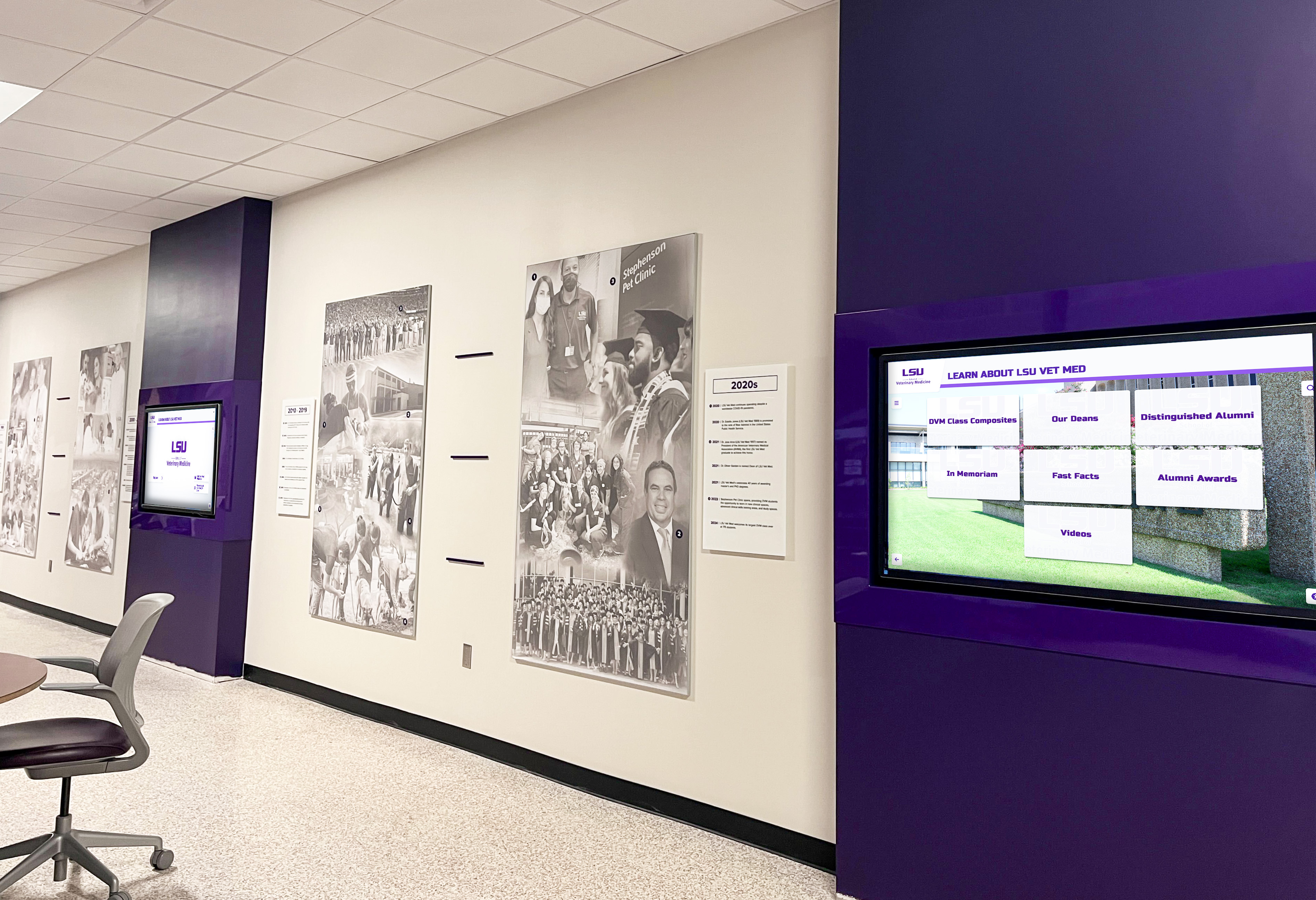
Strategic placement of multiple coordinated displays creates comprehensive historical presence throughout buildings
Content Development and Digitization Strategies
Converting physical historical materials into digital formats suitable for interactive presentation represents substantial work requiring systematic approaches.
Prioritization and Phased Implementation
Limited resources require strategic prioritization focusing initial efforts where they deliver maximum benefit. Consider preservation urgency addressing most deteriorated materials first before they pass recovery points, historical significance prioritizing documentation of foundational eras and significant events, access demand digitizing materials most frequently requested by users, completion opportunity finishing partially digitized collections rather than starting numerous incomplete projects, and engagement potential focusing on content likely to generate strong community interest.
Many successful initiatives implement phased approaches starting with high-impact subsets demonstrating value before pursuing comprehensive coverage. Initial phases might focus on recent decades where alumni remain engaged, specific themes like athletics or performing arts, or representative samples from each historical period.
DIY Versus Professional Digitization Services
Organizations face choices between internal digitization and professional services. DIY approaches reduce direct costs but require equipment investment, staff time or volunteer coordination, technical skill development, and typically produce lower quality compared to professional services. Professional services deliver consistent high quality, faster completion for large projects, proper handling protecting fragile materials, and advanced processing like high-accuracy OCR.
Hybrid approaches work well for many organizations—professional digitization for earliest and most fragile materials while handling recent items internally, scanning representative samples initially with comprehensive processing as budget allows, or focusing professional services on specialized needs like OCR while handling basic scanning internally.
The appropriate approach depends on budget constraints, timeline requirements, staff capacity, and quality standards.
Training, Change Management, and Sustainability
Even excellent technology implementations fail without adequate training, community awareness, and sustainable ongoing management.
Staff Training and Support
Content administrators need comprehensive training covering all common management tasks, clear documentation and video tutorials providing reference resources, practice environments enabling learning without affecting public content, dedicated support contacts for troubleshooting and questions, and periodic refresher training as features evolve or staff turnover occurs.
Cross-training multiple staff members prevents bottlenecks where only one person can manage content, ensuring continuity when individuals are unavailable or leave positions.
Community Awareness and Promotion
Digital history tools deliver value only when communities know they exist and understand access options. Launch activities might include formal unveiling events celebrating new displays or platforms, media coverage through institutional communications channels, social media campaigns featuring compelling historical discoveries, and open house programs inviting community exploration and contribution.
Ongoing promotion sustains engagement beyond initial curiosity through regular social media posts featuring historical content, integration into tours and recruitment programs, curriculum connections encouraging educational use, and reunion programs connecting graduates with era-specific materials.
Establishing Sustainable Workflows
Long-term success requires systematic content management processes rather than periodic intensive campaigns. Designate clear responsibility with explicit expectations, establish regular schedules for content additions, create procedures for community contribution of materials and information, implement quality control reviews ensuring accuracy, and document all processes enabling continuity during staff transitions.
The most common reason digital history initiatives lose momentum is lack of clear ownership and accountability for ongoing management.
Measuring Success and Demonstrating Value
Regular assessment demonstrates digital history tool impact while identifying improvement opportunities and justifying continued resource allocation.
Key Performance Indicators
Different objectives suggest different success measures. For preservation objectives, track number of historical items digitized and safely archived, percentage of collections converted to accessible formats, oral histories recorded before community knowledge is lost, and at-risk materials protected before deterioration. For engagement objectives, monitor physical display interaction counts and session durations, online platform visitors and page views, search queries revealing content interests, social sharing frequency amplifying content reach, and community contributions of photos and information.
For educational objectives, measure student research projects utilizing historical resources, classroom integration of local history, student volunteer participation in heritage work, and intergenerational connections through oral history projects. For institutional advancement, assess alumni engagement increases correlated with platform launches, donor recognition integration, recruitment tour incorporation, and community pride indicators from surveys and feedback.
Continuous Improvement Strategies
Digital history platforms should evolve continuously rather than remaining static after initial implementation. Systematic content development maintains engagement through regular addition of newly digitized materials, current content ensuring platforms remain relevant beyond historical focus, featured rotations highlighting different eras and themes, enhanced metadata adding detail improving discoverability, and multimedia supplementation enriching primarily photo-based content.
User experience optimization responds to analytics and feedback through navigation improvements addressing confusion patterns, search refinements responding to unsuccessful queries, featured content adjustments highlighting underutilized sections, performance optimization ensuring fast loading, and accessibility enhancements serving users with disabilities.
Technology upgrades enable growth through hardware refreshes as displays age, software updates adding capabilities, additional installations extending presence, mobile app development when web platforms prove successful, and integration with other organizational systems creating unified experiences.
Conclusion: Digital Tools Transforming Historical Engagement and Preservation
Digital tools fundamentally transform how organizations preserve, present, and engage communities with historical content—addressing space constraints limiting traditional displays, creating interactive experiences matching modern expectations, extending accessibility beyond physical locations, properly preserving endangered materials, and generating measurable engagement demonstrating heritage value.
The challenge facing schools, museums, historical societies, and organizations managing heritage no longer involves whether to implement digital history tools, but rather which tools to prioritize and how to implement them effectively within resource constraints and institutional contexts.
Get Your Touchscreen Mock-Up
Transform your historical content into engaging interactive experiences. Rocket Alumni Solutions creates custom-designed touchscreen displays and digital archives that bring heritage to life while engaging modern audiences through purposeful design and intuitive functionality.
Schedule Your Design ConsultationThe most successful digital history implementations share common characteristics including clear strategic objectives guiding technology selection, appropriate tools matching organizational capacity and needs, systematic content development building comprehensive coverage over time, engaging presentation creating memorable experiences, and sustainable workflows ensuring long-term currency and relevance.
Organizations should begin where they are with resources available—even modest initiatives focusing on specific collections or themes provide more value than comprehensive plans remaining unimplemented due to overwhelming scope. Build systematically over time, engage communities treating heritage as collaborative rather than purely administrative initiatives, and celebrate progress generating awareness and support.
Ready to explore digital history tools for your organization? Discover how digital storytelling enhances athletic programs through multimedia presentation approaches. Learn about school historical timeline development presenting institutional evolution engagingly. Explore interactive announcement feed systems connecting current events with historical context. Review historical photo archive strategies preserving visual heritage. Consider online digital archive approaches extending access globally. And understand how to digitize old yearbooks systematically preserving school history.
Your community’s history deserves recognition equal to its significance. Decades or centuries of achievement, growth, tradition, and countless individual stories defining collective identity—these remarkable narratives deserve preservation and presentation through thoughtfully implemented digital tools making heritage accessible, engaging, and inspiring for all who encounter them. With systematic planning, appropriate technology, and genuine commitment to comprehensive heritage stewardship, you can create digital history experiences ensuring your organization’s irreplaceable legacy survives and thrives for generations to come.































