




Intent: Inspire reunion organizers to create interactive touchscreen experiences that transform class gatherings from nostalgic conversations into immersive digital journeys through shared memories, achievements, and connections.
High school class reunions represent milestone opportunities for reconnecting with formative communities, celebrating collective journeys, and bridging decades of divergent life paths. Yet traditional reunion formats often struggle to facilitate meaningful engagement across large groups—conversations cluster in familiar cliques, quieter classmates remain peripheral, and rich shared history remains trapped in fading yearbooks and scattered photo albums rather than becoming centerpiece attractions drawing attendees into collective reminiscence.
Interactive touchscreen displays for class reunions solve these engagement challenges by transforming passive event decoration into dynamic exploration hubs where attendees actively discover classmate updates, relive captured moments, explore achievement timelines, and spark conversations through visual storytelling. Unlike static slideshow projections cycling through photos while attendees chat, purpose-designed interactive reunion displays invite hands-on exploration, enable personal discovery, and create focal points that draw diverse groups together around shared digital artifacts.
This comprehensive guide explores how to design, implement, and optimize touchscreen displays specifically for high school class reunion events—covering experience layout strategies, content development approaches, brand integration techniques, and practical deployment considerations that transform reunion technology from novelty into genuine engagement catalyst celebrating your class’s unique story.
Class reunion organizers implementing well-designed interactive displays report dramatically increased attendee engagement, with digital memory walls becoming primary gathering points where classmates spend 15-20 minutes exploring content compared to brief glances at traditional display boards. This sustained interaction creates natural conversation starters, helps attendees reconnect with less-familiar classmates, and transforms reunion venues into immersive environments celebrating class identity.

Interactive touchscreen displays transform passive viewing into active exploration, creating engagement opportunities that traditional static displays cannot match
Understanding Reunion Touchscreen Display Goals
Before designing specific experiences, clarifying what interactive reunion displays should accomplish ensures technology serves genuine event objectives rather than becoming disconnected novelty.
Creating Natural Conversation Catalysts
The primary value of reunion touchscreens lies in facilitating connections between attendees who may not have spoken in decades. Effective displays accomplish this by surfacing shared memories that spark recognition and conversation, highlighting commonalities between classmates who traveled different paths, providing visual anchors for storytelling and reminiscence, and creating comfortable gathering points where groups naturally congregate around content discovery.
Unlike forced ice-breaker activities that many attendees resist, interactive displays offer self-directed exploration that appeals to varied personality types—extroverts gather groups around discoveries while introverts comfortably browse independently before joining conversations about content they’ve found compelling.
Conversation Starter Features
Design displays to facilitate interaction through elements like “then and now” photo comparisons generating immediate reaction and discussion, achievement highlights celebrating diverse post-graduation paths, memorable moment galleries featuring athletics, performances, and school events, superlatives and polls allowing attendees to vote and compare perspectives, and connection mapping showing relationship networks and shared experiences across the class.
Celebrating Collective Achievement and Individual Journeys
Class reunions honor both shared institutional experience and diverse individual paths emerging from common starting points. Touchscreen displays excel at showcasing this duality through content organization that celebrates class-wide milestones alongside individual accomplishments.
Collective Class Content
Highlight shared experience through timeline visualizations showing world events and cultural touchstones from graduation year, class statistics revealing demographic patterns and interesting facts, shared memory collections curated from attendee contributions, group achievement highlights celebrating collective impact, and reunion history documenting previous gatherings and participation over decades.
Individual Profile Content
Honor personal journeys through biographical updates showing current locations, careers, and families, achievement recognition highlighting professional accomplishments and community contributions, personal milestones celebrating life events since graduation, “remember when” anecdotes sharing individual perspectives on shared experiences, and connection requests enabling attendees to exchange contact information digitally.
This balanced approach ensures all attendees feel represented regardless of traditional success metrics—celebrating the teacher who shaped hundreds of lives equally alongside the entrepreneur who founded companies, the parent who raised remarkable families alongside the artist who created meaningful work.

Touchscreen interfaces should balance intuitive navigation with rich content depth, enabling both quick browsing and extended exploration
Preserving Memories Beyond the Event
While reunion touchscreen displays serve immediate event engagement, their greatest long-term value often emerges through preservation of gathered content for lasting access. Digital platforms enable memory capture extending reunion impact far beyond single evening gatherings.
Persistent Access Strategies
Extend value through web-based companion experiences accessible from any device, mobile-responsive designs enabling smartphone and tablet exploration, QR codes linking physical displays to online content, social sharing features distributing highlights to broader networks, and permanent reunion archives preserving content for future gatherings and those unable to attend.
Organizations developing reunion displays for permanent school installations create even greater value by integrating reunion content into ongoing alumni recognition programs that maintain engagement between milestone gatherings while celebrating class heritage within broader institutional community.
Experience Layout: Designing Intuitive Reunion Interfaces
Effective touchscreen experiences for reunions require thoughtful interface design balancing aesthetic appeal with functional usability across attendees with varying technical comfort levels.
Layout Blueprint and Zone Architecture
Organize screen real estate into functional zones serving distinct purposes while maintaining cohesive visual flow:
Zone 1: Hero Area with Class Identity (Top 15-20%)
The masthead establishes immediate context through class year and school identity with prominent logo and colors, reunion milestone (25th, 30th, 50th) celebrating the gathering, date and location grounding the event temporally, and optional featured classmate or rotating highlight showcasing compelling content that draws initial attention.
Zone 2: Primary Navigation (Below Hero, 15%)
Navigation enables intuitive content discovery through clear categories presented as large touch-friendly buttons. Effective structures include browse by name enabling alphabetical exploration, view class timeline showing chronological progression, explore memories accessing photo galleries and stories, see classmate updates finding biographical information, and play trivia or polls accessing interactive engagement features.
Navigation should use plain language familiar to all attendees rather than abstract iconography requiring interpretation. Button labels like “Find Classmates” and “Share Memories” communicate function more effectively than generic “Search” or “Gallery” options.
Zone 3: Content Display Area (Center, 50-55%)
The main content zone presents profiles, galleries, and interactive elements using layouts appropriate for content type. Effective approaches include grid-based card views showing multiple classmates simultaneously with thumbnail photos and key information, list views providing scrollable directories with filtering options, detail views displaying complete individual profiles with expanded content, gallery views showcasing photos and videos with minimal text overlay, and interactive features like polls and quizzes engaging attendees through participation.
Zone 4: Footer and Social Actions (Bottom, 10-15%)
Footer zones provide secondary functions including social sharing enabling attendees to post discoveries, QR codes linking to mobile experiences and contact sharing, sponsor acknowledgment when appropriate, reunion committee recognition celebrating organizing team, and home navigation enabling easy return to starting point.

Card-based interfaces with clear visual hierarchy enable natural exploration patterns matching familiar smartphone experiences
Content Blocks and Motion Design
Beyond static layout, thoughtful animation and transitions enhance usability while creating polish that reflects care invested in reunion planning:
Attraction Loop (Idle State)
When not actively used, displays should run compelling attraction sequences drawing attendee attention and demonstrating interactivity. Effective content includes highlight montages showing compelling classmate photos rotating through dynamic layouts, featured memory spotlights showcasing particularly interesting or humorous submitted content, achievement celebrations rotating through notable classmate accomplishments, and clear interaction prompts inviting attendees to touch and explore.
Attraction loops should cycle every 30-45 seconds, providing sufficient time for observation without becoming repetitive for attendees lingering nearby. Include subtle motion graphics and transitions maintaining visual interest while avoiding aggressive animation that feels dated or distracting.
Transition Animations
Smooth transitions between screens guide attention and create premium feel. Use fade transitions for content swaps within same layout type, slide animations indicating directional relationships (left/right for peer navigation, up/down for hierarchy), zoom effects when moving between overview and detail views, and card shuffle animations when reordering or filtering content.
Keep transition duration between 300-500 milliseconds—fast enough to feel responsive but slow enough to provide clear visual feedback confirming touch input was registered.
Interactive Feedback and Delight
Create engaging experiences through thoughtful micro-interactions including button press states providing immediate visual confirmation, loading indicators managing expectations during content retrieval, success animations celebrating actions like poll votes or memory submissions, and celebratory elements marking significant interactions like finding your own profile or discovering interesting content.
These polish details transform functional interfaces into experiences that feel crafted specifically for your class celebration rather than generic template applications.
Accessibility and UX Checklist
Creating inclusive reunion experiences requires deliberate accessibility consideration ensuring all attendees can comfortably engage regardless of age or ability:
Physical Accessibility
Position displays with screen centers at 48-60 inches above floor for comfortable standing adult interaction, provide adequate approach space allowing wheelchair users and groups to gather, ensure touch targets minimum 44x44 pixels with spacing preventing accidental adjacent button activation, and consider providing seating nearby enabling extended exploration for attendees preferring to sit.
Visual Accessibility
Maintain text contrast ratios minimum 4.5:1 against backgrounds ensuring readability, provide text sizing appropriate for viewing distances (minimum 24pt for body text, 36pt+ for headings), enable optional high-contrast modes for attendees with vision challenges, and avoid relying solely on color to convey information.
Cognitive Accessibility
Use clear, straightforward language avoiding jargon or complex terminology, maintain consistent navigation patterns throughout experience preventing confusion, minimize required steps to accomplish common tasks, provide obvious home/back navigation enabling recovery from wrong turns, and include optional audio accompaniment or narration for attendees preferring auditory information.
Remember that many reunion attendees, particularly for milestone reunions of 30+ years, may have less touchscreen familiarity than younger generations. Interfaces should prioritize simplicity and clarity over sophisticated features that risk alienating significant portions of attendees.

Grid layouts enable efficient browsing while providing sufficient visual information to guide selection decisions
Brand Integration: Celebrating Class Identity
Effective reunion displays should immediately communicate class identity through thoughtful brand integration reflecting shared institutional experience.
Visual Identity Implementation
School Colors and Mascot Integration
Apply institutional branding systematically throughout experience creating immediate recognition and nostalgia. Use school colors as dominant palette for navigation elements, headers, and key UI components, incorporate mascot imagery in headers, backgrounds, or as watermarks connecting to institutional pride, reference iconic campus locations through environmental photography creating place-based connection, and integrate class mottos, songs, or traditions familiar to all attendees.
Typography and Style Reflecting Era
Consider typography and design aesthetics evoking the graduation era. Classes from the 1970s might embrace period-appropriate fonts and color palettes referencing that decade’s aesthetic, while more recent classes might prefer contemporary clean design reflecting current sensibilities. This temporal alignment creates additional layer of nostalgia making displays feel custom-crafted for specific class rather than generic template.
Yearbook-Inspired Design Patterns
Many reunion displays benefit from design languages referencing yearbook layouts familiar to all attendees. Incorporate elements like superlative categories echoing senior polls and awards, composite grid layouts showing class members organized by name or activity, section dividers matching yearbook organizational structure, and quote callouts highlighting memorable sayings and inside jokes.
Custom Backgrounds and Environmental Imagery
Campus Location Photography
Create strong sense of place through imagery featuring iconic campus locations meaningful to attendees. Include exterior shots of main building entrances where students gathered daily, athletic facilities hosting memorable competitions and Friday night lights, cafeteria and common areas where social interactions occurred, classrooms and specialized spaces like auditoriums and libraries, and landscape or architectural details unique to campus identity.
For classes whose schools have undergone significant renovation or construction, juxtaposing “then and now” photography creates powerful visual storytelling showing institutional evolution while honoring historical memory.
Archival Imagery and Historical Context
Integrate historical photography from graduation year creating temporal context including world events and news headlines from senior year, popular culture references like music, movies, and fashion trends, local community events and developments, technological artifacts like computers, phones, and entertainment devices showing how daily life has transformed, and price comparisons for gas, housing, and everyday items providing humorous perspective on change.
These contextual elements help attendees reconnect not just with each other but with the specific moment in time they shared together, creating richer reminiscence and conversation opportunities.
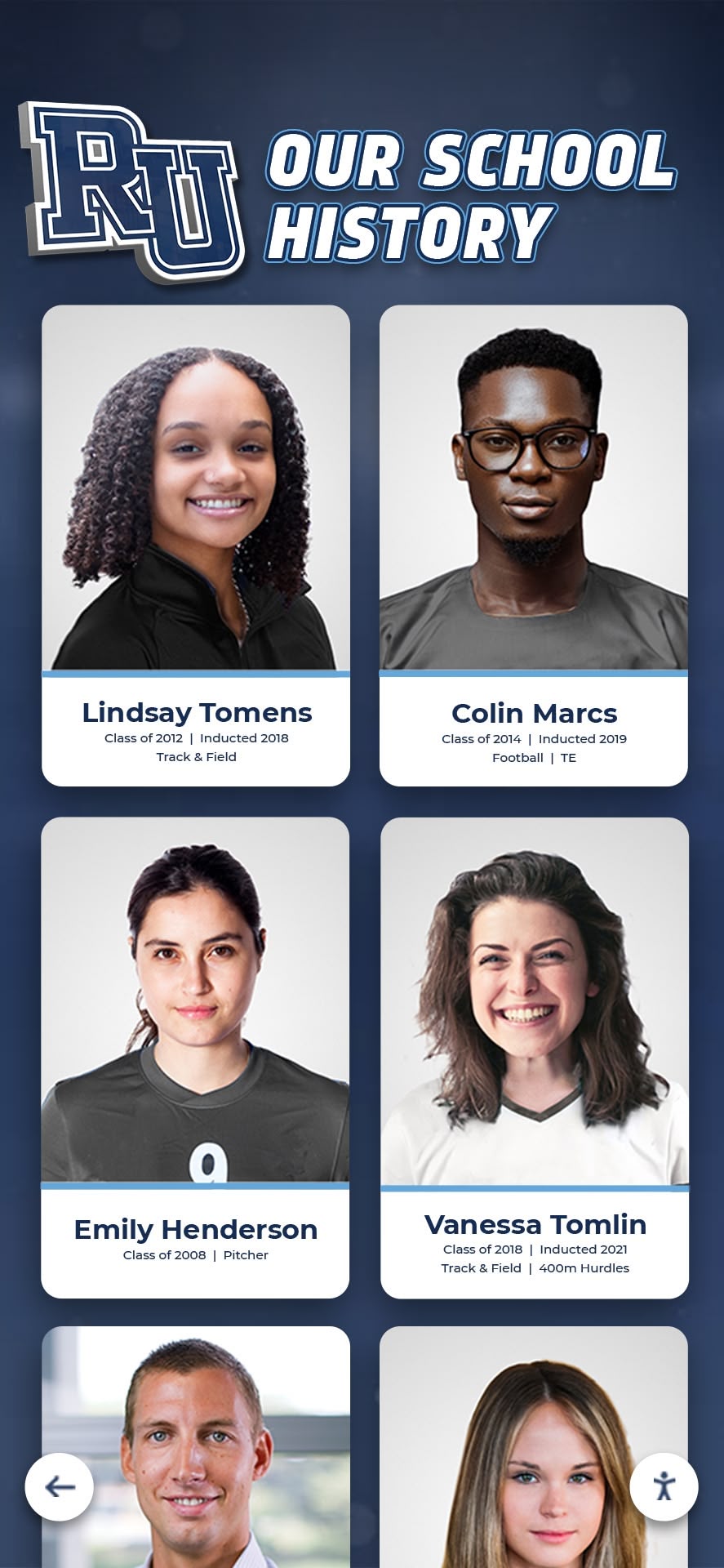
Portrait-based layouts showcase individual identities while maintaining cohesive visual organization across large groups
Content Development Strategy
The value of reunion touchscreen displays depends entirely on content quality and relevance—technology provides delivery mechanism but substance determines engagement.
Gathering Classmate Information
Successful reunion displays require systematic content collection well before event date:
Pre-Reunion Outreach Campaigns
Begin gathering content 6-9 months before reunion through structured requests including biographical update forms collecting current location, career, family information, achievement highlights, and personal milestones, photo submissions requesting current photos, family pictures, and favorite memories from school years, memory story prompts asking attendees to share favorite moments, funny incidents, or meaningful experiences, and permission confirmations ensuring classmates consent to inclusion and photo usage.
Use multiple communication channels reaching diverse classmate segments including email campaigns to known addresses, social media outreach through class Facebook groups and LinkedIn networks, postal mail for classmates without digital presence, and phone campaigns for harder-to-reach individuals.
Consider creating dedicated reunion website or online portal where classmates can submit content directly, review submissions from others, and build anticipation for gathering. Platforms like interactive alumni directories provide frameworks adaptable for reunion-specific applications.
Archival Research and Content Curation
Supplement direct submissions with institutional and community archives including school yearbooks providing official photos and documentation, local newspaper archives capturing athletic competitions, performances, and awards, school newsletters and programs documenting events and activities, athletic and activity records showing championships and achievements, and historical school records when accessible with appropriate permissions.
Content Completeness Standards
Establish achievable inclusion standards balancing comprehensive coverage with content quality. Some reunion organizers require participation—only including classmates who submit updates and photos—while others pursue universal inclusion using yearbook photos and publicly available information for non-respondents alongside richer profiles for active participants.
Consider tiered content levels where all classmates receive basic profiles (name, yearbook photo, last known information) while engaged participants receive enhanced profiles with current photos, biographical narratives, and personal content. This approach ensures nobody feels excluded while incentivizing participation.
Writing Compelling Profile Narratives
Transform submitted information into engaging biographical content:
Profile Content Structure
Organize individual profiles following consistent format including current status snapshot showing location, career, and family, post-graduation journey highlighting major life events and career progression, meaningful achievements celebrating professional accomplishments and community contributions, favorite school memories sharing personal perspectives on shared experiences, messages to classmates offering greetings or specific acknowledgments, and connection information enabling follow-up communication.
Storytelling Techniques
Make profiles engaging through specific details rather than generic descriptions, conversational tone matching reunion’s celebratory atmosphere, humor and personality reflecting individual voices, contextual connections linking to shared experiences or other classmates, and authentic voice maintaining submitted content’s character rather than over-editing into uniform style.
Rather than stating “Works as teacher,” write “Teaches 4th grade at Lincoln Elementary where she inspires students the same way Mrs. Peterson inspired our class.” This approach creates connections and demonstrates individual stories connecting back to shared institutional experience.

Professional photography combined with campus environmental backgrounds creates cohesive recognition presentations celebrating institutional community
Developing Interactive Engagement Features
Beyond passive content browsing, interactive features increase engagement and participation:
Polling and Voting Features
Create participation opportunities through superlative voting allowing attendees to vote on categories like “Most Changed,” “Least Changed,” “Most Likely to Be President,” updating classic yearbook traditions, prediction reveals showing original senior year predictions alongside current reality, reunion-specific polls gathering opinions on event elements or future reunion preferences, and trivia competitions testing knowledge of class history and shared memories with leaderboard tracking.
These interactive elements transform displays from information repositories into active participation platforms encouraging repeated engagement throughout event.
Memory Submission and Sharing
Enable real-time content contribution through photo uploads allowing attendees to share pictures from event itself or historical photos they’ve brought, memory story submissions enabling attendees to add personal reminiscences during event, digital signature or message boards where attendees leave greetings and comments, and social media integration pulling content from event hashtags into display in real-time.
This dynamic content creation transforms displays from fixed presentations into living documents evolving throughout reunion and capturing event itself for future memory.
Connection Facilitation
Support ongoing relationships beyond single event through digital business card exchange enabling easy contact information sharing, reunion group directory providing comprehensive class contact database, interest-based groups identifying classmates with shared hobbies or locations, and future gathering coordination tools enabling subset groups to plan regional meetups or interest-based connections.
Resources on digital reunion memory walls provide comprehensive frameworks for building engagement features that extend reunion impact beyond single evening gathering.
Implementation and Activation Plan
Successful reunion display deployment requires careful planning across technology selection, content preparation, logistics coordination, and event-day management.
Technology Selection and Platform Options
Choose solutions appropriate for reunion context and budget:
Hardware Considerations
Reunion displays typically use 55-75 inch commercial touchscreen displays for events hosted in venues accommodating multiple simultaneous groups, portable kiosk stands enabling easy transport and positioning in rental venues, reliable touch technology preferably capacitive for responsive consumer-like interaction, sufficient brightness for venues with challenging lighting, and integrated audio when incorporating video content or sound effects.
For single-evening events, rental options often prove more practical than purchase. Many AV rental companies offer touchscreen displays with delivery, setup, and retrieval included. For classes planning multiple reunion events or integrating displays into permanent school installations, purchase makes more economic sense.
Software Platform Options
Several approaches serve reunion applications with varying complexity and customization:
Custom web development creates fully tailored experiences but requires significant technical investment and development time. Purpose-built recognition platforms like Rocket Alumni Solutions provide sophisticated features designed specifically for celebrating people and achievements, though may exceed simple reunion needs. Interactive presentation software like TouchCast or IntuiFace enables custom content creation without programming. And simplified web-based solutions using responsive websites optimized for touchscreen interaction offer accessible entry points for technically-comfortable organizers.
Evaluate platforms considering content management accessibility for non-technical reunion committee members, display quality and user experience polish, analytics capabilities revealing engagement patterns, budget constraints, and implementation timeline relative to reunion date.
Network and Infrastructure Requirements
Ensure venue provides reliable WiFi or cellular connectivity if content requires internet access, sufficient electrical outlets and power capacity, space accommodating display with adequate approach area and viewing distance, and appropriate ambient lighting avoiding screen glare while maintaining visibility.
Schedule venue walk-through 1-2 months before event confirming technical feasibility and identifying any infrastructure limitations requiring adjustment.

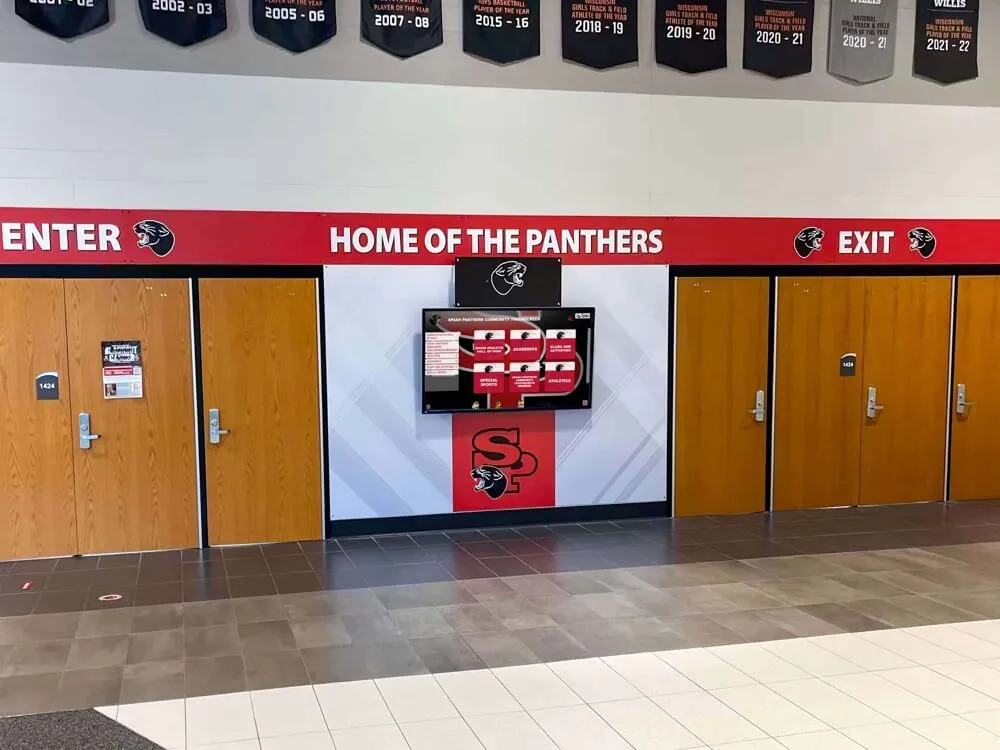
Prominent lobby placement ensures maximum visibility while creating focal points that naturally draw attendee exploration
Strategic Placement and Installation
Display effectiveness depends critically on physical positioning within reunion venue:
Optimal Venue Locations
Position displays in high-traffic circulation areas where attendees naturally pass rather than sequestered corners, near entrance areas where attendees arrive and form initial impressions, adjacent to social gathering spaces like bars or appetizer stations where people naturally congregate, and visible from main event spaces drawing attendees to explore during natural conversation lulls.
Avoid positioning displays in noisy areas where audio content becomes inaudible or in extremely bright spaces where screen visibility suffers. Consider providing comfortable seating nearby encouraging extended exploration rather than only standing interaction.
Multi-Display Strategies
For large reunions or complex content, multiple displays serve specialized purposes. Consider content specialization where Display 1 shows classmate profiles and directories, Display 2 features photo galleries and video content, and Display 3 hosts interactive features like polls and trivia. Alternatively, use replica content on multiple displays reducing wait times in high-traffic periods, or employ timeline organization where displays correspond to different time periods or aspects of class history.
Testing and Preparation
Schedule installation and testing minimum 2-3 hours before attendees arrive allowing time for troubleshooting. Verify touch responsiveness across entire screen, content loads properly without errors, network connectivity remains stable, display brightness and audio volume suit venue conditions, and navigation functions intuitively.
Assign reunion committee members as “display ambassadors” who understand functionality and can assist attendees, encourage engagement, and monitor for technical issues during event.
Event-Day Management and Engagement
Maximize display value through proactive management during reunion:
Active Promotion and Encouragement
Don’t assume displays will attract attention automatically. Actively promote them through mentions during welcome remarks and announcements, inclusion in event programs and signage, ambassador invitations encouraging hesitant attendees, and social media posts during event highlighting discoveries and encouraging exploration.
Capturing Engagement Moments
Document display interaction creating meta-content for future memories. Photograph attendees discovering their profiles or engaging in conversation around displays, capture video testimonials of attendees sharing what they’ve found meaningful, record particularly funny or touching moments as displays surface forgotten memories, and collect feedback about experience for future reunion planning.
Technical Support and Troubleshooting
Designate technically-comfortable committee member as point person for issues. Common challenges include touchscreen calibration drift requiring recalibration, network connectivity drops requiring reconnection or switching to cellular backup, frozen applications requiring restart, and user confusion requiring assisted navigation.
Have venue contact information readily available for facilities-related issues and maintain backup entertainment plans if displays experience unrecoverable failure.
Integrating displays into architectural elements creates permanent installations that feel intentionally designed rather than afterthought additions
Measuring Success and Capturing Value
Evaluating display effectiveness ensures reunion investment delivers value while informing future event planning:
Engagement Metrics and Analytics
Quality platforms provide quantitative data revealing usage patterns:
Quantitative Measures
Track total interactions showing frequency of display usage, average session duration indicating depth of content engagement, most-viewed profiles revealing which classmates generate highest interest, popular content categories showing which sections attract attention, peak usage times identifying when displays see heaviest traffic, and social shares quantifying content distribution beyond physical venue.
Compare these metrics against total attendance calculating engagement rate percentage. Successful reunion displays typically achieve 60-80% engagement rates meaning that portion of attendees actively used displays during event.
Observational Assessment
Supplement analytics with qualitative observation including display dwell time watching how long people engage, group formation patterns noting whether displays attract clusters or individual use, conversation catalysts observing whether display content sparks discussion, emotional responses watching for laughter, surprise, or touching moments, and accessibility noting whether all demographic segments engage equally.
Post-Event Feedback and Evaluation
Gather attendee perspectives through multiple channels:
Structured Feedback Collection
Distribute post-reunion surveys asking specifically about display experience including awareness (did you notice the interactive displays?), usage (did you explore the content?), value perception (how much did displays enhance your reunion experience?), content quality (was information accurate and interesting?), technical usability (was interface easy to use?), and future interest (would you want similar displays at future reunions?).
Social Media and Informal Feedback
Monitor class social media groups, email responses, and casual conversations for organic comments about displays. Often the most valuable feedback emerges spontaneously when attendees share what resonated most or suggest improvements for future events.
Long-Term Impact Assessment
Evaluate lasting value through ongoing engagement with digital content, new connections formed attributable to display discoveries, increased participation in class communications following reunion, and interest in permanent school-based recognition installations.
Many reunion committees discover that successful event displays generate enthusiasm for permanent alumni recognition installations at schools, creating lasting celebration of class legacy while benefiting current students who gain inspiration from alumni achievement.
Special Applications and Creative Approaches
While standard reunion displays focus on classmate profiles and memories, creative applications extend possibilities:
Memorial Recognition and Remembrance
Thoughtfully honor deceased classmates through dedicated memorial sections with respectful presentation including professional portraits when available, biographical tributes celebrating lives and contributions, classmate remembrances sharing personal memories and perspectives, and contribution opportunities directing memorial giving to meaningful causes or scholarship funds.
Establish clear editorial guidelines ensuring memorial content maintains appropriate tone and accuracy. Consider involving families when developing memorial tributes ensuring representation honors deceased classmates in ways families find meaningful.
Achievement Celebration and Recognition
Highlight remarkable post-graduation accomplishments through dedicated recognition features showcasing professional achievements across diverse career paths, community service and philanthropic leadership, creative accomplishments in arts and entertainment, academic research and teaching excellence, athletic achievement in amateur or professional competitions, and entrepreneurial success and business leadership.
Establish inclusive recognition criteria celebrating multiple achievement dimensions rather than narrow definitions of success. The teacher who shaped hundreds of students deserves equal recognition alongside the executive who led major organizations.
Scholarship and Giving Integration
For classes with scholarship funds or philanthropic initiatives, integrate giving opportunities into displays through scholarship recipient profiles showing students supported by class generosity, giving level recognition acknowledging reunion campaign contributors, impact storytelling demonstrating concrete outcomes of class philanthropy, and convenient donation mechanisms enabling immediate contribution via QR codes linking to giving platforms.
Resources on digital donor recognition provide frameworks adaptable for class-based fundraising contexts creating recognition that honors generosity while inspiring continued support.
Permanent Installation Opportunities
Many successful reunion displays evolve into permanent school installations celebrating class legacy while inspiring current students. Schools increasingly welcome digital recognition installations funded by reunion classes as lasting gifts that serve multiple constituencies including current students who gain inspiration from alumni achievement, prospective families evaluating school communities during tours, future reunion attendees who discover comprehensive class histories, and school communities celebrating collective heritage.
Permanent installations justify increased technology investment delivering value across decades rather than single evening, while creating naming opportunities recognizing reunion classes or individual donor leadership.
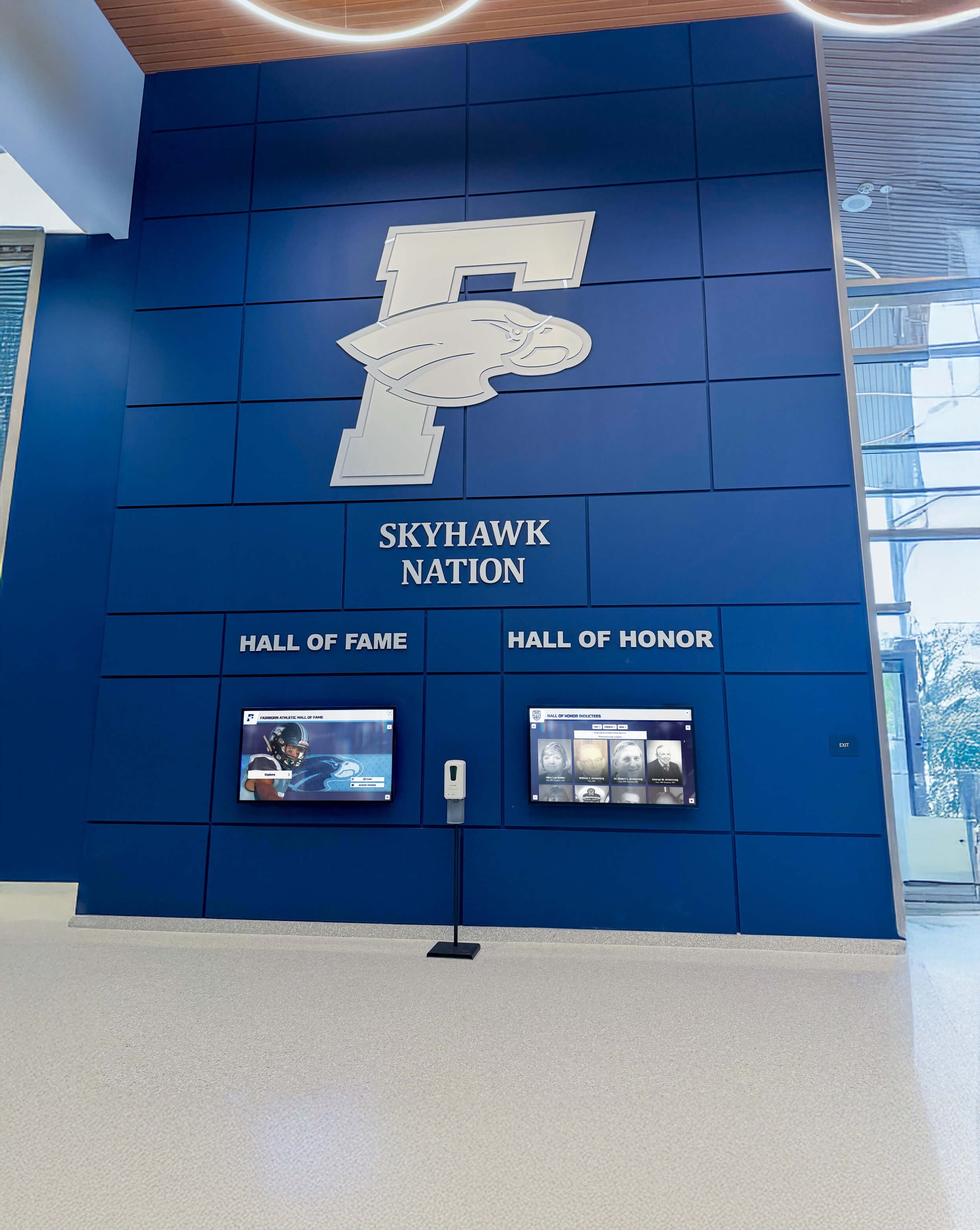
Comprehensive branding integration creates signature institutional spaces where reunion displays complement broader recognition programs
Common Implementation Challenges and Solutions
Understanding typical obstacles helps organizers proactively address challenges:
Budget Constraints and Funding Strategies
Interactive displays require investment ranging from $3,000-8,000 for rentals to $15,000-30,000 for permanent installations:
Alternative Funding Approaches
Reduce individual burden through early-bird ticket premiums allocating portion of proceeds to display funding, corporate sponsorships particularly from classmate-owned businesses, dedicated technology fees as separate fundraising category, class fund allocation drawing from existing treasury when available, and permanent installation campaigns positioning displays as legacy gifts creating lasting impact.
Some classes discover that display investment becomes reunion highlight justifying premium ticket prices that attendees willingly pay for enhanced experience. Frame displays as experience investment rather than decoration expense emphasizing engagement value.
Content Development Capacity and Timeline
Comprehensive content requires significant development effort 6-9 months before reunion:
Resource Strategies
Distribute work through reunion committee subcommittees focused on content gathering, multiple content collection waves beginning early and continuing through event, volunteer recruitment engaging classmates passionate about history and connection, and professional support contracting designers or developers for technical implementation while committee manages content.
Start with achievable scope focusing on active participants before pursuing universal inclusion. Launch with 40-50 quality profiles rather than attempting incomplete coverage of 300+ classmates generating overwhelm without delivering value.
Technical Complexity and Support Requirements
Reunion organizers often lack technical expertise raising implementation concerns:
Support Strategies
Simplify through platform selection prioritizing user-friendly content management, vendor partnership choosing providers offering comprehensive support and setup assistance, technical liaison recruiting classmate with relevant professional background to own technical aspects, rental options leveraging provider setup and retrieval rather than managing equipment, and backup planning maintaining alternative entertainment if displays experience failure.
Quality vendors understand that reunion committees need reliable, turnkey solutions rather than complex systems requiring constant technical intervention. Prioritize vendors offering white-glove service including setup, testing, and event-day support.
Privacy and Consent Management
Displaying classmate information and photos requires careful consent management:
Privacy Best Practices
Establish clear policies through explicit consent requests when gathering content, opt-in rather than opt-out approaches, content review processes enabling classmates to verify information before display, removal protocols honoring requests to exclude information, and data protection ensuring submitted information remains secure and limited to approved uses.
Communicate privacy practices clearly during content collection alleviating concerns about information usage. Respect that some classmates prefer limited participation or exclusion—forced inclusion damages trust and creates negative experience.
Conclusion: Creating Reunion Experiences That Reconnect and Celebrate
Interactive touchscreen displays represent powerful tools for transforming class reunions from standard social gatherings into immersive celebration experiences honoring shared history while bridging decades of divergent paths. By eliminating information accessibility barriers that plague paper directories and static displays, enabling personal discovery and exploration matching individual interests, creating natural conversation catalysts surfacing shared memories and connections, and preserving reunion content for lasting access extending event impact, well-designed touchscreen technology delivers reunion enhancement that traditional approaches cannot match.
Get Your Touchscreen Mock-Up
Transform your class reunion with custom-designed interactive displays that celebrate your unique story. Rocket Alumni Solutions creates engaging touchscreen experiences purpose-built for alumni connection and celebration.
Schedule Your Design ConsultationThe most successful reunion touchscreen implementations start with clear engagement objectives understanding what connections and experiences matter most to your class, select appropriate technology balancing sophistication with usability and budget, develop compelling content celebrating both collective identity and individual journeys, position displays strategically where they become natural gathering points, and actively promote engagement ensuring displays fulfill their connection-building potential rather than becoming ignored decoration.
Whether planning your first reunion or enhancing milestone gathering for classes celebrating 25, 30, or 50 years since graduation, interactive touchscreen displays provide proven frameworks for creating memorable experiences that honor shared institutional foundation while celebrating the remarkable diversity of paths emerging from common starting point.
Ready to explore touchscreen display options for your class reunion? Discover comprehensive high school reunion planning strategies that integrate technology with traditional event elements. Learn about alumni welcome area design approaches applicable to reunion venues creating inviting gathering spaces. Explore digital recognition display buyer considerations helping evaluate technology options. And when you’re ready to discuss your specific reunion vision and class story, connect with Rocket Alumni Solutions to explore how purpose-built interactive displays can help you create the reunion experience your classmates deserve—one that genuinely reconnects friends, celebrates collective achievement, and honors the shared journey that binds your class together across decades and distance.































