




Interactive kiosk software has transformed how schools communicate with students, parents, staff, and visitors. From digital wayfinding systems helping newcomers navigate sprawling campuses to interactive recognition displays celebrating student achievements, modern kiosk solutions address dozens of operational and engagement challenges that traditional static signage cannot solve.
Yet selecting the right interactive kiosk software proves remarkably complex for educational institutions. School technology directors face competing vendor claims, unclear pricing structures, varying feature sets, integration requirements with existing systems, accessibility compliance demands, and limited budgets requiring careful investment decisions. A solution perfect for student check-ins might lack the content management features needed for recognition displays. Software excelling at wayfinding could prove unnecessarily expensive for basic announcement needs. Hardware designed for corporate lobbies might fail in high-traffic school environments where durability and accessibility matter most.
This comprehensive guide helps schools navigate interactive kiosk software selection by examining essential features, comparing pricing models, evaluating leading platforms, and providing implementation frameworks that ensure successful deployments aligned with specific institutional needs and budgets.
Schools implementing strategic interactive kiosk solutions report measurable improvements including enhanced student engagement through dynamic content that captures attention better than static posters, improved campus navigation reducing confusion during open houses and athletic events, streamlined administrative processes from visitor check-ins to event registrations, strengthened community connections through recognition displays celebrating achievements, and better communication effectiveness reaching audiences who bypass traditional channels like email and newsletters.

Modern interactive kiosks serve multiple functions from wayfinding to recognition displays, creating engagement points throughout educational facilities
Understanding Interactive Kiosk Software for Educational Environments
Before evaluating specific platforms, understanding what distinguishes educational kiosk software from generic digital signage helps schools identify solutions matching their unique requirements.
What Makes Educational Kiosk Software Different
Interactive kiosk software designed specifically for schools addresses challenges rarely encountered in retail or corporate environments including extreme content variety spanning announcements, events, recognition, wayfinding, and emergency alerts all within single installations, accessibility compliance requirements under ADA and Section 508 mandating specific interaction patterns and alternative access methods, student privacy considerations governed by FERPA regulations affecting what information can be displayed publicly, durability requirements for high-traffic environments with thousands of daily student interactions, and budget constraints requiring affordable solutions without compromising essential functionality.
Core Functionality Expectations
Educational institutions typically require kiosk software capable of content management systems enabling non-technical staff to update displays easily, touchscreen interaction supporting both directed tasks like wayfinding and exploratory browsing of recognition content, scheduling capabilities allowing time-based content rotation throughout school days and seasons, multi-display management when schools deploy kiosks across multiple buildings or campuses, offline functionality ensuring displays work even during network interruptions, and analytics tracking engagement to demonstrate return on investment and inform content strategies.
This combination of requirements makes generic digital signage software often inadequate for school applications, while retail-focused kiosk platforms include unnecessary transaction features that inflate costs without adding educational value.
Primary Use Cases Driving School Kiosk Adoption
Schools deploy interactive kiosks to solve specific operational and engagement challenges across several core categories.
Wayfinding and Campus Navigation
Large school campuses, especially high schools and universities, struggle with visitor orientation during open houses, athletic events, performing arts programs, and community functions. Interactive wayfinding kiosks provide searchable building directories, interactive campus maps with routing, event location information, parking guidance, and accessibility route planning.
Effective wayfinding systems reduce staff interruptions from directional questions, improve visitor experiences during first campus encounters, and ensure accessibility by providing digital alternatives to complex printed maps that challenge visitors with visual or cognitive disabilities.

Intuitive touchscreen interfaces enable all ages to access information independently without requiring staff assistance
Recognition and Achievement Celebration
Digital recognition displays honor student accomplishments, athletic achievements, academic honors, arts program successes, and community service contributions. Unlike static trophy cases with limited physical space, interactive recognition kiosks provide unlimited capacity for comprehensive achievement celebration across multiple decades and categories.
Students and families engage deeply with recognition content that includes photos, videos, performance statistics, and complete achievement narratives impossible with traditional plaques. Schools report recognition displays significantly improving school culture, student motivation, and community pride when implemented comprehensively. Learn more about touchscreen software capabilities for recognition applications.
Communication and Announcements
Interactive announcement kiosks strategically placed in cafeterias, main entrances, and student commons display lunch menus, daily schedules, upcoming events, club meetings, sports schedules, and important administrative notices. The dynamic nature captures student attention more effectively than easily-ignored paper posters or email announcements.
Advanced systems include student-facing content submission workflows allowing clubs and organizations to request announcement placements, approval processes for administrative oversight, and scheduling ensuring time-sensitive content appears only during relevant periods.
Visitor Management and Check-In
Security-conscious schools implement visitor check-in kiosks at main entrances requiring guests to register, receive printed badges, and acknowledge school policies. Integration with background check databases and banned visitor lists strengthens school safety while streamlining front office administrative burdens.
Check-in kiosks free office staff from repetitive tasks, create audit trails documenting campus visitors, and improve security response times by providing real-time data about who currently occupies buildings.
Student Services and Self-Service Access
Progressive schools deploy student-facing kiosks providing library catalog searches, class schedule lookups, grade access (with authentication), college application information, career exploration resources, and counseling appointment booking. Self-service access reduces administrative bottlenecks while giving students convenient information access during passing periods and lunch breaks.
Understanding how schools leverage displays for specific applications like digital hall of fame systems in professional venues provides inspiration for educational recognition implementations.
Essential Features for School Interactive Kiosk Software
Effective educational kiosk platforms must include specific capabilities addressing school operational requirements and user expectations.
Content Management and Publishing Capabilities
Schools need systems enabling non-technical staff to maintain current, engaging content without vendor dependencies or specialized training.
Intuitive Content Management Interfaces
Quality platforms provide web-based content management systems accessible from any device without software installation, visual editors supporting drag-and-drop layout design rather than requiring HTML coding, template libraries offering pre-designed layouts for common content types like announcements and recognition profiles, media libraries organizing photos, videos, and documents with efficient upload and management tools, and preview functions allowing content review before publication.
Content management complexity directly affects whether schools actually maintain current content or allow displays to become stale with outdated information diminishing user trust and engagement.

Grid-based content layouts enable efficient browsing of large content collections while maintaining visual appeal and user-friendly navigation
Advanced Scheduling and Content Rotation
Schools require sophisticated scheduling allowing time-based content display during specific periods, date-range scheduling showing seasonal content automatically, recurring schedules for weekly or daily content patterns, priority layering enabling emergency announcements to override standard content, and playlist creation rotating multiple content items within designated time blocks.
Effective scheduling means lunch menus appear only during relevant hours, sports team recognition rotates to feature different programs weekly, and graduation-related content automatically appears only during spring semester.
Multi-Display Management
Schools with multiple kiosks across campuses need centralized management providing synchronized content across all displays, display grouping enabling building-specific or grade-level content targeting, individual display overrides for location-specific information, remote monitoring showing which displays currently operate correctly, and bulk content updates changing information across multiple kiosks simultaneously.
Centralized management proves essential for maintaining consistency across large installations while supporting necessary location-specific customization.
Interaction Design and User Experience
Educational kiosks serve diverse audiences from young elementary students to elderly grandparents attending events, requiring exceptionally intuitive interfaces.
Touch-Optimized Interface Design
Quality educational kiosk software includes large, finger-friendly touch targets meeting minimum 44-pixel touch target recommendations, clear visual feedback when users interact with elements, simple navigation with obvious back buttons and home reset options, minimal text entry through extensive use of selection-based interfaces, and error prevention through confirmation dialogs before consequential actions.
Poorly designed interfaces create frustration causing users to abandon kiosks without accomplishing tasks, wasting institutional investments in hardware and software.
Accessibility and Universal Design
ADA compliance and inclusive design principles require adjustable text sizing allowing vision-impaired users to read content, sufficient color contrast meeting WCAG 2.1 AA standards minimum (4.5:1 for normal text), screen reader compatibility for users with visual disabilities, alternative input methods beyond touch for users with motor disabilities, and content available in multiple languages for non-English speaking community members.
Many schools overlook accessibility during initial kiosk deployments only to face expensive retrofits when compliance gaps emerge. Proactive accessibility planning protects institutions from legal exposure while ensuring equitable access to information and services.
Engagement Features Supporting Exploration
Recognition and celebration kiosks particularly benefit from search and filtering enabling users to find specific individuals or achievements, categorization allowing browsing by year, sport, honor type, or department, related content linking connecting alumni to their teams and classmates, social sharing allowing users to share achievements on personal social media, and QR code generation providing mobile-friendly access to displayed content.
These features transform passive viewing into active exploration increasing dwell time and emotional engagement with displayed content.

Strategic placement in high-traffic areas ensures maximum visibility while integration with existing décor maintains cohesive facility aesthetics
Technical Requirements and Integration Capabilities
Educational kiosk software must coexist within complex institutional technology ecosystems requiring specific technical capabilities.
System Integration and Data Connectivity
Schools benefit from platforms supporting student information system integration pulling names, photos, and achievement data automatically, content management system connections synchronizing website content with kiosk displays, calendar and scheduling system integration displaying upcoming events automatically, directory service authentication enabling secure student-facing services, and API availability allowing custom integrations with specialized school applications.
Integration capabilities reduce administrative burden by eliminating duplicate data entry while ensuring information consistency across all school communication channels.
Hardware Compatibility and Requirements
Quality software platforms support diverse hardware configurations including various screen sizes from compact 22-inch displays to large 55-inch installations, multiple operating systems allowing deployment on Windows, Android, or specialized kiosk OS, both landscape and portrait orientations matching display mounting locations, peripheral compatibility with barcode scanners, badge printers, and payment terminals, and ruggedized hardware options for high-use educational environments.
Vendor lock-in to specific hardware limits schools’ ability to optimize deployments for different locations and budget constraints.
Security and Content Protection
Educational institutions require robust security including role-based access control limiting content management to authorized staff, content approval workflows preventing publication of inappropriate material, scheduled automatic backups protecting against content loss, remote device management enabling software updates and troubleshooting without physical access, and kiosk mode lockdown preventing users from accessing underlying operating systems or inappropriate content.
Security gaps allowing unauthorized content modification or student access to restricted systems create significant liability exposures and undermine kiosk credibility.
Understanding professional approaches like those used in visitor kiosks in hospitality environments provides insights applicable to educational visitor management implementations.
Interactive Kiosk Software Pricing Models and Cost Considerations
Understanding kiosk software pricing structures helps schools budget appropriately while comparing vendor proposals accurately.
Common Pricing Structures in Educational Kiosk Software
Educational technology vendors employ various pricing models reflecting different business strategies and total cost of ownership implications.
Per-Display Licensing Models
Many providers charge monthly or annual fees per active kiosk display typically ranging from $30-$150 monthly per screen depending on feature sophistication. This model scales proportionally with deployment size making initial pilots affordable while potentially creating significant costs for large multi-campus implementations.
Schools should clarify whether per-display pricing includes unlimited content updates, technical support, software updates, and content storage, or whether additional fees apply for these essential services.
Institution-Wide Platform Fees
Alternative providers charge flat institutional fees regardless of display quantity, typically ranging from $2,000-$10,000 annually based on school size and feature requirements. This approach benefits schools planning extensive multi-building deployments since per-display costs decrease substantially as kiosk quantities increase.
Flat-fee models provide budget predictability and remove disincentives against expanding successful kiosk programs to additional locations when usage demonstrates value.
Perpetual Licensing Options
Some platforms offer perpetual software licenses with upfront costs typically $1,500-$5,000 per display followed by optional annual maintenance fees of 15-20 percent covering software updates and technical support. This traditional software licensing approach minimizes long-term costs for schools committing to platforms for 5+ year periods.
Schools should carefully evaluate whether perpetual licenses include future feature enhancements or only maintenance updates fixing bugs without adding capabilities.

Commercial-grade kiosk installations combine professional software with durable hardware designed for continuous operation in high-traffic educational environments
Total Cost of Ownership Considerations
Software licensing represents only part of comprehensive kiosk deployment costs requiring consideration of complete financial commitments.
Hardware Investment Requirements
Commercial-grade touchscreen displays suitable for educational environments typically cost $1,500-$4,000 per unit depending on screen size, touch technology, and durability features. Schools often underestimate hardware requirements by considering consumer-grade displays lacking commercial reliability specifications.
Additional hardware costs include mounting systems and security enclosures ($200-$800), network connectivity infrastructure for locations lacking ethernet access ($100-$500), electrical work for power installation ($200-$1,000), and replacement screen protectors and peripherals as wear items require periodic updates.
Implementation and Content Development
Beyond hardware and software, successful deployments require professional installation services ($500-$2,000 per location), initial content development creating templates, media assets, and launch content ($1,000-$5,000 depending on content volume), staff training ensuring administrators can manage systems effectively ($500-$2,000), and ongoing content management either through dedicated staff time or outsourced services.
Schools frequently underestimate content development requirements only to deploy impressive hardware displaying minimal or generic content that fails to engage users or deliver expected value.
Maintenance and Operating Costs
Ongoing ownership costs include software subscription renewals or maintenance fees, technical support when issues arise, periodic hardware repairs or replacements especially for high-use touchscreens, electricity costs for 24/7 display operation, and content updates ensuring freshness and relevance.
Comprehensive five-year total cost of ownership typically ranges from $8,000-$20,000 per kiosk location depending on software selection, hardware specifications, content complexity, and whether schools leverage internal resources or external services for ongoing management.
Understanding ROI frameworks used in other recognition contexts like donor recognition walls in schools helps justify interactive kiosk investments to stakeholders.
Budget Optimization Strategies
Schools can maximize kiosk value while controlling costs through strategic approaches.
Phased Implementation Plans
Rather than comprehensive campus-wide deployments, successful schools often begin with single-location pilots in highest-impact areas like main entrances or athletic facilities, measuring engagement and refining content strategies before expansion. This approach distributes costs across multiple budget cycles while proving value before major investments.
Pilot implementations also provide learning opportunities identifying integration requirements, content management workflows, and hardware specifications informing subsequent deployments.
Multi-Purpose Display Planning
Maximizing per-display ROI requires planning kiosks serving multiple functions rather than single purposes. A well-designed kiosk can simultaneously provide wayfinding, display recognition content, show announcements, and deliver emergency alerts—justifying higher initial investments through consolidated functionality.
Single-purpose displays often struggle to justify costs compared to traditional alternatives, while multi-function kiosks deliver value impossible through any combination of static signage.
Educational Pricing and Grant Opportunities
Many kiosk vendors offer educational institution discounts ranging from 10-30 percent off standard commercial pricing. Schools should always inquire about educational pricing, multi-year payment discounts, and quantity discounts for multi-display purchases.
Additionally, technology grants from state education agencies, federal E-Rate programs (for qualifying communication technologies), and private foundations often fund kiosk deployments when applications emphasize accessibility improvements, safety enhancements, or student engagement outcomes.
Leading Interactive Kiosk Software Platforms for Schools
Evaluating specific platform capabilities helps schools match solutions to their particular requirements and budgets.
Rocket Alumni Solutions: Purpose-Built Educational Recognition Platform
Platform Overview and Core Strengths
Rocket Alumni Solutions provides specialized interactive kiosk software designed specifically for educational recognition applications including athletic hall of fame displays, academic honor recognition, alumni celebration, donor recognition, and community achievement highlighting. Unlike generic kiosk platforms requiring extensive customization, Rocket’s purpose-built approach includes pre-configured templates, layouts, and workflows optimized for school recognition use cases.
Distinctive Features for Educational Recognition
The platform excels in comprehensive content management supporting unlimited honoree profiles without per-person fees, rich multimedia integration seamlessly incorporating photos, videos, and documents, automated content organization with sophisticated filtering and search capabilities, social media integration enabling achievement sharing, and professional design templates requiring no graphic design expertise.
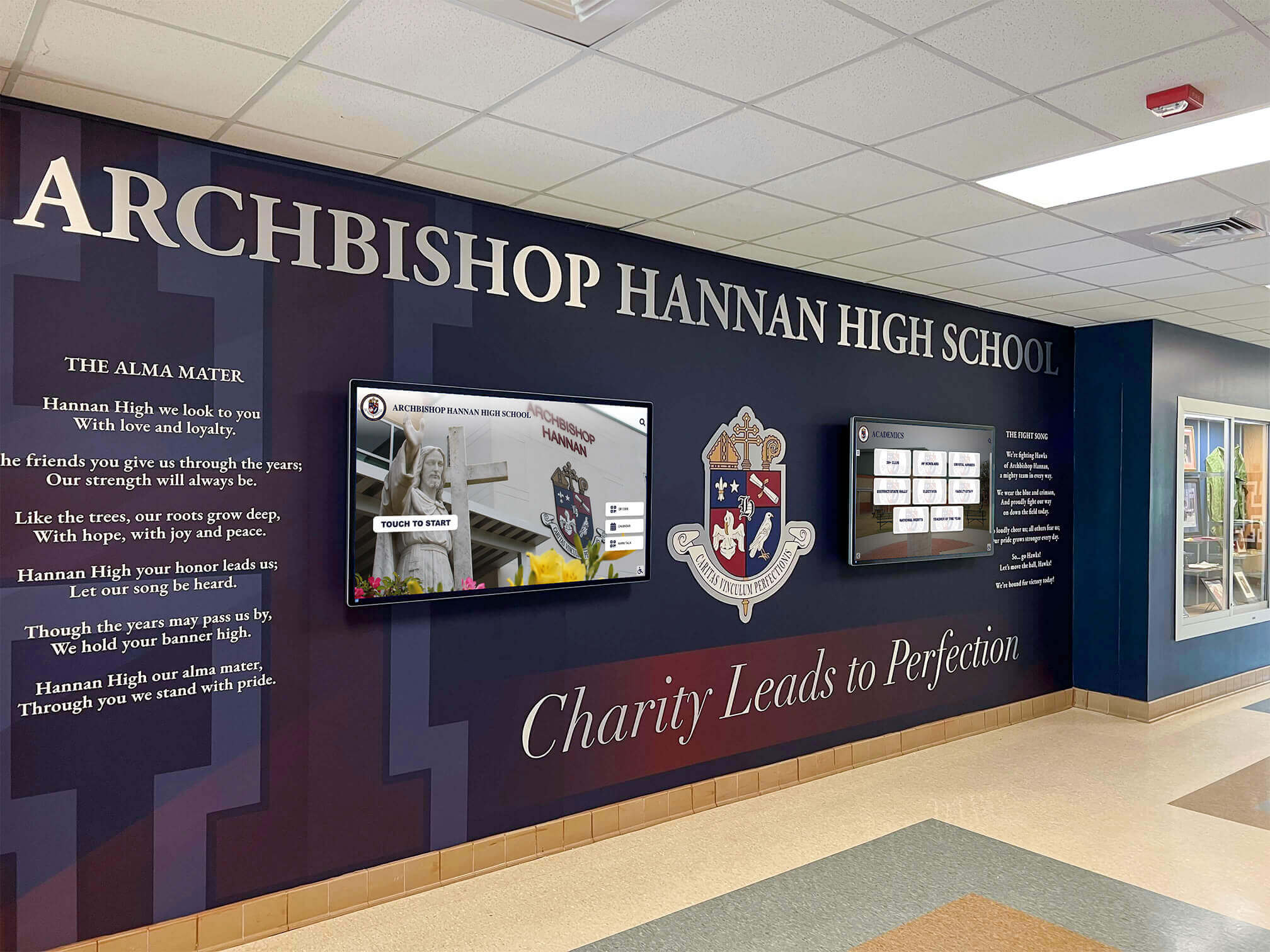
Integration of digital displays within existing architectural features creates cohesive environments where technology enhances rather than disrupts traditional school aesthetics
Recognition-focused features include career pathway tracking showing where alumni attended college and current occupations, team and group relationships connecting individual athletes to their teams and classmates, historical timeline views displaying achievement chronology across decades, and mobile access extending recognition beyond physical kiosk locations to web and smartphone interfaces.
Pricing and Implementation Model
Rocket Alumni Solutions typically offers institution-wide licensing rather than per-display fees, making the platform particularly cost-effective for schools planning multiple recognition displays across athletic facilities, academic buildings, and main entrances. Implementations include turnkey hardware packages with commercial-grade touchscreens, professional installation services, comprehensive content development support, and ongoing technical assistance ensuring successful deployments.
Schools should consider Rocket Alumni Solutions when recognition represents the primary kiosk use case and when comprehensive support for content development and ongoing management justifies integrated service pricing. Institutions prioritizing achievement celebration alongside other kiosk functions may implement Rocket for recognition displays while utilizing different platforms for wayfinding or announcement needs.
ScreenCloud: Versatile Digital Signage with Interactive Capabilities
Platform Overview and Application Flexibility
ScreenCloud provides cloud-based digital signage software supporting both passive display content and interactive touchscreen applications. The platform’s app-based architecture enables customization through extensive app marketplace including wayfinding, emergency alerts, social media feeds, calendars, menus, and custom content development.
Schools appreciate ScreenCloud’s flexibility supporting diverse use cases from simple announcement displays to sophisticated interactive installations using the same platform and management interface. This versatility proves particularly valuable for institutions deploying mixed kiosk types across campuses.
Educational Pricing and Deployment Options
Per-screen licensing typically ranges from $20-$40 monthly depending on feature requirements and commitment terms, positioning ScreenCloud competitively for budget-conscious institutions. The cloud-based architecture minimizes IT infrastructure requirements while enabling remote management from any location.
ScreenCloud works well for schools needing flexible, general-purpose digital signage platforms that can support occasional interactive applications without requiring specialized recognition or wayfinding features.
22Miles Wayfinding: Specialized Navigation Solutions
Platform Overview and Navigation Focus
22Miles provides interactive wayfinding software specifically designed for complex campus navigation challenges faced by large educational institutions, healthcare systems, and corporate campuses. The platform excels in 3D mapping, turn-by-turn routing, accessibility route planning, and location-based content delivery.
Educational implementations typically focus on main campus entrances, large event facilities, and visitor centers where navigation complexity justifies specialized wayfinding technology investments.
Advanced Features for Complex Campuses
22Miles distinguishes itself through photorealistic 3D mapping providing intuitive visual navigation, mobile integration allowing users to transfer routes to smartphones, analytics tracking navigation patterns informing signage placement, content management zones delivering location-specific information, and accessibility routing accounting for users requiring elevator access or avoiding stairs.
Investment Requirements and Use Case Fit
22Miles pricing typically reflects specialized capability with institution-wide implementations ranging from $10,000-$50,000 annually depending on campus size, map complexity, and display quantities. This investment level makes sense for large campuses with genuine navigation challenges but often exceeds budget justification for smaller institutions or schools where wayfinding represents secondary kiosk functions.
Schools should evaluate 22Miles when navigation complexity creates documented problems including frequent visitor directional assistance requests, accessibility complaints about unclear routes, or event attendance impacted by difficulty finding locations.
OptiSigns: Budget-Friendly Entry Level Option
Platform Overview and Cost-Conscious Approach
OptiSigns delivers simplified digital signage software emphasizing ease of use and affordability with per-screen pricing starting around $10-$15 monthly. The platform focuses on essential content scheduling, template-based design, and straightforward management avoiding advanced features that increase complexity and cost.
Feature Set and Limitations
OptiSigns provides adequate capabilities for basic announcement displays, menu boards, and simple recognition content. However, limitations in advanced interactivity, sophisticated content organization, and integration capabilities make the platform less suitable for complex recognition applications or interactive wayfinding.
Schools operating under severe budget constraints or requiring only simple announcement displays may find OptiSigns appropriately matched to basic needs, accepting feature limitations in exchange for minimal financial commitments.
Understanding how technology enhances student experiences through applications like showcasing class achievements helps justify platform investments to stakeholders.
Implementation Strategy and Deployment Best Practices
Successful kiosk deployments require strategic planning beyond software selection addressing content, hardware, and organizational considerations.
Strategic Planning and Needs Assessment
Effective implementations begin with clear understanding of what schools aim to accomplish through interactive kiosks.
Defining Primary Objectives and Use Cases
Schools should identify specific problems kiosks will solve or opportunities they’ll create including communication challenges where current approaches fail to reach audiences, recognition gaps where achievements go uncelebrated due to physical space limitations, navigation difficulties creating visitor confusion or accessibility barriers, administrative inefficiencies consuming staff time through repetitive information requests, and engagement opportunities where dynamic content could strengthen school culture or community connections.
Clarity about primary objectives guides software selection, content strategy, and deployment locations while providing success metrics for post-implementation evaluation.
Audience Analysis and Location Planning
Understanding who will use kiosks and where they congregate informs deployment decisions. Different audiences benefit from different locations including prospective students and families during tour routes through admissions offices and main entrances, current students in cafeterias, student commons, and near locker areas, staff in faculty lounges and administrative offices, event attendees near gymnasium entrances and performing arts lobbies, and community members in main building entrances and athletic facilities.
Multi-display deployments should intentionally target diverse audiences through strategic placement rather than concentrating all kiosks in single areas reaching limited user populations.

Modern interactive displays complement traditional trophy cases by providing unlimited digital recognition capacity without physical space constraints
Technical Infrastructure Assessment
Successful kiosk deployments require adequate infrastructure including reliable network connectivity with sufficient bandwidth for content updates and cloud platform communication, electrical power at planned display locations or budget for installation, physical security through mounting capabilities preventing theft or vandalism, and adequate ambient lighting ensuring screen visibility without excessive glare.
Infrastructure gaps discovered after software selection often delay deployments and increase total costs requiring unexpected construction or technology upgrades.
Content Strategy and Development
Quality software displaying poor content delivers minimal value regardless of feature sophistication—content strategy proves equally important as platform selection.
Content Planning and Asset Collection
Schools should inventory available content assets including photos from past events, yearbooks, and achievement ceremonies, statistical information from athletic records and academic honors, video footage from programs and competitions, written narratives about honored individuals and programs, and historical documents and newspaper articles providing context for recognition content.
Asset collection often reveals significant gaps requiring systematic photography during future events, interviews with alumni or students for written profiles, and video production capturing programs and personalities.
Content Management Workflows and Responsibilities
Sustainable kiosk programs require clear organizational workflows defining who creates content drafts, who reviews and approves material, who publishes approved content to displays, how often content updates occur, and how community members request content additions or changes.
Unclear responsibilities lead to either stale, outdated content or bottlenecks where single overworked administrators cannot maintain freshness across multiple displays and content categories.
Accessibility and Inclusive Design Practices
Content development should proactively address accessibility including sufficient color contrast in designed graphics, alt text for all images supporting screen readers, captions or transcripts for video content, simplified language appropriate for diverse reading levels, and multilingual content for non-English speaking community members when significant populations exist.
Accessibility retrofits prove more expensive and time-consuming than inclusive design from project inception, making proactive planning both more ethical and more economical.
Professional Installation and Technical Deployment
Quality hardware installation protects equipment investments while ensuring reliable operation and professional aesthetics.
Hardware Selection and Procurement
Schools should specify commercial-grade displays rated for continuous operation rather than consumer televisions lacking reliability specifications, high-brightness screens for locations with challenging lighting conditions, optical bonding reducing glare and improving touch accuracy, vandal-resistant enclosures for unsupervised public areas, and ADA-compliant mounting heights with appropriate reach ranges for wheelchair users.
Hardware decisions significantly impact user experience and total cost of ownership through reliability, accessibility, and maintenance requirements.
Installation Requirements and Facility Coordination
Professional installation addresses mounting security preventing theft, electrical installation meeting building codes, network connectivity ensuring reliable cloud platform access, environmental protection from moisture or extreme temperatures in some school locations, and accessibility compliance meeting ADA reach range and approach space requirements.
Schools should coordinate installations with facility management, technology departments, and security personnel ensuring all stakeholder requirements receive consideration during deployment planning.
Exploring recognition applications in different contexts like honoring varsity letter recipients provides content strategy inspiration for athletic recognition kiosks.
Measuring Success and Maximizing Kiosk Impact
Effective programs require ongoing evaluation and optimization based on usage data and stakeholder feedback.
Analytics and Engagement Tracking
Quality kiosk platforms provide usage data revealing actual user behavior and content effectiveness.
Key Performance Metrics
Valuable measurements include total interaction sessions showing how frequently users engage displays, average session duration indicating content interest depth, popular content items revealing what resonates with audiences, search queries demonstrating what information users seek, peak usage times correlating with events or schedule patterns, and navigation paths showing how users move through content hierarchies.
These metrics inform content strategy by identifying high-performing content deserving expansion and underperforming material requiring revision or removal.
Qualitative Feedback Collection
Beyond quantitative analytics, schools should systematically gather stakeholder perspectives through student surveys about content relevance and usefulness, staff feedback regarding administrative impact and communication effectiveness, visitor comments during tours and events, and community input from parents, alumni, and local residents.
Qualitative feedback often reveals impacts that metrics cannot capture such as emotional connections with recognition content or specific navigation challenges despite adequate usage statistics.
Continuous Improvement and Content Evolution
Successful kiosk programs evolve continuously based on usage patterns, stakeholder feedback, and organizational changes.
Content Refresh Strategies
Maintaining user interest requires regular content updates including seasonal rotations highlighting relevant programs and achievements, current event integration connecting to ongoing school activities, historical spotlight features exploring achievement archives, and theme-based collections organizing content around subjects, time periods, or achievement categories.
Fresh content encourages repeat engagement while stale displays quickly become invisible as users learn they offer nothing new.
Feature Utilization and Capability Expansion
Schools often launch kiosks with basic functionality before expanding to advanced features as organizational capabilities mature. Progressive enhancement might include initial passive content viewing followed by interactive search and filtering, social media integration enabling content sharing, mobile extensions providing smartphone access, API integrations connecting to student information systems, and advanced analytics informing institutional decision-making beyond kiosk management.
Capability expansion demonstrates ongoing value while justifying platform investments to stakeholders questioning whether simpler alternatives would suffice.
Understanding comprehensive approaches to recognition like those used in National Honor Society ceremonies helps schools develop content strategies worthy of their kiosk investments.
Conclusion: Strategic Selection for Maximum Educational Impact
Interactive kiosk software represents significant institutional investments requiring careful evaluation balancing feature requirements, budget constraints, technical capabilities, and implementation support needs. Schools succeeding with kiosk deployments approach selection strategically by clearly defining objectives and use cases before evaluating platforms, thoroughly assessing total cost of ownership beyond software licensing alone, prioritizing accessibility and inclusive design from project inception, planning sustainable content management workflows matching organizational capabilities, and establishing success metrics enabling ongoing evaluation and optimization.
The platform landscape includes specialized solutions like Rocket Alumni Solutions optimizing for recognition applications, versatile general-purpose platforms like ScreenCloud supporting diverse use cases, focused wayfinding systems like 22Miles addressing complex navigation needs, and budget-friendly options like OptiSigns providing basic capabilities for cost-conscious institutions. No single platform serves all school requirements equally well—successful selection requires matching specific institutional needs, use case priorities, budget realities, and technical capabilities to platform strengths.
Explore Purpose-Built Recognition Kiosk Solutions
Discover how specialized interactive kiosk platforms can help your school celebrate student achievements, honor alumni accomplishments, and strengthen community connections through engaging touchscreen experiences designed specifically for educational recognition.
Request InformationBeyond software selection, implementation success depends on strategic content development creating engaging material worthy of sophisticated platforms, professional hardware installation ensuring reliability and accessibility, clear organizational workflows sustaining current, relevant content, and ongoing evaluation measuring actual impact against intended objectives. Schools treating kiosk deployments as technical projects risk expensive failures regardless of platform quality, while institutions approaching them as comprehensive communication and engagement strategies achieve transformational results justifying investments through measurable improvements in student engagement, community connections, and operational efficiency.
Whether your school requires sophisticated recognition displays celebrating decades of achievement, comprehensive wayfinding systems guiding visitors through complex campuses, dynamic announcement platforms replacing static bulletin boards, or integrated solutions addressing multiple communication challenges simultaneously, purpose-built educational kiosk platforms deliver capabilities impossible through traditional approaches. Interactive kiosks transform static information delivery into engaging experiences, limited physical recognition into unlimited digital celebration, and one-way communication into dynamic conversations strengthening school communities.
Ready to explore interactive kiosk solutions for your institution? Consider your primary objectives and use case priorities, evaluate platforms matching your specific requirements, plan comprehensive implementations addressing content, hardware, and organizational factors, and when ready to discuss recognition-focused kiosk applications specifically, connect with specialized providers like Rocket Alumni Solutions who understand educational achievement celebration and provide turnkey solutions ensuring successful deployments from initial planning through long-term content management and technical support.































