



Educational facilities face mounting pressure to modernize recognition programs, enhance visitor engagement, and create dynamic environments that reflect institutional excellence. Interactive touch screen displays have emerged as powerful solutions—transforming static trophy cases and plaque walls into engaging digital experiences that celebrate unlimited achievements while providing intuitive exploration capabilities students, visitors, and alumni genuinely enjoy using.
The challenge extends beyond simply purchasing technology. Schools implementing interactive displays without proper planning often encounter hardware that fails under daily student use, software too complex for staff to maintain, or installations that generate initial excitement but quickly become outdated as content grows stale. Meanwhile, thoughtfully implemented touchscreen systems become community focal points—driving engagement, simplifying recognition program administration, and delivering measurable returns through enhanced school spirit and alumni connection.
This comprehensive guide explores the complete landscape of interactive touch screen display options specifically for educational contexts. From understanding technology fundamentals through evaluating hardware specifications, assessing software platforms, planning strategic installations, and implementing sustainable content workflows, you’ll discover actionable frameworks for selecting and deploying touchscreen solutions that transform how your institution celebrates achievement and engages communities.
Educational institutions implementing purpose-built interactive touch screen displays report dramatic improvements in community engagement, with touchscreen installations generating five to eight times more interaction than traditional static recognition displays. This heightened engagement translates directly to stronger institutional pride, more effective recognition programs, and enhanced visitor experiences that positively influence enrollment decisions and alumni relationships.

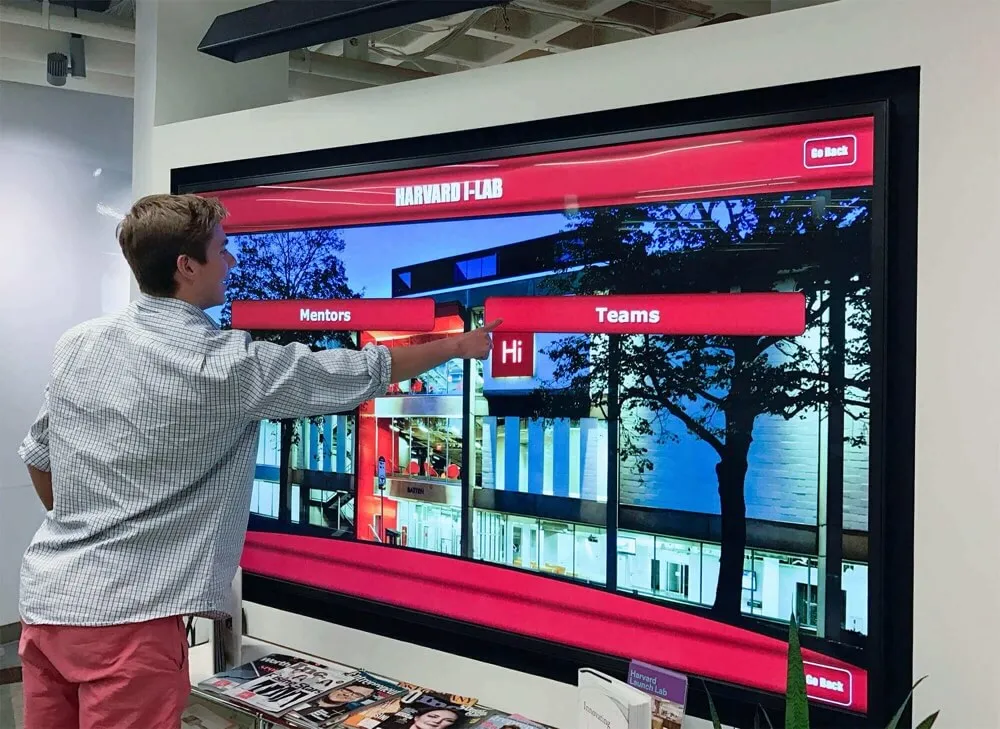
Modern interactive touchscreens create natural engagement behaviors through intuitive interfaces familiar from smartphone experiences
Understanding Interactive Touch Screen Display Technology
Before exploring specific product options and implementation strategies, understanding fundamental touchscreen technology provides essential context for informed decision-making.
What Makes Displays “Interactive” for Educational Use
True interactive displays differ fundamentally from digital signage playing rotating content without user control. Educational interactive systems provide:
User-Directed Exploration—visitors control what content they view, how long they engage, and what information they discover through touch-based navigation mirroring smartphone interactions students already understand intuitively.
Immediate Response to Touch Input—high-quality capacitive touchscreens register touch within milliseconds, providing fluid, responsive experiences that maintain engagement rather than frustrating users through laggy, unresponsive interfaces common with inferior hardware.
Rich Content Navigation—search functionality, filtering options, category browsing, and related content suggestions enable efficient discovery whether visitors seek specific individuals or explore achievements across categories, time periods, or recognition types.
Multimedia Integration—photos, video highlights, biographical narratives, achievement timelines, and statistical documentation create comprehensive storytelling impossible with traditional plaques limited to engraved text alone.
Analytics and Engagement Tracking—quality platforms measure visitor interaction patterns, revealing most-viewed content, popular search terms, and engagement duration—data informing continuous improvement of recognition programs based on actual usage rather than assumptions.
The distinction matters because many schools purchase “touchscreens” expecting interactive experiences but receive basic digital signage with touch capabilities added—creating disappointing results that fail to deliver anticipated engagement benefits. Understanding comprehensive touchscreen kiosk solutions helps differentiate truly interactive systems from touch-enabled signage lacking meaningful interactivity.
Core Components of Educational Touchscreen Systems
Complete interactive display solutions integrate multiple elements working together seamlessly:
Display Hardware—commercial-grade touchscreen panels ranging from 43 to 86 inches diagonal, featuring capacitive touch technology, 4K resolution for image clarity, and continuous-operation ratings enabling reliable 16-hour daily use across academic years without premature failure.
Computing Platform—media player computers with adequate processing power (Intel Core i5 or better), sufficient RAM (8GB minimum, 16GB recommended), solid-state storage preventing mechanical failures, and reliable operating systems supporting educational software requirements.
Mounting Solutions—wall mounts or freestanding kiosks providing proper installation at ADA-compliant heights, security against theft or vandalism, cable management maintaining professional appearance, and positioning optimized for visibility and accessibility throughout facilities.
Interactive Software—purpose-built recognition platforms like Rocket Alumni Solutions designed specifically for celebrating achievements, managing individual profiles, organizing content by categories and time periods, and providing intuitive interfaces requiring no technical expertise for content management or visitor interaction.
Network Infrastructure—reliable connectivity enabling cloud-based content management, remote updates without physical access to displays, centralized control when deploying multiple displays across campus, and analytics synchronization tracking engagement patterns across all installations.

Lobby installations create natural gathering points where students, families, and visitors explore institutional heritage
Touch Technology Fundamentals for School Environments
Touch detection technology directly impacts user experience quality, reliability, and maintenance requirements:
Capacitive Touch Technology
The industry standard for educational touchscreens, capacitive technology senses electrical properties of fingertips through glass surfaces. Benefits include precise multi-touch gesture support enabling pinch-zoom and swipe navigation, excellent durability withstanding millions of touches without degradation, superior optical clarity through solid glass construction, and fast response times meeting expectations set by smartphones and tablets.
Limitations include inability to work with gloved hands (relevant for outdoor installations in cold climates) and higher cost compared to alternative technologies—though prices have decreased substantially as manufacturing has scaled.
Infrared Touch Technology
Infrared systems use sensor frames around screen edges detecting interruptions in invisible light beams when objects contact screens. While less expensive than capacitive solutions, infrared touch offers inferior precision particularly near edges, slower response times causing noticeable lag, and vulnerability to false activations from dust, insects, or ambient light—making them less suitable for high-traffic educational environments.
Optical Touch Technology
Camera-based systems analyzing screen reflections to detect touch points work at very large sizes where other technologies become prohibitively expensive. However, optical touch provides inconsistent accuracy, struggles with multiple simultaneous touches, and requires regular calibration—limiting educational applicability except for very large format displays exceeding 75 inches.
For most educational touchscreen installations between 43-75 inches, capacitive touch technology represents the clear choice—delivering reliable, responsive experiences that meet expectations students carry from daily smartphone use while withstanding the demanding conditions of school environments.
Hardware Options for Educational Interactive Displays
Selecting appropriate hardware balances performance requirements, durability needs, budget constraints, and specific use case demands within educational contexts.
Display Size Selection for Different Spaces
Screen size dramatically affects visibility, engagement, and installation feasibility:
43-50 Inch Displays
- Optimal Locations: Hallway installations with 6-8 foot viewing distances, smaller lobby areas, classroom recognition displays
- Capacity: Comfortable viewing for 2-3 simultaneous users; individual interaction focus
- Advantages: Lower cost ($1,200-2,500 for commercial displays), easier installation with lighter weight, more flexible placement options
- Limitations: Limited visibility from distance, smaller screen area constrains content density
- Best For: Departmental recognition, classroom honor rolls, smaller athletic programs
55-65 Inch Displays
- Optimal Locations: Main lobby installations with 8-12 foot viewing distances, athletic facility entrances, multi-purpose gathering spaces
- Capacity: Comfortable viewing for 4-6 simultaneous users; small group exploration
- Advantages: Strong visibility/size balance, reasonable costs ($2,000-4,500 commercial), mainstream mounting hardware availability
- Limitations: May lack impact in very large spaces like fieldhouses
- Best For: Comprehensive school halls of fame, main athletic recognition, primary lobby installations (most common educational choice)
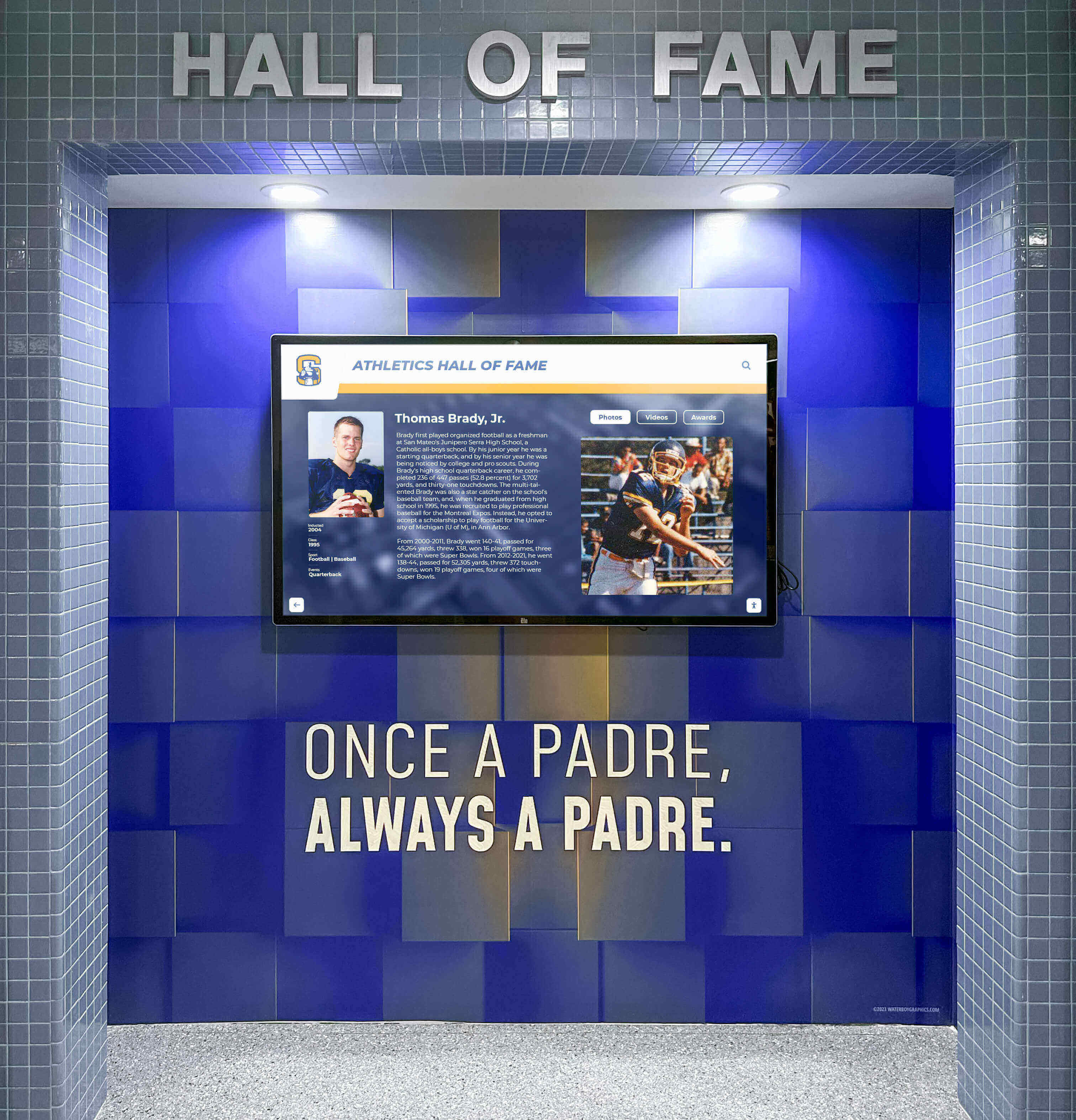
Athletic facilities benefit from larger displays visible across expansive lobby and hallway spaces
70-86 Inch Displays
- Optimal Locations: Large gathering spaces like fieldhouses, gymnasiums, auditorium lobbies, grand entrance halls
- Capacity: Visible from 15-20+ feet; accommodates larger viewing groups
- Advantages: Maximum visibility and impact, suitable for very large spaces
- Limitations: Significant cost ($5,000-12,000+ commercial), substantial weight requiring reinforced mounting, higher electrical consumption
- Best For: Flagship installations in premier locations, competitive athletic programs, universities with grand public spaces
Educational buyers should resist automatically choosing largest affordable displays—mid-range 55-65 inch screens provide optimal balance for most school applications, reserving larger sizes for specific spaces genuinely requiring enhanced visibility.
Commercial vs. Consumer Display Hardware
The distinction between commercial and consumer displays proves critical for educational reliability:
Commercial-Grade Educational Displays
Purpose-built for institutional use, commercial touchscreens provide:
- Extended Operation Ratings: 16-24 hours daily operation vs. 8 hours for consumer TVs
- Higher Touch Durability: Rated for 60-100 million touches vs. consumer products lacking touch cycle specifications
- Enhanced Thermal Management: Active cooling preventing overheating during extended operation in enclosed spaces
- Commercial Warranties: 3-5 year coverage including parts and labor vs. 1-year consumer warranties
- Longer Product Lifecycles: 5-10+ years operational life vs. 2-3 years typical consumer TV replacement
- Professional Support: Manufacturer technical support for installation and operation questions
Cost Differential: Commercial displays cost 1.5-3x consumer equivalents—a 55" commercial touchscreen runs $2,500-4,500 vs. $600-1,200 for consumer touch TVs. However, lifecycle cost analysis favors commercial hardware through superior longevity and reduced replacement frequency.
Consumer Touch Displays
Consumer televisions with touch capabilities suit only very limited educational applications:
- Appropriate Uses: Low-traffic classroom displays, temporary event installations, pilot programs testing concepts before full investment
- Limitations: Premature failure under continuous operation, voided warranties from commercial use, unreliable touch performance, limited or non-existent manufacturer support
Schools implementing consumer displays for permanent public installations typically experience failures within 12-24 months—requiring complete replacement negating initial cost savings while creating interim periods where recognition programs remain inaccessible. Understanding hardware requirements for educational technology helps administrators make informed hardware selections.
Mounting Configuration Options
How displays mount affects accessibility, aesthetics, security, and total installation cost:
Wall-Mounted Installations
Direct wall mounting creates clean, modern aesthetics while conserving floor space:
Flush Mount—display sits flat against wall in minimal profile; requires adequate wall depth for computing hardware and cable management Tilted Mount—display angles downward 5-15 degrees, improving viewing angles and reducing glare from ceiling lighting Articulating Mount—adjustable arms enabling positioning changes; rarely needed for fixed recognition displays but valuable for shared-use screens
Installation Requirements: Adequate wall structure supporting 50-150 pounds depending on screen size, electrical outlets within 6 feet (or new circuits installed), network connectivity either wired or strong wireless signal, and mounting height positioning interactive areas between 36-48 inches from floor for ADA compliance.

Wall mounting integrates displays seamlessly into hallway and lobby architectural features
Installation Costs: Professional wall mounting typically ranges $800-2,500 including mounting hardware, electrical work if needed, network connectivity establishment, and secure cable management.
Freestanding Kiosk Enclosures
Self-contained floor kiosks provide maximum flexibility:
Standard Kiosks—commercial enclosures housing display and computing hardware in coordinated packages; available in black, silver, or white finishes; typically $1,500-4,000 depending on size and features Custom-Branded Kiosks—purpose-designed housings incorporating school colors, logos, and architectural elements; significantly higher cost ($4,000-12,000) but creates distinctive installations matching facility aesthetics Mobile Rolling Kiosks—wheeled stands enabling repositioning for events or seasonal moves; ideal for institutions sharing displays across multiple locations Outdoor-Rated Kiosks—weatherproof enclosures with enhanced cooling, sealed electronics, and anti-glare screens for exterior installations; substantial cost premium ($8,000-20,000) but enables recognition in outdoor gathering spaces
Advantages: No wall construction or modification required, simple relocation if needs change, integrated professional appearance, flexibility accommodating facilities where wall mounting proves impractical
Considerations: Floor space requirements of typically 24-30 inches depth by 30-36 inches width, potential trip hazards in high-traffic corridors requiring strategic placement, greater vulnerability to accidental impacts compared to wall-mounted installations
Computing Hardware Specifications
The computer powering touchscreen displays determines performance, software compatibility, and operational reliability:
Minimum Recommended Specifications
- Processor: Intel Core i5 (11th generation or newer) or AMD Ryzen 5 5000 series
- RAM: 8GB DDR4; 16GB for video-heavy content or large photo libraries
- Storage: 256GB solid-state drive (SSD); mechanical hard drives unacceptable due to shock vulnerability and slower performance
- Graphics: Integrated graphics sufficient for single 4K display; dedicated GPU unnecessary for recognition applications
- Connectivity: Gigabit Ethernet port, WiFi capability, multiple USB ports for peripherals
- Form Factor: Small form factor or mini PC for space-constrained enclosures; standard desktop acceptable for large kiosks
Operating System Options
- Windows 10/11 Pro: Broadest software compatibility, familiar management for IT departments, extensive peripheral support
- Android: Lower hardware costs, simplified management, adequate for web-based recognition platforms
- Chrome OS: Emerging option for Google-centric schools running web-based software
- Linux: Rare in educational settings; only viable when software explicitly supports Linux deployment
All-in-One Solutions: Some vendors provide complete appliances combining commercial displays with integrated computers and pre-loaded software. While convenient, all-in-one approaches limit upgrade flexibility and often charge premiums for commodity hardware components.

Freestanding kiosks offer flexible placement without requiring wall construction or modification
Software Platform Options for Educational Recognition
Hardware provides the delivery mechanism—but software determines user experience quality, administrative ease, and ultimate program success.
Purpose-Built Recognition Platforms
Specialized software designed explicitly for celebrating achievements delivers superior results compared to general-purpose alternatives:
Rocket Alumni Solutions
Purpose-built for educational recognition, Rocket Alumni Solutions provides comprehensive platforms specifically designed for halls of fame, athletic records, academic honors, and donor recognition:
Key Educational Features:
- Pre-designed templates for athletic achievements, academic honors, alumni recognition, and historical timelines
- Intuitive content management requiring no technical expertise—athletic directors and administrative staff maintain displays without IT department intervention
- Unlimited recognition capacity accommodating comprehensive achievement celebration across all programs and eras
- Advanced search enabling visitors to instantly locate specific individuals by name, year, achievement type, or sport
- Timeline visualizations showing program evolution and institutional heritage
- Video integration for game highlights, testimonials, and biographical documentaries
- Web and mobile extensions making recognition accessible beyond physical display locations
- Integrated analytics tracking engagement patterns and most-viewed content
- Cloud-based management enabling updates from any internet-connected device
- Multi-display coordination for institutions deploying recognition networks across campus
Educational Advantages: Purpose-built platforms eliminate the complexity, ongoing technical support requirements, and feature gaps inherent in adapted general software. Schools report 75-85% reduction in administrative time managing recognition content compared to generic digital signage platforms repurposed for achievement celebration.
Pricing Structure: Subscription-based licensing typically ranges $1,200-3,000 annually per display depending on features, support level, and deployment scale. Comprehensive solutions like Rocket Alumni Solutions subscription options include unlimited content updates, ongoing platform enhancements, technical support, and web portal access without usage restrictions.
General Digital Signage Platforms
Broad digital signage software works well for rotating announcements and event calendars but faces limitations for interactive recognition:
Capabilities: Content scheduling and playlist management, remote content deployment across display networks, multi-zone screen layouts, integration with various data sources Limitations: Limited interactive capabilities, no purpose-built recognition features, complex setup requiring technical expertise, ongoing technical support dependencies When Appropriate: Multi-purpose displays serving various communication functions where recognition represents one of many use cases rather than primary purpose
Schools implementing general signage for recognition typically invest significant development resources creating custom interfaces, struggle with ongoing content management complexity, and achieve lower visitor engagement compared to purpose-built alternatives.
Custom Development Approaches
Some institutions consider custom-built touchscreen applications:
Advantages: Complete control over features and user experience, integration with proprietary systems, no recurring software licensing fees Disadvantages: Substantial upfront development costs ($25,000-100,000+), ongoing maintenance requirements as operating systems and dependencies update, lack of vendor support when issues arise, extended development timelines (6-18 months typical) When Viable: Very large institutions with in-house development capabilities, highly specialized requirements poorly served by commercial options, integration needs with legacy systems lacking modern APIs
For most K-12 schools and small-to-mid-size colleges, custom development proves cost-prohibitive and introduces substantial technical risk compared to proven commercial platforms designed specifically for educational recognition.
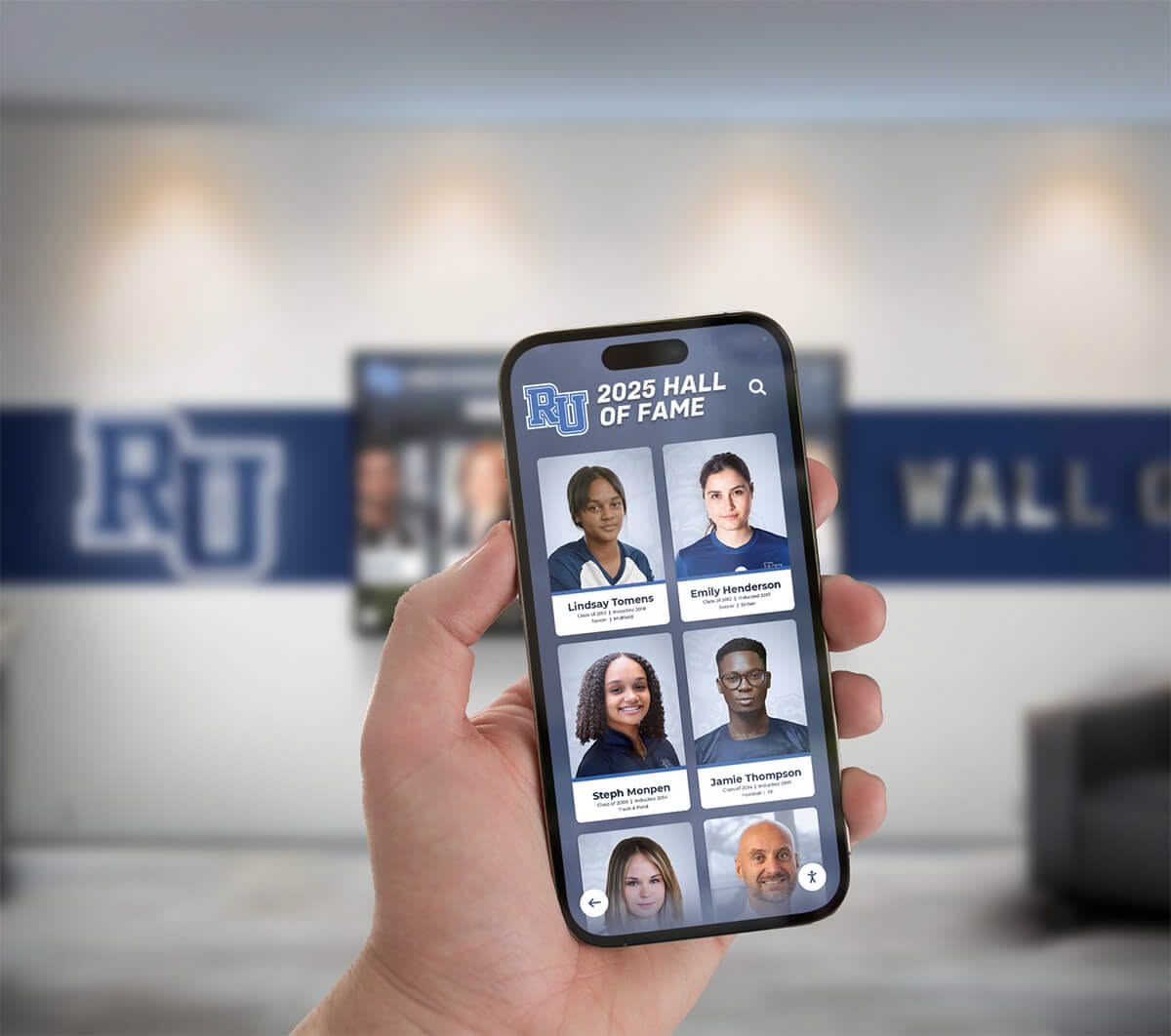
Cloud-based platforms enable authorized staff to manage recognition content from any device without technical expertise
Installation Considerations for Educational Environments
Strategic installation planning ensures touchscreen displays integrate effectively into facilities while meeting safety, accessibility, and operational requirements.
Optimal Placement Locations
Where displays install dramatically affects visibility, engagement, and ultimate program success:
High-Priority Installation Locations
Main Entry Lobbies—first impression locations where prospective families, visitors, and community members immediately encounter institutional achievements, pride, and heritage Athletic Facility Entrances—surrounds current athletes with program tradition during daily practice and competition while showcasing achievements to game attendees and recruits Main Hallway Intersections—high-traffic transitional spaces where students naturally gather between classes, creating repeated exposure throughout school days Cafeteria/Commons Areas—extended dwell time locations where students spend social time, enabling deeper exploration compared to brief hallway transitions Alumni/Development Office Lobbies—strategic positioning where alumni visiting campus and donors meeting with development staff encounter comprehensive recognition
Considerations for Location Selection
- Viewing Distance: Ensure screen size appropriate for typical viewing distances in selected locations
- Lighting Conditions: Avoid direct sunlight causing screen glare; position perpendicular to windows when possible
- Traffic Flow: Place displays where foot traffic naturally slows rather than rapid-transit corridors
- Accessibility: Maintain clear approach spaces for wheelchair users; avoid obstructed positioning behind columns or corners
- Network Connectivity: Verify reliable wired or wireless network availability in potential locations
- Electrical Infrastructure: Confirm adequate electrical capacity and outlet proximity
Schools successfully implementing recognition programs often deploy multiple displays across strategic locations—creating recognition networks serving different audiences and achievement categories. Resources exploring school lobby design strategies provide additional guidance on creating welcoming, engaging recognition environments.
ADA Compliance and Accessibility Requirements
Educational institutions must ensure touchscreen installations comply with Americans with Disabilities Act standards:
Height and Reach Requirements
- Forward Reach: When approach is parallel to display, maximum 48 inches to highest operable element
- Side Reach: When approach from side, maximum 44 inches to highest operable element
- Low Reach: Minimum 15 inches above floor for lowest interactive elements
- Clear Floor Space: Minimum 30 x 48 inches of clear, level floor space for wheelchair positioning
Interactive Interface Requirements
- Touch Sensitivity: Operable without tight grasping, pinching, or twisting wrist
- Force Requirements: Maximum 5 pounds force to activate any control
- Response Time: No time-dependent interactions requiring rapid response sequences
- Visual Contrast: Minimum 3:1 contrast ratio between interface elements and backgrounds
Content Accessibility
- Text Size: Minimum 18-point font for body text; 24+ point for headings
- Color Dependence: Never convey information through color alone
- Alternative Text: Provide text descriptions for images and graphical content
- Audio Descriptions: Consider audio alternatives for text content supporting visually impaired visitors
Professional installation services verify accessibility compliance—critical for institutions receiving federal funding and simply good practice ensuring recognition experiences serve entire communities regardless of abilities.

Proper installation height and positioning ensures touchscreen accessibility for users of all abilities
Network and Power Infrastructure
Reliable operation depends on adequate supporting infrastructure:
Network Connectivity Requirements
Wired Ethernet (Strongly Recommended)—provides reliable, consistent connectivity unaffected by wireless congestion; eliminates intermittent connectivity issues common with WiFi in buildings with structural interference Minimum Bandwidth: 10 Mbps download, 5 Mbps upload adequate for cloud-based content management and analytics synchronization Network Segmentation: Many institutions create separate VLANs for digital displays isolating traffic from student networks Firewall Configuration: Verify institutional firewalls allow touchscreen software to communicate with cloud platforms; some security policies require explicit whitelisting
Wireless Considerations—acceptable for installations where wired connectivity proves impractical (outdoor locations, temporary deployments, facilities lacking network infrastructure); requires enterprise-grade WiFi access points within 50 feet providing consistent signal strength
Power Requirements
- Electrical Capacity: Standard 110V outlets adequate; displays typically consume 150-300 watts depending on size
- Circuit Dedication: Dedicated circuits prevent power interruptions when other equipment cycles
- Surge Protection: Essential for protecting expensive hardware from power fluctuations
- UPS Battery Backup: Optional but valuable for graceful shutdown during power failures
Professional vs. DIY Installation
Schools face decisions about installation approach:
Professional Installation Services
Included Services: Site assessment and recommendations, electrical work ensuring code compliance, network connectivity establishment, secure mounting with appropriate anchors for wall construction, display configuration and software setup, staff training on operation
Costs: $1,500-5,000 depending on installation complexity, electrical work requirements, geographic location, and scope of included services
Advantages: Guaranteed compliant installation, professional appearance with clean cable management, vendor accountability if issues arise, no staff time diversion from educational priorities
Internal Installation
When Viable: Institutions with facilities staff experienced in AV installation, simple wall-mounted installations without electrical work, existing infrastructure already supporting intended locations
Challenges: Ensuring ADA compliance without professional expertise, managing specialized tools and equipment, liability if improper installation causes injury or property damage, no warranty coverage for installation-related failures
Hybrid Approach: Many schools handle basic wall mounting internally while contracting electrical work and complex installations requiring specialized expertise—balancing cost control with appropriate professional services.
Content Strategy for Educational Touchscreens
Hardware and software provide delivery mechanisms—but compelling content determines whether displays generate sustained engagement or become ignored technology installations.
Content Planning and Development
Systematic content strategies transform displays from technology projects into vibrant recognition programs:
Initial Content Development Approach
Schools creating initial recognition content should prioritize:
Phase 1: Current Recognition (Months 1-2)—begin with recent achievement years (past 3-5 years) where information readily accessible, photos digitally available, and content accuracy easily verified. Immediate relevance creates engagement demonstrating value while historical content develops.
Phase 2: Recent History (Months 3-6)—expand to additional recent years working backward from current period. Many schools digitize recognition by decade—completing 2020s, then 2010s, then 2000s—creating manageable projects with clear completion milestones.
Phase 3: Historical Archives (Ongoing)—treat comprehensive historical digitization as long-term project spanning academic years. Engage volunteers, student groups, or alumni assistance gathering historical information and photos from yearbooks, archives, and personal collections.
This phased approach creates functional recognition displays quickly while avoiding overwhelming initial development burdens that delay launches or compromise content quality through rushed execution.

Intuitive interfaces enable students to independently explore recognition content without staff assistance or instruction
Essential Content Types for Educational Displays
Comprehensive recognition profiles tell complete stories rather than listing bare facts:
Individual Honoree Profiles
- Biographical Information: Full name, graduation year, relevant affiliations (teams, clubs, academic programs)
- Achievement Documentation: Specific honors earned, records set, championships won, academic distinctions
- Photo Galleries: Multiple images showing individuals across different life stages and activities
- Statistical Data: Athletic statistics, academic achievements, performance records providing quantitative context
- Narrative Stories: 150-300 word biographical narratives explaining significance beyond raw facts
- Video Content: Game highlights, testimonials, acceptance speeches, or biographical documentaries when available
Team and Group Recognition
- Complete Rosters: All team members with linked individual profiles
- Season Documentation: Record, schedule, tournament progression, championship achievements
- Team Photos: Group photos from seasons, tournaments, and recognition ceremonies
- Coaching Recognition: Coaches and staff contributing to team success
- Historical Context: Significance within program history and competitive landscape
Historical Timeline Content
- Institutional Milestones: Facility construction, program establishment, significant community events
- Era Overviews: Decade summaries capturing social context and institutional evolution
- Record Progressions: Tracking how school records evolved across eras and generations
- Photo Archives: Historical images documenting campus, community, and program development
Quality platforms like Rocket Alumni Solutions provide template structures ensuring consistent, professional presentation across diverse content types while enabling customization reflecting unique institutional character and recognition priorities.
Ongoing Content Maintenance Workflows
Recognition displays require regular updates maintaining currency and relevance:
Annual Update Cycle
- Fall: New hall of fame inductees from annual ceremonies, current academic year honor rolls
- Winter: Winter sports recognition as seasons conclude, mid-year academic honors
- Spring: Spring sports achievements, graduating senior recognition, end-of-year academic awards
- Summer: Historical content additions during slower operational periods, content audits reviewing accuracy
Responsibility Assignment
- Athletic Recognition: Athletic directors or designated coaches managing sport-specific content
- Academic Recognition: Counselors or academic administrators handling honor rolls and academic achievement
- Alumni Content: Alumni association staff or development office managing graduate recognition
- Administrative Oversight: Designated coordinator ensuring consistency, approving publications, coordinating across departments
Content Management Tools
- Cloud-Based Platforms: Enable distributed content creation where responsible parties update relevant areas
- Approval Workflows: Require administrative review before publication preventing errors
- Content Calendars: Schedule recognition announcements coordinating with ceremonies and events
- Style Guides: Maintain consistent tone, formatting, and presentation standards
Schools establishing clear content workflows report significantly higher recognition program success compared to installations lacking defined responsibilities—preventing content staleness that undermines credibility and community engagement.
Cost Analysis for Educational Touchscreen Programs
Understanding comprehensive costs enables realistic budget planning and informed vendor comparison:
Initial Investment Breakdown
Complete touchscreen implementation costs encompass multiple components:
Hardware Costs
- Display: $1,500-8,000 depending on size (43-86") and commercial vs. consumer grade
- Computing Hardware: $500-2,000 for adequately specified media player
- Mounting/Enclosure: $500-8,000 for wall mounts vs. freestanding kiosks, standard vs. custom branded
- Peripherals: $100-300 for cables, surge protection, and accessories
Software Costs
- Initial Licensing: $0-5,000 depending on platform; many offer first-year inclusion in purchase packages
- Setup and Customization: $500-2,500 for initial configuration, branding, and template customization
- Content Management Training: Typically included in quality platforms; separate charges ($500-1,500) indicate potential vendor issues
Installation and Integration
- Professional Installation: $1,500-5,000 for mounting, electrical work, network connectivity, and configuration
- Network Infrastructure: $0-2,000 if existing infrastructure adequate; new network runs or access points add cost
Initial Content Development
- Internal Staff Time: Significant time investment gathering information, collecting photos, creating profiles
- Professional Content Services: $2,000-10,000+ for contracted historical research, photo digitization, and bulk profile creation
Total Initial Investment: $5,000-35,000 per display depending on size, quality level, customization, professional services, and content development approach.
Schools with budget constraints often start with single displays in highest-visibility locations (main lobbies), then expand incrementally as budgets allow and initial installations demonstrate value justifying additional investment.

Multi-display networks share centralized content management reducing administrative burden while expanding recognition reach
Ongoing Operational Costs
Recognition displays incur recurring expenses affecting long-term total cost of ownership:
Annual Recurring Costs
- Software Licensing: $500-3,000 annually per display; comprehensive platforms like Rocket Alumni Solutions include unlimited content updates, ongoing platform enhancements, web portal access, and technical support
- Support Services: $0-2,000 if purchased separately; quality vendors include support in licensing fees
- Content Management: $0-5,000 depending on internal staff capability vs. contracted services
- Electrical Consumption: $50-150 annually for continuous operation
- Maintenance/Repairs: $200-500 annually reserved for occasional hardware service
- Insurance: Typically covered under existing institutional policies
5-Year Total Cost of Ownership: $10,000-50,000 per display including initial investment and operational costs—varies significantly based on scale, quality, and service levels.
Return on Investment Considerations
While recognition displays require investment, benefits often exceed costs through multiple dimensions:
Quantifiable Benefits
- Administrative Efficiency: 75-85% reduction in recognition management time compared to traditional plaques
- Eliminated Plaque Costs: Savings of $1,500-15,000+ annually on physical plaques for institutions honoring 20-50+ individuals yearly
- Space Capacity: Unlimited recognition capacity eliminating expensive trophy case expansions ($5,000-25,000) as physical displays fill
- Reduced Maintenance: Digital recognition eliminates ongoing plaque cleaning, repair, and reorganization labor
Strategic Benefits
- Enhanced Recruitment: Professional recognition presentation influences enrollment decisions and athlete recruiting
- Improved Alumni Engagement: Web-accessible recognition maintains alumni connections across distances
- Strengthened Community Pride: Comprehensive achievement celebration builds institutional identification
- Modern Positioning: Technology demonstrates institutional commitment to innovation and quality
Schools implementing comprehensive recognition displays typically achieve positive ROI within 3-5 years through eliminated recurring costs alone—before accounting for strategic benefits affecting enrollment, advancement, and community relationships. Detailed analyses of touchscreen implementation ROI help administrators build business cases justifying capital investment.
Implementation Best Practices for Schools
Successful touchscreen programs result from thoughtful planning, stakeholder engagement, and systematic execution:
Planning and Stakeholder Engagement
Recognition technology affects multiple constituencies requiring early involvement:
Planning Committee Formation
Effective committees include:
- Administrative Leadership: Principal or assistant principal providing budget authority and strategic direction
- Athletic Directors: Managing sports recognition priorities and content
- Technology Staff: Addressing network infrastructure and technical requirements
- Facilities Management: Handling installation logistics and ongoing maintenance
- Alumni Association: Representing graduate community interests and historical content
- Student Representatives: Ensuring recognition resonates with current student populations
Needs Assessment Process
- Current Recognition Audit: Document existing recognition programs, gaps, challenges, and aspirations
- Stakeholder Interviews: Gather input from faculty, students, alumni, and community members about recognition priorities
- Space Assessment: Evaluate potential installation locations for visibility, traffic, infrastructure, and accessibility
- Budget Development: Establish realistic investment parameters including implementation and ongoing operations
- Success Criteria: Define clear objectives and metrics for evaluating program effectiveness
Early stakeholder engagement builds organizational support while ensuring solutions address actual needs rather than imposing technology without clear purpose or community buy-in.
Vendor Selection Process
Systematic vendor evaluation ensures informed selection decisions:
Essential Evaluation Criteria
- Educational Experience: Portfolio specifically showing school, college, or university implementations
- Recognition Specialization: Purpose-built platforms designed for achievement celebration vs. adapted signage software
- Content Management Simplicity: Intuitive interfaces enabling non-technical staff to maintain recognition without IT dependencies
- Support Quality: Responsive technical assistance, comprehensive training, and ongoing platform development
- Total Cost Transparency: Clear pricing including all recurring fees without hidden costs or usage-based charges
- Reference Quality: Checkable references from comparable institutions willing to discuss implementation experiences
Questions for Prospective Vendors
- How many K-12 school installations have you completed specifically for recognition applications?
- What content management training do you provide, and what ongoing support is included?
- What is typical implementation timeline from purchase to launch?
- What analytics do you provide for understanding visitor engagement?
- How frequently do you release platform updates, and what enhancements have you added recently?
- Can you provide three reference contacts from schools similar to ours?
Red Flags Indicating Potential Issues
- Inability to provide multiple checkable educational references
- Vague pricing or unwillingness to itemize costs transparently
- Primary experience with general signage rather than recognition applications
- High-pressure sales tactics prioritizing rapid closure over thorough evaluation
- Limited or unclear support policies and response commitments
Schools should thoroughly check references—speaking directly with administrators at existing installations reveals vendor performance realities that sales presentations may not fully communicate. Comprehensive hardware setup and service reviews provide models for systematic vendor evaluation.
Launch and Promotion Strategies
Successful implementations require deliberate launches generating awareness and initial engagement:
Pre-Launch Preparation
- Content Completeness: Ensure sufficient recognition content for meaningful exploration before launch
- Staff Training: Prepare all staff who will manage content or answer visitor questions
- Promotional Materials: Create awareness through newsletters, websites, social media, and signage
- Event Planning: Schedule formal unveiling during high-attendance occasions (homecoming, open houses, induction ceremonies)
Launch Events
- Ceremony Integration: Unveil displays during recognition ceremonies where inductees and families naturally attend
- Open Houses: Host dedicated events inviting community members to explore new recognition technology
- Student Demonstrations: Train student ambassadors to demonstrate displays during school tours and visits
- Media Coverage: Invite local media documenting institutional innovation and community pride
Ongoing Promotion
- Social Media: Regularly feature recognition content on institutional social channels with links to web portals
- Tour Integration: Ensure campus tours include display demonstrations for prospective families
- Newsletter Features: Highlight newly-added content and interesting historical discoveries in school communications
- QR Code Integration: Place QR codes near displays linking mobile devices to web-accessible recognition
Strong launches create momentum establishing recognition displays as valued institutional features rather than ignored technology installations. Resources on creating engaging digital experiences provide frameworks for sustained community engagement with recognition content.
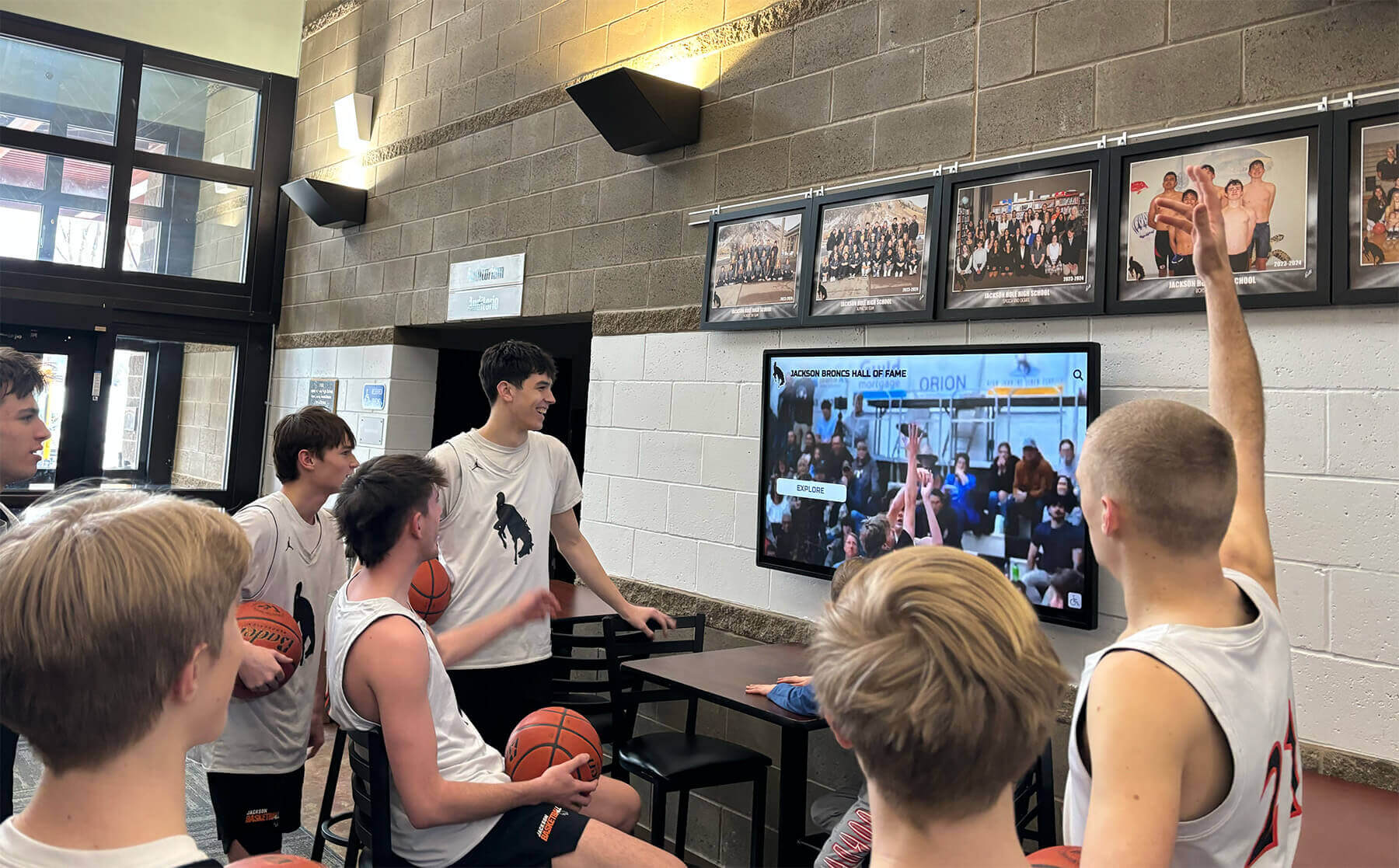
Strategic placement in athletic facilities surrounds current athletes with program tradition and achievement standards
Advanced Features and Future Considerations
As recognition technology matures, emerging capabilities expand engagement possibilities:
Emerging Interactive Capabilities
Social Media Integration—automated content feeds pulling achievements shared on institutional social channels, visitor sharing enabling recognition distribution across personal networks, hashtag aggregation collecting community-generated content around recognition themes
QR Code Extensions—visitors scan codes transferring recognition content to personal devices, enabling continued exploration beyond physical display interaction, facilitating easy content sharing with family and friends unable to attend in person
Mobile Apps—native smartphone applications extending recognition beyond physical installations, push notifications alerting alumni when classmates or teammates receive recognition, offline access enabling content viewing without continuous connectivity
Analytics Enhancement—heat mapping visualizing touch interaction patterns, A/B testing comparing different content presentations, predictive analytics identifying under-recognized achievements based on engagement patterns
Voice Integration—audio descriptions supporting visually impaired visitors, voice search supplementing touch navigation, multilingual support serving diverse communities
Multi-Display Networks
Schools expanding beyond single displays create coordinated recognition networks:
Centralized Management—single content platform controlling multiple displays across campus, role-based access enabling departmental content management within centralized coordination, synchronized updates deploying changes across entire networks simultaneously
Display Specialization—athletic facility displays focusing on sports recognition, academic building displays emphasizing scholarly achievement, main lobby displays showcasing comprehensive institutional excellence
Cross-Display Navigation—visitor searches on any display finding content regardless of which location hosts it, related content suggestions spanning multiple displays and recognition categories, unified analytics aggregating engagement across all network touchpoints
Institutions implementing unlimited screen deployments report significant administrative efficiency compared to managing displays as isolated installations—single content updates propagate across comprehensive networks automatically.
Future Technology Evolution
Recognition display technology continues advancing:
Augmented Reality Integration—mobile devices overlaying digital content onto physical spaces, scanning historical photos revealing “then and now” comparisons, animated biographical content appearing through AR viewers
AI-Assisted Content—automated biographical summaries from provided source materials, intelligent search understanding natural language queries, personalized content recommendations based on interaction patterns
Larger Format Options—direct-view LED displays enabling massive recognition installations, seamless video walls combining multiple panels into unified canvases, transparent displays overlaying recognition onto physical trophy cases
Enhanced Personalization—facial recognition identifying visitors and highlighting relevant content, customized landing pages for alumni visiting physical displays, integration with campus card systems personalizing experiences for identified users
While emerging capabilities offer intriguing possibilities, schools should prioritize proven, robust core functionality over experimental features risking reliability or complicating administration.
Conclusion: Transforming Educational Recognition Through Interactive Technology
Interactive touch screen displays represent fundamental advancement in how educational institutions celebrate achievement, preserve institutional heritage, and engage diverse communities. By eliminating space constraints limiting traditional recognition, enabling immediate content updates maintaining program currency, creating engaging exploration experiences connecting visitors with institutional tradition, incorporating rich multimedia storytelling impossible with static plaques, and extending recognition accessibility beyond physical locations to worldwide audiences, touchscreen technology delivers comprehensive solutions addressing recognition challenges that traditional approaches cannot effectively solve.
Transform Your School's Recognition Program
Discover how purpose-built interactive display platforms deliver superior recognition experiences specifically designed for educational institutions. Rocket Alumni Solutions offers comprehensive systems built exclusively for schools celebrating achievements.
Explore Interactive Display SolutionsSuccessful implementations begin with clear recognition objectives understanding what achievements deserve celebration and which communities need engagement. They select purpose-built platforms designed specifically for educational recognition rather than generic digital signage inadequately adapted. They develop thoughtful content strategies honoring individuals comprehensively rather than documenting minimally. And they position displays strategically in locations where students, visitors, alumni, and families naturally encounter recognition throughout daily campus experiences and special events.
Whether implementing athletic recognition inspiring current competitors through program heritage, academic displays celebrating intellectual achievement across performance levels, comprehensive halls of fame demonstrating institutional impact through graduate success, or integrated systems honoring excellence across all achievement dimensions, interactive touchscreen technology provides proven solutions strengthening educational communities while ensuring every deserving individual receives permanent recognition their accomplishments merit.
Educational institutions investing in interactive touch screen displays demonstrate commitment to celebrating all achievements rather than limiting acknowledgment to those fitting within arbitrary physical space constraints. This comprehensive approach communicates institutional values while building cultures where excellence across all dimensions receives systematic celebration—creating motivation, pride, and lasting connections between individuals and the institutions shaping their development, success, and life trajectories.
Ready to explore interactive display options for your educational facility? Discover how solutions like Rocket Alumni Solutions provide comprehensive platforms designed exclusively for educational recognition, learn about design strategies creating engaging touchscreen experiences, and explore hardware implementation approaches ensuring reliable, accessible recognition technology serving educational communities for years to come.































