




Walk through the hallways of modern schools and you’ll increasingly encounter large-format interactive touch screen walls—impressive digital displays inviting students, visitors, and staff to explore athletic achievements, campus directories, school histories, and recognition programs through intuitive touch interfaces. These installations transform passive wall space into engaging information hubs that serve multiple institutional purposes simultaneously.
Unlike traditional bulletin boards displaying static paper announcements or trophy cases with fixed physical artifacts, interactive touch screen walls provide dynamic, updateable content platforms capable of serving hundreds or thousands of profiles, stories, and data points through organized, searchable interfaces. A single 65-inch or 75-inch touchscreen strategically positioned in a high-traffic lobby can replace dozens of physical plaques, provide comprehensive campus navigation, celebrate athletic excellence, showcase academic achievement, and maintain alumni connections—all while maintaining clean architectural aesthetics impossible with cluttered physical displays.
Schools implementing these systems discover applications far beyond initial deployment plans. What begins as an athletic hall of fame solution expands to include academic recognition, donor appreciation, historical archives, event promotion, and campus wayfinding—creating multifunctional technology infrastructure serving diverse stakeholder needs through unified platforms.
This comprehensive guide explores interactive touch screen wall technology for educational environments: technical specifications distinguishing quality installations from poor implementations, proven use cases demonstrating return on investment, design principles creating intuitive user experiences, and step-by-step implementation frameworks ensuring successful deployment regardless of institutional size or technical expertise.

Modern interactive touch screen walls enable intuitive exploration of comprehensive content through familiar smartphone-like interfaces
Understanding Interactive Touch Screen Wall Technology
Before exploring specific applications, understanding the fundamental technology components distinguishing professional installations from consumer-grade alternatives provides essential context for informed decision-making.
Core Hardware Components and Specifications
Display Technology and Screen Size Considerations
Professional interactive touch screen walls utilize commercial-grade displays specifically engineered for continuous operation in public environments. Unlike consumer televisions designed for residential viewing averaging 4-6 hours daily, commercial displays support 16-18 hour operation schedules without thermal damage, component degradation, or display failure.
Screen sizes for wall-mounted applications typically range from 55 to 86 inches diagonal, with 65-75 inch displays representing the most common installations balancing visibility, space requirements, and budget constraints. Larger displays provide impressive visual impact and support multiple simultaneous users, while smaller options suit constrained spaces or intimate viewing environments.
Display resolution has largely standardized on 4K (3840x2160 pixels) providing crisp text legibility and photographic image quality essential for professional presentation. Brightness specifications matter significantly—displays rated at 400-700 nits ensure visibility in brightly lit hallways and lobbies with natural daylight, while lower brightness consumer displays become washed out and difficult to read in these conditions.
Touch Technology: Capacitive vs. Infrared Systems
Two primary touch technologies dominate professional interactive installations:
Capacitive touchscreens detect finger contact through the same technology powering smartphones and tablets, offering highly responsive, accurate input requiring minimal pressure. These systems support multi-touch gestures including pinch-to-zoom, swipe navigation, and tap selections creating familiar interaction patterns matching personal device experiences. Capacitive technology performs exceptionally well for most school applications where users interact with clean, dry fingers.
Infrared touchscreens create invisible detection grids across display surfaces using infrared LED emitters and sensors. While slightly less responsive than capacitive alternatives, infrared systems offer advantages in certain applications: they support interaction with any object including gloved hands, styluses, or pointers, making them suitable for environments where capacitive touch proves problematic.
For school installations, capacitive touchscreens generally provide superior user experiences through faster response times, more natural interaction, and better multi-touch support—making them the preferred choice for most recognition, wayfinding, and engagement applications.
Mounting Options and Physical Installation
Interactive touch screen walls require secure, professional mounting supporting substantial display weight while positioning screens at appropriate heights for diverse user populations:
Wall-mounted installations attach displays directly to structural walls using commercial-grade articulating mounts or fixed brackets. This approach minimizes floor space consumption while creating clean, integrated appearances suggesting permanent infrastructure rather than temporary technology additions.
Freestanding kiosk enclosures house displays in floor-supported structures providing physical protection, integrated computing components, and optimal accessibility compliance. Kiosks work exceptionally well in open spaces lacking suitable wall mounting locations or environments requiring flexibility to relocate installations periodically.
Height positioning significantly impacts usability—optimal placement positions display centers at 48-60 inches above finished floors, accommodating both standing adult users and wheelchair accessibility requirements specified by ADA guidelines. Lower mounting benefits younger students in elementary settings, while higher placement suits secondary schools and universities with predominantly adult-height populations.

Strategic integration combines digital displays with existing architectural elements and branding creating cohesive recognition environments
Software Platforms and Content Management Systems
Hardware represents only half of effective interactive touch screen wall implementations—software platforms determine usability, content flexibility, and long-term value.
Purpose-Built vs. Generic Digital Signage Software
Schools face critical decisions distinguishing between generic digital signage platforms and purpose-built recognition software:
Generic digital signage systems excel at broadcasting announcements, displaying event calendars, and rotating static content across multiple displays. However, these platforms lack data structures, interaction patterns, and organizational frameworks required for effective recognition applications. They cannot easily manage hundreds of individual athlete profiles, enable searching by name or year, organize content hierarchies by sport or department, or create the engagement experiences users expect from modern interactive applications.
Purpose-built recognition platforms understand that schools need to organize people, achievements, photos, videos, and biographical information systematically. These specialized systems provide pre-built templates for common use cases, intuitive content management for non-technical administrators, and interaction designs optimized specifically for recognition, celebration, and storytelling—delivering superior user experiences impossible with generic alternatives.
Cloud-Based vs. Local Content Management
Modern interactive installations increasingly rely on cloud-based content management systems providing significant operational advantages:
Cloud platforms enable content updates from any device with internet connectivity—administrators can add athlete profiles, update achievement information, or upload new photos from office computers, home devices, or smartphones without requiring physical access to displays or specialized software installations.
Automatic software updates maintain current security patches, new features, and performance improvements without technical intervention. Multi-display management allows centralized control over distributed installations, ensuring consistent content and branding across campus locations from unified administrative dashboards.
Local content management approaches require on-site servers, dedicated technical staff, and more complex update workflows—making cloud platforms significantly more practical for schools with limited IT resources and distributed administrative responsibilities.
User Interface Design and Interaction Patterns
Effective software platforms prioritize intuitive interaction requiring no instructions or training:
Home screens clearly communicate available content categories and primary navigation options using large, touch-friendly targets matching smartphone interaction patterns. Search functionality enables direct name lookups for users seeking specific individuals immediately. Filter controls allow browsing by graduation year, sport, achievement type, or department—helping users narrow vast content libraries to personally relevant subsets.
Detail views present comprehensive information about individuals, teams, or achievements through scrollable layouts incorporating photos, videos, statistics, biographical narratives, and related content links. Consistent back/home navigation ensures users never feel lost or trapped in deep menu structures without clear exit paths.

Freestanding kiosks provide flexible placement options while maintaining ADA compliance and protecting technology investments
Core Use Cases: How Schools Deploy Interactive Touch Screen Walls
Schools implement interactive touch screen wall technology across diverse applications, each delivering distinct value to different stakeholder groups.
Athletic Recognition and Hall of Fame Displays
Athletic recognition represents the most common and compelling use case driving initial interactive display adoption. Schools face persistent challenges celebrating athletic excellence comprehensively—physical trophy cases overflow with awards, championship banners consume limited ceiling space, and individual athlete recognition often gets limited to brief senior night acknowledgments disappearing after single events.
Interactive touch screen walls solve these constraints by providing unlimited digital capacity accommodating every athlete, team, and achievement deserving recognition without physical space limitations:
Comprehensive Athlete Profiles
Digital platforms enable rich, multimedia profiles celebrating individual athletes through multiple photos spanning their competitive careers, video highlight clips preserving memorable performances, complete statistical summaries documenting achievement, biographical narratives explaining personal journeys, coach and teammate testimonials, and future plans including college commitments.
This depth transforms recognition from simple name-and-date documentation to compelling storytelling celebrating complete athletic experiences. A wrestler recognized on a traditional plaque receives perhaps 20 words of text—on an interactive platform, they receive a comprehensive profile with photos from all four years, match video highlights, win-loss records, tournament placements, and reflections on their athletic journey.
Team Championship Celebrations
Interactive displays celebrate team championships through dedicated pages featuring complete rosters with player photos, season highlight videos and photo galleries, championship game summaries and final scores, statistical leaders and standout performances, and coach reflections on championship seasons.
Schools can recognize every championship team across decades without the space constraints forcing difficult decisions about which achievements deserve physical banner representation. Resources on creating comprehensive championship recognition systems provide frameworks applicable to athletic contexts.
Record Boards and Statistical Leaders
Digital platforms maintain current, accurate record boards automatically—no more outdated vinyl boards requiring complete reproduction when records fall. Interactive displays organize records by sport, event, or category, show historical progression as records evolved, highlight current athletes approaching records, and provide context about when and how records were established.
This living record-keeping celebrates achievement while motivating current athletes to pursue excellence understanding exactly what program standards require.
Search and Discovery Features
Unlike physical trophy cases requiring visitors to scan hundreds of plaques hoping to find specific individuals, interactive systems provide instant search functionality. Alumni visiting campus can immediately locate their own profiles from decades past, parents find their student-athletes among hundreds of honorees, prospective recruits research program traditions and notable alumni, and researchers access complete program histories for documentation purposes.
These discovery capabilities transform recognition from passive viewing to active exploration—dramatically increasing engagement and satisfaction compared to physical alternatives.

Students engage with school history and alumni achievements through self-directed exploration and discovery
Academic Recognition and Honor Roll Displays
While athletic applications drive many initial implementations, academic recognition delivers equal or greater educational value by systematically celebrating intellectual achievement:
Honor Roll and Academic Excellence
Interactive displays showcase honor roll students by semester and year, recognize perfect attendance achievements, celebrate National Honor Society inductees, document academic award recipients, and highlight students achieving significant GPA milestones.
Unlike printed honor roll lists posted temporarily on bulletin boards, digital recognition remains accessible year-round while enabling students to explore their complete academic achievement histories spanning multiple years rather than viewing isolated semester snapshots.
Scholarship and College Recognition
Schools document scholarship recipients and award amounts, track college acceptances and matriculation decisions, celebrate students attending prestigious institutions, and recognize academic recruiting achievements parallel to athletic recruiting recognition.
This comprehensive documentation communicates institutional success while inspiring current students to pursue academic excellence understanding the recognition and opportunities awaiting high-achieving students.
Subject-Specific Achievement
Departments create specialized recognition for science fair participants and winners, math competition achievements, writing contest recognition, art exhibition features, music performance honors, and debate team accomplishments.
Subject-specific recognition ensures comprehensive celebration acknowledging diverse talents and interests beyond athletic and traditional academic measures alone.
Multi-Year Achievement Tracking
Digital platforms enable cumulative achievement tracking showing students’ complete honor roll history across all semesters, scholarship accumulation over high school careers, award recognition from multiple years, and comprehensive documentation of intellectual growth and accomplishment.
This longitudinal view celebrates sustained excellence while helping students understand their complete achievement profiles as they approach graduation and college applications. Frameworks for academic recognition programs provide implementation guidance.
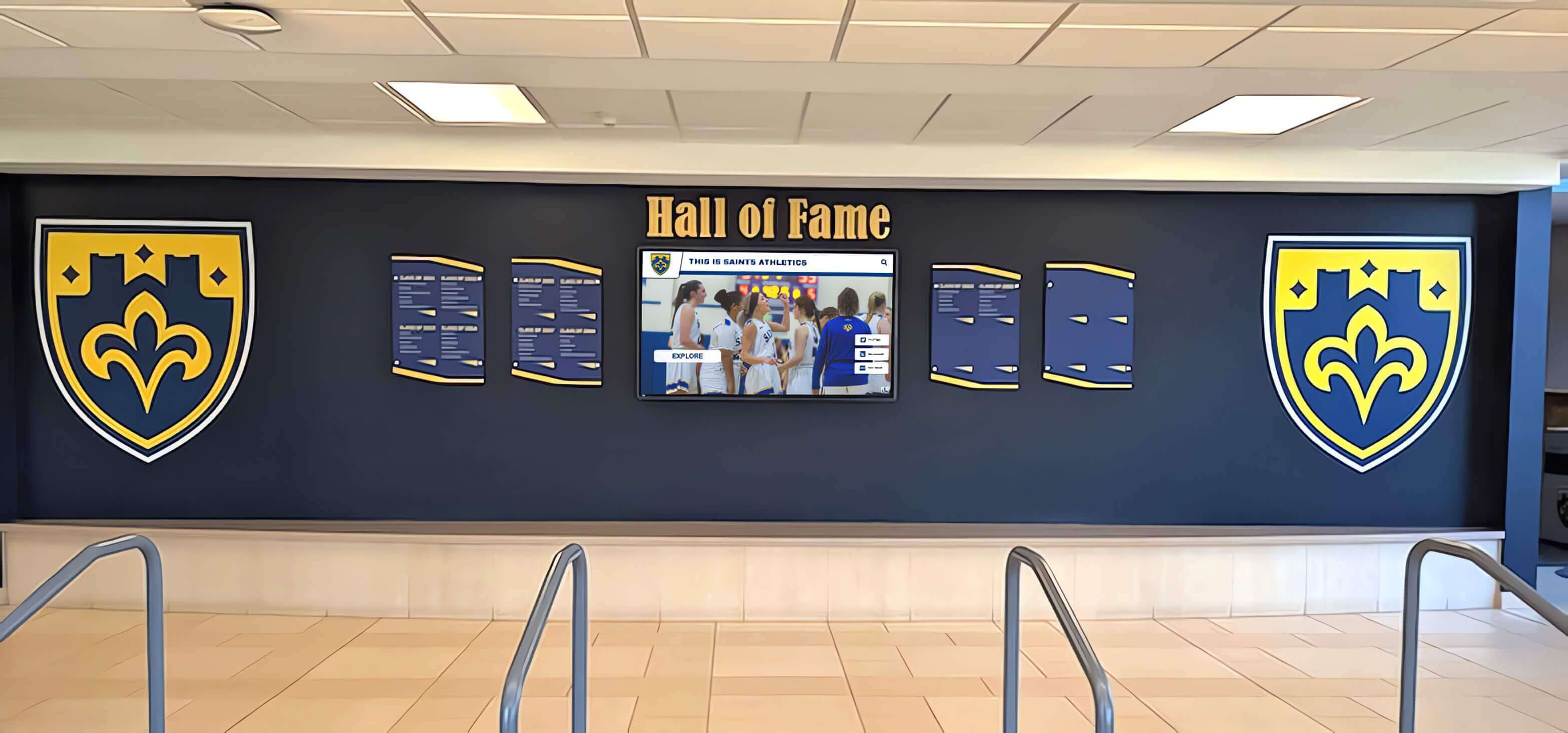
Integrated recognition systems combine traditional design elements like championship shields with modern interactive capabilities
Campus Wayfinding and Directory Systems
Large school campuses with multiple buildings, complex hallway systems, and distributed facilities benefit significantly from interactive wayfinding and directory applications:
Visitor Navigation and Campus Maps
Interactive touch screen walls in main lobbies provide searchable campus maps and building directories, classroom and office location guides, department and administrative contact information, parking information and transportation options, and event location guidance for performances, games, and ceremonies.
These systems reduce front office burden answering directional questions while improving visitor experiences enabling self-service navigation—particularly valuable during evening events when administrative staff may not be available.
Staff and Faculty Directories
Professional touchscreen directories enable name-based searches locating staff members, display department organizational structures, provide contact information including office locations and phone extensions, show office hours and availability, and integrate photos helping visitors identify unfamiliar staff members.
This functionality proves particularly valuable in large schools where locating specific faculty members without centralized directories creates frustration for students, parents, and visitors.
Event Calendars and Scheduling
Interactive displays serve as information hubs broadcasting athletic schedules and game times, academic calendars including testing dates, performing arts events and ticket information, parent engagement opportunities like conferences and meetings, and facility usage schedules for gyms, auditoriums, and fields.
Real-time updates ensure calendars remain current as schedules change throughout school years—eliminating the outdated printed calendars and bulletin board notices plaguing many institutions.
Emergency Communications
While not a primary application, interactive displays can support emergency communications by overriding normal content during critical situations, displaying lockdown procedures and instructions, providing weather emergency information, and broadcasting important administrative messages during crisis events.

Multi-display installations coordinate content across distributed locations serving different audiences with tailored information
Historical Archives and Institutional Memory
Schools possess rich histories deserving preservation and accessibility—interactive touch screen walls transform archives from dusty storage boxes to engaging digital museums:
Yearbook Archives and Historical Photos
Digitize yearbooks spanning decades and make them searchable by year, enable searches by individual names across all archived years, organize photos by decade, sport, or activity, and provide context about historical periods, significant events, and institutional evolution.
Alumni visiting campus can explore their own yearbooks decades after graduation, researchers access historical documentation for community projects, and current students discover institutional heritage understanding their place in ongoing traditions.
Notable Alumni Profiles
Celebrate distinguished graduates who achieved professional success, document alumni contributions to communities and professions, highlight alumni serving in leadership positions, showcase creative and entrepreneurial achievements, and maintain updated profiles as alumni careers progress.
These profiles communicate institutional impact beyond campus boundaries while providing inspiring role models for current students considering career paths.
Institutional Milestone Recognition
Document school founding and significant anniversaries, preserve stories about building construction and facility evolution, celebrate important program achievements and accreditations, recognize leadership contributions from superintendents and principals, and archive significant community events and celebrations.
This historical context strengthens institutional identity while educating stakeholders about heritage and tradition shaping current experiences.
Oral History and Storytelling Projects
Advanced implementations incorporate video interviews with distinguished alumni, faculty reflections on institutional evolution, student perspectives on school experiences across different eras, community members sharing historical context, and documentary footage preserving important moments.
These multimedia archives create living history museums far more engaging than text-based historical documentation alone. Understanding digital archiving approaches for schools provides implementation frameworks.

Intuitive interfaces enable users of all ages and technical backgrounds to explore content without instructions or assistance
Donor Recognition and Development Applications
Schools with active development programs utilize interactive displays for donor recognition providing advantages over traditional static donor walls:
Comprehensive Giving Recognition
Digital platforms accommodate unlimited donor lists without space constraints, organize recognition by giving levels and societies, update immediately as donors increase giving, recognize recurring donations accumulated over years, and celebrate various giving purposes (athletics, academics, scholarships, facilities).
Traditional bronze plaques require expensive reproduction when donors increase giving levels or naming rights change—digital platforms update instantly at zero marginal cost.
Campaign Progress and Goal Visualization
Interactive displays communicate fundraising campaign progress toward goals, recognize campaign leadership and major gift donors, visualize impact through photos of facilities or programs funded, and share stories about how philanthropic support enables programs.
This transparency demonstrates stewardship while encouraging additional giving by showing community investment in institutional priorities.
Donor Impact Stories
Rather than limiting recognition to names and amounts, digital platforms tell stories about scholarship recipients enabled by donations, program improvements funded through philanthropic support, student opportunities created through endowment income, and facilities enhanced by capital campaign success.
These narrative approaches connect donors emotionally to impact rather than treating recognition as transactional acknowledgment alone.
Memorial and Tribute Recognition
Schools honor deceased community members through memorial profiles, recognize tribute gifts made in honor of individuals, document lives and contributions through biographical narratives, and maintain permanent digital memorials accessible to families and communities.
Digital platforms ensure memorial recognition remains permanently accessible unlike physical plaques that may get removed during facility renovations or space reconfigurations. Comprehensive donor recognition display strategies guide effective implementation.
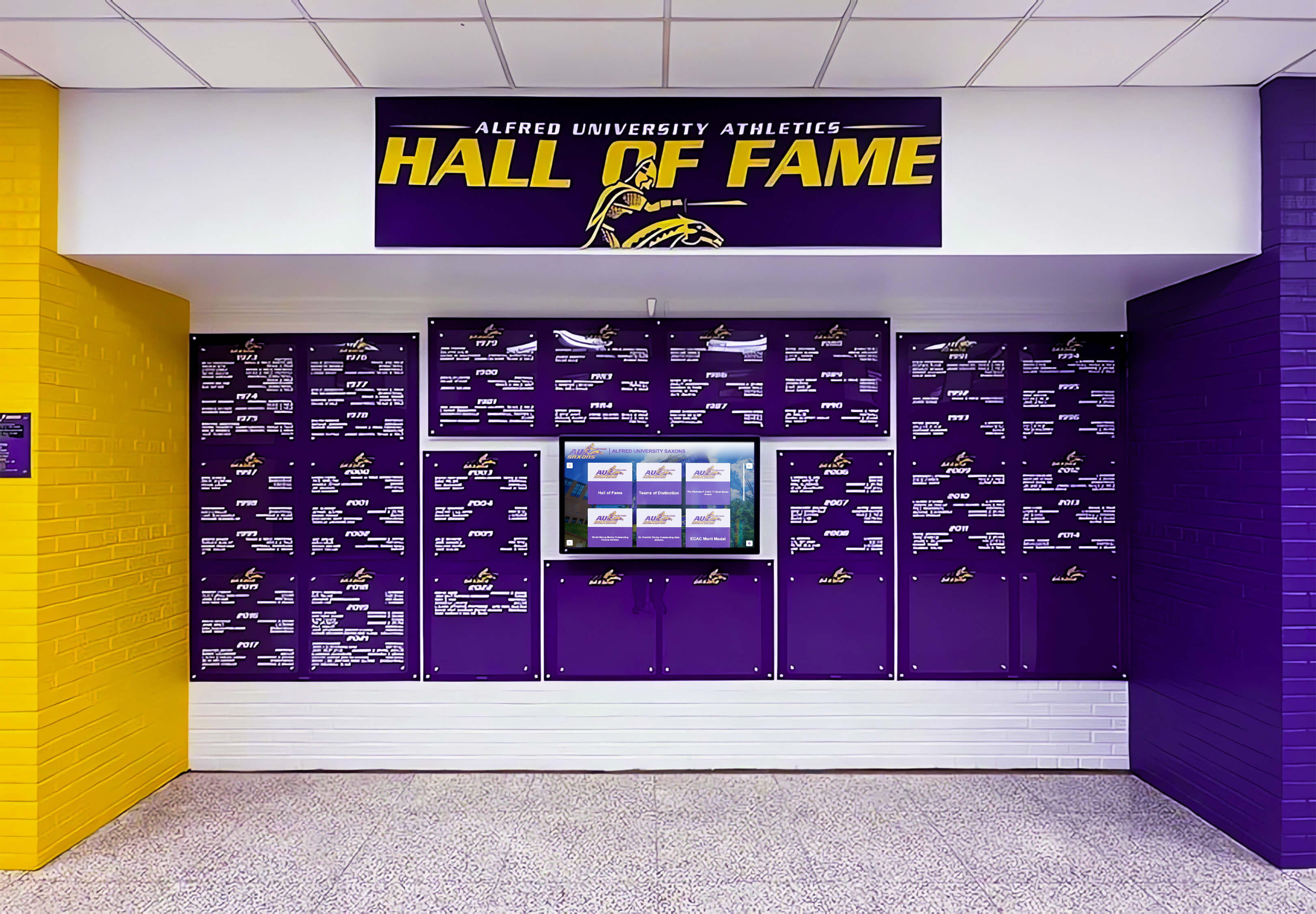
Color-coordinated displays reflect institutional branding while providing professional recognition experiences
Design Principles for Effective Interactive Experiences
Technology capabilities matter far less than thoughtful experience design creating intuitive, engaging interactions requiring minimal instruction or cognitive effort.
Interface Design and User Experience Fundamentals
Visual Hierarchy and Information Architecture
Effective interactive displays organize screen real estate systematically: prominent headers communicating location identity and primary purposes, clear navigation zones with large touch targets for primary actions, focused content areas presenting information without overwhelming density, and persistent home/back controls enabling navigation recovery.
Visual hierarchy guides attention through size, color, and positioning—the most important information receives the most prominent placement while secondary details remain accessible without dominating initial views.
Touch Target Size and Spacing
Smartphone interfaces condition users to certain interaction expectations—buttons and targets smaller than 44x44 pixels (approximately 0.4 inches) create frustration through missed touches requiring repeated attempts. Professional implementations provide generous touch targets with adequate spacing preventing accidental adjacent button presses.
This proves particularly important for younger students with less developed fine motor control and older adults with reduced dexterity—proper target sizing ensures accessibility across age ranges.
Typography and Readability Optimization
Interactive displays serve multiple viewing distances—users stand 18-24 inches away during active touch interaction but may initially view content from 6-10 feet away determining whether to approach. Typography must work across these viewing ranges through large headline fonts (48pt+) for passive distance viewing, clearly legible body text (18-24pt) for close reading, high-contrast color combinations ensuring readability, and simple, clean typefaces avoiding decorative complexity.
Color Systems and Brand Integration
School installations should reinforce institutional identity through systematic color application: primary school colors dominating headers and navigation elements, secondary colors supporting information hierarchy, accent colors highlighting interactive elements and calls-to-action, and white space preventing visual clutter.
Consistent color usage creates professional appearances while strengthening brand recognition—ensuring displays feel like integrated institutional technology rather than generic third-party installations.
Content Strategy and Information Design
Writing for Scanability
Users rarely read complete paragraphs on interactive displays—they scan for relevant information before committing attention. Effective content employs short paragraphs (2-4 sentences maximum), bulleted lists for serial information, descriptive headers enabling quick content evaluation, bold text highlighting key information, and concise language avoiding unnecessary complexity.
Multimedia Balance
While video and photo content creates engagement, excessive multimedia creates slow loading times and navigation frustration. Balanced implementations include 3-5 photos per profile providing visual interest, 30-90 second video clips rather than lengthy content, thumbnail previews before loading full video, and clear play/pause controls for user-initiated viewing.
Progressive Disclosure
Rather than overwhelming users with complete information simultaneously, progressive disclosure reveals complexity gradually: summary cards showing essential information at-a-glance, expanded views providing additional detail on touch, full profile pages containing comprehensive content, and related content links enabling extended exploration.
This layered approach serves both casual browsers seeking quick information and engaged users desiring comprehensive detail.
Search and Filter Design
Powerful search capabilities matter little if users cannot easily access them. Effective implementations include prominent search boxes on home screens, auto-complete suggestions reducing typing requirements, suggested searches helping users understand available content, clear filter controls for browsing by category, and visible result counts showing search effectiveness.
Understanding touchscreen design best practices ensures optimal user experiences.

Card-based interfaces enable intuitive browsing and selection matching familiar smartphone interaction patterns
Accessibility and Inclusive Design
Modern interactive installations must serve all users regardless of physical abilities, age, or technical proficiency.
Physical Accessibility Standards
ADA compliance requires mounting height placing touchable controls within reach ranges (15-48 inches for forward approach), adequate clear floor space for wheelchair access (30x48 inch minimum), and appropriate height positioning for comfortable viewing and interaction.
Volume controls for audio content respect quiet environments while accommodating users with hearing impairments who may need increased volume. Visual-only alternatives ensure deaf users access equivalent information.
Cognitive and Visual Accessibility
Interface designs accommodate diverse abilities through simple, consistent navigation throughout experiences, high-contrast mode options for users with visual impairments, text size controls enabling enlargement, plain language avoiding complex jargon, clear iconography supplementing text labels, and obvious error messages when interactions fail.
Multi-Language Support
Schools serving diverse populations benefit from multi-language interfaces providing Spanish, Chinese, or other language options based on community demographics. This inclusion communicates respect while ensuring non-English-speaking families can access recognition and information.
User Testing with Diverse Populations
Before finalizing designs, test with actual users representing diverse ages, technical proficiencies, and abilities—including elementary students, older adults, wheelchair users, and individuals with visual or cognitive impairments. This testing reveals usability issues designers miss through assumptions about typical users.
Implementation Planning and Best Practices
Successful interactive touch screen wall deployments require systematic planning addressing technology selection, installation, content development, and ongoing management.
Phase 1: Strategic Planning and Stakeholder Alignment
Defining Primary Use Cases and Success Metrics
Begin by clearly articulating what problems interactive displays will solve: insufficient athletic recognition capacity, lack of academic achievement celebration, poor campus wayfinding, inadequate donor recognition, or lost institutional history. Prioritize 2-3 primary use cases rather than attempting comprehensive implementations initially.
Define measurable success criteria: engagement metrics (daily interactions, average session duration), content goals (profiles created, historical years documented), stakeholder satisfaction measures, and return on investment through time savings or enhanced outcomes.
Stakeholder Engagement and Buy-In
Successful implementations require support from athletic directors and coaches for athletic content, academic departments and honors programs for academic recognition, facilities and IT departments for installation and networking, development offices for donor recognition applications, and administrators approving budgets and strategic direction.
Engage stakeholders early presenting use cases relevant to their priorities while addressing concerns about technical complexity, ongoing content responsibilities, or budget constraints.
Budget Development and Funding Sources
Comprehensive interactive installations typically cost $12,000-25,000 including commercial-grade touchscreen hardware ($5,000-12,000), recognition software and licensing (varies by solution), professional installation and network integration ($2,000-4,000), initial content development and training, and first-year support and maintenance.
Explore diverse funding including capital campaign allocations, memorial giving programs, corporate sponsorships, booster club contributions, and grant opportunities from education technology foundations.
Phase 2: Technology Selection and Vendor Evaluation
Hardware Specifications and Quality Criteria
Prioritize commercial-grade displays rated for continuous public operation, capacitive touch technology for responsive interaction, 4K resolution ensuring crisp text and image quality, 400+ nit brightness for well-lit environments, and comprehensive warranties (3-5 years) protecting investments.
Request demonstrations with content similar to intended applications—athletic recognition implementations look very different than donor walls or wayfinding systems, so ensure demonstrations match your specific use cases.
Software Platform Assessment
Evaluate platforms based on purpose-built features for primary use cases (recognition, wayfinding, etc.), intuitive content management accessible to non-technical staff, cloud-based architecture minimizing technical requirements, mobile-responsive web portals extending access beyond physical displays, and vendor experience specifically with educational institutions.
Speak with reference schools about implementation experiences, technical support quality, content management ease, and overall satisfaction before committing to platforms.
Total Cost of Ownership Analysis
Beyond initial hardware and software costs, consider annual software licensing and support fees, content development and management time requirements, electricity costs for continuous operation, periodic hardware maintenance and potential repairs, and eventual hardware replacement (typically 7-10 years).
Platforms with higher annual licensing costs but comprehensive support may deliver better total value than lower-cost alternatives requiring extensive internal technical resources.
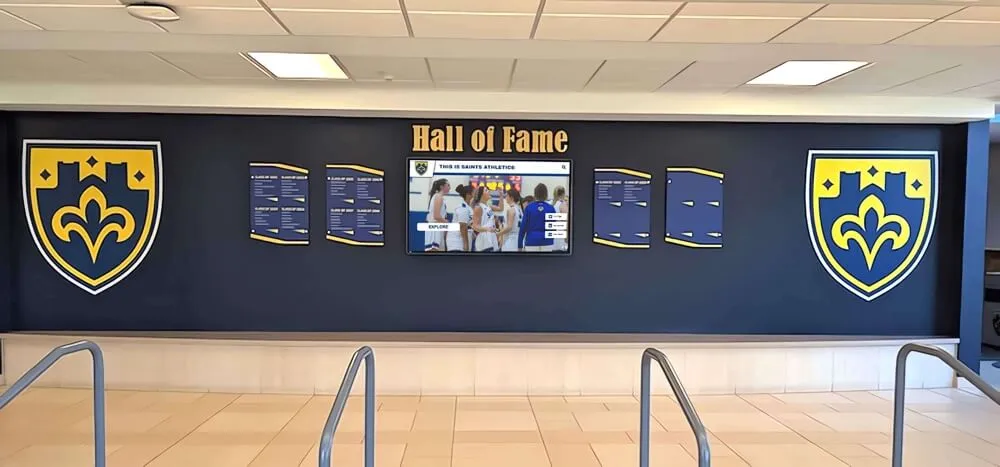
Professional installations integrate digital technology with traditional recognition elements creating comprehensive celebration environments
Phase 3: Installation and Technical Integration
Site Assessment and Placement Strategy
Optimal placement maximizes visibility and accessibility: main entrance lobbies greet all visitors immediately, athletic facility entrances serve sports-focused audiences, cafeterias reach entire student populations daily, administrative areas impress prospective families, and specialized locations serve specific use cases.
Assess structural capacity for wall-mounted installations, evaluate network connectivity and power availability, consider lighting conditions and potential glare, account for ADA accessibility requirements, and plan cable management for clean professional appearance.
Professional Installation Requirements
Commercial display installations require professional expertise including proper mounting supporting substantial weight (65-inch displays weigh 60-80 pounds), secure fastening to structural elements not just drywall, appropriate viewing height and angle, network configuration and integration, and power management with concealed wiring.
Improper installations create safety hazards, damage facilities, void warranties, and result in poor viewing angles or accessibility compliance failures.
Network and Content Delivery Infrastructure
Interactive displays require reliable network connectivity enabling content updates, analytics reporting, remote monitoring, and software updates. Assess whether wireless connectivity provides adequate bandwidth and reliability or hardwired Ethernet connections prove necessary.
For multiple distributed displays, verify network infrastructure capacity supporting simultaneous video streaming and content delivery across all installations without performance degradation.
Phase 4: Content Development and Launch
Initial Content Strategy
Rather than attempting immediate comprehensive coverage, prioritize recent content ensuring quality: current and recent athlete, student, or donor profiles, recent championship teams and achievements, contemporary photos and videos, and well-documented recent history.
Expand historical coverage progressively through summer projects, volunteer efforts, or phased initiatives over multiple years—maintaining quality standards throughout rather than sacrificing depth for breadth.
Content Management Training
Train multiple staff members preventing single-person dependencies, document content workflows and procedures, establish quality standards and approval processes, create content templates ensuring consistency, and schedule regular review cycles maintaining current information.
Launch Strategy and Promotion
Coordinate display unveiling with significant events: athletic banquets or hall of fame inductions, homecoming or alumni weekend celebrations, donor recognition events, or all-school assemblies.
Promote installations through social media highlighting capabilities, direct communication to alumni and families, student demonstrations during classes, and staff orientation introducing technology.
Initial engagement patterns establish usage norms—prominent launches create immediate awareness driving adoption and validating investments.
Understanding comprehensive implementation frameworks for school technology guides successful deployments.
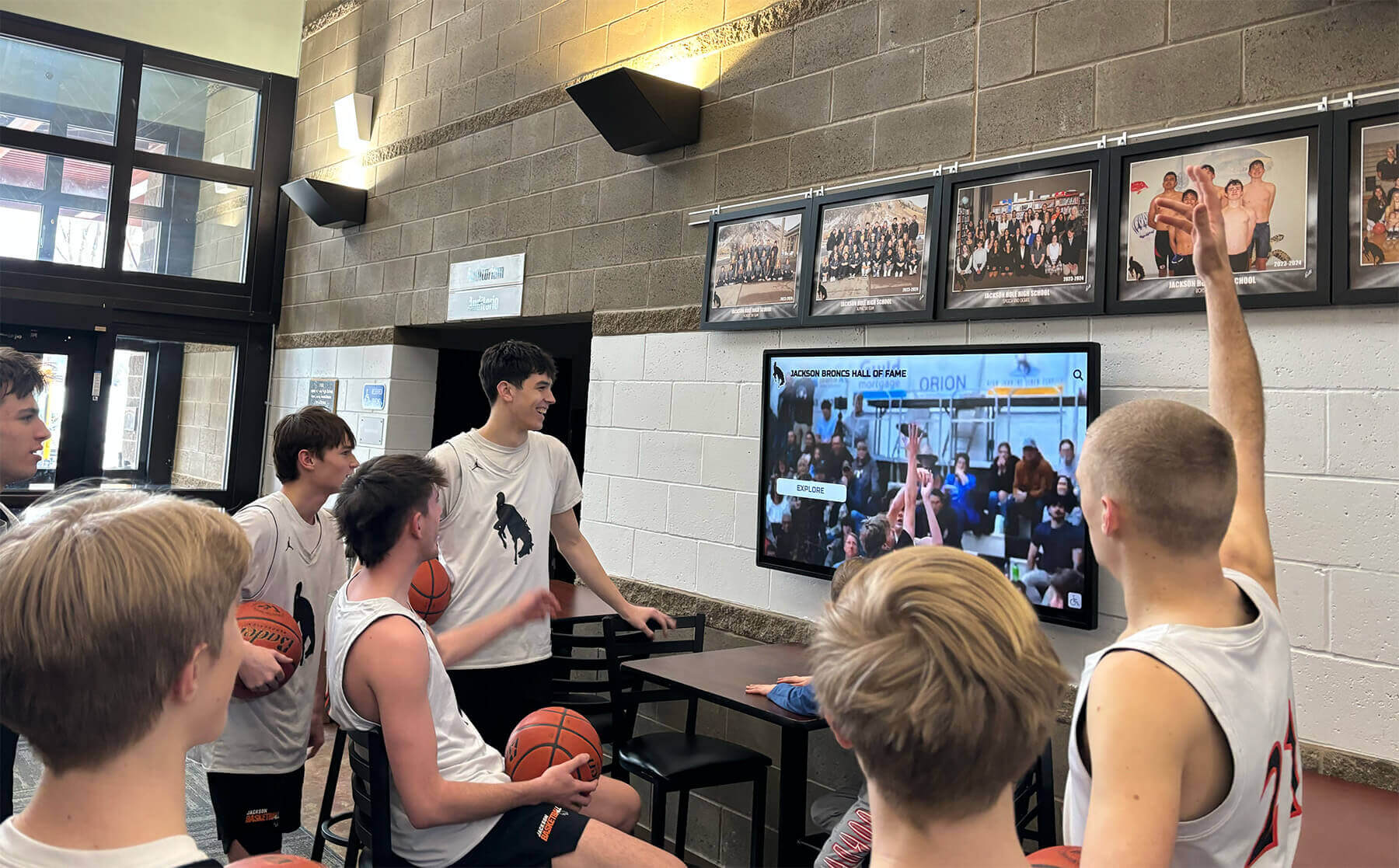
Strategic lobby placement ensures athletes, students, and visitors naturally encounter recognition throughout daily activities
Long-Term Management and Continuous Improvement
Interactive installations require ongoing attention maintaining current content, optimizing performance, and maximizing value.
Sustainable Content Operations
Establishing Update Workflows
Create systematic processes for adding new honorees tied to natural cycles: athletic recognition updates coinciding with season conclusions and banquets, academic recognition updates each semester following grade distribution, donor recognition updates quarterly as campaign progress occurs, and historical content additions during summer when staff capacity increases.
Quality Assurance Processes
Implement review procedures ensuring accuracy before publication, verify proper name spelling and biographical details, confirm statistical information against official records, validate image quality and appropriateness, test links and video playback functionality, and obtain approvals from recognized individuals when possible.
Distributed Content Responsibility
Avoid concentrating all content management in single individuals by assigning athletic recognition to coaches or athletic directors, delegating academic recognition to guidance or honors program staff, distributing historical research to interested teachers or volunteers, and maintaining donor recognition through development offices.
This distribution prevents bottlenecks while leveraging expertise residing in different departments.
Performance Monitoring and Analytics
Engagement Metrics and Usage Patterns
Quality platforms provide analytics revealing daily interaction sessions showing usage frequency, average session duration indicating engagement depth, most-viewed content identifying community interests, search terms revealing what information users seek, peak usage times informing content update scheduling, and navigation patterns showing how users explore applications.
This data drives continuous improvement ensuring installations serve actual user needs rather than assumptions about usage.
Technical Performance Monitoring
Monitor display uptime and reliability, track content loading times and performance, identify network connectivity issues, document touch responsiveness problems, and assess audio-visual quality during regular facility walkthroughs.
Proactive monitoring identifies issues before they significantly impact user experiences or create negative impressions about technology investments.
Expansion and Enhancement Planning
Adding New Use Cases
Successful initial implementations often expand to additional applications: athletic recognition installations add academic achievement celebration, donor walls expand to include historical archives, wayfinding systems incorporate event promotion, and single-purpose displays evolve into multifunctional platforms.
This organic growth maximizes return on initial hardware investments while serving diverse stakeholder needs through shared technology infrastructure.
Multi-Display Networks
Large schools deploy coordinated display networks serving different locations and audiences: main lobby displays providing comprehensive content access, specialized athletic facility displays focused on sports content, academic wings featuring subject-specific recognition, performing arts areas celebrating music and drama achievements, and administrative displays impressing prospective families.
Centralized content management enables coordination across distributed installations while allowing location-specific customization matching local audiences.
Integration with Broader Technology Ecosystems
Advanced implementations integrate with student information systems automating honor roll data imports, connect with athletic statistics databases eliminating manual data entry, synchronize with donor management systems ensuring recognition accuracy, and coordinate with campus signage providing consistent information.
These integrations reduce administrative burden while improving accuracy and timeliness.
Resources about comprehensive recognition system approaches provide frameworks for ongoing enhancement.
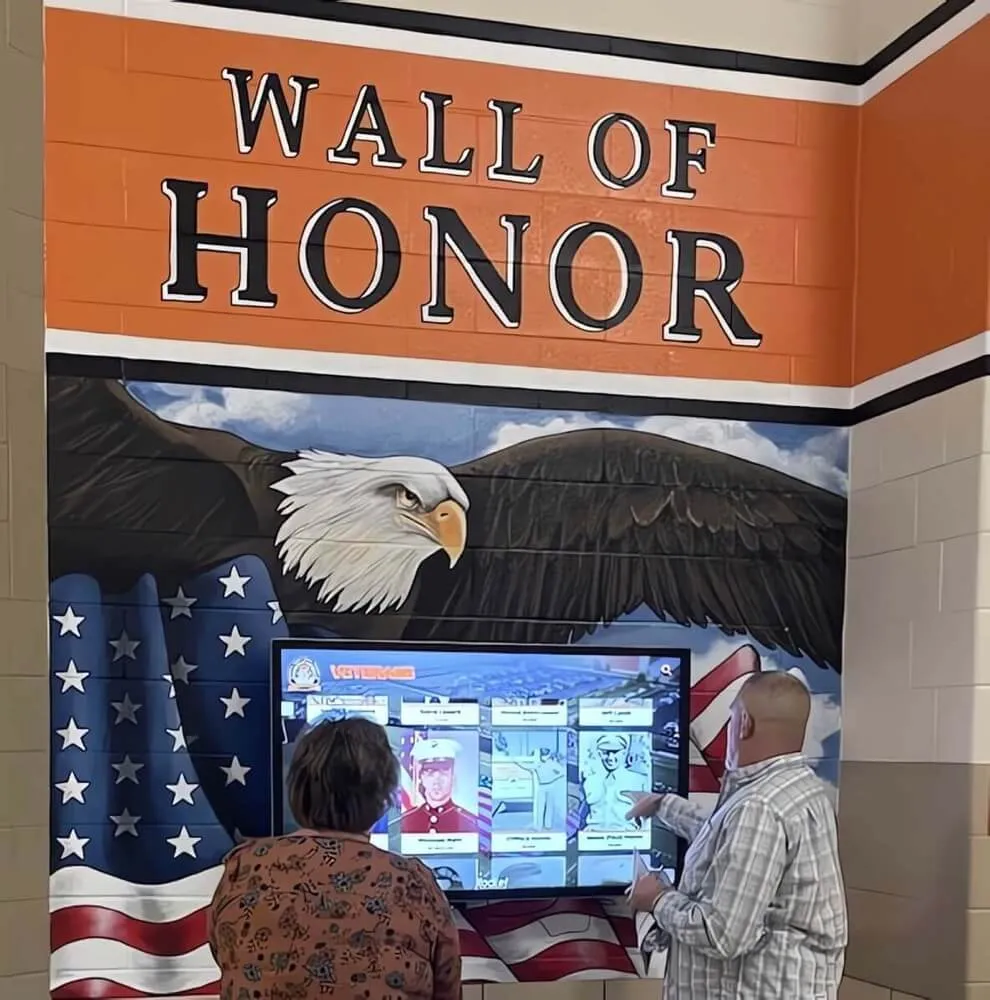
Themed recognition installations celebrate specific purposes while maintaining consistent interactive functionality
Common Challenges and Solutions
Understanding typical implementation obstacles helps schools proactively address issues.
Technical Challenges
Challenge: Network Connectivity and Bandwidth
Interactive displays require reliable network connectivity—spotty wireless networks or inadequate bandwidth creates frustration through slow content loading, video buffering, or system crashes.
Solution: Conduct site surveys assessing network reliability before installation. For problematic locations, install hardwired Ethernet connections providing guaranteed bandwidth. Prioritize network traffic for interactive displays ensuring adequate performance even during peak usage periods.
Challenge: Display Visibility and Glare
Bright natural lighting creates glare making displays difficult to view, while inadequate ambient lighting makes hallway installations feel uninviting or difficult to approach.
Solution: Select high-brightness displays (500+ nits) for naturally lit locations. Position displays perpendicular to windows minimizing direct sunlight reflection. Consider anti-glare coatings or recessed installations reducing reflection angles. Ensure adequate facility lighting without creating excessive glare.
Challenge: Touch Responsiveness and Calibration
Poorly calibrated touchscreens frustrate users through inaccurate touch registration, delayed response, or complete input failures.
Solution: Purchase quality capacitive touchscreens from reputable manufacturers rather than budget alternatives with poor touch controllers. Ensure proper installation without electromagnetic interference from nearby equipment. Implement regular testing protocols identifying calibration drift early. Establish clear vendor support relationships providing responsive technical assistance.
Content and Management Challenges
Challenge: Initial Content Development Workload
Creating hundreds of athlete profiles, digitizing historical materials, or developing comprehensive content feels overwhelming before launch.
Solution: Begin with smaller, manageable scope—current year only, single sport, or recent history. Launch with quality limited content then expand progressively rather than delaying launches pursuing unattainable comprehensive coverage. Engage volunteers, parent groups, or student workers assisting with content development.
Challenge: Ongoing Content Maintenance Burden
Without systematic update processes, initial content grows outdated diminishing value and creating negative impressions about neglected technology.
Solution: Establish clear staff responsibilities with backup coverage. Create annual calendars scheduling predictable updates. Automate data imports where possible reducing manual entry requirements. Set realistic expectations about update frequency rather than attempting unrealistic daily refreshes.
Challenge: Content Quality Inconsistency
Multiple contributors create content with varying quality, writing styles, photo standards, and formatting approaches resulting in unprofessional appearances.
Solution: Develop clear content standards and templates ensuring consistency. Implement approval workflows with quality checks before publication. Provide training and examples demonstrating expectations. Use templates and structured data fields preventing format deviations.
Adoption and Engagement Challenges
Challenge: Low User Awareness and Engagement
Beautiful installations deliver no value if students, staff, and visitors remain unaware of capabilities or don’t understand how to interact.
Solution: Promote installations systematically through announcements, demonstrations, and direct communication. Position displays in unavoidable high-traffic locations. Design attraction loops clearly communicating interactive capabilities. Create compelling content worth exploring rather than minimal information.
Challenge: Initial Technology Intimidation
Some users, particularly older adults, feel intimidated by touchscreen technology and avoid interaction despite interest in content.
Solution: Design extremely intuitive interfaces requiring no instructions. Observe users during initial weeks identifying confusion points. Provide patient staff assistance during initial adoption periods. Create short video demonstrations showing basic navigation. Design forgiving interfaces where experimentation causes no harm.
Understanding common implementation challenges and solutions helps schools avoid predictable pitfalls.

Thoughtful design and intuitive navigation enable users of all ages and technical backgrounds to explore content independently
ROI Assessment and Justifying Investment
Schools must justify technology investments through clear value propositions and measurable outcomes.
Quantifiable Benefits
Space Efficiency and Recognition Capacity
A single 65-inch interactive display replaces approximately 50-75 physical plaques, 20-30 traditional donor wall entries, or 100+ athletic achievement listings—all within a few square feet of wall space. This efficiency proves particularly valuable in space-constrained facilities where physical recognition options exhaust available walls.
Calculate cost per recognition instance: a $15,000 installation serving 500 profiles costs $30 per person compared to $75-150 per person for physical plaques or trophies, delivering 50-80% cost savings while providing far richer multimedia recognition.
Operational Time Savings
Digital platforms reduce administrative burden through elimination of physical plaque ordering and installation coordination, instant content updates versus waiting weeks for production, centralized management rather than distributed physical maintenance, automated data imports reducing manual entry, and reduced response time addressing recognition errors or omissions.
These time savings free staff for higher-value activities while improving recognition timeliness and accuracy.
Extended Reach and Accessibility
Web portal extensions multiply audience reach: physical displays might serve 500-1,000 viewers weekly on campus, while web portals reach thousands of alumni, families, and community members worldwide accessing recognition remotely.
This extended reach amplifies return on content development investments while strengthening alumni engagement and institutional connections.
Qualitative Value Propositions
Enhanced Stakeholder Satisfaction
Surveys of schools implementing interactive recognition consistently show improved satisfaction from athletes feeling appropriately honored, families appreciating comprehensive recognition, alumni maintaining stronger institutional connections, donors receiving meaningful acknowledgment, and prospective students impressed by modern facilities.
These satisfaction improvements, while difficult to quantify precisely, drive concrete outcomes including retention, recruitment, alumni giving, and community support.
Strengthened Institutional Culture
Systematic recognition communicates values and priorities: athletic departments celebrating every participant build inclusive cultures where all contributions matter, academic institutions highlighting intellectual achievement motivate student excellence, schools preserving history demonstrate respect for tradition and heritage, and organizations recognizing donors transparently build philanthropic cultures.
These cultural outcomes deliver long-term value exceeding direct technology costs.
Competitive Differentiation
In competitive educational markets, modern facilities and technology create recruiting advantages. Prospective students touring campuses with impressive interactive recognition systems perceive institutions as forward-thinking, resource-rich, and committed to celebrating achievement—differentiating from competitors lacking similar capabilities.
Future-Proofing and Scalability
Digital platforms grow with institutions: adding recognition for 20 or 200 new athletes costs nothing beyond content development time, expanding from athletics to academics requires no additional hardware, and accumulating decades of history simply adds database entries rather than requiring facility expansion.
This scalability provides long-term value physical alternatives cannot match as institutions grow and recognition needs expand.
Conclusion: Transforming School Spaces Through Interactive Technology
Interactive touch screen walls represent far more than impressive technology installations—they embody institutional commitments to celebrating achievement comprehensively, preserving history systematically, and engaging communities meaningfully through modern digital experiences.
Transform Your School Recognition
Discover how interactive touch screen walls create engaging recognition experiences celebrating athletic excellence, academic achievement, and institutional heritage. Rocket Alumni Solutions designs purpose-built platforms specifically for educational institutions requiring comprehensive, accessible, and inspiring digital recognition.
Explore Interactive SolutionsSchools implementing these systems discover applications expanding far beyond initial deployment intentions. What begins as an athletic hall of fame evolves into comprehensive institutional recognition infrastructure serving academic achievement celebration, campus wayfinding, historical preservation, donor appreciation, and community engagement—all through unified technology platforms managed centrally while serving distributed stakeholder needs.
The most successful implementations combine clear strategic vision with realistic execution planning, prioritize user experience over technical complexity, maintain sustainable content operations supporting long-term viability, and continuously evolve based on analytics and stakeholder feedback.
Whether your institution seeks to honor athletic traditions more comprehensively than physical space allows, celebrate academic achievement systematically rather than through temporary bulletin boards, preserve institutional history for future generations, recognize donors meaningfully while controlling long-term costs, or simply transform underutilized hallway space into engaging information hubs serving multiple purposes—interactive touch screen wall technology provides proven solutions delivering measurable value across diverse applications.
The students, athletes, scholars, donors, and alumni who contribute to institutional excellence deserve recognition matching the quality of their achievements—comprehensive, accessible, engaging, and permanent rather than constrained, limited, and ephemeral. Interactive touch screen walls enable this recognition while creating dynamic, evolving platforms growing with institutions across decades rather than static monuments freezing single moments in time.
Organizations ready to explore interactive recognition technology should prioritize vendors with demonstrated educational experience, evaluate purpose-built platforms over generic digital signage, plan systematically for content development and ongoing management, and view implementations as long-term institutional infrastructure deserving proper investment, planning, and support. Done well, interactive touch screen walls transform spaces while strengthening cultures, honoring excellence, and preserving heritage for generations to come.
Ready to explore interactive touch screen wall solutions for your school? Discover comprehensive touchscreen kiosk options, learn about recognition program planning frameworks, explore digital recognition design best practices, and understand implementation strategies ensuring long-term success for modern interactive recognition systems purpose-built for celebrating institutional excellence and community achievement.































