




Walk into almost any modernized school building today and you’ll notice something that wasn’t there a decade ago: a large interactive display mounted in the lobby, hallway, or athletic corridor inviting students, staff, and visitors to reach out and explore. Interactive touch screens in education have moved well beyond classroom projectors and smartboards. Schools are now deploying them for three distinct and high-impact purposes—celebrating the people who define their culture, guiding visitors through complex campuses, and pulling students into active participation with school content. Each use case solves a different problem, yet together they reshape what it means to walk through a school building.
This guide explores how forward-thinking schools are using interactive displays across all three of these areas, what makes each application effective, and how to think about deploying them in ways that genuinely serve your community rather than simply adding expensive hardware to hallways.
The shift toward interactive touchscreen technology in school environments reflects something deeper than a technology trend. Schools face pressure to communicate more information to more audiences while maintaining a physical environment that feels vibrant and alive. Static plaques collect dust. Paper flyers disappear. Printed directories become outdated within weeks. Interactive displays solve the maintenance problem while simultaneously raising the ceiling on what schools can communicate and celebrate.

Modern interactive hall of fame displays invite students and visitors to explore school history and recognize achievements at their own pace
What Makes Interactive Touch Screens Different in Educational Settings
Before diving into specific applications, it helps to understand why touchscreen technology has particular value in schools compared to passive digital signage or static displays.
Active versus passive engagement sits at the center of the distinction. A looping video display can share information, but it controls the experience—viewers see what the system decides to show next. A touchscreen puts control in the hands of the user. A student can search for a specific alumni athlete, pull up their career statistics, and read their biography in the time it takes a passive display to cycle through twenty slides. That control transforms engagement from accidental to intentional.
Depth without clutter represents the second major advantage. Physical trophy cases and plaques can only hold so much information before lobbies become overwhelming. A single touchscreen can house the entire athletic history of an institution—hundreds of athletes, thousands of records, decades of championships—organized in a clean, navigable interface. Visitors see only what they choose to explore rather than confronting walls of information they must parse.
Updateability eliminates the permanent obsolescence problem that plagues traditional recognition. When a team wins a state championship in November, that record can appear on an interactive display within hours. Physical additions to trophy cases and honor walls take weeks or months and cost money every time.
For a deeper look at how educators are thinking about interactive board suggestions that go beyond classroom instruction, that resource covers approaches specifically tailored to school environments.
Recognition: Giving Achievement the Visibility It Deserves
The most emotionally resonant application of interactive touch screens in education is recognition. Schools have always wanted to celebrate their students, athletes, and alumni—the challenge has been finding scalable, beautiful ways to do it that don’t require constant physical renovation.
Digital Halls of Fame
Athletic halls of fame historically lived in glass cases near gymnasiums, holding printed photos and typed bios that yellowed over time. Interactive touchscreen halls of fame preserve and expand that tradition. An inductee’s profile can include multiple photos from their career, year-by-year statistics, a written biography, and even video highlights if available. The entire archive becomes searchable so a visitor can find a specific person by name, sport, graduation year, or achievement type.
What changes behaviorally is that people actually use these systems. A 1998 alumnus returning for homecoming can find themselves in the database within seconds. A current sophomore can scroll through records in their sport and see exactly what they’d need to accomplish to reach the same level. That combination of historical preservation and live inspiration is difficult to replicate through any other medium.
Schools building these recognition systems benefit from thinking carefully about user experience from the start. The user experience design principles for digital halls of fame cover how navigation hierarchy, search functionality, and content organization affect whether people actually engage with these systems or simply walk past them.
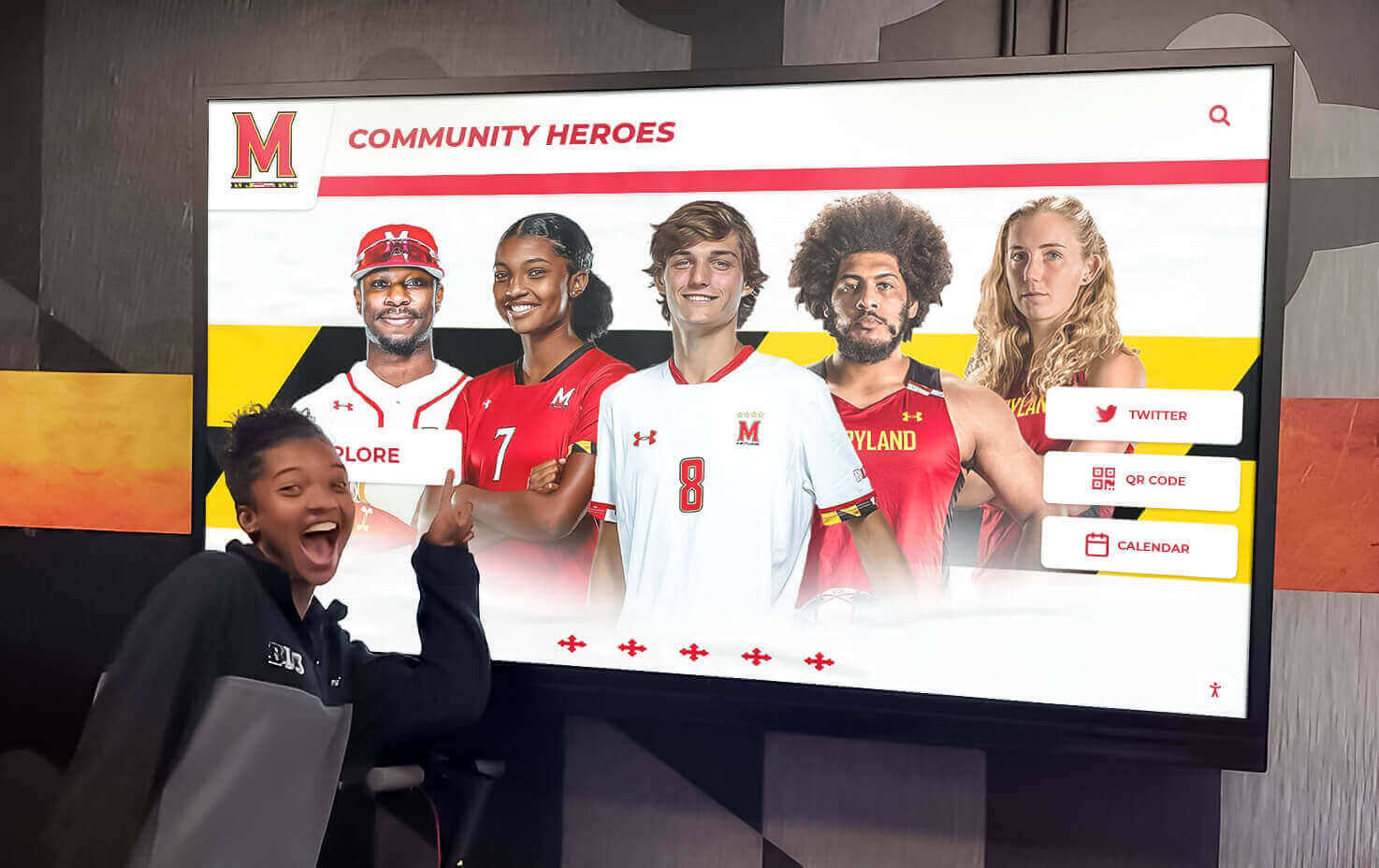
Recognition displays positioned in high-traffic hallways naturally attract students to explore school history and celebrate peers and alumni
Academic Excellence Recognition
Athletic recognition is well-established, but schools using interactive touch screens in education are increasingly expanding displays to cover academic achievement. Valedictorians, National Merit Scholars, all-state musicians, debate champions, and CTE certification earners all deserve visible celebration—and digital platforms give schools the capacity to recognize them without competing for physical wall space.
Academic excellence awards and touchscreen hall of fame displays represent one of the fastest-growing categories of educational touchscreen deployment. When intellectual achievement gets the same visible, interactive treatment as athletic achievement, it sends a clear signal to students about what the institution values.
Student of the Month and Ongoing Recognition Cycles
Recognition doesn’t have to be permanent and historical to benefit from interactive displays. Schools run monthly recognition cycles—student of the month, teacher appreciation highlights, community hero spotlights—and these programs are natural fits for touchscreen systems that can be updated quickly without requiring physical changes.
Understanding the student of the month award as a structured program, not just a plaque, helps schools design recognition systems that build anticipation and community investment over time.
Alumni Engagement Through Recognition
For universities and high schools with active alumni programs, interactive recognition displays serve as powerful relationship tools during campus visits, reunions, and events. Alumni who see themselves or their era represented on a touchscreen feel a tangible connection to the institution that abstract email campaigns rarely achieve.
The broader possibilities here extend into alumni engagement ideas that pair physical touchscreen experiences with digital outreach strategies.
Rocket Alumni Solutions specializes in building exactly this kind of recognition infrastructure for schools—touchscreen walls of fame, interactive honor displays, and digital kiosks that celebrate students, athletes, and alumni in ways that become beloved institutional landmarks.
Wayfinding: Helping Visitors Navigate Complex Campuses
The second major application area for interactive touch screens in education is wayfinding—helping students, families, prospective students, and guests navigate buildings and campuses that can be genuinely difficult to navigate without guidance.

Freestanding kiosks in high-traffic areas serve double duty as recognition displays and wayfinding tools for visitors unfamiliar with campus layout
The Challenge of Modern School Navigation
Modern school buildings—especially consolidated high schools, college preparatory institutions, and university campuses—can span hundreds of thousands of square feet across multiple buildings. A parent visiting for the first time to attend a conference, or a prospective student arriving for a tour, faces real navigation challenges that affect their entire experience of the institution.
Traditional solutions rely on printed maps handed out at reception, posted signs that become outdated, or staff members pressed into service as human directories. None of these scale well. Interactive wayfinding kiosks solve the problem by giving visitors an on-demand resource that never goes home sick and never requires a reprint when the office moves.
Campus Directory Touchscreens
For higher education institutions, touchscreen directory kiosks have become standard features in lobby areas. A visitor can search by department, staff member name, or service type and receive both the location information and, in sophisticated installations, a highlighted path on a campus map.
Schools offering structured campus visits can build touchscreen directory and tour navigation displays that guide prospective students through planned routes while surfacing recognition content—championship histories, distinguished alumni, academic achievements—at relevant stops along the way. This turns a wayfinding tool into a recruitment asset.
Visitor Management Integration
Larger schools are increasingly integrating their interactive touchscreen installations with visitor management workflows. A touchscreen in the main lobby can allow visitors to check in, notify staff of their arrival, print visitor badges, and receive directions to their destination—all without requiring front office staff to manage each interaction manually.
For administrators considering how these systems fit into broader security and operational workflows, a comprehensive school visitor management system guide covers the full picture of how touchscreen technology integrates with school access protocols.
Event-Specific Wayfinding
During high-traffic events—graduation ceremonies, athletic competitions, performing arts presentations, open houses—the wayfinding demand on schools spikes dramatically. Hundreds of visitors who may have never been to the campus before arrive simultaneously, often confused about where to park, where to enter, and where to go.
Interactive displays programmed with event-specific layouts reduce the pressure on staff while improving the visitor experience. Rather than queuing at a reception desk for directions, families can find their way independently, freeing staff to address genuinely complex needs.
Student Engagement: From Passive Audience to Active Participants
The third major category of interactive touch screens in education focuses on student engagement—using touchscreen technology not primarily to broadcast information at students but to invite them into active participation with school content, history, and culture.
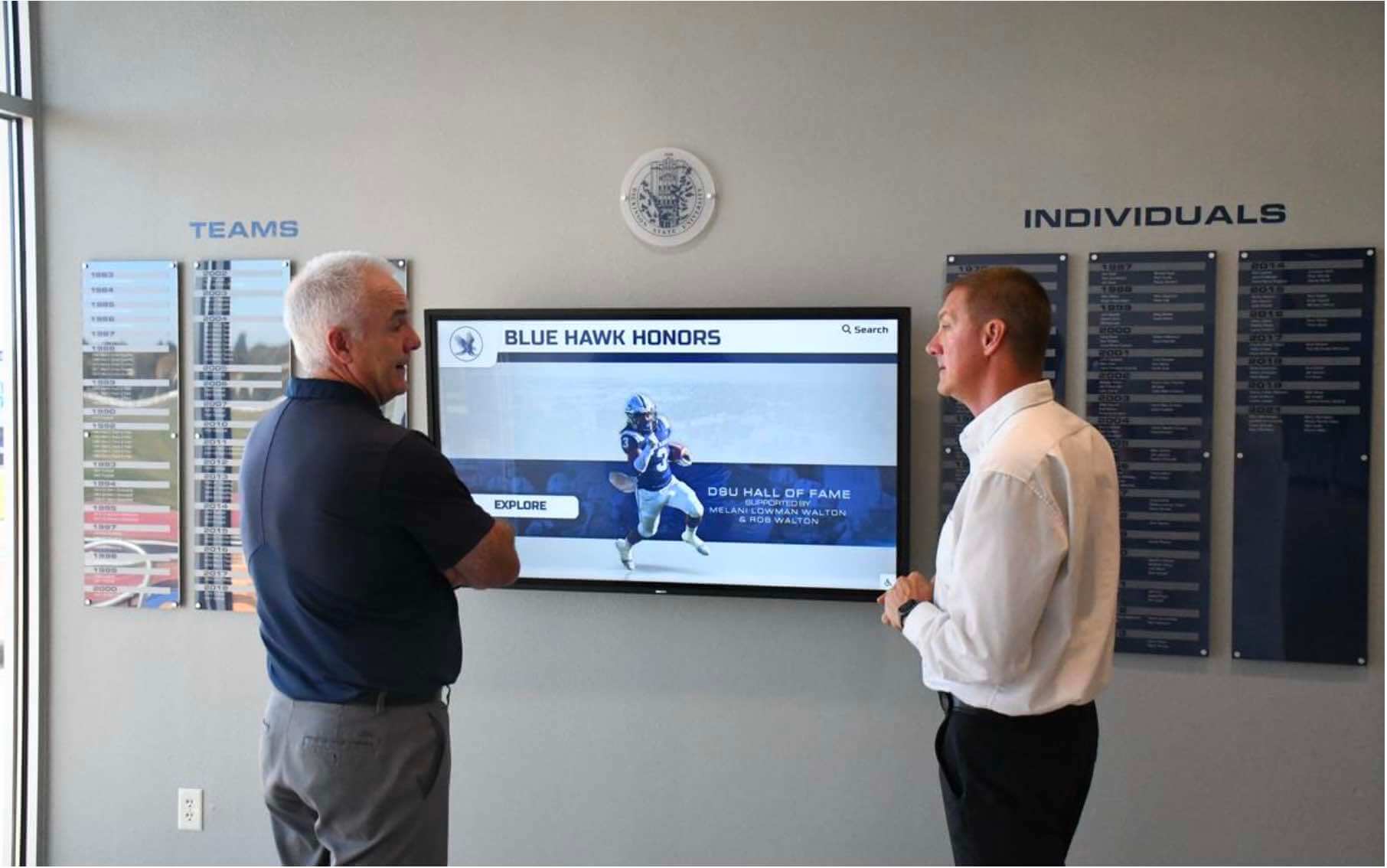
Social engagement around interactive displays builds community connections and shared discovery of school history and achievements
Touchscreens as Social Gathering Points
When an interactive display is well-positioned and well-designed, it becomes a social anchor in a hallway or lobby. Groups of students pause at touchscreen displays in ways they simply don’t at passive signage. They search for friends’ names, compare records, share discoveries, and engage in conversations about school history that wouldn’t otherwise happen.
This social dimension has real value for school culture. Schools where students know their institutional history—who came before them, what was accomplished, what records stand—tend to have stronger community identity and school pride. Interactive touch screens in education facilitate that knowledge transfer organically through exploration rather than requiring formal instruction.
Interactive Class Yearbooks and Composite Displays
Beyond athletic recognition, schools are deploying touchscreen systems as interactive class yearbooks and composite displays that let current students and alumni explore graduating class portraits year by year. The interactive class yearbook and digital flip-through composite display format transforms what was once a static printed artifact into a living archive that grows richer with each passing year.
A student who enrolls as a freshman can find alumni from their hometown, former students who went on to notable careers, or athletes who played the same position they do—connections that build investment in the institution’s story.
CTE Program Showcases
Career and technical education programs often struggle for visibility within school communities that still prioritize traditional academic and athletic achievements. Interactive touchscreens give CTE programs a powerful platform to showcase student work, industry certifications earned, competition results, and career outcomes for program graduates.
The case for dedicated CTE program digital touchscreen displays has grown as schools recognize that these programs need the same cultural visibility as any other area of student achievement.
Learning Space Integration
Universities and high schools are also incorporating interactive touchscreens into learning spaces themselves—not just hallways and lobbies. Large lecture halls and collaborative learning studios benefit from interactive elements that support instruction while maintaining the visual coherence of the space.
The design of college lecture halls as engaging learning spaces increasingly incorporates touchscreen technology as a way to bridge passive information consumption with active student participation.

Integrated installations that blend traditional murals with interactive digital displays create recognition environments that honor history while embracing modern technology
Choosing the Right Interactive Touch Screen Solution for Your School
Schools evaluating interactive touchscreen investments face choices across hardware, software, content strategy, and installation approach. Understanding the landscape helps administrators make decisions that deliver lasting value rather than expensive technology that goes unused.
Hardware Considerations
Interactive displays come in several physical formats, each suited to different deployment contexts.
Wall-mounted flat panels integrate cleanly into existing architectural spaces and work well for recognition displays in hallways and lobbies. Sizes from 55 to 86 inches provide sufficient screen real estate for interactive browsing while remaining proportionate to most installation environments.
Freestanding kiosks offer flexibility in placement and a physical form factor that signals interactivity. Visitors instinctively approach a kiosk as an information resource in ways they may not approach a wall-mounted screen. Kiosk installations work particularly well for wayfinding applications in entryways and event spaces.
Multi-display installations coordinate several screens across a corridor or lobby area to create immersive recognition environments. These installations are most effective when they combine static visual elements—murals, mascot graphics, custom backgrounds—with interactive touchscreen panels, creating a destination-worthy space that rewards extended exploration.
For a thorough review of touchscreen kiosk software and interactive display options, that resource covers the software side of the equation alongside hardware considerations.
Software and Content Management
Hardware is the least important variable in a successful interactive touchscreen deployment. Schools that invest in quality hardware but deploy it with inadequate software—or no clear content management plan—end up with expensive screens showing outdated information or nothing at all.
The most important software criteria for educational touchscreen systems include:
Ease of content updates. Staff who are not technical professionals need to be able to add a new recognition profile, update a directory listing, or change an event layout without IT involvement. Systems requiring developer-level changes for routine content updates fail in practice.
Search and navigation quality. An interactive recognition system is only as useful as its ability to help users find what they’re looking for. Robust search, clear navigation taxonomy, and sensible filtering by relevant criteria (year, sport, achievement type) determine whether users succeed in their exploration or give up in frustration.
Multi-user management. School athletic directors, academic deans, administrative assistants, and communications staff may all have legitimate reasons to update different parts of a touchscreen system. Role-based access control allows distributed management without creating security risks or coordination bottlenecks.
Web accessibility and mobile extension. The best recognition systems extend beyond the physical touchscreen to a web-accessible version that alumni can explore from anywhere in the world. This dramatically expands the audience for recognition content and deepens alumni engagement.
Content Strategy Before Hardware Purchase
Schools that approach interactive touchscreen projects purely as technology purchases—selecting hardware and software before clarifying what content they’ll create and who will manage it—typically struggle after installation. The technology questions are ultimately simpler than the content and management questions.
Before committing to any specific system, schools benefit from answering:
- What categories of people and achievements will we recognize, and how will we collect that information?
- Who owns each category of content, and what is their realistic capacity for creating and maintaining it?
- How frequently will content need to be updated, and what processes will ensure updates happen on schedule?
- How will we measure whether the system is being used and whether it’s achieving our goals?
Institutions that answer these questions clearly before purchasing tend to have much more successful deployments than those that figure out content strategy after hardware is already on the wall.
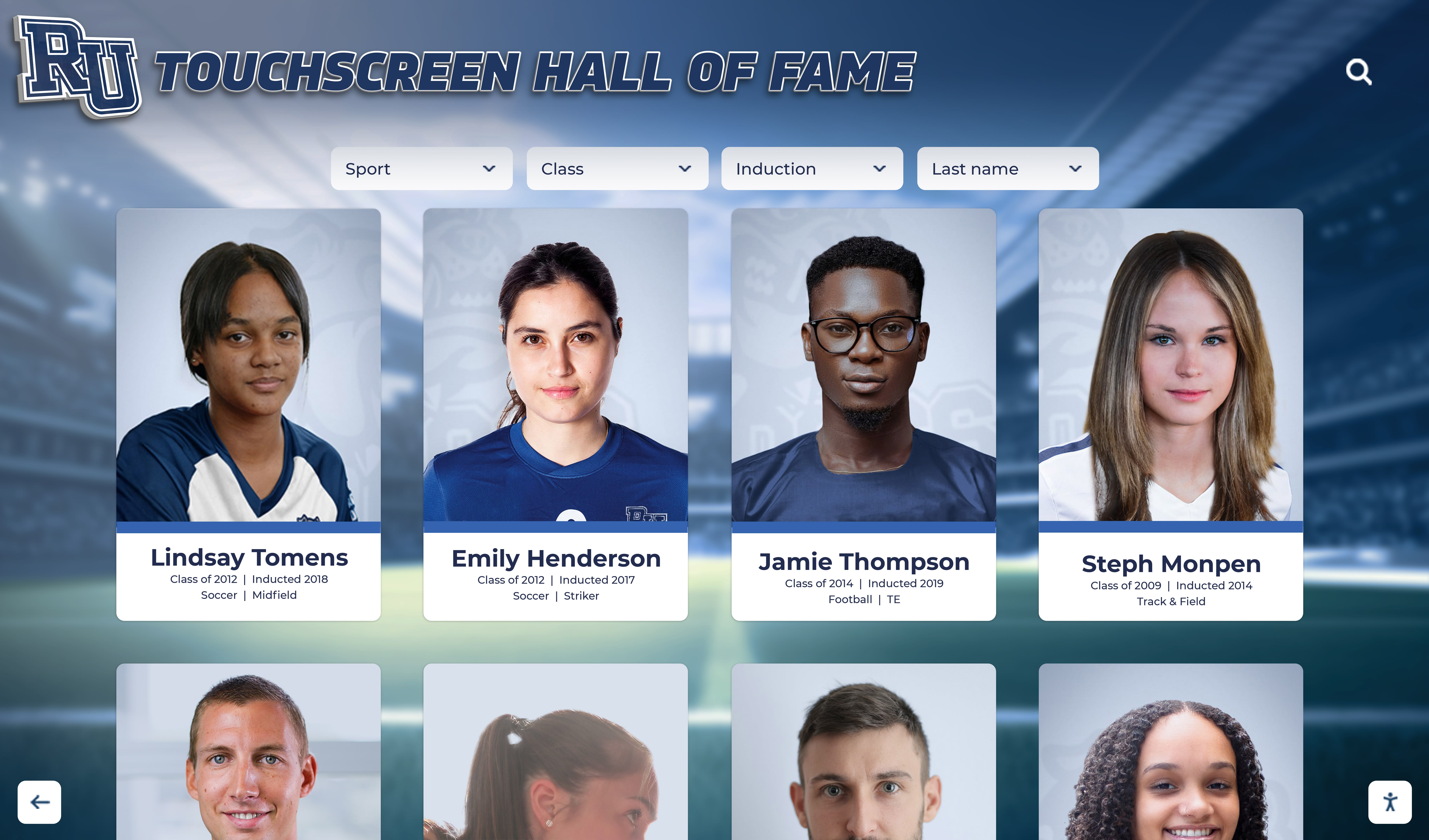
Well-designed profile cards surface key achievement information at a glance while inviting deeper exploration through intuitive touch interaction
Implementation Best Practices for Schools
Schools that deploy interactive touch screens successfully share a set of practices that distinguish their projects from installations that fail to deliver long-term value.
Start with High-Traffic Locations
Placement determines usage more than almost any other variable. A beautiful recognition system installed in a rarely-visited corridor receives a fraction of the engagement of a simpler system in the main lobby. Schools should identify the three to five locations in their building where students, staff, and visitors spend the most time transitioning, waiting, or gathering—and those locations are where interactive displays deliver the greatest return.
Main entrances and lobbies, athletic hallways outside gymnasiums, areas near cafeterias, and primary administrative corridors all represent high-value placement opportunities. Avoiding the temptation to place displays where they’re convenient to install, rather than where people actually congregate, is one of the most important implementation decisions a school can make.
Launch with Substantial Content
Interactive recognition displays launched with minimal content train their audiences to ignore them. When the first hundred visitors touch a screen and find three athlete profiles and a placeholder message, those visitors form a lasting impression that the system is incomplete. Future visits don’t happen because the initial experience set no expectation of value.
Launching with comprehensive content—even if that means delaying the installation by two months to build a proper archive—creates the opposite dynamic. Early visitors find rich, explorable content, tell others about it, and return. The system earns its place in the community’s daily experience.
Plan for Ongoing Maintenance
Recognition systems that stop being updated become monuments to the past rather than living community assets. Schools need clear ownership and processes for content maintenance before installation, not after. Assigning specific staff members responsibility for specific content categories, establishing update deadlines tied to institutional calendars (end of sports seasons, semester end, graduation), and building content creation into standard workflows rather than treating it as an additional task ensures systems stay current over years.
Measure Engagement
Most purpose-built touchscreen software platforms provide interaction analytics—usage frequency, most-browsed content, search terms, session duration. Schools that review this data regularly can make informed decisions about what content to expand, what navigation to improve, and whether placement changes would increase engagement. Data-driven management converts initial investment into continuously improving value.
The Future of Interactive Touch Screens in Education
The trajectory for interactive touchscreen technology in schools points toward deeper integration rather than isolated installations. Schools are beginning to think about coordinated networks of displays across entire campuses, with content that updates synchronously and adapts to context—showing upcoming event information during the hour before a game, shifting to recognition content during normal school hours, and activating visitor-oriented wayfinding when large groups arrive.
Accessibility is also increasingly central to touchscreen design in educational settings. ADA-compliant mounting heights, high-contrast display modes, text scaling options, and integration with assistive technologies ensure that interactive displays serve the entire school community rather than only able-bodied users comfortable with touchscreen technology.
The convergence of recognition, wayfinding, and engagement on a single platform reflects a deeper truth about what interactive touch screens in education are really for: they make schools feel more alive, more proud of their history, and more navigable to everyone who enters them. That combination of emotional and functional value is what transforms a technology investment into a beloved institutional landmark.
Conclusion
Interactive touch screens in education are no longer aspirational technology for well-funded flagship institutions. They’re practical tools that schools of all sizes are deploying to solve real problems: giving recognition the visibility it deserves, helping visitors navigate complex environments, and giving students genuine reasons to engage with their school’s history and culture.
The schools seeing the greatest return from these investments are those that treat the technology as a platform for storytelling and celebration rather than simply a modern replacement for static displays. When the content is comprehensive, the interface is intuitive, and the placement puts the display where people actually go, interactive touchscreens become some of the most-used and most-loved features in a school building.
Whether you’re planning a first installation or expanding an existing system, the combination of recognition, wayfinding, and engagement applications offers a framework for deploying interactive touchscreens in ways that serve your community for years to come.
See What Interactive Touch Screens Can Do for Your School
Rocket Alumni Solutions builds custom interactive touchscreen experiences for schools—halls of fame, recognition walls, digital kiosks, and campus displays that celebrate your community and invite exploration. Request a custom design preview to see how it could look in your building.
Explore Interactive Touchscreen Solutions






























