




Intent: Demonstrate how to design, implement, and optimize photo booth software for public kiosk installations and event experiences that create engagement, capture memories, and deliver professional results through intuitive touchscreen interfaces.
Photo booth software for kiosk public use and events transforms traditional photo experiences into interactive digital engagements that captivate audiences while creating shareable content extending event reach far beyond physical attendees. Modern touchscreen-powered photo booth systems combine intuitive interfaces with professional camera equipment, instant sharing capabilities, and customizable branding—delivering experiences that simultaneously entertain participants, amplify event visibility, and generate lasting memories through technology-enhanced photography.
The challenge organizations face involves selecting and implementing photo booth solutions that balance ease of use for diverse public audiences, reliable hardware performance under continuous event operation, professional image quality meeting brand standards, and flexible customization enabling cohesive integration with event themes and organizational identity. Generic consumer photo apps prove inadequate for professional installations requiring robust kiosk operation, while complex professional photography systems overwhelm casual users seeking simple, enjoyable experiences.
This comprehensive guide explores photo booth software architecture, touchscreen interface design, hardware integration, branding customization, sharing workflows, and operational best practices for creating engaging photo experiences that serve schools, corporate events, public facilities, museums, and entertainment venues effectively. Whether implementing permanent recognition photography installations or configuring portable event solutions, you’ll discover actionable frameworks for leveraging touchscreen technology to create photo experiences that delight users while accomplishing organizational communication and engagement objectives.
Organizations implementing well-designed photo booth experiences report dramatic engagement improvements, with participants spending 3-5 minutes interacting with systems and subsequently sharing branded content across social media platforms—multiplying event visibility and extending organizational reach to networks far exceeding physical attendance. This amplification creates lasting value beyond momentary entertainment, positioning photo booths as strategic communication tools rather than simple novelty attractions.

Modern touchscreen kiosks integrate photo booth capabilities within larger recognition and engagement platforms, creating versatile installations serving multiple organizational objectives
Understanding Photo Booth Software Architecture for Public Kiosks
Before implementing specific photo experiences, understanding what photo booth software provides and how public-use systems differ from consumer applications establishes essential context for informed decision-making.
Core Components of Kiosk Photo Booth Systems
Professional photo booth software designed for public installations integrates multiple technical components creating complete, reliable experiences:
Camera Integration and Image Capture
Unlike smartphone photo apps relying on built-in cameras, professional kiosk photo booths typically integrate external cameras delivering superior image quality through DSLR or mirrorless camera connections, USB webcam support for budget installations, or integrated high-resolution camera modules built into kiosk hardware. This external camera integration enables optimal positioning, professional lighting coordination, and image quality exceeding what touchscreen display cameras alone provide.
Camera control software manages exposure settings ensuring consistent results across varying lighting conditions, triggers synchronized capture coordinating flash and ambient lighting, and handles continuous live preview enabling participants to frame compositions before capture—creating professional results from automated systems requiring no photographer intervention.
Touchscreen Interface and User Control
The touchscreen interface determines whether participants enjoy intuitive, delightful experiences or abandon frustrated by confusing controls. Effective photo booth interfaces provide obvious start prompts attracting attention and communicating purpose, countdown timers building anticipation before capture, instant preview allowing composition adjustment, simple retake options accommodating dissatisfaction without penalty, and clear navigation to customization features when offered.
Interface design must accommodate diverse users including children, elderly participants, and people with varying technical sophistication—requiring larger touch targets, obvious visual feedback, and foolproof navigation that needs no instruction. Organizations implementing interactive touchscreen software for photo booths must prioritize accessibility ensuring all potential participants can successfully engage regardless of prior technology experience.
Image Processing and Enhancement
Post-capture processing transforms raw camera images into polished results through automatic enhancement including exposure correction, color balancing, and sharpening, background replacement for green screen installations, artistic filters and effects when style options are offered, and branding overlay application adding logos, event names, or custom frames.
This processing happens automatically within seconds of capture, maintaining engagement momentum without delay while ensuring consistent professional quality regardless of ambient conditions or camera settings requiring no manual adjustment.
Sharing and Distribution Workflows
Modern photo booth value extends far beyond prints through digital sharing enabling participants to distribute images across their social networks. Professional systems provide email delivery sending high-resolution images to participants directly, SMS/text message distribution for mobile-first audiences, QR code generation enabling instant smartphone downloads, direct social media posting to Facebook, Instagram, Twitter, or organizational platforms, and optional printing for immediate physical keepsakes.
These sharing workflows create viral amplification where single photo booth interactions reach hundreds or thousands of additional viewers through participant social networks—multiplying event visibility and organizational brand exposure exponentially beyond physical attendees. Schools implementing digital touchscreen recognition systems increasingly add photo booth capabilities creating engagement while capturing content for ongoing recognition programs.
Public Kiosk Requirements vs Consumer Photo Apps
Photo booth software designed for public kiosk installations must address unique requirements that consumer mobile photo applications never encounter:
Continuous Unattended Operation
Unlike consumer apps running on personal devices requiring individual user management, public kiosk photo booths operate continuously across hours or days without supervision—demanding software stability preventing crashes or lockups, automatic error recovery enabling operation through minor issues, memory management preventing gradual performance degradation, and secure kiosk mode preventing users from exiting photo booth application or accessing underlying operating systems.
Professional kiosk software runs locked-down preventing unauthorized system access while maintaining reliable operation through thousands of user sessions without requiring technical intervention or restarts.
Diverse Unknown Users
Consumer photo apps optimize for repeat use where individuals learn interface patterns through familiarity. Public kiosk photo booths serve constantly changing users experiencing systems for first—and possibly only—time, requiring instantly intuitive interfaces needing zero instruction, obvious affordances communicating what elements are interactive, foolproof navigation preventing users from getting lost in confusing menu structures, and automatic session resets returning systems to initial states between users.
These public-use considerations demand interface simplicity that might seem excessive for sophisticated users but proves essential for serving general audiences including children, elderly participants, and people uncomfortable with technology.
Professional Image Quality and Branding Control
Consumer photo apps prioritize casual snapshots acceptable for personal sharing. Professional kiosk photo booths must deliver consistent image quality meeting organizational brand standards through reliable hardware integration preventing poor lighting or focus, consistent processing ensuring uniform aesthetic across all captures, comprehensive branding control enabling cohesive integration with event or organizational identity, and quality assurance preventing distribution of unflattering or inappropriate images when moderation proves necessary.
Organizations implementing photo booths for corporate events, school functions, or public facilities require professional results reflecting positively on organizational reputation—making software selection and configuration critical for delivering experiences meeting brand expectations.
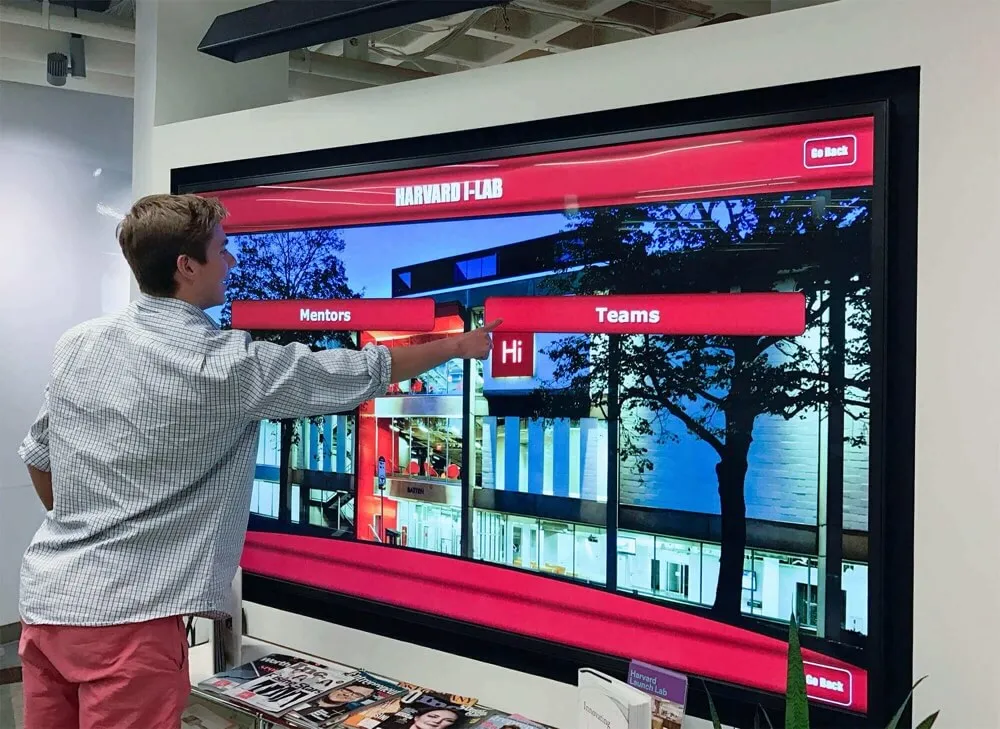
Effective touchscreen interfaces create natural, intuitive navigation through clear visual hierarchy and obvious interactive elements requiring no instruction for first-time users
Experience Layout: Designing Engaging Photo Booth Interfaces
Creating photo booth experiences that delight users while accomplishing organizational objectives requires systematic interface design balancing aesthetic appeal with functional usability across diverse user populations.
Attraction and Session Initiation
Photo booth kiosks competing for attention in busy event environments or public spaces require deliberate attraction strategies drawing participants to installations and communicating purpose clearly:
Attraction Loop Design
When not actively in use, photo booth displays should run eye-catching attraction loops including sample photo montages showing previous participants enjoying experiences, animated prompts inviting interaction with clear calls-to-action, event branding and sponsor recognition establishing context, and rotating participant testimonials or social media posts demonstrating social proof.
Effective attraction loops balance movement and color drawing visual attention while avoiding overwhelming busy-ness that reads as advertising rather than interactive opportunity. Motion should be purposeful—guiding eyes toward interaction prompts rather than random animation creating visual noise.
Start Screen Simplicity
The moment participants touch displays to initiate sessions, interfaces must communicate next steps instantly without instruction. Start screens should feature single large “Start” button occupying prominent central position, clear explanation of what experience provides in 5-7 words maximum, optional secondary features accessible through smaller buttons without cluttering primary call-to-action, and automatic language detection or prominent language selection when serving multilingual audiences.
Research on kiosk interaction demonstrates that users make go/no-go decisions within 3-5 seconds of approaching displays. Complex start screens listing features, explaining workflows, or requiring information input before showing value generate abandonment before engagement begins. Simplicity and immediate gratification prove essential for public kiosk success.
Capture Workflow and User Feedback
Once participants commit to photo booth experiences, capture workflows must guide users through sessions efficiently while maintaining engagement and building anticipation:
Live Preview and Framing
Continuous live preview showing what camera sees enables participants to adjust positioning, compose groups, and verify framing before capture. Preview displays should show full-screen camera feed minimizing interface elements during composition, optional composition guides showing photo boundaries or positioning suggestions, participant count indicators when systems detect faces, and clear “Capture” button becoming prominent once participants appear ready.
This live preview period creates anticipation and ownership—participants actively craft their images rather than passively standing while unknown systems capture unpredictable results. The participatory aspect increases engagement and satisfaction with final results.
Countdown and Capture Feedback
Countdown timers bridge preview to capture, building anticipation through prominent numerical countdown displayed 3-5 seconds before capture, audio cues supplementing visual countdown for hearing-impaired accessibility, final countdown emphasis signaling imminent capture through size, color, or animation, and capture flash or animation confirming image acquisition immediately upon trigger.
These countdowns serve functional purposes allowing last-second positioning adjustments while creating entertainment value and anticipation that enhances experience enjoyment. The ritual of countdown-smile-flash becomes part of photo booth appeal beyond resulting images.
Immediate Review and Retake Options
Instant preview of captured images enables quality verification before commitment. Review screens should display full-screen captured image for evaluation, simple binary choice: “Keep This” or “Try Again,” countdown timer automatically accepting images after 8-10 seconds if participants don’t actively reject, and optional feature access for filters, text, or effects when customization is offered.
Retake functionality proves essential for quality control—participants occasionally blink, turn away, or simply dislike expressions. Providing obvious, penalty-free retake options ensures satisfaction while preventing distribution of unflattering images participants would regret.
Progressive Feature Disclosure
Photo booth interfaces face tension between simplicity and capability. Basic workflows should provide satisfying experiences through minimal interaction, while advanced features enable customization for interested participants without overwhelming casual users.
Tiered Feature Access
Organize features into usage tiers: essential functions accessible through single touches on primary screens, enhancement options available through single optional tap to access filters, frames, or effects, and advanced features requiring deliberate navigation to settings or customization screens.
This progressive disclosure serves both audience segments—casual users complete satisfying basic experiences within 60-90 seconds, while motivated participants access advanced capabilities without constraint. The key involves making advanced features discoverable without forcing interaction for users seeking simplicity.

Clear visual hierarchy and intuitive navigation enable users of all technical sophistication levels to successfully engage with touchscreen systems without instruction
Sharing and Distribution Interface
Post-capture, sharing workflows determine whether photo booth experiences create viral amplification or end with single participant engagement:
Multi-Channel Sharing Options
Present sharing choices clearly without overwhelming decision paralysis: email delivery through simple email address input, SMS/text distribution entering phone numbers, QR code generation enabling instant smartphone scanning and download, direct social posting when appropriate permissions can be obtained, and printing options when hardware is available.
Layout sharing options as large, icon-based buttons requiring single touch to initiate each channel. Avoid checkbox interfaces requiring selection confirmation—let participants choose multiple channels through successive taps on desired options, with each selection providing immediate confirmation feedback.
Simplified Data Entry
When sharing requires contact information input, minimize friction through on-screen keyboards optimized for touch input with large keys, smart defaults setting appropriate input type (email vs. phone number keyboards), auto-capitalization and format correction reducing errors, and prominent submission buttons confirming entry completion.
Consider QR code sharing as friction-free alternative to manual entry—participants scan codes with personal smartphones accessing download links without typing any information into public kiosks. This approach proves particularly effective for younger audiences comfortable with QR workflows while avoiding concerns about entering personal information into public systems.
Organizations implementing touchscreen kiosk software must optimize data entry interfaces for standing users operating public systems rather than defaulting to desktop-optimized inputs that frustrate touchscreen interaction.

School installations benefit from foolproof navigation enabling independent exploration without staff assistance or extensive instruction
Hardware Integration and Technical Considerations
Software capabilities prove meaningless without appropriate hardware delivering reliable performance and professional image quality under continuous public use.
Camera Selection and Integration
Camera hardware significantly impacts image quality, user experience, and system reliability:
DSLR and Mirrorless Camera Integration
Professional photo booth installations commonly integrate full-frame or APS-C sensor cameras delivering superior image quality through larger sensors capturing more light and detail, interchangeable lenses enabling optimal focal lengths for intended framing, external flash synchronization for consistent professional lighting, and tethered shooting enabling live preview and instant image transfer.
DSLR/mirrorless integration requires camera control software providing full remote operation, reliable USB or wireless tethering for image transfer, battery management for extended operation, and automated capture sequences coordinating focus, exposure, and triggering.
While DSLR systems deliver maximum quality, they require higher initial investment ($800-2,500 for bodies plus lenses) and more sophisticated integration compared to simpler alternatives suitable for budget-conscious installations.
USB Webcam Alternatives
Budget photo booth implementations often use high-resolution USB webcams providing acceptable image quality for casual installations through direct USB connection simplifying integration, built-in drivers requiring minimal configuration, lower cost ($100-400) enabling budget implementations, and compact form factors simplifying kiosk mounting.
Modern 4K webcams deliver surprising quality for well-lit environments, though they cannot match DSLR sensors for challenging lighting or detailed resolution. Organizations implementing photo booths for school events, small corporate functions, or casual public engagement often find quality acceptable given dramatically lower costs and simpler integration.
Integrated Kiosk Camera Modules
Some commercial photo booth kiosks include purpose-built camera modules engineered specifically for kiosk integration. These specialized cameras balance quality, cost, and integration simplicity through optimized mounting within kiosk enclosures, pre-configured software drivers and control interfaces, consistent quality control ensuring reliable performance, and manufacturer support covering complete hardware-software integration.
Integrated camera modules simplify deployment particularly for organizations lacking technical expertise for custom camera integration, though they offer less flexibility for upgrades or specialized configurations.
Display Hardware and Touchscreen Selection
Display selection impacts user experience quality, durability, and long-term reliability:
Commercial vs Consumer Touchscreens
Photo booth kiosks require commercial-grade displays designed for continuous public use rather than consumer monitors or tablets that degrade rapidly under extended operation. Commercial displays provide higher touch cycle ratings supporting millions of touches over multi-year lifespans, thermal management enabling continuous operation without overheating, tamper-resistant construction preventing damage from rough public handling, and extended warranties (typically 3-5 years) compared to consumer products.
While commercial displays cost 2-3× consumer equivalents, total cost of ownership proves lower through longer reliable operation without replacement. Organizations implementing touchscreen recognition systems must prioritize commercial-grade hardware for installations expected to serve public audiences over years rather than months.
Screen Size and Viewing Distance
Display size must match intended viewing distances and participant group sizes. Single users photographing themselves work effectively with 21-27 inch displays positioned at arm’s length. Small groups of 2-4 participants benefit from 32-43 inch screens enabling comfortable simultaneous viewing. Larger event installations serving groups of 5-8 people require 50-55 inch displays ensuring peripheral participants see clearly without crowding close.
Larger displays increase hardware costs substantially—32 inch commercial touchscreens cost $1,200-1,800 while 55 inch models reach $3,500-5,000. Balance size against realistic usage patterns rather than defaulting to maximum available screen size regardless of actual needs.
Portrait vs Landscape Orientation
Photo booth displays typically use portrait orientation matching standard portrait photography formats, enabling full-body shots without excessive unused screen space, optimizing vertical composition for standing subjects, and matching smartphone orientation for familiar user interface patterns.
However, landscape orientation sometimes proves appropriate for wide group shots, integration with horizontal kiosk enclosures, or shared installations serving multiple applications beyond photo booth functionality. Software should support either orientation through flexible layout adapting to actual hardware configuration.
Lighting Equipment and Environmental Control
Professional image quality requires proper lighting regardless of camera sophistication:
Flash and Continuous Lighting
Photo booths in uncontrolled lighting environments benefit from supplemental illumination through external flash units synchronized with camera capture, continuous LED panels providing consistent illumination during preview and capture, or ring lights creating flattering even illumination eliminating harsh shadows.
Lighting configuration significantly impacts image quality—proper illumination enables lower ISO settings reducing noise, ensures accurate color rendering, eliminates unflattering shadows across faces, and compensates for challenging ambient lighting conditions.
Budget implementations in well-lit environments might operate without supplemental lighting, though investing $150-400 in basic lighting equipment dramatically improves result quality justifying modest expense.
Background and Environmental Setup
Background treatments transform amateur snapshots into professional portraits through branded backdrops incorporating organizational logos and colors, modular panels enabling scene changes between events, green screens enabling virtual background replacement, or environmental settings leveraging attractive existing architecture when installed in visually appealing locations.
Organizations implementing photo booths for recurring events benefit from reusable background systems adapting to different themes while maintaining professional appearance. Schools might configure athletic recognition displays with school colors and mascots while corporate installations feature brand elements creating cohesive visual identity.

Professional kiosk installations integrate displays, cameras, and computing hardware within durable enclosures suitable for continuous public operation in high-traffic institutional environments
Branding and Customization Strategies
Photo booth experiences should reflect organizational identity and event themes through comprehensive customization creating cohesive branded experiences:
Visual Branding Integration
Custom Overlays and Photo Frames
Branded overlays transform generic photos into organizational or event-specific content through logo placement in consistent positions across all images, event names, dates, and hashtags encouraging social sharing, decorative frames or borders creating visual polish, and sponsor recognition when funding partnerships support implementations.
Design overlays carefully balancing branding with image focus—logos and text should establish context without overwhelming subject photographs. Position branding elements in corners or margins rather than obscuring participants’ faces or bodies.
Organizations implementing digital hall of fame displays often integrate photo booth capabilities creating engagement while capturing content for ongoing recognition programs, with consistent branding connecting booth experiences to broader recognition platforms.
Color Schemes and Theme Coordination
Photo booth interfaces should match event or organizational visual identity through branded color palettes applied to buttons, backgrounds, and interface elements, typography consistent with organizational fonts and hierarchy, icon styles matching broader design systems, and thematic treatments appropriate for specific events (holidays, homecoming, corporate celebrations, etc.).
This visual consistency creates cohesive branded experiences where photo booths feel like intentional event components rather than unrelated third-party services that happen to be present.
Content Customization Options
Participant Interaction Features
Customization capabilities enhance engagement and entertainment value when implemented without complicating core workflows:
- Digital props and stickers enabling participants to add themed graphics to images
- Text overlays allowing custom captions or messages
- Artistic filters providing stylistic variations (black and white, vintage, artistic effects)
- Green screen backgrounds enabling virtual location placement
- Animation and video booth modes creating short shareable video clips
Balance customization options against simplicity—every feature adds complexity potentially confusing less sophisticated users. Consider offering basic and advanced modes where casual users experience streamlined workflows while interested participants access full customization capabilities.
Multi-Language Support
Photo booths in diverse communities benefit from multi-language interfaces serving non-English speakers through automatic language detection based on system settings or prior interactions, prominent language selection on start screens, translated interface elements across all screens and prompts, and culturally appropriate defaults (contact information formats, social platform preferences).
Schools with significant multilingual populations and public facilities serving diverse communities should prioritize language support ensuring photo booth accessibility across entire populations rather than limiting experiences to English speakers alone.
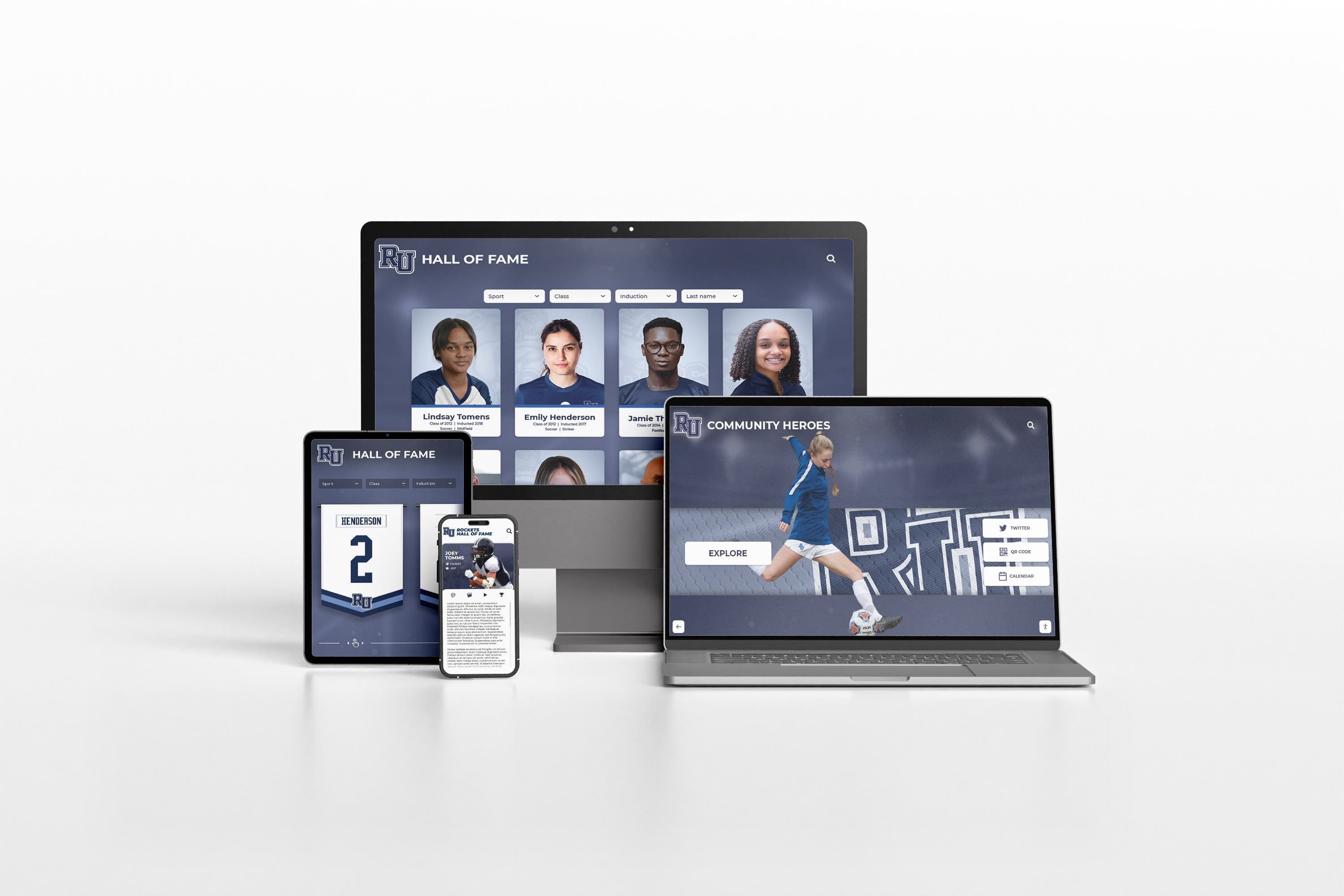
Consistent branding across physical installations and digital platforms creates cohesive experiences reinforcing organizational identity through every touchpoint
Operational Best Practices for Events and Public Installations
Successful photo booth deployments require strategic planning beyond software and hardware selection—covering setup, operation, and content management:
Event Deployment Strategies
Pre-Event Configuration and Testing
Arrive early enabling complete setup and testing before attendees appear. Pre-event preparation should include physical setup of kiosk, camera, and lighting equipment, software configuration loading appropriate branding and settings, comprehensive testing of full workflows from capture through sharing, lighting adjustment ensuring flattering illumination across subject positions, and background installation when using portable backdrop systems.
Reserve minimum 90 minutes for complete setup and testing—rushing installations compromises quality and risks technical issues disrupting events. Professional event organizers treat photo booth setup with same planning rigor as catering or AV systems recognizing importance for event success.
Staffing and Assistance
While photo booths should operate independently without requiring supervision, minimal staffing significantly improves experiences through welcoming participants and explaining features briefly, troubleshooting technical issues before users abandon frustrated, adjusting lighting or backgrounds as needed throughout events, encouraging sharing and social media posting, and maintaining cleanliness and organization around installations.
Single staff member monitoring photo booth installation for 2-4 hours handles typical event requirements. For large events (500+ attendees), consider two-person teams managing queues and preventing bottlenecks during peak usage periods.
Queue Management for High-Traffic Events
Popular photo booth installations at large events require queue management preventing crowding and long waits that discourage participation. Effective strategies include clear signage indicating photo booth location and purpose, physical barriers or stanchions organizing orderly queues, estimated wait time communication managing expectations, and staff monitoring redirecting traffic during peak congestion.
Consider multiple photo booth stations for events expecting 200+ participants—single installations typically serve 20-30 participants per hour maximum. Organizations hosting annual galas, reunions, or major public events should evaluate expected attendance against throughput capacity when planning installations.
Permanent Installation Management
Organizations implementing photo booth kiosks as permanent institutional fixtures face different operational considerations from temporary event deployments:
Content Moderation and Management
Permanent photo booth installations generating continuous content require systematic management including automated content storage organizing images chronologically, periodic review identifying inappropriate content requiring removal, archive management preventing unlimited storage growth, and selective content curation featuring exceptional images in recognition displays or promotional materials.
Consider privacy implications of permanent content storage—communicate clearly what happens to captured images and provide opt-out mechanisms for participants uncomfortable with institutional retention of their photographs.
Regular Maintenance and Updates
Permanent kiosks require ongoing attention maintaining reliable operation through weekly cleaning of touchscreens and equipment, monthly hardware inspection checking cable connections and equipment condition, quarterly software updates addressing security vulnerabilities and feature improvements, and annual comprehensive service including deep cleaning and preventive maintenance.
Establish clear responsibility for maintenance activities preventing neglect that degrades performance and user experience over time. Schools implementing interactive building directories or recognition systems with photo capabilities should incorporate photo booth maintenance into broader digital display management workflows.
Usage Analytics and Optimization
Photo booth software providing usage analytics enables data-driven optimization measuring session frequency revealing usage patterns, completion rates indicating interface effectiveness, sharing channel preferences guiding feature prioritization, peak usage times informing content updates and promotional timing, and popular features identifying customization options participants value most.
Regular analytics review identifies opportunities for improvement—confusing interfaces show low completion rates, unused features suggest simplification opportunities, and sharing patterns reveal which channels create maximum amplification justifying continued support.

Permanent institutional installations require ongoing content management, maintenance scheduling, and performance monitoring ensuring reliable operation serving continuous user populations
Integration with Broader Recognition and Engagement Platforms
Photo booth software delivers maximum value when integrated with larger organizational communication and recognition systems rather than operating as isolated entertainment features:
Recognition Program Integration
Educational institutions implementing academic recognition programs benefit from photo booth integration capturing high-quality portraits for honor roll displays, hall of fame induction ceremonies, senior recognition programs, and student achievement celebrations. Photo booth captures provide professional-quality imagery for ongoing recognition displays without requiring separate photography sessions or informal snapshots that lack consistent quality.
This integration creates engagement during recognition events while generating content assets serving institutional needs throughout academic years. Students enjoy photo booth experiences at ceremonies while schools acquire professional portraits for digital touchscreen displays celebrating achievements long after events conclude.
Social Media and Digital Marketing Synergy
Photo booth images branded with organizational logos, event hashtags, and social media handles create powerful viral marketing when participants share content across personal networks. This organic amplification reaches audiences far exceeding paid advertising reach at fraction of costs.
Maximize social amplification through prominent hashtag displays encouraging consistent tagging, incentives for social sharing through contests or recognition, photo galleries displaying participant images at events creating social proof, and live social walls projecting participant posts in real-time during events.
Organizations implementing photo booths for fundraising galas, community events, or institutional celebrations should treat social sharing as strategic objective rather than optional feature—measuring reach and engagement across participant networks demonstrates value beyond momentary entertainment.
Data Collection and Relationship Development
Photo booth interactions create natural opportunities for relationship building and data collection through email address collection enabling ongoing communication, demographic information gathering supporting audience understanding, participation metrics demonstrating engagement levels, and content preferences revealing interests guiding future programming.
Balance data collection against user experience—excessive information requests create friction reducing participation. Collect only essential information through optional fields enabling deeper sharing for willing participants, incentives encouraging contact information provision, and clear communication explaining how information will be used building trust.
Schools implementing alumni recognition systems integrate photo booth data collection with advancement databases capturing updated contact information during reunion events when alumni willingly provide details in exchange for photo sharing and recognition participation.
Privacy, Security, and Compliance Considerations
Photo booth systems capturing personal images and potentially collecting contact information must address privacy and security implications responsibly:
Image Rights and Usage Policies
Organizations operating photo booth installations should establish clear policies covering captured image retention, usage rights, and participant consent. Consider published photo booth policies explaining what happens to images, obtaining explicit consent for specific uses beyond personal sharing, providing opt-out mechanisms for participants uncomfortable with image retention, and respecting requests for image removal from organizational archives.
Educational institutions must navigate additional considerations including minor consent requirements, FERPA compliance for student image use, and parental permission protocols for minors appearing in images subsequently used for promotional purposes.
Data Security and Privacy Protection
When photo booths collect email addresses, phone numbers, or other personal information for sharing purposes, organizations must protect data appropriately through secure encrypted storage of contact information, limited retention periods deleting data after serving immediate purposes, access controls restricting who can view collected information, and compliance with applicable privacy regulations including GDPR, CCPA, or other jurisdictional requirements.
Avoid collecting unnecessary information—if QR code sharing enables distribution without personal data collection, eliminating email or phone number requirements reduces privacy obligations while improving user experience through reduced friction.
Content Moderation and Appropriateness
Public photo booth installations risk capturing inappropriate content through offensive gestures or signage visible in images, partially clothed participants testing acceptable boundaries, vandalism or damage visible in backgrounds, and copyrighted material appearing in photos.
Implement safeguards including live preview enabling participants to self-moderate before capture, optional manual review before sharing when staff monitoring occurs, automated content filtering detecting inappropriate imagery, and clear usage policies displayed prominently communicating behavioral expectations.
Organizations implementing photo booths in schools, public facilities, or professional corporate environments must balance open access with appropriate content standards protecting institutional reputations and serving diverse audiences comfortably.

Professional installations balance public accessibility with appropriate security measures and content moderation protecting organizational interests while serving diverse user populations
Measuring Success and Return on Investment
Photo booth implementations require investment justification through concrete value demonstration:
Quantitative Success Metrics
Track measurable outcomes demonstrating photo booth value including total sessions completed over time periods, average session duration indicating engagement depth, sharing rates showing percentage of participants distributing images, social media reach measuring impressions across participant networks, email list growth when contact collection integrates with marketing databases, and cost per engagement comparing total investment to participant interactions.
These metrics support data-driven decisions about continued investment, feature priorities, and operational optimizations improving performance over time.
Qualitative Impact Assessment
Beyond quantitative metrics, qualitative assessment reveals photo booth impact through participant feedback gathered via brief surveys or observation, event attendee satisfaction ratings showing overall experience quality, social media sentiment analyzing comments and reactions to shared images, staff observations noting engagement patterns and user behavior, and anecdotal stories demonstrating memorable experiences creating lasting positive associations.
Organizations implementing photo booths for school fundraising events or community celebrations should gather testimonials and stories documenting experiences that generate goodwill and strengthen community relationships beyond measurable ROI calculations.
Comparative Value Analysis
Evaluate photo booth investments against alternative engagement strategies considering entertainment value per dollar compared to other event features, marketing reach relative to paid social media advertising costs, content generation value of professional-quality images for ongoing use, and relationship building opportunities through data collection and ongoing communication.
Many organizations discover photo booth ROI significantly exceeds initial expectations when accounting for secondary benefits including marketing amplification, content asset creation, and relationship development extending far beyond primary entertainment objectives.
Conclusion: Creating Memorable Photo Experiences Through Thoughtful Design
Photo booth software for kiosk public use and events represents powerful tools for creating engagement, capturing memories, and extending organizational reach through participant-generated content shared across social networks. Success requires moving beyond novelty attraction mentality to systematic implementation addressing interface design, hardware integration, branding customization, operational planning, and strategic integration with broader organizational objectives.
Get Your Touchscreen Mock-Up
Discover how interactive touchscreen experiences can transform engagement for your school, organization, or event. Solutions like Rocket Alumni Solutions create customizable displays that combine recognition, information, and interactive features including photo capabilities—delivering comprehensive platforms serving multiple objectives through unified, professionally designed installations.
Schedule Your Design ConsultationWell-designed photo booth experiences balance intuitive simplicity enabling effortless participation across diverse user populations with sufficient customization supporting branding objectives and creative expression. The most successful implementations prioritize user experience first—ensuring interfaces prove instantly understandable, workflows feel natural and enjoyable, and technical reliability prevents frustration derailing engagement.
Organizations should approach photo booth implementation systematically through clear objective definition establishing what success looks like, appropriate hardware selection matching quality and durability to usage contexts, thoughtful software configuration balancing features with simplicity, comprehensive testing ensuring reliable operation before public deployment, and ongoing optimization using analytics and feedback to refine experiences.
Whether implementing portable systems for occasional event use, permanent installations serving continuous public engagement, or hybrid approaches supporting both scenarios, photo booth software delivers measurable value through participant engagement, content generation, social amplification, and relationship development—particularly when integrated strategically with broader recognition and communication platforms maximizing organizational benefit beyond isolated entertainment features.
Ready to explore photo booth capabilities within comprehensive touchscreen platforms serving multiple organizational objectives? Discover how touchscreen design enhances user engagement, learn about interactive display software options, explore kiosk software selection considerations, and understand digital recognition display strategies for creating engaging experiences that celebrate achievement, share information, and build community through purposeful interactive technology designed specifically for educational institutions and organizations serving diverse public audiences effectively.































