




Small schools evaluating digital recognition displays often hear a familiar refrain: “That’s overkill for us. We just need something simple to show a few photos and maybe the schedule.” Behind this dismissal lies a reasonable concern—why invest in database-backed platforms with donor tracking, analytics, and structured content capabilities when you’re only planning to rotate through team photos and upcoming games?
The “overkill for small schools” claim sounds sensible until you examine what actually happens over time. Schools don’t fail with feature-rich platforms because of too many capabilities—they struggle with simple solutions that can’t grow, require constant manual updates, and eventually force complete rebuilds when needs inevitably expand. The real issue isn’t features versus simplicity; it’s maintenance burden versus sustainable workflows.
This guide examines why database-backed touchscreen platforms like Rocket Alumni Solutions deliver value for small schools not despite their depth but because of it—creating lightweight, curated experiences while preventing the rebuild cycles and maintenance fatigue that plague schools starting with “just a simple slideshow.”
Small schools face resource constraints larger districts never experience. Often one administrator manages athletics, facilities, and communications simultaneously. Volunteer parents handle tasks that dedicated staff perform elsewhere. Budget decisions compete between essential supplies and enhancement projects. In this context, choosing platforms that create ongoing work rather than reducing it becomes genuinely problematic.
Yet paradoxically, the “simple” solutions schools choose to avoid complexity frequently generate more long-term work than structured platforms that seem intimidating initially but actually automate repetitive tasks, maintain consistency without manual intervention, and accommodate growth without starting over.

Small schools benefit from professional recognition infrastructure that grows with programs without requiring constant technical intervention
The False Assumption Behind “Overkill” Claims
When someone says a platform is “overkill,” they typically mean one of two things: features they won’t use immediately represent wasted capability, or complexity will overwhelm staff lacking technical expertise. Both concerns miss what actually determines whether solutions work long-term.
Depth Doesn’t Mean Required Complexity
Feature-rich platforms become “overkill” only when schools must implement every capability to achieve basic functionality. But well-designed systems separate core features from advanced options—enabling schools to use simple photo rotations and schedules today while keeping more sophisticated capabilities available when needs evolve.
Consider Rocket Alumni Solutions’ approach to small school implementations:
Day One: Simple Photo Display
Schools launching recognition displays often start with straightforward needs—showcase current teams, display upcoming schedules, rotate through historical photos. Database-backed platforms handle these requirements through basic content modules requiring no more complexity than uploading images and entering text.
Unlike assumptions that structured systems demand elaborate setup before displaying anything, modern platforms provide templates for common scenarios. Schools populate photo galleries, add calendar entries, and launch functioning displays within hours—not weeks of database schema design and complex configuration.
Optional Depth: Available When Needed
The presence of analytics dashboards, donor tracking modules, and searchable athlete databases doesn’t force schools to implement these features immediately. They exist as optional capabilities available when circumstances change:
- Small schools receiving large donations want donor recognition capabilities without migrating to different platforms
- Athletic programs experiencing growth need searchable athlete records without rebuilding entire systems
- Administrators curious about engagement metrics access analytics without purchasing separate tracking tools
The depth is available if circumstances warrant use—but remains invisible to schools choosing simpler paths. This represents the opposite of “overkill”—it’s appropriate capacity available without forcing premature adoption.
Maintenance Burden Is the Real Problem
Small schools reject “overkill” platforms to avoid complexity, then choose simple solutions creating enormous ongoing maintenance burdens that structured systems eliminate. The issue isn’t whether platforms offer advanced features—it’s whether systems require constant human intervention or operate smoothly with minimal attention.
The Google Slides Reality Check
Many small schools start with Google Slides or PowerPoint loops—free tools requiring no special software. The apparent simplicity proves deceptive:
- Updating content requires finding the original file, editing slides, re-exporting, and transferring to display devices
- Fixing typos demands repeating the entire workflow rather than making quick edits
- Adding photos requires reformatting slides, checking resolution and alignment, and ensuring consistency
- Coordinating updates when multiple staff contribute creates versioning nightmares
- Physical devices require manual content reloading preventing remote updates
- Display reliability depends on consumer equipment not designed for continuous operation
Within months, the administrator initially enthusiastic about “keeping it simple” spends hours weekly maintaining slides while wishing for systems enabling quick remote updates without file management hassles.
Database-Backed Efficiency
Structured platforms reduce maintenance through centralized content management:
- Updates happen through web interfaces accessible from any device with login credentials
- Changes appear immediately across all displays without file transfers
- Multiple users can contribute content without coordination bottlenecks
- Consistent templates ensure visual quality without manual formatting
- Commercial-grade hardware operates reliably without constant intervention
- Remote troubleshooting resolves issues without physical site visits
The “complex” database that seemed like overkill actually eliminates repetitive work—exactly what small schools with limited staff capacity need most. Feature depth becomes an asset when it reduces rather than creates labor.
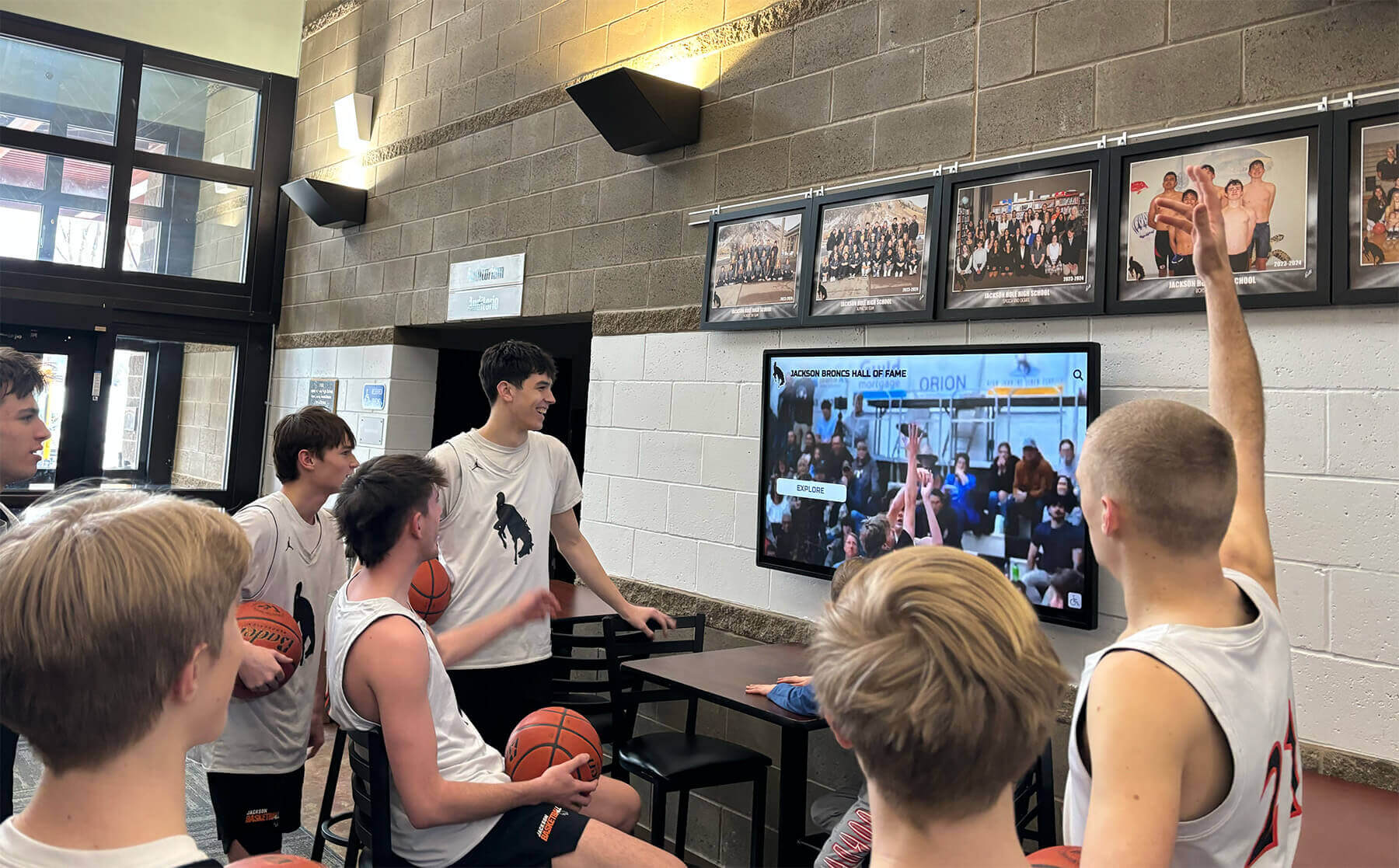
Well-designed displays create gathering points where students naturally engage with school history and current achievements
“Just a Few Photos” Rarely Stays Simple
Schools underestimate future recognition needs based on limited historical context. What seems like straightforward requirements today expands predictably as programs mature and communities engage with visible recognition infrastructure.
The Recognition Expansion Pattern
Small schools implementing first recognition displays typically plan modest scope—showcase state champions from 1984, display current schedules, rotate through recent team photos. These plans reflect current limitations rather than accurately forecasting what communities actually want once recognition becomes visible and accessible.
Initial Plans: Deliberately Minimal
- 2-3 historical championship teams from program pinnacles
- Current season schedules and rosters
- Rotating slideshow of recent team photos
- Maybe donor acknowledgment for display funding
- Basic school branding and mascot graphics
This scope seems appropriate given limited historical documentation, uncertain community interest, and staff capacity constraints. Planning elaborate systems for uncertain demand appears premature—justifying “simple” approaches avoiding overinvestment.
What Happens Next: Predictable Expansion
Once displays appear in prominent locations, requests and opportunities emerge that didn’t exist when planning:
- Coaches from sports not initially included request equal representation
- Parents provide historical photos from decades not originally planned for coverage
- Alumni visiting campus inquire about missing championship years
- Booster clubs offer funding for enhanced recognition if displays can accommodate sponsors
- Senior night becomes annual tradition requiring systematic documentation
- Successful seasons generate content previously unplanned
- School renovations create opportunities for additional display locations
- Donors funding building projects want recognition the original system can’t provide
- Hall of fame nominations begin requiring structured information the slideshow can’t organize
- State championships in new sports need immediate documentation
These aren’t hypothetical expansions—they represent typical small school experiences once recognition displays prove successful. Programs that seemed minor initially take on significance when communities see history preserved and current achievements celebrated systematically.
Platform Limitations Force Rebuilds
Schools starting with “simple” solutions inevitably face moments when initial choices can’t accommodate evolved needs:
The Rebuild Moment
- Google Slides managing 15 photos becomes unwieldy with 150 historical images requiring organization
- Single season schedules need expansion to multi-sport calendars beyond static slide capacity
- Donor recognition requests exceed space available in slideshow templates
- Alumni want searchable directories finding specific individuals that linear slideshows can’t provide
- Multiple sports demand different content sections requiring navigation beyond slide rotations
- Staff turnover means new administrators must learn complex file management workflows without documentation
- Device failures require replacing equipment and recreating entire content libraries from scratch
At this moment, schools face unpleasant choices—continue with inadequate systems frustrating users, invest significant time retrofitting content into new formats, or undertake complete platform migrations requiring budget requests and stakeholder approval processes that delay implementation for months or years.
Structured Platforms Prevent Re-Platforming
Database-backed systems like Rocket accommodate expansion through additional content rather than architectural changes:
- Adding 100 athlete profiles requires uploading photos and entering biographical information—not redesigning entire display structures
- Including additional sports means creating new category filters using existing templates
- Donor recognition appears through configuring existing modules designed specifically for recognition tiers
- Search functionality exists by default—accessible when content volume justifies discoverability features
- Multiple display locations share content libraries without duplicating maintenance effort
- Navigation automatically adapts as content grows without manual menu redesign
- Staff changes don’t disrupt operations because standardized workflows don’t depend on individual knowledge
Schools that “overpaid” for structured platforms on day one avoid spending exponentially more rebuilding two years later when original choices prove inadequate. The feature depth that seemed unnecessary becomes essential infrastructure preventing expensive do-overs.
Approaches to implementing digital recognition at schools demonstrate how structured systems accommodate growth that initially seems unnecessary but reliably emerges over time.
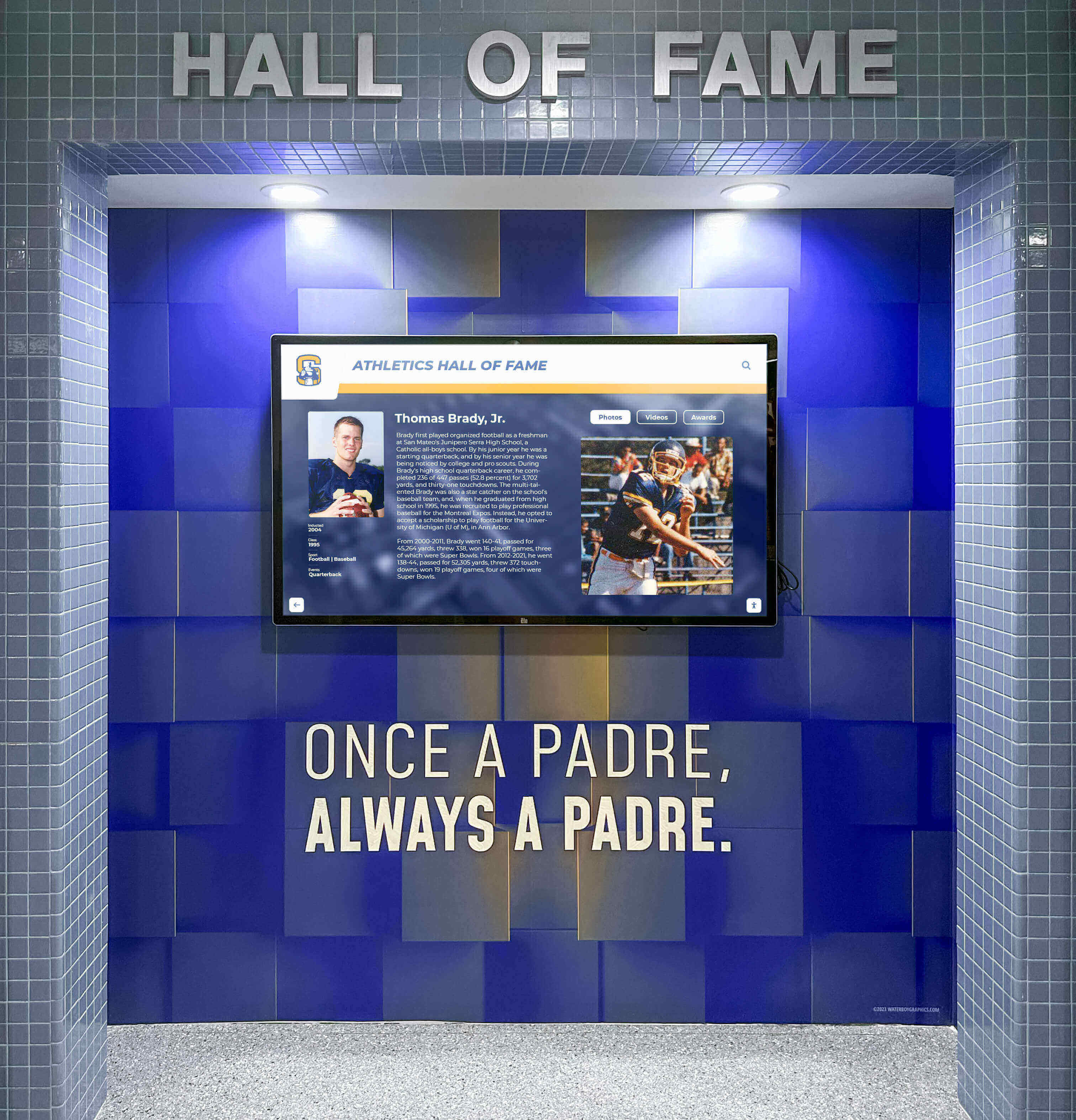
Strategic placement in athletic facilities ensures recognition reaches athletes, families, and visitors daily without requiring active promotion
Total Cost of Ownership Beyond Sticker Price
The “90% cheaper” comparison between structured platforms and basic digital signage tools or slide loops makes budget sense only when calculations include complete long-term costs.
What “Cheap” Solutions Actually Cost
Free or low-cost alternatives advertise attractive initial pricing that excludes significant hidden costs:
Labor Costs: The Invisible Expense
Small schools rarely calculate staff time in platform comparisons because administrators perform updates alongside dozens of other responsibilities without discrete hourly charges. Yet time spent managing displays carries real costs:
- 2 hours weekly updating slides = 100 hours annually
- At $30/hour value for administrative time = $3,000 annual labor cost
- Over 5 years = $15,000 in staff time maintaining “free” slideshows
Structured platforms enabling 15-minute weekly updates through simplified interfaces reduce this to $1,800 over five years—saving $13,200 in labor even before considering platform subscription costs.
Content Development and Redesign
Manual systems require ongoing content formatting as needs evolve:
- Creating new slide templates for additional sports
- Reformatting existing content when layout changes
- Editing master files when branding updates
- Rebuilding damaged files after corruption
- Training new staff on custom workflows
Database platforms handle these tasks through template updates that propagate automatically across content—requiring single changes rather than manual file modifications.
Hardware Replacement and Reliability
Consumer-grade equipment adapted for display use fails faster than commercial solutions designed for continuous operation:
- TVs running 12 hours daily wear out in 2-3 years versus 5-7 years for commercial displays
- Failed equipment requires emergency replacement disrupting recognition programs
- Media players and computers running slideshow software need periodic upgrades
- Troubleshooting technical issues consumes staff time without vendor support
Commercial platforms include enterprise-grade hardware with extended warranties, remote monitoring preventing failures, and vendor support resolving issues without demanding staff technical expertise.
The Re-Platform Tax
When initial solutions prove inadequate, migration costs dwarf original savings:
- Researching and evaluating replacement platforms
- Requesting budget approval and stakeholder buy-in
- Recreating content in new formats
- Training staff on different systems
- Managing transition periods when recognition displays go dark
- Explaining to communities why previous investments were abandoned
Schools avoiding structured platforms to save money often spend more replacing inadequate systems than investing appropriately initially.
What Structured Platforms Actually Include
“Expensive” platforms deliver comprehensive solutions rather than bare software:
Included Services Beyond Software
- Content onboarding assistance converting historical materials into platform formats
- Template design creating branded experiences matching school identity
- Training and documentation enabling staff self-sufficiency
- Ongoing technical support resolving issues quickly
- Regular software updates maintaining security and adding features
- Hardware warranties covering equipment failures
- Remote monitoring catching issues before visibility interruptions
These services represent significant value rarely available with budget alternatives requiring schools to source independently.
Governance and Workflow Tools
Enterprise platforms include capabilities that seem unnecessary until staff turnover or growth creates coordination needs:
- Multi-user permissions enabling distributed content management
- Approval workflows preventing errors before publication
- Content scheduling automating updates without manual intervention
- Asset libraries organizing media for reuse across displays
- Analytics demonstrating engagement justifying continued investment
Future-Proofing and Expansion
Structured platforms accommodate growth without architectural limitations:
- Additional displays share content without duplication
- New locations launch quickly using existing templates
- Web portals extend recognition beyond physical installations
- API integrations connect displays to school data systems
- Mobile access enables updates from any device without special software
Budget comparisons capturing total functionality demonstrate that structured platforms deliver superior value despite higher initial costs—particularly for resource-constrained small schools needing solutions that work reliably without consuming limited staff capacity.
Resources on digital signage for schools explore total cost considerations beyond subscription pricing that determine real long-term value.

Intuitive interfaces enable community members to explore recognition content without training or assistance
Community Prestige and Donor Perception
Small school budgets prioritize essentials over enhancements, making recognition displays seem like luxuries competing with core needs. Yet display quality materially impacts how communities, alumni, and donors perceive institutional commitment and competence.
The High-Visibility Installation Context
Recognition displays typically occupy the most prominent spaces in small school facilities—main entrance lobbies, gymnasium foyers, athletic facility hallways. These locations see consistent traffic from constituencies making judgments about school quality and priorities:
- Prospective families evaluating whether schools warrant enrollment
- Alumni considering philanthropic support for programs and facilities
- Community members forming opinions about institutional competence
- Current families assessing whether schools appropriately value achievement
- Donors evaluating whether organizations manage contributions effectively
In these high-stakes contexts, display quality communicates more than recognition content alone—it signals whether schools approach important tasks professionally or settle for visibly budget approaches that undermine confidence.
Amateur vs. Professional Presentation
Small schools sometimes assume communities won’t notice quality differences between slideshow loops and structured recognition platforms. Experience demonstrates otherwise—audiences immediately perceive presentation quality differences even without articulating specific deficiencies:
Low-Quality Indicators Audiences Notice
- Pixelated images stretched beyond original resolution
- Inconsistent formatting across different slides
- Typos and errors suggesting insufficient review processes
- Static content that never changes suggesting abandonment
- Slow load times and technical glitches during viewing
- Consumer equipment with visible consumer branding and interfaces
- Lack of organization making specific information hard to locate
- Missing recent achievements suggesting stale content
These quality signals accumulate into impressions about institutional competence extending beyond recognition displays to general school management perceptions. Donors concluding that schools handle visible projects carelessly question whether gifts will be managed responsibly.
Professional Quality Signals
Structured platforms deliver consistent quality that inspires confidence:
- High-resolution imagery optimized for display dimensions
- Consistent branding and professional design across all content
- Current information demonstrating active management
- Smooth interactive experiences suggesting technical competence
- Organized navigation enabling efficient information discovery
- Commercial-grade equipment signaling appropriate investment
- Regular updates showing sustained institutional commitment
These quality indicators suggest schools approach important responsibilities seriously—building confidence that extends to all institutional interactions and making philanthropic investment feel safe and worthwhile.
Recognition as Donor Cultivation
Small schools frequently implement recognition displays with funding from major donors or capital campaigns. The displays themselves then become cultivation tools for future giving—either inspiring additional support through demonstrated impact or undermining confidence through poor execution.
When Recognition Inspires Giving
Well-executed displays create positive giving cycles:
- Donors see their contributions visibly appreciated and professionally presented
- Alumni notice comprehensive recognition suggesting institutional memory and gratitude
- Community members observe school commitment to honoring achievement
- Prospective donors gain confidence that contributions will be appropriately acknowledged
- Existing supporters feel justified increasing commitment to institutions demonstrating stewardship
Recognition quality directly influences future fundraising success—particularly for small schools where individual donor relationships determine campaign outcomes.
When Poor Displays Undermine Confidence
Conversely, low-quality recognition generates concerns that inhibit giving:
- Donors wonder whether gifts will be well-managed
- Alumni question whether schools appropriately value contributions
- Supporters feel embarrassed by amateur presentations bearing their names
- Prospective donors hesitate committing to organizations appearing disorganized
- Existing supporters reconsider continued investment in institutions demonstrating poor stewardship
For small schools where losing single major donors materially impacts budgets, recognition quality becomes financially significant beyond display costs themselves.
Comprehensive approaches to digital donor walls demonstrate how recognition quality influences philanthropic relationships essential to small school sustainability.

Coordinated multi-display installations create comprehensive recognition networks while maintaining visual consistency
Touch Interaction Doesn’t Define Platform Value
Small schools sometimes dismiss structured platforms because their hallway displays won’t include touch interaction—concluding that paying for interactive capabilities they won’t use represents wasteful spending. This reasoning misunderstands what creates platform value.
Touch as One Interaction Model
Interactive platforms certainly enable touch-based exploration where users control content discovery through on-screen navigation. However, touch represents one delivery method rather than the core platform value.
The Real Platform Value: Structured Content
Database-backed systems deliver value through organized content infrastructure regardless of interaction model:
- Centralized management enabling updates from any location
- Consistent templates maintaining quality across all content
- Structured data supporting multiple presentation formats
- Search and filtering capabilities organizing large content volumes
- Analytics tracking engagement across different delivery methods
- Workflow tools coordinating distributed content development
These capabilities benefit non-interactive displays just as much as touch-enabled installations—providing content infrastructure that simplifies maintenance and enables expansion regardless of whether screens accept user input.
Lean Mode Display Operation
Small schools can operate structured platforms in “lean mode” delivering passive content rotations while maintaining sophisticated backend infrastructure:
Scheduled Content Rotations
Rather than user-driven exploration, displays cycle through curated content sequences:
- Featured athlete profiles rotating on timed schedules
- Historical photo galleries showcasing program evolution
- Upcoming events and schedule information
- Donor recognition acknowledging support
- School announcements and communications
These rotations leverage database content without requiring touch interaction—audiences see curated highlights while comprehensive information remains accessible through web portals.
Managed Storytelling Displays
Administrators control narrative flow rather than enabling open-ended exploration:
- Weekly spotlights highlighting different programs or individuals
- Seasonal themes reflecting current athletic calendars
- Campaign-focused content supporting fundraising initiatives
- Event-specific displays for homecoming, senior nights, championships
Managed approaches deliver storytelling benefits while avoiding concerns about inappropriate user access or vandalism that sometimes worry schools considering interactive installations in unsupervised spaces.
Flexibility for Future Activation
Starting with lean display modes doesn’t preclude future interactive capability:
- Schools beginning with passive rotations can activate touch features when appropriate
- Additional locations might include interactive exploration while primary displays remain managed
- Special events could temporarily enable interaction without permanent changes
- Expansion to new facilities might incorporate touch where original installations did not
Platform flexibility enables schools to match interaction models to specific contexts—using managed displays in some locations while enabling exploration elsewhere without requiring different content systems or maintaining multiple platforms.
Frameworks for touchscreen display design explore how platforms support diverse interaction approaches within unified content infrastructure.

When appropriate, touch interaction enables self-directed exploration that traditional static displays cannot provide
The Counter-Argument in One Sentence
Rocket isn’t overkill for small schools because the database and platform depth reduce maintenance burden, prevent future rebuilds, and provide a scalable path from “simple display” to “community engagement” without switching systems—delivering exactly what resource-constrained schools need most.
When Simple Alternatives Make Sense
Structured platforms aren’t universally appropriate—specific circumstances genuinely justify simpler approaches:
One Screen, No Expansion Planned
Schools installing single displays with firm commitments never to expand can reasonably choose simpler tools. However, small schools rarely maintain this discipline—successful recognition generates demand for additional locations and enhanced content that simple systems can’t accommodate.
One Person Owns Updates Forever
If specific individuals enjoy manual content creation and will reliably maintain displays indefinitely, workflow efficiency matters less. However, staff turnover inevitably occurs—particularly at small schools where administrative roles rotate frequently. Systems depending on individual knowledge become problematic the moment those individuals leave.
No Need for Structure or Reusability
Schools displaying purely decorative content without information accuracy requirements or reuse across formats can avoid structured approaches. However, recognition displays typically contain factual information requiring accuracy and updates that repetitive manual formatting makes unnecessarily burdensome.
Display Is Not a Strategic Touchpoint
If displays occupy low-visibility locations where quality doesn’t influence stakeholder perceptions, presentation quality matters less. However, small schools typically install recognition in prominent spaces specifically to demonstrate commitment and build pride—contexts where quality significantly impacts effectiveness.
Budget Is the Only Decision Variable
Schools with no possibility of funding anything beyond absolute minimum costs must sometimes accept limitations of cheap alternatives. However, total cost calculations including labor, hardware replacement, and eventual rebuilds often demonstrate that “expensive” platforms cost less long-term than “cheap” solutions requiring constant intervention and eventual replacement.
The Weakening “Overkill” Claim
When any of these conditions prove false—and for most small schools, several are false simultaneously—the “overkill” characterization weakens rapidly. What seemed like unnecessary capability becomes essential infrastructure preventing maintenance fatigue, quality concerns, and expensive rebuilds that budget-conscious schools can least afford.
Small schools rejecting structured platforms to avoid “overkill” frequently discover that inadequate infrastructure creates more problems than appropriate investment would have cost—making platform depth an asset rather than unnecessary complexity.
Resources on affordable hall of fame solutions for small schools demonstrate how appropriate platform selection serves resource-constrained environments effectively.
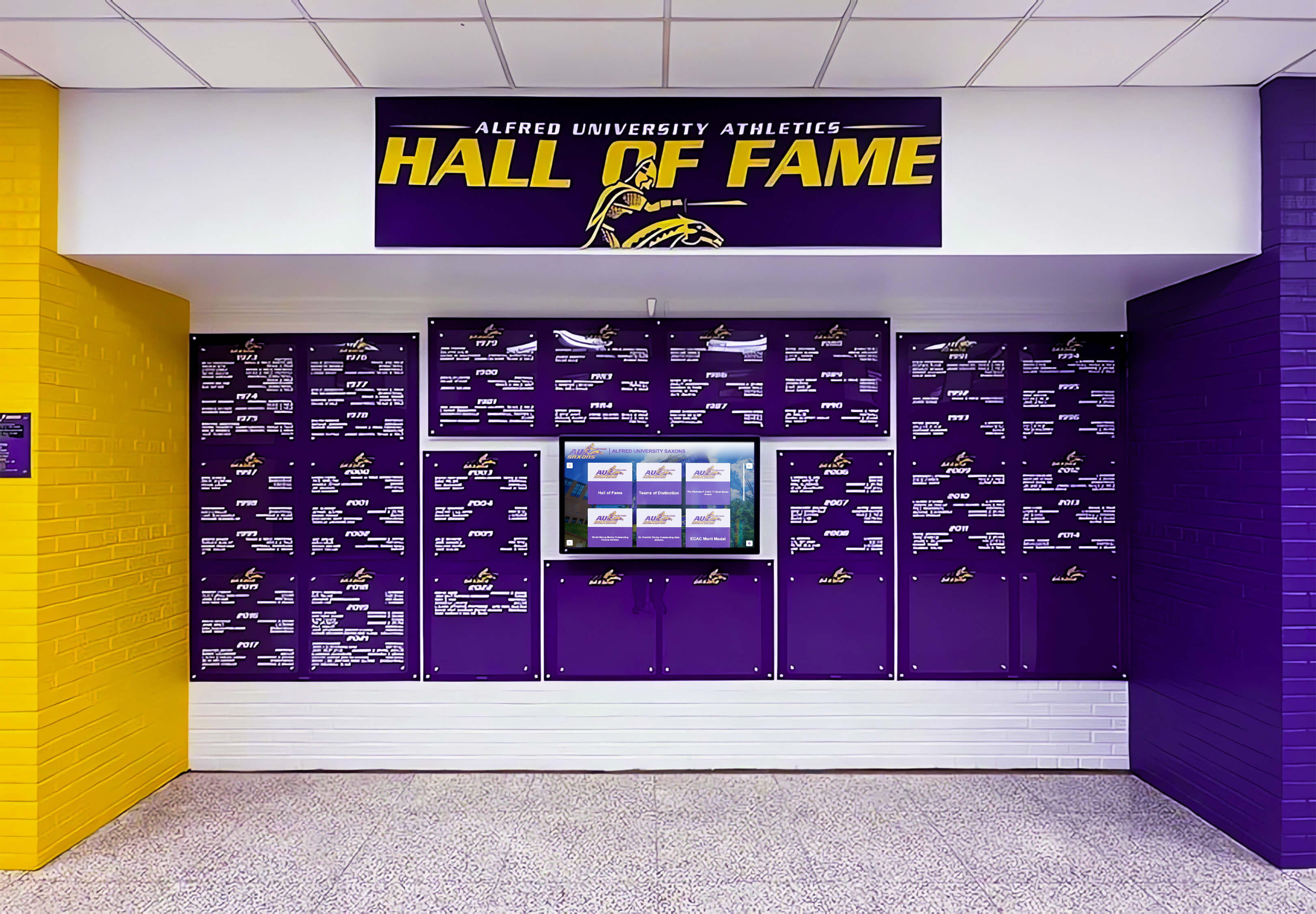
Professional brand integration creates recognition experiences that reinforce institutional identity while celebrating achievement
Making the Right Platform Decision
Small schools evaluating recognition displays should assess platforms based on sustainable operation rather than initial feature lists that seem intimidating.
Essential Evaluation Criteria
Beyond comparing feature checklists, prioritize factors determining long-term success:
Maintenance Burden and Workflow Efficiency
- How much time does content creation and updating require?
- Can staff make quick changes from any device without specialized software?
- Do templates maintain quality automatically or demand manual formatting?
- Will future staff transitions disrupt operations due to custom workflows?
Platforms reducing ongoing maintenance deliver value regardless of advanced features small schools might not use immediately.
Growth Accommodation Without Rebuilding
- Can the system handle 10x content growth without architectural changes?
- Do additional displays share content or require independent management?
- Will adding new features or categories force content migration?
- Can the platform accommodate unpredictable future needs?
Flexibility prevents expensive rebuilds when recognition needs evolve beyond initial plans.
Professional Quality Without Technical Expertise
- Does the platform deliver professional presentation automatically?
- Can non-technical staff create attractive content independently?
- Will the system continue operating reliably without constant intervention?
- Is technical support available when issues arise?
Small schools lacking dedicated IT staff need platforms that work consistently without demanding specialized knowledge.
Total Cost Including Hidden Expenses
- What does comprehensive cost include beyond subscription pricing?
- How much staff time will maintenance consume annually?
- What happens when hardware fails or needs replacement?
- Will expansion or migration costs emerge later?
Accurate cost comparisons capture labor, hardware lifecycle, and potential rebuild expenses that sticker price comparisons exclude.
Questions to Ask Before Choosing “Simple”
Schools tempted by basic alternatives should honestly assess whether simpler approaches will actually serve long-term needs:
- Do we genuinely have no plans for expansion, or do we simply lack current capacity?
- Will staff enjoy maintaining manual systems, or will this become burdensome?
- Are we certain recognition needs won’t grow once displays prove successful?
- Can we afford rebuild costs if initial choices prove inadequate?
- Will amateur presentation quality undermine the recognition program’s purpose?
Honest answers often reveal that “simple” choices create future problems that structured platforms prevent—making apparent complexity actually represent appropriate investment rather than unnecessary expense.
See Rocket in Action for Small Schools
Discover how Rocket Alumni Solutions delivers enterprise capabilities through simple interfaces that small schools manage easily—providing professional recognition infrastructure without overwhelming limited staff capacity.
Book a DemoConclusion: Choosing Platforms That Actually Serve Small Schools
The “overkill for small schools” narrative reflects reasonable concerns about complexity and cost that lead to poor decisions when schools prioritize initial simplicity over sustainable operation. Small schools don’t fail with feature-rich platforms because of too many capabilities—they struggle with inadequate tools that seem simple initially but generate ongoing maintenance burdens, quality problems, and eventual rebuild requirements consuming far more resources than appropriate initial investment would have cost.
Database-backed platforms like Rocket Alumni Solutions serve small schools effectively not despite their depth but because structured content infrastructure, centralized management, professional templates, and growth accommodation reduce the ongoing labor that resource-constrained schools can least afford to spend on recognition maintenance. The feature depth that seems like “overkill” actually prevents the rebuilds, quality compromises, and maintenance fatigue that “simple” alternatives reliably create.
Small schools comparing platforms should evaluate based on total long-term costs including staff time, hardware reliability, eventual rebuild expenses, and donor perception impact—not just initial subscription pricing or feature counts. When comprehensive calculations include these factors, structured platforms frequently cost less while delivering superior quality and preventing future disruptions that budget-conscious small schools find particularly disruptive.
Your school’s recognition program deserves infrastructure that works reliably without demanding constant attention—enabling limited staff to maintain professional presentations that inspire students, engage alumni, and cultivate donors rather than consuming time on manual updates and workarounds that “simple” systems require. Choosing appropriate platforms prevents problems rather than creating them—exactly what small schools navigating resource constraints need most.
Ready to explore recognition solutions built for small school realities? Learn about implementing touchscreen displays in schools balancing capability with usability. Discover digital recognition display options serving schools with limited budgets. Explore athletic recognition programs demonstrating how structured systems prevent maintenance burden. And understand content management approaches that simplify operations through appropriate platform architecture designed specifically for educational recognition environments where sustainability matters more than initial simplicity.































