




Student recognition award display design transforms how schools and organizations celebrate achievement—moving from crowded trophy cases and static wall plaques to dynamic, engaging touchscreen experiences that honor FBLA competitive events, FFA proficiency awards, academic excellence, athletic records, and countless other student accomplishments through intentional layout, visual storytelling, and interactive exploration frameworks.
Yet many institutions approach digital recognition displays as technical purchases rather than design opportunities. Hardware vendors present generic templates. Committees select software based solely on feature checklists. Displays launch with content arrangements borrowed from physical trophy cases—chronological walls of names that fail to inspire, engage, or demonstrate the full story behind each achievement.
This design-focused guide explores the creative layout strategies, UX patterns, accessibility considerations, and visual frameworks that transform student recognition from database presentation into compelling storytelling that builds school pride, motivates current students, and creates memorable experiences for alumni, families, and visitors.
Schools implementing thoughtful recognition display design report dramatic increases in visitor engagement—with well-designed interfaces generating 5-7 minute average interactions compared to 30-second glances at poorly designed alternatives. These engagement differences directly impact recognition program goals including student motivation, alumni connection, community pride, and recruitment effectiveness.

Contemporary recognition kiosks combine commercial hardware with intentional UX design creating engaging celebration environments
Experience Goal: Celebrating Achievement Through Design Excellence
Student recognition displays serve multiple stakeholder groups with distinct needs and exploration behaviors. Understanding these audience segments shapes design decisions affecting layout, navigation, content depth, and interaction patterns.
Primary Audience Segments and Their Design Needs
Effective recognition experiences accommodate diverse visitor intentions without compromising any stakeholder group:
Current Students: Inspiration and Aspiration
Students exploring recognition displays seek role models and pathway visualization—understanding what achievements merit celebration and imagining themselves earning similar recognition. Design implications include:
- Clear achievement category organization showing diverse excellence opportunities beyond athletics alone
- Detailed accomplishment documentation explaining how honorees earned recognition
- Accessible presentation enabling independent exploration without staff mediation
- Mobile device extension allowing continued engagement beyond physical display encounters
- Social sharing capabilities enabling students to celebrate peers and share aspirations
Alumni: Personal Connection and Legacy
Former students return seeking their own recognition and reminiscing about shared experiences with classmates. Design must prioritize:
- Powerful search functionality enabling instant location of specific individuals across decades
- Comprehensive historical coverage spanning complete institutional recognition history
- Contextual connections surfacing teammates, classmates, and contemporaries
- High-quality biographical content worth revisiting and sharing with personal networks
- Export capabilities allowing alumni to preserve and share individual profiles
Families and Prospective Students: Program Quality Demonstration
Parents and prospective families evaluate institutional character and program excellence through recognition displays. Design should emphasize:
- Professional presentation quality reflecting institutional standards and pride
- Breadth demonstration across academics, athletics, leadership, service, and arts
- Depth illustration through rich multimedia content and achievement documentation
- Accessibility and usability demonstrating modern technology implementation
- Strategic placement in recruitment spaces and during key visit experiences
Understanding these audience priorities prevents design compromises that serve one group while failing others—enabling recognition experiences delivering value across all stakeholder segments simultaneously.

Intuitive navigation enables students to independently discover achievements without staff assistance or instructional overhead
Layout Blueprint: Organizing Multi-Category Recognition Content
Student achievement spans diverse domains—from FBLA competitive events and FFA proficiency awards through academic honors, athletic records, performing arts recognition, and service leadership. Effective layouts organize this complexity into intuitive exploration frameworks.
Hero Zone: Making Recognition Discoverable
The initial screen determines whether visitors engage or walk away—requiring careful balance between welcoming simplicity and achievement celebration:
Visual Welcome and Brand Integration
Hero zones should immediately communicate institutional identity and recognition program purpose through:
- Branded masthead incorporating school colors, logos, and recognition program branding
- High-impact hero imagery showing students celebrating achievements across diverse categories
- Clear program title communicating content scope (“Student Recognition” vs. “Athletic Hall of Fame”)
- Motion elements like subtle animations or rotating featured content preventing static appearance
- Accessibility notes indicating touchscreen operation for visitors unfamiliar with interactive displays
Schools implementing digital hall of fame design strategies emphasize that first impressions established in hero zones directly predict overall engagement duration and exploration depth.
Primary Navigation Grid
Hero zones transition into primary navigation presenting clear entry points organized around logical achievement categories:
- Grid-based card layout displaying 6-12 major categories per screen
- Visual icons paired with text labels supporting quick recognition and accessibility
- Category-specific imagery suggesting content depth behind each navigation choice
- Recognition counts showing honoree totals per category signaling content breadth
- Featured spotlight cards promoting recent inductees or notable achievements
Effective category organization balances institutional priorities with intuitive visitor mental models. Consider these common frameworks:
Achievement Domain Organization
- Athletics
- Academics
- Leadership & Service
- Performing & Visual Arts
- Special Recognition
Organization-Specific Grouping
- FBLA Recognition
- FFA Awards
- National Honor Society
- Athletic Hall of Fame
- Distinguished Alumni
Time-Based Navigation
- By Decade
- By Graduating Class
- Current Academic Year
- Historical Legacy
Most effective implementations combine primary domain organization with secondary filtering enabling alternative exploration pathways accommodating different visitor intentions and browsing preferences.
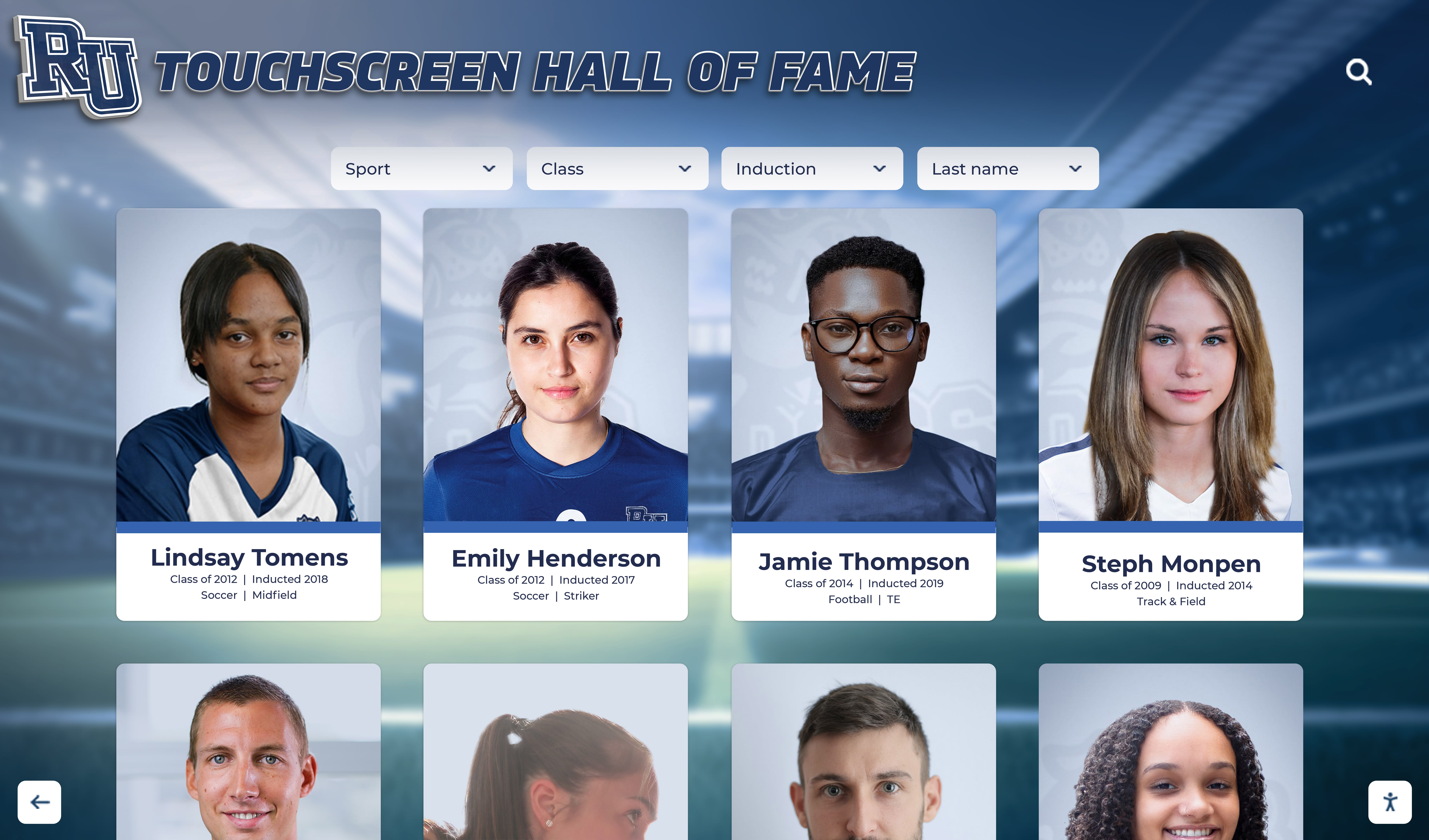
Grid-based layouts enable efficient browsing across multiple honorees while maintaining visual interest through varied imagery
Content Modules: Achievement Profile Design Patterns
Individual recognition profiles form the core content experience—requiring careful layout balancing comprehensive information with scannable formatting suitable for standing touchscreen interaction:
Portrait Card Layout Pattern
Card-based designs create consistent, professional presentations across diverse achievement types:
- Prominent photograph positioned top-center drawing immediate visual attention
- Name and primary achievement headline below photo establishing recognition context
- Achievement year and category metadata providing classification information
- Achievement badge icons indicating recognition levels or honor types
- Expandable detail zones revealing comprehensive information on demand
Timeline Visualization Format
For honorees with multiple achievements spanning years, timeline layouts show progression:
- Vertical or horizontal timeline axis showing chronological achievement sequence
- Achievement nodes plotted along timeline with year labels and category icons
- Expandable content zones per achievement revealing detailed documentation
- Visual distinction between achievement types through color coding or iconography
- Current outcome information showing post-graduation career or educational paths
Team-Based Recognition Modules
Sports teams, group projects, and collective achievements require different layout approaches:
- Team photo positioned prominently establishing group context
- Individual team member grid with names and positions or roles
- Season statistics or project outcomes in scannable data visualization format
- Coach or advisor recognition acknowledging leadership contributions
- Related team connections linking championship teams or sustained program excellence
Organizations celebrating FBLA awards recognition find that achievement-specific layout patterns accommodate diverse recognition types more effectively than generic templates attempting to serve all content identically.
Media Integration Zones
Rich multimedia content brings recognition to life beyond static biography and photo presentation:
- Video testimonials embedded within profile layouts with clear play controls
- Photo galleries showing achievement context, competition moments, or career highlights
- Document embedding for certificates, news articles, or official recognition letters
- Audio content for speeches, performances, or recorded interviews
- Social media integration displaying honoree posts or community celebration
Media zones require careful interface design ensuring content enhancement without overwhelming core biographical information or creating navigation confusion through excessive interaction complexity.
Navigation Architecture: Multi-Path Exploration Framework
Visitors approach recognition with different intentions—some seeking specific individuals, others casually browsing, and many following curiosity-driven paths through related content. Effective navigation accommodates all exploration modes:
Persistent Navigation Elements
Core navigation tools should remain accessible from any screen preventing exploration dead-ends:
- Home button returning to hero zone regardless of current depth
- Back button enabling step-wise navigation reversal
- Breadcrumb trail showing current position within content hierarchy
- Search icon triggering search overlay from any context
- Category filter maintaining visibility showing current content scope
Research on touchscreen UX design demonstrates that visible escape routes increase exploration depth—users who know they can always return home demonstrate greater willingness to follow tangential interests compared to interfaces where navigation mistakes create anxiety.
Advanced Search and Filter Interface
Power users and goal-directed visitors need efficient search enabling instant location of specific individuals or achievement categories:
- Keyword search supporting name, achievement type, and year queries
- Auto-complete suggestions appearing as users type preventing spelling frustration
- Filter refinement options narrowing results by multiple criteria simultaneously
- Sort options ordering results by year, name, achievement level, or relevance
- Search history or recent views enabling quick return to previously discovered content
Relationship Navigation: The Serendipity Layer
Beyond goal-directed search, relationship connections encourage exploratory discovery creating extended engagement:
- “View Teammates” links on athletic recognition connecting seasonal roster members
- “Classmates” connections showing same-year graduates across all achievement categories
- “Related Achievements” surfacing individuals with similar recognition in different years
- “Where Are They Now” links showing current honoree information for historical recognition
- Random profile discovery promoting serendipitous exploration of unexpected connections
These relationship layers transform recognition displays from searchable databases into engaging exploration environments where visitors follow curiosity-driven paths creating memorable discovery experiences impossible with static trophy case presentations.
Understanding FFA awards digital display implementation demonstrates how agricultural education programs leverage relationship navigation connecting proficiency award winners with SAE project types and career pathway outcomes.

Responsive touch interfaces support natural gesture interactions users already understand from smartphone experiences
Content Blocks & Motion: Bringing Recognition to Life
Static layouts present information—dynamic experiences create engagement. Strategic motion, multimedia integration, and interactive elements transform recognition displays from digital filing cabinets into living celebrations.
Animation and Transition Design
Subtle motion guides attention, signals interactivity, and creates polish distinguishing professional implementations from amateur attempts:
Welcome Sequence Animation
Initial display activation should create inviting first impression through:
- Fade-in transition bringing hero content from subtle transparency to full visibility
- Staggered appearance of navigation cards creating gentle cascading effect
- Ambient motion like subtle floating or glow effects on interactive elements
- Looping hero background video or photo carousel preventing static appearance during idle states
Animation should enhance without overwhelming—excessive motion creates distraction while complete stillness appears lifeless and fails to signal touchscreen interactivity.
Content Transition Choreography
Navigation between screens requires carefully designed transitions communicating relationships between content:
- Slide transitions showing directionality when drilling deeper into content hierarchies
- Fade transitions for lateral movement between similar content at same hierarchy level
- Scale effects when expanding card previews into full profile detail views
- Layered overlays for search and filter interfaces appearing atop existing content
- Loading animations bridging transitions exceeding 200 milliseconds preventing uncertainty
Consistent transition vocabulary creates predictable experience enabling visitors to develop reliable mental models of content structure and navigation relationships.
Interactive Feedback Affordances
Every touch interaction requires immediate visual response confirming system recognition:
- Button press states showing subtle scale reduction or color shift within 100 milliseconds
- Touch ripple effects radiating from contact point providing direct manipulation feedback
- Hover states on desktop or kiosk contexts previewing interactive element response
- Swipe gesture visual following showing content movement corresponding to finger position
- Progress indicators for operations exceeding two seconds preventing abandonment concern
Organizations implementing touchscreen software solutions emphasize that responsive feedback dramatically reduces user frustration and perception of system lag even when actual processing times remain unchanged.
Video Integration and Multimedia Storytelling
Rich media transforms biographical text into compelling narratives demonstrating achievement context and personal journey:
Video Content Placement Strategies
Video integration requires careful interface design balancing impact with usability:
- Hero zone background video creating ambient motion without interaction requirement
- Profile page embedded video with clear thumbnail previews and play button affordances
- Full-screen video modal experiences for keynote content or significant documentary features
- Multi-clip galleries enabling visitors to select from several related video segments
- Auto-play considerations—ambient background acceptable, content video requires explicit activation
Video content should support not replace textual information—accessibility requirements and visitor preferences demand text equivalents providing core information independently from multimedia enhancement.
Photo Gallery and Media Library Design
Student achievements generate rich visual documentation deserving prominent showcase:
- Thumbnail grid layouts displaying multiple images simultaneously enabling preview and selection
- Lightbox or full-screen modal expansion for detailed image viewing
- Swipe gesture navigation between gallery images supporting natural smartphone-like interaction
- Zoom capability allowing detailed examination of group photos or document images
- Caption overlays providing context without requiring separate text panels
Photo galleries celebrating debate team achievement boards demonstrate how competition documentation, team photos, and tournament moments create visual storytelling far exceeding static portrait photography alone.
Audio Content Integration
Voice content adds personal dimension through testimonials, speeches, and recorded reflections:
- Audio player controls integrated within profile layouts maintaining visual context during playback
- Transcript provision supporting accessibility and enabling reading during audio listening
- Chapter markers or segment selection for longer audio content preventing abandonment
- Autoplay prevention respecting visitor control and preventing unexpected sound in public spaces
- Volume control prominence ensuring visitors can immediately adjust or mute playback
Audio particularly enhances recognition for performing arts students, student government leaders who gave speeches, and distinguished alumni willing to record reflections about formative institutional experiences.

Museum-quality interfaces balance rich content depth with intuitive exploration enabling self-guided discovery
Accessibility & UX Checklist: Inclusive Recognition Design
Truly engaging recognition serves all visitors regardless of abilities, technological familiarity, or accessibility needs. Comprehensive design addresses physical, sensory, cognitive, and technological accessibility dimensions.
Physical Accessibility and ADA Compliance
Recognition displays must accommodate visitors with diverse physical capabilities and mobility equipment:
Installation Height and Reach Requirements
Americans with Disabilities Act standards establish specific positioning requirements:
- Primary interactive elements positioned 36-48 inches from floor level
- Display viewing area extending no higher than 54 inches for wheelchair user visibility
- Clear floor space minimum 30 x 48 inches providing wheelchair approach zones
- Knee clearance beneath displays for forward wheelchair approach contexts
- Angled installation tilting screens 10-15 degrees downward improving viewing angles
Schools implementing college intramural sports recognition emphasize that proper installation height benefits all users—not just those using mobility equipment—by reducing neck strain and improving viewing angles for standing visitors of varying heights.
Touch Target Sizing and Spacing
Inclusive interface design accommodates visitors with motor control challenges or limited precision:
- Minimum 44-pixel touch targets meeting baseline accessibility standards
- Recommended 60-pixel targets providing forgiveness for public kiosk contexts
- Minimum 12-pixel spacing between adjacent interactive elements preventing miss-taps
- Critical action isolation with 24+ pixel clearance preventing catastrophic accidents
- Finger-friendly gesture vocabulary avoiding precise multi-touch requirements
Visual Accessibility and Legibility
Public touchscreen displays face challenging viewing conditions requiring careful attention to contrast, typography, and visual hierarchy:
Color Contrast and WCAG Compliance
Web Content Accessibility Guidelines establish minimum contrast ratios ensuring legibility:
- 4.5:1 minimum contrast ratio for body text meeting WCAG AA standards
- 3:1 minimum contrast ratio for large text and graphical interface elements
- 7:1 target contrast for public displays facing bright ambient lighting conditions
- Color-independent information coding avoiding sole reliance on color for meaning communication
- Reduced motion alternatives for visitors sensitive to animation or experiencing vestibular disorders
Typography Selection and Hierarchy
Text legibility at distance requires careful font selection and sizing decisions:
- Sans-serif typefaces providing superior legibility for screen display contexts
- Minimum 18-point body text ensuring readability from typical viewing distances
- 24-32 point heading text establishing clear visual hierarchy
- Generous line spacing improving text block scanability during standing interaction
- Sentence case or title case avoiding all-caps text blocks challenging readability
Visual Hierarchy Through Layout and Spacing
Clear information organization enables quick comprehension without careful study:
- Whitespace utilization preventing visual density overwhelming visitors
- Consistent grid alignment creating predictable information positioning
- Prominent primary content with subordinate secondary information clearly distinguished
- Progressive disclosure revealing detailed information only when visitors request expansion
- Visual chunking grouping related information through proximity and containment
Resources on CTE program digital displays demonstrate how career and technical education recognition balances comprehensive achievement documentation with scannable formatting accommodating brief visitor attention spans.

Properly positioned installations serve diverse visitors through universal design principles accommodating varying heights and abilities
Cognitive Accessibility and Comprehension Support
Recognition displays should welcome visitors with diverse technological familiarity and cognitive abilities:
Consistent Interaction Patterns
Predictable interface behavior reduces cognitive load enabling confident exploration:
- Single-tap activation for all interactive elements avoiding gesture complexity
- Consistent button positioning across all screens enabling automatic behavior development
- Standard gesture vocabulary matching smartphone conventions without custom invention
- Uniform navigation pattern throughout application preventing relearning between sections
- Persistent navigation tools always accessible from any interface state
Clear Affordances and Signification
Visitors should instantly recognize interactive elements without experimentation:
- Button styling clearly distinguished from non-interactive content through visual treatment
- Textual labels supplementing icon navigation preventing interpretation confusion
- Interactive element highlighting on hover or focus states for accessible navigation
- Instructional overlays for first-time users dismissible after initial comprehension
- Help access clearly visible for visitors encountering navigation confusion
Comprehension Support and Content Structure
Information presentation should accommodate diverse reading levels and learning preferences:
- Clear heading structure enabling quick content scanning and orientation
- Short paragraphs and sentences improving comprehension during standing interaction
- Bullet-point formatting extracting key facts for quick reference
- Glossary access explaining specialized terminology or acronyms
- Multiple representation modes offering visual, textual, and when feasible audio content alternatives
Organizations creating academic recognition programs find that comprehension-focused design benefits all visitors—not only those with cognitive challenges—by respecting limited attention spans and standing interaction contexts.
Activation Plan: From Design to Deployment
Exceptional recognition design requires careful implementation planning ensuring technical execution matches creative vision while establishing sustainable content workflows.
Pre-Launch Content Strategy
Recognition display effectiveness depends equally on design quality and content comprehensiveness—requiring systematic content development before launch:
Historical Achievement Inventory
Comprehensive recognition requires thorough research documenting complete institutional history:
- Trophy case audit cataloging existing physical recognition and achievement documentation
- Yearbook review extracting historical achievement information and photography
- Archive research locating historical programs, newspaper clippings, and official records
- Alumni outreach requesting achievement information and biographical content
- Department consultation gathering athletic records, academic honor rolls, and activity recognition
Historical content development typically requires 40-80 hours depending on program history depth and existing documentation organization—representing significant project component deserving appropriate resource allocation.
Content Entry and Quality Assurance
Systematic data management prevents errors undermining recognition credibility:
- Spreadsheet templating standardizing information collection across all honorees
- Bulk import tools accelerating profile creation from structured data sources
- Quality assurance review identifying missing information, spelling errors, or inconsistent formatting
- Approval workflow routing profiles to appropriate authorities before publication
- Staged launch strategy publishing verified content while continuing historical research
Schools implementing digital hall of fame systems emphasize that initial content quality establishes visitor expectations—launching with incomplete or error-filled content creates negative first impressions difficult to overcome through subsequent improvement.
Hardware Installation and Technical Configuration
Physical installation requires careful planning ensuring optimal positioning and reliable operation:
Site Selection and Environmental Assessment
Recognition display placement dramatically affects visibility, accessibility, and visitor engagement:
- High-traffic location selection maximizing visibility to students, visitors, and families
- Adequate clearance for wheelchair access and group viewing accommodating multiple simultaneous visitors
- Lighting assessment ensuring screen visibility without excessive glare or reflection
- Power and network access verification confirming infrastructure adequacy
- Climate control ensuring temperature and humidity ranges supporting reliable hardware operation
Professional Installation Services
Commercial-grade displays require proper mounting and configuration ensuring safety and reliability:
- Structural assessment confirming wall capacity supporting display weight and mounting forces
- Electrical work providing dedicated circuits with surge protection
- Network connectivity configuration establishing reliable internet access
- Secure mounting with appropriate anchoring for wall construction and display weight
- Cable management creating clean appearance without exposed wiring
Technical Configuration and Testing
Pre-launch testing identifies issues before public deployment:
- Display calibration ensuring accurate color representation and optimal brightness
- Touch responsiveness testing confirming reliable interaction across entire screen surface
- Content loading verification ensuring media appears correctly without broken links or missing assets
- Navigation workflow testing identifying confusing interaction patterns or dead-end screens
- Performance assessment confirming responsive operation without lag or stutter
- Accessibility audit verifying keyboard navigation, screen reader compatibility, and contrast standards
Understanding senior class awards display strategies demonstrates how graduation recognition benefits from strategic timing—launching displays during senior week or commencement maximizing initial engagement and establishing usage patterns.
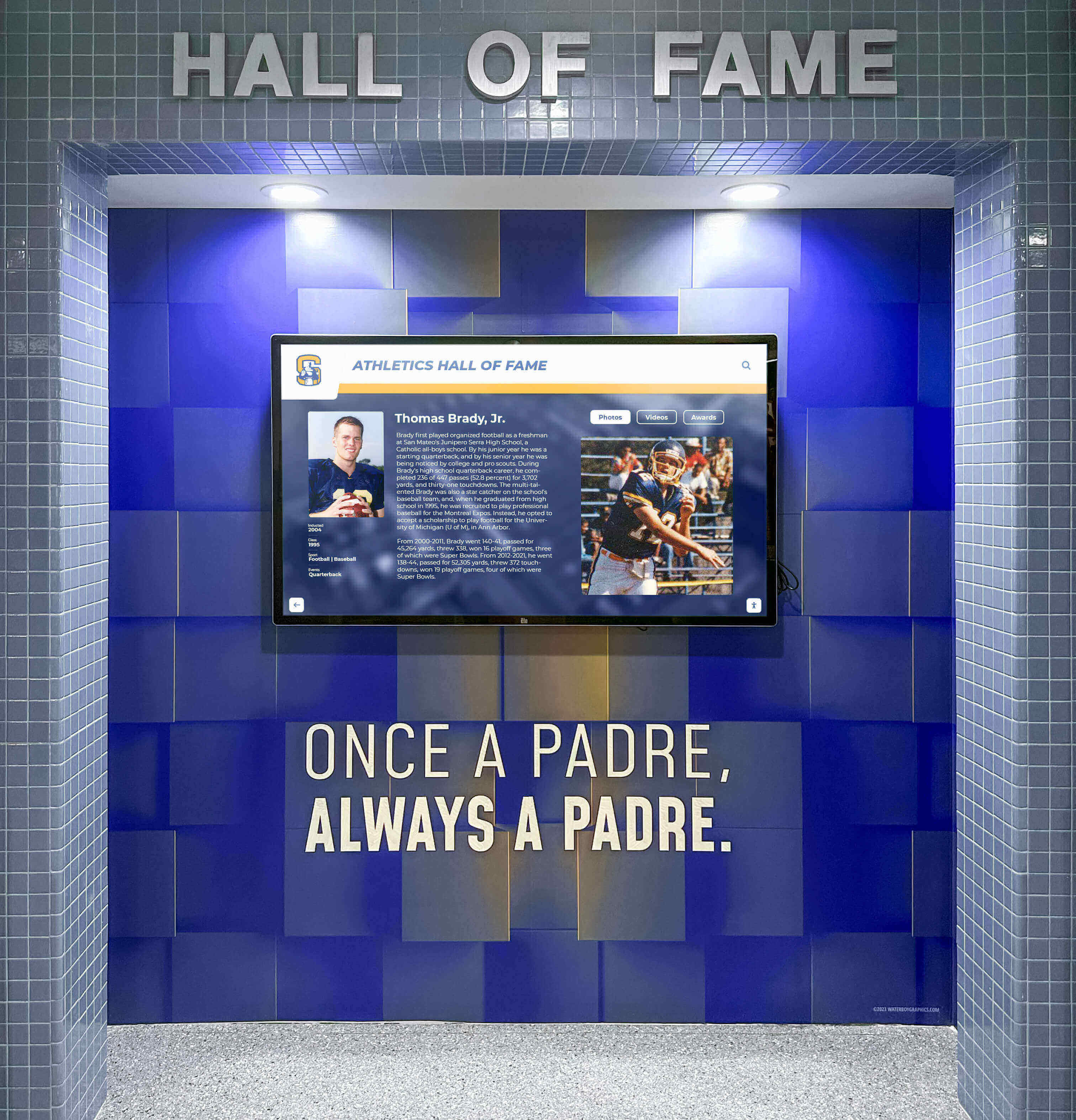
Athletic facility installations benefit from large format displays visible across lobby spaces creating impressive visual impact
Refresh Cadence and Content Lifecycle Management
Recognition displays require ongoing content maintenance preserving relevance and visitor engagement:
New Achievement Integration Workflow
Establishing clear processes ensures timely recognition of current accomplishments:
- Achievement notification system alerting content administrators about new recognition qualifying events
- Standardized content submission templates gathering necessary information and media from honorees
- Review and approval workflow ensuring quality and appropriate content before publication
- Scheduled publishing coordinating recognition launches with ceremonies or announcements
- Social promotion amplifying recognition through school communications channels and social media
Seasonal Content Highlighting
Dynamic content rotation maintains display freshness encouraging repeat engagement:
- Academic year milestones highlighting relevant recognition (senior awards, honor roll, competition results)
- Historical anniversaries featuring past achievements from 10, 25, or 50 years prior
- Athletic season alignment showcasing sport-specific recognition during competition seasons
- Alumni reunion coordination featuring specific graduating class recognition during reunion events
- National recognition days leveraging observances like National Honor Society Week or FFA Week
Archival Strategy and Legacy Preservation
Long-term content management requires clear policies balancing current emphasis with historical preservation:
- Featured content rotation ensuring recent achievements receive prominent homepage visibility
- Searchable archive maintaining complete recognition history accessible through navigation
- Legacy honoree enrichment gradually enhancing historical profiles with additional research and media
- Deceased honoree memorial notation acknowledging passing while celebrating lifetime achievement
- Digital preservation ensuring content backups preventing catastrophic loss from technical failures
Insights on digital storytelling for athletic programs demonstrate how ongoing content development transforms static archives into living programs where stories evolve, connections deepen, and recognition impact compounds over time.
Design Patterns for Specific Recognition Types
Different achievement categories benefit from specialized layout approaches accommodating unique content characteristics and visitor expectations:
FBLA Competitive Events Recognition
Future Business Leaders of America awards span dozens of competition categories requiring clear organization:
Category-Based Organization Pattern
FBLA recognition benefits from event category grouping:
- Primary navigation organized by competition domains (accounting, marketing, technology, etc.)
- Secondary filtering by competition level (chapter, regional, state, national)
- Individual competitor profiles showing all events across participation years
- Team event special formatting displaying all team members with group achievement context
- Award progression visualization showing members advancing through multiple competition levels
Understanding FBLA awards recognition implementation demonstrates how business education programs leverage competition taxonomies creating intuitive exploration aligned with FBLA organizational structure.
FFA Proficiency Awards and SAE Recognition
Agricultural education recognition requires specialized content structure documenting supervised agricultural experience projects:
Project Documentation Layout Pattern
FFA proficiency recognition tells comprehensive stories beyond simple name and award listing:
- Proficiency category prominent display establishing agricultural domain context
- SAE project description explaining scope, scale, and agricultural focus
- Financial documentation showcasing entrepreneurship and business management competencies
- Photo galleries documenting project from inception through completion
- Career pathway connection showing how SAE experience influenced post-secondary education and professional direction
Resources on agricultural education digital displays provide detailed frameworks for SAE documentation ensuring comprehensive project celebration.
Academic Honor Roll and Scholarship Recognition
Academic achievement displays require flexible design accommodating term-based updates and multiple honor classifications:
Time-Based Grid Layout
Academic recognition often benefits from chronological primary organization:
- Current term honor roll prominent feature encouraging student aspiration
- Historical archive organized by academic year and term
- Multi-year recognition special designation for sustained academic excellence
- Scholarship award integration showing financial recognition beyond grades alone
- Academic competition achievements (Science Olympiad, math competitions, etc.) alongside classroom honors
Understanding academic wall of excellence design demonstrates how schools balance celebrating individual achievement with avoiding excessive comparison creating unhealthy competition focused on recognition rather than learning.
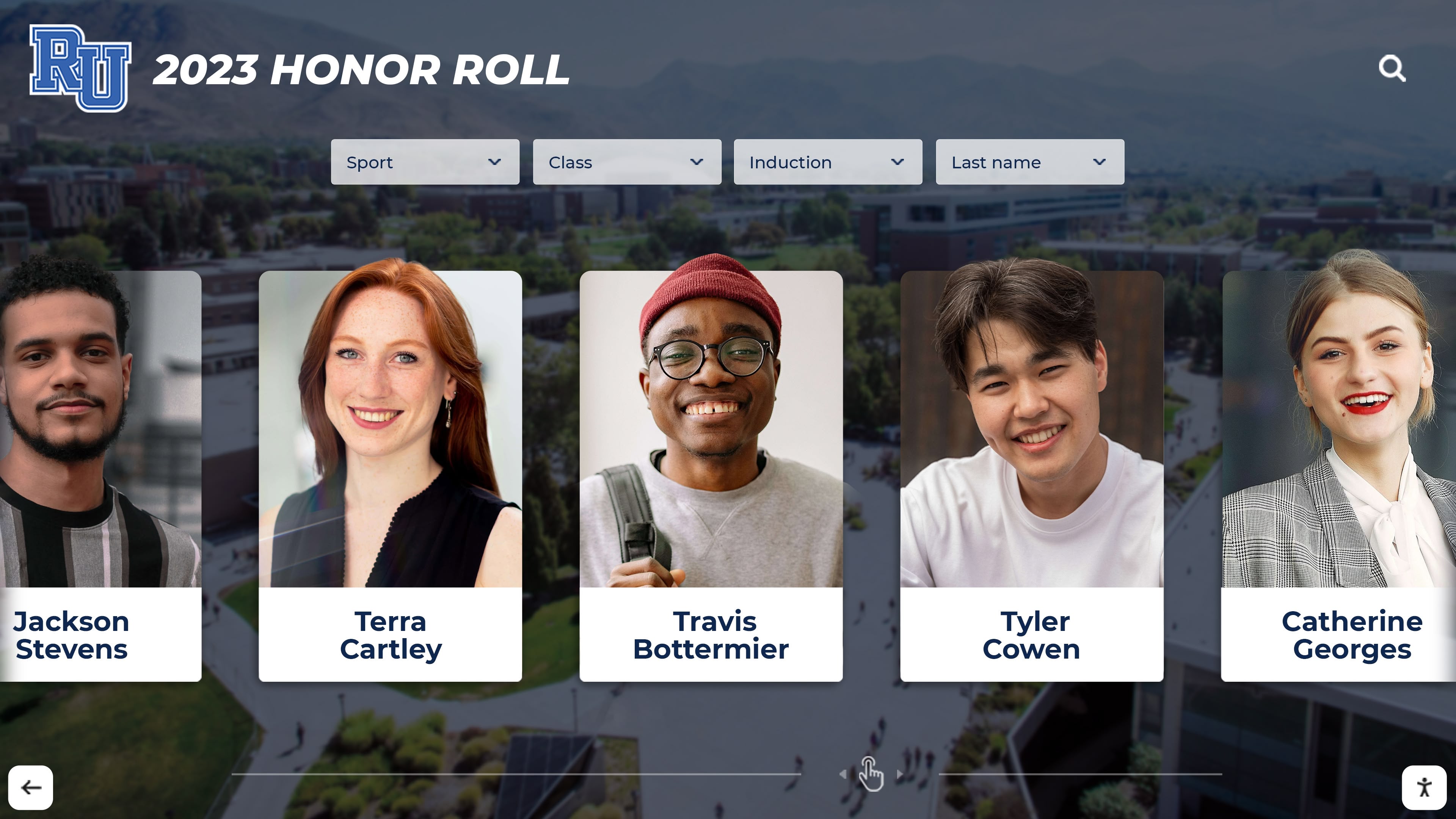
Professional portrait card layouts create consistent visual presentation across diverse achievement categories and honor types
Athletic Recognition and Record Board Integration
Sports achievement displays demand specialized features accommodating statistics, records, and performance documentation:
Statistical Data Visualization
Athletic recognition benefits from quantitative achievement presentation:
- Career statistics tables showing comprehensive performance across athletic career
- School record comparisons contextualizing individual achievements within institutional history
- Season highlight reels when video documentation exists
- Team roster integration connecting individual athletes to collective championship achievements
- Coaching recognition acknowledging leadership contributions to program success
Schools creating athletic building digital displays emphasize record board functionality transforming recognition from historical archive into living competition motivating current athletes toward record-breaking performances.
Conclusion: Designing Recognition That Inspires
Student recognition award display design represents far more than aesthetic exercise—it creates the visual and experiential framework determining whether institutional achievement celebration inspires current students, engages alumni, impresses visitors, and fulfills recognition program strategic objectives.
The design strategies explored throughout this guide provide actionable frameworks for creating recognition experiences that honor FBLA competitive excellence, celebrate FFA proficiency achievement, showcase academic distinction, document athletic records, and acknowledge countless other student accomplishments through intentional layout, accessible interaction, compelling storytelling, and strategic content organization.
Get Your Touchscreen Mock-Up
Transform your recognition program through purpose-built design frameworks celebrating student achievement across all domains. Rocket Alumni Solutions delivers specialized touchscreen experiences designed specifically for schools and organizations honoring excellence.
Book a demoWhether implementing athletic achievement displays, academic honor recognition, career and technical education awards, or comprehensive multi-category celebration systems, design excellence determines recognition program effectiveness. Purpose-built solutions like Rocket Alumni Solutions provide specialized design frameworks, tested UX patterns, and proven engagement strategies optimized specifically for student recognition—delivering superior results compared to adapted generic digital signage alternatives.
Begin with clear recognition goals understanding what achievement celebration should accomplish for your institution. Map stakeholder needs ensuring design serves all audience segments from current students through alumni and families. Prioritize accessibility guaranteeing inclusive experiences welcoming all visitors regardless of abilities or technological familiarity. And establish sustainable content workflows ensuring recognition remains current, comprehensive, and compelling for years following initial launch.
The design decisions you make today establish how future generations will experience your institutional legacy, understand achievement pathways, and connect with school heritage. Invest in design excellence creating recognition experiences worthy of the student achievements they celebrate.
For additional implementation guidance, explore resources on digital recognition display layouts and interactive touchscreen UX best practices providing complementary perspectives on creating engaging student recognition experiences through thoughtful design and intentional user experience frameworks.































