




Carousel Digital Signage has served educational institutions and organizations for years as a flexible platform for digital communication displays. However, many schools, athletic departments, and alumni associations discover that general digital signage platforms—while excellent for announcements and wayfinding—fall short when the primary goal involves celebrating achievements, honoring individuals, and preserving institutional heritage through interactive recognition displays.
The search for Carousel alternatives typically arises when organizations realize their recognition needs require specialized functionality beyond what general digital signage offers. Schools seeking to create digital hall of fame touchscreen experiences discover that rotating slideshows cannot match the engagement of interactive profile exploration. Athletic departments building comprehensive recognition programs find that generic platforms lack person-centric content management designed specifically for honoring individuals. And alumni associations implementing donor recognition displays recognize that purpose-built solutions deliver superior results compared to adapted announcement systems.
This comprehensive guide explores the top Carousel Digital Signage alternatives for 2025—examining both general digital signage platforms for organizations with diverse display needs and specialized recognition solutions designed specifically for celebrating achievements and preserving institutional heritage. Whether you’re evaluating alternatives due to cost, features, ease of use, or recognition-specific requirements, you’ll discover actionable frameworks for selecting platforms that truly match your organizational priorities and use cases.
Understanding the digital signage landscape helps organizations make informed decisions aligned with their specific needs rather than defaulting to familiar names or selecting platforms optimized for use cases that don’t match institutional priorities.

Purpose-built recognition platforms deliver intuitive exploration experiences specifically designed for celebrating individuals and achievements
Understanding Carousel Digital Signage and Why Organizations Seek Alternatives
Before exploring specific alternatives, understanding what Carousel Digital Signage offers and why organizations commonly search for alternatives provides essential context for evaluation frameworks.
What Is Carousel Digital Signage?
Carousel Digital Signage represents an established digital signage platform serving organizations across multiple industries for over two decades. The platform delivers comprehensive digital communication solutions designed for displaying content across various screen types including standard displays, video walls, interactive kiosks, and tablet-based installations.
According to publicly available information, Carousel emphasizes several core capabilities distinguishing the platform from competitors. The software provides cloud-based content management accessible through web interfaces, enabling remote control of displays from any internet-connected device. Multi-user access supports organizations where different departments manage content for their respective display areas. Real-time monitoring capabilities help administrators identify display issues proactively before they impact audience experiences. And flexible scheduling enables content display at specific times, on particular days, or in response to various triggering conditions.
The platform positions itself as suitable for corporate communications, retail environments, educational institutions, healthcare facilities, and other organizations requiring digital display networks for information sharing and audience engagement.
Common Reasons Organizations Seek Carousel Alternatives
Organizations evaluate alternatives to any established platform for various legitimate reasons reflecting changing needs, priorities, or organizational contexts. Understanding common drivers behind alternative searches helps clarify whether different solutions might better serve specific institutional requirements.
Cost Considerations and Budget Constraints
Digital signage platforms typically involve multiple cost components including software licensing fees, hardware expenses, implementation services, ongoing support costs, and content development resources. Organizations with limited budgets may find that enterprise-grade platforms like Carousel include extensive feature sets that exceed their actual needs—essentially paying for capabilities they’ll never utilize.
Budget-conscious schools and community organizations commonly seek alternatives offering similar core functionality at lower price points, particularly when displays serve specific focused purposes like recognition rather than comprehensive facility-wide communication networks requiring advanced enterprise features.
Feature Gaps for Specific Applications
General digital signage platforms excel at rotating announcements, schedules, and promotional content. However, organizations implementing specialized applications often discover that general platforms require significant customization or simply cannot deliver functionality needed for specific use cases.
Schools creating interactive displays for recognition programs frequently find that slideshow-focused platforms lack person-centric profile management, powerful search functionality enabling visitors to find specific individuals, unlimited recognition capacity organized by categories and achievement types, multimedia storytelling through comprehensive photo galleries and videos, and web portals extending recognition beyond physical displays to worldwide audiences.
These feature gaps drive organizations toward specialized platforms designed specifically for their primary use cases rather than attempting to force general tools into specialized applications.
Ease of Use and Content Management Complexity
Enterprise digital signage platforms often assume dedicated communications or IT staff will manage content creation and updates. Schools and smaller organizations with limited technical resources may struggle with complex content management workflows, steep learning curves for new administrators, dependency on IT departments for routine content updates, and sophisticated design tools requiring graphic design expertise.
Organizations seeking alternatives frequently prioritize intuitive interfaces enabling non-technical staff to manage content independently, reducing operational burdens and ensuring displays remain current without requiring constant IT involvement.
Integration Requirements and Technical Limitations
Digital signage systems deliver maximum value when content flows automatically from existing organizational systems rather than requiring manual data entry. Schools may need integration with student information systems for honor roll displays, athletic management platforms for team rosters and statistics, scheduling systems for event calendars, and alumni databases for recognition content.
When existing platforms cannot provide needed integrations or require expensive custom development, organizations naturally explore alternatives offering better compatibility with their specific technical ecosystems.
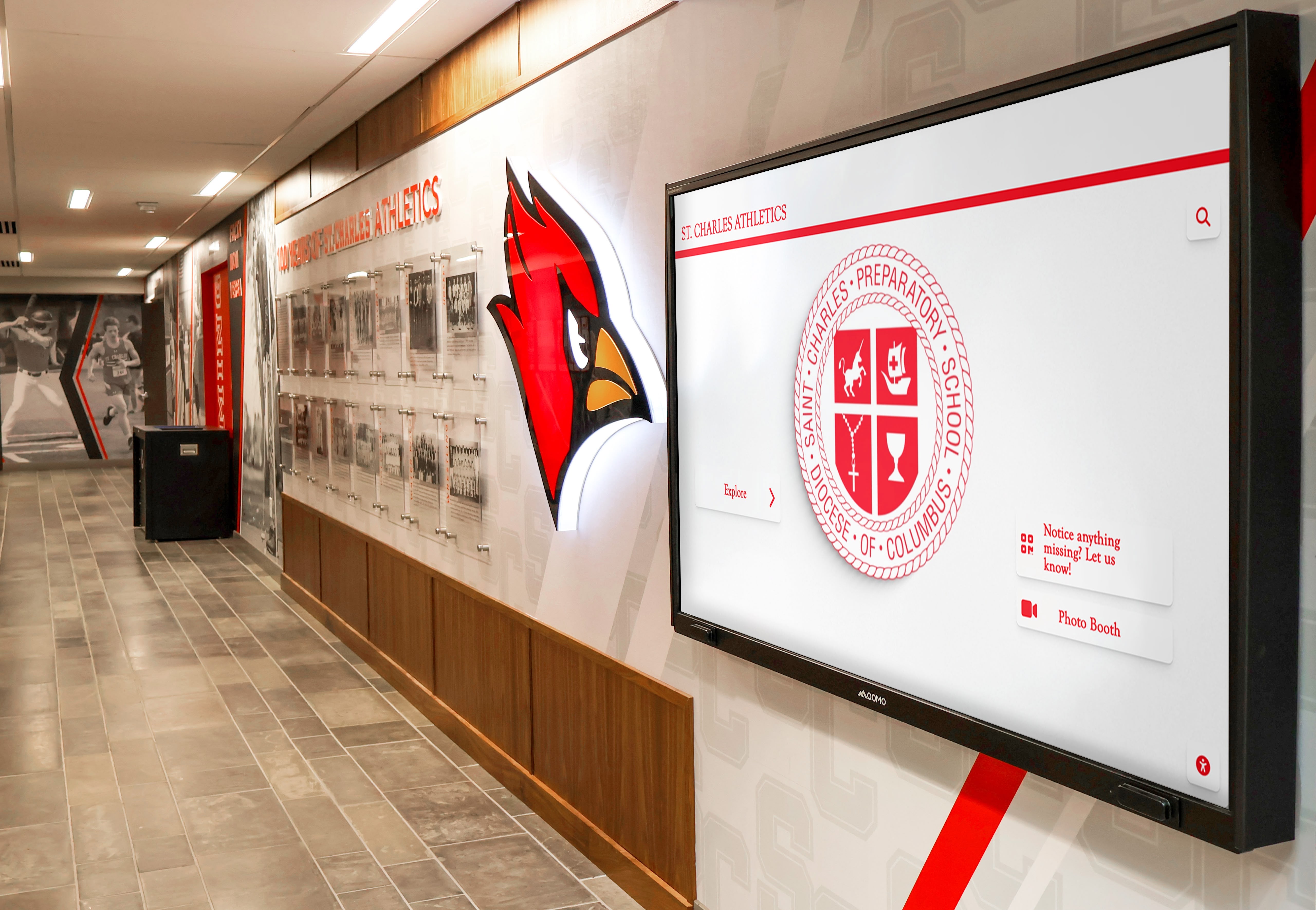
Successful digital display implementations complement existing institutional design and serve specific communication purposes effectively
The Purpose-Built vs. General Platform Decision
One fundamental question organizations must address when evaluating Carousel alternatives involves determining whether their needs align better with general digital signage platforms serving multiple purposes or specialized solutions designed specifically for particular applications.
When General Digital Signage Platforms Work Well
General platforms like Carousel, ScreenCloud, Rise Vision, and similar solutions excel when organizations need versatile display networks serving multiple functions across facilities. Schools displaying daily announcements in main lobbies, lunch menus in cafeterias, wayfinding maps at entrances, event promotions throughout hallways, and schedule changes near administrative offices benefit from unified platforms managing all these varied applications through centralized interfaces.
The versatility becomes valuable when content changes frequently, different display types serve different purposes, centralized communications teams manage content, and organizations prioritize flexibility over application-specific optimization.
When Purpose-Built Recognition Platforms Excel
Organizations primarily seeking to celebrate achievements, honor individuals, and preserve institutional heritage through interactive displays typically find that specialized recognition platforms deliver superior results compared to general digital signage—even when general platforms include “kiosk” or “interactive” capabilities.
Purpose-built platforms like Rocket Alumni Solutions focus specifically on person-centric recognition rather than attempting to serve all digital signage needs. These specialized systems provide intuitive profile management for creating individual honoree pages, unlimited recognition capacity accommodating decades of achievements, powerful search enabling visitors to find specific people instantly, comprehensive multimedia storytelling through photos and videos, web portals extending recognition to worldwide audiences, and analytics demonstrating engagement patterns.
Organizations implementing donor recognition displays, athletic halls of fame, academic honor rolls, or alumni recognition programs commonly report that purpose-built platforms dramatically reduce management complexity while delivering superior visitor engagement compared to adapted general signage systems.
Top General Digital Signage Alternatives to Carousel
For organizations requiring versatile display networks serving multiple communication purposes throughout facilities, several comprehensive general digital signage platforms represent strong Carousel alternatives worth evaluating.
Rise Vision: Cloud-Based Educational Focus
Rise Vision positions itself specifically toward educational markets, offering digital signage designed with schools and nonprofit organizations in mind. The platform emphasizes simplicity and affordability while providing capabilities suitable for most common school digital signage applications.
Key Capabilities and Strengths
Rise Vision provides cloud-based content management accessible through standard web browsers without requiring client software installation. The platform offers free tier options for small deployments, making initial experimentation accessible for budget-conscious schools. Content creation tools include templates designed specifically for common educational displays like daily announcements, lunch menus, event calendars, and emergency notifications.
Integration capabilities include connections with Google Workspace, enabling display of content from Google Slides, Sheets, and other familiar educational tools many schools already use extensively. This Google ecosystem integration reduces learning curves when content creators already work within Google environments daily.
The platform supports Chrome OS devices as media players, allowing schools to leverage low-cost Chromebox hardware rather than requiring expensive Windows PCs for every display—potentially delivering significant hardware cost savings across multi-display deployments.
Considerations and Limitations
Rise Vision’s educational focus means the platform optimizes for announcement-style content rather than specialized applications. Schools seeking interactive recognition displays, comprehensive wayfinding systems, or sophisticated multimedia experiences may find the platform better suited for straightforward information display rather than complex interactive applications.
While the free tier provides valuable entry points, schools expanding beyond a few displays will encounter pricing tiers that may or may not prove more economical than alternatives depending on total display counts and required features.
ScreenCloud: Versatile Enterprise Platform
ScreenCloud delivers comprehensive digital signage capabilities serving organizations from small businesses to large enterprises across multiple industries. The platform emphasizes ease of use combined with powerful features supporting diverse display applications.
Key Capabilities and Strengths
ScreenCloud provides extensive app marketplace integration, enabling content display from numerous sources including social media feeds, weather services, news sources, Google tools, Microsoft applications, and specialized business systems. This integration ecosystem allows organizations to create dynamic displays pulling content from multiple existing systems without custom development.
The platform supports various hardware options including dedicated media players, smart displays, and repurposed existing screens—providing flexibility for organizations with different technical environments or hardware preferences.
Content creation tools emphasize simplicity through drag-and-drop interfaces and pre-built templates while still enabling advanced customization for organizations with design resources. Multi-user access with role-based permissions supports distributed content management where different departments control their respective displays.
Considerations and Limitations
ScreenCloud’s versatility means the platform serves diverse industries and use cases but doesn’t specialize deeply in any particular vertical like education or recognition. Schools may find themselves adapting generic tools rather than benefiting from purpose-built educational features.
Pricing structures based on screen counts can become expensive for organizations deploying extensive display networks, particularly when many displays show similar content that might be managed more economically through alternative pricing models.
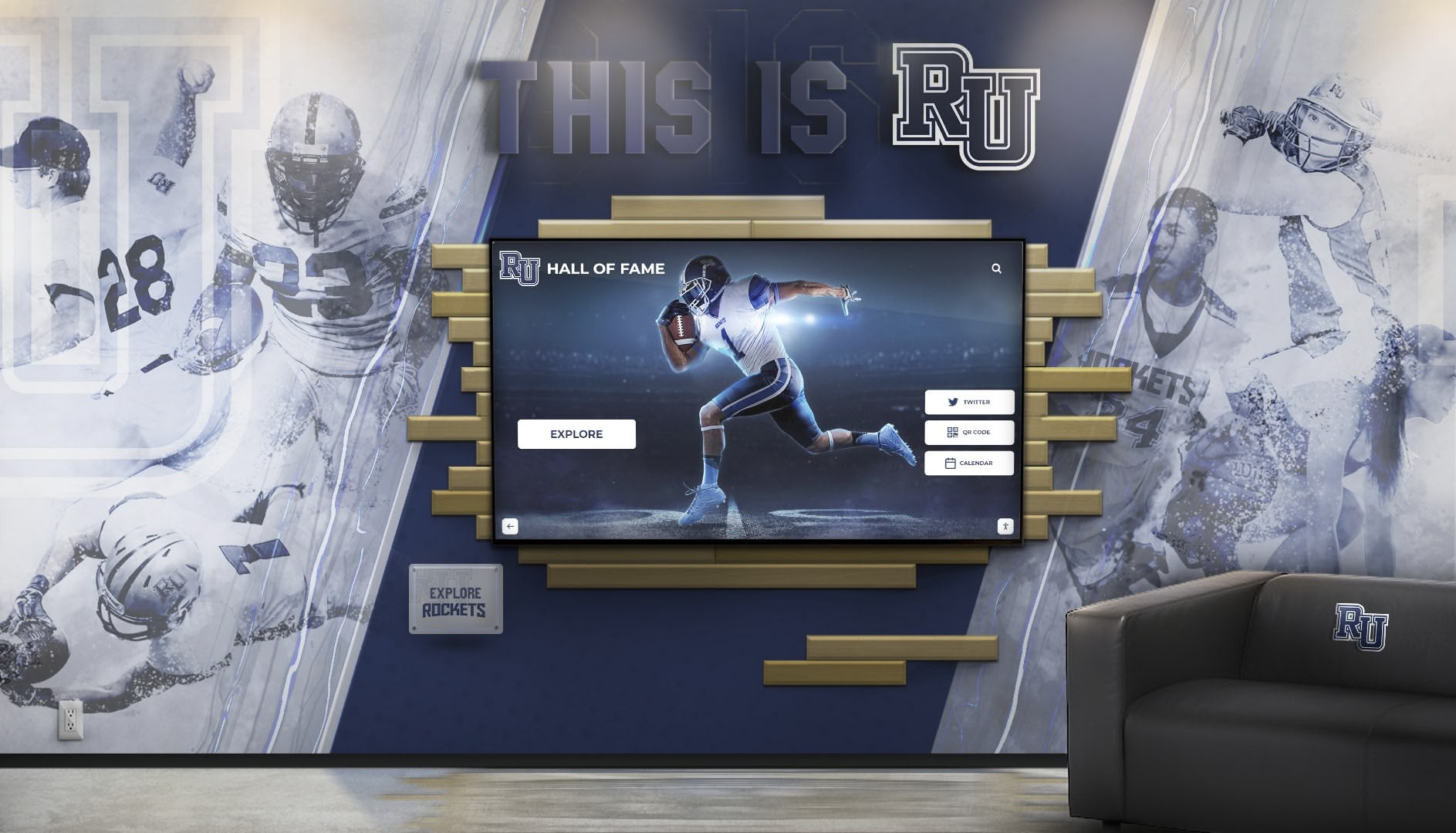
Interactive displays combine information delivery with engaging exploration experiences when properly designed for specific purposes
OptiSigns: Simplified Approach for Small Deployments
OptiSigns targets organizations seeking straightforward digital signage without overwhelming feature complexity. The platform emphasizes quick setup, intuitive management, and affordable pricing for small to medium deployments.
Key Capabilities and Strengths
OptiSigns provides simple content scheduling through calendar-based interfaces familiar to most users. The platform supports basic multimedia content including images, videos, and web pages alongside templates for common display types like announcements and menus.
Hardware flexibility allows organizations to use various media players including Amazon Fire TV sticks, Android devices, Raspberry Pi systems, or dedicated commercial players—enabling budget-conscious approaches leveraging low-cost consumer hardware for appropriate applications.
Pricing structures remain straightforward without hidden fees or complex tier calculations, helping organizations understand total costs clearly during evaluation processes.
Considerations and Limitations
The platform’s emphasis on simplicity means advanced features common in enterprise platforms may not exist or may require workarounds. Organizations needing sophisticated interactivity, complex scheduling rules, extensive integrations, or advanced analytics might find OptiSigns too limited for comprehensive requirements.
Interactive capabilities remain basic compared to platforms designed specifically for touchscreen applications. Schools seeking to create state championship trophy case displays with extensive multimedia content and exploration functionality would likely find OptiSigns insufficient for rich interactive recognition experiences.
Yodeck: Budget-Friendly Option with Free Tier
Yodeck emphasizes affordability through free single-display plans and low-cost expansion options, making digital signage accessible for organizations with minimal budgets or those experimenting with initial implementations before committing to larger deployments.
Key Capabilities and Strengths
The platform provides completely free service for single displays—removing financial barriers for organizations testing digital signage or implementing focused single-purpose displays. This free tier includes full feature access rather than limited functionality, enabling meaningful evaluation.
Yodeck supports Raspberry Pi media players officially, providing extremely low-cost hardware options when organizations already possess displays and simply need computing devices to drive content. Combined with free software for single displays, this enables complete implementations for under $100 in hardware costs.
Content management remains straightforward through web interfaces emphasizing common use cases like announcements, menus, and promotional content without overwhelming users with excessive complexity.
Considerations and Limitations
While the free tier removes cost barriers for single displays, multi-display deployments require paid plans that organizations should evaluate against alternatives for total cost of ownership comparison.
Feature sets focus on core digital signage functionality rather than specialized applications. Organizations implementing complex interactive experiences, sophisticated wayfinding, or recognition-focused displays might find Yodeck’s capabilities appropriate for basic announcement displays but insufficient for specialized applications requiring purpose-built functionality.
Purpose-Built Recognition Platform Alternatives
Organizations specifically focused on celebrating achievements, honoring individuals, and preserving institutional heritage through digital displays should evaluate specialized recognition platforms designed explicitly for these applications rather than attempting to adapt general digital signage tools.
Rocket Alumni Solutions: Comprehensive Recognition Platform
For schools, athletic departments, and alumni associations seeking to create engaging recognition experiences through interactive touchscreen displays, Rocket Alumni Solutions delivers purpose-built platform capabilities specifically designed for celebrating individuals and preserving institutional heritage.
Recognition-Specific Capabilities
Unlike general digital signage platforms displaying rotating content, Rocket Alumni Solutions organizes content around individual profiles enabling comprehensive person-centric recognition. Athletic programs can create detailed athlete profiles including biographical information, achievement statistics, photo galleries, video highlights, and team affiliations—telling complete stories rather than simply listing names and dates.
The platform provides unlimited recognition capacity, accommodating decades of hall of fame inductees, thousands of honor roll students, comprehensive donor recognition, or extensive alumni databases without ever exhausting space. Schools implementing digital trophy case solutions can recognize every deserving individual across all achievement categories rather than facing difficult choices about whose accomplishments receive visibility due to physical space constraints.
Powerful search and filtering functionality enables visitors to find specific individuals instantly through name search, filter by sport or achievement category, browse by graduation year or induction class, and explore related individuals such as teammates. This discovery capability transforms passive viewing into active exploration where visitors control their experience based on personal interests.
Multimedia Storytelling and Engagement
Recognition succeeds when it tells compelling stories about honored individuals—explaining not just what they accomplished but who they were and why their contributions mattered. Rocket Alumni Solutions emphasizes rich multimedia content through high-resolution photo galleries, embedded video interviews and highlights, audio recordings capturing personal reflections, biographical narratives explaining achievement context, and historical documents preserving primary source materials.
Organizations implementing these comprehensive profiles report dramatically increased engagement compared to traditional plaques or rotating slideshows. Visitors exploring interactive alumni displays commonly spend three to five minutes discovering content rather than briefly glancing at static displays—creating meaningful experiences that strengthen community connections and institutional pride.
Web and Mobile Extensions
Recognition impact extends far beyond physical display locations when alumni, parents, and community members can access content remotely. The platform includes responsive web portals enabling worldwide access to the same recognition content visitors explore on physical touchscreens, ensuring alumni living across the country can reconnect with institutional heritage and see themselves honored regardless of geographic distance.
Mobile-optimized interfaces ensure excellent experiences across smartphones and tablets where many users increasingly consume content. Social sharing features enable visitors to share specific profiles across social networks, extending institutional visibility organically through personal networks representing potential audiences for enrollment, employment, and philanthropic support.

Purpose-built recognition platforms coordinate content across multiple displays while maintaining consistent user experiences
Simplified Content Management for Non-Technical Users
General digital signage platforms typically assume some technical proficiency among content managers. Purpose-built recognition platforms prioritize intuitive interfaces enabling non-technical staff to manage content independently without requiring IT department involvement for routine updates.
Administrators can create and publish new recognition profiles through simple web forms, upload photos and videos through drag-and-drop interfaces, organize content through visual category management, preview exactly how content will appear before publishing, and schedule recognition publication for specific dates such as induction ceremonies.
This simplified management dramatically reduces total cost of ownership by eliminating ongoing IT support requirements for content maintenance. Athletic departments implementing church sports touchscreen recognition displays or community organization halls of fame can manage their recognition content independently without technical expertise that creates unsustainable operational dependencies.
Analytics and Engagement Measurement
Understanding how visitors interact with recognition displays helps organizations demonstrate program value, identify popular content, and continuously improve based on actual behavior rather than assumptions. The platform provides comprehensive analytics tracking total interaction sessions, average engagement duration, most-viewed profiles and categories, search patterns revealing visitor interests, and peak usage times informing content strategy.
These metrics prove particularly valuable when justifying recognition program investments to school boards, university administrations, or organizational leadership. Data demonstrating thousands of annual engagements with multi-minute average session durations clearly establishes recognition displays as valuable community assets rather than expensive decorations.
When Recognition Platforms Deliver Superior Value
Organizations evaluating Carousel alternatives specifically for recognition applications should understand the contexts where specialized platforms dramatically outperform general digital signage—even when general platforms technically include “interactive” or “kiosk” capabilities.
Hall of Fame and Achievement Celebration
Athletic departments, academic programs, and organizations honoring distinguished members find purpose-built platforms deliver superior results for comprehensive recognition. These specialized systems excel when recognition focuses on people rather than rotating announcements, unlimited capacity matters for accommodating decades of honorees, comprehensive profiles tell complete stories beyond names and dates, and visitor exploration drives engagement rather than passive viewing.
Schools implementing honor roll touchscreen displays or national honor society recognition programs report that purpose-built platforms simplify management while delivering engagement levels impossible with slideshow-based general signage.
Donor Recognition and Advancement Programs
Colleges, universities, hospitals, and nonprofit organizations implementing donor recognition discover that specialized platforms provide capabilities specifically designed for honoring philanthropic support. Donor-specific features include gift level categories organizing by contribution amounts, cumulative giving totaling lifetime support across multiple gifts, anonymity options respecting privacy preferences, memorial designations honoring gifts made in memory of loved ones, and pledge tracking showing progress toward campaign goals.
These donor-specific capabilities require extensive customization in general digital signage platforms while representing core functionality in purpose-built solutions designed explicitly for advancement and development applications.
Alumni Engagement and Connection
Alumni associations, independent schools, and universities implementing alumni gathering area displays benefit from recognition platforms emphasizing connection and engagement. Alumni-specific features include class browsing enabling exploration by graduation year, career information helping current students discover alumni career paths, geographic distribution showing alumni presence worldwide, networking facilitation connecting alumni with shared interests, and reunion content highlighting milestone anniversaries.
These engagement-focused capabilities position recognition as strategic institutional asset supporting enrollment, advancement, and community building rather than simply commemorative decoration—delivering return on investment that general announcement displays cannot match.

Intuitive interfaces designed specifically for recognition enable visitors of all ages to explore content independently without instruction
Key Evaluation Criteria When Selecting Carousel Alternatives
Systematic evaluation frameworks help organizations select digital signage or recognition platforms aligned with actual needs and priorities rather than defaulting to familiar names or sales presentations.
Application-Specific Feature Alignment
The most important evaluation criterion involves determining how well platform capabilities align with primary use cases and organizational priorities.
Identify Primary Use Cases First
Organizations should clearly articulate what they primarily need displays to accomplish before evaluating specific platforms. Common primary use cases include daily announcements and schedule information, interactive wayfinding and navigation, athletic recognition and hall of fame, academic honor roll display, donor recognition and stewardship, alumni engagement and connection, event promotion and marketing, or emergency notifications and safety information.
Different platforms optimize for different applications. Selecting platforms designed for your primary use case rather than attempting to force general tools into specialized applications typically delivers superior results with lower total cost of ownership through reduced customization and simplified management.
Match Capabilities to Requirements
Once primary use cases are clear, evaluate whether platforms provide specific capabilities those applications require. Recognition-focused applications need person-centric profile management, unlimited recognition capacity, powerful search functionality, multimedia content support, web portal extensions, and simplified content management for non-technical users.
General announcement displays require content scheduling, multi-display management, role-based access control, integration with calendars and information systems, and template-based content creation. Wayfinding applications need interactive mapping, room search functionality, real-time occupancy display, and accessibility features.
Platforms matching required capabilities to actual needs deliver better results than feature-rich general solutions including extensive capabilities you’ll never utilize while lacking focused functionality your specific applications demand.
Total Cost of Ownership Analysis
Initial purchase prices represent only one component of actual costs organizations incur over digital signage platform lifecycles. Comprehensive total cost of ownership (TCO) analysis provides more accurate financial comparison.
Software Licensing and Subscription Costs
Digital signage platforms typically charge through monthly or annual subscription fees calculated various ways including per-display pricing charging for each screen, site licensing charging per facility regardless of display count, tiered pricing based on display quantities, or feature-based pricing where advanced capabilities require premium tiers.
Organizations should calculate five-year software costs rather than focusing solely on monthly rates, as this reveals actual financial commitments over reasonable planning horizons.
Hardware and Installation Expenses
Software subscriptions represent only part of total costs. Hardware expenses include commercial-grade display panels appropriate for continuous operation, touchscreen overlays or integrated touch displays for interactive applications, media player computers with adequate specifications, mounting systems and kiosks for physical installation, and cabling and network infrastructure supporting connectivity.
Installation costs may include professional mounting services, electrical work for power delivery, network infrastructure expansion, and architectural integration ensuring displays complement rather than clash with facility design.
Ongoing Management and Support Costs
Operational costs continue throughout platform lifecycles including staff time for content creation and management, IT support for hardware maintenance and troubleshooting, software updates and security patching, content development resources for photos and videos, and training for new administrators as staff turnover occurs.
Purpose-built platforms designed for non-technical users typically reduce management costs compared to complex enterprise systems requiring ongoing IT involvement. When evaluating alternatives, consider whether platforms enable self-sufficient content management or create dependencies on technical resources that represent hidden ongoing costs.

Coordinated display networks throughout athletic facilities ensure recognition remains visible across multiple high-traffic locations
Ease of Use and Content Management Workflows
Platform sophistication means little if content managers cannot effectively utilize capabilities independently. Ease of use significantly impacts total cost of ownership and long-term success.
Content Creation Simplicity
Effective platforms enable non-technical staff to create and publish content without extensive training or ongoing IT assistance. Evaluation should assess whether content creation uses intuitive web forms rather than complex design tools, provides templates for common content types reducing design requirements, includes drag-and-drop interfaces for media upload and organization, offers preview capabilities showing exactly how content appears before publishing, and requires minimal training for basic competency.
Schools implementing semester recognition highlights or academic recognition programs need platforms enabling counselors or academic administrators to publish honor roll updates independently without submitting IT tickets for every content change.
Update Frequency and Workflow Efficiency
Consider how frequently content requires updates and whether platform workflows support efficient management. Recognition programs inducting new members annually benefit from efficient bulk upload capabilities adding entire classes simultaneously. Academic honor rolls updating quarterly need streamlined processes publishing hundreds of students efficiently. Event promotion displays updating daily require extremely simple content creation avoiding friction that causes displays to show outdated information.
Platforms matching workflow capabilities to actual update frequencies and patterns reduce management burdens while ensuring displays remain current and valuable.
Multi-User Access and Permissions
Large organizations where different departments manage content for their respective areas need robust multi-user access with appropriate permission controls. Effective platforms provide role-based permissions controlling what content each user can modify, department-specific content areas enabling independent management, approval workflows when content review processes exist, and audit trails tracking who made what changes when.
Integration Capabilities and Technical Compatibility
Digital displays deliver maximum value when content flows automatically from existing organizational systems rather than requiring redundant manual data entry.
Critical Integration Points
Educational institutions should evaluate integration capabilities with student information systems for honor roll automation, athletic management platforms for roster and statistics, scheduling systems for event calendars and room availability, alumni databases for recognition content, and fundraising systems for donor recognition.
Purpose-built platforms often provide pre-built integrations for common educational systems while general digital signage may require expensive custom development achieving equivalent functionality.
Technical Infrastructure Requirements
Platforms have various technical requirements affecting feasibility and costs including network connectivity needs, supported operating systems for media players, browser compatibility for content management, security requirements around firewall configurations, and cloud vs. on-premise deployment options.
Organizations should involve IT departments early in evaluation processes to identify any infrastructure limitations or policy conflicts requiring resolution before platform selection rather than discovering incompatibilities after purchase commitments.
Implementation Best Practices for Digital Signage Success
Selecting appropriate platforms represents only the foundation—successful implementations require systematic approaches addressing hardware, placement, content strategy, and ongoing management.
Strategic Display Placement for Maximum Impact
Display location dramatically influences visibility, usage, and ultimate value delivery. High-impact placement locations typically include main entrances greeting all visitors immediately upon facility entry, high-traffic hallways capturing attention during movement between destinations, gathering spaces where people naturally pause near elevator lobbies or seating areas, decision points providing wayfinding information where visitors need directional guidance, and destination locations placing specialized content near relevant areas such as athletic recognition in fieldhouses.
Multiple strategically distributed displays often deliver more value than single large installations in locations only certain audiences encounter regularly. When implementing exciting hallway displays or alumni welcome area installations, consider visitor flow patterns ensuring displays appear where target audiences naturally congregate rather than requiring deliberate navigation to remote locations.
Hardware Specifications for Reliable Operation
Appropriate hardware selection ensures displays deliver reliable performance throughout expected operational lifecycles. Commercial-grade displays rated for 16-24 hour daily operation provide necessary reliability that consumer televisions lack, preventing premature failures in demanding public environments.
For interactive applications, projected capacitive (PCAP) touchscreen technology delivers most reliable, responsive touch experiences. Display resolution should match content types—4K (3840x2160) recommended for photo-heavy recognition content while Full HD (1920x1080) suffices for text-focused announcements.
Media player computers require adequate specifications including Intel Core i5 or AMD Ryzen 5 processors minimum, 8GB RAM minimum with 16GB recommended, and 256GB SSD storage minimum expanding to 512GB for extensive photo and video libraries.

Freestanding kiosks offer flexible placement options and can complement traditional recognition elements effectively
Content Strategy and Quality Standards
Technology enables communication—content quality determines whether displays deliver value or become ignored visual clutter.
Visual Design Consistency
Establish and enforce design standards ensuring content maintains professional appearance and institutional branding. Guidelines should address typography and font usage, color schemes reflecting institutional identity, image quality standards and acceptable sources, layout templates for common content types, and logo usage and placement rules.
Inconsistent design quality makes institutions appear unprofessional and undermines message credibility. Template-based content creation tools help maintain consistency even when multiple departments contribute content independently.
Content Freshness and Relevance
Nothing undermines digital display credibility faster than outdated content showing last week’s events or previous semester honor rolls. Systematic content review processes ensure outdated material gets removed promptly, scheduled content publishes at appropriate times, seasonal content appears during relevant periods, and displays always show current information audiences can trust.
Appropriate Content Depth and Complexity
Balance content depth with viewing context. Brief announcements in high-traffic hallways require concise messaging with large readable fonts and strong visual elements. Recognition displays in gathering spaces where visitors pause deliberately can support deeper content exploration through detailed profiles and extensive multimedia. Match content complexity to viewing patterns in each location.
Measuring Success and Continuous Improvement
Systematic evaluation demonstrates value while identifying improvement opportunities based on actual behavior rather than assumptions.
Quantitative Analytics
Modern platforms provide analytics tracking usage including total interaction sessions for touchscreen displays, average engagement duration indicating content depth, most-viewed content revealing audience interests, search patterns showing what visitors seek, and peak usage times informing optimal content scheduling.
These metrics demonstrate return on investment while identifying underutilized content that may need improvement or removal. Organizations tracking interactive versus static display engagement consistently find interactive implementations generate substantially longer visitor engagement compared to passive displays—validating specialized platform investments.
Qualitative Feedback
Beyond analytics, gather qualitative feedback through staff observations documenting how visitors interact with displays, informal conversations during events assessing display usefulness, periodic surveys measuring awareness and satisfaction, and comment collection mechanisms enabling specific input.
Qualitative feedback often reveals impact that metrics cannot capture—students feeling proud seeing their achievements recognized publicly, parents impressed by professional displays during campus tours, or alumni reconnecting with institutional heritage through interactive exploration.
Iterative Improvement
Digital displays should evolve continuously based on usage patterns and feedback. Successful organizations regularly review content performance removing underutilized material, adjust navigation based on search patterns, add content addressing frequently-asked questions, refine design approaches based on what resonates with audiences, and expand recognition categories when new achievement types emerge.
This continuous improvement mindset treats digital displays as living communication platforms rather than static technology deployments requiring no ongoing attention after initial installation.
Selecting the Right Alternative for Your Organization
The digital signage landscape offers numerous Carousel alternatives serving different organizational needs and priorities. The key to successful selection involves clearly understanding your primary use cases, required capabilities, and operational context before evaluating specific platforms rather than defaulting to familiar names or impressive feature lists.
Transform Your Recognition Program with Purpose-Built Solutions
While general digital signage platforms serve important communication needs, celebrating achievements and honoring individuals requires specialized recognition technology. Discover how Rocket Alumni Solutions delivers superior engagement and simplified management for halls of fame, donor walls, and athletic recognition programs.
Explore Recognition SolutionsOrganizations requiring versatile display networks for daily announcements, wayfinding, event promotion, and varied facility-wide communication should evaluate general digital signage platforms like Rise Vision, ScreenCloud, OptiSigns, or Yodeck based on educational focus, feature requirements, ease of use priorities, and budget constraints. These comprehensive platforms excel when content changes frequently, multiple display types serve different purposes, centralized communications teams manage content, and organizations value flexibility over application-specific optimization.
Organizations primarily seeking to celebrate achievements, honor individuals, and preserve institutional heritage through interactive recognition displays should prioritize purpose-built platforms designed specifically for these applications. Solutions like Rocket Alumni Solutions deliver person-centric profile management, unlimited recognition capacity, powerful search and exploration, comprehensive multimedia storytelling, web portal extensions, and simplified management that general platforms cannot match—even with extensive customization.
Many institutions find optimal strategies combine both approaches—deploying general digital signage for announcements and wayfinding while implementing specialized recognition platforms for celebrating achievements. This hybrid approach ensures each display type leverages technology optimized for its specific purpose rather than forcing single platforms to serve incompatible functions simultaneously.
Whether implementing comprehensive display networks or focusing specifically on recognition applications, successful organizations share common characteristics: they start with clear communication goals understanding what audiences need, involve stakeholders early ensuring solutions serve actual community needs, allocate appropriate resources for content development and ongoing management, establish systematic workflows maintaining content quality and currency, and measure effectiveness continuously improving based on usage patterns and feedback.
The technology enabling transformative digital communication exists today across numerous proven platforms serving thousands of successful installations. Organizations need only commitment to strategic selection processes matching platforms to actual needs, systematic implementation addressing content and workflows alongside technology, and ongoing management ensuring displays deliver lasting value rather than becoming expensive unused screens showing outdated information.
For schools and organizations specifically exploring recognition alternatives, understanding how to modernize recognition walls and differences between digital and traditional displays provides valuable frameworks for evaluation. Organizations implementing comprehensive recognition programs should explore digital hall of fame services and complete implementation guides demonstrating how specialized platforms create engaging experiences impossible with general digital signage.
Ready to explore Carousel alternatives that truly match your organizational needs? Whether implementing general digital signage for facility-wide communication or deploying specialized recognition platforms for celebrating achievements, systematic evaluation ensures successful outcomes that engage communities, strengthen institutional pride, and provide excellent return on investment through technology appropriately matched to actual priorities and use cases.
Disclaimer: This comparison is based on publicly available information as of November 2025. All product names and trademarks belong to their respective owners. Comparative statements reflect Rocket Alumni Solutions’ interpretation of available data and may change over time. All trademarks are property of their respective owners. Rocket Alumni Solutions is not affiliated with or endorsed by Carousel Digital Signage, Rise Vision, ScreenCloud, OptiSigns, Yodeck, or any other platforms mentioned in this article. This content was produced by Rocket Alumni Solutions to provide educational information about digital signage alternatives for schools and organizations.































