




Schools across the country face a persistent challenge: how to effectively communicate with increasingly diverse audiences—students, parents, visitors, staff, and community members—while celebrating achievements, sharing critical information, and creating welcoming environments that reflect institutional identity. Static bulletin boards and traditional trophy cases no longer meet expectations in a world where everyone carries interactive devices delivering instant, personalized information.
Touch screen digital signage transforms how schools engage their communities. These interactive displays move beyond passive announcements to create dynamic experiences where visitors control their exploration, searching for specific information, browsing achievement galleries, discovering school history, and connecting with institutional stories in personally meaningful ways. The difference between traditional digital signage showing rotating slides and true interactive touchscreen solutions parallels the difference between watching television and exploring the internet—one broadcasts predetermined content while the other enables self-directed discovery.
This comprehensive guide explores touch screen digital signage specifically for educational environments. You’ll discover what differentiates broadcast digital signage from interactive touchscreen solutions, essential features supporting educational applications, strategic placement maximizing engagement and visibility, content strategies that resonate with school audiences, implementation frameworks matching limited technical resources, and proven approaches delivering measurable value while supporting educational missions rather than creating technology maintenance burdens.
Modern educational institutions implementing well-designed interactive touchscreen solutions report dramatic improvements in community engagement, visitor satisfaction, and institutional pride. These installations become destination attractions within buildings—gathering points where students explore history, parents discover program information, alumni reconnect with memories, and prospective families experience school culture authentically during tours. Conversely, schools selecting inappropriate technology or inadequate content strategies face disappointment when expensive displays become ignored background elements generating minimal interaction despite significant investment.

Professional interactive touchscreen installations integrate seamlessly into school environments while attracting attention through strategic placement and compelling content
Understanding Touch Screen Digital Signage vs. Traditional Digital Displays
Before exploring specific school applications, understanding fundamental differences between passive digital signage and interactive touchscreen solutions helps clarify which technology serves different objectives.
Broadcast Digital Signage for Announcements
Traditional digital signage excels at broadcasting scheduled content to passive viewing audiences. These systems display rotating announcements, emergency alerts, cafeteria menus, event calendars, promotional videos, and general information following predetermined sequences. Content creators schedule media to appear at specific times, displays loop through material automatically, and viewers receive whatever information happens to be showing when they happen to look.
Appropriate Broadcast Signage Applications
Schools effectively use broadcast digital signage for cafeteria menu boards updating daily without manual poster changes, emergency alert systems displaying critical information instantly across buildings, lobby welcome screens showing rotating institutional highlights for brief glimpses during entry, hallway announcement displays presenting upcoming events and schedule changes, and athletic event scoreboard information broadcasting real-time game updates.
These passive viewing applications work well precisely because audiences need quick information consumption rather than deep exploration. A student checking today’s lunch menu doesn’t want to navigate complex interfaces—they need immediate visibility of scheduled content.
Interactive Touchscreen Solutions for Exploration
Interactive touchscreen systems serve fundamentally different purposes through user-controlled content discovery. Rather than broadcasting predetermined sequences, these solutions organize comprehensive content collections enabling visitors to search, filter, browse, and explore based on personal interests and information needs. The technology transforms displays from one-way broadcast channels into two-way engagement tools.
Educational Applications Requiring Interactivity
Schools benefit from interactive touchscreen solutions for athletic halls of fame celebrating athletes across all sports and eras, academic achievement recognition honoring scholars, honor students, and award recipients, alumni showcases featuring distinguished graduates inspiring current students, school history timelines documenting institutional evolution across decades, donor recognition acknowledging philanthropic support at all contribution levels, and program information helping prospective families explore offerings during tours.
These recognition and information applications fail when forced into broadcast signage frameworks showing slideshow sequences. A parent searching for their child in the honor roll doesn’t want to wait through 200 other students displayed sequentially—they need search functionality delivering instant results. An alumni visitor seeking their graduation class shouldn’t navigate chronological slideshows—they need filtering by year enabling immediate access.
Organizations implementing interactive touchscreen kiosks for schools consistently find that purpose-built interactive platforms deliver superior engagement compared to attempting to force exploration-focused content into broadcast-oriented generic signage.

Students naturally engage with well-designed touchscreen interfaces requiring no training or assistance for successful navigation and content discovery
Hybrid Approaches Combining Both Technologies
Many schools benefit from deploying both technologies strategically rather than choosing one exclusively. Broadcast digital signage serves time-sensitive announcements and passive viewing contexts while interactive touchscreens enable deep exploration of achievements, history, and recognition content.
Strategic Technology Allocation
Consider broadcast digital signage for cafeteria menu boards where daily updates require no interaction, main entrance welcome screens greeting visitors with rotating institutional highlights during brief moments entering buildings, hallway announcement displays presenting upcoming events for quick consumption while passing, and emergency alert capabilities ensuring critical information reaches everyone instantly without requiring interaction.
Deploy interactive touchscreen solutions for main lobby installations where visitors linger and explore during downtime, athletic facility recognition celebrating sports achievements comprehensively, library or commons area installations encouraging discovery during gathering times, administrative office areas helping prospective families explore programs, and alumni gathering spaces enabling graduates to reconnect with institutional history.
This hybrid strategy maximizes strengths of each technology while avoiding weaknesses—using broadcast for quick information delivery and interactive exploration for comprehensive content discovery.
Essential Features for School-Focused Interactive Touchscreen Systems
Not all interactive touchscreen solutions serve educational environments effectively. Schools require specific capabilities supporting diverse audiences, limited technical resources, distributed content management, and institutional recognition missions that generic digital signage platforms cannot adequately address.
Intuitive User Interfaces Requiring No Training
School touchscreens serve audiences ranging from young children through elderly community members, many encountering specific systems only once or occasionally. Unlike workplace applications where users receive training and use systems regularly, school installations must deliver immediately intuitive experiences requiring no instruction or assistance.
Design Principles for Walk-Up Usability
Effective school touchscreen interfaces provide clear visual hierarchy emphasizing primary actions prominently while subordinating advanced features, appropriately sized touch targets (minimum 60 pixels) preventing activation failures and frustration, persistent navigation elements including visible home buttons providing psychological safety, immediate visual feedback confirming touch registration within 50 milliseconds, and familiar interaction patterns matching smartphone behaviors users already understand instinctively.
Generic digital signage platforms often feature interfaces optimized for mouse interaction rather than touch, creating frustration when users struggle with small buttons, ambiguous navigation, delayed responsiveness, or confusing organizational structures. Purpose-built touchscreen solutions design specifically for finger-based interaction from the ground up rather than adapting mouse-oriented interfaces poorly.
Accessibility Compliance for Universal Access
Federal accessibility requirements under the Americans with Disabilities Act apply to interactive technology in educational institutions. Schools must ensure displays position within reach ranges (maximum 48 inches for forward approach), interfaces provide sufficient color contrast (4.5:1 minimum for normal text), touch targets offer adequate size and spacing preventing accidental activation, and alternative access methods support users unable to use touch interfaces effectively.
Organizations implementing digital signage content for schools should incorporate accessibility throughout planning rather than attempting retrofits after discovering compliance violations following expensive installations.
Powerful Search and Filtering Capabilities
Recognition applications managing hundreds or thousands of profiles require robust search functionality enabling instant content discovery regardless of collection size. Visitors shouldn’t need to browse through sequential lists when searching for specific individuals, years, achievements, or categories.
Essential Search Features
Professional touchscreen platforms provide full-text search finding content across all profile fields including names, years, sports, achievements, and biographical narratives, type-ahead suggestions appearing dynamically as users type preventing spelling errors and abandoned searches, category filtering by year, sport, achievement type, or custom attributes enabling focused browsing, combined search and filter allowing progressive refinement (show all basketball players from 2015-2020), and instant results delivering sub-second responses even across thousands of profiles.
These capabilities transform recognition systems from simple directories into powerful discovery tools. A parent can instantly search their child’s name finding all honor roll appearances across years. An alumni visitor can filter to their graduation year seeing all inductees from that era. A student researcher can locate all athletes in specific sports exploring program history comprehensively.
Generic digital signage platforms treating content as media files lack structured data organization enabling sophisticated search and filtering, forcing users into frustrating sequential browsing through predetermined sequences.
Rich Multimedia Profile Support
Compelling recognition transcends simple name-and-photo directories. Effective systems tell stories through biographical narratives, achievement details, historical context, multimedia content, and emotional connections transforming recognition from data presentation into meaningful storytelling.
Profile Content Components
Comprehensive touchscreen platforms support high-resolution photos displaying clearly on large commercial displays, video content including highlight reels, interviews, or event footage, biographical narratives (200-500 words) providing context and human connection, achievement statistics and milestones documenting specific accomplishments, historical photos showing subjects at different life stages, social media integration connecting to current profiles when available, and custom fields capturing sport-specific statistics, academic metrics, or institutional awards.
This multimedia richness creates engaging experiences worthy of interactive exploration. Visitors spend 2-5 minutes exploring well-designed profiles with compelling content compared to 5-10 seconds glancing at simple name directories—demonstrating value of substantial content investment.
Schools developing content for academic recognition programs or athletic achievement displays benefit from platforms designed specifically for people-focused storytelling rather than forcing recognition into announcement-oriented frameworks.

Touch-optimized interfaces with appropriately sized selection targets enable natural exploration through rich profile galleries
Cloud-Based Content Management for Limited IT Resources
Most schools lack dedicated IT staff available for constant touchscreen content management. Systems requiring physical display access, complex software installations, or technical expertise for routine updates prove unsustainable when technology coordinators juggle dozens of competing priorities across limited time.
Remote Administration Benefits
Cloud-based platforms enable content management from any internet-connected device without requiring physical display access or specialized software installation. Athletic directors update sports recognition from office computers or personal tablets at convenient times. Alumni coordinators add distinguished graduates from home during evening volunteer hours. Communications staff publish announcements remotely without visiting display locations.
This accessibility proves essential for distributed content management where different administrators oversee distinct content areas (athletic director manages sports recognition, development office updates donor acknowledgment, academic affairs maintains scholar profiles) without requiring technical coordination or central bottlenecks.
Automatic Updates and Maintenance
Quality cloud platforms handle software updates, security patches, feature enhancements, and infrastructure maintenance automatically without requiring school IT involvement. Displays automatically receive new capabilities as vendors release improvements. Security vulnerabilities get patched immediately rather than waiting for overextended technology coordinators to schedule maintenance windows.
This managed infrastructure approach allows schools to benefit from sophisticated technology without assuming maintenance burdens inappropriate for limited technical resources. The alternative—on-premises installations requiring internal server management, software updates, security monitoring, and troubleshooting—proves unsustainable for most educational institutions.
Integrated Web Portals Extending Recognition Globally
Physical touchscreen installations serve on-campus audiences effectively but exclude community members unable to visit facilities regularly—alumni living across the country, prospective families researching schools before visiting, parents at work during school hours, and students exploring history from home.
Multi-Platform Content Delivery
Modern recognition platforms provide integrated web portals presenting identical content accessible through desktop computers, tablets, and smartphones in addition to physical touchscreens. Schools publish content once through unified management interfaces with automatic distribution across all access points.
This multi-platform approach amplifies recognition impact dramatically. Physical touchscreens might generate 500-2,000 monthly interaction sessions depending on foot traffic, while web portals accessible globally deliver 5,000-20,000+ monthly sessions as alumni, prospective families, and community members explore from anywhere.
Web accessibility proves particularly valuable for fundraising and development applications. Donors can explore recognition from home when considering contributions. Alumni associations share links during campaigns encouraging graduates to discover classmates and reconnect with institutional memories. Prospective families research programs and culture from distant locations during school selection processes.
Organizations implementing donor recognition walls increasingly require integrated web portals extending acknowledgment beyond physical displays to maximize program impact and fundraising effectiveness.
Analytics and Engagement Measurement
Understanding how audiences interact with touchscreens informs content optimization and demonstrates program value when competing for budget allocations or justifying continued investment in digital recognition initiatives.
Essential Analytics Capabilities
Comprehensive platforms track total interaction sessions showing usage frequency, average session duration indicating engagement depth, most-viewed profiles revealing community interests, search queries demonstrating what visitors seek, navigation patterns showing how users explore content, and peak usage times informing content launch scheduling and promotional strategies.
These insights enable data-driven refinement rather than guessing about effectiveness. Schools discover which sports generate most interest deserving expanded content, identify confusing navigation requiring simplification, measure engagement trends demonstrating growth over time, and quantify total usage justifying technology investments through concrete evidence.
Analytics prove particularly valuable when school leadership questions touchscreen value or digital recognition competes with other initiatives for limited budgets. Documented interaction counts, session durations, and usage growth provide objective evidence that installations actively engage communities rather than passively occupying wall space.

Strategic placement in high-traffic entrance areas maximizes visibility and engagement while welcoming visitors with dynamic institutional storytelling
Strategic Placement and Installation Considerations
Even exceptional touchscreen solutions deliver minimal value when poorly positioned. Strategic placement decisions significantly impact engagement frequency, audience reach, and overall program effectiveness.
High-Traffic Location Selection
Touchscreens generate engagement when positioned where people naturally gather, pass frequently, or experience downtime creating opportunities for exploration. Installations in low-traffic corridors or locations visitors rarely access prove ineffective regardless of technology quality.
Prime Placement Opportunities
Main entrance lobbies offer excellent positioning where all visitors pass while waiting for appointments, tours, or meetings. Athletic facilities near gymnasiums, competition venues, or locker room areas capture athlete and spectator attention during events and practices. Library or commons gathering spaces provide comfortable exploration contexts during free periods and social times. Administrative office waiting areas engage prospective families researching programs during enrollment tours. Alumni gathering spaces in designated areas create destination attractions for graduate visitors reconnecting with institutions.
Schools considering digital signage in school entryways should prioritize visibility, foot traffic patterns, comfortable viewing environments, and audience relevance when selecting specific installation locations.
Locations to Avoid
Narrow hallways with rushing traffic where people hurry past without stopping, low-traffic administrative corridors away from student and visitor flows, locations with poor lighting creating screen glare or visibility challenges, uncomfortable viewing positions requiring awkward standing or reaching, and areas with competing distractions (television screens, high noise levels, constant interruptions) prove ineffective for interactive installations requiring focused attention.
Physical Installation Requirements
Professional touchscreen installations require careful attention to mounting, power access, network connectivity, viewing ergonomics, and aesthetic integration.
Commercial-Grade Hardware Specifications
Schools should specify commercial-grade touchscreen displays rated for continuous operation (16+ hours daily) rather than consumer televisions designed for residential use. Commercial displays provide enhanced durability through higher-rated components, extended warranties (typically 3 years versus 1 year consumer standards), superior thermal management preventing overheating failures, and touch cycle ratings supporting millions of touches required for public installations.
Display sizing depends on viewing contexts—43-49 inches suits close-proximity interaction at desktop heights, 55-65 inches serves mixed use supporting both touch interaction and medium-distance viewing, while 70+ inches works for large spaces prioritizing distance visibility over intimate interaction.
Touch technology selection impacts user experience significantly. Capacitive touchscreens provide smartphone-like responsiveness with sub-50-millisecond response times and multi-touch gesture support, delivering experiences meeting user expectations conditioned by personal devices. Infrared alternatives cost less but offer slower response (100-150 milliseconds) and reduced precision disappointing users accustomed to responsive consumer technology.
Mounting and Ergonomic Considerations
Freestanding kiosk enclosures provide professional appearance with integrated computers, cable management, protective enclosures, and flexible positioning without wall modifications. Quality kiosks accommodate standing adults and wheelchair users through adjustable height positioning while incorporating institutional branding through custom colors and logos.
Wall-mounted installations create sleeker permanent deployments integrating architecturally. This approach requires professional installation addressing power and network access, structural mounting supporting display weight (100+ pounds for large commercial touchscreens), and careful height positioning—48-60 inches to display center serves standing adults while lower positioning accommodates wheelchair accessibility requirements.
Schools must ensure installations comply with ADA accessibility standards including forward reach limits (maximum 48 inches to highest interactive element), appropriate mounting depths allowing close approach, and adequate clear floor space (30×48 inches minimum) enabling wheelchair positioning.
Network Infrastructure and Connectivity
Cloud-based touchscreen platforms require reliable network connectivity for content updates, remote administration, and analytics reporting. Schools should evaluate network infrastructure adequacy before finalizing installation locations.
Wired vs. Wireless Connectivity
Wired ethernet connections provide most reliable connectivity through dedicated bandwidth, consistent performance immune to wireless interference, and simplified troubleshooting when issues occur. Schools should prioritize wired connections when network ports exist in desired locations or construction budgets accommodate running cables to installation sites.
Wireless connectivity proves more convenient for locations lacking ethernet access and deployments where running cables proves prohibitively expensive or architecturally disruptive. Modern WiFi infrastructure supports touchscreen applications adequately when signal strength remains strong and network congestion remains manageable.
Schools should test wireless connectivity thoroughly at proposed installation locations before committing to wireless deployments. Upload and download speed tests, extended connectivity monitoring, and peak-usage performance evaluation ensure wireless infrastructure adequately supports touchscreen operation.
Bandwidth and Data Considerations
Quality touchscreen platforms optimize bandwidth consumption through content caching, progressive media loading, and efficient update synchronization. Typical installations consume 2-5 GB monthly depending on multimedia content volume and update frequency—modest requirements within capacity of standard school internet connections.
Schools with restrictive bandwidth limits at remote campuses or locations with unreliable connectivity should verify platform offline capabilities. Well-designed systems cache content locally enabling continued operation during connectivity interruptions with automatic synchronization when connections restore.

Comprehensive recognition programs often deploy multiple coordinated displays serving different content categories while maintaining consistent brand presentation
Content Strategy Development for Educational Touchscreens
Technology provides delivery mechanisms, but compelling content ultimately determines whether installations engage audiences or become ignored background elements. Schools require systematic content strategy approaches ensuring sustainable programs delivering long-term value.
Defining Content Scope and Priorities
Comprehensive recognition potentially encompasses hundreds or thousands of individuals across athletic achievements, academic honors, alumni accomplishments, donor acknowledgments, faculty milestones, and historical figures. Attempting complete coverage immediately proves overwhelming—successful implementations start focused then expand systematically.
Starting Point Identification
Schools benefit from beginning with highest-priority recognition categories delivering immediate value and engagement. Athletic programs might start with hall of fame inductees and recent championship teams generating strong community interest. Academic recognition could focus on current honor students and recent distinguished alumni maintaining relevance. Development initiatives might prioritize major donors and campaign contributors connecting to active fundraising.
This focused approach delivers functional systems quickly while building content development expertise and demonstrating value before expanding to additional categories. Initial success provides momentum justifying resource investment for comprehensive historical content requiring substantial research and compilation effort.
Systematic Expansion Planning
After establishing core content, schools develop systematic expansion plans adding historical depth gradually. Athletic programs might add one decade of historical recognition annually, ultimately achieving comprehensive coverage across institutional history. Academic recognition could expand backward from recent graduates toward founding, creating complete archives over multi-year timelines.
This staged expansion proves more sustainable than attempting immediate comprehensive coverage requiring unsustainable resource bursts that exhaust volunteers and staff. Gradual progress maintains momentum while distributing workload appropriately across available capacity.
Organizations developing school history content strategies should balance ambition with realism, understanding that sustainable programs delivering lasting value require patient systematic development rather than rushed incomplete implementations.
Profile Content Standards and Guidelines
Consistent profile quality ensures professional presentation while establishing realistic expectations for content development workload. Schools should define profile standards addressing content components, length guidelines, photo requirements, and approval workflows.
Essential Profile Components
Effective recognition profiles include high-resolution portrait photos (minimum 1200×1600 pixels) displaying clearly on large commercial displays, biographical narratives (200-500 words) providing context beyond basic statistics, achievement summaries documenting specific accomplishments and milestones, relevant statistics appropriate to recognition category (athletic records, academic honors, contribution amounts), graduation year and era information enabling filtering and context, and sport, department, or category assignments supporting organizational browsing.
Additional optional components enhance profiles when available: action photos showing subjects in relevant contexts, video content including interviews, highlights, or event footage, historical photos documenting subjects across different periods, quotes capturing personal perspectives or memorable statements, and social media links connecting to current profiles when appropriate and approved.
Schools should establish minimum viable profile standards ensuring baseline quality while allowing enhanced profiles when exceptional material exists. This approach prevents perfect becoming enemy of good—enabling systematic content development rather than waiting indefinitely for ideal material that may never materialize.
Content Development Workflows and Responsibilities
Sustainable content management requires clear ownership with designated individuals responsible for ongoing updates rather than treating content as everyone’s responsibility (which typically means no one’s priority).
Distributed Ownership Models
Schools benefit from assigning content areas to natural owners: athletic directors or coaches manage sports recognition, academic affairs or counseling staff oversee scholar profiles, development offices maintain donor acknowledgment, alumni associations coordinate distinguished graduate features, and historical societies or archives lead institutional history documentation.
This distributed ownership ensures relevant expertise while preventing central bottlenecks requiring technology coordinators or communications staff to manage all content despite lacking detailed knowledge across diverse areas.
Cloud-based content management platforms enable distributed workflows where department representatives manage respective areas through intuitive web interfaces requiring no technical expertise. Updates publish directly without requiring IT involvement or central approval bottlenecks when appropriate trust and guidelines exist.
Quality Control and Approval Processes
Schools should implement appropriate review mechanisms based on risk assessment and institutional culture. Some organizations prefer pre-publication approval ensuring accuracy and appropriateness before content becomes visible. Others adopt post-publication review monitoring what appears rather than approving everything beforehand, improving agility while maintaining oversight through periodic audits.
Balance review thoroughness against agility—overly burdensome approval requiring multiple stakeholders for routine updates discourages content creation and delays time-sensitive recognition. Focus review efforts on high-visibility or sensitive content while allowing trusted contributors to publish routine updates directly.
Maintaining Content Freshness and Relevance
Initial content development generates excitement, but sustained value requires ongoing updates maintaining relevance and preventing stale displays that audiences learn to ignore.
Update Rhythms and Calendars
Schools should establish update rhythms aligned with institutional calendars: annual hall of fame inductions adding new classes each year, quarterly honor roll updates recognizing academic achievement each grading period, seasonal athlete spotlights highlighting current competitors during their respective sport seasons, monthly alumni features maintaining dynamic content rotation, and campaign milestone updates celebrating fundraising progress during development initiatives.
Regular update schedules create accountability while ensuring displays remain dynamic and engaging. Audiences return repeatedly when content changes regularly compared to ignoring static installations showing identical material months after initial viewing.
Event-Driven Content Strategies
Beyond scheduled updates, schools should leverage events and milestones creating content opportunities: championship victories generating immediate recognition, academic competitions producing scholar spotlights, graduation ceremonies highlighting distinguished seniors, homecoming weekends featuring alumni reunion year classes, and donor campaign launches celebrating major gifts and contribution milestones.
Event-driven content connects recognition to timely institutional moments when community attention and energy naturally focus on celebration and acknowledgment, maximizing impact and relevance.
Organizations implementing interactive displays for schools should develop comprehensive content calendars ensuring consistent updates maintaining audience engagement and demonstrating program vitality.
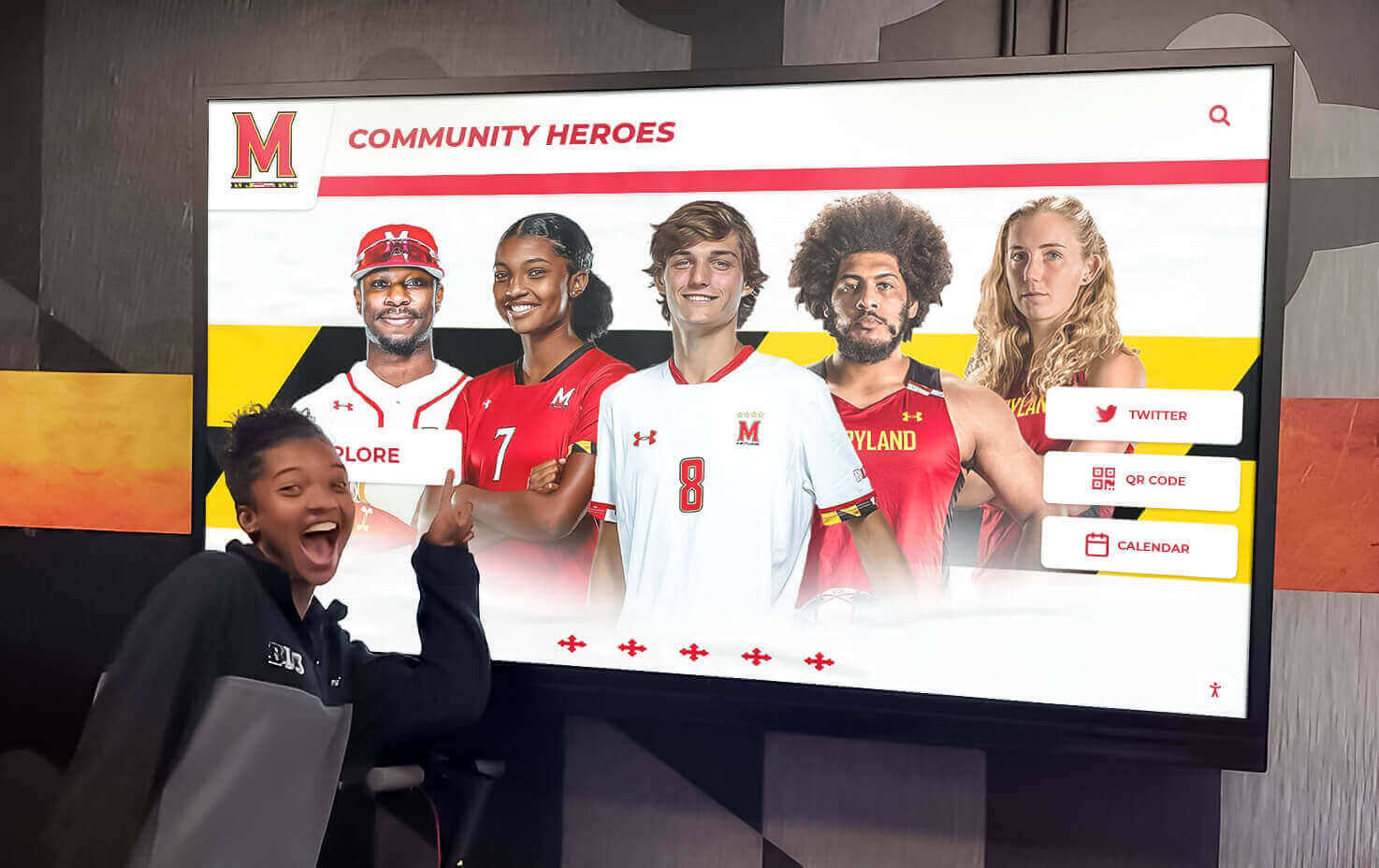
Timely recognition of current achievements maintains relevance and engagement while celebrating student accomplishments during active participation
Implementation Frameworks for Schools with Limited Resources
Schools face constant budget constraints, competing priorities, and limited technical resources. Successful touchscreen implementations require frameworks accommodating these realities rather than assuming unlimited capacity and expertise.
Turnkey Solutions vs. DIY Approaches
Schools must decide between comprehensive turnkey solutions providing complete systems including hardware, software, installation, training, and ongoing support versus DIY approaches attempting to assemble components independently to minimize upfront costs.
Turnkey Implementation Benefits
Comprehensive turnkey providers deliver complete functional systems through single vendor relationships. These packages typically include commercial-grade touchscreen displays and kiosk enclosures, purpose-built interactive software optimized for educational recognition, professional installation with proper mounting and connectivity, comprehensive training ensuring staff can manage content effectively, ongoing technical support resolving issues quickly, automatic software updates maintaining security and adding features, and content strategy consultation helping schools plan sustainable programs.
Turnkey investments typically range $10,000-20,000 for single-display installations depending on hardware specifications, software features, and service levels. This represents significant investment but delivers complete working systems ready for immediate content population and operation without requiring internal technical expertise.
The value proposition centers on comprehensive support ensuring long-term success. Schools receive expert guidance throughout planning, implementation, and operation rather than struggling independently through unfamiliar technologies and workflows. This support proves particularly valuable for institutions lacking dedicated IT staff or experience managing interactive display programs.
DIY Implementation Considerations
Budget-conscious schools sometimes attempt DIY approaches purchasing consumer televisions with basic touch overlays, installing free or low-cost software, and managing implementation internally. This approach minimizes upfront expenditure—basic installations might cost $3,000-5,000 for display hardware and software subscriptions.
However, DIY approaches create significant hidden costs and risks: consumer displays lack durability for continuous public use requiring replacement within 2-3 years, generic software forces recognition content into frameworks designed for announcements rather than interactive exploration, inadequate training leaves staff struggling with complex systems beyond their expertise, ongoing troubleshooting and maintenance consumes IT staff time diverted from other priorities, and poor results from inappropriate technology undermine program value despite cost savings.
Schools should honestly assess internal technical capacity, available time for system management, and long-term sustainability when considering DIY approaches. Apparent savings often prove illusory when accounting for internal labor, premature hardware replacement, and eventual migration to appropriate solutions after discovering generic platforms inadequately serve educational recognition needs.
Organizations comparing full-service versus DIY touchscreen implementations should evaluate total five-year ownership costs including hardware, software, implementation labor, ongoing management time, training, support, and eventual replacement rather than focusing exclusively on initial purchase prices.
Phased Deployment Strategies
Schools managing multiple planned installations benefit from phased approaches starting with pilot deployments before expanding programs across campuses.
Pilot Installation Benefits
Single pilot installations in high-visibility locations allow schools to develop content creation expertise, refine workflows and approval processes, gather usage data demonstrating engagement and value, identify technical issues before widespread deployment, build stakeholder support through demonstrated success, and secure budget approval for expansion based on objective pilot results.
Pilot phases should extend 6-12 months providing sufficient time to populate substantial content, observe usage patterns across different periods, refine interfaces based on user feedback, and compile analytics demonstrating program impact. Rushing to expansion before thoroughly validating approaches risks replicating initial mistakes across multiple expensive installations.
Systematic Expansion Planning
After successful pilots, schools develop systematic expansion plans prioritizing high-impact locations: athletic facilities serving sports recognition programs, main administration areas supporting prospective family tours, library or commons spaces encouraging student exploration during gathering times, and development offices showcasing donor recognition for cultivation purposes.
This strategic sequencing ensures each installation serves clear purposes with defined audiences and content strategies rather than deploying displays arbitrarily because locations happen to have available wall space or budget exists for additional hardware.
Funding and Budget Strategies
Touchscreen recognition systems represent significant investments requiring creative funding approaches beyond general operating budgets.
Capital Campaign Integration
Development initiatives and capital campaigns provide natural funding opportunities. Schools can designate interactive touchscreen systems as campaign components, inviting donors to sponsor installations as named gifts. A $15,000-20,000 interactive recognition display becomes attractive naming opportunity while delivering tangible visible result donors can see and interact with regularly.
Athletic booster organizations often fund sports recognition systems celebrating program achievements while building school spirit and pride. Alumni associations sponsor installations connecting graduates to institutional history and creating engagement tools supporting alumni relations objectives. Individual major donors sometimes sponsor recognition systems honoring specific individuals, teams, or eras holding personal significance.
Grant Opportunities and Technology Funding
Educational technology grants sometimes support interactive display implementations when proposals emphasize educational applications: campus tour enhancements improving prospective student recruitment, school history preservation documenting institutional heritage, academic recognition supporting student motivation, or community engagement initiatives strengthening school-community connections.
Schools should explore state and federal technology grants, educational foundation funding, corporate technology donation programs, and industry-specific grants supporting innovative educational technology implementations.
Phased Funding Approaches
When comprehensive funding proves challenging, schools can implement phased approaches: initial installation using available budget with plans to add content richness over time, single pilot display demonstrating value before seeking expansion funding, basic hardware and software with enhanced features added as budget permits, or hardware-first approach using commercial displays for broadcast signage initially with interactive software added when funding becomes available.
These staged approaches deliver partial functionality quickly while building toward comprehensive solutions as resources permit, avoiding indefinite delays waiting for complete funding that may never materialize.
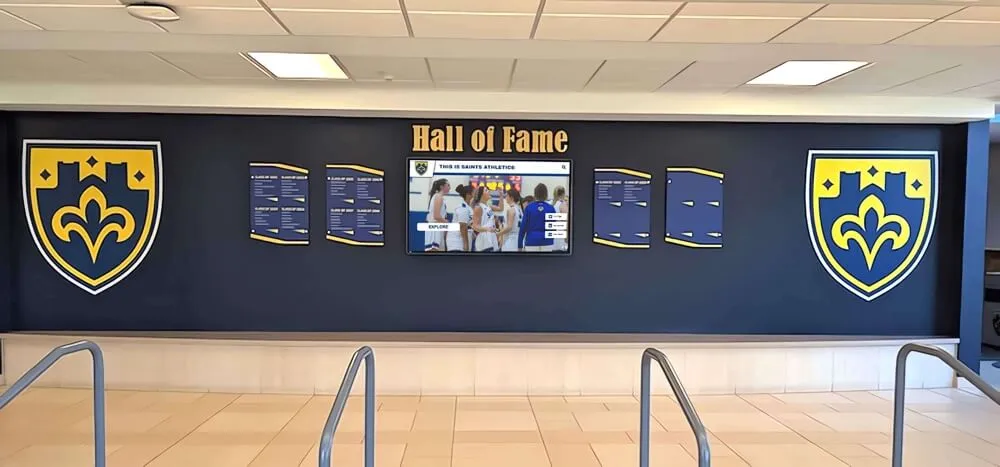
Comprehensive recognition environments integrate digital displays with traditional architectural elements creating cohesive celebration spaces
Best Practices for Long-Term Success
Initial installations represent beginnings rather than endpoints. Sustained value requires ongoing attention, systematic improvement, and organizational commitment beyond initial enthusiasm.
Training and Capability Development
Platform capabilities only deliver value when staff members know how to use them effectively. Comprehensive training programs ensure schools maximize technology investment rather than underutilizing expensive systems due to capability gaps.
Role-Specific Training Programs
Different users require different training depth: content administrators need comprehensive platform training covering profile creation, multimedia upload, organizational structures, search testing, and analytics review; occasional contributors require focused training on specific tasks like adding photos or updating statistics without needing full system expertise; school leadership benefits from overview training understanding capabilities, limitations, and strategic opportunities without operational details; and IT support staff need technical training covering infrastructure, connectivity troubleshooting, and vendor escalation procedures.
Vendors providing turnkey solutions should deliver comprehensive training as implementation components rather than optional add-ons requiring additional payment. Training should include initial sessions during deployment, follow-up sessions 60-90 days later addressing questions arising during actual use, and ongoing access to documentation, video tutorials, and responsive technical support.
Building Internal Expertise
Schools benefit from designating platform champions who develop deep expertise and assist colleagues with routine issues before escalating to vendor support. These internal experts typically come from technology coordinator, athletic director, or communications staff roles—individuals naturally positioned to support colleagues while possessing sufficient technical comfort to learn systems thoroughly.
Platform champions should receive enhanced training directly from vendors, participate in user community discussions sharing best practices, and maintain direct relationships with vendor support teams for quick issue resolution.
Measuring Success and Demonstrating Value
Technology investments face scrutiny in resource-constrained educational environments. Schools should establish success metrics demonstrating program value through objective evidence rather than subjective impressions.
Engagement Analytics
Quality touchscreen platforms provide comprehensive analytics documenting usage: total interaction sessions over time showing usage trends, average session duration indicating engagement depth, most-viewed content revealing community interests, search query reports demonstrating what visitors seek, navigation pattern analysis showing how users explore content, and peak usage times informing content launch strategies.
These metrics enable data-driven optimization identifying popular content deserving expansion, confusing navigation requiring simplification, and underutilized features needing improvement or removal. Schools can demonstrate value through usage growth, sustained engagement levels, and concrete interaction counts justifying investment.
Qualitative Feedback Collection
Complement quantitative analytics with qualitative feedback: brief intercept interviews with visitors asking about experiences, comment cards or digital feedback forms near installations, social media monitoring capturing organic reactions and shares, staff observations documenting engagement patterns and overheard comments, and formal surveys during stakeholder meetings gathering structured feedback.
Qualitative insights reveal dimensions analytics miss—emotional reactions to content, specific stories resonating with audiences, navigation confusion causing abandoned interactions, and suggested improvements addressing unmet needs.
Return on Investment Frameworks
Schools should document program benefits beyond engagement metrics: prospective family tour enhancements improving recruitment effectiveness, alumni engagement initiatives supporting development and fundraising, student motivation through visible recognition and achievement celebration, community pride building strengthening school reputation, and institutional history preservation documenting heritage for future generations.
While these benefits challenge precise quantification, documented stakeholder testimonials, enrollment trends, fundraising results, and program sustainability demonstrate value justifying continued investment and potential expansion.
Continuous Improvement and Evolution
Initial deployments rarely prove optimal—effective programs embrace continuous improvement based on observed usage, stakeholder feedback, and evolving institutional needs.
Regular Content Audits
Quarterly or biannual content reviews assess whether current content remains comprehensive, accurate, and engaging: identifying popular categories deserving expanded coverage, discovering outdated information requiring updates or removal, revealing gaps in historical content needing research and compilation, assessing photo quality and consistency across profiles, and evaluating content freshness through update recency tracking.
These audits prevent stagnation while ensuring recognition programs grow and improve rather than becoming static installations showing identical content indefinitely until audiences lose interest.
Interface and Experience Optimization
Usage analytics and user feedback inform interface refinements improving engagement: enlarging touch targets that show low activation success rates, simplifying navigation paths where users frequently get lost, highlighting popular content making it easier to discover, adding filters or search capabilities addressing common user needs, and optimizing performance addressing slow-loading content or responsiveness issues.
Small incremental improvements often yield surprisingly large engagement impacts. A simplified category structure might increase browsing by 40%. Enlarged search functionality could double search-based discovery. Enhanced photo galleries might triple average session duration.
Technology Refresh Planning
Commercial touchscreen displays provide 5-7 year operational lifespans before requiring replacement. Schools should plan technology refresh cycles ensuring displays remain modern, reliable, and meeting evolving user expectations rather than becoming dated installations with poor responsiveness or degraded appearance.
Refresh planning includes budgeting replacement costs into long-term financial projections, monitoring display performance identifying developing issues before failures, evaluating new technology capabilities determining optimal replacement timing, and negotiating vendor upgrade paths offering favorable pricing for existing customers.
Purpose-built recognition platforms like Rocket Alumni Solutions provide long-term technology partnerships supporting schools throughout initial implementation, operational phases, and eventual technology refreshes ensuring sustained success beyond initial enthusiasm.

Strategic placement in athletic facilities connects recognition displays to relevant contexts while serving athletes, families, and supporters during events and practices
Common Challenges and How to Address Them
Understanding typical implementation challenges helps schools anticipate and prevent common issues undermining program success.
Content Development Overwhelm
Schools frequently underestimate content development effort required for comprehensive recognition. Each profile requires research, photo acquisition, biographical writing, statistics compilation, and approval—30-90 minutes per profile depending on complexity and source availability.
Preventing Content Paralysis
Start focused on highest-priority recognition categories delivering immediate value rather than attempting comprehensive coverage immediately. Athletic programs might begin with recent hall of fame inductees and championship teams. Academic recognition could focus on current honor roll students and recent distinguished alumni.
Leverage existing resources reducing development burden: digitize historical archives and yearbooks containing photos and achievements, engage alumni volunteers researching and writing profiles for their graduation years, partner with student journalism or history classes creating recognition content as academic projects, and hire part-time archivists or researchers when significant historical content requires compilation.
Accept that comprehensive programs develop over years rather than months. Patient systematic progress proves more sustainable than exhausting bursts attempting immediate completion.
Technical Difficulties and Support Needs
Technology inevitably experiences issues—network connectivity problems, software bugs, hardware malfunctions, or user errors. Schools require responsive support resolving problems quickly before installations become unreliable frustrations.
Ensuring Adequate Support
Prioritize vendors providing comprehensive ongoing support rather than minimum service levels: verify support availability during school operating hours matching when staff need assistance, confirm response time commitments for urgent issues affecting display operation, test support quality during vendor evaluation by submitting questions and assessing response speed and quality, establish clear escalation procedures addressing unresolved issues quickly, and maintain vendor relationship contacts enabling direct communication when problems arise.
Schools should also invest in internal capability development enabling resolution of routine issues without vendor escalation: train technology coordinators on basic troubleshooting for connectivity and display problems, document common issues and solutions creating internal knowledge bases, establish regular maintenance procedures preventing problems through proactive attention, and maintain spare hardware components enabling quick replacements when failures occur.
Sustaining Momentum After Initial Launch
Initial enthusiasm naturally fades as installations become familiar and competing priorities demand attention. Programs risk becoming neglected installations with stale content undermining value despite significant investment.
Building Sustainable Programs
Establish clear ownership with designated individuals responsible for ongoing content management rather than diffused responsibility to “whoever has time.” Create accountability through regular reporting at administrative meetings documenting updates, engagement metrics, and program growth. Integrate content updates into existing workflows—athletic directors update sports recognition during annual induction processes, counselors add honor roll students each grading period, development staff publish donor recognition following campaign milestones.
Celebrate program success through regular communication: share engagement metrics demonstrating usage, highlight compelling individual stories resonating with audiences, feature recognition content in newsletters and social media extending reach, and recognize staff members contributing to program success encouraging continued engagement.
Build community ownership by engaging stakeholders beyond school staff: involve booster organizations supporting specific recognition areas, partner with alumni associations coordinating distinguished graduate features, engage historical societies preserving institutional heritage, and invite recognized individuals to share stories and photos enriching their own profiles.
Managing Competing Priorities and Limited Time
Schools face countless initiatives competing for limited staff time, budget resources, and leadership attention. Touchscreen recognition programs must deliver sufficient value justifying ongoing investment despite competing demands.
Demonstrating Ongoing Value
Regularly document and communicate program impact: compile quarterly analytics reports showing engagement trends and usage growth, gather testimonials from visitors sharing positive experiences, document specific benefits including prospective family feedback, alumni engagement examples, and student motivation instances, calculate return on investment through recruitment improvements, fundraising results, or operational efficiencies, and share success stories at board meetings, administrative gatherings, and community events.
Visible results build stakeholder support justifying continued resource investment. Programs demonstrating clear value through concrete evidence receive prioritization despite competing initiatives, while those lacking evidence face pressure to reduce investment or eliminate entirely.
Transform Your School's Recognition Program
Rocket Alumni Solutions specializes in purpose-built interactive touchscreen systems designed specifically for educational institutions. Our comprehensive platform combines intuitive content management, unlimited recognition capacity, powerful search and filtering, integrated web portals, and expert implementation support ensuring long-term success without burdening limited technical resources. From athletic halls of fame through academic achievement displays and alumni recognition, we provide complete solutions celebrating your school community.
Explore Recognition SolutionsConclusion: Strategic Approach to Touch Screen Digital Signage in Schools
Touch screen digital signage represents transformative technology for educational institutions when implemented strategically with appropriate platforms, comprehensive content, sustainable workflows, and ongoing organizational commitment. These interactive displays move beyond passive announcement systems to create dynamic engagement tools celebrating achievements, documenting institutional history, building community pride, and supporting strategic objectives from student recruitment through alumni relations and development.
Success requires understanding fundamental differences between broadcast digital signage serving announcement applications and interactive touchscreen solutions enabling deep exploration of recognition content. Schools attempting to force halls of fame, academic achievement displays, or donor recognition into generic broadcast signage consistently experience disappointing results despite expensive investments. Purpose-built recognition platforms deliver superior engagement through features specifically designed for celebrating people—powerful search and filtering, rich multimedia profiles, intuitive touch interfaces, cloud-based content management, integrated web portals, and comprehensive analytics.
Strategic implementation frameworks acknowledge educational realities including limited budgets, constrained technical resources, competing priorities, and need for sustainable programs requiring minimal ongoing burden. Turnkey solutions providing complete systems with hardware, software, installation, training, and ongoing support prove most successful for schools lacking dedicated IT staff despite higher upfront investment compared to DIY approaches that often fail due to inappropriate technology, inadequate support, and unsustainable management complexity.
Content strategy development determines whether installations engage audiences or become ignored background elements. Schools should start focused on highest-priority recognition categories delivering immediate value before systematically expanding coverage. Establishing clear content ownership, defining profile standards, creating regular update rhythms, and leveraging event-driven recognition opportunities maintains freshness and relevance preventing stale displays that communities learn to ignore.
Placement decisions significantly impact engagement—high-traffic locations where people naturally gather or experience downtime generate interaction while low-visibility installations in peripheral corridors deliver minimal value regardless of technology quality. Schools should prioritize main entrance lobbies, athletic facilities, library or commons gathering spaces, and administrative areas serving prospective families during tours.
Long-term success requires training ensuring staff can manage systems effectively, analytics demonstrating program value through objective usage data, regular content audits maintaining quality and comprehensiveness, continuous interface optimization based on user feedback, and technology refresh planning keeping installations modern and reliable across multi-year operational lifespans.
Touch screen digital signage serves educational missions effectively when implemented with strategic intentionality, appropriate technology, comprehensive content, and sustainable organizational commitment. Schools making informed platform selections, developing realistic implementation plans, creating compelling content strategies, and building stakeholder support create recognition programs delivering sustained value—celebrating achievement, preserving history, building community, and supporting institutional objectives for years beyond initial installations.
Organizations ready to explore interactive touchscreen solutions should investigate purpose-built educational recognition platforms like Rocket Alumni Solutions designed specifically for schools rather than attempting to force recognition into generic announcement-oriented frameworks inadequately serving celebration and storytelling needs that define effective educational recognition programs.































