




Intent: Demonstrate how touch screen kiosk software transforms standard displays into engaging interactive experiences through strategic layout design, content architecture, and user-centered interface patterns.
Touch screen kiosk software represents the foundation enabling memorable interactive experiences in schools, museums, corporate facilities, and public spaces worldwide in 2025. Yet selecting appropriate software proves challenging—with dozens of platforms claiming superior capabilities, intuitive interfaces, and seamless content management. The difference between exceptional interactive kiosks that capture attention and abandoned displays nobody touches often lies in understanding how software architecture, interface design, and content strategy combine to create truly engaging experiences.
Organizations implementing interactive kiosks frequently focus on hardware selection—display size, mounting options, commercial-grade durability—while treating software as an afterthought. This backwards approach creates expensive mistakes requiring complete system replacement when initial software selections prove inadequate for actual requirements. Software capabilities fundamentally determine what experiences you can create, how easily content updates happen, and whether kiosks deliver lasting value across multi-year operational lifespans.
This comprehensive guide explores touch screen kiosk software through the creative, experience-focused lens essential for TouchscreenWebsite.com audiences. Rather than listing technical specifications, you’ll discover proven layout frameworks that maximize engagement, content organization strategies that enable intuitive exploration, accessibility considerations ensuring inclusive experiences, and practical implementation approaches that deliver exceptional results for recognition displays, wayfinding systems, and interactive exhibits.
Organizations that systematically evaluate software capabilities alongside hardware specifications report satisfaction rates exceeding 85 percent with kiosk deployments, compared to under 40 percent among those who purchase hardware first then struggle finding software that delivers intended experiences. Success requires recognizing that touch screen kiosk software determines not just what content displays, but how visitors discover, explore, and remember the information and stories you present.

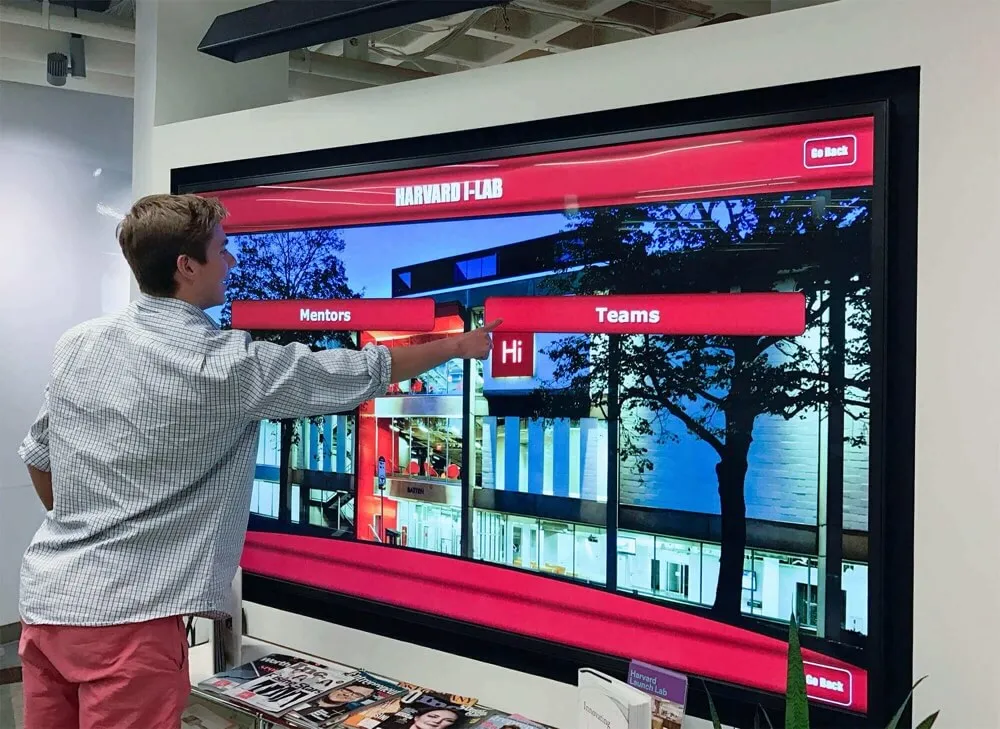
Purpose-built kiosk software creates intuitive navigation frameworks enabling visitors to explore comprehensive content collections independently
Experience Layout: Architecting Intuitive Interactive Kiosk Interfaces
Effective touch screen kiosk software begins with clear spatial organization—visitors should instantly understand interface structure without instruction or experimentation. Layout architecture determines whether kiosks feel natural and inviting or confusing and frustrating.
Hero Zone Design and Content Hierarchy
The hero zone occupies the top third of kiosk displays, immediately capturing attention as visitors approach. This critical real estate establishes brand identity, communicates purpose, and invites interaction through carefully orchestrated visual hierarchy.
Hero Zone Components
Professional kiosk layouts dedicate hero zones to institutional branding with logos positioned consistently across all screens, compelling headlines explaining display purpose without reading fine print, feature imagery showcasing engaging content available for exploration, and prominent calls-to-action with large, obvious touch targets inviting first interaction. According to research on kiosk user behavior, visitors spend under three seconds evaluating whether to interact—hero zones must communicate value instantly or risk immediate abandonment.
Organizations implementing digital hall of fame guide displays demonstrate effective hero design through dramatic imagery celebrating honored individuals, clear “Explore Our Champions” messaging, and large “Start Browsing” buttons that feel unmistakably interactive. This immediate visual communication transforms casual passers-by into engaged explorers.
Visual Weight Distribution
Effective hero zones balance multiple elements through deliberate visual weight assignment. Primary headlines use 48+ point bold typography ensuring readability from 8-10 feet away—the typical distance visitors begin evaluating kiosks. Feature images occupy 40-50 percent of hero area with faces positioned according to rule-of-thirds composition principles that feel naturally engaging. And call-to-action buttons contrast sharply with backgrounds through color, shadow, and sizing that signals obvious interactivity.
Touch screen kiosk software should support flexible hero zone customization enabling organizations to emphasize brand identity, feature seasonal content, or adapt messaging for different audience contexts without requiring technical expertise or vendor intervention for routine modifications.
Navigation Architecture and Content Modules
Below hero zones, professional kiosk layouts organize navigation and content into predictable zones enabling efficient information discovery. Grid-based modular approaches provide consistency users rely on while maintaining visual interest through varied content types.
Primary Navigation Placement
Horizontal navigation ribbons immediately below hero zones present 4-8 primary categories with equal visual prominence. Each category receives 80+ pixel touch targets with clear icon-plus-label combinations serving visitors with varying literacy levels or language fluency. Research on public kiosk interaction demonstrates that horizontal top navigation outperforms side navigation for standing visitors who scan screens left-to-right following established reading patterns.
Vertical sidebar navigation works when content hierarchies demand more than eight primary categories, though this configuration requires careful visual balance preventing sidebar from dominating content area. Most effective kiosk layouts limit primary categories to six or fewer, using subcategories within content areas rather than overwhelming initial navigation with excessive choices.

Horizontal navigation ribbons with clear iconography and labels enable immediate category recognition and selection
Content Card Grids
Central content areas display search results, category browsing, or featured content through card-based grids that enable efficient scanning. Effective card designs include prominent imagery with faces positioned centrally when featuring people, clear headlines visible without squinting from standing positions, 2-3 key details providing preview information, and obvious “Learn More” or expansion affordances inviting deeper exploration.
Touch screen kiosk software should render these grids responsively—3-4 cards per row on large displays, 2 per row on medium screens, single column on portrait installations. Consistent spacing between cards prevents accidental mis-taps while generous padding around content prevents visual cramping that creates uncomfortable density.
Solutions like Rocket Alumni Solutions demonstrate professional card grid implementations through recognition displays featuring honoree profiles with high-quality photography, achievement summaries, and clear interaction affordances that transform static biographical data into engaging exploratory experiences.
Interactive Detail Panels and Layered Information
When visitors select cards or navigation elements, detail panels reveal comprehensive information through carefully structured layouts balancing depth with digestibility.
Detail Panel Organization
Professional detail screens dedicate the top 25 percent to prominent imagery establishing emotional connection—for recognition displays, impactful portraits or action photos; for historical exhibits, relevant archival images; for wayfinding, maps or building photos. Below imagery, hierarchical typography presents primary information first with 32-40 point headlines, supporting details in 24-28 point body text, and supplementary information in 18-20 point captions.
Vertical scrolling enables unlimited depth without overwhelming initial views, provided software implements momentum scrolling with appropriate acceleration curves matching smartphone behavior visitors expect. However, most effective kiosk content fits within 1.5-2 screen heights—longer content suggests better suited for website access rather than standing kiosk interaction.
Media Integration Zones
Interactive kiosks delivering exceptional engagement integrate rich multimedia seamlessly within detail panels. Video players occupy dedicated 16:9 zones with large, obvious play controls sized for fingers rather than mouse pointers. Photo galleries present thumbnail strips enabling quick navigation with large featured image display. Audio players provide unmistakable play buttons with visual feedback confirming playback state.
Organizations implementing interactive displays courtrooms guide systems or library touchscreen interactive displays require sophisticated media handling supporting documents, historical photographs, video testimonials, and audio recordings within unified interfaces that maintain consistent interaction patterns across content types.

Detail panels layer comprehensive information through clear visual hierarchy and multimedia integration supporting rich storytelling
Content Blocks & Motion: Creating Dynamic Kiosk Experiences
Static displays fail to capture attention in environments competing for visitor focus. Professional touch screen kiosk software leverages subtle motion, progressive disclosure, and responsive feedback creating experiences that feel alive and engaging.
Attract Loop and Idle State Design
When nobody actively interacts, kiosks should present attract loops that capture passing attention without displaying sensitive content visitors might prefer discovering privately.
Attract Loop Content Strategy
Effective attract loops cycle through visually compelling content on 8-12 second intervals—fast enough maintaining visual interest, slow enough allowing comprehension. Content might include feature imagery highlighting compelling stories available for exploration, rotating statistics demonstrating breadth of content collections, brief video clips showing emotional moments from oral histories or testimonials, and periodic “tap to explore” reminders with animated arrows or pulsing buttons drawing attention to interaction methods.
Schools implementing best touchscreen software web-based vs native app systems should configure attract loops featuring recent achievements, upcoming events, and diverse content categories suggesting depth worth exploring rather than showing all available content in predetermined slideshows that remove discovery incentives.
Privacy-Conscious Idle Transitions
Kiosks in public spaces must protect visitor privacy by clearing screens after 30-60 seconds of inactivity. Professional software implements gradual fade transitions to attract loops rather than abrupt returns creating jarring experiences. During countdown to idle state, subtle progress indicators warn visitors about impending timeouts, providing 5-10 second warnings enabling quick additional interactions extending sessions.
Organizations deploying kiosks in sensitive environments like fallen heroes touchscreen displays require immediate privacy protection, while recreational contexts like golf course leaderboard displays tolerate longer idle periods encouraging casual group exploration.
Animation and Transition Design
Professional touch screen kiosk software employs purposeful animation creating fluid experiences without distracting gimmickry or performance-degrading excess.
Micro-Interactions and Feedback
Every touch interaction should trigger immediate visible feedback confirming input registration. Buttons animate with subtle scale increases (105-110 percent) plus shadow depth changes on touch-down, reversing on release. Cards elevate slightly with shadow expansion when touched before transitioning to detail views. And navigation elements highlight with color shifts or underlines appearing instantaneously.
Research on interaction design demonstrates users perceive delays exceeding 100 milliseconds as sluggish, with frustration increasing dramatically beyond 200 milliseconds. Touch screen kiosk software must prioritize immediate feedback over elaborate animations that introduce perceptible lag between action and response.
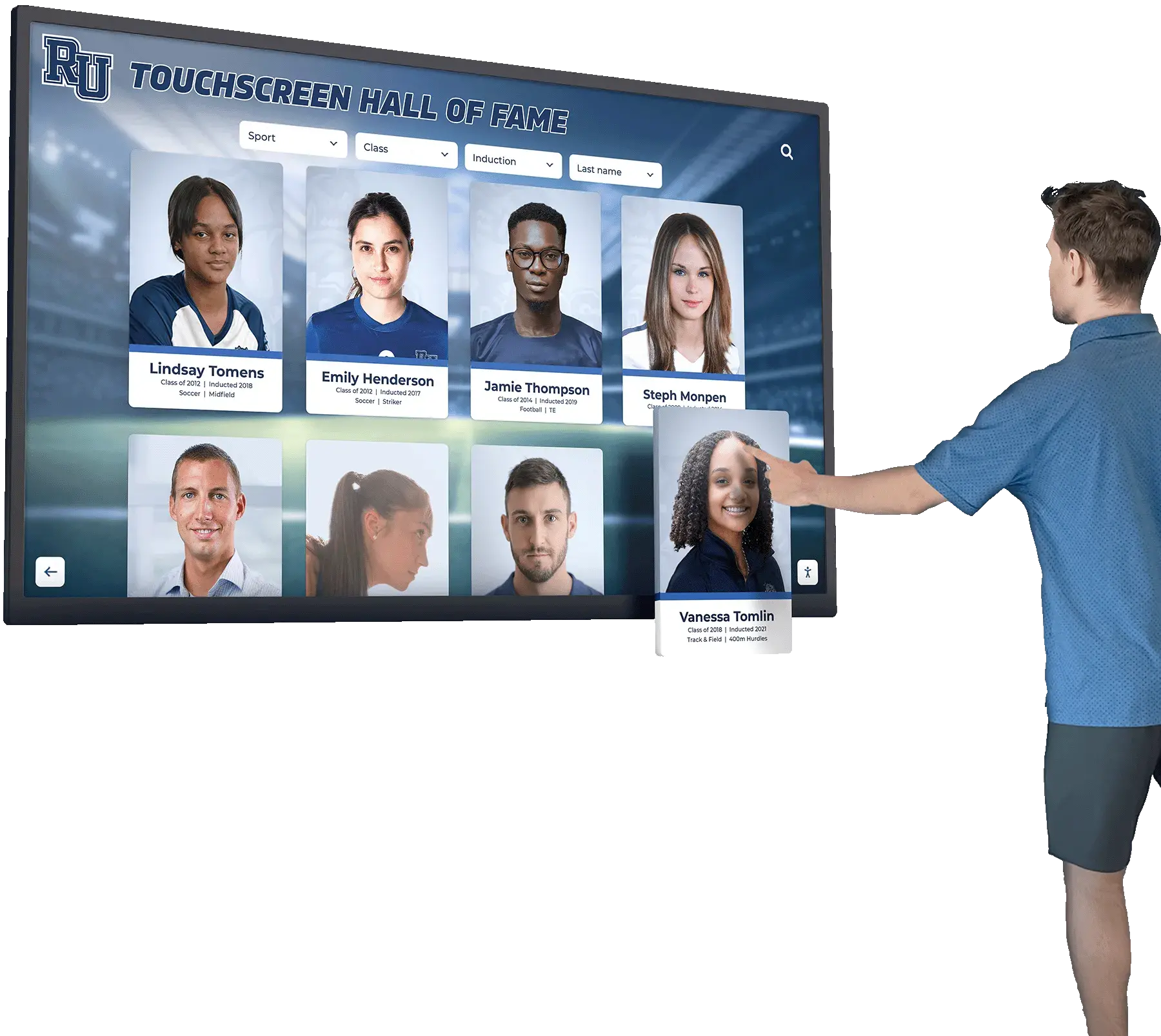
Immediate visual feedback confirms every touch interaction through subtle scale, shadow, and color changes
Screen Transitions and Content Loading
Navigation between kiosk screens benefits from consistent transition patterns establishing predictable mental models. Forward navigation (entering detail views or subcategories) commonly uses slide-left transitions suggesting progression deeper into content hierarchies. Back navigation employs slide-right returns suggesting retreat to previous states. And home button presses might use fade transitions resetting spatial metaphors entirely.
During content loading, professional software displays elegant skeleton screens showing layout structure with pulsing placeholders rather than blank screens or generic spinning indicators. This approach maintains visual continuity while providing progress indication without anxiety-inducing uncertainty about system state.
Responsive Touch Feedback and Gesture Recognition
Modern visitors expect smartphone-quality touch responsiveness from all interactive displays. Professional kiosk software must meet these expectations through optimized touch handling and familiar gesture support.
Standard Gesture Implementation
Touch screen kiosk software should embrace universal gesture vocabulary visitors already know from smartphones: single tap selects and activates, swipe scrolls through lists and galleries, pinch-zoom explores high-resolution images and maps, and long-press might reveal contextual options for advanced users. Custom gestures face severe discoverability challenges—unless explicitly demonstrated, visitors won’t attempt unfamiliar interactions.
Organizations implementing design touch screen experience user engagement systems consistently report higher satisfaction and completion rates when limiting interaction vocabulary to standard smartphone gestures rather than inventing novel alternatives requiring instruction that interrupts engagement.
Touch Target Sizing and Spacing
Minimum touch target standards established for handheld devices prove inadequate for public kiosks where users interact while standing at variable distances and angles. Professional kiosk software employs 60+ pixel minimum touch targets with 12-16 pixel spacing preventing accidental activation of adjacent elements. Primary actions like “Explore,” “Search,” or “Home” buttons warrant 80+ pixel dimensions ensuring reliable activation from hasty or imprecise touches.
Accessible kiosk design exceeds these minimums significantly for users with motor control challenges. Installations serving diverse populations benefit from 80-100 pixel touch targets with 20+ pixel clearance, slightly larger than optimal for typical users but vastly improved for those requiring generous hit areas.

Commercial kiosk installations balance optimal touch target sizing with information density through careful interface architecture
Accessibility & UX Checklist: Ensuring Inclusive Kiosk Experiences
Truly engaging touch screen kiosk software serves diverse visitor populations including those with varying abilities, technological familiarity, and interaction preferences. Comprehensive accessibility considerations ensure kiosks deliver value for entire communities rather than only technologically sophisticated visitors.
Physical Accessibility and Installation Standards
Beyond software design, physical kiosk placement fundamentally impacts accessibility for users with mobility challenges or varying heights.
ADA-Compliant Positioning
The Americans with Disabilities Act provides specific guidance for interactive display positioning ensuring wheelchair users can reach and view screens comfortably. Touch controls and interactive elements must fall within reach ranges: 48 inches maximum height for side approaches where users can position wheelchairs adjacent to displays, 44 inches maximum for front approaches where display depth prevents close positioning.
For displays serving diverse populations, primary interactive areas benefit from 36-42 inch positioning serving both standing adults and seated wheelchair users comfortably without requiring different content zones for different abilities. Secondary content extending higher remains acceptable provided critical navigation and primary features remain within universal reach zones.
Professional installation ensures adequate clear floor space approaching kiosks—minimum 30×48 inches for wheelchair maneuvering—plus appropriate viewing angles preventing glare from overhead lighting that washes out screens at steep angles common when wheelchair users view displays installed for average standing adult height.
Motor Control Accommodations
Touch screen kiosk software should accommodate users with tremors, limited fine motor skills, or reduced dexterity through generous touch targets that exceed minimum standards, forgiving hit areas extending beyond visible button boundaries by 8-10 pixels, single-tap interactions avoiding double-tap or long-press requirements that prove difficult for some users, and adjustable timeout periods allowing extended interaction without abrupt idle state transitions.
Installations in settings serving senior populations or users with disabilities should configure extended timeouts (90-120 seconds rather than standard 30-60), provide larger touch targets throughout interfaces (80-100 pixel minimums), and eliminate timed interactions requiring responses within fixed windows that create pressure for users requiring additional processing time.
Visual Accessibility and Readability
Public kiosks face challenging viewing conditions—bright ambient lighting, reflective glass surfaces, and viewing from angles rather than optimal perpendicular approaches. These realities demand exceptional attention to contrast, typography, and color usage.
Contrast and Color Guidelines
Web Content Accessibility Guidelines (WCAG) recommend minimum 4.5:1 contrast ratio for body text and 3:1 for large elements. However, public kiosk contexts benefit from exceeding these minimums significantly—7:1 or higher for body text ensures readability across diverse lighting conditions including bright sunlight streaming through adjacent windows or intense overhead fixtures common in institutional facilities.
Color usage must never represent the sole method communicating information. Interactive elements should combine color changes with shape, text, or icon modifications ensuring users with color vision deficiencies recognize state changes. “Tap here” buttons should appear obviously interactive through size, shadow, and labeling rather than depending solely on color differentiation from surrounding content.

High-contrast interfaces ensure readability across challenging lighting conditions common in schools and public facilities
Typography and Text Sizing
Minimum text sizing for kiosk displays substantially exceeds website or mobile app standards given viewing distances and lighting conditions. Body text should never fall below 24 points, with 28-32 points providing comfortable readability for most visitors. Headlines warrant 40+ point sizing ensuring visibility as visitors approach kiosks before committing to interaction.
Font selection matters equally—sans-serif typefaces like Open Sans, Roboto, or system fonts render more clearly on backlit displays than serif alternatives. Avoid thin font weights that disappear under challenging lighting conditions in favor of regular and medium weights providing adequate stroke thickness at smaller sizes.
Organizations implementing touchscreen high school basketball game engagement systems or college intramural sports digital recognition displays require exceptional readability given typical installation in brightly-lit athletic facilities with significant ambient noise and visual distraction competing for attention.
Cognitive Accessibility and Usability
Visual and motor accessibility receive considerable attention, but cognitive accessibility proves equally important for creating broadly engaging experiences serving visitors with diverse technological sophistication and cognitive processing patterns.
Interface Consistency and Predictability
Consistent interaction patterns enable visitors to develop reliable mental models supporting confident navigation. When similar actions always produce similar results through similar interactions, users understand interface behavior without careful study of every screen state. Inconsistency creates confusion disproportionately affecting users with cognitive challenges, limited technological experience, or simply divided attention in busy public environments.
Professional touch screen kiosk software maintains ruthless consistency through persistent navigation elements appearing identically across all screens, standardized touch targets where similarly-functioning buttons maintain consistent size and position, predictable transitions where forward navigation always animates left while back always slides right, and uniform interaction feedback where all selections trigger identical visual confirmation.
Progressive Disclosure and Information Layering
Presenting all available information simultaneously overwhelms visitors and creates visual density that intimidates interaction. Effective kiosk interfaces employ progressive disclosure showing essential information initially with optional deeper exploration for interested users. Recognition profile cards might display names, photos, and primary achievements on grid views, reserving complete biographies, multimedia galleries, and detailed statistics for dedicated detail screens accessed through deliberate selection.
This layered approach serves both casual browsers seeking quick overviews and motivated visitors pursuing comprehensive information without forcing either population through suboptimal experiences designed for the other’s needs. Organizations implementing student mentorship alumni discovery board systems or alumni gathering area design displays benefit from progressive disclosure balancing breadth of available content with focused presentations preventing overwhelming density.
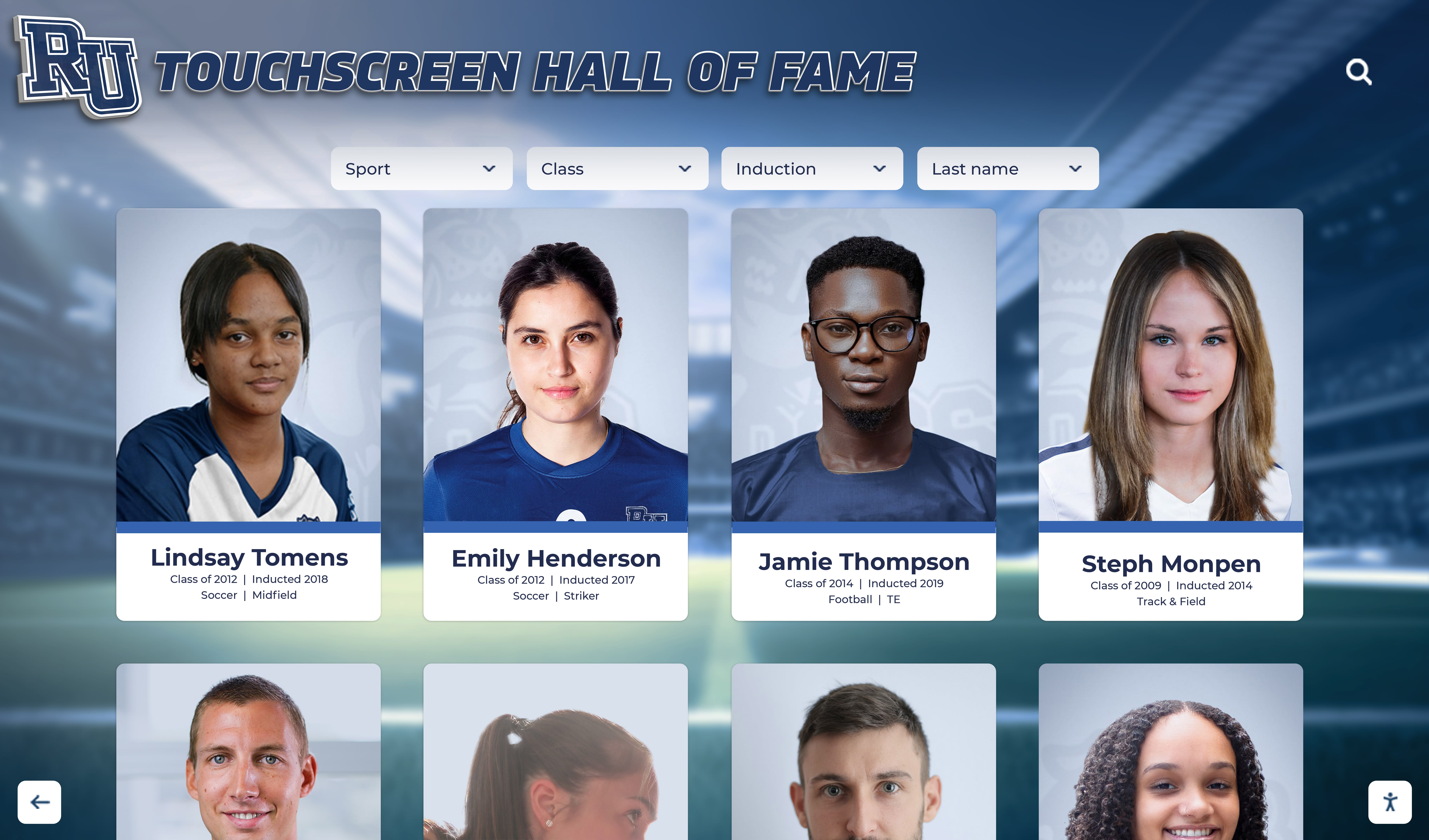
Card-based interfaces employ progressive disclosure showing essential preview information with comprehensive details available through deliberate selection
Brand Integration Checklist: Customizing Kiosk Experiences for Organizational Identity
Professional touch screen kiosk software enables comprehensive brand integration ensuring interactive displays reinforce institutional identity rather than feeling like generic vendor templates applied superficially.
Unlimited Layout Customization
Organizations should demand kiosk software supporting flexible layout modification without requiring technical expertise or vendor intervention for routine customization.
Layout Template Libraries
Quality platforms provide pre-designed layout templates spanning common kiosk applications—recognition displays, wayfinding systems, information directories, event schedules, museum exhibits—enabling rapid implementation while maintaining professional design standards. However, templates must serve as starting points rather than unchangeable constraints, with organizations retaining control over color schemes matching brand guidelines, typography selections reflecting institutional voice, content organization matching specific navigation priorities, and module placement adapting to unique content emphases.
According to research from 2024-2025 on digital recognition effectiveness, organizations that customize kiosk interfaces to match broader brand identity achieve 35-40 percent higher engagement than those accepting generic vendor templates that feel disconnected from surrounding institutional design language. This brand coherence signals quality and authority encouraging visitor trust and interaction.
Custom Background and Branding
Hero zones should accommodate institutional brand assets including primary logos prominently positioned establishing immediate identity connection, taglines or mission statements reinforcing organizational values, brand color palettes applied consistently throughout interface elements, and custom backgrounds featuring campus imagery, team photography, or abstract patterns aligned with existing brand systems.
Schools implementing high school athletics equity checklist systems or academic recognition programs recognize that brand-coherent kiosks integrate naturally into institutional environments rather than appearing as disconnected vendor displays that undermine rather than enhance professional appearance and community perception.
Multimedia Content Integration
Rich storytelling through diverse media types transforms basic information displays into emotionally engaging experiences that visitors remember and share.
Video Background Loops
Attract loops benefit from subtle video backgrounds showing campus life, athletic highlights, historical moments, or environmental footage creating visual interest without demanding active attention. These looping backgrounds should run at reduced opacity (20-30 percent) behind interface elements preventing distraction while adding motion and energy to idle states.
Organizations implementing homecoming festivities guide displays or basketball hall of fame recognition systems leverage video backgrounds featuring championship moments, emotional ceremonies, or community celebrations that capture essence of programs being celebrated.
Integrated video content transforms static biographical information into emotional storytelling that creates meaningful visitor connections
Social Media Gallery Integration
Modern kiosks should connect with institutional social media enabling real-time content integration without manual duplication. Instagram feeds showcase current activities and community engagement. Twitter streams display recent announcements and news. And YouTube galleries present video content already produced for digital channels, maximizing content investment across multiple distribution channels simultaneously.
Touch screen kiosk software should handle social media integration through authenticated API connections enabling selective content filtering—displaying posts from official accounts while excluding user-generated content potentially inappropriate for public kiosk display without moderation. Auto-refresh ensures social feeds remain current without administrator intervention, though reasonable caching (5-15 minutes) prevents excessive API calls that might trigger rate limiting.
Sponsorship Recognition Zones
Organizations seeking financial support for kiosk installations require flexible sponsorship recognition capabilities rewarding donor contributions while maintaining professional aesthetics and visitor-focused experiences.
Sponsor Placement Strategies
Effective sponsor integration balances recognition visibility with user experience quality. Tasteful approaches include footer ribbons displaying 3-5 sponsor logos with rotation if more donors exist than screen real estate accommodates, dedicated sponsor screens accessible through “Our Supporters” navigation but not interrupting primary content exploration, sponsor acknowledgment within relevant content where athletic equipment sponsors appear on team pages or academic program funders link from department information, and sponsor video or profile integration telling donor stories alongside beneficiary content.
Organizations implementing church interactive donor boards or capital campaign donor recognition systems require sophisticated sponsorship capabilities that honor financial support appropriately while avoiding commercial appearance that feels inappropriate for mission-driven contexts. Professional kiosk software enables this balance through flexible sponsor zone configuration matching organizational values and donor expectations.
Rotation and Impression Tracking
When sponsor count exceeds available display space, rotation schedules ensure equitable visibility across all supporters. Professional software provides configurable rotation intervals (30-60 seconds typical), guaranteed impression minimums ensuring each sponsor receives specified visibility percentage regardless of total sponsor count, and analytics tracking actual impression delivery enabling ROI reporting to current donors and supporting development efforts with prospective contributors.
Touch screen kiosk software should generate sponsor impression reports showing logo display frequency, screen views, interaction sessions, and estimated reach based on facility traffic patterns—concrete data demonstrating recognition value rather than anecdotal assertions about kiosk placement in “high-traffic areas” without quantification or verification.
Activation Plan: Deploying and Maintaining Exceptional Kiosk Experiences
Selecting professional touch screen kiosk software represents only the beginning—successful deployments require systematic activation addressing content development, strategic placement, staff training, and ongoing maintenance ensuring kiosks deliver lasting value across multi-year operational lifespans.
Content Development and Population Strategy
Software enables experiences, but compelling content determines whether kiosks engage audiences or generate disinterest. Organizations must invest in systematic content development creating depth justifying interactive exploration.
Phased Content Rollout
Start with achievable scope demonstrating value quickly rather than attempting comprehensive historical coverage before launching. Schools implementing recognition displays might initially populate recent 5-10 years of honorees before gradually expanding historical content. Museums could feature 50-100 key collection items before adding thousands of catalog entries. And organizations might showcase current programs before undertaking extensive archival research documenting complete institutional histories.
This phased approach enables learning from initial implementations, gathering visitor feedback on engaging content types, refining presentation approaches before investing massive effort, and demonstrating early value supporting continued investment rather than endless development delaying any public launch. Organizations implementing national honor society digital recognition displays or FFA awards digital displays benefit from focused initial scope covering recent years with gradual historical expansion as resources allow.
Content Standards and Quality Control
Establish content standards ensuring consistency throughout kiosk experiences including photography requirements for image quality, composition, and resolution, biographical narrative templates maintaining voice and style coherence, required metadata enabling filtering and categorization, and review processes verifying accuracy and appropriateness before publication.
Assign clear content ownership with specific staff or departments responsible for different content areas—athletics manages sports recognition, academics oversees honor rolls, development maintains donor information. This distributed ownership ensures subject matter experts maintain content accuracy while preventing overwhelming any single individual with comprehensive management responsibilities.
Cloud-based content management enables distributed ownership where multiple departments maintain kiosk content within their expertise areas
Installation Location and Environmental Considerations
Display placement dramatically impacts usage and value. Strategic positioning in high-traffic areas with natural dwell opportunities generates engagement while poor placement relegates expensive kiosks to ignored displays nobody uses despite quality content and software.
Optimal Placement Locations
Consider main entrance lobbies greeting all visitors immediately upon arrival, gathering spaces where people naturally pause near seating areas or elevator lobbies, decision points providing wayfinding information at facility intersections, destination locations placing specialized content near relevant areas like athletic recognition in fieldhouses, and event spaces where displays generate conversation during receptions, tours, or ceremonies.
Avoid mid-hallway positions without natural stopping points, areas with poor lighting causing screen glare from windows or overhead fixtures, locations requiring uncomfortable reach or viewing angles, and spaces lacking nearby electrical power or network connectivity requiring expensive infrastructure extensions. Professional installation costs typically range $1,000-2,500 depending on complexity—budget accordingly rather than selecting challenging locations dramatically increasing implementation expenses.
Organizations implementing division II athletics digital recognition systems or fan experience centers digital displays recognize that strategic placement near high-traffic areas during games, events, and tours maximizes visibility and engagement compared to locations serving daily operations but lacking special occasion prominence.
Environmental Factors and Hardware Selection
Installation locations dictate appropriate hardware specifications. Indoor controlled environments support consumer-grade displays with standard brightness (300-400 nits). Locations near windows or under bright lighting require commercial displays with 500+ nit brightness preventing washout. And outdoor or semi-outdoor installations demand weatherproof enclosures with 1000+ nit high-brightness panels.
Touch technology selection matters equally—capacitive touchscreens provide exceptional responsiveness and multi-touch support but require direct skin contact, creating challenges for users wearing gloves common in cold climates or certain professional contexts. Resistive touchscreens respond to pressure from any object but support only single-touch interaction with less precise tracking.
Refresh Cadence and Content Maintenance
Kiosk effectiveness depends on currency and relevance—outdated content undermines credibility while fresh updates maintain interest encouraging repeat engagement.
Regular Update Schedules
Establish systematic update cycles matching content types and organizational rhythms. Recognition displays require updates coinciding with induction ceremonies or annual celebrations—typically once or twice yearly. Event information needs weekly updates maintaining accuracy and timeliness. And social media integration refreshes automatically every few minutes ensuring current content without manual intervention.
Schedule quarterly content audits reviewing complete kiosk experiences identifying outdated information requiring removal or revision, discovering gaps where new content opportunities exist, evaluating engagement analytics revealing popular and neglected content, and refreshing attract loops preventing staleness that causes regular visitors to stop noticing kiosks entirely.
Organizations implementing online high school digital archives or historical photos archive preservation systems balance static historical content remaining relevant indefinitely with dynamic contemporary additions maintaining visitor interest through regular discovery of new material worth exploring.
Sponsor Rotation and Agreement Compliance
When kiosks include sponsor recognition, maintain rigorous tracking ensuring contractual obligations fulfill completely. Document guaranteed impression counts, logo display frequencies, sponsor zone positioning, and agreement durations. Generate regular reports providing sponsors concrete data about recognition value delivered—impression metrics, estimated reach, visitor engagement statistics, and renewal proposals backed by performance documentation rather than vague assurances.
Rotation schedules should guarantee equitable visibility when multiple sponsors exist, with software-enforced impression balancing preventing technical issues or content additions from inadvertently favoring certain sponsors over others. Professional touch screen kiosk software provides built-in rotation management and reporting eliminating manual tracking prone to errors that damage donor relationships and undermine fundraising credibility.

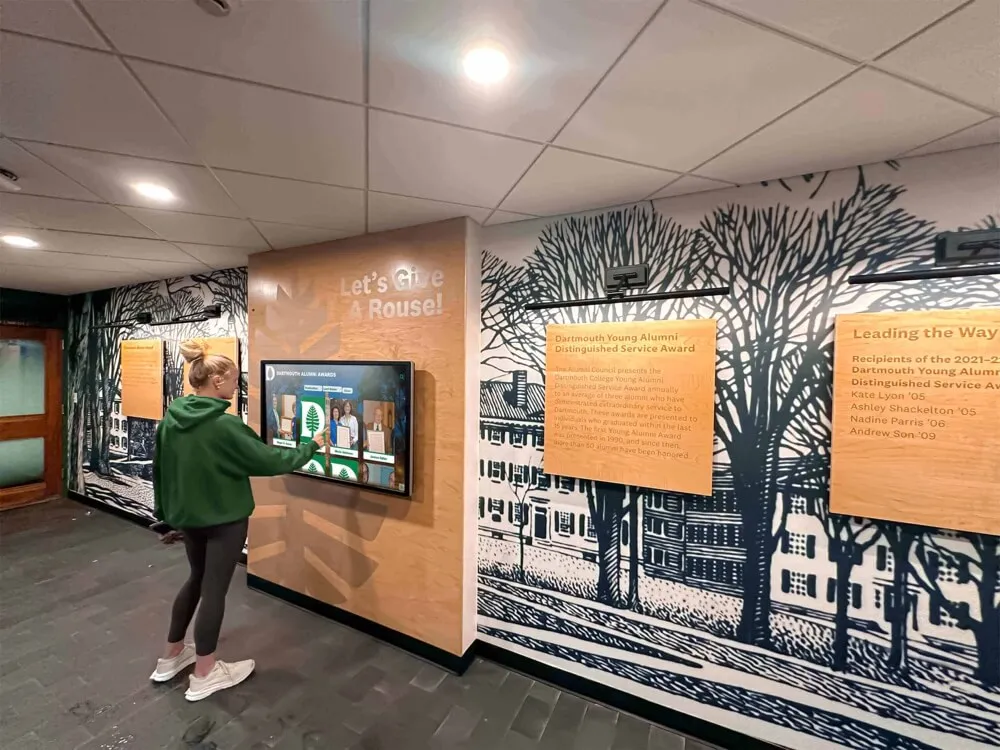
Strategic kiosk positioning near traditional recognition creates natural exploration opportunities for visitors already engaged with institutional heritage
Advanced Kiosk Software Capabilities and Emerging Technologies
Beyond core content display and navigation, professional touch screen kiosk software increasingly integrates advanced capabilities that enhance engagement, extend reach, and enable new experience possibilities.
Multi-Device Access and Connected Experiences
Modern kiosks should integrate seamlessly with personal devices enabling visitors to save, share, and continue exploration beyond physical installations.
QR Code Content Transfer
Dynamic QR codes appearing on kiosk screens enable visitors to capture content for later review or sharing with family members unable to visit physical installations. Implementations might include profile-specific QR codes appearing on individual recognition pages enabling instant content transfer to smartphones, section QR codes providing access to entire content categories for comprehensive exploration, share functionality generating custom QR codes for any visitor-selected content combination, and follow-up engagement where scanned codes collect email addresses enabling ongoing communication and event invitations.
Organizations implementing alumni where are they now spotlight programs or student mentorship discovery boards benefit from QR code connections enabling students to contact featured alumni, request mentorship, or learn about career pathways represented in institutional communities.
Web Portal Integration
Professional kiosk software should mirror physical installations through integrated web portals accessible worldwide. Identical content appears on both physical touchscreen kiosks and website-based platforms, enabling alumni living anywhere to revisit recognition, prospective members to research organizational heritage during decision processes, and current participants to share achievements with distant family members unable to attend ceremonies.
This universal accessibility dramatically multiplies kiosk investment value—rather than reaching only those physically present during facility hours, web-integrated recognition extends to unlimited global audiences at any time. Analytics track both physical kiosk interaction and web portal engagement, providing comprehensive usage data demonstrating program reach and impact.
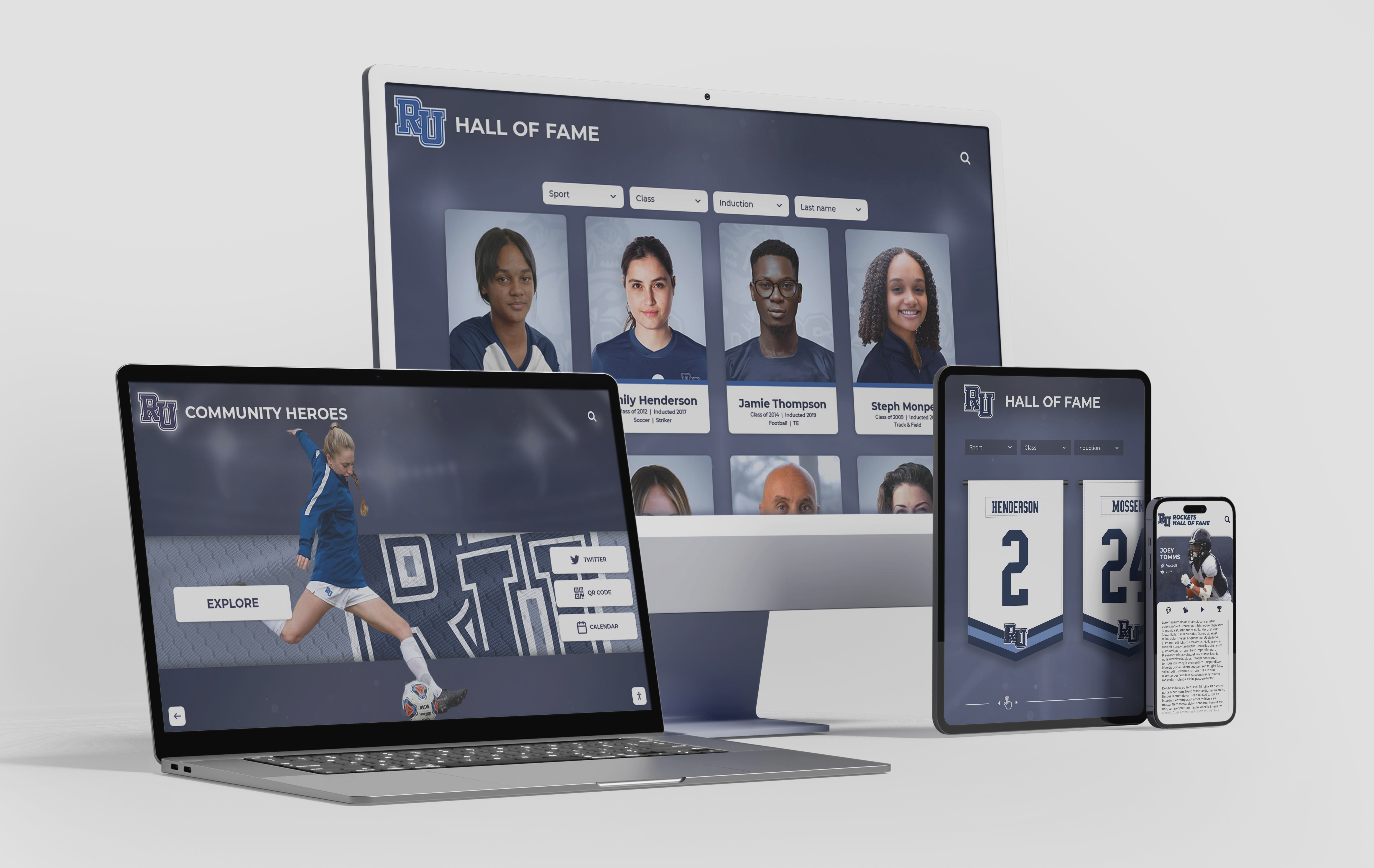
Web portal integration ensures kiosk content remains accessible across all devices enabling worldwide engagement beyond physical installations
Solutions like Rocket Alumni Solutions provide seamless integration between physical touchscreen installations and web-based platforms, ensuring recognition content reaches entire communities regardless of geographic proximity to campus displays through responsive interfaces automatically adapting to desktops, tablets, and smartphones without separate development for each platform.
Analytics and Engagement Measurement
Understanding visitor behavior enables continuous improvement based on actual usage patterns rather than assumptions about optimal content and navigation.
Essential Engagement Metrics
Professional kiosk software tracks total interaction sessions showing usage frequency and patterns, average engagement duration revealing content depth, most-viewed content identifying popular profiles or information, search terms demonstrating what visitors seek, navigation paths revealing exploration patterns, and peak usage times informing optimal update schedules and sponsorship value.
Organizations leverage these insights to identify which recognition categories generate highest engagement, determine what additional content visitors seek through unsuccessful searches, understand whether users explore beyond initial screens or abandon quickly, demonstrate program value through concrete usage data supporting budget requests, and optimize content strategies based on actual behavior rather than assumptions about visitor interests.
Heatmap and Touch Analytics
Advanced kiosk software provides visual heatmaps showing where visitors actually touch screens, often revealing surprising patterns. Assumed primary navigation might receive less engagement than expected while unexpected elements attract focus. Small touch targets might show repeated tapping patterns indicating frustrated users struggling with precise targeting. And ignored sections signal wasted screen real estate better repurposed for content visitors actually explore.
Touch analytics reveal accessibility issues like areas requiring excessive precision suggesting enlarged touch targets, interaction patterns indicating confusion about navigation paths warranting clearer affordances, and abandonment points where visitors consistently disengage revealing friction requiring interface refinement.
Artificial Intelligence and Personalization
AI integration represents significant emerging trend transforming kiosk software capabilities in 2024-2025, though organizations should carefully evaluate concrete benefits beyond marketing buzzwords.
Intelligent Content Recommendations
AI-powered recommendation engines analyze visitor interaction patterns suggesting related content likely to interest users based on their exploration history. Visitors viewing basketball athlete profiles receive suggestions for other basketball inductees. Those exploring specific graduation years discover classmates from same eras. And users researching particular achievement types find similar recognition across different categories.
According to technology trend analysis for 2025, AI recommendations help visitors discover relevant content they might not have found through traditional navigation, increase engagement duration by 25-35 percent through suggested exploration paths, and create more personalized experiences despite public kiosk contexts where traditional personalization through login proves impractical.
Natural Language Search
Traditional keyword search requires precise terminology matching content metadata. AI-powered natural language processing understands conversational queries enabling visitors to search “basketball players from the 1990s who became teachers” rather than carefully constructing boolean queries with specific field filters. This natural interaction reduces friction particularly for users with limited technological sophistication who struggle with traditional database search interfaces.
Organizations implementing touchscreen software for Mac systems or touchscreen digital signage software platforms should evaluate whether AI capabilities provide genuine value justifying premium pricing or represent marketing additions delivering marginal improvement over well-designed traditional search interfaces.
Selecting Touch Screen Kiosk Software: Decision Framework and Vendor Evaluation
With dozens of platforms claiming superior capabilities, systematic evaluation against specific criteria helps organizations identify solutions genuinely suited to requirements rather than falling for impressive demonstrations that don’t translate to sustainable real-world deployments.
Purpose-Built vs. General Platform Considerations
Different kiosk applications demand fundamentally different software capabilities—recognition displays require person-centric content organization while wayfinding needs map integration and real-time updates.
Recognition-Specific Platform Benefits
Organizations prioritizing achievement celebration and heritage preservation benefit from purpose-built recognition platforms like Rocket Alumni Solutions providing individual profile management where administrators create comprehensive honoree pages, unlimited capacity ensuring space constraints never force difficult choices about whose achievements display, powerful search enabling instant location of specific individuals, category organization supporting exploration by sport, department, or achievement type, and multimedia storytelling incorporating photos, videos, and biographical narratives.
General kiosk software or digital signage platforms lack intuitive person-profile management, requiring technical workarounds for features recognition platforms provide natively. Organizations often purchase general platforms, struggle with recognition application limitations, then eventually migrate to specialized solutions—expensive paths that proper initial evaluation prevents.
General Platform Appropriate Applications
Wayfinding systems, event schedules, facility information directories, and announcement displays benefit from general kiosk or digital signage software emphasizing content scheduling, real-time data integration, and multi-display management rather than deep interactive exploration. These applications share common characteristics—relatively simple information hierarchies, frequent updates, and straightforward navigation rather than extensive content collections demanding sophisticated search and discovery.
Organizations implementing kiosk interactive software systems serving multiple facility functions might deploy different platforms for different applications—specialized recognition software for achievement celebration alongside general digital signage for announcements and wayfinding—rather than attempting to force single platforms serving all needs adequately but none exceptionally.
Ease of Administration and Content Management
Technical sophistication impressing during sales demonstrations often translates to operational nightmares when non-technical staff attempt routine content management. Prioritize platforms designed for typical users rather than requiring IT expertise for every update.
Administrator Experience Evaluation
Request demonstration accounts enabling actual staff members to attempt realistic content management tasks. Can communications coordinators add announcements independently? Can athletic directors update team rosters without assistance? Can alumni relations managers create inductee profiles from printed forms? If realistic scenarios prove challenging during evaluation, implementation will prove worse.
Platforms requiring minimal training and enabling distributed content management consistently deliver higher long-term satisfaction than sophisticated systems concentrating all work on overextended IT departments. Solutions designed for educational contexts should empower subject matter experts maintaining content within their areas without becoming technical specialists.

Intuitive interfaces enable independent exploration and content management without requiring technical training or IT intervention
Total Cost of Ownership and Vendor Stability
Initial software licensing represents only one component of costs organizations incur over five-year typical kiosk lifespans. Comprehensive analysis should include software licensing or subscription fees, hardware infrastructure including displays, media players, and mounting, network connectivity and bandwidth requirements, content creation costs for initial population and updates, staff time for training, administration, and management, and ongoing technical support for troubleshooting and maintenance.
Request detailed pricing covering realistic deployments—not just single-display scenarios but three-to-five-display networks most organizations eventually implement. Clarify what support comes standard versus requiring additional fees. And verify whether platforms impose per-user charges, per-display fees, or storage limitations affecting scalability as programs grow.
Research vendor stability and longevity—established vendors with ten-plus year track records demonstrate proven viability compared to startups potentially disappearing when market challenges arise. Request customer references from similar organizations facing comparable use cases, and actually contact those references asking about implementation experiences, support responsiveness, and long-term satisfaction beyond initial enthusiasm.
Conclusion: Creating Exceptional Interactive Kiosk Experiences Through Strategic Software Selection
Touch screen kiosk software determines whether hardware investments deliver exceptional engagement or become expensive displays showing content nobody explores. Success requires understanding that software capabilities extend far beyond simple content display—professional platforms enable strategic layout design that guides visitor attention, intuitive navigation supporting confident exploration, accessibility features serving diverse populations, brand integration reinforcing institutional identity, and operational simplicity enabling non-technical staff to maintain current, relevant content across multi-year system lifespans.
Get Your Touchscreen Mock-Up
Discover how purpose-built interactive kiosk software transforms achievement celebration through compelling layout design, intuitive navigation, and seamless content management. Request a custom design preview demonstrating how your content could engage visitors through professionally architected touchscreen experiences.
Schedule Your Design SessionOrganizations approaching kiosk implementation should begin with clear objective definition understanding exactly what displays need to accomplish. This clarity enables evaluating whether platforms actually provide required capabilities or would need extensive customization creating ongoing support burdens. Consider application-specific requirements—recognition demands differ fundamentally from wayfinding, which differs from announcement displays, which differs from museum exhibits. Software optimized for specific applications consistently outperforms general platforms attempting to serve all needs adequately but none exceptionally.
Prioritize platforms designed for your staff’s actual technical capabilities rather than impressive demonstrations translating to operational nightmares when non-technical employees attempt routine content management. The most sophisticated software proves worthless if nobody can effectively maintain it—simplicity and intuitive design deliver better long-term value than feature-rich complexity requiring constant technical support.
Evaluate total cost of ownership across realistic five-year horizons rather than focusing exclusively on lowest initial pricing. Consider all expenses including software, hardware, installation, network infrastructure, content development, staff time, and ongoing support. Platforms claiming lowest prices often impose highest long-term costs through expensive renewals, inadequate support, or operational complexity demanding dedicated resources.
And recognize that software selection represents only the beginning—successful kiosk implementations require compelling content justifying exploration, strategic placement in locations where target audiences naturally encounter displays, comprehensive training ensuring staff leverage full capabilities, and organizational commitment to ongoing maintenance preserving currency and relevance.
For organizations specifically focused on celebrating achievements and honoring individuals, explore how purpose-built recognition platforms deliver superior results compared to adapting general software for specialized applications. For schools implementing high school touchscreen admissions tours or athletic departments creating college commitment recognition displays, selecting software designed specifically for recognition applications ensures intuitive management, unlimited capacity, and engagement levels general platforms cannot match regardless of customization efforts.
The technology enabling transformative interactive kiosk experiences exists today—proven touch screen kiosk software delivers reliable, engaging systems across thousands of installations worldwide. Organizations need only commitment to systematic evaluation matching platform capabilities to specific requirements, comprehensive implementation addressing technology and organizational dimensions, and ongoing management ensuring displays remain current, relevant, and valuable to communities they serve.
Ready to transform recognition, wayfinding, or information access for your school, museum, athletic program, or organization? Explore how purpose-built kiosk software creates exceptional experiences through strategic layout design, intuitive interaction patterns, accessibility features serving diverse populations, and operational simplicity enabling lasting success across multi-year deployments. Contact our team to discuss your specific requirements and discover whether specialized platforms or general solutions better serve your unique context and objectives.
Sources:































