




Schools researching digital hall of fame displays quickly discover pricing complexity. One vendor quotes hardware costs only. Another lists monthly subscriptions without explaining what’s included. A third mentions “implementation services” priced separately. Busy athletic directors and principals need straightforward answers: What’s the complete, all-in price for a functioning recognition display—including the equipment, software, someone to set up our historical content, and training so our staff can manage it going forward?
A turnkey digital hall of fame package addresses this need by bundling every component required for launch: commercial-grade touchscreen hardware, purpose-built recognition software, professional installation, historical content digitization and setup, staff training programs, and ongoing technical support. Rather than coordinating multiple vendors and services separately, turnkey providers deliver complete, ready-to-use recognition systems through single comprehensive packages.
This guide examines turnkey digital hall of fame pricing for schools, breaking down what comprehensive packages include, comparing cost structures across providers, and helping administrators evaluate which turnkey offerings deliver genuine value versus merely repackaging separate services at inflated prices.
Schools investing in turnkey digital hall of fame packages typically spend between $12,000 and $35,000 per display for comprehensive solutions including everything needed for successful launches. Understanding what drives cost variation helps administrators identify packages matching budget constraints while meeting recognition program requirements.

Turnkey installations deliver complete recognition systems ready for immediate use without separate vendor coordination
Understanding Turnkey Digital Hall of Fame Packages
Before evaluating specific pricing, understanding what distinguishes genuine turnkey offerings from basic hardware sales with optional services helps schools recognize comprehensive value.
What “Turnkey” Actually Means for Recognition Displays
Turnkey solutions provide everything required for operational recognition displays through integrated packages rather than itemized component sales:
Complete Hardware Procurement and Configuration
Turnkey providers source all physical components—commercial touchscreen displays, media player computers, mounting hardware or freestanding kiosks, and necessary cabling—eliminating school responsibility for researching specifications, verifying compatibility, or coordinating multiple purchases. Hardware arrives configured and ready for installation rather than requiring technical setup.
Integrated Software Licensing and Setup
Recognition software comes pre-licensed, pre-configured, and customized with school branding rather than requiring separate software purchases and configuration. Administrators receive functional systems displaying school colors, logos, and visual identity from day one rather than generic templates requiring customization.
Professional Installation Services
Installation teams handle site assessment, electrical work coordination, display mounting or kiosk placement, network connectivity setup, and final system testing. Schools receive installed, tested, operational displays rather than boxed equipment requiring internal IT resources for setup.
Historical Content Digitization and Population
Perhaps most valuable for busy schools, turnkey packages include services for digitizing historical recognition content—scanning yearbook photos, collecting biographical information, creating individual honoree profiles, and populating software databases. Schools launch with comprehensive historical content rather than empty systems awaiting data entry.
Comprehensive Staff Training Programs
Training ensures school staff can confidently manage content updates, add new inductees, modify layouts, and troubleshoot basic issues. Training formats vary—some providers offer on-site sessions, others provide video tutorials, while comprehensive packages include both plus ongoing support access.
Resources on digital hall of fame implementation planning provide frameworks for understanding comprehensive launch requirements that turnkey packages address.
Why Schools Choose Turnkey Packages
Comprehensive turnkey solutions cost more than piecemeal approaches but deliver advantages justifying premium pricing:
Single Accountability and Project Management
When problems arise—display mounting encounters unexpected wall construction, network connectivity proves challenging, or software configuration questions emerge—schools contact one vendor managing all components rather than troubleshooting blame between hardware suppliers, software vendors, and installation contractors.
Guaranteed Compatibility and Integration
Turnkey providers ensure hardware specifications support software requirements, mounting solutions accommodate display dimensions, and network infrastructure handles content management needs. Schools avoid discovering compatibility issues after purchasing incompatible components from separate sources.
Accelerated Timeline to Launch
Coordinated procurement, configuration, and installation happens faster than schools independently researching specifications, soliciting bids, coordinating deliveries, and scheduling separate installation and training. Turnkey providers launch recognition displays in 4-8 weeks versus 3-6 months for independently coordinated projects.
Staff Time Savings
Perhaps most valuable, turnkey packages eliminate dozens of hours athletic directors, principals, or IT staff would otherwise spend researching hardware, coordinating vendors, digitizing photos, entering data, learning software, and troubleshooting setup issues. Staff focus on recognition program goals rather than technical implementation.
Schools implementing comprehensive digital recognition systems report that turnkey approaches prove most cost-effective when accounting for internal staff time required for piecemeal implementations.

Comprehensive staff training ensures administrators confidently manage recognition content without ongoing technical support requirements
Breaking Down Turnkey Package Components and Costs
Understanding component-level costs within turnkey packages helps schools evaluate whether bundled pricing represents fair value or unnecessary markup.
Hardware Components: Display, Computer, and Mounting
Physical equipment represents the most visible turnkey package component:
Commercial Touchscreen Display Selection
Turnkey packages typically offer display size options with corresponding price tiers:
- 43-55 inch displays: Entry packages suitable for hallway installations—hardware costs $2,500-4,500
- 55-65 inch displays: Most popular for school recognition—hardware costs $3,500-6,500
- 65-75 inch displays: Premium installations for lobbies or fieldhouses—hardware costs $5,500-9,500
- 75+ inch displays: Grand installations for competition venues—hardware costs $8,500-15,000+
Commercial-grade touchscreen displays with projected capacitive touch technology, 4K resolution, and commercial warranty coverage cost significantly more than consumer televisions—but provide durability, reliability, and touch responsiveness required for public interactive installations.
Media Player Computer Specifications
Computing hardware requirements vary by software platform complexity:
- Basic configurations: Intel Core i5 processor, 8GB RAM, 256GB SSD—cost $500-800
- Standard configurations: Intel Core i7 processor, 16GB RAM, 512GB SSD—cost $800-1,200
- Premium configurations: High-performance processor, 32GB RAM, 1TB SSD—cost $1,200-2,000
Most recognition applications perform excellently with standard configurations—premium specs benefit video-heavy content or very large display formats requiring additional processing power.
Mounting Hardware or Freestanding Kiosks
Installation approach significantly affects total hardware costs:
- Wall mount brackets: Commercial-grade tilting mounts—cost $300-800
- Basic freestanding kiosks: Powder-coated steel enclosures—cost $1,500-3,500
- Custom-branded kiosks: Purpose-designed enclosures with school colors and logos—cost $3,500-8,000
- Outdoor-rated enclosures: Weather-resistant housings for exterior installations—cost $5,000-12,000
Freestanding kiosks offer placement flexibility and professional appearance but increase package costs substantially compared to wall-mounted configurations.
Software Licensing and Customization
Recognition software represents the intelligence layer determining user experience quality:
Platform Licensing Models
Turnkey packages handle software licensing through various structures:
- Annual subscription included: First-year software licensing included in turnkey price, with disclosed ongoing annual costs typically $800-2,500 per display
- Multi-year licensing prepaid: 3-5 year software licenses included in turnkey package, reducing or eliminating short-term recurring costs
- Perpetual licensing: One-time software purchase with optional annual support contracts typically $500-1,500 per year
Rocket Alumni Solutions and similar providers typically include first-year software licensing in turnkey packages with transparent ongoing subscription costs disclosed upfront, avoiding surprise renewal fees.
Brand Customization and Visual Design
Turnkey packages include varying customization levels:
- Template-based branding: School colors, logos, and name applied to standard layouts—included in base packages
- Custom layout design: Purpose-designed interface reflecting unique school identity—adds $1,500-5,000
- Motion graphics and video backgrounds: Custom animated elements and branded video content—adds $2,000-8,000
- Multi-template creation: Different designs for athletics, academics, and donor recognition—adds $3,000-10,000
Most schools achieve excellent results with template-based branding included in standard turnkey packages—custom design primarily benefits institutions with unique architectural elements or sophisticated brand standards requiring specialized execution.
Detailed information on touchscreen interface design principles provides context for evaluating customization value versus standard template approaches.
Installation Services and Site Preparation
Professional installation ensures displays mount securely, connect reliably, and operate correctly from launch:
Standard Installation Services Included
Comprehensive turnkey packages typically include:
- Site assessment: Pre-installation evaluation ensuring locations accommodate displays and meet accessibility requirements—value $200-500
- Display mounting: Professional installation with appropriate anchoring for wall construction type—value $500-1,200
- Electrical work coordination: Ensuring power access meets requirements, though separate electrician costs may apply—coordination value $200-400
- Network connectivity: Ethernet connection or WiFi configuration enabling cloud-based management—value $200-500
- System configuration: Final software setup, testing, and optimization—value $300-800
Total installation service value typically ranges $1,400-3,400 depending on installation complexity and site preparation requirements.
Additional Site Preparation Costs
Some installation requirements fall outside turnkey package scope:
- Electrical outlet installation: If mounting location lacks nearby power, electrician costs add $300-1,200 depending on distance from panel
- Network infrastructure: If mounting location lacks network access, network cable installation adds $200-1,500 depending on distance from network closet
- Structural reinforcement: Unusual wall construction may require additional support—costs vary widely by situation
- Construction or renovation coordination: Installations during active construction may require additional coordination fees
Turnkey providers typically conduct pre-installation site assessments identifying additional preparation requirements and associated costs before contract signing—avoiding surprise charges after commitment.
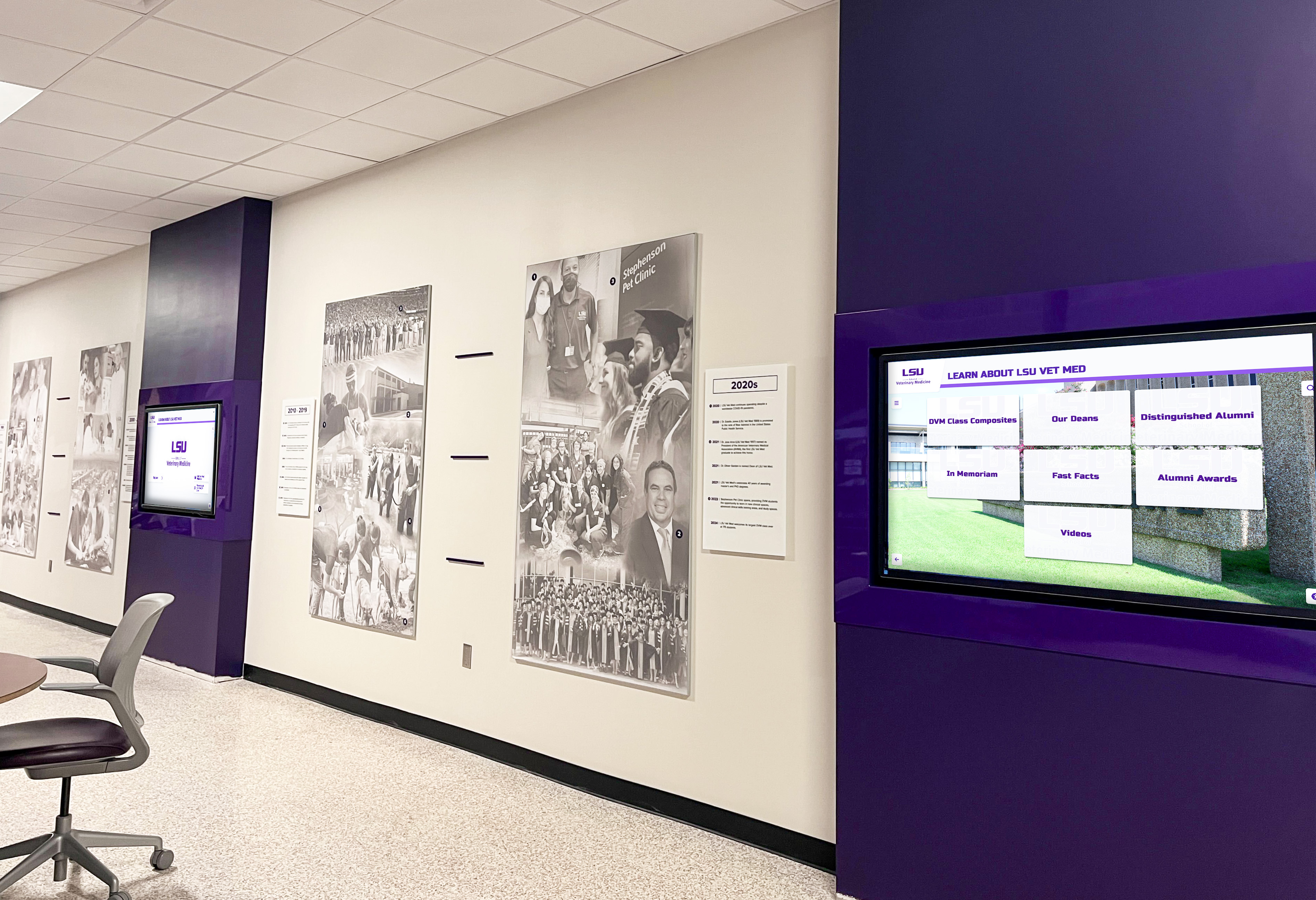
Multi-display installations benefit significantly from turnkey coordination ensuring consistent configuration across all units
Content Setup Services: From Historical Photos to Launch
Historical content digitization and database population often represent the most time-intensive aspect of recognition display launches—and the service component schools most appreciate in turnkey packages.
Historical Content Digitization Services
Decades of yearbooks, photo archives, and achievement records require systematic digitization:
Photo Scanning and Digital Restoration
Turnkey providers offer varying approaches to photo digitization:
- On-site scanning services: Teams visit schools to scan yearbooks and photo archives—typically included for up to 200-300 photos in comprehensive packages, with additional photos at $1-3 each
- Ship-to-scan services: Schools mail yearbooks or photos to vendor scanning facilities—same volume and per-photo costs as on-site
- School-performed scanning with vendor coordination: Vendors provide specifications and quality control while schools handle scanning—reduces package costs $1,000-3,000 but requires substantial staff time
High-quality scans require minimum 300 DPI resolution and appropriate image formats—vendors experienced with digital archives for schools ensure proper standards preventing poor quality that undermines recognition impact.
Data Collection and Organization
Beyond photos, biographical information and achievement documentation require systematic organization:
- Spreadsheet template provision: Vendors provide formatted templates schools populate with names, years, achievements, and biographical details
- Data entry assistance: Some turnkey packages include vendor assistance entering information from existing records—typically included for 100-200 profiles, with additional entries at $5-15 each
- Data validation and quality control: Vendors review information accuracy, identify missing elements, and flag formatting issues before publication
Schools typically gather biographical information internally—but vendor templates and validation services ensure data arrives in correct formats preventing rework.
Database Population and Profile Creation
Converting raw photos and data into polished recognition profiles requires systematic processing:
Batch Import and Automated Profile Generation
Advanced turnkey packages include:
- Bulk data import: Uploading spreadsheets containing hundreds of honorees simultaneously rather than manual individual entries
- Automated photo matching: Software attempts matching imported data with photo files based on naming conventions
- Template-based profile generation: Automated creation of consistent profile pages from imported data
- Quality assurance review: Vendor staff review automatically generated profiles before launch, correcting errors
These services save schools dozens or hundreds of hours compared to manual profile creation for extensive historical recognition programs.
Manual Profile Creation for Complex Biographies
Some honorees merit more detailed recognition than automated templates accommodate:
- Featured inductee profiles: Comprehensive biographies with multiple photos, videos, and narrative storytelling—typically 10-25 included in comprehensive packages
- Achievement timeline creation: Visual timeline layouts showing career progression—labor-intensive creation typically limited in standard packages
- Video integration: Processing and hosting video testimonials or highlights—varies by package
Schools should understand which honorees receive comprehensive featured treatment versus standard automated profiles when evaluating turnkey content setup services.
Launch Content Planning
Strategic planning ensures recognition displays launch with compelling content:
- Phased content approach: Some packages launch with recent inductees and featured honorees, then add historical content systematically after launch
- Complete historical population: Premium packages include creating profiles for all eligible honorees before launch—appropriate for smaller programs (under 200 honorees)
- Ongoing population contracts: Monthly content addition services for sustained historical population after initial launch
Most schools balance budget constraints with launch timeline pressure through hybrid approaches—launching with recent 10-20 years populated completely, with older historical content added quarterly over following year.
Resources on hall of fame selection and induction processes provide frameworks for prioritizing content development within budget constraints.
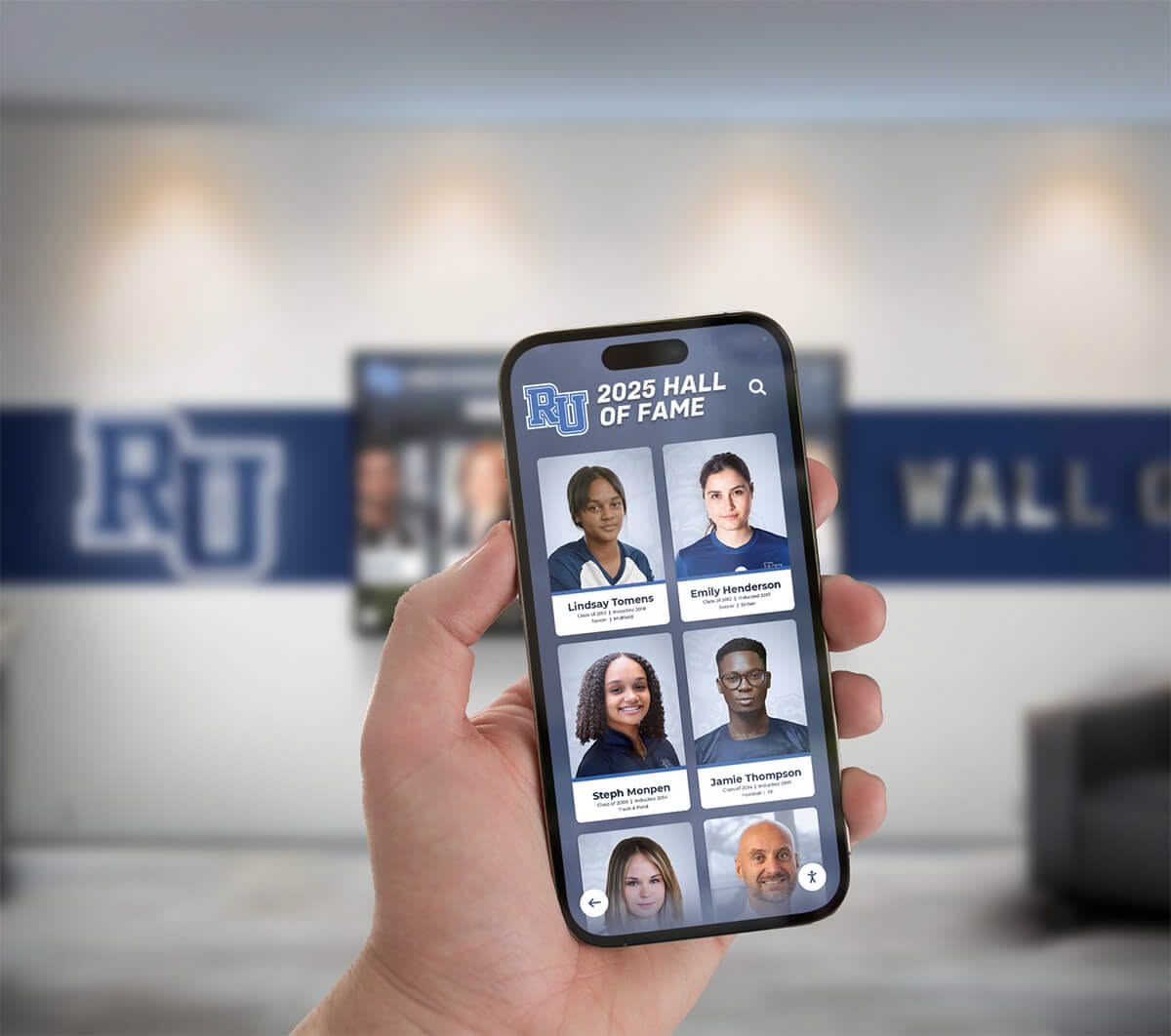
Cloud-based content management enables updates from any device after initial turnkey setup completes
Staff Training Programs and Ongoing Support
Even excellently designed recognition software requires training ensuring school staff confidently manage content after turnkey providers depart.
Training Program Formats and Approaches
Turnkey packages include various training delivery methods:
On-Site Training Sessions
In-person training at school locations immediately following installation:
- Administrator training: 2-4 hour sessions teaching content management, profile creation, layout customization, and basic troubleshooting—standard in comprehensive packages
- Group training: Sessions accommodating multiple staff members ensuring distributed knowledge—particularly valuable for larger schools
- Hands-on practice: Structured exercises creating actual profiles and making real updates during training rather than passive demonstration
On-site training proves most effective for schools preferring personal instruction and immediate question-and-answer opportunities.
Remote Virtual Training
Video conference training sessions reduce costs while maintaining interactive instruction:
- Scheduled video sessions: 1-2 hour training blocks via Zoom or similar platforms—increasingly common in standard packages
- Screen-sharing demonstration: Trainers walk through content management tasks while administrators follow along on their devices
- Recording provision: Sessions recorded for future reference and training additional staff members later
Virtual training works well for schools comfortable with remote technology and preferring schedule flexibility.
Self-Paced Video Tutorial Libraries
Pre-recorded instructional content administrators access on-demand:
- Comprehensive video courses: 15-30 short tutorial videos covering all content management tasks—included in most packages
- Task-specific quick guides: Brief videos demonstrating single operations (uploading photos, creating profiles, publishing updates)
- Regular content updates: Tutorial libraries expanded as software platforms add features
Video libraries supplement live training effectively but rarely suffice as sole training method—combination approaches work best.
Documentation and Written Guides
Text-based reference materials supporting training:
- Administrator manuals: Comprehensive PDF guides documenting all software features and procedures
- Quick-start guides: Single-page references for common tasks
- FAQ databases: Searchable knowledge bases addressing frequent questions
Written documentation proves valuable for later reference but rarely succeeds as primary training method for visual software tasks.
Ongoing Technical Support Structures
Training prepares administrators for routine management, but questions and issues inevitably arise requiring vendor assistance:
Support Channel Options
Turnkey packages include varying support access:
- Email/ticket support: Standard in all packages—submit questions receiving responses within 24-48 business hours
- Phone support: Direct calling for urgent questions—included in premium packages or available as add-on
- Live chat support: Real-time text communication during business hours—increasingly common
- Emergency support: After-hours assistance for critical issues—typically available only in premium packages or enterprise contracts
Schools should evaluate realistically which support levels they’ll actually need—most routine questions resolve adequately through email, with phone support valuable primarily for urgent situations requiring immediate resolution.
Included Support Duration
Turnkey package pricing includes varying support periods:
- 30-60 days post-launch: Basic packages include short-term support covering initial adjustment period
- First-year comprehensive support: Standard packages include full first year—by far most common structure
- Multi-year support included: Premium packages prepay 3-5 years support eliminating annual renewal decisions
- Ongoing support through subscriptions: Annual software subscriptions typically include unlimited support as long as subscriptions remain active
First-year comprehensive support proves most valuable—questions concentrate heavily during initial months, then decline dramatically once staff gain experience.
Schools implementing interactive digital displays report support needs declining 70-80% after first six months as staff master routine content management tasks.
Comparing Turnkey Package Pricing Across Providers
Understanding actual market pricing helps schools evaluate whether proposals represent competitive value or inflated costs.
Entry-Level Turnkey Packages ($12,000-18,000)
Budget-conscious comprehensive packages typically include:
Hardware Components
- 43-55 inch commercial touchscreen display
- Standard media player computer (Core i5, 8GB RAM, 256GB SSD)
- Basic wall mount or entry-level freestanding kiosk
- Standard cabling and accessories
Software and Services
- First-year software licensing (with ongoing annual fees disclosed)
- Template-based branding with school colors and logos
- Standard installation with site assessment
- Historical content setup for 50-100 profiles (photos and basic biographical data)
- Virtual training session (1-2 hours via video conference)
- 90-day email technical support
Typical Providers at This Tier
- Halloffamewall.com offers basic turnkey packages starting around $13,500 for 55-inch installations
- Touchwall.us provides entry packages near $14,800 with standard content setup
- Chasemckee.com pricing typically begins around $15,200 for comparable configurations
Entry packages suit small schools with limited budgets, modest historical content requirements (recent 10-15 years), and staff comfortable with remote training and email support.
Mid-Range Turnkey Packages ($18,000-26,000)
Comprehensive packages balancing features and value typically include:
Hardware Components
- 55-65 inch commercial touchscreen display with 4K resolution
- Enhanced media player computer (Core i7, 16GB RAM, 512GB SSD)
- Premium freestanding kiosk with partial custom branding or professional wall-mount installation
- Professional cabling with cable management
Software and Services
- First-year software licensing with comprehensive feature access
- Template customization with school-specific modifications
- Professional installation with site preparation coordination
- Historical content setup for 150-250 profiles with photo restoration
- On-site training session (half-day, accommodating multiple staff)
- First-year comprehensive support (email, chat, and phone)
- Mobile app integration enabling off-site content access
Typical Providers at This Tier
- Rocket Alumni Solutions comprehensive packages typically range $19,500-24,500 depending on display size and content volume
- Touchhalloffame.us full-service installations generally price $21,000-25,800 for comparable offerings
- Halloffamewall.com premium packages span $20,500-26,000 with enhanced customization
Mid-range packages represent the most popular choice among high schools—delivering professional quality across all components while remaining accessible to typical school budgets.
Premium Turnkey Packages ($26,000-35,000+)
Top-tier comprehensive packages include:
Hardware Components
- 65-75+ inch commercial touchscreen display with 4K resolution and premium brightness
- High-performance media player computer supporting extensive multimedia
- Fully custom-branded freestanding kiosk or architectural integration
- Commercial-grade surge protection and backup power
Software and Services
- Multi-year software licensing (3-5 years prepaid)
- Custom interface design reflecting unique school identity
- Premium installation with project management and construction coordination
- Comprehensive historical content setup for 300-500+ profiles with extensive photo restoration
- On-site training (full day for multiple staff members with hands-on practice)
- Multi-year comprehensive support with priority phone and after-hours emergency assistance
- Mobile app, web portal, and social media integration
- Ongoing quarterly content assistance
Typical Providers at This Tier
- Rocket Alumni Solutions executive packages range $28,000-35,000+ for large-scale implementations
- Touchhalloffame.us premier installations typically price $29,500-38,000 with complete historical population
- Custom regional providers may quote $32,000-50,000+ for highly specialized installations
Premium packages suit larger schools, institutions with extensive historical content requiring substantial digitization, or organizations prioritizing minimal internal staff burden through maximum vendor service inclusion.
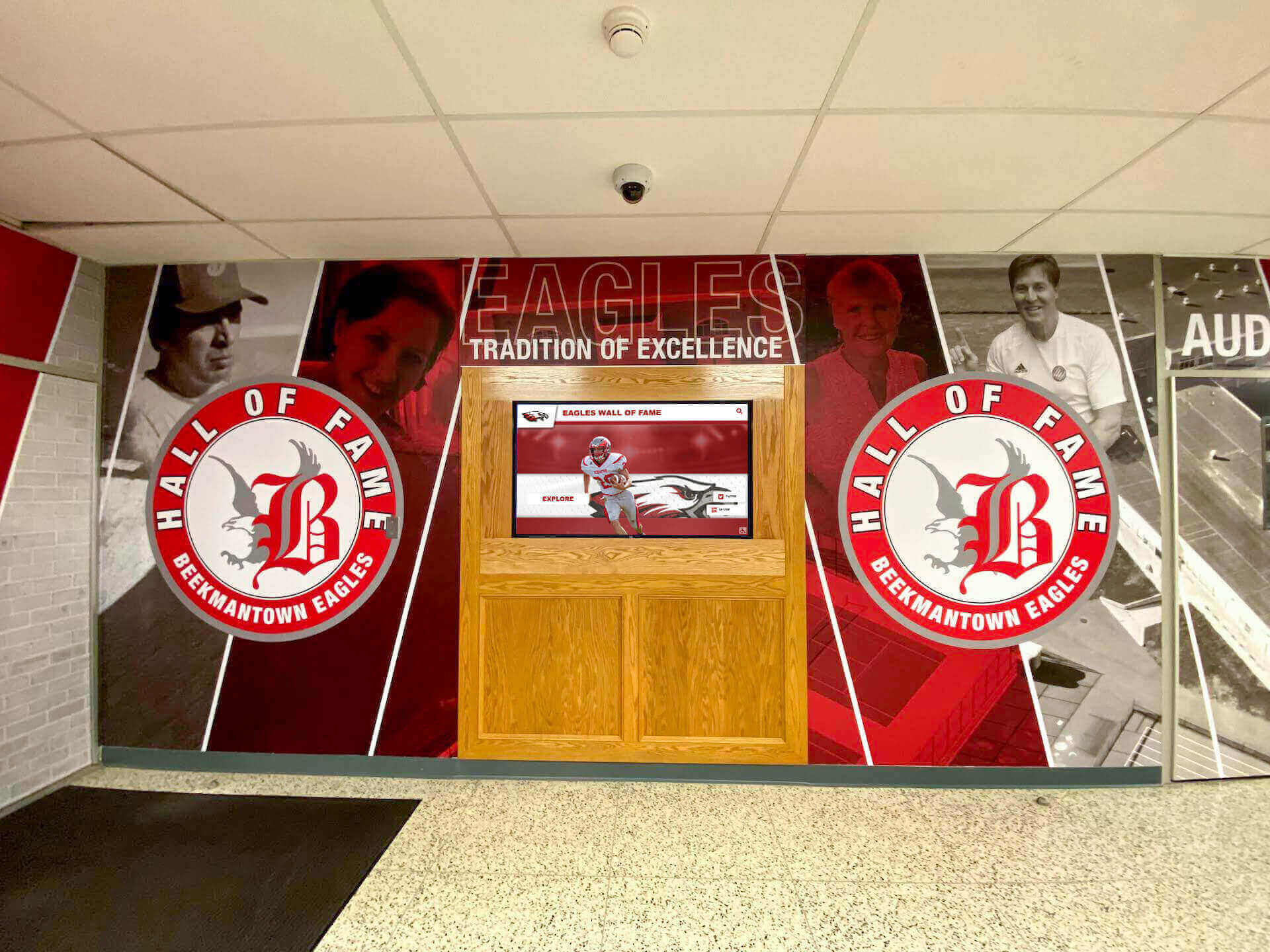
Premium installations integrate digital displays with architectural elements and custom branding creating cohesive recognition environments
Experience Layout Design in Turnkey Packages
Effective recognition displays require thoughtful interface design—an often-overlooked turnkey component significantly affecting visitor engagement quality.
Standard Template Layouts
Entry and mid-range turnkey packages typically utilize proven template structures:
Hero Zone and Institutional Branding
- School logo and colors occupy top 15% of screen establishing immediate institutional connection
- Display title (“Athletic Hall of Fame,” “Wall of Champions”) provides clear context
- Optional rotating featured athlete spotlight draws attention to compelling content
- Clean design avoiding clutter while communicating professionalism
Primary Navigation Architecture
- Prominent search bar enabling name-based discovery
- Category browsing by sport, decade, or achievement type
- Featured collections highlighting state champions or record holders
- Touch-friendly button sizing (minimum 44x44 pixels) preventing mis-selection
Content Display Zone
- Grid-based card layouts showing 6-12 athletes simultaneously with photos and key achievements
- List views providing scrollable directories with sort options
- Detail pages displaying comprehensive profiles when visitors select specific honorees
- Smooth transitions between views maintaining engagement
Footer and Utility Areas
- Social sharing options via QR codes
- Return to home navigation
- Optional sponsor acknowledgment zones when appropriate
Standard templates prove effective for most schools—refined through hundreds of implementations across diverse institutions.
Custom Design Approaches
Premium packages enable purpose-designed interfaces:
Environmental Integration
- Background imagery featuring school facilities and architecture
- Motion graphics incorporating school mascots and athletics action
- Color palettes precisely matching institutional brand guidelines
- Typography reflecting school personality and traditions
Specialized Content Modules
- Record board integrations showing current school records
- Championship banner recreations displaying title history
- Video highlight showcases featuring game footage
- Timeline visualizations showing program evolution
Advanced Interactive Elements
- Multi-touch gestures enabling grouped browsing
- Animated transitions guiding attention and confirming interactions
- Accessibility modes with high-contrast options and screen reader support
- Idle attraction loops drawing visitor attention from distances
Custom design proves worthwhile primarily for schools with sophisticated brand standards, unique architectural contexts requiring specialized integration, or distinctive recognition needs not addressed by standard templates.
Comprehensive resources on touchscreen user experience design explore interface principles affecting engagement quality across recognition applications.
Accessibility Compliance in Turnkey Designs
All turnkey packages should include ADA WCAG 2.1 AA compliant designs:
Visual Accessibility Requirements
- Text contrast ratios minimum 4.5:1 for body text, 3:1 for large headings
- Text scaling supporting enlargement without horizontal scrolling
- Color-independent information presentation (not relying solely on color to communicate)
- Alternative text for images supporting screen readers
Physical Accessibility Standards
- Display mounting heights placing primary controls 15-48 inches from floor for wheelchair accessibility
- Touch targets sized adequately with sufficient spacing
- Kiosk designs providing knee and toe clearance when applicable
- Tilt angles accommodating both standing and seated users
Cognitive Accessibility Design
- Clear, simple navigation with consistent patterns
- Plain language avoiding jargon
- Minimal steps for common tasks
- Obvious return navigation enabling error recovery
Turnkey providers should demonstrate accessibility compliance rather than requiring schools to audit independently—verified compliance included in comprehensive packages protects schools from potential accessibility complaints.

ADA-compliant installations ensure all community members access recognition content regardless of physical ability
Evaluating Turnkey Proposals and Vendor Selection
With multiple providers offering turnkey packages at similar price points, careful evaluation identifies which delivers best value.
Essential Questions for Turnkey Providers
About Content Setup Services
- How many historical profiles are included in quoted content setup?
- What photo scanning services are included versus charged separately?
- Do you provide on-site scanning or require shipping materials?
- What’s the process for collecting biographical information from our archives?
- How long does content setup typically take from providing materials to launch?
About Training Programs
- What training format is included—on-site, virtual, or video tutorials?
- How many staff members can participate in training sessions?
- Are training sessions recorded for future reference?
- What ongoing training resources remain available after initial sessions?
- How do you handle training new staff members hired after initial implementation?
About Ongoing Support
- What support duration is included in quoted turnkey price?
- What support channels are available—email, phone, chat?
- What are your response time commitments for various priority levels?
- What happens if we have urgent issues during high-visibility events?
- What are ongoing support costs after initial included period expires?
About Total Cost Transparency
- What is the complete first-year cost including everything needed for launch?
- What are the ongoing annual costs for software, support, and any other recurring fees?
- Are there any additional costs for content storage, user accounts, or feature access?
- What would expanding to additional displays cost in future years?
- What costs might we encounter that aren’t included in this proposal?
Vendors comfortable with their offerings answer these questions thoroughly and transparently—while vague responses suggest potential hidden costs or service limitations.
Red Flags in Turnkey Proposals
Certain proposal characteristics warrant additional scrutiny:
Unclear Service Definitions
- “Content setup assistance” without specifying how many profiles or what vendor actually does
- “Training provided” without clarifying format, duration, or participant limits
- “Ongoing support” without defining channels, response times, or included duration
Artificially Low Hardware Pricing
- Display costs significantly below market suggesting consumer-grade rather than commercial equipment
- Unusually cheap computers likely lacking specifications for smooth multimedia performance
- Basic mounting hardware requiring separate installation contractor coordination
Software Licensing Ambiguity
- Unclear whether ongoing subscriptions required and at what cost
- Vague feature descriptions making year-one versus future-year capabilities unclear
- Perpetual licenses with expensive mandatory annual “support” that’s actually required software access
Limited Reference Portfolio
- Inability to provide multiple references from schools with comparable implementations
- References from very different institution types (corporations rather than schools)
- Recent market entry without proven track record
Trust evaluation instincts—if proposals feel unclear or vendors avoid direct answers, problems likely worsen after contracts sign.
Comparing Proposals Systematically
Create structured evaluation comparing all proposals:
Key Comparison Factors
- Total first-year cost including everything needed for operational display
- Projected ongoing annual costs for years 2-5
- Content setup volume included (number of profiles)
- Training format and duration included
- Support channels and duration included
- Display size and quality specifications
- Software feature completeness for recognition needs
- Reference quality from similar schools
- Implementation timeline from contract to launch
Weight factors based on institutional priorities—some schools prioritize lowest cost, others emphasize maximum service inclusion, while others focus on software features or vendor experience.
Schools implementing digital recognition buying strategies report systematic evaluation frameworks identifying optimal value proposals that might not appear cheapest initially but deliver superior results long-term.
Alternative Approaches: Turnkey vs. Piecemeal Implementation
While turnkey packages dominate school digital hall of fame implementations, alternative approaches merit consideration.
Self-Managed Implementation
Schools with significant IT resources occasionally pursue independent coordination:
Potential Advantages
- Component-level purchasing potentially reduces costs 10-20% compared to turnkey markup
- Complete control over vendor selection for each component
- Flexibility timing different project phases based on budget availability
Realistic Challenges
- Requires substantial internal project management time (40-80 hours)
- Compatibility verification responsibilities fall entirely on school
- No single vendor accountability when problems arise
- Content digitization and population still requires substantial effort
- Training and support entirely self-sourced or purchased separately
Self-managed approaches rarely save schools money when accounting for internal staff time required—and dramatically increase risk of compatibility issues, timeline delays, or underwhelming results from inadequate planning.
Hybrid Approaches
Some schools split turnkey components strategically:
Hardware Independent, Software Turnkey
- Schools purchase and install displays and computers independently
- Contract turnkey provider only for software licensing, content setup, and training
- Reduces costs 15-25% while maintaining service benefits for most complex components
Basic Turnkey, Enhanced Content Separately
- Purchase basic turnkey package with minimal content setup
- Contract separate digitization service or assign internal staff for comprehensive historical population
- Spreads costs across multiple budget years while ensuring functional launch quickly
Hybrid approaches work well for schools with specific capabilities (installation contractors on staff, existing digitized photo archives) while lacking others (content management expertise, software selection knowledge).
Multi-Display Volume Considerations
Schools implementing multiple displays gain negotiating leverage:
Typical Volume Pricing
- 2-3 displays: 5-10% discount from single-display pricing
- 4-6 displays: 10-18% discount as project efficiencies increase
- 7+ displays: 15-25% discount plus potentially enhanced service inclusion
Volume pricing varies by vendor—some offer standard published discount structures while others negotiate project-specifically.
Schools planning multi-phase installations across several years should inquire whether vendors offer consistent pricing honoring initial-phase rates for subsequent additions—protecting against price increases and ensuring consistent configurations.

Many schools integrate digital displays with existing traditional recognition creating comprehensive achievement celebration spaces
Budgeting Strategies and Funding Approaches
Understanding funding options helps schools afford comprehensive turnkey packages delivering optimal results.
Operating vs. Capital Budget Allocation
Turnkey packages span budget categories:
Capital Budget Appropriate Components
- Hardware equipment with multi-year useful life
- Professional installation creating permanent fixtures
- Custom kiosk enclosures representing facility improvements
Operating Budget Appropriate Components
- Software licensing and subscriptions
- Content setup services
- Training programs
- Ongoing support contracts
Some schools split turnkey packages across budget types—capital funding for hardware/installation, operating funds for software/services—enabling project approval when either budget alone proves insufficient.
Alternative Funding Sources
Beyond general operating budgets, schools often fund recognition displays through:
Booster Club Partnerships
- Athletic booster organizations funding displays benefiting sports recognition
- Typically covers 50-100% of costs through fundraising campaigns or accumulated funds
- Ensures community investment in recognition programs
Donor-Funded Recognition
- Major donors funding recognition displays as gifts
- Often includes display dedication plaques acknowledging benefactor support
- Particularly common for academic recognition or comprehensive halls of fame
Capital Campaign Integration
- Displays funded as components of larger facility renovation or construction projects
- Recognition functionality acknowledges campaign donors directly through donor wall features
- Spreads costs across comprehensive fundraising initiatives
Grant Opportunities
- Technology grants supporting educational technology investments
- Community foundation grants for institutional improvement projects
- Alumni association grants benefiting graduate engagement
Lease or Financing Options
- Some vendors offer 24-48 month payment plans
- Monthly payments of $400-1,200 depending on package size
- Enables implementation without full upfront capital availability
Resources on booster club fundraising strategies provide frameworks for community-supported recognition display funding.
Conclusion: Investing in Comprehensive Recognition Solutions
Turnkey digital hall of fame packages deliver complete recognition systems through integrated hardware, software, installation, content setup, training, and support—eliminating the complexity, coordination burden, and compatibility risks inherent in piecemeal implementations. While turnkey pricing appears higher initially than hardware-only costs, comprehensive packages prove cost-effective when accounting for internal staff time, avoided coordination challenges, and accelerated timelines to successful launches.
Schools evaluating turnkey proposals should focus on total value delivered rather than lowest initial price. The least expensive proposal often omits critical services like comprehensive content setup, thorough training, or adequate ongoing support—leading to underwhelming implementations requiring expensive remediation or leaving displays underutilized because staff lack confidence managing content.
Get Complete Turnkey Pricing
Discover exactly what comprehensive digital hall of fame packages cost for your school including hardware, software, installation, content setup, and training. Rocket Alumni Solutions provides transparent turnkey pricing with no hidden fees or surprise costs.
Request Detailed ProposalProviders like Rocket Alumni Solutions, Touchhalloffame.us, Halloffamewall.com, Touchwall.us, and Chasemckee.com offer varying turnkey package options accommodating different school sizes, budget levels, and service requirements. The optimal choice depends on specific institutional needs—small schools with limited budgets may find entry-level packages perfectly adequate, while larger institutions with extensive historical content benefit from premium packages including comprehensive digitization and setup services.
The most successful turnkey implementations share common characteristics: they start with realistic budget expectations understanding that quality comprehensive solutions require appropriate investment, select vendors demonstrating genuine education sector experience through verifiable school references, prioritize transparent pricing avoiding hidden fees or unclear service definitions, and commit to initial content preparation enabling strong launches showcasing recognition program value immediately.
Whether implementing athletic recognition celebrating sports excellence, academic displays honoring scholarly achievement, comprehensive halls of fame spanning all student accomplishments, or donor recognition acknowledging community support, turnkey packages provide the most reliable path to successful digital recognition display launches for schools lacking extensive internal technical resources or project management capacity.
Ready to explore comprehensive turnkey options? Learn more about complete recognition display solutions, discover content setup best practices, explore training program approaches, and understand vendor evaluation frameworks ensuring your school selects turnkey packages delivering exceptional long-term value while celebrating achievement through purpose-built interactive technology designed specifically for educational recognition excellence.































