




Digital signage screens have transformed how organizations communicate with audiences—from schools displaying student achievements and campus information to businesses showcasing products and services. Yet choosing the right screen technology represents one of the most critical decisions that determines whether displays deliver exceptional engagement or become expensive disappointments that fail to meet expectations.
The digital signage display landscape in 2025 offers diverse technologies serving different applications, environments, and budgets. LCD screens provide cost-effective solutions for controlled indoor environments. LED displays deliver superior brightness for outdoor installations and high-ambient-light locations. OLED technology creates stunning visual experiences with deep blacks and incredible contrast. Interactive touchscreens enable engagement impossible with passive displays. And video walls create dramatic large-format presentations that command attention.
This comprehensive guide explores every major screen type used for digital signage, comparing advantages, limitations, ideal applications, and critical selection factors. You’ll discover which display technologies best serve specific environments and purposes, understand total cost of ownership beyond initial purchase prices, and learn practical frameworks for evaluating options that deliver lasting value rather than buyer’s remorse.
Organizations that invest time understanding screen technology fundamentals before purchasing displays report satisfaction rates exceeding 85 percent with their digital signage implementations. Those who select screens based solely on price or vendor recommendations experience frustration rates above 60 percent—eventually replacing systems within 2-3 years when displays prove inadequate for intended applications. The difference lies in matching technology capabilities to actual requirements rather than assuming all digital screens serve interchangeable functions.

Modern digital signage encompasses diverse screen technologies—from basic LCD displays to sophisticated interactive touchscreens serving varied applications
Understanding Digital Signage Display Technology Fundamentals
Before exploring specific screen types, understanding fundamental display technology principles helps organizations make informed decisions aligned with their actual needs rather than marketing claims.
How Digital Displays Create Images
All digital screens share common principles for creating visual content, though implementation varies dramatically across technologies:
Pixel-Based Image Formation
Digital displays divide screen area into thousands or millions of discrete picture elements (pixels), each capable of displaying specific colors. Full HD displays contain 1,920 x 1,080 pixels (approximately 2.1 million total), while 4K Ultra HD screens feature 3,840 x 2,160 pixels (roughly 8.3 million). Higher pixel counts enable sharper images and text, particularly important for large displays or close viewing distances.
Each pixel contains subpixels typically arranged in red, green, and blue (RGB) configurations. By controlling individual subpixel intensity, displays create millions of distinct colors through additive color mixing—the foundation of all digital image reproduction from smartphones to massive stadium video boards.
Brightness and Backlight Systems
Display brightness measures in nits (candelas per square meter), with higher values enabling visibility in brighter ambient lighting. Indoor digital signage typically requires 300-500 nits for office or retail environments, while outdoor displays demand 2,500-5,000+ nits to remain visible in direct sunlight. Consumer TVs typically deliver 200-400 nits—adequate for living rooms but insufficient for many commercial applications.
Traditional LCD displays require separate backlight systems illuminating liquid crystal layers that control pixel colors. LED displays use light-emitting diodes directly creating visible light without separate backlights. OLED technology features self-illuminating pixels eliminating backlights entirely. These fundamental differences create distinct performance characteristics affecting suitability for various digital signage applications.
Commercial Displays vs. Consumer TVs: Critical Differences
Many organizations consider consumer televisions for digital signage to save money, but these devices lack capabilities essential for commercial deployments:
Operating Hours and Durability
Consumer TVs design for residential use assumes 4-6 hours daily operation in climate-controlled environments. Commercial displays engineer for 16-24 hours daily operation, supporting continuous usage patterns common in business, retail, and institutional settings. Extended operation with consumer displays results in premature component failures, screen uniformity problems, and expensive replacements within 18-24 months.
Commercial displays feature enhanced cooling systems dissipating heat during extended operation, ruggedized components tolerating temperature fluctuations and continuous use, commercial-grade panels rated for 50,000-100,000+ operating hours, and protective glass resistant to damage in public spaces. These engineering differences justify higher initial costs through dramatically extended operational lifespans.
Warranty Coverage and Support
Consumer TV warranties typically cover 1 year for residential use and often exclude commercial applications entirely. Manufacturers void consumer warranties when displays operate in business environments. Commercial display warranties provide 3-5 year coverage designed for business use, on-site service options minimizing downtime, advance replacement programs ensuring business continuity, and technical support teams understanding commercial deployment challenges.
For organizations implementing interactive touchscreen software for recognition displays or information kiosks, commercial-grade screens represent essential foundations preventing costly premature failures.

Commercial-grade displays provide reliable performance for institutional applications requiring extended daily operation and multi-year lifespans
LCD Displays: Versatile Workhorses for Indoor Digital Signage
Liquid Crystal Display (LCD) technology represents the most common screen type for indoor digital signage, offering excellent balance between image quality, cost-effectiveness, and proven reliability.
How LCD Technology Works
LCD screens combine several layers creating visible images through light manipulation:
LCD Structure and Components
LCD displays start with LED backlight panels providing illumination through entire screen area. Liquid crystal layers contain molecules that rotate when electrical current applies, controlling how much backlight passes through each pixel location. Color filters separate light into red, green, and blue subpixels creating full-color images. And front polarizing films ensure optimal viewing angles and contrast.
This layered approach delivers excellent image quality for most digital signage applications, though backlight requirements create limitations compared to self-illuminating technologies.
Advantages of LCD Screens for Digital Signage
LCD displays dominate indoor digital signage markets because they deliver multiple benefits:
Cost-Effectiveness and Availability
LCD manufacturing maturity creates excellent value propositions. Large-scale production drives down costs compared to newer technologies. Wide availability across numerous manufacturers ensures competitive pricing and diverse options. Proven technology reduces implementation risks through decades of commercial deployment experience. And mature supply chains support rapid replacement if failures occur.
Many schools implementing digital donor walls or recognition displays choose LCD technology for reliable performance at accessible price points.
Image Quality and Resolution Options
Modern LCD displays deliver impressive visual performance: full HD (1920x1080) and 4K (3840x2160) resolutions create sharp, detailed images and text. Wide color gamut support enables vibrant, accurate color reproduction. High refresh rates (60Hz-120Hz) provide smooth motion for video content. And anti-glare coatings reduce reflections improving readability in varied lighting conditions.
Size Variety and Configuration Flexibility
LCD commercial displays span sizes from 32" through 98" diagonal measurements, accommodating diverse space requirements and viewing distances. Portrait and landscape mounting orientations serve varied content layouts. Thin bezels enable video wall configurations creating large seamless displays. And both wall-mount and freestanding kiosk installations provide deployment flexibility.
Limitations to Consider with LCD Technology
Despite numerous advantages, LCD displays present certain constraints:
Brightness Limitations for High-Ambient-Light Environments
Standard LCD displays typically deliver 300-500 nits brightness—adequate for offices, hallways, and indoor retail but potentially insufficient for window displays, outdoor-facing installations, or areas with significant natural light. High-bright LCD variants offer 700-2,500 nits but cost substantially more and may not match LED outdoor performance.
Backlight Uniformity and Black Level Performance
LCD backlights illuminate entire screens continuously, creating several challenges. True black reproduction proves impossible since backlight always emits some light even when pixels should display black. Backlight bleeding can occur around screen edges where light escapes beyond intended areas. And long-term use may create uneven backlight aging causing brightness inconsistencies across screen areas.
Viewing Angle Considerations
Traditional LCD technology experiences color shift and contrast degradation when viewed from sharp angles. Modern IPS (In-Plane Switching) LCD panels dramatically improve viewing angles (typically 178 degrees horizontal and vertical), but some performance degradation remains compared to technologies like OLED offering consistent appearance from any angle.
Ideal Applications for LCD Digital Signage
LCD displays excel in specific environments and use cases:
Indoor Institutional and Corporate Settings
Educational facilities deploying school historical timeline displays benefit from LCD reliability and cost-effectiveness. Corporate lobbies showcasing company information and recognition leverage LCD image quality. Healthcare facilities requiring reliable patient information systems choose proven LCD technology. And government buildings implementing wayfinding and communication displays rely on LCD commercial durability.
Retail Environments with Controlled Lighting
Indoor shopping centers utilize LCD displays for directories and promotional content. Restaurants implement LCD menu boards in dining areas away from windows. Banks deploy LCD screens for queue management and financial information. And service businesses showcase offerings through LCD digital signage in reception areas.
Content Requiring High Detail and Resolution
Applications demanding text clarity and image detail favor LCD displays. Recognition installations showing detailed profiles and biographical information benefit from LCD resolution. Interactive wayfinding systems requiring map clarity leverage LCD sharpness. And informational displays presenting schedules, data visualizations, or detailed graphics utilize LCD capabilities.
Schools implementing comprehensive honor roll digital recognition displays commonly choose LCD technology for excellent text clarity at accessible pricing.

LCD displays provide reliable performance for educational recognition applications requiring excellent text clarity and image detail
LED Displays: Superior Brightness and Outdoor Performance
LED (Light Emitting Diode) display technology serves applications demanding exceptional brightness, outdoor durability, or extremely large display formats impossible with traditional LCD screens.
Understanding LED Display Technology
LED displays differ fundamentally from LCD screens despite similar terminology:
Direct-View LED vs. LCD-LED Confusion
Important distinction: “LED TV” marketing refers to LCD displays with LED backlights—not true LED display technology. Direct-view LED (DVLED) displays use discrete LEDs directly creating visible images without liquid crystal layers or backlights. Each pixel consists of small LED modules containing red, green, and blue diodes generating light independently.
This self-emissive approach enables brightness levels, contrast ratios, and configuration flexibility impossible with traditional LCD technology—though at significantly higher costs per square foot.
Pixel Pitch and Viewing Distance Relationships
LED displays specify resolution through pixel pitch—the distance in millimeters between LED module centers. Smaller pixel pitch creates higher resolution enabling closer viewing distances. Common pixel pitches include:
- 10mm-16mm pitch: Outdoor billboards and stadium displays viewed from 30+ feet
- 2.5mm-6mm pitch: Indoor video walls for conference rooms and lobbies (10-20 feet viewing)
- 1.2mm-2mm pitch: Fine-pitch LED for close viewing applications (6-10 feet)
- Sub-1mm pitch: Ultra-fine-pitch LED approaching LCD resolution (3-6 feet viewing)
Appropriate pixel pitch selection based on primary viewing distance determines whether LED displays deliver acceptable image quality or appear grainy and pixelated.
LED Display Advantages for Digital Signage
LED technology provides unique capabilities justifying premium pricing for appropriate applications:
Exceptional Brightness for Outdoor and High-Light Environments
LED displays commonly deliver 2,500-10,000+ nits brightness—5-20 times brighter than LCD screens. This extraordinary brightness remains visible in direct sunlight and high-ambient-light conditions where LCD displays become unreadable. Automatic brightness sensors adjust output maintaining visibility while conserving energy during lower light conditions. And weather-resistant enclosures protect LED modules from moisture, temperature extremes, and environmental challenges.
Organizations implementing outdoor digital recognition displays benefit from LED visibility impossible with LCD technology in sunlit locations.
Superior Contrast and Black Levels
Self-illuminating LED pixels turn completely off when displaying black, creating infinite contrast ratios and perfect black reproduction. Adjacent bright and dark content areas maintain independent brightness without LCD backlight compromises. And HDR (High Dynamic Range) support enables dramatic contrast enhancing visual impact.
Unlimited Size and Custom Configurations
LED displays tile together creating seamless installations in virtually any size or shape. Rectangular video walls span hundreds of square feet for dramatic impact. Custom shapes wrap columns, follow curved walls, or create unique artistic installations. And modular construction enables field servicing replacing individual modules if failures occur without replacing entire displays.
LED Display Limitations and Considerations
LED technology presents challenges tempering enthusiasm for certain applications:
Significantly Higher Initial Costs
Direct-view LED pricing commonly reaches $1,500-$5,000+ per square foot depending on pixel pitch, compared to $50-$200 per square foot for equivalent LCD installations. Small LED installations (under 50 square feet) often cost $75,000-$200,000+ for hardware alone. And fine-pitch LED matching LCD viewing distance capabilities demands premium pricing at technology’s upper boundaries.
Resolution and Image Quality at Close Distances
LED displays excel for viewing from appropriate distances, but reveal individual pixels when viewed too closely. Achieving LCD-equivalent resolution requires extremely fine pixel pitches available only at premium pricing. Color uniformity may vary slightly across large LED installations as individual modules age differently. And image processing quality varies dramatically across LED manufacturers affecting overall visual experience.
Complex Installation and Calibration Requirements
LED video walls demand professional installation expertise ensuring proper module alignment, power distribution, and thermal management. Initial color calibration across all modules creates uniform appearance. Ongoing maintenance includes periodic recalibration as LED modules age. And content requires careful preparation ensuring appropriate resolution and aspect ratios for custom LED configurations.
Optimal LED Display Applications
LED technology serves specific digital signage scenarios justifying premium investments:
Outdoor Digital Signage and Billboards
Large-format outdoor advertising displays utilize LED brightness and weather resistance. Campus message boards and marquees maintain visibility in all lighting conditions. Stadium and arena video boards deliver impact for thousands of spectators. And transportation hubs implement LED displays for schedule and wayfinding information visible in daylight.
High-Brightness Indoor Environments
Retail window displays competing with sunlight require LED visibility. Atriums and lobbies with significant natural light benefit from LED brightness. Large venues and convention centers utilize LED displays visible across expansive spaces. And architectural installations creating design statements leverage LED flexibility.
Large-Format Video Walls
Corporate lobbies creating dramatic visual impact deploy LED video walls. Control rooms and operations centers requiring wall-sized displays utilize LED tiled configurations. Museums and visitor centers implementing immersive exhibits leverage LED scale. And entertainment venues creating atmospheric experiences choose LED installations.
Institutions implementing large-scale athletic hall of fame displays may consider LED technology for dramatic lobby presentations, though many choose LCD for superior cost-effectiveness in indoor controlled environments.
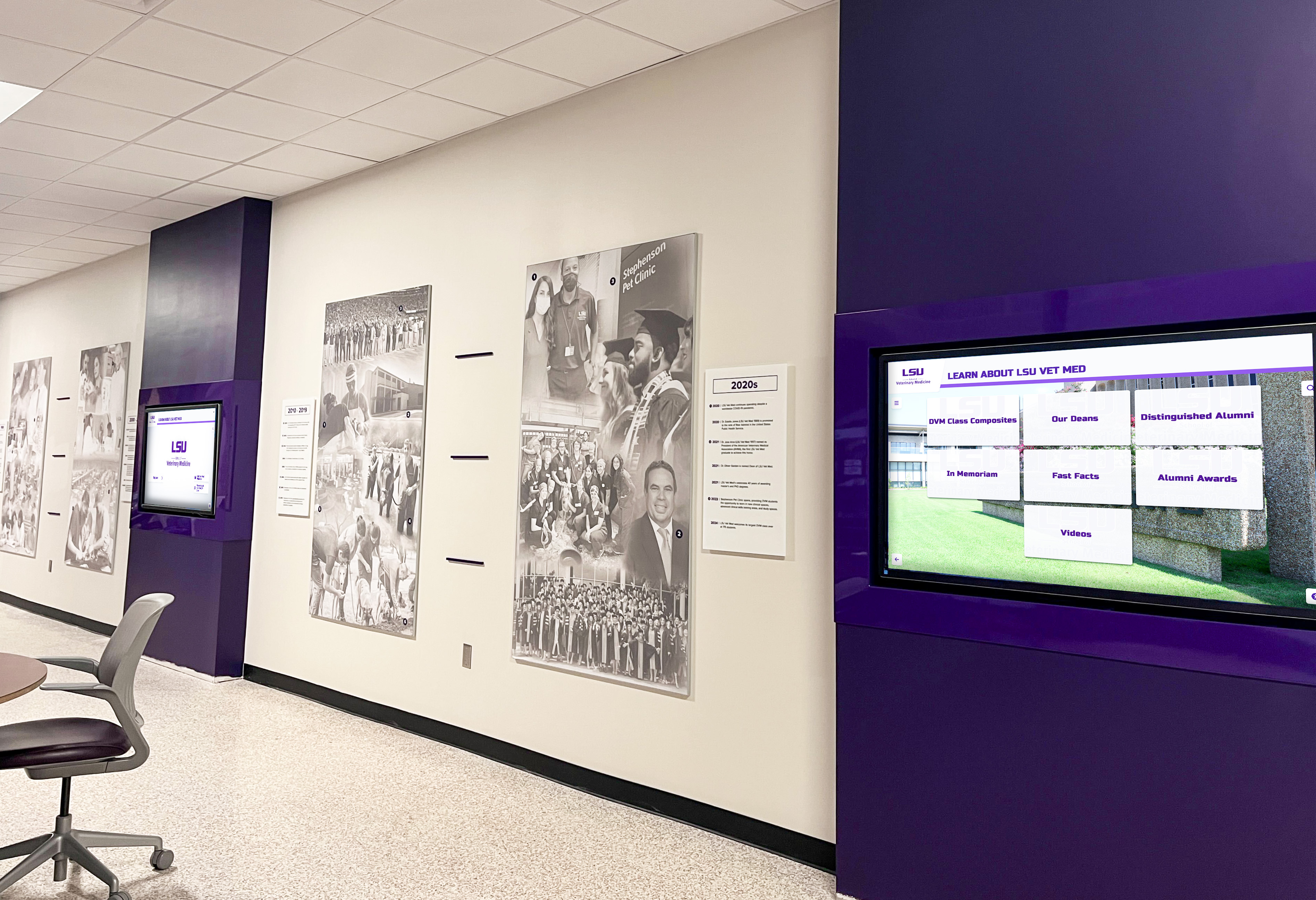
LED display technology enables large-format installations creating dramatic visual impact for institutional recognition and information
OLED Displays: Premium Image Quality for High-End Applications
Organic Light Emitting Diode (OLED) technology represents the cutting edge of display innovation, delivering exceptional image quality that commands premium pricing.
OLED Technology Fundamentals
OLED displays revolutionize image creation through self-emissive organic compounds:
How OLED Screens Work
OLED displays contain organic compounds that emit light when electrical current applies. Each pixel features red, green, and blue organic material layers independently generating visible light without backlights. Transparent substrates allow OLED creation on flexible materials enabling curved displays or transparent applications. And ultra-thin construction (millimeters thick) provides design flexibility impossible with traditional displays.
This approach delivers visual characteristics fundamentally superior to LCD technology in several key dimensions.
OLED Display Advantages
OLED technology provides remarkable capabilities for premium applications:
Perfect Black Levels and Infinite Contrast
OLED pixels turn completely off when displaying black, creating absolute zero light emission. This enables infinite contrast ratios with adjacent bright and dark elements maintaining complete independence. HDR content displays with stunning dynamic range showcasing full creative intent. And low ambient light viewing reveals shadow detail impossible with LCD backlight limitations.
Superior Color Accuracy and Gamut
OLED displays typically cover 100 percent of DCI-P3 color space (cinema standard) and increasingly approach full BT.2020 coverage. Individual pixel control enables precise color reproduction without backlight compromises. And factory calibration commonly achieves Delta-E values under 2 (professional accuracy standard) ensuring colors appear exactly as intended.
Ultra-Thin Profiles and Flexible Form Factors
OLED displays measure mere millimeters thick, enabling elegant ultra-thin installations. Curved OLED panels create distinctive design statements impossible with flat-only LCD or LED. Transparent OLED displays allow see-through applications for retail showcases or museum exhibits. And flexible OLED enables future applications wrapping columns or unconventional surfaces.
Wide Viewing Angles with Consistent Performance
OLED maintains color accuracy, contrast, and brightness from any viewing angle. No color shift occurs when viewing from sharp angles unlike LCD technology. And consistent performance ensures displays appear identical whether viewed straight-on or from extreme angles—critical for public installations where viewers approach from varied positions.
OLED Display Limitations and Concerns
Despite impressive capabilities, OLED technology presents challenges limiting widespread commercial adoption:
Premium Pricing and Limited Availability
OLED manufacturing remains expensive compared to mature LCD production, creating significant cost premiums. Commercial OLED displays commonly cost 3-5 times equivalent LCD solutions. Limited manufacturer options (primarily LG for large commercial OLED) restrict competition and pricing pressure. And size availability typically caps at 65"-88" diagonal (compared to 98"+ LCD and unlimited LED) limiting large-format applications.
Burn-In Risk for Static Content
Prolonged display of static elements (logos, navigation bars, persistent interface elements) can cause permanent image retention or “burn-in” where ghost images remain visible when displaying different content. This risk concerns digital signage applications showing consistent branding, menus, or interface elements for extended periods. Mitigation strategies include pixel shifting, logo dimming, and screensavers—but some residual risk remains.
Shorter Lifespan Compared to LCD
OLED organic compounds degrade over time, particularly blue subpixels which fade faster creating color shift toward warmer tones as displays age. Manufacturer ratings commonly specify 30,000-50,000 hours half-life (time until brightness reduces 50 percent) compared to 50,000-100,000+ hours for commercial LCD displays. Organizations should plan for potential replacement within 5-7 years of continuous operation rather than 8-10+ years common with quality LCD commercial displays.
Ideal OLED Applications for Digital Signage
OLED premium pricing limits deployment to applications justifying superior image quality:
Luxury Retail and High-End Hospitality
Premium brand boutiques showcase products through OLED displays matching luxury positioning. High-end hotels deploy OLED screens in lobbies and suites creating sophisticated ambiance. Automotive showrooms utilize OLED technology reflecting vehicle premium positioning. And jewelry or watch retailers leverage OLED image quality presenting intricate product details.
Museum and Gallery Exhibits
Art museums require color accuracy displaying digital artwork or exhibit information. Historical exhibits utilize OLED perfect blacks creating dramatic presentations. Interactive exhibits leverage OLED thin profiles for elegant installations. And cultural institutions position OLED displays as premium experiences matching collection quality.
Corporate Executive Spaces and Boardrooms
C-suite offices and executive areas warrant OLED premium positioning. Boardrooms implement OLED displays for critical presentations demanding excellent image quality. Corporate lobbies create first impressions through OLED visual impact. And innovation centers showcase cutting-edge technology through OLED deployments.
Video Production and Broadcast Environments
Television studios utilize OLED reference monitors ensuring accurate content evaluation. Production facilities require OLED color accuracy for critical color grading. Broadcast operations leverage OLED image quality for on-air graphics and presentations. And media companies implement OLED displays demonstrating technical excellence.
Most educational institutions and organizations implementing recognition displays find LCD technology provides better value propositions than OLED premium pricing for typical indoor institutional applications.
Interactive Touchscreen Displays: Engaging Audiences Through Direct Interaction
Interactive touchscreen technology transforms passive viewing into active engagement—essential for applications where users need to search, explore, or discover content matching personal interests.
Touchscreen Technology Types
Multiple technologies enable touch interaction, each with distinct characteristics:
Capacitive Touch Technology
Capacitive touchscreens detect electrical conductivity from human touch, enabling responsive multi-touch interaction. Glass surfaces provide smooth, responsive feel matching smartphone experiences. Multi-touch support enables gestures like pinch-to-zoom and two-finger scrolling. And sealed construction resists dust and moisture for reliable public deployment.
Capacitive represents the gold standard for public interactive displays, delivering user experiences users expect based on mobile device familiarity.

Interactive touchscreen displays enable engagement impossible with passive digital signage, particularly for recognition and information discovery applications
Infrared Touch Technology
Infrared touch systems create invisible light grids above display surfaces, detecting touch when fingers interrupt beams. Any object (fingers, styluses, gloved hands) triggers touch response unlike capacitive requiring conductive touch. Large format support extends beyond typical capacitive size limits. However, infrared systems require bezels housing emitters and receivers creating less elegant aesthetics than edge-to-edge glass designs.
Interactive Display Advantages for Digital Signage
Touchscreen capabilities enable applications impossible with passive displays:
User-Directed Content Discovery
Visitors search for specific individuals, locations, or information matching personal interests rather than passively viewing predetermined content sequences. Filtering by categories, dates, or attributes narrows large content collections to relevant subsets. Deep content hierarchies reveal detail on-demand without cluttering primary interfaces. And personalized experiences create engagement passive displays cannot match.
Schools implementing interactive alumni directories enable graduates to search for themselves and classmates, creating nostalgic engagement through personal content discovery.
Enhanced Engagement and Dwell Time
Interactive displays command attention generating 3-5 times longer engagement than passive digital signage. Users invest time exploring content matching interests rather than glancing briefly at predetermined messages. Multiple simultaneous users can engage independently with large-format touchscreens. And memorable interactive experiences create positive associations with organizations and brands.
Data Collection and Analytics
Touch interactions reveal what content users find most interesting. Search queries demonstrate what visitors seek. Navigation patterns show how users explore information hierarchies. Engagement metrics quantify which content generates sustained interaction. And analytics inform continuous optimization improving experiences over time.
Organizations deploying interactive touchscreen software gain valuable insights about audience interests and behavior impossible with passive displays.
Interactive Touchscreen Limitations
Touch-enabled displays present considerations beyond passive signage:
Higher Initial Costs
Interactive displays typically cost 1.5-3 times equivalent non-touch screens. Specialized computing requirements for responsive touch interaction add expense beyond display hardware. Professional interactive software development or licensing increases total investment. And ruggedized enclosures protecting public touchscreens from abuse add costs compared to simple wall-mounted passive displays.
Content Development Complexity
Interactive experiences require professional interface design ensuring intuitive navigation. Content organization must support multiple discovery pathways (search, browse, filter). Quality assurance testing verifies all interactions function correctly. And ongoing content management proves more complex than simple slideshow updates for passive displays.
Maintenance and Cleaning Requirements
Touchscreens accumulate fingerprints requiring regular cleaning maintaining professional appearance. High-traffic public installations need daily attention unlike passive displays requiring only weekly dusting. Cleaning procedures must avoid damaging touch-sensitive surfaces. And consumable screen protectors may require periodic replacement on heavily-used installations.
Optimal Interactive Touchscreen Applications
Touch interaction serves specific digital signage scenarios:
Wayfinding and Directory Systems
Campus maps enable visitors to search destinations and view navigation paths. Building directories allow guests to locate offices, departments, or individuals. Transportation hubs help travelers find gates, platforms, or services. And retail malls direct shoppers to specific stores or amenities.
Recognition and Hall of Fame Displays
Athletic halls of fame enable fans to search legendary athletes and teams. Alumni recognition systems help graduates find themselves and classmates. Employee recognition showcases workforce achievements and milestones. And donor walls celebrate philanthropic support with searchable profiles.
Product Information and Retail Kiosks
Retail showrooms provide detailed product specifications and comparisons. Automotive dealerships enable vehicle feature exploration and configuration. Real estate displays showcase available properties with detailed information. And museum exhibits present artifact information and educational content.
Educational and Interpretive Exhibits
Museums implement interactive exhibits enabling visitor-directed learning. Science centers create hands-on digital explorations of concepts. Historical societies present archival materials through searchable interfaces. And cultural institutions showcase collections through interactive discovery experiences.
Solutions like Rocket Alumni Solutions specialize in interactive recognition displays for schools and organizations, providing purpose-built platforms designed specifically for searchable achievement celebration rather than adapted general digital signage software.
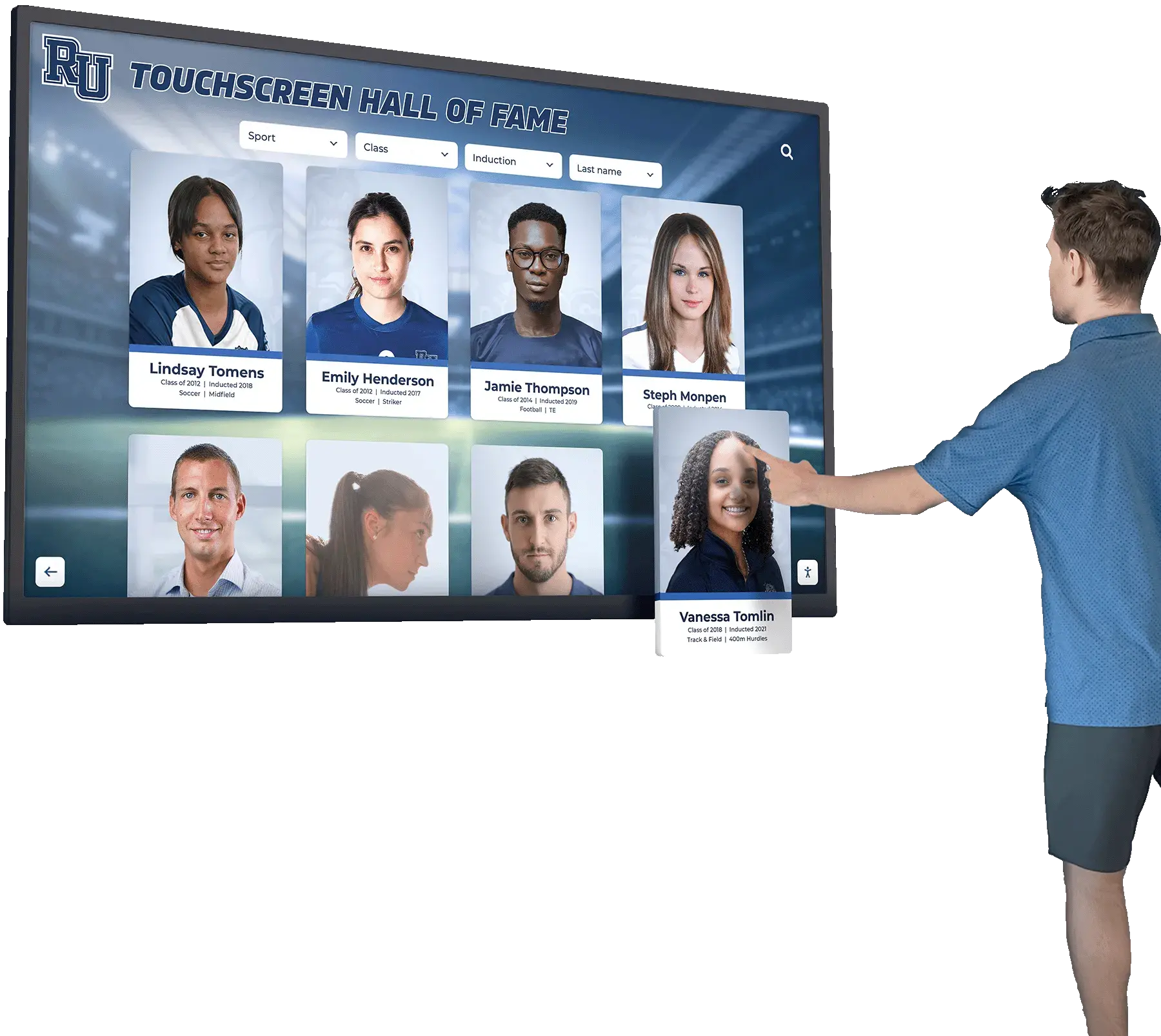
Interactive touchscreens enable personalized content discovery through search and filtering capabilities impossible with passive displays
Video Walls: Creating Large-Format Visual Impact
Video walls combine multiple displays creating seamless large-format presentations commanding attention through sheer scale and visual drama.
Video Wall Configuration Types
Organizations implement video walls using different technologies and arrangements:
LCD Video Wall Configurations
Ultra-narrow bezel LCD displays tile together with minimal gaps between screens. Modern commercial LCD video walls feature bezels measuring 0.9mm-3.5mm creating relatively seamless appearance when properly aligned. Matrix configurations arrange displays in rectangular grids (2x2, 3x3, 4x4, or larger) creating proportional large-format screens. Custom layouts enable non-rectangular arrangements matching architectural requirements. And video wall controllers process content distributing output across multiple displays creating single unified image.
Direct-View LED Video Walls
Cabinet-based LED systems mount modular LED panels creating truly seamless displays without visible bezels. Flexible configurations accommodate any size or aspect ratio including curved installations. Front-service modules enable maintenance without rear access—ideal for wall-mounted installations. And mounting systems range from permanent wall installations to temporary truss-mounted touring configurations.
Video Wall Advantages
Large-format displays deliver impact impossible with single screens:
Dramatic Scale and Visual Presence
Large video walls dominate spaces creating impossible-to-ignore visual anchors. Massive content presentation enables legibility from extreme distances. Multiple content zones display different information simultaneously across video wall areas. And dynamic content creates movement and interest commanding attention.
Flexibility and Scalability
Start with smaller configurations expanding as needs and budgets allow. Modular designs enable custom sizes matching available spaces. Failed individual displays or modules replace without replacing entire video walls. And content layouts adjust utilizing available screen real estate creatively.
Enhanced Collaboration and Presentation
Corporate environments display multiple content sources simultaneously during meetings. Control rooms present numerous data feeds providing comprehensive operational awareness. Digital command centers visualize complex information across large-format displays. And video production environments review content at scale revealing details invisible on smaller monitors.
Video Wall Limitations and Considerations
Large-format installations present unique challenges:
Significant Infrastructure Requirements
Video walls demand substantial mounting systems supporting combined display weight (hundreds of pounds). Adequate electrical power requires dedicated circuits and potentially electrical service upgrades. Computing power must drive multiple displays simultaneously—often requiring specialized video wall processors. And installation complexity increases costs compared to single-display solutions.
Content Creation and Management Complexity
Custom aspect ratios require purpose-specific content creation rather than standard video formats. Video wall controllers add complexity to content management workflows. Resolution requirements scale dramatically—4x4 4K LCD video wall creates 32 million total pixels demanding high-performance content systems. And bezel compensation algorithms adjust content avoiding critical elements appearing across display gaps.
Higher Total Cost of Ownership
Multiple displays multiply costs compared to single-screen installations. Video wall controller hardware and software add $5,000-$50,000+ depending on capabilities and display counts. Installation labor increases proportionally with complexity and display quantities. And potential component failures affect larger portions of displays requiring more frequent service compared to single screens.
Appropriate Video Wall Applications
Large-format displays serve specific scenarios justifying premium investments:
Corporate Lobbies and Reception Areas
Company lobbies create dramatic first impressions through large video wall installations. Brand messaging displays at scale reinforcing corporate identity. Dynamic content showcases company capabilities, products, or achievements. And visitor experiences reflect organizational sophistication and technological leadership.
Retail Flagship Stores and Experience Centers
Premium retail locations create immersive brand experiences through video walls. Product launches utilize large-format displays for dramatic reveals. Seasonal campaigns leverage video wall impact capturing attention. And shopping environments compete for consumer attention through visual spectacle.
Sports Facilities and Entertainment Venues
Athletic facilities showcase team highlights and achievements through large displays. Stadium concourses implement video walls for replays and entertainment. Arena main boards utilize massive LED video walls visible throughout venues. And sports bars create viewing experiences through large-format display configurations.
Control Rooms and Operations Centers
Network operations centers monitor infrastructure across video wall displays. Security command centers view multiple camera feeds simultaneously. Emergency management facilities maintain situational awareness through large-format visualization. And transportation operations coordinate complex systems using video wall information displays.
Most schools and organizations implementing digital recognition displays find single large-format displays (65"-98") provide better value than video wall complexity for typical institutional applications, though premier athletic facilities may justify video wall impact.

Multiple coordinated displays create larger visual presence than single screens while maintaining more manageable costs than true video wall implementations
Specialized Display Types for Unique Applications
Beyond mainstream LCD, LED, OLED, and interactive displays, specialized screen technologies serve niche applications:
E-Paper and E-Ink Displays
Electronic paper displays mimic printed paper appearance using reflected ambient light rather than emitted backlight:
E-Paper Characteristics and Benefits
E-ink displays remain visible in bright sunlight—actually becoming more readable as ambient light increases. Ultra-low power consumption enables battery operation for weeks or months between charges. Paper-like appearance reduces eye strain compared to backlit displays. Static images remain visible with zero power consumption (power only required when changing displayed content). And wide viewing angles maintain readability from any position.
Appropriate E-Paper Applications
Outdoor menu boards and pricing displays benefit from sunlight readability without power-hungry brightness. Transit schedules and wayfinding signage operate on minimal power budgets. Retail shelf labels update electronically without disposable paper waste. And industrial environments utilize rugged e-paper displays in challenging conditions where traditional displays fail.
However, e-paper technology limitations include slow refresh rates inappropriate for video content, limited color reproduction (primarily black/white or limited color palettes), and minimal availability in large formats suitable for prominent digital signage.
Transparent and Mirror Displays
See-through display technologies enable unique applications where display transparency matters:
Transparent OLED and LCD Displays
Transparent displays allow viewing content while maintaining visibility through screens to backgrounds beyond. Retail applications showcase products behind displays while presenting digital information. Museum exhibits overlay digital content on physical artifacts. Architectural installations create distinctive design elements. And automotive applications present head-up displays maintaining forward visibility.
Smart Mirror Displays
Two-way mirror displays appear as traditional mirrors when dark but reveal digital content when backlit pixels activate. Retail fitting rooms present product information and recommendations. Hospitality bathrooms integrate mirrors with weather, news, or schedule information. Fitness facilities display workout data or entertainment. And commercial spaces create distinctive branded experiences through unexpected mirror interactivity.
These specialized displays command premium pricing limiting deployment to applications where transparency features justify significant costs compared to conventional alternatives.
Outdoor-Rated High-Bright Displays
Purpose-built outdoor displays endure environmental challenges impossible for standard commercial screens:
Outdoor Display Requirements
Weather-sealed enclosures achieve IP65/IP66 ratings protecting against rain, dust, and moisture. Temperature regulation through heating and cooling systems maintains operating ranges across seasonal extremes (-30°C to +50°C in many cases). High-brightness panels deliver 2,500-4,000+ nits remaining visible in direct sunlight. Vandal-resistant glass prevents damage from impacts or vandalism. And corrosion-resistant materials withstand humidity and salt air in coastal environments.
Outdoor Digital Signage Applications
Transit shelters display route information and schedules exposed to weather. Campus message boards communicate with students and visitors outdoors. Outdoor menu boards serve drive-through restaurants. Parking facilities provide wayfinding and availability information. And outdoor advertising displays compete for attention in sunlit environments.
Outdoor display pricing commonly reaches 2-4 times equivalent indoor commercial displays, justified only when outdoor installation represents the only viable option for reaching target audiences.
Key Selection Criteria: Matching Display Technology to Requirements
Successful display selection balances multiple factors beyond simple initial pricing:
Environmental Considerations
Ambient Lighting Conditions
Indoor controlled lighting (offices, hallways): LCD displays 300-500 nits provide adequate visibility. High-ambient indoor (atriums, windows): High-bright LCD 700-1,500 nits or LED displays ensure readability. Partial outdoor protection: 1,500-2,500 nit displays handle covered outdoor installations. Full outdoor exposure: 2,500-5,000+ nit LED displays maintain visibility in direct sunlight.
Insufficient brightness creates displays that disappear in ambient light—wasting investments in content and infrastructure supporting unreadable screens.
Temperature and Climate Control
Consumer displays require climate-controlled environments (10-35°C operating ranges). Commercial displays tolerate wider temperature ranges (0-40°C typical). Outdoor displays operate across extreme temperatures (-30 to +50°C). And specialized displays handle humidity, dust, and other environmental challenges beyond typical indoor parameters.
Organizations should verify display environmental ratings match actual installation conditions—consumer or basic commercial displays fail rapidly in challenging environments exceeding rated specifications.
Viewing Distance and Resolution Requirements
Optimal Pixel Pitch for Viewing Distance
Display resolution requirements correlate directly with primary viewing distance. Closer viewing demands higher resolution preventing visible pixelation:
- 3-6 feet: 4K resolution (3840x2160) in 65"-75" displays or fine-pitch LED
- 6-10 feet: Full HD (1920x1080) in 65"-85" displays adequate
- 10-20 feet: Full HD acceptable in displays up to 98" or medium-pitch LED
- 20+ feet: Lower resolution acceptable or larger LED pixel pitch sufficient
Insufficient resolution at primary viewing distance creates grainy, pixelated appearance diminishing professional presentation quality and content effectiveness.
Content Detail and Text Legibility
Applications requiring detailed text (recognition bios, schedules, directories): Prioritize 4K resolution and appropriate viewing distances. Primarily photographic or video content: Full HD often sufficient depending on viewing distance. Wayfinding and directional signage: Large text enables lower resolution at equivalent distances. And artistic installations: Resolution may subordinate to scale, unique form factors, or environmental durability.
Schools implementing academic recognition programs should ensure display resolution supports comfortable text reading at primary viewing distances—typically requiring 4K in displays exceeding 55" diagonal for typical 6-10 foot lobby or hallway viewing.
Budget and Total Cost of Ownership
Initial Investment Considerations
Display hardware costs vary dramatically across technologies: consumer LCD TVs ($300-$1,500 for 55"-75" though inappropriate for commercial use), commercial LCD displays ($1,500-$6,000 for 55"-98"), direct-view LED ($75,000-$300,000+ for video wall installations), OLED displays ($4,000-$15,000 for 55"-88"), and interactive touchscreens ($4,000-$12,000 for 55"-86" capacitive touch).
Supporting infrastructure adds substantial costs beyond display purchases including computing hardware (media players or interactive PCs), mounting systems (wall mounts, floor kiosks, or video wall structures), installation labor, and software platforms for content management and delivery.
Ongoing Operating Expenses
Long-term costs significantly impact total ownership economics: power consumption varies dramatically (LCD most efficient, large LED installations may cost hundreds monthly in electricity), software subscriptions or licensing (typically $500-$3,000 annually), content creation and management labor, maintenance and cleaning supplies, and eventual replacement cycles.
Commercial displays with 7-10 year operational lifespans deliver better long-term value than consumer equipment requiring replacement every 2-3 years despite lower initial pricing. Organizations should calculate total cost across realistic deployment horizons rather than focusing exclusively on upfront purchase prices.
Integration and Interactivity Requirements
Content Management and Update Workflows
Determine who will manage display content and their technical capabilities: in-house technical staff supporting complex systems, non-technical content owners requiring intuitive interfaces, centralized IT management across multiple locations, or cloud-based platforms enabling remote management. Software capabilities must match actual staff expertise—sophisticated systems requiring technical knowledge fail when responsibility falls to communications teams lacking IT backgrounds.
Interactive Functionality Needs
Assess whether passive content display suffices or interactive engagement provides value justifying premium touchscreen investments. Recognition applications enabling search and exploration benefit substantially from interactive capabilities. Informational wayfinding and directories require touch interaction. Product showcases and retail applications leverage interactive exploration. But general messaging, branding, or awareness content may not justify interactive complexity and costs.
Solutions like Rocket Alumni Solutions provide comprehensive platforms integrating hardware recommendations, interactive software, and ongoing support—particularly valuable for organizations implementing athletic recognition systems or school history displays without dedicated IT resources for complex technology integration.

Successful display selection balances technology capabilities with actual requirements, budget realities, and long-term operational sustainability
Installation and Implementation Best Practices
Appropriate display technology represents only part of successful digital signage—proper installation and configuration ensure systems deliver intended value.
Professional Installation vs. DIY Approaches
When Professional Installation Makes Sense
Large displays (75"+) and heavy video walls require expertise safely mounting equipment supporting hundreds of pounds. Interactive touchscreens in public spaces benefit from professional-grade enclosures deterring vandalism and protecting technology investments. Outdoor installations demand weather sealing and environmental protection beyond typical DIY capabilities. And organizations lacking in-house technical expertise avoid frustration and potential damage through professional installation services.
Professional installation commonly costs $1,000-$4,000+ depending on display size, mounting complexity, infrastructure requirements, and geographic location—typically 10-25 percent of display hardware costs.
DIY Installation Considerations
Smaller displays (under 65") with standard wall mounts accommodate confident DIY installation. Simple slideshow digital signage requires minimal technical configuration. Organizations with capable facilities or IT teams possess expertise handling routine installations. And budget-conscious implementations may trade staff time for reduced contractor expenses.
However, DIY approaches should include adequate time for planning, researching proper techniques, and methodical execution. Rushed amateur installations risk damaged equipment, unsafe mounting, or suboptimal results requiring expensive professional correction.
Optimal Placement and Positioning
Location Selection Factors
High-traffic areas maximize visibility and engagement: main entrance lobbies ensure all visitors encounter displays, hallway intersections capture passing audiences without blocking circulation, reception and waiting areas leverage dwell time with captive audiences, and destination areas place content near relevant locations (athletic recognition in fieldhouses, donor walls in development offices).
Avoid locations where environmental conditions challenge displays or technical limitations prevent effective installations: direct sunlight exposure overwhelming LCD brightness, areas lacking electrical power or network connectivity requiring expensive infrastructure extensions, confined spaces preventing comfortable viewing distances, or mounting surfaces inadequate for supporting display weight.
Height and Viewing Angle Optimization
Center displays at appropriate eye level for primary audiences: standing viewing typically positions display centers 55-65 inches from floor, seated viewing lowers center point to 40-50 inches, and accessible viewing ensures wheelchair users can comfortably engage with interactive touchscreens (ADA guidelines recommend maximum 48-inch center height for interactive elements requiring reaching).
Angle displays perpendicular to primary approach paths minimizing glare and optimizing viewing angles. Avoid positions where windows or bright lights reflect in screens creating readability challenges. And ensure adequate clearance preventing viewers from blocking circulation or creating congestion.
Content Strategy and Display Programming
Resolution and Format Optimization
Create content matching native display resolution preventing scaling artifacts: 1920x1080 for Full HD displays, 3840x2160 for 4K screens, and custom resolutions for video walls or unusual aspect ratios. Export video content with appropriate codecs ensuring smooth playback on media player hardware. And optimize file sizes balancing quality against storage and bandwidth limitations.
Visual Design for Digital Signage
Larger text sizes ensure legibility at viewing distances (minimum 24-36pt fonts for body text viewed from 10+ feet). High contrast between text and backgrounds improves readability in varied lighting. Simple layouts avoid cluttered presentations difficult to process during brief viewing windows. And consistent branding creates professional appearance reinforcing institutional identity.
Organizations implementing interactive recognition displays should prioritize intuitive navigation, clear typography, and high-quality photography creating engaging user experiences that encourage extended exploration.
Maintenance and Long-Term Management
Sustainable digital signage requires ongoing attention ensuring displays continue delivering value across multi-year operational lifespans:
Routine Maintenance Requirements
Physical Cleaning and Care
Touchscreens require daily or weekly cleaning removing fingerprints and smudges maintaining professional appearance. Microfiber cloths and appropriate screen cleaning solutions (avoiding harsh chemicals damaging coatings) provide safe effective cleaning. Passive displays need less frequent attention—typically weekly dusting sufficing for indoor installations. And outdoor displays may require monthly comprehensive cleaning removing environmental accumulation.
Technical Monitoring and Updates
Regularly verify displays function correctly with consistent brightness, no dead pixels, and proper color reproduction. Monitor media player operation ensuring content updates deliver as intended. Apply software updates maintaining security and fixing bugs. Test interactive functionality confirming touch response remains accurate and responsive. And review analytics identifying unusual patterns suggesting technical issues.
Planning for Technology Lifecycle
Expected Service Life by Display Type
Commercial LCD displays: 7-10 years typical operational lifespan (50,000-100,000 hours). LED displays: 10-15 years common with proper maintenance. OLED displays: 5-7 years before noticeable degradation (30,000-50,000 hour half-life). Interactive touchscreens: 5-8 years depending on usage intensity and public exposure. And consumer displays inappropriately used commercially: 18-36 months before failures.
Organizations should budget for eventual replacement as displays age rather than treating installations as permanent solutions requiring no future investment.
Technology Obsolescence Considerations
Digital signage technology evolves continuously with improved resolution standards, enhanced connectivity options, refined interactive capabilities, and energy efficiency improvements. While displays may function physically for many years, obsolescence occurs when capabilities fall substantially behind current expectations or content sources incompatible with aging hardware.
Plan technology refreshes every 7-10 years maintaining contemporary functionality, competitive appearance, and reliable operation rather than extending aging installations beyond useful service life through excessive repair investments.
Conclusion: Making Informed Display Technology Decisions
Selecting appropriate screen technology for digital signage applications demands understanding fundamental differences between LCD, LED, OLED, interactive touchscreen, and specialized display technologies. Each offers distinct advantages and limitations, with optimal choices depending on specific environments, applications, viewing distances, interactivity requirements, budget parameters, and long-term operational considerations.
Transform Your Recognition and Communication with Professional Digital Displays
Whether implementing interactive recognition systems, informational displays, or engagement-focused digital signage, choosing appropriate display technology ensures success. Discover how purpose-built solutions deliver superior results for educational institutions and organizations.
Explore Display SolutionsLCD displays provide cost-effective versatility for indoor digital signage where controlled lighting, moderate viewing distances, and conventional mounting arrangements define requirements. Commercial-grade LCD screens deliver reliable performance, excellent image quality, and proven operational lifespans justifying moderate investments—making them appropriate default choices for most institutional, corporate, and retail indoor applications.
LED displays justify premium pricing when exceptional brightness overcomes challenging lighting conditions, outdoor exposure demands environmental protection, or massive video wall scale creates dramatic impact impossible with other technologies. Organizations should carefully evaluate whether applications truly require LED capabilities or if less expensive alternatives serve needs adequately.
OLED technology delivers unmatched image quality through perfect blacks, infinite contrast, and exceptional color accuracy—compelling for premium brand positioning, luxury retail, critical color accuracy, or distinctive ultra-thin aesthetic requirements. However, burn-in risks, higher costs, and shorter lifespans limit appropriate applications to specific scenarios where OLED advantages justify premium investments.
Interactive touchscreens transform passive viewing into active engagement—essential for recognition systems enabling personal content discovery, wayfinding applications requiring search and filtering, and educational exhibits supporting visitor-directed exploration. Organizations implementing digital hall of fame displays or alumni recognition consistently report dramatically higher engagement with interactive capabilities compared to passive slideshow alternatives.
Ready to implement digital signage displays that deliver lasting value? Begin with clear requirements definition understanding environments, viewing distances, interactivity needs, and realistic budgets. Research display technologies matching specific applications rather than assuming one-size-fits-all solutions serve varied needs equally. Prioritize commercial-grade equipment designed for continuous operation and extended lifespans over consumer products inappropriately deployed in commercial settings. And partner with experienced providers offering complete solutions—hardware, software, installation, and ongoing support—ensuring successful implementations rather than fragmented approaches creating integration challenges.
For schools and organizations specifically focused on recognition and institutional heritage display, explore how purpose-built recognition platforms integrate appropriate display hardware with specialized interactive software designed for achievement celebration rather than adapted general digital signage tools. Discover approaches to displaying athletic history that honor traditions while engaging current community members. Learn about comprehensive donor recognition utilizing digital displays celebrating philanthropy inspiring continued support. And understand how interactive kiosk solutions enable engagement impossible with passive displays across diverse applications.
The right display technology transforms digital signage from expensive wall decorations into powerful engagement tools strengthening community connections, celebrating achievements, delivering information effectively, and justifying continued investment through measurable value. Organizations that thoughtfully match technology capabilities to actual requirements, prioritize total cost of ownership over initial pricing alone, and commit to sustainable long-term management create digital signage installations serving communities effectively across the decade-plus operational lifespans these systems should deliver.































