




Intent: Demonstrate how interactive displays transform school recognition, wayfinding, and engagement through purposeful touchscreen technology that invites exploration rather than passive viewing.
Walk through the main entrance of a modern school building and you’re likely to encounter something that didn’t exist a decade ago—a large touchscreen positioned prominently in the lobby, inviting visitors to explore athletic achievements, browse alumni profiles, or navigate the campus. These interactive displays have rapidly evolved from novelty installations to essential infrastructure, transforming how educational institutions communicate excellence, preserve history, and engage their communities.
Unlike traditional static signage or one-way digital displays cycling through announcements, interactive displays respond to human touch, enabling personalized exploration where each visitor discovers content matching their specific interests. A prospective student might browse athletic programs and view highlight videos. An alumnus visiting for reunion weekend can locate their graduation year and reconnect with classmates. A parent attending back-to-school night explores academic programs and recent school achievements. The same physical screen serves infinite purposes because interaction creates personalization impossible with broadcast-only communication.
This comprehensive buyer’s guide explores exactly what interactive displays are, how schools implement them effectively, the technology ecosystem supporting these installations, design considerations creating engaging experiences, and decision frameworks helping institutions invest wisely in recognition technology that delivers lasting value rather than becoming expensive digital decorations gathering dust.
Schools implementing well-designed interactive displays consistently report remarkable outcomes: prospective families spend significantly longer exploring school excellence during campus tours, alumni engagement increases as graduates discover accessible digital archives preserving their contributions, and institutional pride strengthens as achievements receive systematic celebration rather than disappearing after brief ceremonies.

Interactive displays create destination experiences inviting exploration of athletic achievements, program history, and school excellence
Understanding Interactive Displays: Technology and Terminology
Before evaluating specific solutions, understanding the fundamental technology distinguishing interactive displays from simpler alternatives provides essential context for informed decision-making.
What Makes a Display “Interactive”?
At its core, an interactive display incorporates touch-sensing technology enabling direct user input, transforming passive viewing into active engagement. When you touch specific screen areas—tapping athlete profiles, swiping through photo galleries, or searching recognition databases—the display responds immediately to your actions, creating personalized experiences unique to each visitor.
This fundamental interaction capability distinguishes interactive displays from three common alternatives often confused during technology evaluation:
Digital Signage (Non-Interactive)
Traditional digital signage displays information through scheduled content rotation without accepting user input. These displays cycle through announcements, upcoming events, lunch menus, or emergency alerts on fixed schedules. While valuable for broadcast communication, they cannot personalize content or enable exploration—every viewer sees identical sequences regardless of interest or need.
Projection Systems
Projectors display content on walls or screens but typically lack touch interaction. While some specialized projection systems incorporate infrared sensors enabling touch, these remain expensive and less responsive than capacitive touchscreen displays. Most projection implementations serve presentation purposes rather than interactive exploration.
Traditional Static Signage
Printed posters, trophy cases, and plaque walls represent completely static recognition with zero digital capability. While these traditional approaches maintain aesthetic value and ceremonial significance, they cannot update without physical replacement, accommodate unlimited content, or enable personalized discovery.
Interactive displays combine the best attributes of digital flexibility with human-centered interaction design, creating engaging experiences impossible through broadcast-only or static approaches.
Touch Technology: Capacitive vs. Resistive Systems
Interactive displays utilize two primary touch-sensing technologies, each with distinct characteristics affecting usability and cost:
Capacitive Touchscreens
Modern capacitive technology—the same used in smartphones and tablets—detects touch through electrical conductivity. When your finger contacts the screen surface, it disrupts the electrostatic field, registering precise touch location. This technology enables smooth multi-touch gestures including pinch-to-zoom, two-finger scrolling, and simultaneous multi-user interaction.
Capacitive displays deliver smartphone-like responsiveness creating intuitive experiences requiring minimal instruction. Users instinctively understand interaction patterns because the technology behaves identically to devices they use daily. This familiarity eliminates learning curves, ensuring successful engagement across all age groups and technical comfort levels.
Quality commercial capacitive displays support 10+ simultaneous touch points, enable precise interaction even with large screen sizes, resist environmental interference from lighting or ambient electrical noise, and maintain responsiveness through years of continuous operation.
Resistive Touchscreens
Older resistive technology detects touch through physical pressure rather than conductivity. These screens comprise multiple layers that compress when touched, registering interaction location. While functional, resistive displays require more pressure to register touches, support limited multi-touch capability, and feel less responsive than capacitive alternatives.
Resistive technology costs less initially but delivers inferior user experiences causing interaction frustration, particularly with large displays where precision touch proves challenging. For educational applications prioritizing engagement and accessibility, the user experience advantages of capacitive technology justify modest cost premiums.
Best Practice Recommendation
For school recognition applications, capacitive touchscreen technology represents the clear choice despite marginally higher hardware costs. The superior responsiveness, intuitive interaction, and smartphone-familiar experience create engagement levels impossible with resistive alternatives—and engagement determines whether installations deliver value or become ignored decorations.
Display Hardware: Commercial vs. Consumer Grade
Interactive displays utilize either commercial-grade panels purpose-built for continuous operation or consumer televisions adapted for institutional deployment. Understanding critical distinctions informs appropriate technology selection:
Commercial Display Characteristics
Commercial panels designed for business and institutional applications incorporate features essential for reliable school deployment including continuous operation ratings supporting 16-18 hour daily usage, thermal management preventing overheating during extended operation, reinforced panels withstanding frequent touch interaction, anti-glare coatings maintaining visibility in bright environments, and extended warranties (3-5 years) reflecting build quality.
Commercial displays cost 30-50% more than comparable consumer televisions but deliver lifespan and reliability justifying premium pricing for institutional applications expecting decade-long deployment.
Consumer Television Limitations
Standard consumer televisions engineered for residential viewing—typically 4-6 hours daily—face reliability challenges under institutional usage patterns. Consumer panels operated 12+ hours daily experience accelerated component wear, thermal stress reducing lifespan, screen burn-in from static interface elements, and warranty limitations explicitly excluding commercial deployment.
While budget constraints tempt schools toward consumer alternatives, total cost of ownership calculations typically favor commercial hardware when accounting for premature failure replacement costs, technical support burden, and negative user experiences from unreliable operation.
Size, Resolution, and Viewing Distance
Interactive display sizing balances visibility against budget and physical space constraints. Common deployment sizes include:
- 43-50 inch displays: Optimal for close interaction (2-4 feet) in narrow hallways or small rooms
- 55-65 inch displays: Versatile middle ground balancing visibility with manageable cost
- 70-75 inch displays: Maximum impact for large lobbies, gymnasiums, or high-traffic gathering spaces
- 84+ inch displays: Premium installations for flagship locations emphasizing institutional commitment
Resolution standards have largely standardized around 4K (3840 x 2160 pixels) providing sharp text and images at any practical viewing distance. While lower-resolution displays cost less, the visual quality differences prove immediately noticeable, particularly with text-heavy content requiring clarity for comfortable reading.
Understanding technical considerations for interactive recognition displays helps schools balance specifications against real-world requirements and budget realities.

Intuitive touch interfaces enable natural exploration with immediate feedback and responsive interaction
The Software Ecosystem: Content Management and Experience Design
Hardware provides the physical interface, but software determines whether interactive displays deliver engaging experiences or frustrating interaction. Understanding the software ecosystem proves equally critical as evaluating display specifications.
Purpose-Built vs. Generic Digital Signage Platforms
Schools evaluating interactive display software encounter two fundamentally different platform categories:
Generic Digital Signage Software
General-purpose digital signage platforms like ScreenCloud, Rise Vision, or Yodeck prioritize broadcast content scheduling—rotating announcements, event calendars, social media feeds, and informational loops. While some platforms include basic interactivity features, these remain secondary to broadcast scheduling capabilities.
Generic platforms lack structures for organizing recognition content, provide no athlete or alumni profile management, offer minimal search and discovery functionality, cannot accommodate statistical data or achievement tracking, and require extensive customization attempting to support recognition use cases.
These platforms excel at cafeteria menu displays, lobby announcement screens, and classroom schedule boards—applications where broadcast communication serves primary needs. For recognition, athletics, and alumni engagement applications, generic signage platforms prove fundamentally mismatched regardless of customization effort.
Purpose-Built Recognition Software
Specialized platforms designed specifically for celebrating achievements, preserving institutional history, and engaging communities incorporate content structures and interaction patterns matched to recognition requirements including individual profile management organizing biographical information, photos, videos, and achievements, search and filtering enabling visitors to discover specific individuals or cohorts, timeline and historical organization revealing program evolution across decades, statistical displays and leaderboards celebrating quantified excellence, and multimedia galleries preserving photos and videos systematically.
Purpose-built platforms understand recognition workflows—annual inductee classes, seasonal roster updates, championship documentation, record tracking—automating content organization that generic systems force into inappropriate structures.
Solutions like Rocket Alumni Solutions provide platforms architected specifically for educational recognition, understanding that schools need athlete profiles, alumni directories, hall of fame management, and donor recognition—specialized requirements generic signage cannot accommodate effectively regardless of configuration effort.
Content Management Systems and Workflow
Effective interactive display software provides accessible content management enabling non-technical staff to update information without vendor dependencies or complex technical processes:
Cloud-Based Architecture
Modern recognition platforms utilize cloud-based content management where authorized staff access editing interfaces through standard web browsers from any computer or tablet. This architecture eliminates local server requirements, enables remote content updates from home or offices, provides automatic backup protecting against data loss, and ensures consistent software versions without manual update installation.
Cloud platforms reduce technical support burden while empowering broader staff participation in content maintenance—critical factors for sustainable long-term program success.
Intuitive Editing Interfaces
Quality content management systems prioritize user-friendliness through familiar word-processor-style editors, drag-and-drop file uploads for photos and videos, pre-designed templates maintaining visual consistency, preview functions showing exactly how content appears before publication, and version history enabling recovery if edits create unintended problems.
Staff members comfortable with basic email and document editing should successfully manage recognition content without specialized training—if platforms require technical expertise, content inevitably becomes outdated as overwhelmed administrators neglect updates.
Role-Based Permissions and Workflows
Larger institutions benefit from permission systems enabling distributed content responsibility. Effective platforms allow different staff members to manage specific content areas—perhaps athletic directors control sports recognition while development staff manage donor displays—without requiring everyone to access complete system administration.
Approval workflows enable content review before publication, ensuring quality control while distributing update workload across multiple contributors rather than burdening single individuals with complete responsibility.
Data Integration and Automation
Advanced recognition platforms reduce manual content entry through integration with existing school data systems:
Athletic and Academic Data Integration
Purpose-built platforms can import roster information from athletic management systems, synchronize GPA and honor roll data from student information systems, pull statistics from scoring and officiating platforms, and connect with alumni databases maintaining biographical information.
These integrations eliminate redundant data entry while ensuring accuracy and currency—recognition content remains automatically synchronized with authoritative institutional records rather than becoming outdated through manual update neglect.
Social Media and User-Generated Content
Some platforms incorporate social media feeds displaying tagged posts, enable alumni to submit updates about current activities, and allow controlled crowdsourcing where community members contribute photos and memories enriching official recognition with personal perspectives.
These participatory features transform recognition from institutional broadcast to community conversation, strengthening engagement while distributing content creation beyond limited staff capacity.
Understanding comprehensive school recognition technology approaches helps buyers evaluate software capabilities matching institutional needs and technical capacity.

Accessible placement in high-traffic areas ensures recognition reaches entire school communities and visiting families
Experience Design: Creating Engaging Interactive Content
Hardware and software provide capability, but thoughtful experience design determines whether installations create meaningful engagement or sit ignored despite substantial investment.
Layout Architecture and Information Organization
Effective interactive experiences organize content through clear spatial and navigational structures balancing immediate impact with explorable depth:
Zone-Based Interface Design
Professional interactive experiences divide screen real estate into functional zones creating visual hierarchy and intuitive navigation:
- Hero Zone (Top 15-20%): Institutional branding, featured content, and attention-grabbing multimedia establishing context and drawing interest
- Navigation Bar (10-15%): Clear wayfinding enabling browsing by category, searching by name, or filtering by criteria
- Primary Content Area (50-60%): Main exploration space displaying selected content with appropriate detail and visual emphasis
- Action Footer (10-15%): Persistent controls for home/back navigation, social sharing, QR codes linking mobile access, and system functions
This zone structure creates predictable interaction patterns reducing cognitive load—users quickly understand how to navigate because layout architecture remains consistent across different content types and sections.
Progressive Disclosure and Detail Layers
Well-designed recognition experiences reveal information progressively through multiple detail levels:
- Overview/Browse: Grid or list views showing multiple items simultaneously with thumbnail images, names, and essential identifying information
- Summary View: Touch-selected items expand revealing moderate detail—perhaps 3-5 key facts, primary photo, and brief biographical summary
- Full Profile: Dedicated screens for individuals display comprehensive content including photo galleries, video highlights, complete achievement lists, statistics, and biographical narratives
This progressive structure serves diverse visitor needs—casual browsers discover interesting content through overview scanning while deeply interested visitors explore complete profiles without interface clutter overwhelming less-engaged users.
Touch Targets and Accessibility
Interactive experiences must accommodate diverse users including children, elderly visitors, and people with disabilities. Design best practices include minimum touch target sizes of 44x44 pixels (roughly fingertip dimensions), adequate spacing between interactive elements preventing accidental touches, clear visual feedback when touches register (highlight, animation, or sound), and obvious navigation controls enabling recovery from unintended actions.
These usability fundamentals distinguish professional implementations from amateur efforts where frustrating interaction prevents engagement regardless of content quality.
Visual Design and Brand Integration
Interactive displays represent institutional identity requiring visual design reflecting brand standards and communicating professionalism:
Color Systems and Typography
Effective recognition displays incorporate school colors systematically through branded headers and navigation elements, content accents and interactive highlights, sport-specific color coding when applicable, and high-contrast combinations ensuring readability across lighting conditions.
Typography selections balance personality against legibility—headline fonts might reflect institutional character while body text prioritizes comfortable reading. Font sizes must accommodate viewing distances with text remaining legible from 8-10 feet away during passive viewing and close-up interaction.
Imagery and Multimedia Standards
Visual content quality directly impacts perceived institutional excellence. Professional implementations establish and maintain photo resolution standards (minimum 1920x1080 for featured images), consistent editing styles creating visual cohesion, appropriate cropping emphasizing subjects, and quality control preventing poorly-lit or amateur imagery undermining professional presentation.
Video content proves particularly powerful for athletic recognition and institutional storytelling but requires thoughtful production including proper exposure and audio quality, editing for appropriate length (30-90 seconds typically), captions ensuring accessibility for hearing-impaired visitors, and file optimization balancing quality against smooth playback.
Motion Design and Animation
Strategic animation enhances engagement without creating distraction or overwhelming experiences. Effective motion design includes attraction loops running when displays sit idle drawing attention and demonstrating interactivity, smooth transitions between screens guiding attention and creating polish, subtle hover effects providing feedback confirming interactive elements, and loading animations indicating system responsiveness during content retrieval.
Excessive or poorly-executed animation creates opposite effects—making interfaces feel amateurish, distracting from content, or causing motion sickness in sensitive individuals. Less proves more when animation serves functional purposes rather than decorative excess.
Resources about creating inspiring recognition displays provide design frameworks applicable across recognition contexts and institutional types.
Content Strategy and Update Cadence
Technology enables instant updates, but sustainable programs require realistic content strategies matching institutional capacity:
Core vs. Evergreen Content
Distinguish between core content requiring regular updates (current year athletes, recent achievements, upcoming events) and evergreen content remaining relevant indefinitely (historical hall of fame inductees, championship archives, institutional history).
Establish realistic update schedules matched to available staff time—perhaps quarterly updates adding recent achievements, annual comprehensive updates coinciding with induction ceremonies or academic year transitions, and as-needed updates addressing errors or significant developments.
Seasonal Content Rotation
Some institutions rotate featured content seasonally highlighting in-season sports during competitive periods, celebrating graduating seniors during spring recognition ceremonies, featuring summer program offerings and fall registration, and emphasizing alumni during homecoming and reunion events.
This rotation maintains display freshness encouraging repeat engagement while distributing content development across year-round cycles rather than concentrating effort into overwhelming annual projects.
Stakeholder Contribution Models
Sustainable content strategies distribute creation responsibility across multiple contributors rather than burdening single individuals. Effective models include coaches providing sport-specific content and statistics, development staff managing donor recognition, communications teams handling photography and video production, student organizations contributing multimedia projects, and alumni volunteers documenting historical content.
These collaborative approaches build content richer and more comprehensive than any single person could create while strengthening stakeholder investment in recognition success.

Responsive capacitive touch technology delivers smartphone-like interaction requiring minimal pressure and supporting multi-touch gestures
Strategic Placement and Installation Considerations
Even brilliantly designed interactive experiences fail when poorly positioned. Strategic placement determines whether displays serve intended audiences or sit ignored despite substantial investment.
High-Traffic Location Identification
Successful installations position displays where target audiences naturally congregate or pass during normal activities:
Primary Placement Priorities
- Main entrance lobbies: Welcome all visitors immediately upon entering facilities creating powerful first impressions
- Athletic facility entrances: Celebrate program excellence where athletes, families, and fans gather for competitions
- Hallway intersections: Capture passing students, staff, and visitors during transitions between classes or activities
- Cafeterias and commons: Reach students during daily routines regardless of specific program participation
- Library and study areas: Provide discovery opportunities during quiet individual time
- Administrative reception: Impress prospective families during admissions visits and campus tours
Secondary Opportunity Locations
- Gymnasium and arena concourses: Engage spectators before games, during halftime, and after events
- Locker room areas: Surround current athletes with program tradition during daily practice preparations
- Weight and training facilities: Inspire athletes during individual workouts
- Alumni centers and development offices: Support cultivation and stewardship activities
- Conference and meeting spaces: Showcase institutional excellence to visiting groups
Understanding visitor flow patterns through facilities helps identify optimal placement creating natural discovery rather than requiring deliberate seeking.
Installation Methods and Mounting Options
Interactive displays deploy through several installation approaches, each with distinct advantages and considerations:
Wall-Mounted Displays
Direct wall mounting saves floor space while creating clean, architectural integration. Considerations include wall structure and load capacity supporting display weight (50-150+ pounds depending on size), appropriate mounting height positioning screen centers at 48-60 inches for standing adult viewing, cable routing concealing power and network connections, and security mounting preventing theft in unsupervised areas.
Wall mounting works best in dedicated recognition areas where displays occupy primary positions without competing for wall space with other content.
Freestanding Kiosks
Custom kiosks provide complete interactive solutions incorporating displays, computers, speakers, and branded enclosures in coordinated packages. Kiosk advantages include flexible positioning without wall mounting requirements, integrated branding creating custom branded experiences, accessibility compliance with ADA-appropriate heights and forward reach, physical security through enclosed equipment compartments, and professional appearance communicating institutional investment.
Quality kiosks cost $2,000-5,000 beyond display and computing hardware but deliver turnkey solutions eliminating installation complexity while creating destination recognition features.
Architectural Integration
Premium installations incorporate displays into facility architecture through custom millwork, branded surrounds, and coordinated design connecting recognition technology with building aesthetics. These integrated approaches position displays as permanent institutional features rather than afterthought technology additions.
Architectural integration requires collaboration between technology vendors, designers, and contractors during facility planning or renovation—difficult to achieve in existing buildings without major renovation but powerful when coordinated with construction projects.
Technical Infrastructure Requirements
Reliable interactive display operation requires appropriate supporting infrastructure:
Power and Electrical
Displays require dedicated electrical circuits providing adequate power without overloading existing systems. Commercial displays typically consume 150-400 watts depending on size and brightness—modest electrical loads but requiring proper circuit capacity and potentially new outlet installation near mounting locations.
Surge protection guards against electrical spikes damaging expensive equipment, particularly in areas experiencing frequent electrical storms or unstable power delivery.
Network Connectivity
Cloud-based content management requires reliable internet connectivity. Wired Ethernet connections provide superior reliability compared to WiFi, particularly for large video content. Network requirements include adequate bandwidth (10+ Mbps recommended for smooth video playback), network security configuration allowing cloud platform communication, and quality of service prioritization preventing content interruption during peak network usage.
Coordinate with IT departments early in planning ensuring network capacity and security policies accommodate recognition platform requirements without extensive infrastructure modification.
Environmental Considerations
Display placement must account for lighting, temperature, and physical environment. Key considerations include avoiding direct sunlight causing screen washout and accelerated component wear, maintaining ambient temperatures within manufacturer specifications (typically 32-95°F), ensuring adequate ventilation preventing heat buildup, and protecting against moisture in humid environments or areas near building entrances.
Understanding building directory and wayfinding display implementation provides practical installation guidance applicable across interactive display applications.

Coordinated design integrates displays with existing murals and branding creating cohesive recognition environments
Common Use Cases: How Schools Deploy Interactive Displays
Understanding typical deployment scenarios helps institutions envision appropriate applications matching specific needs and objectives:
Athletic Recognition and Hall of Fame
Athletic recognition represents the most common interactive display application in educational institutions. Effective implementations include comprehensive athlete profiles documenting careers, achievements, statistics, and biographical information, searchable databases enabling visitors to locate specific individuals across decades, championship documentation preserving team rosters, game highlights, and season narratives, record boards celebrating school records and statistical leaders across program history, and coach profiles honoring leadership excellence across coaching tenures.
These athletic applications transform physical trophy cases and static plaque walls into dynamic archives celebrating unlimited athletes without physical space constraints. Where traditional approaches might recognize 50-100 individuals constrained by wall space, digital platforms accommodate thousands of profiles creating comprehensive program histories impossible through physical alternatives.
Guidance on hall of fame selection and digital display integration helps schools develop systematic recognition programs.
Alumni Engagement and Advancement
Development and alumni relations teams utilize interactive displays supporting cultivation and stewardship activities through alumni directories enabling graduate discovery and networking, class reunion features highlighting specific graduation years, donor recognition celebrating philanthropic support with appropriate visibility and gratitude, capital campaign progress tracking building excitement and demonstrating community support, and legacy timeline documentation showing institutional evolution and alumni contributions across generations.
These advancement applications create engagement tools supporting relationship building while demonstrating appreciation in high-visibility institutional spaces impressing visiting alumni and prospective donors.
Academic Excellence and Scholarship Recognition
Beyond athletics, interactive displays celebrate academic achievement through honor roll and dean’s list recognition, scholarship recipient profiles highlighting supported students, academic competition success documenting debate, robotics, science fair, and other competitive achievements, department and program showcases explaining curricular offerings, and student research galleries presenting capstone projects and scholarly work.
Academic recognition proves particularly valuable in institutions where athletic achievement receives disproportionate visibility relative to equally impressive academic excellence—interactive displays provide platform celebrating intellectual achievement systematically.
Resources about academic recognition display programs demonstrate frameworks applicable across academic contexts.
Campus Wayfinding and Information
Interactive displays serve functional wayfinding purposes beyond celebration including building directories helping visitors locate offices and facilities, campus maps enabling navigation across larger campuses, event calendars displaying upcoming activities and important dates, emergency information and safety resources, and staff directories connecting visitors with appropriate personnel.
These utility applications complement recognition functions—the same display might feature hall of fame content during idle attraction loops while providing building directory functionality when visitors actively seek specific locations.
Community Engagement and Public Relations
Forward-thinking institutions utilize interactive displays for community storytelling including institutional history timelines documenting founding stories and evolution, community partnership showcases celebrating relationships with local organizations, student life galleries presenting co-curricular activities and campus culture, performing arts portfolios featuring theater, music, and visual arts achievements, and sustainability initiatives demonstrating environmental stewardship and program impact.
These storytelling applications communicate institutional values and achievements beyond traditional academic and athletic recognition, presenting comprehensive portraits of educational excellence.
Multi-Purpose Flexibility and Content Rotation
The most successful installations embrace flexibility, rotating content purposes serving multiple functions through same physical displays. A single interactive installation might display athletic hall of fame content during sporting events and alumni weekends, feature academic recognition during college fair events and prospective student visits, highlight performing arts during concert seasons and theater productions, showcase current student work during parent conferences and open houses, and provide campus wayfinding functionality during large public events.
This multi-purpose approach maximizes investment value while maintaining display freshness encouraging repeat engagement from regular building occupants who might ignore static single-purpose content.
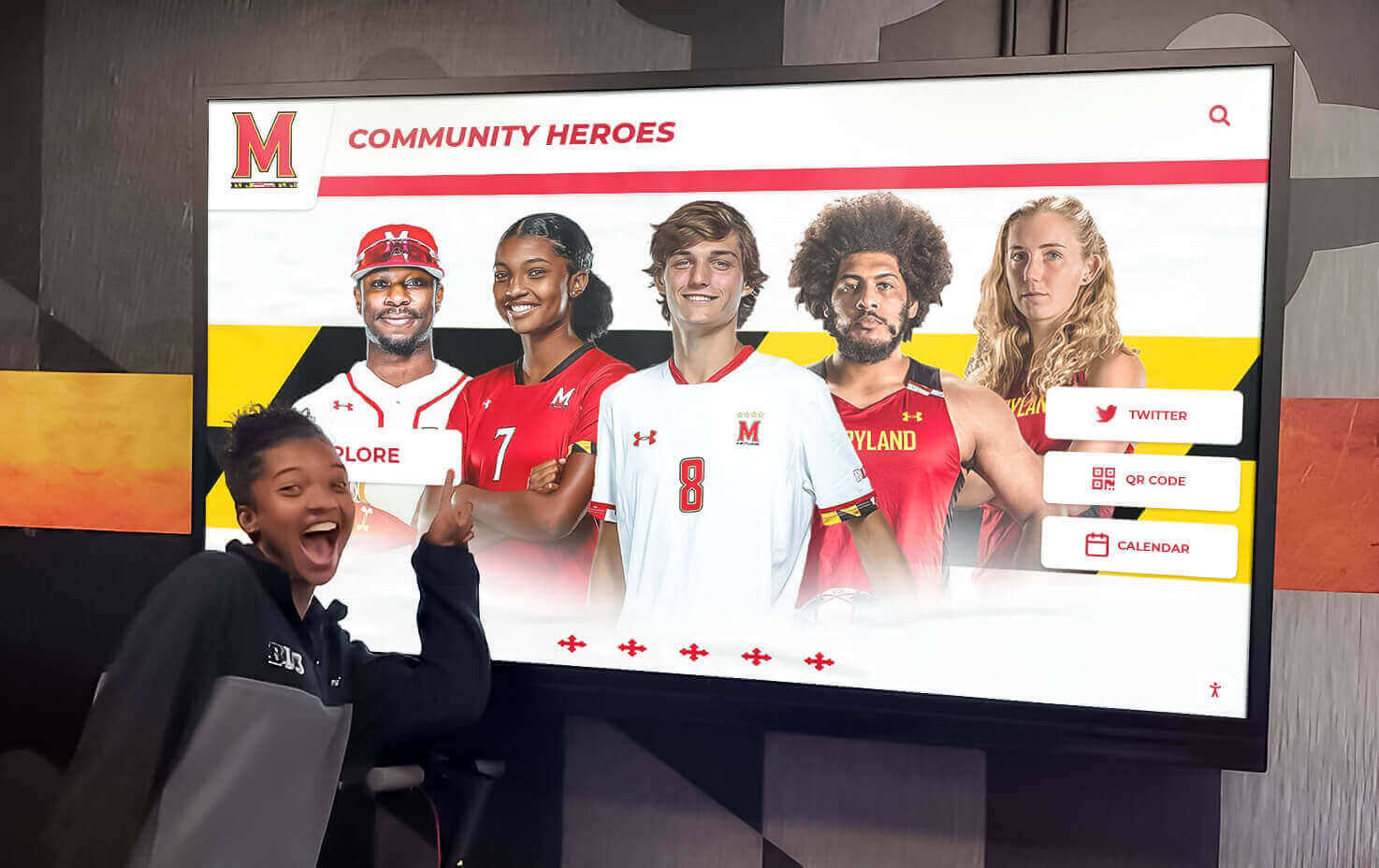
Next-generation students draw inspiration from comprehensive recognition celebrating excellence and tradition
Buyer’s Evaluation Framework: Critical Decision Factors
Schools investing in interactive displays should systematically evaluate options across multiple dimensions ensuring appropriate technology selection:
Total Cost of Ownership Analysis
Look beyond initial purchase prices evaluating complete lifecycle costs including hardware (display, computer, mounting, accessories), software licensing (monthly/annual subscription or one-time purchase), installation labor (professional mounting, electrical work, network configuration), initial content development (creating initial recognition content), ongoing content management (staff time maintaining currency), technical support (vendor assistance, troubleshooting, repairs), and eventual replacement (expected lifespan 7-10 years for quality commercial hardware).
Complete 5-year cost of ownership projections reveal true investment levels while identifying potential hidden costs causing budget surprises after implementation.
Vendor Experience and Support Quality
Prioritize vendors demonstrating educational institution experience including reference installations at comparable schools, understanding of recognition workflows and content structures, accessible technical support with reasonable response commitments, comprehensive training resources supporting non-technical staff, and established track records indicating business stability and continued platform development.
Request conversations with reference schools asking specifically about responsiveness to problems, content management accessibility, actual vs. promised capabilities, and whether they’d select the same vendor again knowing current experience.
Scalability and Future Expansion
Consider whether platforms accommodate growth through additional displays managed centrally through single content systems, new content types as institutional needs evolve, increased user volumes without performance degradation, integration with emerging technologies and standards, and data migration if eventually transitioning to different platforms.
Avoid solutions locking institutions into proprietary ecosystems where expansion requires continued vendor relationship regardless of service quality or competitive pricing.
Content Management Accessibility
Evaluate platforms based on realistic staff capacity through hands-on content management demonstrations, clarity of training materials and ongoing support, role-based permissions if multiple staff members contribute content, preview capabilities before publishing changes, and mobile accessibility if updates happen beyond traditional office computers.
If the intended content managers cannot successfully complete basic tasks during vendor demonstrations, implementation will struggle regardless of platform capabilities.
Platform Accessibility and Compliance
Ensure solutions meet accessibility standards including ADA compliance for physical installation height and reach, WCAG 2.1 AA conformance for digital content accessibility, screen reader compatibility for visually impaired users, adjustable text sizes and high-contrast modes, and keyboard navigation as alternative to touch interaction.
Accessibility requirements carry legal obligations while representing ethical commitments ensuring technology serves all community members regardless of ability.
Data Privacy and Security
Particularly for student and minor content, verify platforms provide appropriate security through secure cloud hosting with encrypted data transmission, user authentication protecting administrative access, privacy controls governing public information display, data backup and disaster recovery procedures, and compliance with relevant regulations (FERPA for student data, COPPA for minor privacy).
Schools have special obligations protecting student information requiring vendor partnerships understanding and respecting educational privacy requirements.
Understanding technology evaluation frameworks for school recognition systems provides detailed vendor comparison methodologies.
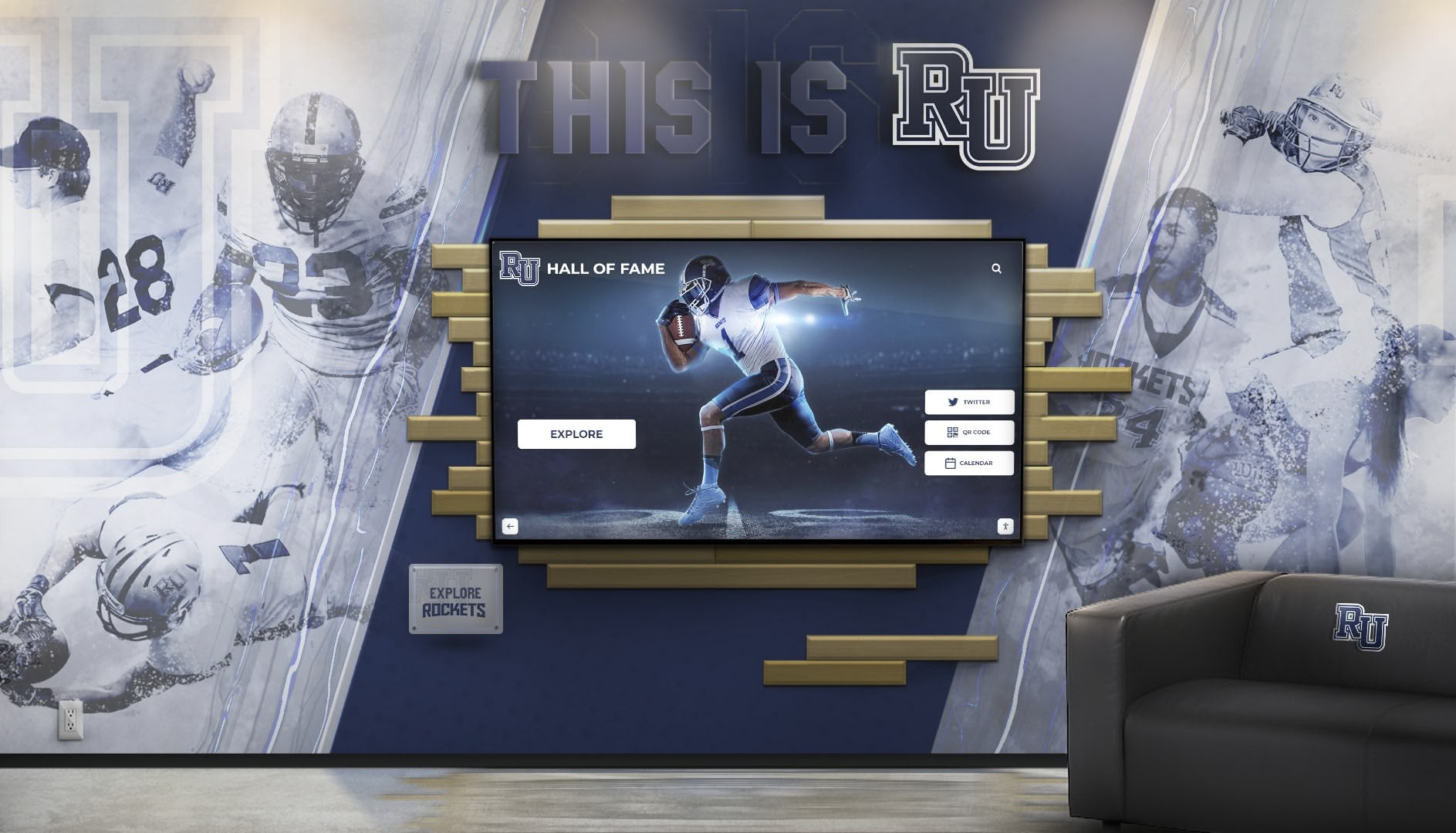
Flagship installations create powerful visual impact welcoming visitors with immediate recognition of excellence
Implementation Best Practices: Ensuring Successful Deployment
Technology selection represents just one component of successful implementation. Systematic deployment approaches ensure installations deliver intended value:
Stakeholder Engagement and Planning
Begin implementations with clear objectives defining what success looks like, identify primary audiences and their specific needs, determine content scope and initial coverage priorities, assess available budget across hardware, software, content, and support, and establish realistic timelines accounting for decision cycles, procurement, and content development.
Engage stakeholders including administrators articulating institutional priorities, technical staff ensuring infrastructure readiness, content contributors understanding update responsibilities, and intended audiences providing input on desired features and information.
This collaborative planning builds implementation support while creating shared understanding preventing misaligned expectations causing disappointment despite successful technical deployment.
Pilot Implementations and Incremental Expansion
Consider starting with single pilot displays demonstrating value before comprehensive deployment. Pilot approaches enable learning content management workflows and realistic time requirements, gathering user feedback refining experience design, demonstrating value building support for broader implementation, and identifying unforeseen technical or operational challenges.
Successful pilots create organizational confidence and stakeholder enthusiasm supporting expansion while limiting initial investment risk.
Professional Content Development
First impressions matter profoundly—installations launching with minimal, low-quality, or placeholder content communicate lack of institutional commitment regardless of hardware quality. Invest in strong initial content including professional photography maintaining quality standards, well-written biographical narratives and descriptions, accurate, complete information avoiding obvious gaps, and sufficient content depth demonstrating platform capabilities.
Some schools engage initial content development support from vendors or contracted professionals building high-quality foundations while training internal staff assuming ongoing maintenance responsibility.
Sustainable Administration and Maintenance
Establish clear ongoing responsibility through designated content managers with explicit job responsibilities, documented procedures ensuring continuity during staff transitions, realistic update schedules matched to available capacity, scheduled quarterly reviews assessing currency and quality, and defined vendor support protocols for technical issues.
Without sustainable administration models, content becomes outdated within 12-18 months—transforming promising installations into abandoned technology generating cynicism about future innovation initiatives.
Training and Change Management
Ensure successful adoption through comprehensive training for content managers and administrators, documentation providing ongoing reference materials, communication campaigns informing communities about new resources, launch events creating awareness and excitement, and feedback mechanisms enabling continuous improvement based on actual usage patterns.
Technology implementation represents organizational change requiring deliberate change management ensuring adoption and sustained engagement.
Measurement and Continuous Improvement
Establish success metrics and monitor performance through usage analytics (interaction frequency, session duration, popular content), stakeholder satisfaction surveys gathering qualitative feedback, observation of actual usage patterns and user behavior, comparative analysis measuring improvements against pre-implementation baselines, and annual reviews assessing continued alignment with institutional objectives.
This measurement discipline enables data-informed optimization while demonstrating value justifying continued investment and potential expansion.
Resources about implementing comprehensive digital recognition programs provide operational frameworks supporting long-term success.
Common Pitfalls and How to Avoid Them
Learning from typical implementation challenges helps schools avoid expensive mistakes:
Inadequate Content Planning
The Problem: Schools purchase impressive hardware without realistic assessment of content development requirements. Displays launch with minimal content or sit dark for months awaiting content creation, generating community cynicism about technology investments.
The Solution: Develop content strategies before hardware procurement, ensuring staff capacity, information access, and realistic timelines align with implementation schedules. Consider phased content development starting with core recognition expanding systematically rather than attempting comprehensive immediate coverage.
Generic Technology Mismatched to Use Case
The Problem: Institutions select general-purpose digital signage platforms attempting to force recognition content into inappropriate structures, creating frustrating content management and poor user experiences.
The Solution: Prioritize purpose-built recognition platforms understanding specific content types, organizational structures, and interaction patterns required for celebrating achievements. Generic solutions cost less initially but deliver inferior experiences while consuming excessive staff time attempting workarounds.
Poor Physical Placement
The Problem: Displays positioned in low-traffic areas, difficult-to-access locations, or environments with problematic lighting sit unused despite quality content and technology.
The Solution: Conduct systematic site assessment evaluating traffic patterns, lighting conditions, viewing distances, and environmental factors before finalizing installation locations. Prioritize high-visibility, high-traffic placements even if requiring additional infrastructure investment.
Insufficient Ongoing Maintenance
The Problem: Content becomes outdated as staff transitions, priorities shift, or initial enthusiasm fades, transforming displays into embarrassing monuments to neglect.
The Solution: Establish sustainable administration models with clear responsibility assignment, realistic update schedules, documented procedures, and organizational commitment treating recognition as permanent programs rather than temporary projects.
Accessibility Neglect
The Problem: Implementations ignore accessibility requirements creating barriers for wheelchair users, visually impaired visitors, or others with disabilities—generating legal exposure while excluding community members.
The Solution: Prioritize accessibility throughout planning, design, and implementation through compliant mounting heights, screen reader compatible content, high-contrast modes, and adherence to WCAG 2.1 AA standards.
Budget Underestimation
The Problem: Institutions budget for hardware purchase without accounting for installation, software licensing, content development, training, and ongoing support—creating budget crises mid-implementation or forcing quality compromises.
The Solution: Develop comprehensive budgets including all implementation components plus 15-20% contingency for unforeseen costs. Total cost of ownership projections spanning 5-7 years reveal true investment requirements.
Conclusion: Strategic Investment in Recognition Technology
Interactive displays have evolved from experimental novelty to proven institutional infrastructure transforming how schools celebrate achievement, preserve history, and engage communities. When implemented thoughtfully with appropriate technology, purposeful design, quality content, and sustainable administration, these installations deliver remarkable value—strengthening culture, building pride, supporting recruitment, and creating meaningful connections between current communities and institutional legacy.
Get Your Interactive Display Mock-Up
Discover how purpose-built recognition platforms transform school lobbies, athletic facilities, and gathering spaces through engaging interactive experiences celebrating excellence. Rocket Alumni Solutions creates custom-designed displays combining beautiful aesthetics with intuitive interaction and comprehensive content management.
Schedule Your Design ConsultationThe most successful schools approach interactive displays as strategic investments supporting multiple institutional objectives rather than isolated technology purchases. Recognition applications strengthen athletic culture and alumni engagement. Wayfinding functionality improves visitor experience and operational efficiency. Storytelling capabilities communicate institutional excellence during recruitment and public events. Multi-purpose flexibility ensures displays serve evolving needs across changing priorities and circumstances.
Key success factors span technology selection, design quality, and organizational commitment. Choose commercial-grade capacitive touchscreen hardware sized appropriately for installation locations and viewing distances. Select purpose-built recognition software matching specific content requirements rather than attempting to force specialized needs into generic platforms. Invest in professional experience design creating intuitive interaction and beautiful visual presentation reflecting institutional brand standards. Develop comprehensive initial content demonstrating capability and communicating commitment. Establish sustainable administration models with clear responsibility, realistic update schedules, and documented procedures ensuring long-term content currency.
Avoid common pitfalls through systematic planning, realistic budget development, stakeholder engagement, and pilot implementations testing approaches before comprehensive deployment. Prioritize accessibility ensuring technology serves all community members. Measure success through usage analytics and satisfaction feedback enabling data-informed continuous improvement.
For schools evaluating interactive display investments, begin with clear objectives defining what you hope to accomplish, realistic assessment of available budget spanning complete implementation lifecycle, honest evaluation of staff capacity for content development and ongoing maintenance, and systematic vendor research comparing capabilities, costs, support quality, and institutional experience.
The right interactive display implementation—combining appropriate technology, purposeful design, quality content, and sustainable administration—transforms institutional communication from broadcast announcements to personalized exploration, from space-constrained physical recognition to unlimited digital celebration, and from forgotten achievements to rediscovered heritage inspiring current excellence through connection with institutional legacy.
Your school’s achievements deserve recognition infrastructure matching the quality of excellence being celebrated—comprehensive, accessible, engaging, and permanent. Interactive displays provide proven technology enabling this celebration when implemented thoughtfully as strategic institutional investments rather than tactical technology purchases. The students, athletes, alumni, and community members whose contributions built your institutional excellence deserve nothing less than systematic, beautiful, permanent recognition honoring their dedication while inspiring future generations to similar achievement.
Ready to explore interactive display solutions for your institution? Learn more about comprehensive recognition system planning, discover athletic facility display strategies, explore digital signage technology options, and understand successful community showcase implementations celebrating excellence through modern touchscreen technology purpose-built for educational institutions.































